Failure [INSTALL_FAILED_TEST_ONLY: installPackageLI]

Failure [INSTALL_FAILED_TEST_ONLY: installPackageLI]

Today adb command to install apk,prompted the following error:.
Failure [INSTALL_FAILED_TEST_ONLY: installPackageLI]

Solution:
Method 1:
Change android:testOnly=”true” to android:testOnly=”false” in AndroidManifest.xml, or just remove it.
Method 2:
adb push .apk /tmp
adb shell pm install -t /tmp/.apk
Method 3:
adb install -t *.apk

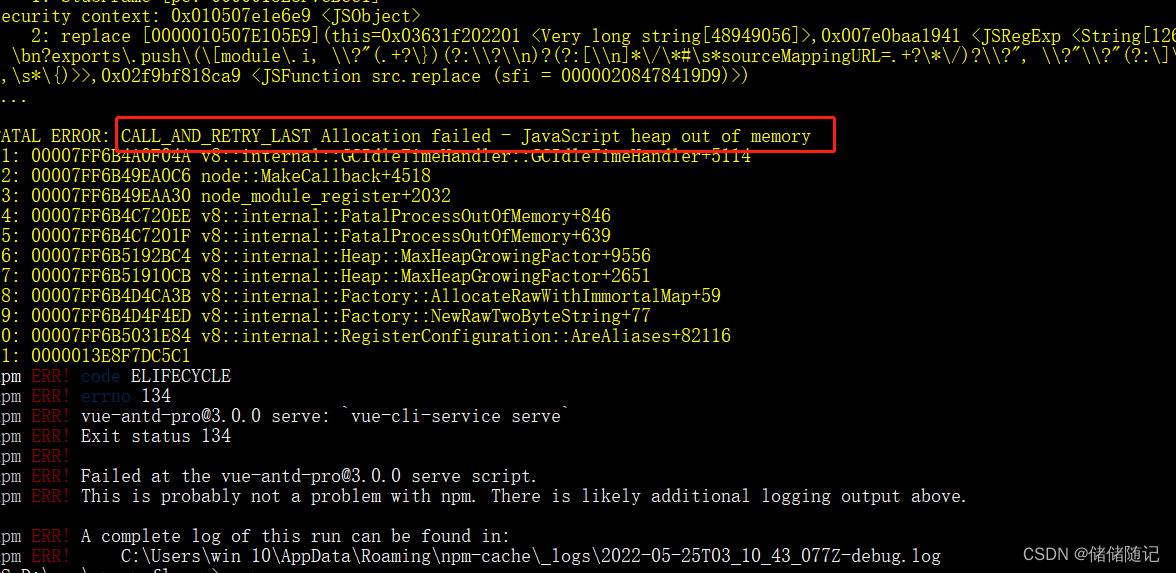
[Solved] Vue Project Modify Page Error: CALL_AND_RETRY_LAST Allocation failed – JavaScript heap out of memory

vue项目 CALL_AND_RETRY_LAST Allocation failed – JavaScript heap out of memory 修改页面后自动运行报错退出

Vue project: as soon as the page is modified, the automatic operation will report an error and exit (fat error: call_and_retry_last allocation failed – Javascript heap out of memory)

Solution:
step 1: NPM install -g increase memory limit
step 2: increase memory limit

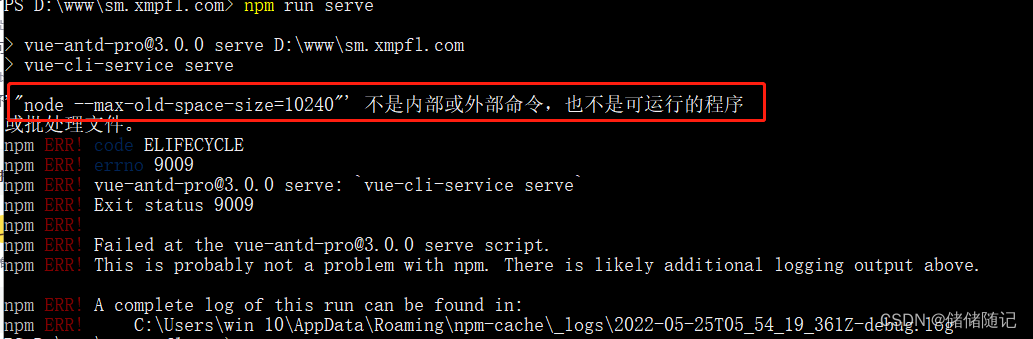
Step 3: Run the project normally, if an error is reported (“node –max-old-space-size=10240″‘ is not an internal or external command, and is not a runnable program)

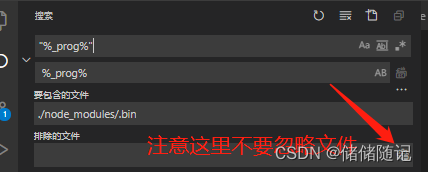
step 4: Look in the .bin file under node_module and replace “%_prog%” with %_prog% (without the quotes).

step 5: Run the Project normally.

spack install failed with bootstrapping [How to Solve]

spack install failed with bootstrapping

An error occurs when spack is used for the first time,

[tools_adm@computing-host-001 ~]$ spack install python
==> Bootstrapping clingo from pre-built binaries
==> Bootstrapping clingo from sources
==> Error: cannot bootstrap the "clingo" Python module from spec "clingo-bootstrap@spack+python %gcc target=x86_64" due to the following failures:
    'spack-install' raised ConflictsInSpecError: Conflicts in concretized spec "clingo-bootstrap@spack%[email protected]~docs~ipo+python~static_libstdcpp build_type=Release arch=linux-centos7-x86_64/6hb2rkn"

    List of matching conflicts for spec:

    clingo-bootstrap@spack%[email protected]~docs~ipo+python~static_libstdcpp build_type=Release arch=linux-centos7-x86_64
        ^[email protected]%[email protected] arch=linux-centos7-x86_64
            ^[email protected]%[email protected] arch=linux-centos7-x86_64
                ^[email protected]%[email protected] libs=shared,static arch=linux-centos7-x86_64
            ^[email protected]%[email protected]+sigsegv patches=9dc5fbd0d5cb1037ab1e6d0ecc74a30df218d0a94bdd5a02759a97f62daca573,bfdffa7c2eb01021d5849b36972c069693654ad826c1a20b53534009a4ec7a89 arch=linux-centos7-x86_64
                ^[email protected]%[email protected] arch=linux-centos7-x86_64
            ^[email protected]%[email protected]+cpanm+shared+threads arch=linux-centos7-x86_64
                ^[email protected]%[email protected]+cxx~docs+stl patches=b231fcc4d5cff05e5c3a4814f6a5af0e9a966428dc2176540d2c05aff41de522 arch=linux-centos7-x86_64
                ^[email protected]%[email protected]~debug~pic+shared arch=linux-centos7-x86_64
                ^[email protected]%[email protected] arch=linux-centos7-x86_64
                    ^[email protected]%[email protected] arch=linux-centos7-x86_64
                        ^[email protected]%[email protected]~symlinks+termlib abi=none arch=linux-centos7-x86_64
                            ^[email protected]%[email protected] arch=linux-centos7-x86_64
                ^[email protected]%[email protected]+optimize+pic+shared arch=linux-centos7-x86_64
        ^[email protected]%[email protected]~doc+ncurses+openssl+ownlibs~qt build_type=Release arch=linux-centos7-x86_64
            ^[email protected]%[email protected]~docs certs=system arch=linux-centos7-x86_64
        ^[email protected]%[email protected]+bz2+ctypes+dbm~debug+libxml2+lzma~nis~optimizations+pic+pyexpat+pythoncmd+readline+shared+sqlite3+ssl~tix~tkinter~ucs4+uuid+zlib arch=linux-centos7-x86_64
        ^[email protected]%[email protected] arch=linux-centos7-x86_64

1. "%gcc@:5" conflicts with "clingo-bootstrap" [C++14 support is required to bootstrap clingo]

    Please run `spack -d spec zlib` for more verbose error messages
[tools_adm@computing-host-001 ~]$ spack install python
==> Bootstrapping clingo from pre-built binaries
==> Bootstrapping clingo from sources
==> Error: cannot bootstrap the "clingo" Python module from spec "clingo-bootstrap@spack+python %gcc target=x86_64" due to the following failures:
    'spack-install' raised ConflictsInSpecError: Conflicts in concretized spec "clingo-bootstrap@spack%[email protected]~docs~ipo+python~static_libstdcpp build_type=Release arch=linux-centos7-x86_64/6hb2rkn"

    List of matching conflicts for spec:

    clingo-bootstrap@spack%[email protected]~docs~ipo+python~static_libstdcpp build_type=Release arch=linux-centos7-x86_64
        ^[email protected]%[email protected] arch=linux-centos7-x86_64
            ^[email protected]%[email protected] arch=linux-centos7-x86_64
                ^[email protected]%[email protected] libs=shared,static arch=linux-centos7-x86_64
            ^[email protected]%[email protected]+sigsegv patches=9dc5fbd0d5cb1037ab1e6d0ecc74a30df218d0a94bdd5a02759a97f62daca573,bfdffa7c2eb01021d5849b36972c069693654ad826c1a20b53534009a4ec7a89 arch=linux-centos7-x86_64
                ^[email protected]%[email protected] arch=linux-centos7-x86_64
            ^[email protected]%[email protected]+cpanm+shared+threads arch=linux-centos7-x86_64
                ^[email protected]%[email protected]+cxx~docs+stl patches=b231fcc4d5cff05e5c3a4814f6a5af0e9a966428dc2176540d2c05aff41de522 arch=linux-centos7-x86_64
                ^[email protected]%[email protected]~debug~pic+shared arch=linux-centos7-x86_64
                ^[email protected]%[email protected] arch=linux-centos7-x86_64
                    ^[email protected]%[email protected] arch=linux-centos7-x86_64
                        ^[email protected]%[email protected]~symlinks+termlib abi=none arch=linux-centos7-x86_64
                            ^[email protected]%[email protected] arch=linux-centos7-x86_64
                ^[email protected]%[email protected]+optimize+pic+shared arch=linux-centos7-x86_64
        ^[email protected]%[email protected]~doc+ncurses+openssl+ownlibs~qt build_type=Release arch=linux-centos7-x86_64
            ^[email protected]%[email protected]~docs certs=system arch=linux-centos7-x86_64
        ^[email protected]%[email protected]+bz2+ctypes+dbm~debug+libxml2+lzma~nis~optimizations+pic+pyexpat+pythoncmd+readline+shared+sqlite3+ssl~tix~tkinter~ucs4+uuid+zlib arch=linux-centos7-x86_64
        ^[email protected]%[email protected] arch=linux-centos7-x86_64

1. "%gcc@:5" conflicts with "clingo-bootstrap" [C++14 support is required to bootstrap clingo]

    Please run `spack -d spec zlib` for more verbose error messages

According to the error message, I need a compiler that supports C++14. I installed a new version of gcc/11.2.0 and added its bin directory to the PATH variable.

[tools_adm@computing-host-001 ~]$ setenv PATH /tools/oss/gcc/11.2.0/bin:$PATH
[tools_adm@computing-host-001 ~]$ spack -d spec zlib %[email protected]
==> [2022-05-24-10:03:13.206293] Imported spec from built-in commands
==> [2022-05-24-10:03:13.211112] Imported spec from built-in commands
Input spec
--------------------------------
zlib%[email protected]

Concretized
--------------------------------
==> [2022-05-24-10:03:13.222579] Reading config file /tools/oss/spack-0.17.2/etc/spack/defaults/config.yaml
==> [2022-05-24-10:03:13.298617] Reading config file /tools/oss/spack-0.17.2/etc/spack/defaults/bootstrap.yaml
==> [2022-05-24-10:03:13.333346] Reading config file /tools/oss/spack-0.17.2/etc/spack/defaults/config.yaml
==> [2022-05-24-10:03:13.387447] DATABASE LOCK TIMEOUT: 3s
==> [2022-05-24-10:03:13.387643] PACKAGE LOCK TIMEOUT: No timeout
==> [2022-05-24-10:03:13.388771] Reading config file /tools/oss/spack-0.17.2/etc/spack/defaults/bootstrap.yaml
==> [2022-05-24-10:03:13.412265] DATABASE LOCK TIMEOUT: 3s
==> [2022-05-24-10:03:13.412528] PACKAGE LOCK TIMEOUT: No timeout
==> [2022-05-24-10:03:13.412772] [BOOTSTRAP CONFIG SCOPE] name=_builtin
==> [2022-05-24-10:03:13.413841] [BOOTSTRAP CONFIG SCOPE] name=defaults, path=/tools/oss/spack-0.17.2/etc/spack/defaults
==> [2022-05-24-10:03:13.413961] [BOOTSTRAP CONFIG SCOPE] name=defaults/linux, path=/tools/oss/spack-0.17.2/etc/spack/defaults/linux
==> [2022-05-24-10:03:13.414080] [BOOTSTRAP CONFIG SCOPE] name=bootstrap, path=/home/tools_adm/.spack/bootstrap/config
==> [2022-05-24-10:03:13.414180] [BOOTSTRAP CONFIG SCOPE] name=bootstrap/linux, path=/home/tools_adm/.spack/bootstrap/config/linux
==> [2022-05-24-10:03:13.416454] Reading config file /home/tools_adm/.spack/bootstrap/config/linux/compilers.yaml
==> [2022-05-24-10:03:13.504704] [BOOTSTRAP ROOT SPEC] clingo-bootstrap@spack+python %gcc target=x86_64
==> [2022-05-24-10:03:13.504904] [BOOTSTRAP MODULE clingo] Try importing from Python
==> [2022-05-24-10:03:13.505664] Reading config file /tools/oss/spack-0.17.2/etc/spack/defaults/bootstrap.yaml
==> [2022-05-24-10:03:13.533487] Bootstrapping clingo from pre-built binaries
==> [2022-05-24-10:03:13.539614] Reading config file /tools/oss/spack-0.17.2/etc/spack/defaults/config.yaml
==> [2022-05-24-10:03:13.602270] DATABASE LOCK TIMEOUT: 3s
==> [2022-05-24-10:03:13.602520] PACKAGE LOCK TIMEOUT: No timeout
==> [2022-05-24-10:03:13.656899] Reading config file /tools/oss/spack-0.17.2/etc/spack/defaults/mirrors.yaml
==> [2022-05-24-10:03:14.404023] Cached index for https://mirror.spack.io/bootstrap/github-actions/v0.1 already up to date
==> [2022-05-24-10:03:14.477810] Imported buildcache from built-in commands
==> [2022-05-24-10:03:14.502955] Imported buildcache from built-in commands
==> [2022-05-24-10:05:40.274042] Reading config file /tools/oss/spack-0.17.2/etc/spack/defaults/config.yaml
==> [2022-05-24-10:05:40.351266] Reading config file /home/tools_adm/.spack/bootstrap/config/linux/config.yaml
==> [2022-05-24-10:05:40.627291] [BOOTSTRAP MODULE clingo] The installed spec "clingo-bootstrap@spack+python %gcc target=x86_64 ^[email protected] /vcipwnf57slgoo7busvvkzjkk7vydeb5" provides the "clingo" Python module
==> [2022-05-24-10:05:40.691909] Reading config file /tools/oss/spack-0.17.2/etc/spack/defaults/repos.yaml
==> [2022-05-24-10:05:40.876049] Reading config file /home/tools_adm/.spack/linux/compilers.yaml
==> [2022-05-24-10:05:40.914061] Reading config file /tools/oss/spack-0.17.2/etc/spack/defaults/config.yaml
==> [2022-05-24-10:05:40.969529] Reading config file /tools/oss/spack-0.17.2/etc/spack/defaults/packages.yaml
==> [2022-05-24-10:05:41.244816] build(zlib)
[email protected]%[email protected]+optimize+pic+shared arch=linux-centos7-sandybridge

Problem-solving.

Done.

[Solved] Tomcat Startup Error: A child container failed during start、LifecycleException: Failed to start component

An error is reported when Tomcat is started. The error contents are as follows

WARNING: A child container failed during start
java.util.concurrent.ExecutionException: org.apache.catalina.LifecycleException: Failed to start component [StandardEngine[Tomcat].StandardHost[localhost]]
	at java.base/java.util.concurrent.FutureTask.report(FutureTask.java:122)
	at java.base/java.util.concurrent.FutureTask.get(FutureTask.java:191)
	at org.apache.catalina.core.ContainerBase.startInternal(ContainerBase.java:1123)
	at org.apache.catalina.core.StandardEngine.startInternal(StandardEngine.java:302)
	at org.apache.catalina.util.LifecycleBase.start(LifecycleBase.java:150)
	at org.apache.catalina.core.StandardService.startInternal(StandardService.java:443)
	at org.apache.catalina.util.LifecycleBase.start(LifecycleBase.java:150)
	at org.apache.catalina.core.StandardServer.startInternal(StandardServer.java:732)
	at org.apache.catalina.util.LifecycleBase.start(LifecycleBase.java:150)
	at org.apache.catalina.startup.Tomcat.start(Tomcat.java:341)
	at org.apache.tomcat.maven.plugin.tomcat7.run.AbstractRunMojo.startContainer(AbstractRunMojo.java:1238)
	at org.apache.tomcat.maven.plugin.tomcat7.run.AbstractRunMojo.execute(AbstractRunMojo.java:592)
	at org.apache.maven.plugin.DefaultBuildPluginManager.executeMojo(DefaultBuildPluginManager.java:137)
	at org.apache.maven.lifecycle.internal.MojoExecutor.execute(MojoExecutor.java:210)
	at org.apache.maven.lifecycle.internal.MojoExecutor.execute(MojoExecutor.java:156)
	at org.apache.maven.lifecycle.internal.MojoExecutor.execute(MojoExecutor.java:148)
	at org.apache.maven.lifecycle.internal.LifecycleModuleBuilder.buildProject(LifecycleModuleBuilder.java:117)
	at org.apache.maven.lifecycle.internal.LifecycleModuleBuilder.buildProject(LifecycleModuleBuilder.java:81)
	at org.apache.maven.lifecycle.internal.builder.singlethreaded.SingleThreadedBuilder.build(SingleThreadedBuilder.java:56)
	at org.apache.maven.lifecycle.internal.LifecycleStarter.execute(LifecycleStarter.java:128)
	at org.apache.maven.DefaultMaven.doExecute(DefaultMaven.java:305)
	at org.apache.maven.DefaultMaven.doExecute(DefaultMaven.java:192)
	at org.apache.maven.DefaultMaven.execute(DefaultMaven.java:105)
	at org.apache.maven.cli.MavenCli.execute(MavenCli.java:972)
	at org.apache.maven.cli.MavenCli.doMain(MavenCli.java:293)
	at org.apache.maven.cli.MavenCli.main(MavenCli.java:196)
	at java.base/jdk.internal.reflect.NativeMethodAccessorImpl.invoke0(Native Method)
	at java.base/jdk.internal.reflect.NativeMethodAccessorImpl.invoke(NativeMethodAccessorImpl.java:62)
	at java.base/jdk.internal.reflect.DelegatingMethodAccessorImpl.invoke(DelegatingMethodAccessorImpl.java:43)
	at java.base/java.lang.reflect.Method.invoke(Method.java:566)
	at org.codehaus.plexus.classworlds.launcher.Launcher.launchEnhanced(Launcher.java:282)
	at org.codehaus.plexus.classworlds.launcher.Launcher.launch(Launcher.java:225)
	at org.codehaus.plexus.classworlds.launcher.Launcher.mainWithExitCode(Launcher.java:406)
	at org.codehaus.plexus.classworlds.launcher.Launcher.main(Launcher.java:347)
	at org.codehaus.classworlds.Launcher.main(Launcher.java:47)

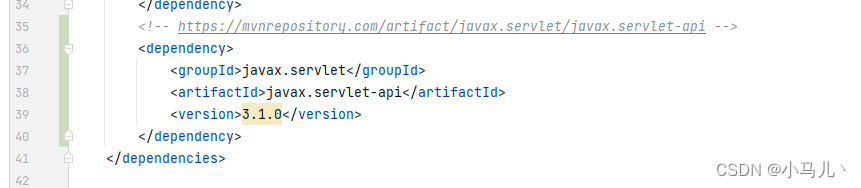
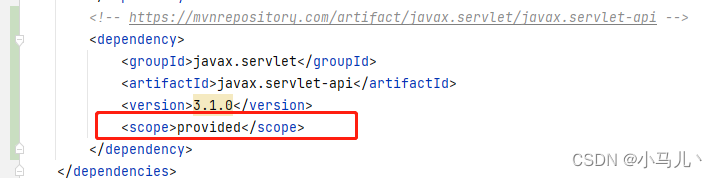
The code change adds the following servlet dependency, and it starts successfully if you remove it, but it reports an error if you remove the reference to the project.
The reason is that adding the servlet dependency caused a conflict with another dependency when packaging.

Solution

You only need to add the scope tag in the dependency to exclude the servlet-api we introduced when packaging the project, as shown below


Classification of scope

Maven’s default dependency configuration items, the default value of scope is compile, the project is often silly to distinguish between the direct default. Today to sort out maven’s scope.

  • compile: the default is compile, nothing is configured, which means compile. compile means that the dependent project needs to participate in the compilation of the current project, of course, the subsequent test, runtime also participate in it, is a relatively strong dependency. This is a strong dependency. It is usually included when packaging.
  • test: The scope is test, which means that the dependent project is only involved in the test-related work, including the compilation and execution of the test code. Typical examples are junit.
  • runntime: The dependent project does not need to be involved in the compilation of the project, but it is required to be involved in the later testing and runtime cycles. Compared with compile, it just skips the compilation. To be honest, in the terminal project (non-open source, internal system), the difference with compile is not very big. The API jar corresponding to the implementation of JSR×××× is compiled, and the specific implementation is runtime, which is enough for compile to know the interface. oracle jdbc driver package is a good example, and the general scope is runntime. I can use A to achieve it, or B to achieve it.
  • provided: provided means that it can be packaged without being packaged in, and other facilities (Web Container) will provide it. In fact, the dependency can theoretically participate in the compile, test, run, etc. cycle. It is equivalent to compile, but with the exclude action done during the packaging phase.
  • system: In terms of involvement, it is the same as provided, but the dependencies are not grabbed from the maven repository, but from the local filesystem.

[Solved] prometheus Startup Error: opening storage failed

Modify prometheus.yml file and failed to start:

1. Configuring prometheus + node_exporter monitoring, the solution to the failure to start after modifying the prometheus.yml file.
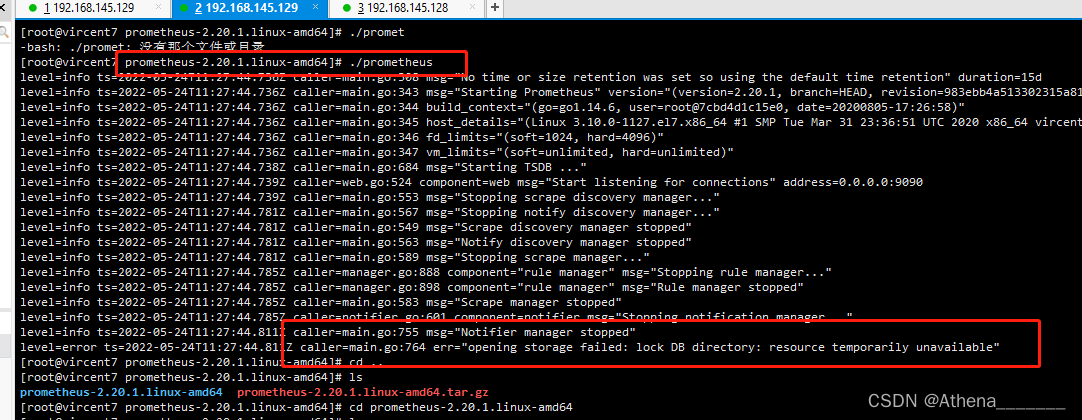
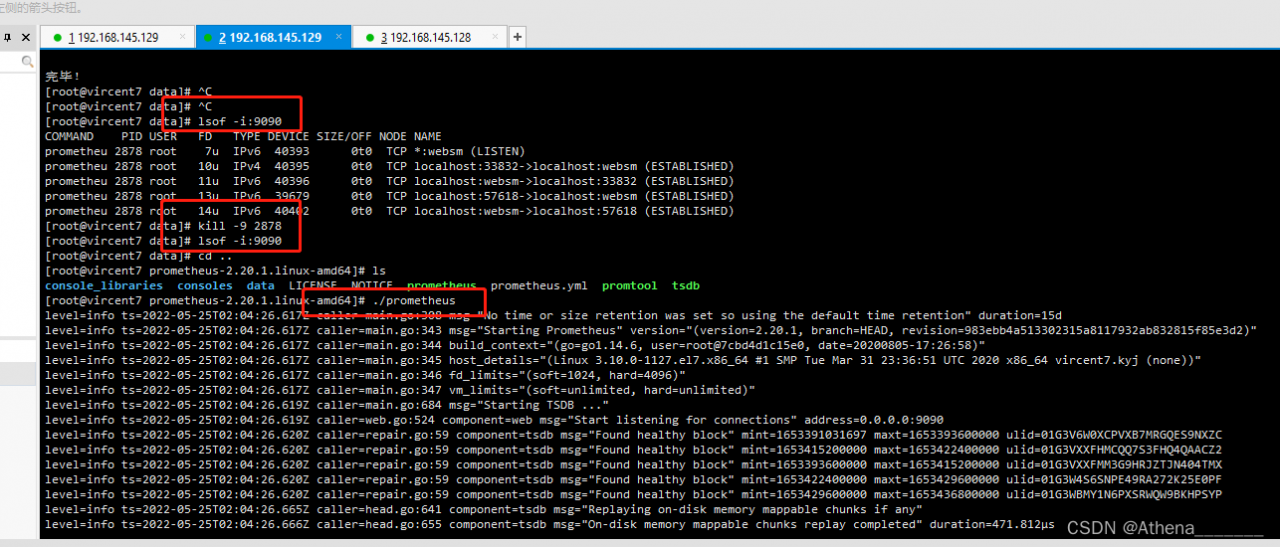
2. Error message 1: err=”opening storage failed: lock DB directory: resource temporarily unavailable”

Solution: Check whether the current directory has generated files plus data/lock, need to delete the lock file: rm -rf lock
Delete and restart again

error message 2:err= “error starting web server: listen TCP 0.0.0:9090: bind: address ready in use”
installation command: yum install lsof -y
view command: lsof -i:9090
end command: kill -9 2878
restart command: ./prometheus
restart succeeded after operation


[Solved] Linux ECDSA key Error: Host key verification failed

Project scenario:

Under Linux Ubuntu system, use SCP command to transfer files from another server to this server.


Problem description

tips: describe the problems encountered in the project here:

@@@@@@@@@@@@@@@@@@@@@@@@@@@@@@@@@@@@@@@@@@@@@@@@@@@@@@@@@@@
@    WARNING: REMOTE HOST IDENTIFICATION HAS CHANGED!     @
@@@@@@@@@@@@@@@@@@@@@@@@@@@@@@@@@@@@@@@@@@@@@@@@@@@@@@@@@@@
IT IS POSSIBLE THAT SOMEONE IS DOING SOMETHING NASTY!
Someone could be eavesdropping on you right now (man-in-the-middle attack)!
It is also possible that a host key has just been changed.
The fingerprint for the ECDSA key sent by the remote host is
SHA256:'A string of characters'.
Please contact your system administrator.
Add correct host key in /home/tonnn/.ssh/known_hosts to get rid of this message.
Offending ECDSA key in /home/tonnn/.ssh/known_hosts:12
ECDSA host key for 'External Server IP' has changed and you have requested strict checking.
Host key verification failed.

Cause analysis:

Tip: fill in the problem analysis here:

I found out after Google that the ECDSA key of the cloud server was changed because I reinstalled my Aliyun server system, and the ECDSA key left in /home/tonnn/.ssh/known_hosts on the target server was still the original ECDSA key, resulting in failed Host key verification.


Solution:

Clear the ECDSA key corresponding to the IP address in the target server /home/tonnn/.ssh/known_hosts, and then add a new one.
Use the ssh-keygen -R ip-address command, and go to the official website https://www.ssh.com/academy/ssh/keygen#command-and-option-summary to check out how-to-use, which means that the known_hosts file belongs to a host all the keys of the hostname are cleared.

After clearing, reconnect the corresponding host, and the server will record the new ecdsa key.

[Solved] DLL load failed while importing _sqlite3: the specified module could not be found.

In the anaconda environment, pysqlite3 is installed:

pip install pysqlite3

But an error is reported:

DLL load failed while importing _sqlite3: the specified module could not be found.

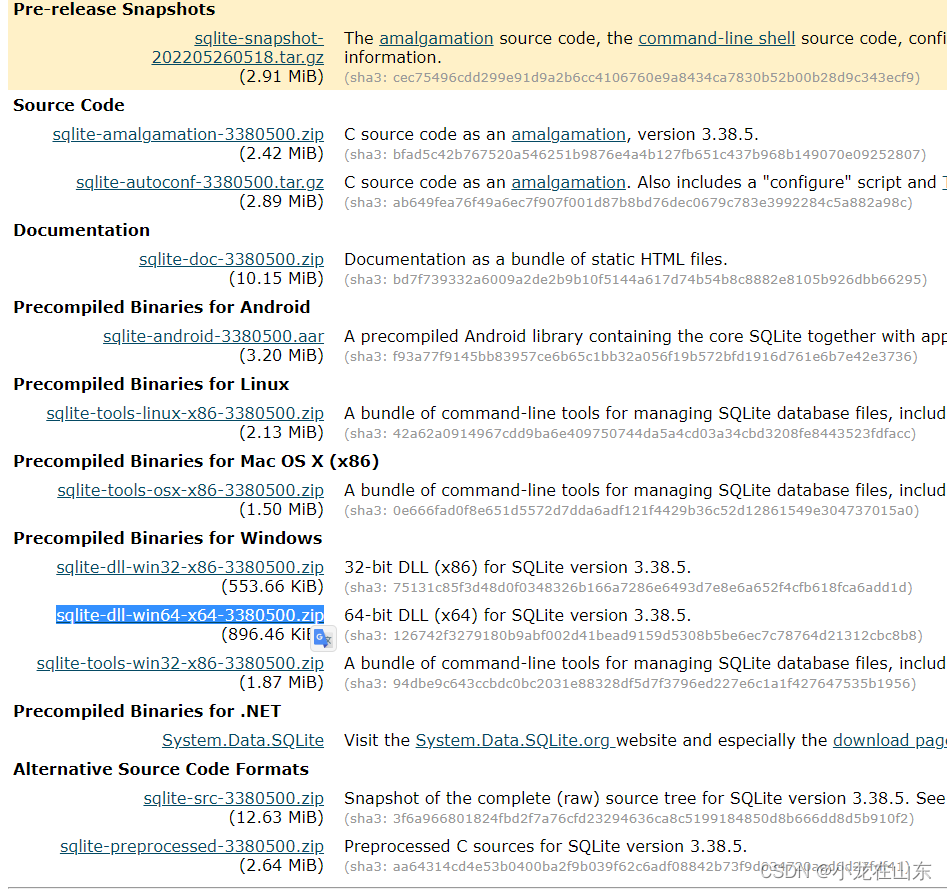
The DLL file is missing. Go to the official website to download the DLL compressed package of the corresponding system version

Copy sqlite3.dll to the DLLs directory under Anaconda and it’s solved.

[Solved] failed to start remount root and kernel file system

1. The problem that appears, this problem comes from the file system is backed up out. The problem does not occur if you install it yourself using the CD

failed to start remount root and kernel file system

What it means is: Failed to mount root and kernel. 2.

2. the cause of the problem:

The uuid in /etc/fatab is different from the actual uuid.

It is better to comment the unused disk mount

When system boots, it will mount the file system in the order specified in fatab.

3. how to solve:

(1) Go to live cd (the disk where you install Ubuntu) or other linux system

(2) Open terminal, type sudo blkid, check the uuid of all partitions

(3) Go to the /etc folder under the root partition where you normally enter the system, open a terminal in the folder, and type sudo gedit fstab (or sudo vim fstab ) to modify fstab
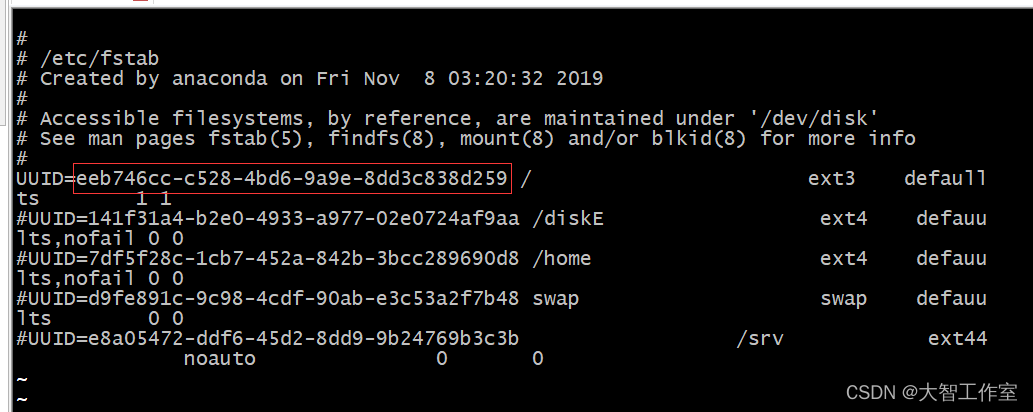
Change it to your own and comment out the rest

In addition to the above problems, it also causes the system to wait overtime:
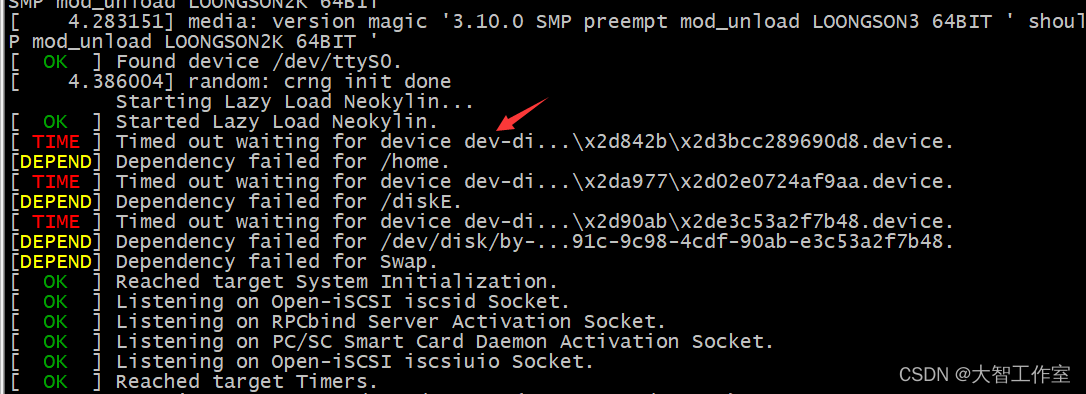
The problem of waiting timeout can be solved by adding the above unused mount notes.

The timeout here is still caused by the file mount in the fstab.
[Solved] Resource compilation failed. Check logs for details.

Record the problems encountered that cannot be clearly answered by the search.

Error log:

Execution failed for task ‘:app:mergeDebugResources’.
> A failure occurred while executing com. android. build. gradle. internal. res.ResourceCompilerRunnable
> Resource compilation failed. Check logs for details.

* Try:
Run with –info or –debug option to get more log output. Run with –scan to get full insights.

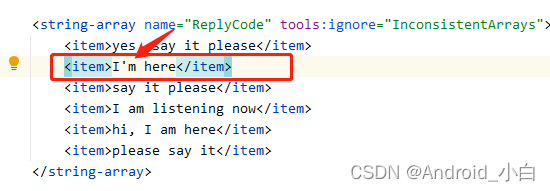
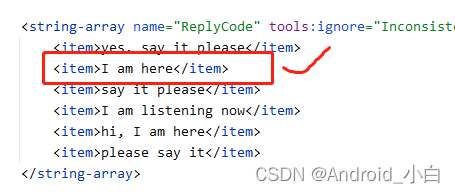
Error: I added a string-array resource file, and “I’m here” used the abbreviation, which is what caused the above error.

Solution: no abbreviation, directly use “I am here”


[Solved] ElasticsearchStatusException[Elasticsearch exception [type=mapper_parsing_exception, reason=failed t

Project scenario:

Today, when I was writing code in Java to check the data in ES, the following error occurred. I checked it for a while and found the problem


Console prompt

ElasticsearchStatusException[Elasticsearch exception [type=mapper_parsing_exception, reason=failed to parse field [location] of type [geo_point]]
]; nested: ElasticsearchException[Elasticsearch exception [type=parse_exception, reason=unsupported symbol [.] in geohash [30.871729121.81959]]]; nested: ElasticsearchException[Elasticsearch exception [type=illegal_argument_exception, reason=unsupported symbol [.] in geohash [30.871729121.81959]]];
	at org.elasticsearch.rest.BytesRestResponse.errorFromXContent(BytesRestResponse.java:176)
	at org.elasticsearch.client.RestHighLevelClient.parseEntity(RestHighLevelClient.java:2011)
	at org.elasticsearch.client.RestHighLevelClient.parseResponseException(RestHighLevelClient.java:1988)
	at org.elasticsearch.client.RestHighLevelClient.internalPerformRequest(RestHighLevelClient.java:1745)
	at org.elasticsearch.client.RestHighLevelClient.performRequest(RestHighLevelClient.java:1702)
	at org.elasticsearch.client.RestHighLevelClient.performRequestAndParseEntity(RestHighLevelClient.java:1672)
	at org.elasticsearch.client.RestHighLevelClient.index(RestHighLevelClient.java:1029)
	at com.woniu.EsDemoApplicationTests.insertDoc(EsDemoApplicationTests.java:115)
	at sun.reflect.NativeMethodAccessorImpl.invoke0(Native Method)
	at sun.reflect.NativeMethodAccessorImpl.invoke(NativeMethodAccessorImpl.java:62)
	at sun.reflect.DelegatingMethodAccessorImpl.invoke(DelegatingMethodAccessorImpl.java:43)
	at java.lang.reflect.Method.invoke(Method.java:498)
	at 
	at org.junit.platform.launcher.core.SessionPerRequestLauncher.execute(SessionPerRequestLauncher.java:53)
	at com.intellij.junit5.JUnit5IdeaTestRunner.startRunnerWithArgs(JUnit5IdeaTestRunner.java:69)
	at com.intellij.rt.junit.IdeaTestRunner$Repeater.startRunnerWithArgs(IdeaTestRunner.java:33)
	at com.intellij.rt.junit.JUnitStarter.prepareStreamsAndStart(JUnitStarter.java:230)
	at com.intellij.rt.junit.JUnitStarter.main(JUnitStarter.java:58)
	Suppressed: org.elasticsearch.client.ResponseException: method [PUT], host [http://120.48.46.177:9200], URI [/hotel/_doc/45870?timeout=1m], status line [HTTP/1.1 400 Bad Request]
Warnings: [Elasticsearch built-in security features are not enabled. Without authentication, your cluster could be accessible to anyone. See https://www.elastic.co/guide/en/elasticsearch/reference/7.16/security-minimal-setup.html to enable security.]
{"error":{"root_cause":[{"type":"parse_exception","reason":"unsupported symbol [.] in geohash [30.871729121.81959]"}],"type":"mapper_parsing_exception","reason":"failed to parse field [location] of type [geo_point]","caused_by":{"type":"parse_exception","reason":"unsupported symbol [.] in geohash [30.871729121.81959]","caused_by":{"type":"illegal_argument_exception","reason":"unsupported symbol [.] in geohash [30.871729121.81959]"}}},"status":400}
		at org.elasticsearch.client.RestClient.convertResponse(RestClient.java:326)
		at org.elasticsearch.client.RestClient.performRequest(RestClient.java:296)
		at org.elasticsearch.client.RestClient.performRequest(RestClient.java:270)
		at org.elasticsearch.client.RestHighLevelClient.performClientRequest(RestHighLevelClient.java:2082)
		at org.elasticsearch.client.RestHighLevelClient.internalPerformRequest(RestHighLevelClient.java:1732)
		... 71 more
Caused by: ElasticsearchException[Elasticsearch exception [type=parse_exception, reason=unsupported symbol [.] in geohash [30.871729121.81959]]]; nested: ElasticsearchException[Elasticsearch exception [type=illegal_argument_exception, reason=unsupported symbol [.] in geohash [30.871729121.81959]]];
	at org.elasticsearch.ElasticsearchException.innerFromXContent(ElasticsearchException.java:485)
	at org.elasticsearch.ElasticsearchException.fromXContent(ElasticsearchException.java:396)
	at org.elasticsearch.ElasticsearchException.innerFromXContent(ElasticsearchException.java:426)
	at org.elasticsearch.ElasticsearchException.failureFromXContent(ElasticsearchException.java:592)
	at org.elasticsearch.rest.BytesRestResponse.errorFromXContent(BytesRestResponse.java:168)
	... 74 more
Caused by: ElasticsearchException[Elasticsearch exception [type=illegal_argument_exception, reason=unsupported symbol [.] in geohash [30.871729121.81959]]]
	at org.elasticsearch.ElasticsearchException.innerFromXContent(ElasticsearchException.java:485)
	at org.elasticsearch.ElasticsearchException.fromXContent(ElasticsearchException.java:396)
	at org.elasticsearch.ElasticsearchException.innerFromXContent(ElasticsearchException.java:426)

Cause analysis:

The data structure of the geographic coordinate attribute location in ES is (latitude, longitude), and I inserted a comma in the middle when I spliced strings, resulting in an error in inserting data. Here are the really useful parts of the above code.

Real error reason:

{"error":{"root_cause":[{"type":"parse_exception","reason":"unsupported symbol [.] in 
geohash [30.871729121.81959]"}],"type":"mapper_parsing_exception","reason":"failed to parse 
field [location] of type [geo_point]","caused_by":{"type":"parse_exception","reason":"unsupported symbol [.] in geohash 
[30.871729121.81959]","caused_by":
{"type":"illegal_argument_exception","reason":"unsupported symbol [.] in geohash 
[30.871729121.81959]"}}},"status":400}

Incorrect writing:

this.location = hotel.getLatitude()+hotel.getLongitude();

Correct writing:

this.location = hotel.getLatitude()+","+hotel.getLongitude();

Solution:

Check the string before splicing, and the order (latitude and longitude) cannot be reversed, otherwise it may lead to geographical location errors.