How to Solve Mujoco Install Error in Ubuntu (Pycharm Run Error)

When I install Mujoco on Ubuntu 18.04 LTS (Bionic Beaver):

There is no error in the terminal test, but the following error is reported when pycharm runs the test program:

Please add the following line to .bashrc
export LD_LIBRARY_PATH=$LD_LIBRARY_PATH:/home/shubhom/.mujoco/mjpro150/bin

However, my .bashrc file has the path already added;

Solution:

  1. This problem occurs when you run it on terminal.

You should check your ~/.bashrc
add

export LD_LIBRARY_PATH= /path/to/.mujoco/mjpro150/bin {LD_LIBRARY_PATH}}
export MUJOCO_KEY_PATH= /path/to/.mujoco${MUJOCO_KEY_PATH}

and “source ~/.bashrc”

  1. The problem occurs when you run it on PyCharm.

You should first check if it can run successfully on the terminal.
If it’s ok on the terminal then:

Click Run -> Edit Configuration -> Environment Variables

Add to

LD_LIBRARY_PATH /path/to/.mujoco/mjpro150/bin
MUJOCO_KEY_PATH /path/to/.mujoco


Attach the test code:

import mujoco_py
import os
mj_path, _ = mujoco_py.utils.discover_mujoco()
xml_path = os.path.join(mj_path, 'model', 'humanoid.xml')
model = mujoco_py.load_model_from_path(xml_path)
sim = mujoco_py.MjSim(model)
print(sim.data.qpos)
#[0.  0.  1.4 1.  0.  0.  0.  0.  0.  0.  0.  0.  0.  0.  0.  0.  0.  0.
# 0.  0.  0.  0.  0.  0.  0.  0.  0.  0. ]
sim.step()
print(sim.data.qpos)
#[-1.12164337e-05  7.29847036e-22  1.39975300e+00  9.99999999e-01
#  1.80085466e-21  4.45933954e-05 -2.70143345e-20  1.30126513e-19
# -4.63561234e-05 -1.88020744e-20 -2.24492958e-06  4.79357124e-05
# -6.38208396e-04 -1.61130312e-03 -1.37554006e-03  5.54173825e-05
# -2.24492958e-06  4.79357124e-05 -6.38208396e-04 -1.61130312e-03
# -1.37554006e-03 -5.54173825e-05 -5.73572648e-05  7.63833991e-05
# -2.12765194e-05  5.73572648e-05 -7.63833991e-05 -2.12765194e-05]


[Solved] logback log format adjustment error: Failed to create converter for [%M] keyword

Adjust the log format of logback, and the program starts to report an error.

before fixing:

    <property name=”logLayout” value=”%d{yyyy-MM-dd HH:mm:ss.SSS} [%thread] %-5level %logger{10} :%-3L – %msg %X{span} %n”/>

adjusted:

   <property name=”logLayout” value=”%d{yyyy-MM-dd HH:mm:ss.SSS} [%thread] %-5level %logger.%M\(%L\) – %msg %n” />

Error after adjustment:

Failed to create converter for [%M] keyword


The content of the logback-spring.xml file after format adjustment, before the format adjustment, the program is normal, and an error is reported after the adjustment.

<?xml version="1.0" encoding="UTF-8"? >
<configuration
 
    <contextName>emc-service</contextName>
 
    <springProperty scope="context" name="logging.path" source="logging.path"
                    defaultValue="/data/logs/emc-service"/>
    <springProperty scope="context" name="logging.level.root" source="logging.level.root"
                    defaultValue="info"/>
 
    <property name="logLayout" value="%d{yyyy-MM-dd HH:mm:ss.SSS} [%thread] %-5level %-logger.%M\(%L\) - %msg %n"/>
    <! --%d date | %color() text color | -5level log level | %logger{10} is the class path | %-3L lines | %msg log content | %ex is the exception in log.error(xx,exption) | -->
    <! --><property name="logLayout" value="%blue(%-4relative) %d{yyyy-MM-dd HH:mm:ss.SSS} | [%thread] | %highlight(%-5level) | %logger{10} :%-3L - % yellow(%msg) %X{span}%n"/> -->
 
    <! -- Logger, date scrolling logging -->
    <appender name="FILE" class="ch.qos.logback.core.rolling.RollingFileAppender">
        <! -- Path and filename of the log file being logged -->
        <file>${logging.path}/emc-service.log</file
        <! -- Rolling policy for logger, by date, by size -->
        <rollingPolicy class="ch.qos.logback.core.rolling.TimeBasedRollingPolicy">
            <! -- The path to the archived log file, e.g. today is the 2013-12-21 log, the path to the currently written log file is specified by the file node, you can set this file to a different path than the file specified by file, thus placing the current log file or the archived log file in a different directory.
            And the log file of 2013-12-21 in specified by fileNamePattern. %d{yyyy-MM-dd} specifies the date format and %i specifies the index -->
            <fileNamePattern>${logging.path}/%d{yyyy-MM,aux}/emc-service.%d.%i.gz</fileNamePattern>
            <! -- In addition to logging by log, it is also configured that the log file cannot exceed 2M, and if it exceeds 2M, the log file will start with index 0.
            Name the log file, e.g. log-error-2013-12-21.0.log -->
            <timeBasedFileNamingAndTriggeringPolicy class="ch.qos.logback.core.rolling.SizeAndTimeBasedFNATP">
                <maxFileSize>300MB</maxFileSize
            </timeBasedFileNamingAndTriggeringPolicy>
            <maxHistory>30</maxHistory
        </rollingPolicy>
        <! -- Append method of logging -->
        <append>true</append>
        <! -- Format of log file -->
        <encoder class="ch.qos.logback.classic.encoder.PatternLayoutEncoder">
            <pattern>${logLayout}</pattern>
            <charset>utf-8</charset>
        </encoder>
    </appender>
 
    <! -- Logger, date scrolling logging -->
    <appender name="ERROR" class="ch.qos.logback.core.rolling.RollingFileAppender">
        <! -- Path and filename of the log file being logged -->
        <file>${logging.path}/emc-service-error.log</file
 
        <filter class="ch.qos.logback.classic.filter.LevelFilter">
            <level>ERROR</level>
            <onMatch>ACCEPT</onMatch
            <onMismatch>DENY</onMismatch>
        </filter>
 
        <! -- Logger's rolling policy, by date, by size -->
        <rollingPolicy class="ch.qos.logback.core.rolling.TimeBasedRollingPolicy">
            <! -- The path to the archived log file, e.g. today is the 2013-12-21 log, the path to the currently written log file is specified by the file node, you can set this file to a different path than the file specified by file, thus placing the current log file or the archived log file in a different directory.
            And the log file of 2013-12-21 in specified by fileNamePattern. %d{yyyy-MM-dd} specifies the date format and %i specifies the index -->
            <fileNamePattern>${logging.path} /%d{yyyy-MM,aux}/emc-service-error.%d.%i.gz
            </fileNamePattern>
            <! -- In addition to logging by log, it is also configured that the log file cannot exceed 2M, and if it exceeds 2M, the log file will start with index 0.
            Name the log file, e.g. log-error-2013-12-21.0.log -->
            <timeBasedFileNamingAndTriggeringPolicy class="ch.qos.logback.core.rolling.SizeAndTimeBasedFNATP">
                <maxFileSize>100MB</maxFileSize
            </timeBasedFileNamingAndTriggeringPolicy>
            <maxHistory>30</maxHistory
        </rollingPolicy>
        <! -- Append method of logging -->
        <append>true</append>
        <! -- Format of log file -->
        <encoder class="ch.qos.logback.classic.encoder.PatternLayoutEncoder">
            <pattern>${logLayout}</pattern>
            <charset>utf-8</charset>
        </encoder>
    </appender
 
    <appender name="STDOUT" class="ch.qos.logback.core.
        <! --encoder is configured as PatternLayoutEncoder by default -->
        <encoder
            <pattern>${logLayout}</pattern>
            <charset>utf-8</charset>
        </encoder>
    </appender>
 
    <root level="${logging.level.root}">
        <! -- weighted logging -->
        <appender-ref ref="FILE"/>
        <! -- Error log -->
        <appender-ref ref="ERROR"/>
    </root
 
    <springProfile name="dev">
        <root level="${logging.level.root}">
            <appender-ref ref="STDOUT"/>
        </root
    </springProfile>
</configuration>


Solution:

Replace all placeholders ${logLayout} with log format content without placeholders

${logLayout} is replaced by %d{yyyy-MM-dd HH:mm:ss.SSS} [%thread] %-5level %logger.%M\(%L\) – %msg %n


Error Messages:

2022-06-07 10:34:17.943 [main] ERROR org.springframework.boot.SpringApplication.%PARSER_ERROR[M] - Application startup failed 
java.lang.IllegalStateException: Logback configuration error detected: 
ERROR in ch.qos.logback.core.pattern.parser.Compiler@66048ac4 - Failed to instantiate converter class [ch.qos.logback.classic.pattern.MethodOfCallerConverter] as a composite converter for keyword [M] ch.qos.logback.core.util.IncompatibleClassException
ERROR in ch.qos.logback.core.pattern.parser.Compiler@66048ac4 - Failed to create converter for [%M] keyword
ERROR in ch.qos.logback.core.pattern.parser.Compiler@4f525e13 - Failed to instantiate converter class [ch.qos.logback.classic.pattern.MethodOfCallerConverter] as a composite converter for keyword [M] ch.qos.logback.core.util.IncompatibleClassException
ERROR in ch.qos.logback.core.pattern.parser.Compiler@4f525e13 - Failed to create converter for [%M] keyword
ERROR in ch.qos.logback.core.pattern.parser.Compiler@5d404a3c - Failed to instantiate converter class [ch.qos.logback.classic.pattern.MethodOfCallerConverter] as a composite converter for keyword [M] ch.qos.logback.core.util.IncompatibleClassException
ERROR in ch.qos.logback.core.pattern.parser.Compiler@5d404a3c - Failed to create converter for [%M] keyword
        at org.springframework.boot.logging.logback.LogbackLoggingSystem.loadConfiguration(LogbackLoggingSystem.java:162)
        at org.springframework.boot.logging.AbstractLoggingSystem.initializeWithConventions(AbstractLoggingSystem.java:81)
        at org.springframework.boot.logging.AbstractLoggingSystem.initialize(AbstractLoggingSystem.java:59)
        at org.springframework.boot.logging.logback.LogbackLoggingSystem.initialize(LogbackLoggingSystem.java:114)
        at org.springframework.boot.logging.LoggingApplicationListener.initializeSystem(LoggingApplicationListener.java:304)
        at org.springframework.boot.logging.LoggingApplicationListener.initialize(LoggingApplicationListener.java:277)
        at org.springframework.boot.logging.LoggingApplicationListener.onApplicationEnvironmentPreparedEvent(LoggingApplicationListener.java:240)
        at org.springframework.boot.logging.LoggingApplicationListener.onApplicationEvent(LoggingApplicationListener.java:213)
        at org.springframework.context.event.SimpleApplicationEventMulticaster.doInvokeListener(SimpleApplicationEventMulticaster.java:172)
        at org.springframework.context.event.SimpleApplicationEventMulticaster.invokeListener(SimpleApplicationEventMulticaster.java:165)
        at org.springframework.context.event.SimpleApplicationEventMulticaster.multicastEvent(SimpleApplicationEventMulticaster.java:139)
        at org.springframework.context.event.SimpleApplicationEventMulticaster.multicastEvent(SimpleApplicationEventMulticaster.java:122)
        at org.springframework.boot.context.event.EventPublishingRunListener.environmentPrepared(EventPublishingRunListener.java:74)
        at org.springframework.boot.SpringApplicationRunListeners.environmentPrepared(SpringApplicationRunListeners.java:54)
        at org.springframework.boot.SpringApplication.prepareEnvironment(SpringApplication.java:325)
        at org.springframework.boot.SpringApplication.run(SpringApplication.java:296)
        at org.springframework.boot.web.support.SpringBootServletInitializer.run(SpringBootServletInitializer.java:154)
        at org.springframework.boot.web.support.SpringBootServletInitializer.createRootApplicationContext(SpringBootServletInitializer.java:134)
        at org.springframework.boot.web.support.SpringBootServletInitializer.onStartup(SpringBootServletInitializer.java:87)
        at org.springframework.web.SpringServletContainerInitializer.onStartup(SpringServletContainerInitializer.java:169)
        at org.eclipse.jetty.plus.annotation.ContainerInitializer.callStartup(ContainerInitializer.java:145)
        at org.eclipse.jetty.annotations.ServletContainerInitializersStarter.doStart(ServletContainerInitializersStarter.java:64)
        at org.eclipse.jetty.util.component.AbstractLifeCycle.start(AbstractLifeCycle.java:72)
        at org.eclipse.jetty.servlet.ServletContextHandler.startContext(ServletContextHandler.java:341)
        at org.eclipse.jetty.webapp.WebAppContext.startWebapp(WebAppContext.java:1445)
        at org.eclipse.jetty.webapp.WebAppContext.startContext(WebAppContext.java:1409)
        at org.eclipse.jetty.server.handler.ContextHandler.doStart(ContextHandler.java:822)
        at org.eclipse.jetty.servlet.ServletContextHandler.doStart(ServletContextHandler.java:275)
        at org.eclipse.jetty.webapp.WebAppContext.doStart(WebAppContext.java:524)
        at org.eclipse.jetty.util.component.AbstractLifeCycle.start(AbstractLifeCycle.java:72)
        at org.eclipse.jetty.deploy.bindings.StandardStarter.processBinding(StandardStarter.java:46)
        at org.eclipse.jetty.deploy.AppLifeCycle.runBindings(AppLifeCycle.java:188)
        at org.eclipse.jetty.deploy.DeploymentManager.requestAppGoal(DeploymentManager.java:513)
        at org.eclipse.jetty.deploy.DeploymentManager.addApp(DeploymentManager.java:154)
        at org.eclipse.jetty.deploy.providers.ScanningAppProvider.fileAdded(ScanningAppProvider.java:173)
        at org.eclipse.jetty.deploy.providers.WebAppProvider.fileAdded(WebAppProvider.java:447)
        at org.eclipse.jetty.deploy.providers.ScanningAppProvider$1.fileAdded(ScanningAppProvider.java:66)
        at org.eclipse.jetty.util.Scanner.reportAddition(Scanner.java:784)
        at org.eclipse.jetty.util.Scanner.reportDifferences(Scanner.java:753)
        at org.eclipse.jetty.util.Scanner.scan(Scanner.java:641)
        at org.eclipse.jetty.util.Scanner.doStart(Scanner.java:540)
        at org.eclipse.jetty.util.component.AbstractLifeCycle.start(AbstractLifeCycle.java:72)
        at org.eclipse.jetty.deploy.providers.ScanningAppProvider.doStart(ScanningAppProvider.java:146)
        at org.eclipse.jetty.util.component.AbstractLifeCycle.start(AbstractLifeCycle.java:72)
        at org.eclipse.jetty.deploy.DeploymentManager.startAppProvider(DeploymentManager.java:599)
        at org.eclipse.jetty.deploy.DeploymentManager.doStart(DeploymentManager.java:249)
        at org.eclipse.jetty.util.component.AbstractLifeCycle.start(AbstractLifeCycle.java:72)
        at org.eclipse.jetty.util.component.ContainerLifeCycle.start(ContainerLifeCycle.java:169)
        at org.eclipse.jetty.server.Server.start(Server.java:407)
        at org.eclipse.jetty.util.component.ContainerLifeCycle.doStart(ContainerLifeCycle.java:117)
        at org.eclipse.jetty.server.handler.AbstractHandler.doStart(AbstractHandler.java:100)
        at org.eclipse.jetty.server.Server.doStart(Server.java:371)
        at org.eclipse.jetty.util.component.AbstractLifeCycle.start(AbstractLifeCycle.java:72)
        at org.eclipse.jetty.xml.XmlConfiguration.lambda$main$0(XmlConfiguration.java:1888)
        at java.security.AccessController.doPrivileged(Native Method)
        at org.eclipse.jetty.xml.XmlConfiguration.main(XmlConfiguration.java:1837)
        at sun.reflect.NativeMethodAccessorImpl.invoke0(Native Method)
        at sun.reflect.NativeMethodAccessorImpl.invoke(NativeMethodAccessorImpl.java:62)
        at sun.reflect.DelegatingMethodAccessorImpl.invoke(DelegatingMethodAccessorImpl.java:43)
        at java.lang.reflect.Method.invoke(Method.java:498)
        at org.eclipse.jetty.start.Main.invokeMain(Main.java:218)
        at org.eclipse.jetty.start.Main.start(Main.java:491)
        at org.eclipse.jetty.start.Main.main(Main.java:77)


[Solved] ENSP Failed to Start AR Device error code: 40

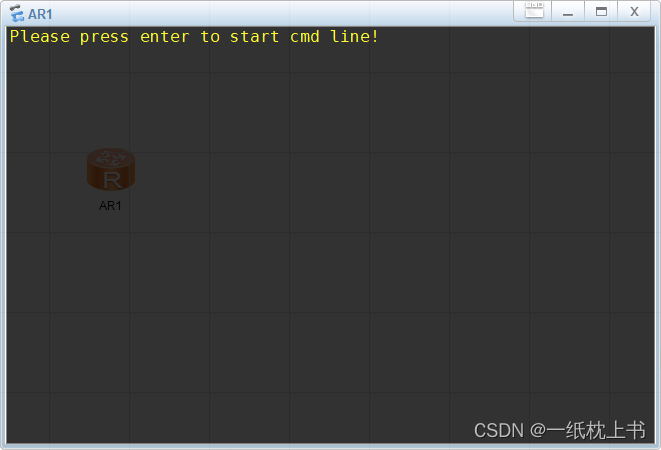
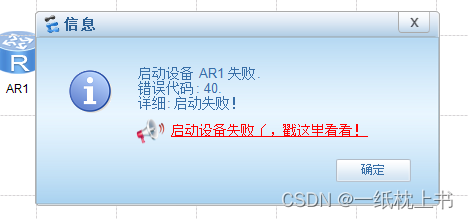
Errors are reported as follows:

My configuration is as follows:

ENSP-1.3

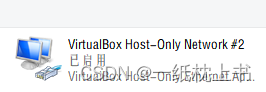
Virtualbox-5.2.32 (only version 5.0-5.2 can be used)

Wireshark-win64-3.0.3

My problem is solved as follows:

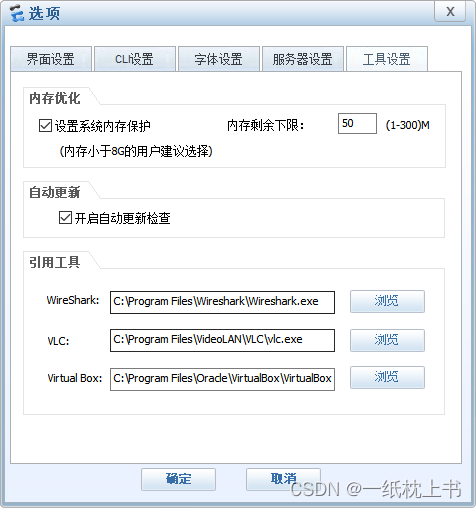
First, make sure that the installation paths of the reference tools are on Disk C

Those not in the C disk are reinstalled to the C disk, otherwise there is a high probability of error.

Then import the device package

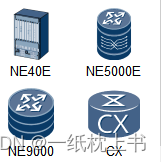
When you drag it out and start it, you can add a device package. At this time, you can add a device package with the suffix img.

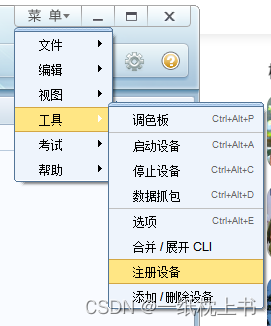
Registering an AR device

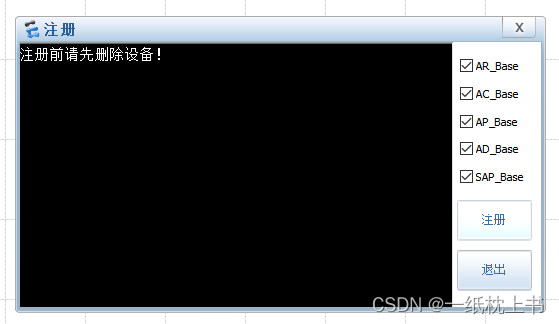
Follow the prompts on the help document to register the device.

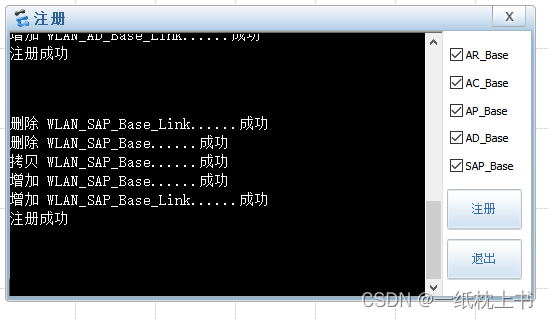
Select all AR devices and register them.

After registration, exit and restart ENSP.

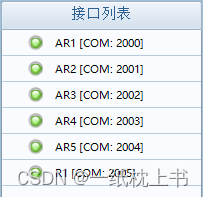
Inspection

Start successful.

Database App.config configurate file Error & Solution

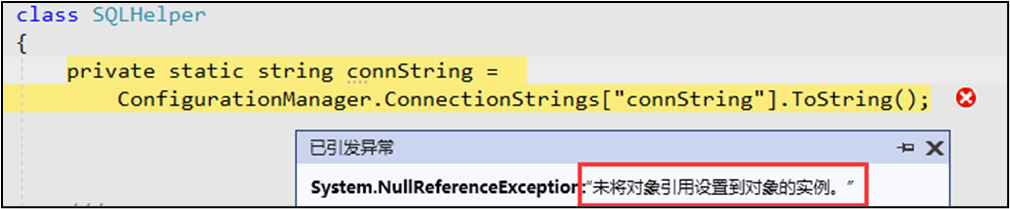
Error message 1

Object reference is not set to an instance of the object.

Error Message:

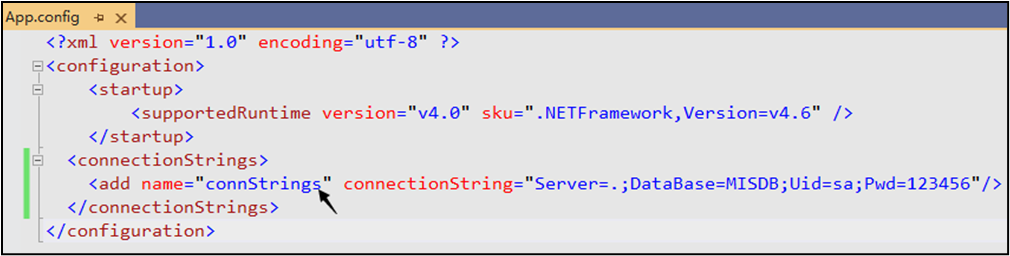
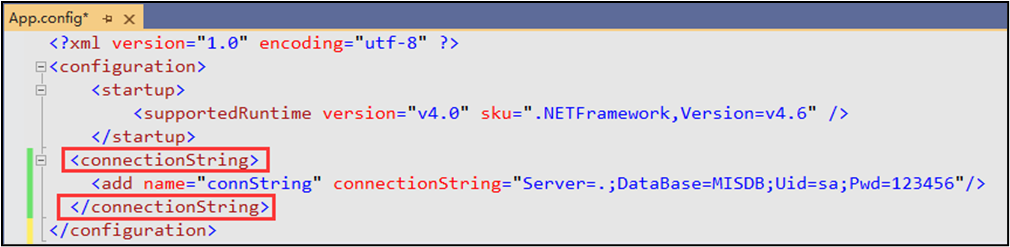
[Problem Analysis]: Open the App.config file, check the string in the name node and the current brackets is the same, the comparison found, not the same, more than one S. Remember, C# reads the name in brackets used in the node, and the configuration file node configuration name must be consistent!

Solution

[problem-solving] remove “s” and run it.

[other Error] 1: some friends don’t pay attention to this situation that you add spaces in the string will also lead to this problem, such as the following:

Spaces must be removed. You cannot add any spaces in the configuration file.

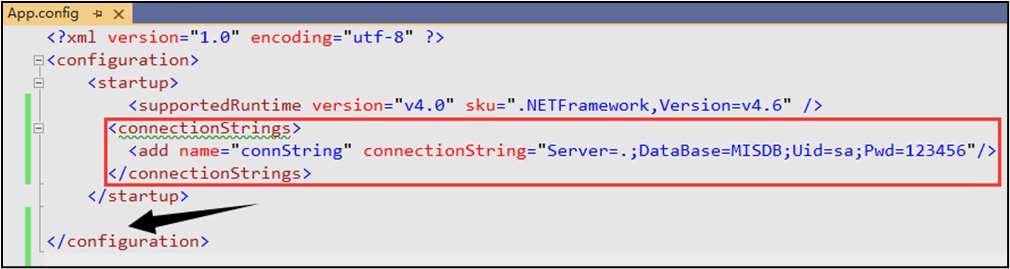
[other Error] 2: if the node position is written incorrectly, the above error will also occur. For example, in the screenshot below, the node should be written to the arrow position.

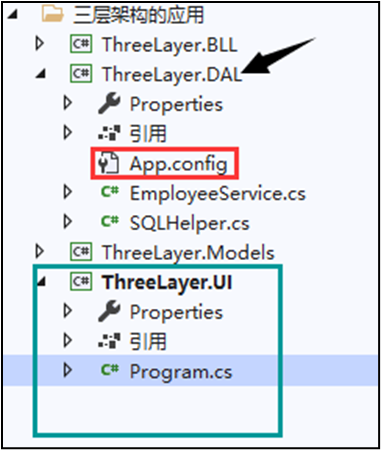
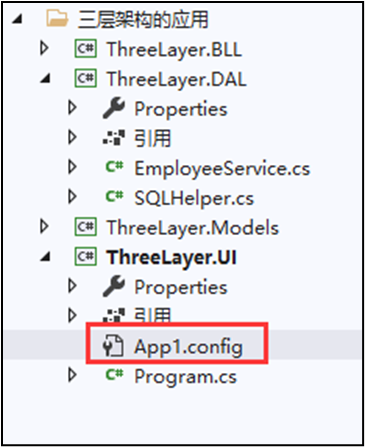
[other Error] 3: If the App.config configuration file is not added, or the App.config file is not placed in the project launchable project directory, the above error will also occur. For example, the following is wrong:

The following green part is the project’s startable items, App.config file must be put here to work.

[Other Error] 4: modified the name of the configuration file, the configuration file requirements must be the default App.config to work, if you modify the file name, there will also be errors, such as the following is not allowed: the case of.


Error message 2

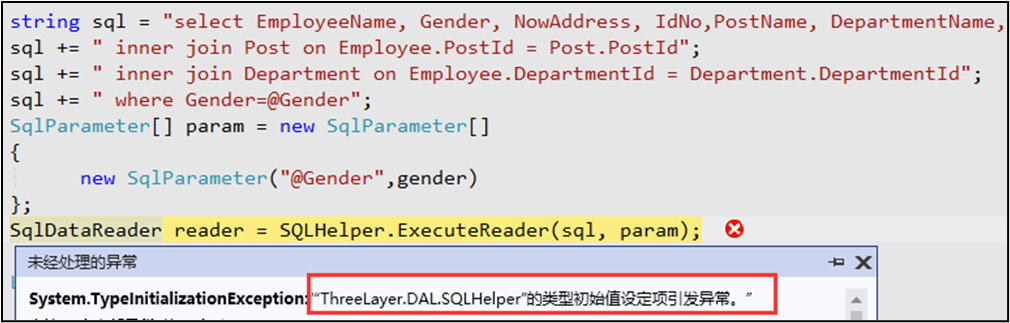
The type initial value setting item of “ThreeLayer.DAL.SQLHelper” raises an exception.

Error Message:

The problem is that as long as the prompt “SQLHelper’s type initial setting item raises an exception”. Generally, it is a configuration file problem, because we use App.config configuration file to save the data connection string. For beginners, because they can’t understand this error, so they don’t know where to start, here please remember the following troubleshooting methods.

Solution
[Solution 1] The configuration file node is written wrong

Originally this place node name is also the above is less than an s, change to the following can be: [Solution 2] configuration file App.config file if you change the name, not placed in the “startable project” root directory.

[Solution 2] configuration file App.config file if the name is modified, not put into the “startable project” root directory, some VS versions will also appear the above error. (This is the same as the solution to error 1)

Summary
According to the above method, you can perfectly solve the common problem of getting the connection string through App.config. I hope today’s content can help you.

[Solved] MSYS2+ fatal error: zlib.h: There is no such file or directory

Operating environment: windows+msys2+vscode

A brief introduction to msys2

MSYS2 (Minimal SYStem 2) is a standalone rewrite of MSYS, mainly for shell command line development environments. It is also a Windows software that builds on Cygwin (POSIX compatibility layer) and MinGW-w64 (from “MinGW-generation”) for better interoperability.

Problem Description: fatal error: zlib.h: There is no such file or directory

There is an error message when executing the makefile file.

Fatal error: zlib.h: There is no such file or directory

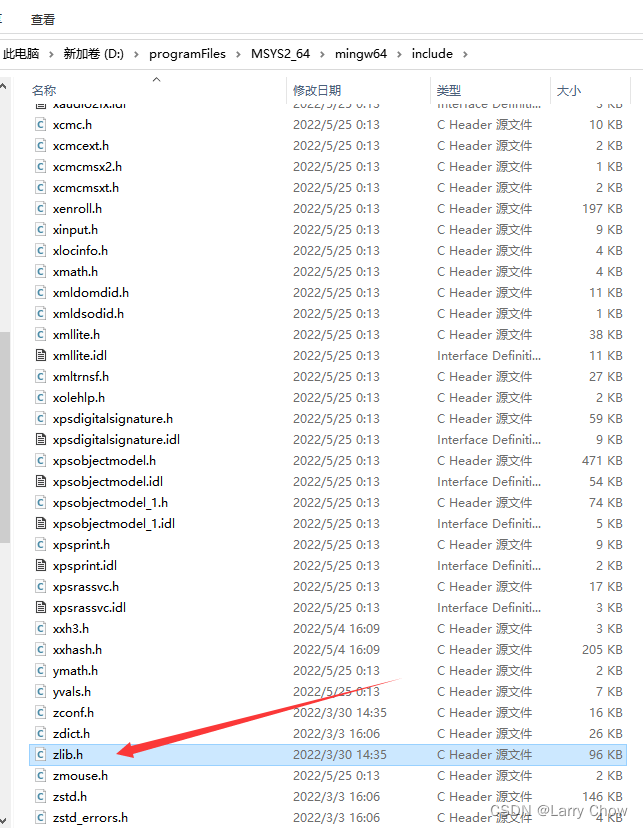
After carefully checking the header file library, it is clear that this header file exists. And I ruled out the possibility of incorrect environment configuration.

Therefore, I open the GUI of msys2. Try other possible solutions.

Enter at the command line

pacman -Ss zlib

The explanation of this command is to find related resources with the keyword “zlib”.

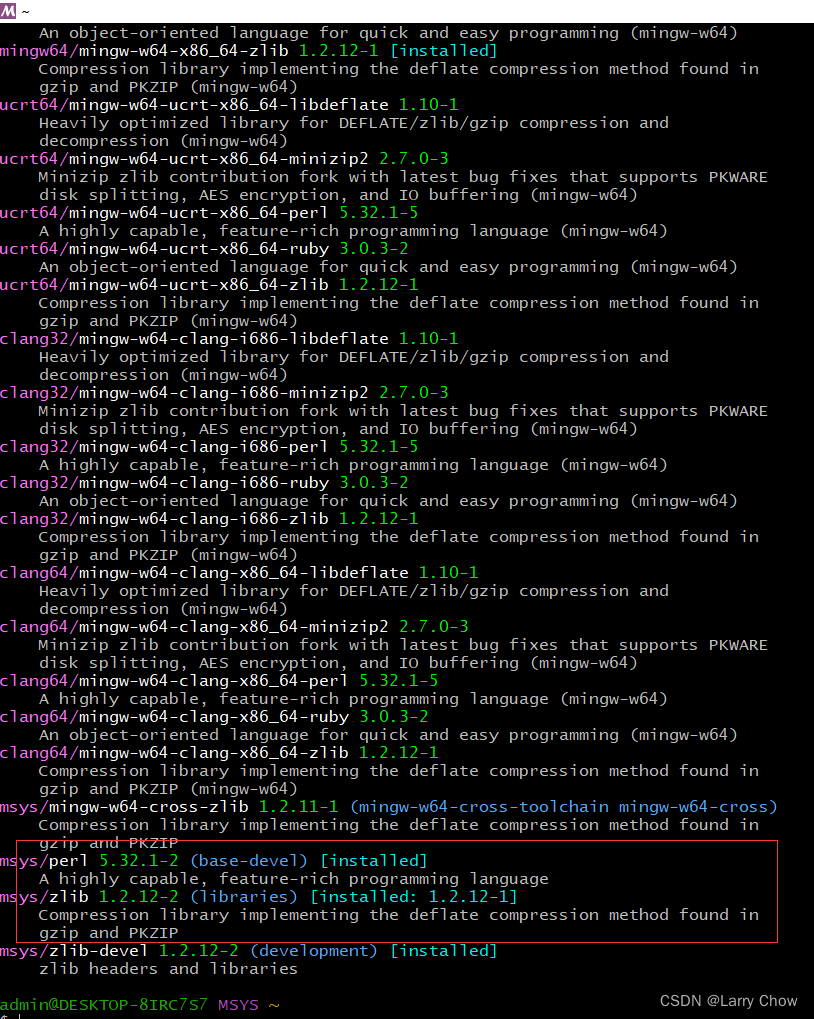
The search result is

At first, the only modules that showed up as installed were msys/zlib 1.2.12-2 (libraries) and msys/perl 5.32.1-2 (base-devel).

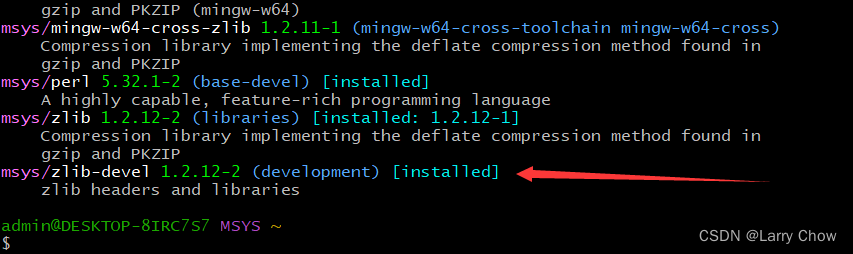
I found that the last one felt quite like what I needed, after all, it was installed and not used at best, so I gave it a try, just in case it worked. So I’m going to install msys/zlib-devel 1.2.12-2 (development) as well!

Solution

The command to install msys/zlib-devel 1.2.12-2 (development) is:

pacman -S zlib-devel

Successfully solved the problem!

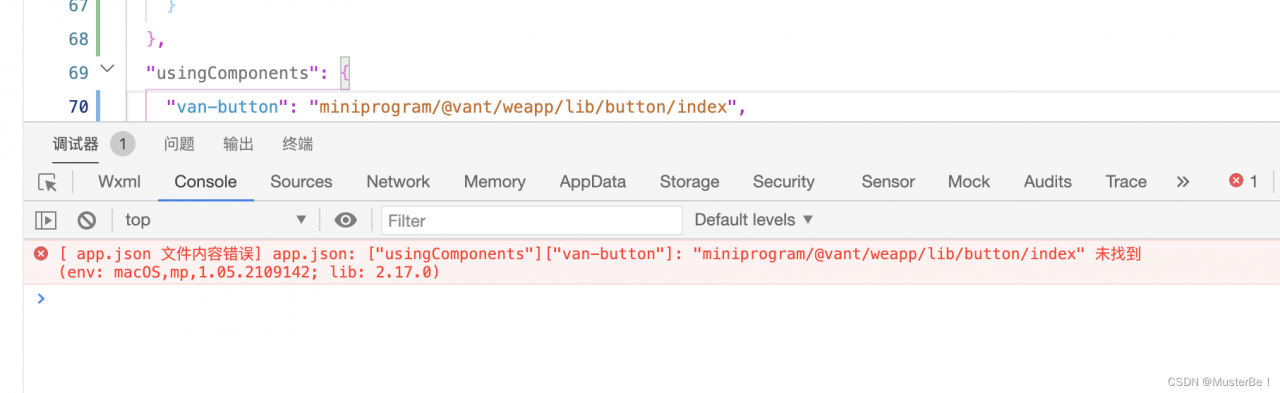
Wechat Applet error: [app.json file content error] app json: [“usingComponents“][“van-button“]: “@vant/weapp/lib/button/index

微信小程序报错[ app.json 文件内容错误] app.json: [“usingComponents“][“van-button“]: “@vant/weapp/lib/button/index

After pulling items from git to build NPM, the following error is reported:

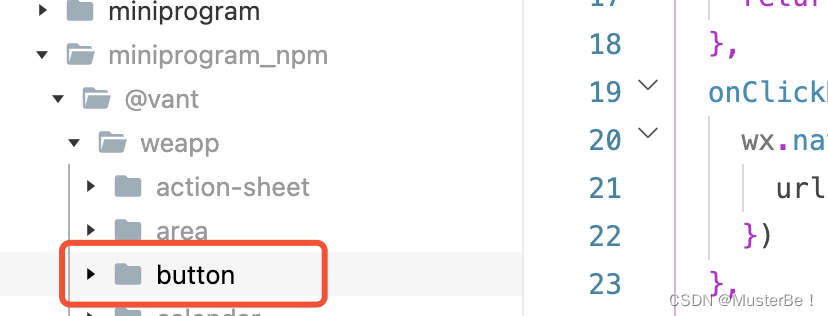
Point out that the file cannot be found and the button component cannot be used. The file path is wrong. First, find the button file in the project,

After copying the path, change the van-button path of usingComponents in app.json

Problem-solving.

Summary: error in file path. Find the file and update the path.


JavaScript Common Errors List (Reasons & Solutions)

Here is a list of the most common errors in JavaScript.


JavaScript Common Errors List

1.Uncaught TypeError: Cannot read property

Improper initialization of the state when reading the properties of an undefined object or calling its methods or rendering UI components will appear in the console

The simplest Solution: initialize state in the constructor.

2. TypeError: ‘undefined’ is not an object

An error occurred while reading a property or calling a method on an undefined object in safari.

3. TypeError: null is not an object

An error occurred while reading a property or calling a method on an empty object in Safari

Note: in JavaScript, null and undefined are different, which is why we see two different error messages. Undefined is usually a variable that has not been allocated, and null means the value is empty.

4.  (unknown): Script error

This kind of script error occurs when an uncaught JavaScript error (an error caused by the window.oneror handler rather than captured in the try catch) is restricted by the browser’s cross domain policy.

5. TypeError: Object doesn’t support property

The error in ie when calling an undefined method is equivalent to the “typeerror:” undefined “isnotafunction” error in chrome.

6. TypeError: ‘undefined’ is not a function

This is an error in chrome when calling an undefined function.

7. Uncaught RangeError

This error occurs when calling a recursive function that does not terminate, or if you pass a value to a function that is out of range.

8. TypeError: Cannot read property ‘length’

An error occurred while reading the length attribute of an undefined variable.

9. Uncaught TypeError: Cannot set property

When accessing an undefined variable, it always returns undefined. We cannot get or set any undefined properties.

10. ReferenceError: event is not defined

This error is raised when a variable is undefined or is outside the current scope.

[Solved] Java Run Error: For input string: “XXX”

Background

Today, a small partner of front-end joint commissioning said that an interface reported an error.

I first glanced at the code and found no problem.

First post the code of the place where the error is reported

...
IntegralRecord integralRecord = new IntegralRecord();
integralRecord.setUid(uid);
integralRecord.setLinkType(IntegralRecordConstants.TYPE_SIGN);
integralRecord.setTitle(IntegralRecordConstants.INTEGRAL_TASK);
integralRecord.setIntegral(Integer.parseInt(amount));
integralRecord.setStatus(1);
integralRecord.setType(IntegralRecordConstants.TYPE_ADD); 
integralRecord.setMark(StrUtil.format("Free {} points for completing tasks", amount));
userIntegralRecordService.save(integralRecord);
...

Problem location
There is no choice but to debugger a line to run.

After running to

integralRecord.setIntegral(Integer.parseInt(amount));

This line, then reported an error message For input string.

This line of code, when I look at it, just does a conversion operation on the type.

Is there something wrong with the passed data?

I ran it again and found that amount=2.00

Explanation: Because the amount is shared by several places, considering that there may be a decimal situation, a String is used in the front-end pass, and the back-end uses the corresponding type for conversion according to the actual situation.

When converting, it is indeed this line that has a problem.

The specific test situation is shown below:
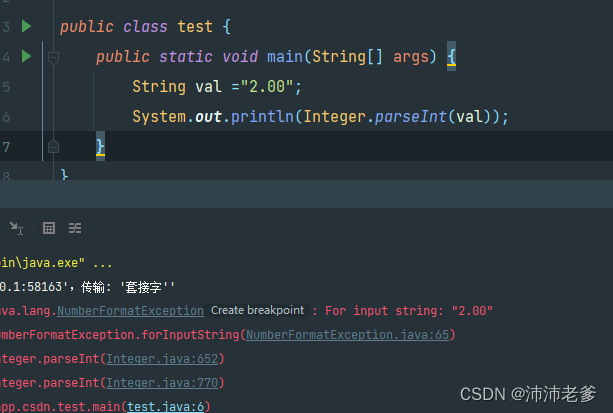
Then we changed it to

amount=”2″

The results are as follows
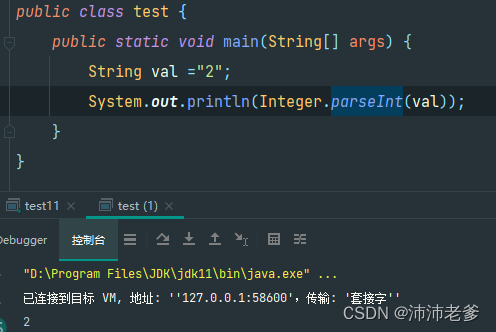
Then the problem can be defined because integer cannot recognize the case with decimals during conversion.

Problem follow up

Integer.parseInt source code

We found that parseInt finally called the following code.

public static int parseInt(String s, int radix) throws NumberFormatException{

        if (s == null) {
            throw new NumberFormatException("null");
        }

        if (radix < Character.MIN_RADIX) {
            throw new NumberFormatException("radix " + radix +
                                            " less than Character.MIN_RADIX");
        }

        if (radix > Character.MAX_RADIX) {
            throw new NumberFormatException("radix " + radix +
                                            " greater than Character.MAX_RADIX");
        }

        boolean negative = false;
        int i = 0, len = s.length();
        int limit = -Integer.MAX_VALUE;

        if (len > 0) {
            char firstChar = s.charAt(0);
            if (firstChar < '0') { // Possible leading "+" or "-"
                if (firstChar == '-') {
                    negative = true;
                    limit = Integer.MIN_VALUE;
                } else if (firstChar != '+') {
                    throw NumberFormatException.forInputString(s);
                }

                if (len == 1) { // Cannot have lone "+" or "-"
                    throw NumberFormatException.forInputString(s);
                }
                i++;
            }
            int multmin = limit/radix;
            int result = 0;
            while (i < len) {
                int digit = Character.digit(s.charAt(i++), radix);
                if (digit < 0 || result < multmin) {
                    throw NumberFormatException.forInputString(s);
                }
                result *= radix;
                if (result < limit + digit) {
                    throw NumberFormatException.forInputString(s);
                }
                result -= digit;
            }
            return negative ?result : -result;
        } else {
            throw NumberFormatException.forInputString(s);
        }
    }

Source code positioning

In the code, we can see that an error will be reported if the range is no longer specified

int digit = Character.digit(s.charAt(i++), radix);
  if (digit < 0 || result < multmin) {
    throw NumberFormatException.forInputString(s);
}

java.lang.Character.digit(char ch, int radix) method :

Returns the value of the character ch in the specified base, if the base is not in the range MIN_RADIX ≤ base ≤ MAX_RADIX or if the value of the channel is not a valid number in the specified base -1, then it is returned.

The value of radix is 10, this is because the conversion Int type is when the single character 0~9.

So if the value is not a number between 0~9 an error will be reported.

The exception thrown is forInputString.

Solution:
String interception
In this example, it is clear that only the integer part is needed, so you can specify the character “.” based on the to intercept.

Then you can convert it and it’s done.

Borrowing from a third party
Here we recommend using the NumberUtil from the hutool toolkit

You can convert similar numbers directly.

Method: NumberUtil.parseInt

 String val ="2.00";
 int i = NumberUtil.parseInt(val);

Type conversion

Because it can be determined that the value must be of numerical type.

So it can be directly converted to BigDecimal type.

BigDecimal has an intValue method, which can be called after direct conversion

 String val ="2.00";
 int i = new BigDecimal(val).intValue();
[Solved] Vue3 npm ERR code ERR_SSL_DECRYPTION_FAILED_OR_BAD_RECORD_MAC

Vue3 npm ERR code ERR_SSL_DECRYPTION_FAILED_OR_BAD_RECORD_MAC

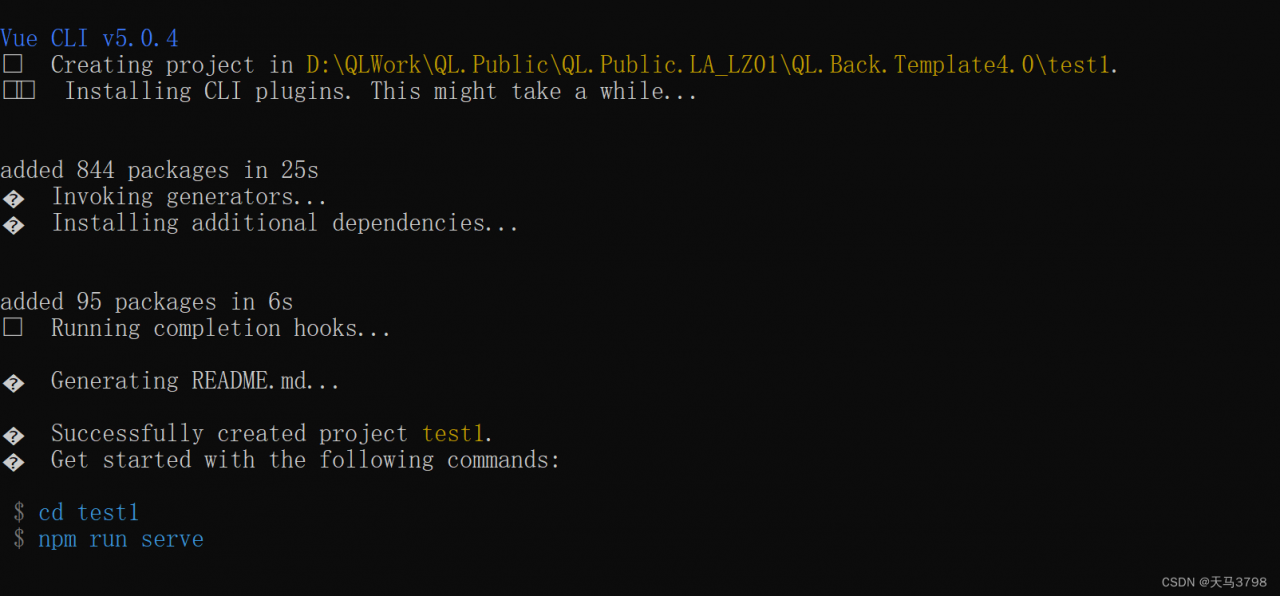
1. Vue3 create project error

vue create test1

 npm ERR! code ERR_SSL_DECRYPTION_FAILED_OR_BAD_RECORD_MAC

The detailed error is as follows:

npm ERR! code ERR_SSL_DECRYPTION_FAILED_OR_BAD_RECORD_MAC
npm ERR! 2240:error:1408F119:SSL routines:ssl3_get_record:decryption failed or bad record mac:c:\ws\deps\openssl\openssl\ssl\record\ssl3_record.c:677:
npm ERR!

npm ERR! A complete log of this run can be found in:
npm ERR!     C:\Users\qianle102\AppData\Local\npm-cache\_logs\2022-05-28T07_44_19_121Z-debug-0.log
 ERROR  Error: command failed: npm install --loglevel error --legacy-peer-deps
Error: command failed: npm install --loglevel error --legacy-peer-deps
    at ChildProcess.<anonymous> (C:\Users\qianle102\AppData\Roaming\npm\node_modules\@vue\cli\lib\util\executeCommand.js:138:16)
    at ChildProcess.emit (node:events:527:28)
    at ChildProcess.cp.emit (C:\Users\qianle102\AppData\Roaming\npm\node_modules\@vue\cli\node_modules\cross-spawn\lib\enoent.js:34:29)
    at maybeClose (node:internal/child_process:1092:16)
    at Process.ChildProcess._handle.onexit (node:internal/child_process:302:5)

The second error is the error of the python download command. That is, the python command is used during the installation of vue3.

If Python is not installed on this computer, an error will be reported.

2. Solutions

Download the phthon installation package and install the python framework

[Solved] itextpdf Read PDF File Error: Rebuild failed: trailer not found.

Recently, I used itextpdf to print invoices, but there was an error when reading the file stream. The following is the key code

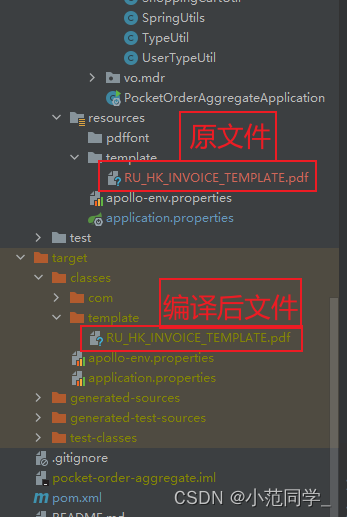
ClassPathResource classPathResource = new ClassPathResource("/template/RU_HK_INVOICE_TEMPLATE.pdf");
InputStream inputStream = classPathResource.getInputStream();
reader = new PdfReader(inputStream);// read the template of pdf

The following errors are reported in the new PdfReader(inputStream) each time:

com.itextpdf.text.exceptions.InvalidPdfException: Rebuild failed: trailer not found.; Original message: xref subsection not found at file pointer

Maven will use pom XML configuration files uniformly encode the project, but some files do not need to be re encoded, such as PDF template files; After recoding, the PDF template structure may be damaged, resulting in the unavailability of the files generated after compilation, as shown in the following figure

Therefore, it is necessary to filter out the files that do not need to be encoded: filter all files with the suffix .pdf or .p8 and do not encode them uniformly. Need to be configured in the pom.xml file nonFilteredFileExtension tag

<!-- Filter the suffixes of files that do not need to be transcoded pdf -->
            <plugin>
                <groupId>org.apache.maven.plugins</groupId>
                <artifactId>maven-resources-plugin</artifactId>
                <version>3.0.1</version>
                <configuration>
                    <encoding>UTF-8</encoding>
                    <useDefaultDelimiters>false</useDefaultDelimiters>
                    <nonFilteredFileExtensions>
 						<nonFilteredFileExtension>pdf</nonFilteredFileExtension>
                    </nonFilteredFileExtensions>
                </configuration>
            </plugin>

[Solved] Vite Error: Failed to load module script: Expected a JavaScript module script but the server…

Error message

Use the white screen of the web page packaged by vite, and the console reports an error.

Failed to load module script: Expected a JavaScript module script but the server responded with a MIME type of “text/plain”. Strict MIME type checking is enforced for module scripts per HTML spec.

reason

MIME type errors are generally a problem with native windows development. I encountered this after opening it with Python’s built-in http.server on Windows.

Solution

Deploy the packaged files in a formal server environment (such as nginx and Apache)

[Solved] grafana Startup Error: failed to parse “/etc/grafana/grafana.ini“: open /etc/grafana/grafana.ini: no such file or directory

Grafana failed to start, and the configuration file parsing reported an error:

lvl=crit msg="failed to parse \"/etc/grafana/grafana.ini\": 
open /etc/grafana/grafana.ini: no such file or directory"

The grafana.ini file is not loading properly for the following two reasons.
1, there is no grafana.ini on the host itself.

If at this point it is docker-based boot and -v goes to mount it, the result is definitely still not there.

2, -v is not used correctly, there is grafana.ini on the host, but the file is not mapped into the container