Error executing Aidl: return code 1

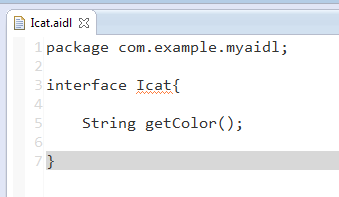
I learned from the video in Aidl studio, and then I used it to create a note file. The Aidl file created in the video has a set of templates. The Aidl file created in eclipse has nothing, even no code prompt. Error executing Aidl: return code 1.

After traversing various websites, even stackoverflow did not find the answer. There is only one similar eclipse that creates Aidl without generating a java file in the gen directory, and writes a standard Aidl format code according to it. After saving, the error disappears.

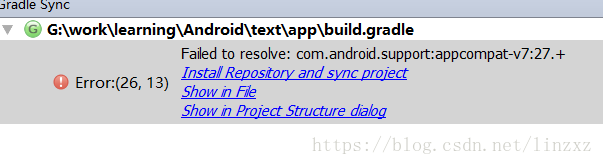
About Android studio error: (26,13) failed to resolve: com.android.support : appcompat-v7:27. + error

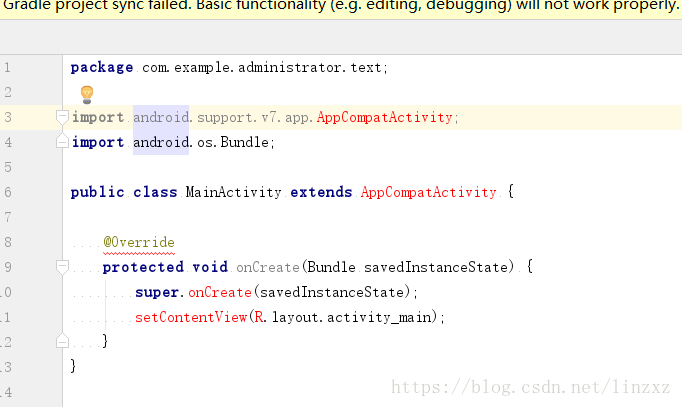
Error: as shown in the figure

Some methods in mianactivity will report errors:

At the beginning, I thought that the SDK was faulty, because I always thought that my SDK was not installed properly. Then I repeatedly installed Android studio. Those who included the SDK and didn’t package the SDK came several times, and I repeatedly installed the SDK (this is a sad story) Finally, with the help of Baidu boss, we can solve this problem

Solution:

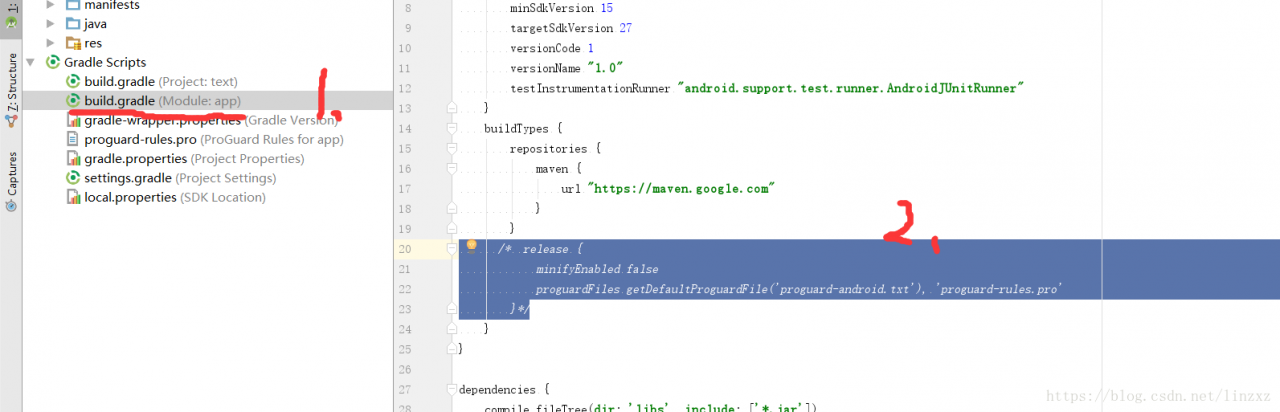
1. Open build.gradle

2. Replace the release method comment with “repositories {maven {URL” https://maven.google.com “}” is as follows:

3、clean project

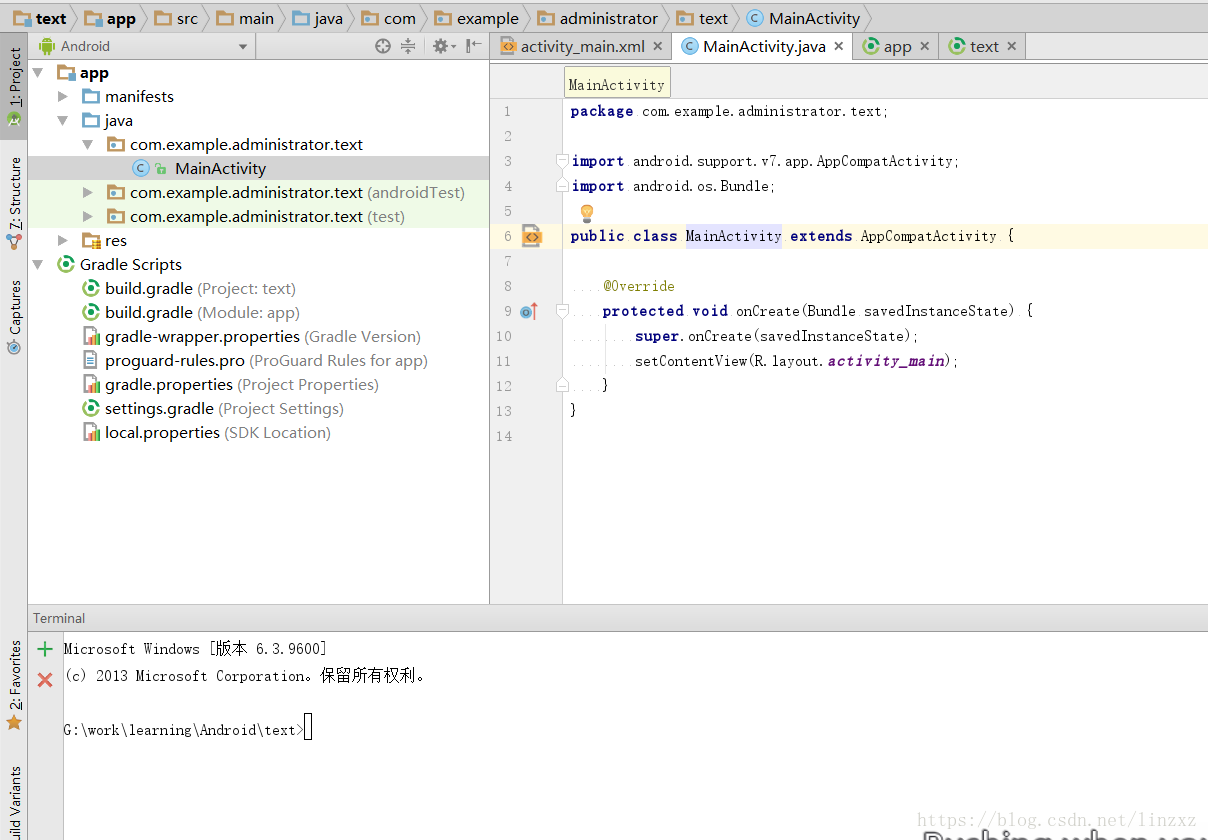
The solution effect is as follows:

Vs generated an error: “error LNK 1168: unable to open xxxxxx.exe Write to

When writing C + + code with VS, you often encounter this situation when you finish writing the code generation project: “error LNK 1168: unable to open xxxxxx.exe Write.


There are three solutions (the first two are temporary but not permanent, and the third is radical)

1. Do nothing, wait for a moment, about a few minutes, you can successfully generate.

2. Delete the. EXE file generated in the previous debug folder, and it will be generated successfully.

3. The most fundamental way: open the control panel – & gt; management tools – & gt; Services – & gt; to enable the application experience service.

Error starting day: SELinux is not supported with the overlay 2

Environment: centos7

Command: systemctl start docker

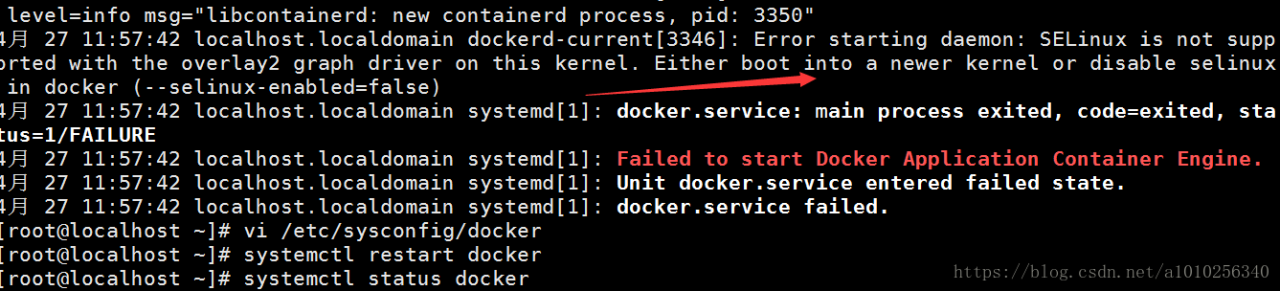
          systemctl status docker -l

Error starting day: SELinux is not supported with the overlay 2 graph driver on this kernel. Either boot into a new kernel or disable SELinux in docker (- – SELinux enabled = false)

Solution:

It means: SELinux in this Linux kernel does not support overlay 2 graph driver. There are two solutions: either start a new kernel or disable SELinux in docker, – SELinux enabled = false

To edit the docker profile again:

vi /etc/sysconfig/docker

Change to:

Then systemctl start docker is ready

SBT command package error solution

Package

Clear

Stack overflow
error occurred: java.lang.StackOverflowError

For this overflow, you need to change the size of the stack. Find the following in SBT’s configuration file conf: sbtconfig.txt , add content:

-Xss2m

Memory overflow
error occurred: java.lang.OutOfMemoryError

Common memory overflow phenomenon, add configuration information:

-The size of xms64m
– xmx512m
can be changed by yourself.


Python: CUDA error: an illegal memory access was accounted for

Error in pytorch1.6 training:

RuntimeError: CUDA error: an illegal memory access was encountered

The reason for the error is the same as that of the lower version of python (such as version 1.1)

Runtimeerror: expected object of backend CUDA but get backend CPU for argument https://blog.csdn.net/weixin_ 44414948/article/details/109783988

Cause of error:

The essence of this kind of error reporting is model and input data_ image、input_ Label) is not all moved to GPU (CUDA).
* * tips: * * when debugging, you must carefully check whether every input variable and network model have been moved to the GPU. I usually report an error because I have missed one or two of them.

resolvent:

Model, input_ image、input_ The example code is as follows:

model = model.cuda()
input_image = input_iamge.cuda()
input_label = input_label.cuda()

or

device = torch.device("cuda" if torch.cuda.is_available() else "cpu")
model = model.to(device)
input_image = input_iamge.to(device)
input_label = input_label.to(device)

JavaScript summary: the difference between typeof and instanceof, and Object.prototype.toString() method

In my previous blog, I introduced basic data type and reference data type: basic type is a simple data segment stored in stack memory, that is, a single literal value; reference data type refers to an object composed of multiple values.

Typeof is an operator used to detect variable data types, mainly used to detect basic data types. It can determine whether a variable is a string, a numeric value, a Boolean value or undefined. However, if the detected variable is a reference data type, it can return object or function, but it can’t tell in detail whether it is array or regexp.

The main purpose of nstanceof is to detect reference types.


Let’s take a closer look

The difference between typeof and instanceof:

1.typeof:

Typeof is a unary operation, which can be of any type before an operand.

It is mainly used to determine whether the data is the basic data type:
string, number, object, null, undefined and Boolean, but it is unable to determine the function, array and regexp

the return value is a string indicating the type of the operand.

only a few results can be returned, such as number, undefined, and Boolean.

We can even use typeof to determine whether a variable exists,
such as if (typeof a = = undefined){ document.write (“OK”);}, and you don’t need to use if (a), because if a doesn’t exist (undeclared), there will be an error. For special objects such as array and null, typeof will always return objects, which is the limitation of typeof.

Take a look at the code example:

<!DOCTYPE html>
<html>
<head>
<meta http-equiv="Content-Type" content="text/html; charset=utf-8" />
<script language="javascript" type="text/javascript">
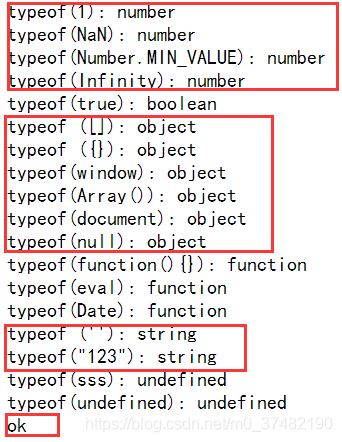
document.write ("typeof(1): "+typeof(1)+"<br>");
document.write ("typeof(NaN): "+typeof(NaN)+"<br>");
document.write ("typeof(Number.MIN_VALUE): "+typeof(Number.MIN_VALUE)+"<br>");
document.write ("typeof(Infinity): "+typeof(Infinity)+"<br>");
document.write ("typeof(true): "+typeof(true)+"<br>");
document.write ("typeof ([]): "+typeof([])+"<br>");
document.write ("typeof ({}): "+typeof({})+"<br>");
document.write ("typeof(window): "+typeof(window)+"<br>");
document.write ("typeof(Array()): "+typeof(new Array())+"<br>");
document.write ("typeof(document): "+typeof(document)+"<br>");
document.write ("typeof(null): "+typeof(null)+"<br>");
document.write ("typeof(function(){}): "+typeof(function(){})+"<br>");
document.write ("typeof(eval): "+typeof(eval)+"<br>");
document.write ("typeof(Date): "+typeof(Date)+"<br>");
document.write ("typeof (''): "+typeof('')+"<br>");
document.write ("typeof(\"123\"): "+typeof("123")+"<br>");
document.write ("typeof(sss): "+typeof(sss)+"<br>");
document.write ("typeof(undefined): "+typeof(undefined)+"<br>");
if(typeof a=="undefined"){document.write ("ok");}
</script>
<title>javascript</title>
</head>
<body>
</body>
</html>

Running results:

2.instanceof:

The main purpose of instanceof is to detect the reference type. The return value of is only true and false </ font>, which can be used to determine whether the prototype attribute of a constructor exists in the prototype chain of another object to be detected. Here we can ignore the prototype first

See the following code example:

<!DOCTYPE html>
<html>
<head>
<meta http-equiv="Content-Type" content="text/html; charset=utf-8" />
<script language="javascript" type="text/javascript">
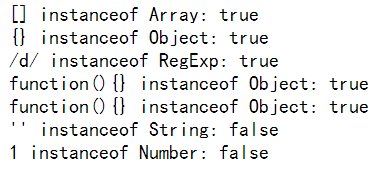
document.write ("[] instanceof Array: " + ([] instanceof Array )+ "<br>");
document.write ("{} instanceof Object: " + ({} instanceof Object )+ "<br>");
document.write ("/\d/ instanceof RegExp: " +( /\d/ instanceof RegExp) + "<br>");
document.write ("function(){} instanceof Object: " + (function(){} instanceof Object) +"<br>");
document.write ("function(){} instanceof Object: " + (function(){} instanceof Function) +"<br>");
document.write ("'' instanceof String: " + ('' instanceof String) +"<br>");
document.write ("1 instanceof Number: "+ (1 instanceof Number) +"<br>");
</script>
<title>javascript类型测试</title>
</head>
<body>
</body>
</html>

The running results are as follows:
For example, we need to determine whether a is an instance of B?You can use a instance of B?Alert (“true”): Alert (“false”); to judge

Instanceof is used to determine whether a variable is an instance of an object
for example, var a = new array(); alert (a instanceof array); will return true
and alert (a instanceof object) will return true;
this is because array is a subclass of object.

When it comes to instanceof, we need to insert one more problem, which is the arguments of function. We may all think that arguments is an array, but if we use instanceof to test, we will find that arguments is not an array object, although it looks very similar.

In addition:

Test var a = new array(); if (a instance of object) alert (‘y ‘); else alert (‘n’);
get ‘y’

But if (window instance of object) alert (‘y ‘); else alert (‘n’);
get ‘n’

Therefore, the object of instanceof test here refers to the object in JS syntax, not the DOM model object.

There are some differences when using typeof
alert (typeof (window)) will get object


three Object.prototype.toString

In many cases, we can use the instanceof operator or the constructor property of the object to detect whether the object is an array. For example, many JavaScript frameworks use these two methods to determine whether an object is an array type. But detecting arrays in cross frame pages fails. The reason is that arrays created in different iframes do not share their prototype properties with each other

    <script>
    window.onload=function(){
    var iframe_arr=new window.frames[0].Array;
    alert(iframe_arr instanceof Array); // false
    alert(iframe_arr.constructor == Array); // false
    }
    </script>

The tostring() method is called across the prototype chain Object.prototype.toString (), which can solve the above cross framework problem.
This is a primitive prototype extension function of an object, which is used to distinguish data types accurately
when Object.prototype.toString (o) After execution, the following steps are performed:

1) Get the class property of object o.
2) connection string “[object” + result (1) + “]
3) return result

Object.prototype.toString . call ([]);// returns “[object array]”
0 Object.prototype.toString . call (/ reg/Ig);// returns “[object regexp]”

And we will find that it is not accurate to judge the data type by typeof. For example, the return values of array, regular, date and object typeof are all objects, which will cause some errors.
Therefore, on the basis of type of judgment, we need to use Object.prototype.toString Method to further determine the data type.

Let’s look at the code:

<script language="javascript" type="text/javascript">
var type=Object.prototype.toString
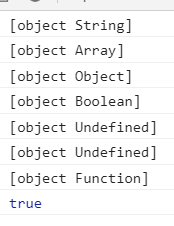
console.log(type.call(''));//object String
console.log(type.call([]));//object Array
console.log(type.call({}));//object Object
console.log(type.call(false));//object Boolean
console.log(type.call());//object Null
console.log(type.call(undefined));//object Undefined
console.log(type.call(function(){}));//object Function
console.log(type.call('')=="[object String]");//true
</script>

Running results:

To sum up:

Both typeof and instanceof are operators used to detect variable types. The difference between them is that

Typeof is used to judge the basic type of variable; instanceof is used to judge the type of object;

Call the tostring() method across the prototype chain: Object.prototype.toString (), which can solve the cross frame problem.
This is a primitive prototype extension function of the object, which can be used to accurately distinguish data types
Detailed explanation of OpenCV approxpolydp() function

CV_EXPORTS_W void approxPolyDP( InputArray curve,OutputArray approxCurve,double epsilon, bool closed );

@param curve Input vector of a 2D point stored in std::vector or Mat
@param approxCurve Result of the approximation. The type should match the type of the input curve.
@param epsilon Parameter specifying the approximation accuracy. This is the maximum distance
between the original curve and its approximation.
@param closed If true, the approximated curve is closed (its first and last vertices are
connected). Otherwise, it is not closed.

The function cv::approxPolyDP approximates a curve or a polygon with another curve/polygon with less
vertices so that the distance between them is less or equal to the specified precision. It uses the
Douglas-Peucker algorithm <http://en.wikipedia.org/wiki/Ramer-Douglas-Peucker_algorithm>

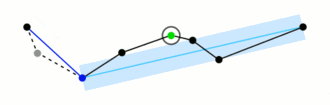
The main function is to crease a continuous smooth curve

There are four parameters

Inputarray curve: input curve. The data type can be vector & lt; point & gt;.

Outputarray approxcurve: output polyline. The data type can be vector & lt; point & gt;.

Double epsilon: the threshold value for judging the distance between the point and the corresponding line segment. (if the distance is greater than this threshold, it will be discarded. If the distance is less than this threshold, it will be retained. The smaller the epsilon is, the closer the shape of the broken line is to the curve.)

Bool closed: Flag of whether the curve is closed or not.

Program example:

#include<opencv2/opencv.hpp>
#include<iostream>

using namespace std;
using namespace cv;

void main()
{
    Mat srcImg = imread("01.jpg");
    imshow("src", srcImg);
    Mat dstImg(srcImg.size(), CV_8UC3, Scalar::all(0));

    cvtColor(srcImg, srcImg, CV_BGR2GRAY);
    threshold(srcImg, srcImg, 200, 255, CV_THRESH_BINARY_INV);
    vector<vector<Point>> contours;
    vector<Vec4i> hierarcy;
    findContours(srcImg, contours, hierarcy, 0, CV_CHAIN_APPROX_NONE);
    vector<vector<Point>> contours_poly(contours.size());
    for (int i = 0; i<contours.size(); i++)
    {
        approxPolyDP(Mat(contours[i]), contours_poly[i], 15, true);

        drawContours(dstImg, contours_poly, i, Scalar(0, 255, 255), 2, 8); 
    }
    imshow("approx", dstImg);
    waitKey(0);
}

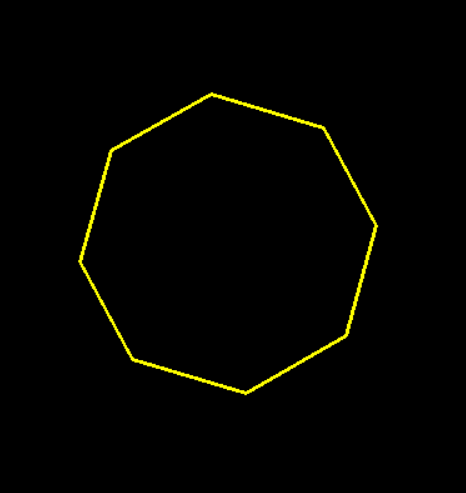
Image “01. JPG”:

Epsilon was 15

Epsilon was 5

The thread implementation of timer in Java

  1. js
    $(function(){
                 initTodoInfo(true);
      
                 })

//Get the scheduling command information and assign it to the prompt button findDcmdSize
        function initDcmdInfo(showWindow){
            var url = 'nnmis/view/dcmd/findDcmdSizeDCMD.tg';
             $.post(url, {}, function (data) {
              if(data != ""){
                     //From JSON data, parse quantity and new alarms
                     var response = eval("("+ data +")");
                     var totalCount = response[0].TOTALCNT;
                     //Update the displayed value of the quantity
                     $("#dcmd_info_label").html("Command["+totalCount+"]");


                 }
             });    
        }

//Number of regular updates
        var getRealData = self.setInterval("initTodoInfo(true);", 60000);

2. action

@Autowired
    private DcmdData ddata;

/**
     * Returns the number of unprocessed items for the day
     */
    public void findDcmdSize() {

        String dataGridStr = "";
        // List<Map> dcmdlist = dcmdService.findDcmdListNumByCondtion(dcmd);
        List<Map> dcmdlist = ddata.getDcmdList();
        if (dcmdlist.size() == 0) {
            dcmdlist = dcmdService.findDcmdListNumByCondtion(dcmd);
        }
        dataGridStr = super.autoDMapLst2DgJson(dcmdlist);

        returnJson(dataGridStr, response);

    }


3. to do data cache class

package com.casco.csmis.dcmd.data;

import java.util.ArrayList;
import java.util.List;
import java.util.Map;

import org.springframework.beans.factory.annotation.Autowired;
import org.springframework.stereotype.Repository;
import org.springframework.stereotype.Service;

import com.casco.csmis.dcmd.service.IDcmdInfoService;
import com.casco.csmis.dcmd.vo.DcmdInfo;

/**
 * <b> To-Do Data Cache Class<b>
 * <p>
 * Created by 60847
 */
@Repository(value = "dcmdData")
@Service
public class DcmdData {
	@Autowired
	private IDcmdInfoService dcmdService;

	private static List<Map> dcmdList = new ArrayList<Map>();

	private DcmdInfo dcmd;

	public static List<Map> getDcmdList() {
		return dcmdList;
	}

	public static void setDcmdList(List<Map> dcmdList) {
		DcmdData.dcmdList = dcmdList;
	}

	public DcmdData() {

	}

	public DcmdData(IDcmdInfoService dcmdService) {
		this.dcmdService = dcmdService;
	}

	/**
	 * Initialization
	 */
	public void init() {
		try {
			dcmdList = dcmdService.findDcmdListNumByCondtion(dcmd);

		} catch (Exception e) {
			e.printStackTrace();
		}
	}
}

4. Call the thread to start the thread when the server starts


/**
 * @Title: MemoryListener.java
 * @Package com.casco.csmis.listener
 * @Description:
 * @author ligangying [email protected]
 * @date 2013-10-2 AM 9:56:33
 * @version V1.0
 */

package com.casco.csmis.permissions.listener;

import javax.servlet.ServletContextEvent;
import javax.servlet.ServletContextListener;

import org.apache.commons.logging.Log;
import org.apache.commons.logging.LogFactory;
import org.springframework.context.ApplicationContext;
import org.springframework.web.context.support.WebApplicationContextUtils;

import com.casco.csm.casco.core.tools.util.ReadProperty;

import com.casco.csmis.dcmd.data.DcmdData;

/**
 * @ClassName: MemoryListener
 * @Description: Initialize global parameters and system dictionary
 * @author sunct [email protected]
 * @date 2013-10-6 下午3:03:16
 */
public class MemoryListener implements ServletContextListener {

	private DcmdData dcmdData;

	Log logger = LogFactory.getLog(MemoryListener.class);

	@Override
	public void contextDestroyed(ServletContextEvent arg0) {

		logger.debug("tomcat Done");
	}

	@Override
    public void contextInitialized(ServletContextEvent arg0) {
        ApplicationContext ctx = WebApplicationContextUtils.getWebApplicationContext(arg0.getServletContext());

       
            this.setDcmdData((DcmdData) ctx.getBean("dcmdData"));
           

            logger.debug("tomcat start running");

            Thread dcmdThread = new Thread(new DcmdThread(this.getDcmdData()));
            dcmdThread.start();


    }

	public DcmdData getDcmdData() {
		return dcmdData;
	}

	public void setDcmdData(DcmdData dcmdData) {
		this.dcmdData = dcmdData;
	}

}

5. Thread call cache class

package com.casco.csmis.dcmd.util;

import com.casco.csmis.dcmd.data.DcmdData;

/*
 * Receiving server responsible for receiving data sent from C++
 */
public class DcmdThread implements Runnable {

	private DcmdData dcmdData;

	public DcmdData getDcmdData() {
		return dcmdData;
	}

	public void setDcmdData(DcmdData dcmdData) {
		this.dcmdData = dcmdData;
	}

	public DcmdThread(DcmdData dcmdData) {
		this.setDcmdData(dcmdData);
	}

	@Override
	public void run() {
		while (true) {
			// Reading the datas
			try {
				dcmdData.init();
				Thread.sleep(30000);
			} catch (Exception e) {
				e.printStackTrace();
			}
		}
	}
}


6 server class configuration in web.xml

<listener>
        <listener-class>com.casco.csmis.permissions.listener.MemoryListener</listener-class>
    </listener>


To solve the problem that the loss of verification set of resnet50 pre-training model remains unchanged

# Available whenever available in the library Use pre-trained ResNet50 models
covn_base = tf.keras.applications.ResNet50(weights='imagenet', include_top = False,
                                           input_shape=(im_height,im_width,3), layers=tf.keras.layers)

K.set_learning_phase(1)
"""
freeze the weights for the first 174-33=141
frezee the level 141 before
"""
for layer in covn_base.layers[0:141]:
    layer.trainable = False

for layer in covn_base.layers[141:]:
    layer.trainable = True

model.add(covn_base)
model.add(tf.keras.layers.GlobalAveragePooling2D())
model.add(tf.keras.layers.Dense(512,activation="relu"))
model.add(tf.keras.layers.Dropout(rate=0.2))
model.add(tf.keras.layers.Dense(CLASS,activation="softmax"))

Load pre training model with your own classification model!!!

Vscode code block / full text collapse / expand shortcut

Requirements & amp; operations

There are two types of scenes commonly used (pay attention to the scope of operation):

To operate all code blocks in the file where the cursor is located:

Collapse all Ctrl + K + 0 expand all Ctrl + K + J just operate the code in the code block where the cursor is located:

Collapse Ctrl + Shift + [ Expand Ctrl + Shift +]

More operations

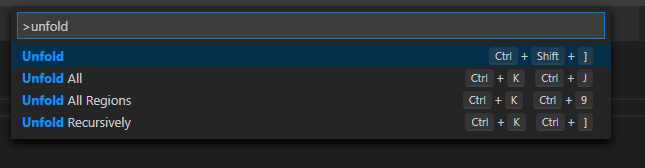
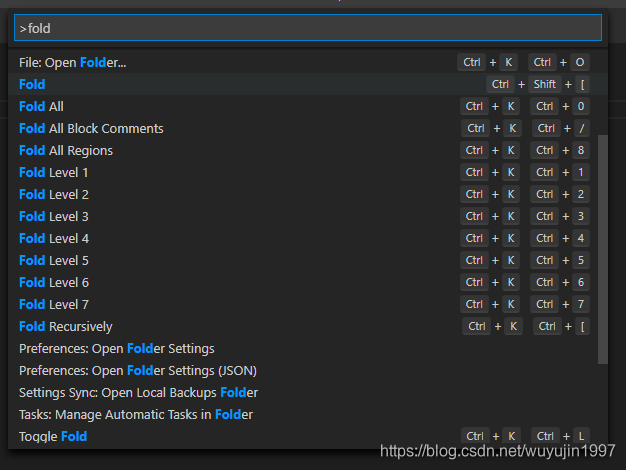
If you have more needs, you can use Ctrl + Shift + P to search fold and unfold for more options.
The following commands can be used to find, do not have to remember (but the above two are still necessary to be familiar with).

Unfold - unfold

Fold - fold