Problem Description:
System: win10 (64 bit)
python version: 3.7.8
MySQL Server 8.0
MySQL Connector C 6.1
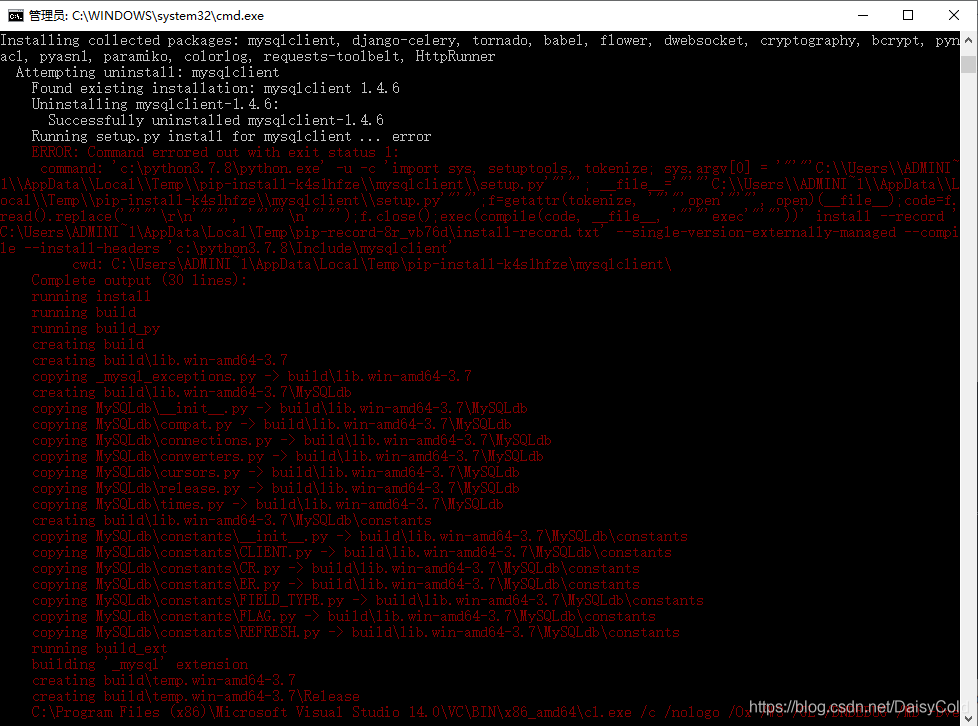
When using the pip install -r requirements.txt command, an error is reported when installing to mysqlclient (mysqlclient has been installed through the pip command):
ERROR: Command errored out with exit status 1:
command: ‘c:\python3.7.8\python.exe’ -u -c ‘import sys, setuptools, tokenize; sys.argv[0] = ‘”‘”‘C:\\Users\\ADMINI~1\\AppData\\Local\\Temp\\pip-install-k4s1hfze\\mysqlclient\\setup.py'”‘”‘; __file__='”‘”‘C:\\Users\\ADMINI~1\\AppData\\Local\\Temp\\pip-install-k4s1hfze\\mysqlclient\\setup.py'”‘”‘;f=getattr(tokenize, ‘”‘”‘open'”‘”‘, open)(__file__);code=f.read().replace(‘”‘”‘\r\n'”‘”‘, ‘”‘”‘\n'”‘”‘);f.close();exec(compile(code, __file__, ‘”‘”‘exec'”‘”‘))’ install –record ‘C:\Users\ADMINI~1\AppData\Local\Temp\pip-record-8r_vb76d\install-record.txt’ –single-version-externally-managed –compile –install-headers ‘c:\python3.7.8\Include\mysqlclient’
cwd: C:\Users\ADMINI~1\AppData\Local\Temp\pip-install-k4s1hfze\mysqlclient\
Complete output (30 lines):
running install
running build
running build_py
creating build
creating build\lib.win-amd64-3.7
copying _mysql_exceptions.py -> build\lib.win-amd64-3.7
creating build\lib.win-amd64-3.7\MySQLdb
copying MySQLdb\__init__.py -> build\lib.win-amd64-3.7\MySQLdb
copying MySQLdb\compat.py -> build\lib.win-amd64-3.7\MySQLdb
copying MySQLdb\connections.py -> build\lib.win-amd64-3.7\MySQLdb
copying MySQLdb\converters.py -> build\lib.win-amd64-3.7\MySQLdb
copying MySQLdb\cursors.py -> build\lib.win-amd64-3.7\MySQLdb
copying MySQLdb\release.py -> build\lib.win-amd64-3.7\MySQLdb
copying MySQLdb\times.py -> build\lib.win-amd64-3.7\MySQLdb
creating build\lib.win-amd64-3.7\MySQLdb\constants
copying MySQLdb\constants\__init__.py -> build\lib.win-amd64-3.7\MySQLdb\constants
copying MySQLdb\constants\CLIENT.py -> build\lib.win-amd64-3.7\MySQLdb\constants
copying MySQLdb\constants\CR.py -> build\lib.win-amd64-3.7\MySQLdb\constants
copying MySQLdb\constants\ER.py -> build\lib.win-amd64-3.7\MySQLdb\constants
copying MySQLdb\constants\FIELD_TYPE.py -> build\lib.win-amd64-3.7\MySQLdb\constants
copying MySQLdb\constants\FLAG.py -> build\lib.win-amd64-3.7\MySQLdb\constants
copying MySQLdb\constants\REFRESH.py -> build\lib.win-amd64-3.7\MySQLdb\constants
running build_ext
building ‘_mysql’ extension
creating build\temp.win-amd64-3.7
creating build\temp.win-amd64-3.7\Release
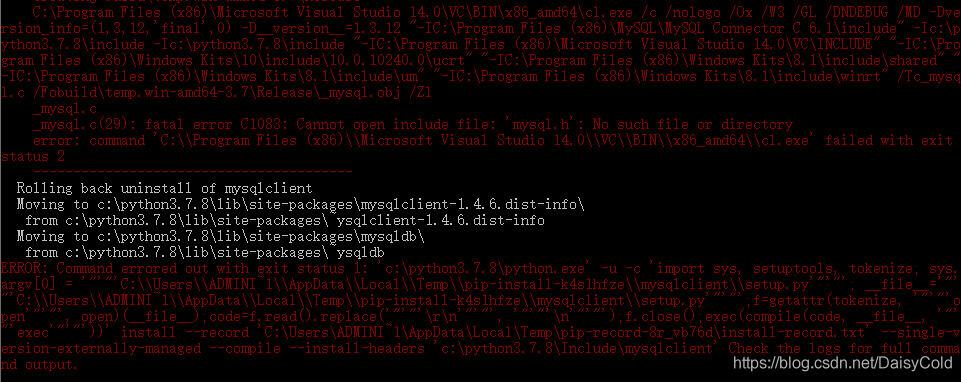
C:\Program Files (x86)\Microsoft Visual Studio 14.0\VC\BIN\x86_amd64\cl.exe /c /nologo /Ox /W3 /GL /DNDEBUG /MD -Dversion_info=(1,3,12,’final’,0) -D__version__=1.3.12 “-IC:\Program Files (x86)\MySQL\MySQL Connector C 6.1\include” -Ic:\python3.7.8\include -Ic:\python3.7.8\include “-IC:\Program Files (x86)\Microsoft Visual Studio 14.0\VC\INCLUDE” “-IC:\Program Files (x86)\Windows Kits\10\include\10.0.10240.0\ucrt” “-IC:\Program Files (x86)\Windows Kits\8.1\include\shared” “-IC:\Program Files (x86)\Windows Kits\8.1\include\um” “-IC:\Program Files (x86)\Windows Kits\8.1\include\winrt”/Tc_mysql.c /Fobuild\temp.win-amd64-3.7\Release\_mysql.obj / Zl
_mysql.c
_mysql.c(29): fatal error C1083: Cannot open include file: ‘mysql.h’: No such file or directory
error: command ‘C:\\Program Files (x86)\\Microsoft Visual Studio 14.0\\VC\\BIN\\x86_amd64\\cl.exe’ failed with exit status 2
—————————————-
Rolling back uninstall of mysqlclient
Moving to c:\python3.7.8\lib\site-packages\mysqlclient-1.4.6.dist-info\
from c:\python3.7.8\lib\site-packages\~ysqlclient-1.4.6.dist-info
Moving to c:\python3.7.8\lib\site-packages\mysqldb\
from c:\python3.7.8\lib\site-packages\~ysqldb
ERROR: Command errored out with exit status 1: ‘c:\python3.7.8\python.exe’ -u -c ‘import sys, setuptools, tokenize; sys.argv[0] = ‘”‘”‘C:\\Users\\ADMINI~1\\AppData\\Local\\Temp\\pip-install-k4s1hfze\\mysqlclient\\setup.py'”‘”‘; __file__='”‘”‘C:\\Users\\ADMINI~1\\AppData\\Local\\Temp\\pip-install-k4s1hfze\\mysqlclient\\setup.py'”‘”‘;f=getattr(tokenize, ‘”‘”‘open'”‘”‘, open)(__file__);code=f.read().replace(‘”‘”‘\r\n'”‘”‘, ‘”‘”‘\n'”‘”‘);f.close();exec(compile(code, __file__, ‘”‘”‘exec'”‘”‘))’ install –record ‘C:\Users\ADMINI~1\AppData\Local\Temp\pip-record-8r_vb76d\install-record.txt’ –single-version-externally-managed –compile –install-headers ‘c:\python3.7.8\Include\mysqlclient’ Check the logs for full command output.
Reason analysis:
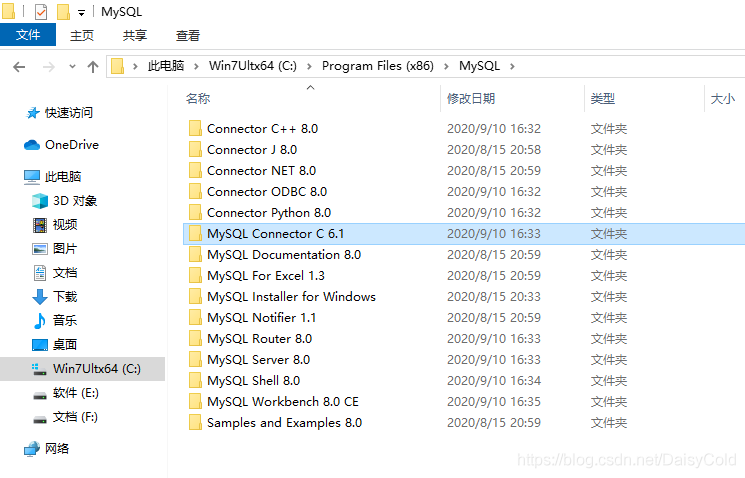
For 64-bit Windows, when pip installs mysqlclient, it only searches for certain MySQL files (such as “mysql.h”) in the Program files (x86) folder, but does not search for Program files. This machine installs the MySQL connector Go to C:\Program Files\MySQL, but there is no MySQL installation directory in C:\Program Files (x86), so no content is found in Program files (x86), resulting in an error.
Solution:
Copy the C:\Program Files\MySQL\MySQL Connector C 6.1 folder to the C:\Program Files (x86)\MySQL\MySQL Connector C 6.1 directory (I used a very simple and rude method to copy the entire MySQL folder ), re-execute the command pip install -r requirements.txt. The command was executed successfully
E:\HttpRunnerManager>pip install -r requirements.txt
Requirement already satisfied: Django==2.0.3 in c:\python3.7.8\lib\site-packages (from -r requirements.txt (line 1)) (2.0.3)
Requirement already satisfied: PyYAML==3.12 in c:\python3.7.8\lib\site-packages (from -r requirements.txt (line 2)) (3.12)
Requirement already satisfied: requests==2.18.4 in c:\python3.7.8\lib\site-packages (from -r requirements.txt (line 3)) (2.18.4)
Requirement already satisfied: eventlet==0.22.1 in c:\python3.7.8\lib\site-packages (from -r requirements.txt (line 4)) (0.22.1)
Collecting mysqlclient==1.3.12
  Using cached mysqlclient-1.3.12.tar.gz (89 kB)
Collecting django-celery==3.2.2
  Using cached django-celery-3.2.2.tar.gz (90 kB)
Collecting flower==0.9.2
  Using cached flower-0.9.2.tar.gz (1.3 MB)
Collecting dwebsocket==0.4.2
  Using cached dwebsocket-0.4.2.tar.gz (14 kB)
Collecting paramiko==2.4.1
  Using cached paramiko-2.4.1-py2.py3-none-any.whl (194 kB)
Collecting HttpRunner==1.5.8
  Using cached HttpRunner-1.5.8-py2.py3-none-any.whl (48 kB)
Requirement already satisfied: pytz in c:\python3.7.8\lib\site-packages (from Django==2.0.3->-r requirements.txt (line 1)) (2020.1)
Requirement already satisfied: chardet<3.1.0,>=3.0.2 in c:\python3.7.8\lib\site-packages (from requests==2.18.4->-r requirements.txt (line 3)) (3.0.4)
Requirement already satisfied: certifi>=2017.4.17 in c:\python3.7.8\lib\site-packages (from requests==2.18.4->-r requirements.txt (line 3)) (2020.6.20)
Requirement already satisfied: idna<2.7,>=2.5 in c:\python3.7.8\lib\site-packages (from requests==2.18.4->-r requirements.txt (line 3)) (2.6)
Requirement already satisfied: urllib3<1.23,>=1.21.1 in c:\python3.7.8\lib\site-packages (from requests==2.18.4->-r requirements.txt (line 3)) (1.22)
Requirement already satisfied: greenlet>=0.3 in c:\python3.7.8\lib\site-packages (from eventlet==0.22.1->-r requirements.txt (line 4)) (0.4.16)
Requirement already satisfied: celery<4.0,>=3.1.15 in c:\users\administrator\appdata\roaming\python\python37\site-packages (from django-celery==3.2.2->-r requirements.txt (line 6)) (3.1.26.post2)
Collecting tornado>=4.2.0
  Using cached tornado-6.0.4-cp37-cp37m-win_amd64.whl (417 kB)
Collecting babel>=1.0
  Using cached Babel-2.8.0-py2.py3-none-any.whl (8.6 MB)
Requirement already satisfied: setuptools in c:\python3.7.8\lib\site-packages (from dwebsocket==0.4.2->-r requirements.txt (line 8)) (47.1.0)
Requirement already satisfied: six in c:\python3.7.8\lib\site-packages (from dwebsocket==0.4.2->-r requirements.txt (line 8)) (1.15.0)
Collecting cryptography>=1.5
  Using cached cryptography-3.1-cp37-cp37m-win_amd64.whl (1.5 MB)
Collecting pynacl>=1.0.1
  Using cached PyNaCl-1.4.0-cp37-cp37m-win_amd64.whl (206 kB)
Collecting pyasn1>=0.1.7
  Using cached pyasn1-0.4.8-py2.py3-none-any.whl (77 kB)
Collecting bcrypt>=3.1.3
  Using cached bcrypt-3.2.0-cp36-abi3-win_amd64.whl (28 kB)
Requirement already satisfied: har2case in c:\python3.7.8\lib\site-packages (from HttpRunner==1.5.8->-r requirements.txt (line 10)) (0.3.1)
Collecting requests-toolbelt
  Using cached requests_toolbelt-0.9.1-py2.py3-none-any.whl (54 kB)
Requirement already satisfied: Jinja2 in c:\python3.7.8\lib\site-packages (from HttpRunner==1.5.8->-r requirements.txt (line 10)) (2.11.2)
Requirement already satisfied: colorama in c:\python3.7.8\lib\site-packages (from HttpRunner==1.5.8->-r requirements.txt (line 10)) (0.4.3)
Collecting colorlog
  Using cached colorlog-4.2.1-py2.py3-none-any.whl (14 kB)
Requirement already satisfied: billiard<3.4,>=3.3.0.23 in c:\users\administrator\appdata\roaming\python\python37\site-packages (from celery<4.0,>=3.1.15->django-celery==3.2.2->-r requirements.txt (line 6)) (3.3.0.23)
Requirement already satisfied: kombu<3.1,>=3.0.37 in c:\users\administrator\appdata\roaming\python\python37\site-packages (from celery<4.0,>=3.1.15->django-celery==3.2.2->-r requirements.txt (line 6)) (3.0.37)
Requirement already satisfied: cffi!=1.11.3,>=1.8 in c:\python3.7.8\lib\site-packages (from cryptography>=1.5->paramiko==2.4.1->-r requirements.txt (line 9)) (1.14.2)
Requirement already satisfied: MarkupSafe>=0.23 in c:\python3.7.8\lib\site-packages (from Jinja2->HttpRunner==1.5.8->-r requirements.txt (line 10)) (1.1.1)
Requirement already satisfied: anyjson>=0.3.3 in c:\users\administrator\appdata\roaming\python\python37\site-packages (from kombu<3.1,>=3.0.37->celery<4.0,>=3.1.15->django-celery==3.2.2->-r requirements.txt (line 6)) (0.3.3)
Requirement already satisfied: amqp<2.0,>=1.4.9 in c:\users\administrator\appdata\roaming\python\python37\site-packages (from kombu<3.1,>=3.0.37->celery<4.0,>=3.1.15->django-celery==3.2.2->-r requirements.txt (line 6)) (1.4.9)
Requirement already satisfied: pycparser in c:\python3.7.8\lib\site-packages (from cffi!=1.11.3,>=1.8->cryptography>=1.5->paramiko==2.4.1->-r requirements.txt (line 9)) (2.20)
Using legacy 'setup.py install' for mysqlclient, since package 'wheel' is not installed.
Using legacy 'setup.py install' for django-celery, since package 'wheel' is not installed.
Using legacy 'setup.py install' for flower, since package 'wheel' is not installed.
Using legacy 'setup.py install' for dwebsocket, since package 'wheel' is not installed.
Installing collected packages: mysqlclient, django-celery, tornado, babel, flower, dwebsocket, cryptography, pynacl, pyasn1, bcrypt, paramiko, requests-toolbelt, colorlog, HttpRunner
  Attempting uninstall: mysqlclient
    Found existing installation: mysqlclient 1.4.6
    Uninstalling mysqlclient-1.4.6:
      Successfully uninstalled mysqlclient-1.4.6
    Running setup.py install for mysqlclient ... done
  Attempting uninstall: django-celery
    Found existing installation: django-celery 3.3.1
    Uninstalling django-celery-3.3.1:
      Successfully uninstalled django-celery-3.3.1
    Running setup.py install for django-celery ... done
    Running setup.py install for flower ... done
    Running setup.py install for dwebsocket ... done
  Attempting uninstall: HttpRunner
    Found existing installation: httprunner 3.1.4
    Uninstalling httprunner-3.1.4:
      Successfully uninstalled httprunner-3.1.4
Successfully installed HttpRunner-1.5.8 babel-2.8.0 bcrypt-3.2.0 colorlog-4.2.1 cryptography-3.1 django-celery-3.2.2 dwebsocket-0.4.2 flower-0.9.2 mysqlclient-1.3.12 paramiko-2.4.1 pyasn1-0.4.8 pynacl-1.4.0 requests-toolbelt-0.9.1 tornado-6.0.4

E:\HttpRunnerManager>
other reasons:
Reason 1:
1. Mysqlclient version does not match, Mysqlclient download address https://www.lfd.uci.edu/~gohlke/pythonlibs/#mysqlclient
2. Mysqlclient installation command
pip install mysqlclient-1.4.6-cp37-cp37m-win_amd64.whl
3. To verify whether the installation is successful, use the command:
python
>>> import MySQLdb
No error means success
C:\Users\Administrator>python
Python 3.7.8 (tags/v3.7.8:4b47a5b6ba, Jun 28 2020, 08:53:46) [MSC v.1916 64 bit (AMD64)] on win32
Type "help", "copyright", "credits" or "license" for more information.
>>> import MySQLdb
>>>
Reason two:
MySQL Connector-c is not installed, the download address is https://downloads.mysql.com/archives/cc/ , just download and install.
Reason three:
Use the pip install mysql-connector command to install mysql-connector
C:\Users\Administrator>pip install mysql-connector
Collecting mysql-connector
  Downloading mysql-connector-2.2.9.tar.gz (11.9 MB)
     |████████████████████████████████| 11.9 MB 467 kB/s
Using legacy 'setup.py install' for mysql-connector, since package 'wheel' is not installed.
Installing collected packages: mysql-connector
    Running setup.py install for mysql-connector ... done
Successfully installed mysql-connector-2.2.9