[Solved] Running in 64 bit mode with the 32 bit Oracle client installed

When connecting to Oracle database, it is easy to encounter the problem of 32-bit and 64 bit drivers. On a 32-bit machine, everything is 32-bit, which is not complicated. But now the general win7 system is 64 bit, and 64 bit machine can install 32-bit and 64 bit driver.


If the WinForm program is used to connect to Oracle database, you can use Oracle’s own DLL, Oracle.DataAcess , you can also use Microsoft’s own System.Data.OracleClient . But the premise of using these two days is that the Oracle client driver must be installed on the machine. The driver here is divided into 32-bit and 64 bit. and Oracle.DataAcess Also divided into 32-bit and 64 bit, which must be consistent before and after the two.

Let’s talk about the recent problems. Recently, I’m working on a website project. Note that it’s not a web application, it’s just a website project, and it’s directly published to IIS. It’s just Microsoft ystem.Data.OracleClient The build mode of the project is any CPU, as shown in the figure below.
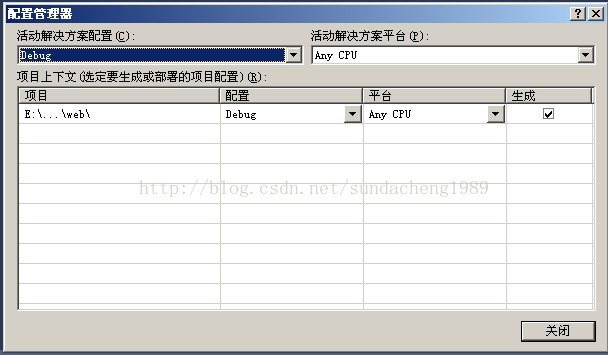


Because vs has its own Cassini server only in 32-bit mode, the programs in any CPU mode can only run in 32-bit mode. At this time, an exception running in 64 bit mode with the 32 bit Oracle client installed is reported System.Data.OracleClient The version of 32 or 64 is not right. Many changes have been made, but the reason has not been found out. Later, I understood that the 32 bit Oracle client installed here refers to the DLL, not the driver downloaded from the Oracle official website. Because at this time, only ORALCE’s 64 bit driver is installed on my machine. Now this program is 32-bit. When I connect to the 64 bit driver, this exception is reported. When I installed the 32-bit Oracle driver, this problem was solved.


I also encountered a small problem during the installation, because I have installed 64 bit driver before, and there is an Oracle app directory in the machine. At this time, we can install the 32-bit driver into the custom directory app2. In other words, 32-bit and 64 bit Oracle client drivers are installed on the machine at the same time. The program will connect to the corresponding driver according to its own x86 or x64 mode, and then connect to the Oracle database remotely. Note that the driver for installing Oracle client is the machine where the DLL is located, that is, the machine where the program runs, not the machine where the Oracle server is located. In essence, Oracle client and Oracle server transmit data on the network.


The execution of ExecuteNonQuery by oraclecommand is suspended

string sql = "INSERT INTO TempTable (A, B, C) VALUES ('2222222', '1111111', 'RRR')";
OracleCommand cmd = new OracleCommand(sql, connection);
cmd.ExecuteNonQuery();


When executing this code, the first insertion failed. When stop debug restarts, it is found that the program runs to cmd.ExecuteNonQuery It’s stuck when I’m in. The reason for this is Oracle’s block mechanism.

If session “A” inserts a row in a table with a primary key, session “A” will block ANY other session attempting to insert the same primary key until session “A” commits or rolls back the insert. All other attempts to insert will “hang”.

At this point, I change the primary key 2222222 of SQL statement into 33333333 in the code, and then I can insert it smoothly. This indicates that this operation will be blocked only when the primary key is the same. Because when 2222222 was inserted, the program ended unexpectedly, but the Oracle transaction was not committed or rolled back, so this primary key was locked. Note that it’s just the primary key of this value.

there is another problem here, that is, when I open SQL developer and execute the primary key statement of 2222222, the execution will be completed smoothly without blocking. Now, when I execute SQL statements with code, the blocking phenomenon will still occur. But when I restart vs, create a new project and write these codes, it is also equivalent to another program to execute the insert statement, which will also get stuck. May be related to the. Net provider used?Because you are using the same provider, it is stuck. Because SQL developer doesn’t use this provider, it won’t get stuck?It’s just a guess.

This kind of lock is called tmlock, or row transaction lock. You can use SQL statements to check whether there is such a lock
or not

SELECT sid, id1 FROM v$lock WHERE TYPE=’TM’

SID ID1
76 14197

SELECT * FROM dba_ objects WHERE object_ id = 14197;

OBJECT_ NAME
——————————————————————————————————————————–
TemTable


How to release this TM lock?row transaction lock

Just execute a commit command in the SQL developer UI.

The page you are requesting cannot be served because of the extension configuration

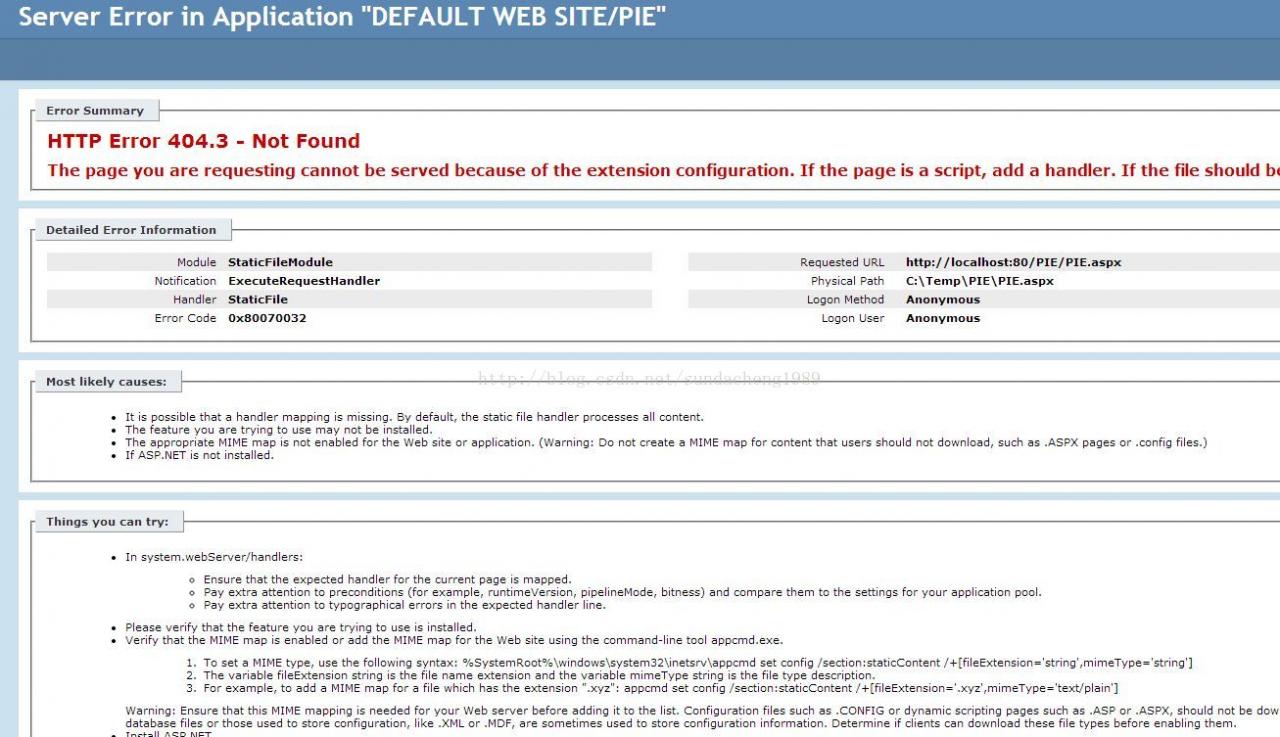
In deployment ASP.NET When the website is deployed to IIS, visit the page http://localhost/UserCenter/user.aspx , but an exception was thrown. At this time, to detect whether the deployment is successful, you can write a text file for testing in the root directory text.txt , and then access the file http://localhost/UserCenter/test.txt If you can see the contents of this file, it means that there is no problem with the deployment. Maybe there is a problem with the code.


Abnormal prompt:

HTTP error 404.3 – not found
the page you are asking cannot be served because of the extension configuration. If the page is a script, add a handler. If the file should be downloaded, add a mime map.

abnormal screenshot


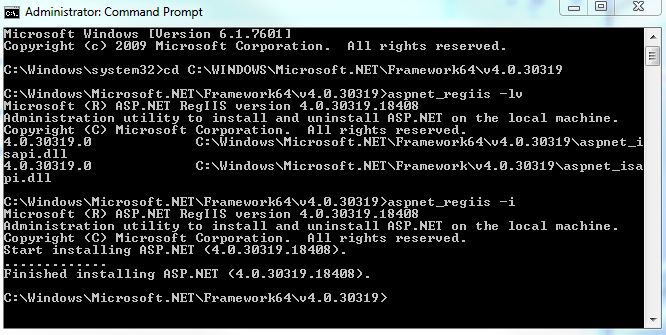
The reason for this problem is that there are multiple. Net versions on the machine, so there are multiple ASP.NET Version. Now our application pool is in version 4.0, but this version is not registered in IIS, so this error is reported. Now what we need to do is register the 4.0 ASP.NET Version. In C: windows\ Microsoft.NET \Find IIS registration tools, namely aspnet, in the directory of framework64/v4.0.xxxx_ regiis.exe Then start it in the form of a DOS window, aspnet_ Regiis – I refer to MSDN for details http://msdn.microsoft.com/en-us/library/k6h9cz8h%28VS.80%29.aspx

Running results


At this point, restart the application pool and website, and you can see the normal ASPX rendered page.


Springboot + mybatis + logback does not print SQL problems on the console

This project uses springboot + mybatis + logback. In order to print SQL on the console, various configurations have been made in the configuration file. All the methods available on the Internet have been tried, but SQL statements are still not printed.

This is indicated in the configuration file logging.level.cn . homecredit.sams.ddme . reconciliation.model.mapper=debug . still do not print SQL statements.

Another SpringBoot project, as like as two peas, is able to print SQL statements on the console. By comparing the differences between the two projects step by step, it is found that the project can be printed after the histrix package is introduced.

<dependency>
     <groupId>org.springframework.cloud</groupId>
     <artifactId>spring-cloud-starter-hystrix</artifactId>
</dependency>


In the end, I don’t know what the reason is, but after introducing this package, the problem is solved.

Note that this is only one of the possible reasons for this problem. In addition, there are many other problems that may result in the inability to print SQL on the console. You need to configure every step.


Solve the problem of incomplete search results of outlook search function

Recently, when I used outlook, I found that the search results were always limited to a certain date when I searched e-mail in my inboxes according to the keywords of people’s names, and the search results were not complete at all.

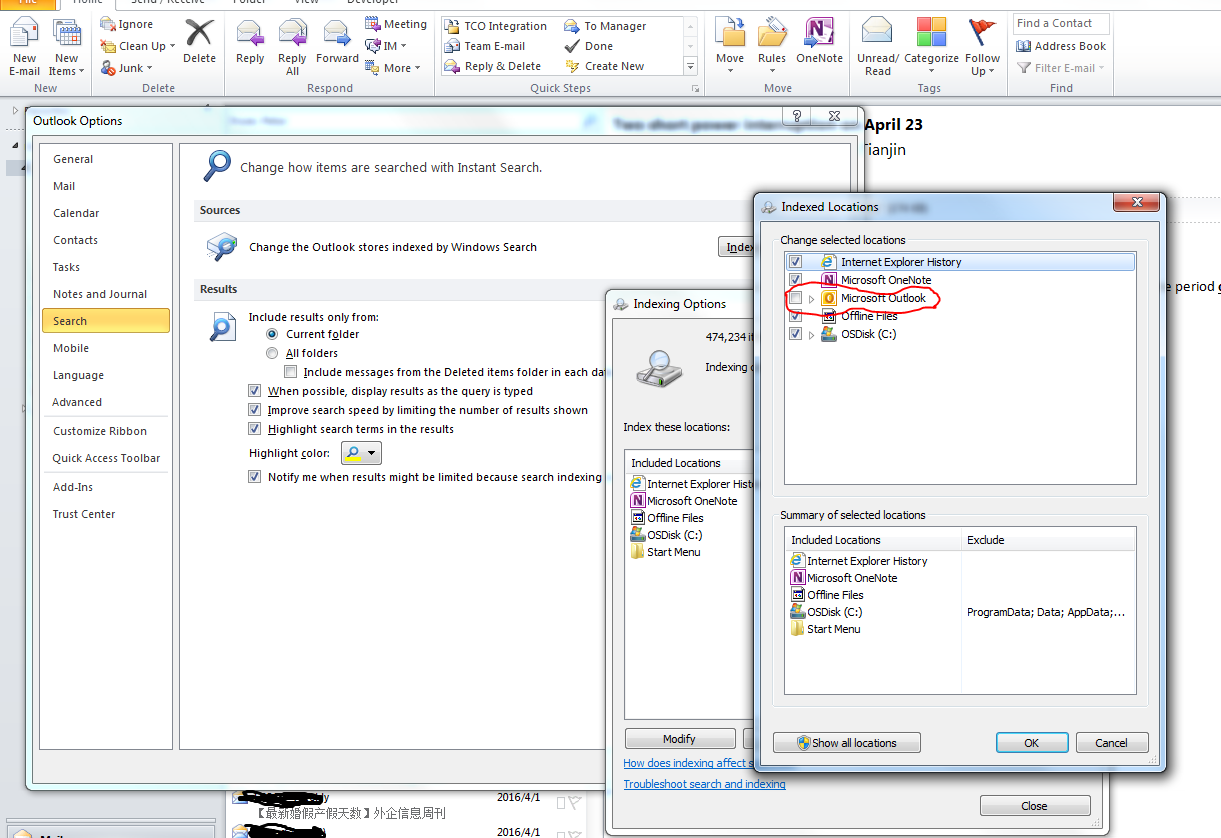
The solution is to go to the file – & gt; Options tab, select search in the pop-up dialog box, then select index option, and then remove the check mark of Microsoft Outlook options in the moidfy dialog box.

After the setting is completed, the search should be conducted according to the keyword of the person’s name, which should be the complete result.


Then I thought, why?Because it could be. When we select Microsoft Outlook in the index options dialog box, that is to say, windows will index the files in outlook. When we use Outlook to search, outlook finds that it is in the index category, so it will look for things in the index directory, and the index directory is not up-to-date, which directly leads to incomplete search results.


If we remove the index option of outlook, outlook finds that it is not in the index category when searching, and will directly search all the files in outlook according to its own algorithm instead of in the index directory, so the result will be very complete and accurate.


In summary, the purpose of index is to speed up the search speed, but if the index directory is not updated in time, it will cause the incompleteness of the search results.

From personal blog: http://www.sunrobin.net

Ajax can’t download file to browser

Recently, I encountered such a function when I was working on a website. In the page as shown in the figure, when users need to click the link, they can judge whether the corresponding excel file is stored in the server in an asynchronous ajax way. If not, they will be prompted that they have not found it, and if so, they will download it to the local user.


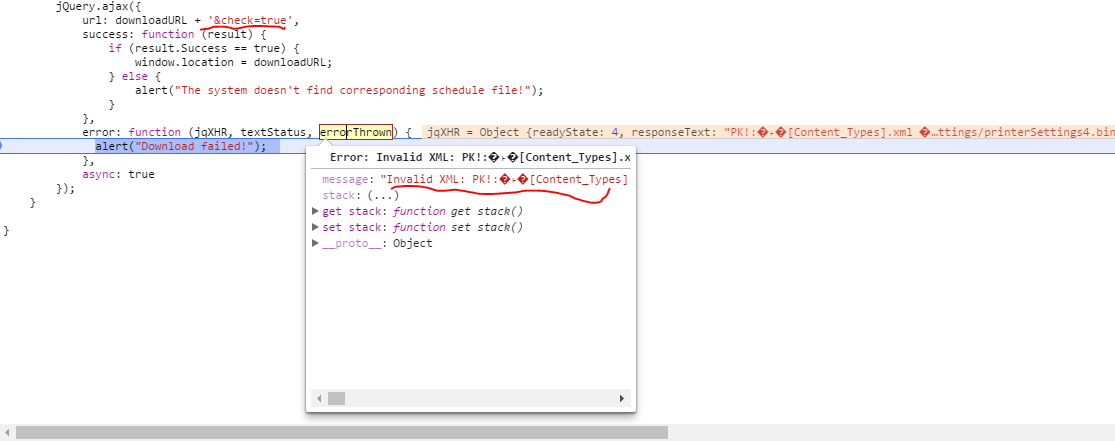
Of course, this is a very simple problem. Just write Ajax in a normal way. But when the server returns the file content to the browser in binary form, the browser’s Ajax throws an error. It’s about parseError, invalid XML, PK, etc.


The reason for this problem is not that there is a problem with the server-side code or JavaScript code, but that downloading files through AJAX is forbidden. For security reasons, JavaScript is not able to save the file to the local, so Ajax takes this into account. It only accepts the return value in XML, Ajax and JSON format, and the binary return format will throw this exception.


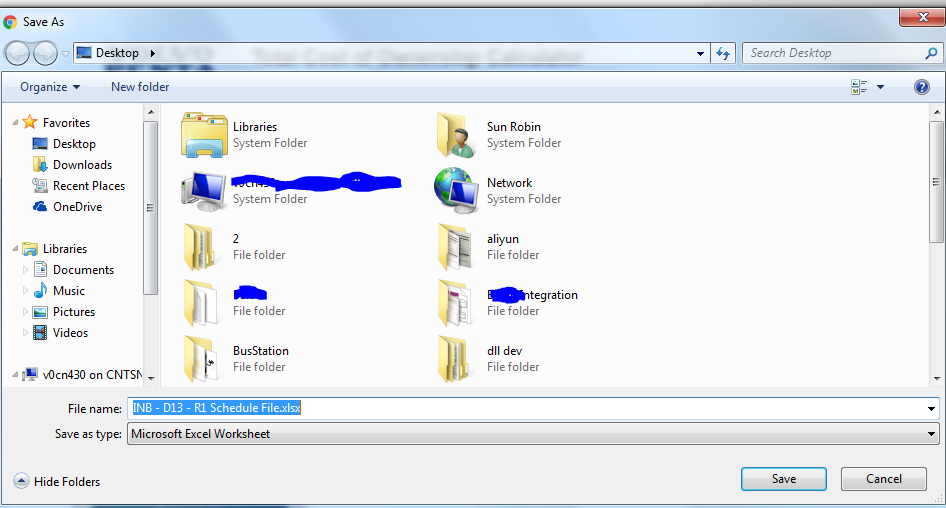
How to solve this problem?use window.location =URL is OK. Some people will ask, such as the above figure, when you click the download link on a certain page, because it has changed window.location Is the current page about to jump?In fact, I use Chrome browser. When I click that link, the next file save dialog box will pop up directly, and the address bar of the page has no change. At this time, if you click save, the file will be kept. If you click cacel, the operation will be cancelled. During the process, the current page will be kept and will not jump to other pages.


From personal blog www.sunrobin.net


The requested page cannot be accessed because the related configuration data for the page is invalid

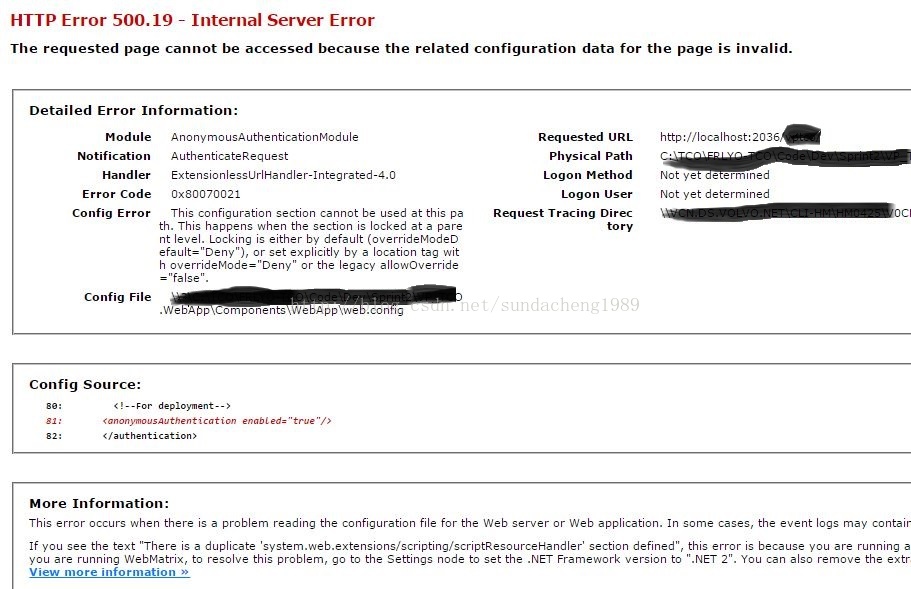
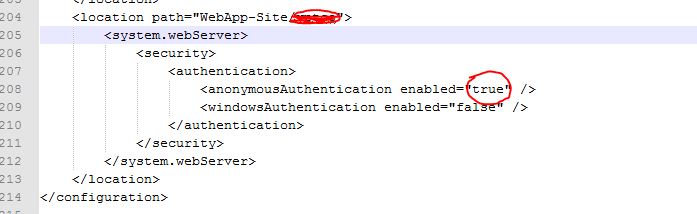
In the development process, IIS express is used to debug the web program. When there is a problem when opening the website, the following page will be displayed. The reason for this problem is that the website may be Web.config The control of access rights in IIS express is different from that of IIS express itself application.host There is a problem with the configuration in. What we need to do now is to find the conflicting configuration according to the prompt. Here is the authentication configuration. The configuration is in my documents/iisexpress/config. The specific path may change, but the configuration file is usually installed in my documents during installation.

According to the tips on the page, after modifying the conflicting configuration, there will be no problem in accessing the website.

Take this problem as an example, here is because of access rights conflict, so just change it.

Abnormal display of page object moved to here

When using Response.Redirect () method, if null or “” is passed in, object moved to here will be displayed on the page. There are only these letters object moved to here on a blank page. This is because the server returns a

The 302 command asks to jump again, but it doesn’t send the URL to jump. The browser doesn’t know where to jump, so the browser displays these letters.

Solution to server application error in IIS 5.1

Error message:

Server Application Error 
The server has encountered an error while loading an application during the processing of your request. Please refer to the event log for more detail information. Please contact the server administrator for assistance.

terms of settlement:

[1]
check whether your DTC service (full name: Distributed Transaction Coordinator) can start normally. If it is normal, please skip this step. If it fails to start normally, please run: MSDTC – resetlog in the start menu to create the log file. Restart the machine and check whether IIS can be used normally. If not, continue.

[2]:
execute the following command under CMD:
CD% windir% \ system32 \ \ inetsrv

rundll32 wamreg.dll , CreateIISPackage 

regsvr32 asptxn.dll

I can use it here. Now open IIS and visit the corresponding page.

Invalid object name ‘UserInfo’

use ADO.NET Or other ORM framework, throw this exception, it may be the wrong database to connect. Maybe the database that the program wants to connect to is database1, and your configuration file or connection string is copied. If you neglect to modify it completely, this exception will appear.

Exception specific information

 NHibernate.Exceptions.GenericADOException : could not execute query
[ select userinfo0_.id as id0_, userinfo0_.name  as name2_0_, userinfo0_.description  as descript3_0_, userinfo0_.state  as state4_0_ from UserInfo userinfo0_ where userinfo0_.name ='testname' ]
[SQL: select userinfo0_.id as id0_, userinfo0_.name  as name2_0_, userinfo0_.description  as descript3_0_, userinfo0_.state  as state4_0_ from UserInfo userinfo0_ where userinfo0_.name ='testname']
  ----> System.Data.SqlClient.SqlException : Invalid object name 'UserInfo'.
	at NHibernate.Loader.Loader.DoList(ISessionImplementor session, QueryParameters queryParameters)
	at NHibernate.Loader.Loader.ListIgnoreQueryCache(ISessionImplementor session, QueryParameters queryParameters)
	at NHibernate.Loader.Loader.List(ISessionImplementor session, QueryParameters queryParameters, ISet`1 querySpaces, IType[] resultTypes)
	at NHibernate.Hql.Ast.ANTLR.Loader.QueryLoader.List(ISessionImplementor session, QueryParameters queryParameters)
	at NHibernate.Hql.Ast.ANTLR.QueryTranslatorImpl.List(ISessionImplementor session, QueryParameters queryParameters)
	at NHibernate.Engine.Query.HQLQueryPlan.PerformList(QueryParameters queryParameters, ISessionImplementor session, IList results)
	at NHibernate.Impl.SessionImpl.List(String query, QueryParameters queryParameters, IList results)
	at NHibernate.Impl.SessionImpl.List[T](String query, QueryParameters parameters)
	at NHibernate.Impl.QueryImpl.List[T]()
	UserInfoDAL.cs(21,0): at NHibernateWCF.DAL.UserInfoDAL.ExistUserInfo(String name)
	UserInfoDALTest.cs(18,0): at NHibernateWCF.Test.UserInfoDALTest.ExistUserInfoTest()
	--SqlException
	at System.Data.SqlClient.SqlConnection.OnError(SqlException exception, Boolean breakConnection)
	at System.Data.SqlClient.SqlInternalConnection.OnError(SqlException exception, Boolean breakConnection)
	at System.Data.SqlClient.TdsParser.ThrowExceptionAndWarning()
	at System.Data.SqlClient.TdsParser.Run(RunBehavior runBehavior, SqlCommand cmdHandler, SqlDataReader dataStream, BulkCopySimpleResultSet bulkCopyHandler, TdsParserStateObject stateObj)
	at System.Data.SqlClient.SqlDataReader.ConsumeMetaData()
	at System.Data.SqlClient.SqlDataReader.get_MetaData()
	at System.Data.SqlClient.SqlCommand.FinishExecuteReader(SqlDataReader ds, RunBehavior runBehavior, String resetOptionsString)
	at System.Data.SqlClient.SqlCommand.RunExecuteReaderTds(CommandBehavior cmdBehavior, RunBehavior runBehavior, Boolean returnStream, Boolean async)
	at System.Data.SqlClient.SqlCommand.RunExecuteReader(CommandBehavior cmdBehavior, RunBehavior runBehavior, Boolean returnStream, String method, DbAsyncResult result)
	at System.Data.SqlClient.SqlCommand.RunExecuteReader(CommandBehavior cmdBehavior, RunBehavior runBehavior, Boolean returnStream, String method)
	at System.Data.SqlClient.SqlCommand.ExecuteReader(CommandBehavior behavior, String method)
	at System.Data.SqlClient.SqlCommand.ExecuteDbDataReader(CommandBehavior behavior)
	at System.Data.Common.DbCommand.System.Data.IDbCommand.ExecuteReader()

This is the stack information in the case of NHibernate when the connection database is inconsistent. use ADO.NET Or other frameworks may be different in details, but they should all be exceptions of this kind in general.

The solution is to modify the connection string, change the database connected in the configuration to the correct database, so that the corresponding table can be found when executing SQL statements.

Solution to the problem of keyword not supported data source

When using the Entity Framework, if the connection string in the configuration file is not written correctly, this exception will be thrown. Moreover, when you modify the configuration file and press crtl + s to save, you will be prompted in the output window. The solution is to correct your connection string again. The correct format is as follows

<add name="testEntities" 
     connectionString="metadata=res://*/Model1.csdl|res://*/Model1.ssdl|res://*/Model1.msl;provider=System.Data.SqlClient;provider connection string="data source=(local);initial catalog=test;integrated security=True;multipleactiveresultsets=True;App=EntityFramework"" 
     providerName="System.Data.EntityClient" />

The built-in filter function in Excel can’t contain all the items

In an excel file, the columns include name, age, gender, etc.

Now there are 800 pieces of data, including 20, 21, 22, 25 and so on. Now using the filter function, it is found that there are no 25 items in the drop-down list. The reason for this phenomenon may be that there are blank lines in the middle. For example, if line 600 is a blank line and does not contain any content, the filter only filters lines 1 to 600. At this time, the drop-down list only contains the age values that have appeared in the first 600 lines. After using keywords for filtering, 601-800 rows of records will also be displayed in the results. However, we found that the line numbers of the records filtered out from 1 to 600 are blue, while the line numbers from 601 to 800 are black. Therefore, the 200 lines are completely displayed there without any filtering.

Note that the blank line here means that all cells in this line have no values, or even spaces. Even if the value of only one cell in a row is a space, although it looks like a blank row, excel will not treat it as a blank row when recognizing it.