How to Solve Error:options.query cannot be used with loaders

Original code:

 test: /(\.jsx|\.js)$/,

 loaders:["babel-loader","eslint-loader"] ,

 options:{
     cacheDirectory:true
 },
 exclude: /node_modules/,

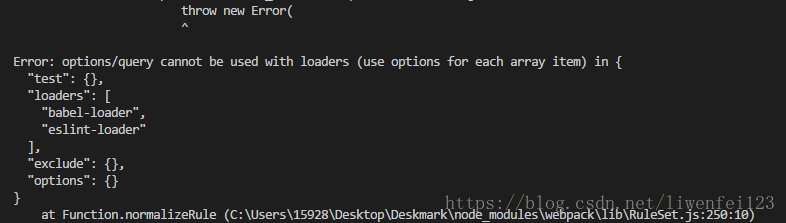
Error: error:options.query cannot be used with loaders
as follows:

Write picture description here

solve:

 test: /(\.jsx|\.js)$/,
 use:[
      {loader:"eslint-loader"},
      {
          loader:"babel-loader",
          options:{//options、queryCannot be used with loader arrays
              cacheDirectory:true//Use cache to improve performance and babel is slow
          },
      }
  ],
  exclude: /node_modules/,

Nginx Error: [emerg] bind() to [::]:80 failed (98: Address already in use)

Problem description

When starting the nginx service, the following error occurred:

nginx: [emerg] bind() to 0.0.0.0:80 failed (98: Address already in use)
nginx: [emerg] bind() to [::]:80 failed (98: Address already in use)
nginx: [emerg] bind() to 0.0.0.0:80 failed (98: Address already in use)
nginx: [emerg] bind() to [::]:80 failed (98: Address already in use)
...

Cause of the problem

There are many reasons for this problem. We will list our scenarios and solutions here.

First, the port is occupied

This is the most common reason. Port 80 is occupied, which leads to binding of nginx service.

Solution 1

Find the process occupying port 80 and end it.

Second, dual stack sockets for IPv6

This is a common problem in the transition period from IPv4 to IPv6. The following configuration will also cause the above error:

server {
    listen [::]:80 ipv6only=off;        
    server_name dual-stack.example.com;
}
server {
    listen 0.0.0.0:80;
    server_name ipv4.example.com;
}

With the IPv6 only = off option, the currently created socket is dual stack, and IPv4 will be mapped to IPv6. At this time, only one monitor can be created, and IPv4 can no longer be monitored.

Solution 2

Since we can’t monitor IPv4, and now it’s a dual stack, we can monitor IPv6 address safely (and ensure IPv4 access at the same time)

server {
    listen [::]:80 ipv6only=off;        
    server_name dual-stack.example.com;
}
server {
    listen [::]:80;
    server_name ipv4.example.com;
}
# Because of the specific scenario, we cannot modify the configuration of the first Server
# Of course, it is also possible to turn off the double stack.

Explain the performance comparison of contains, exists, any and where in C# list in detail

Test
create a new person class

public class Person
  {
    public Person(string name,int id)
    {
      Name = name;
      Id = id;
    }
    public string Name { get; set; }
    public int Id { get; set; }
 
  }

Initialize a million pieces of data in the list, and then use each method to determine whether Xiaoming is in the list. The code is as follows

static void Main(string[] args)
    {
      List<Person> persons = new List<Person>();
      //Initialize persons data
      for (int i = 0; i < 1000000; i++)
      {
        Person person = new Person("My" + i,i);
        persons.Add(person);
      }
      Person xiaoming=new Person("My999999", 999999);
       
      //The following three methods are used to determine whether persons contain xiaoming
      Stopwatch watch = new Stopwatch();
      watch.Start();
      bool a = persons.Contains(xiaoming);
      watch.Stop();
 
      Stopwatch watch1 = new Stopwatch();
      watch1.Start();
      bool b = persons.Exists(x=>x.Id==xiaoming.Id);
      watch1.Stop();
 
      Stopwatch watch2 = new Stopwatch();
      watch2.Start();
      bool c = persons.Where(x=>x.Id==xiaoming.Id).Any();
      watch2.Stop();
 
      Stopwatch watch3 = new Stopwatch();
      watch3.Start();
      bool d = persons.Any(x => x.Id == xiaoming.Id);
      watch3.Stop();
 
      Console.WriteLine("Contains time:" + watch.Elapsed.TotalMilliseconds);
      Console.WriteLine("Exists time:" + watch1.Elapsed.TotalMilliseconds);
      Console.WriteLine("Where time:" + watch2.Elapsed.TotalMilliseconds);
      Console.WriteLine("Any time:" + watch3.Elapsed.TotalMilliseconds);
      Console.ReadLine();
    }

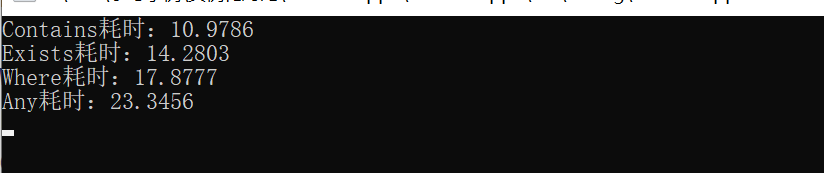
The execution result is shown in the figure below

Conclusion
it can be seen from the figure above that the performance ranking is

Contains > Exists > Where > Any

Note:
no query conditions are allowed in contains

This article about the detailed explanation of C # list contains, exists, any, where performance comparison is introduced here. For more related C # contains, exists, any, where content, please search the previous articles of C # tutorial script home or continue to browse the following related articles. I hope you can support more in the future

Read multiple sheets of an excel file according to npoi

As we all know, npoi components can read and create Excel files when you don’t have Office installed locally. But we usually read the first sheet of C # tutorial of an excel file by default. So if you want to read all the sheets of an excel, what should you do?

Now let’s tell you how to operate npoi to read all sheets of Excel.

First of all, let’s explain how to operate a class created by Excel, which I named execlhelp

using NPOI.HSSF.UserModel;
using NPOI.SS.UserModel;
using NPOI.XSSF.UserModel;
using System;
using System.Collections.Generic;
using System.Data;
using System.IO;
using System.Linq;
using System.Text;
using System.Threading.Tasks;
  
  
  public class ExcelHelper : IDisposable
        {
            private string fileName = null; //file name
            private IWorkbook workbook = null;
            private FileStream fs = null;
            private bool disposed;
  
            public ExcelHelper(string fileName)
            {
                this.fileName = fileName;
                disposed = false;
            }
  
            /// <summary>
            /// Import DataTable data into excel
            /// </summary>
            /// <param name="data">Data to be imported</param>
            /// <param name="isColumnWritten">The column name of the DataTable to import or not</param>
            /// <param name="sheetName">The name of the excel sheet to import</param>
            /// <returns>the number of rows of data to import (the row containing the column name)</returns>
            public int DataTableToExcel(DataTable data, string sheetName, bool isColumnWritten)
            {
                int i = 0;
                int j = 0;
                int count = 0;
                ISheet sheet = null;
  
                fs = new FileStream(fileName, FileMode.OpenOrCreate, FileAccess.ReadWrite);
                if (fileName.IndexOf(".xlsx") > 0) // v-2007
                    workbook = new XSSFWorkbook();
                else if (fileName.IndexOf(".xls") > 0) // v-2003
                    workbook = new HSSFWorkbook();
  
                try
                {
                    if (workbook != null)
                    {
                        sheet = workbook.CreateSheet(sheetName);
                    }
                    else
                    {
                        return -1;
                    }
  
                    if (isColumnWritten == true) //Write the column names to the DataTable
                    {
                        IRow row = sheet.CreateRow(0);
                        for (j = 0; j < data.Columns.Count; ++j)
                        {
                            row.CreateCell(j).SetCellValue(data.Columns[j].ColumnName);
                        }
                        count = 1;
                    }
                    else
                    {
                        count = 0;
                    }
  
                    for (i = 0; i < data.Rows.Count; ++i)
                    {
                        IRow row = sheet.CreateRow(count);
                        for (j = 0; j < data.Columns.Count; ++j)
                        {
                            row.CreateCell(j).SetCellValue(data.Rows[i][j].ToString());
                        }
                        ++count;
                    }
                    workbook.Write(fs); //write to the excel
                    return count;
                }
                catch (Exception ex)
                {
                    Console.WriteLine("Exception: " + ex.Message);
                    return -1;
                }
            }
  
            /// <summary>
            /// Import data from excel to DataTable
            /// </summary>
            /// <param name="sheetName">The name of the excel workbook sheet</param>
            /// <param name="isFirstRowColumn">whether the first row is the column name of the DataTable</param>
            /// <returns>returnedDataTable</returns>
            ///
  
  
                public Dictionary<int,string> ReturnSheetList()
            {
                Dictionary<int, string> t = new Dictionary<int, string>();
                ISheet sheet = null;
                DataTable data = new DataTable();
                int startRow = 0;
                    try
                    {
                        fs = new FileStream(fileName, FileMode.Open, FileAccess.Read);
                        if (fileName.IndexOf(".xlsx") > 0) // 2007
                            workbook = new XSSFWorkbook(fs);
                        else if (fileName.IndexOf(".xls") > 0) // 2003
                            workbook = new HSSFWorkbook(fs);
                        int count = workbook.NumberOfSheets; //get all SheetName
                        for(int i=0;i<count;i++)
                        {
                            sheet = workbook.GetSheetAt(i);
                            if (sheet.LastRowNum > 0)
                            {
                                t.Add(i, workbook.GetSheetAt(i).SheetName);
                            }
                        }
                        return t;
                    }
                    catch (Exception ex)
                    {
                        throw new Exception(ex.Message);
                    }
                   
  
            }<br>        ///index excel
            public DataTable ExcelToDataTable(int index)
            {
                ISheet sheet = null;
                DataTable data = new DataTable();
                int startRow = 0;
                try
                {
                    fs = new FileStream(fileName, FileMode.Open, FileAccess.Read);
                    if (fileName.IndexOf(".xlsx") > 0) // 2007
                        workbook = new XSSFWorkbook(fs);
                    else if (fileName.IndexOf(".xls") > 0) // 2003
                        workbook = new HSSFWorkbook(fs);
                    //int coutnts = workbook.NumberOfSheets;
  
                    sheet = workbook.GetSheetAt(index);
                    //string names= sheet.SheetName;
                    if (sheet != null)
                    {
                        IRow firstRow = sheet.GetRow(0);
                        int cellCount = firstRow.LastCellNum; //The number of the last cell in a row is the total number of columns
  
  
                        for (int i = firstRow.FirstCellNum; i < cellCount; ++i)
                        {
                            ICell cell = firstRow.GetCell(i);
                            CellType c = cell.CellType;
                            if (cell != null)
                            {
                                string cellValue = cell.StringCellValue;
                                if (cellValue != null)
                                {
                                    DataColumn column = new DataColumn(cellValue);
                                    data.Columns.Add(column);
                                }
                            }
                        }
                        startRow = sheet.FirstRowNum + 1;
  
  
                        //The last column of the marker
                        int rowCount = sheet.LastRowNum;
                        for (int i = startRow; i <= rowCount; ++i)
                        {
                            IRow row = sheet.GetRow(i);
                            if (row == null) continue; //Rows with no data are null by default       
  
                            DataRow dataRow = data.NewRow();
                            for (int j = row.FirstCellNum; j < cellCount; ++j)
                            {
                                if (row.GetCell(j) ! = null) // Similarly, cells with no data are null by default
                                    dataRow[j] = row.GetCell(j).ToString(); 
                            }
                            data.Rows.Add(dataRow);
                        }
                    }
  
                    return data;
                }
                catch (Exception ex)
                {
                    return null;
                    throw new Exception(ex.Message);
  
                }
            }
  
            public void Dispose()
            {
                Dispose(true);
                GC.SuppressFinalize(this);
            }
  
            protected virtual void Dispose(bool disposing)
            {
                if (!this.disposed)
                {
                    if (disposing)
                    {
                        if (fs != null)
                            fs.Close();
                    }
  
                    fs = null;
                    disposed = true;
                }
            }
        }<br><br>

The datatabletoexcel method is to export data to excel, and the parameters are annotated in the code, which can be applied directly. Exceltodatatable mainly imports Excel data into databtable. Similarly, parameters are also included in comments. We mainly talk about the returnsheetlist method. Before reading, we need to judge whether the imported excel version is a high version or a low version. This is because npoi provides different operation classes of high and low versions. Versions greater than 03 and less than 07 provide hssfworkbook, and versions less than 07 provide xssfworkbook. then workbook.NumberOfSheets This is mainly to get how many sheets there are in an excel file. We read the sheet according to the loop traversal, and then transfer the name of the sheet name and the corresponding index to a data dictionary for saving. So the data dictionary contains all the content sheets and corresponding indexes of the excel file you imported. With the use of exceltodatatable, you can switch to read different sheets of an excel.

The above is the details of reading multiple sheets of an excel file according to npoi

C# implementation of TXT document to table example code

code:

public DataTable TXTToDataTable(string fileName, string columnName)
    {
      DataTable dt = new DataTable();
      FileStream fs = new FileStream(fileName, System.IO.FileMode.Open, System.IO.FileAccess.Read);
      StreamReader sr = new StreamReader(fs, System.Text.Encoding.Default);
      //Record the line read each time
      string strLine = "";
 
      //record the content of each field in each line of the record
      string[] aryLine;
      //Mark the number of columns      
      int columnCount = 0;
      //indicate whether it is the first line read
      bool IsFirst = true;
 
      if (IsFirst == true)
      {
        //strLine = "ATTENDANCE_DATE,EMP,ATTENDANCE_DEPT,EMP_TYPE,SHITF,PLANT_CODE";
        strLine = columnName;
        aryLine = strLine.Split(',');
        IsFirst = false;
        columnCount = aryLine.Length;
        //create raw
        for (int i = 0; i < columnCount; i++)
        {
          DataColumn dc = new DataColumn(aryLine[i].ToUpper());
          dt.Columns.Add(dc);
        }
      }
 
      //Read the data in txt line by line
      while ((strLine = sr.ReadLine()) != null)
      {
        aryLine = strLine.Split('\t');//tab
        DataRow dr = dt.NewRow();
        for (int j = 0; j < columnCount; j++)
        {
          dr[j] = aryLine[j].ToUpper();
        }
        dt.Rows.Add(dr);
      }
 
      sr.Close();
      fs.Close();
      return dt;
    }
public DataTable TXTToDataTable(string fileName, string columnName)
    {
      DataTable dt = new DataTable();
      FileStream fs = new FileStream(fileName, System.IO.FileMode.Open, System.IO.FileAccess.Read);
      StreamReader sr = new StreamReader(fs, System.Text.Encoding.Default);
      //Record the line read each time
      string strLine = "";

      //record the content of each field in each line of the record
      string[] aryLine;
      //Mark the number of columns      
      int columnCount = 0;
      //indicate whether it is the first line read
      bool IsFirst = true;

      if (IsFirst == true)
      {
        //strLine = "ATTENDANCE_DATE,EMP,ATTENDANCE_DEPT,EMP_TYPE,SHITF,PLANT_CODE";
        strLine = columnName;
        aryLine = strLine.Split(',');
        IsFirst = false;
        columnCount = aryLine.Length;
        //create column
        for (int i = 0; i < columnCount; i++)
        {
          DataColumn dc = new DataColumn(aryLine[i].ToUpper());
          dt.Columns.Add(dc);
        }
      }

      //record the content of each field in each line of the record
      while ((strLine = sr.ReadLine()) != null)
      {
        aryLine = strLine.Split('\t');//tab
        DataRow dr = dt.NewRow();
        for (int j = 0; j < columnCount; j++)
        {
          dr[j] = aryLine[j].ToUpper();
        }
        dt.Rows.Add(dr);
      }

      sr.Close();
      fs.Close();
      return dt;
    }

The above is the C # implementation of TXT document to table example code, C # tutorial details, more about C # TXT document to table information please pay attention to

onnx.onnx_cpp2py_export.checker.ValidationError

onnx.onnx cpp2py export Yeah. checker.ValidationError

“25253rd;”381693rd;”

    import mxnet as mx
    import numpy as np
    from mxnet.contrib import onnx as onnx_mxnet
    import logging

    logging.basicConfig(level=logging.INFO)
    from onnx import checker
    import onnx

    syms = './mxnet/new_model-symbol.json'
    params = './mxnet/new_model-0000.params'

    input_shape = (1, 3, 112, 112)

    onnx_file = './mnist.onnx'

    # Invoke export model API. It returns path of the converted onnx model
    converted_model_path = onnx_mxnet.export_model(syms, params, [input_shape], np.float32, onnx_file)

    # Load onnx model
    model_proto = onnx.load_model(converted_model_path)

Online solution: pip install onnx==1.5.0
After the change, more errors are reported.
onnx.onnx_cpp2py_export.checker.ValidationError: Unrecognized attribute: spatial for operator BatchNormalization
==> Context: Bad node spec: input: “conv_1_conv2d” input: “conv_1_batchnorm_gamma” input: “conv_1_batchnorm_beta” input: “conv_1_batchnorm_moving_mean” input: “conv_1_batchnorm_moving_var” output: “conv_1_batchnorm” name: “conv_1_batchnorm” op_type: “BatchNormalization” attribute { name: “epsilon” f: 0.001 type: FLOAT } attribute { name: “momentum” f: 0.9 type: FLOAT } attribute { name: “spatial” i: 0 type: INT }

Debug | AttributeError: ‘numpy.int64‘ object has no attribute ‘to_pydatetime‘

reason

When using pyfolio , we encountered the following errors:

/usr/local/lib/python3.7/dist-packages/pyfolio/ timeseries.py in gen_ drawdown_ table(returns, top)
1006 recovery,
1007 freq=‘B’))
-> 1008 df_ drawdowns.loc [i, ‘Peak date’] = ( peak.to_ pydatetime()

AttributeError: ‘ numpy.int64 ’ object has no attribute ‘to_ pydatetime’

analysis

Confused, is very confused, after all, the transfer of a problem is also very uncomfortable.
search online, pyfoliogithub issues also has many people make complaints about this problem, such as #520, #652, #653, but more people are same error, no solution. 😦

Solution

Many solutions have been found on the Internet. They have tried one by one. Only the last one works well. Everyone can try it

s1 (Failed)

The /usr/local/lib/python3.7/dist-packages/pyfolio/ timeseries.py 893 line changed to

valley = underwater.index[np.argmin(underwater)] # end of the period

It’s no use, continue to change:

s2 (Failed)

The *. To_ Pydatetime() change to this

pd.to_datetime(peak)
pd.to_datetime(valley
pd.to_datetime(recovery)

Failure, and then repeatedly change those lines of code in the reference websites, mainly for the function that reported the error and def get_ max_ drawdown_ Underwater (underwater):
the code in
failed. It’s better to find a solution without changing the code:

sn (Success)

If we install it in PIP install pyfolio , then we uninstall and install it in GIT. Maybe it’s the latest version or something. In the end, this is the solution:

!pip uninstall pyfolio  # uninstall
!pip install git+https://github.com/quantopian/pyfolio # reinstall

After unloading, restart the code, or del pyfolio Import pyfolio , it is recommended to restart
and then run it again ~
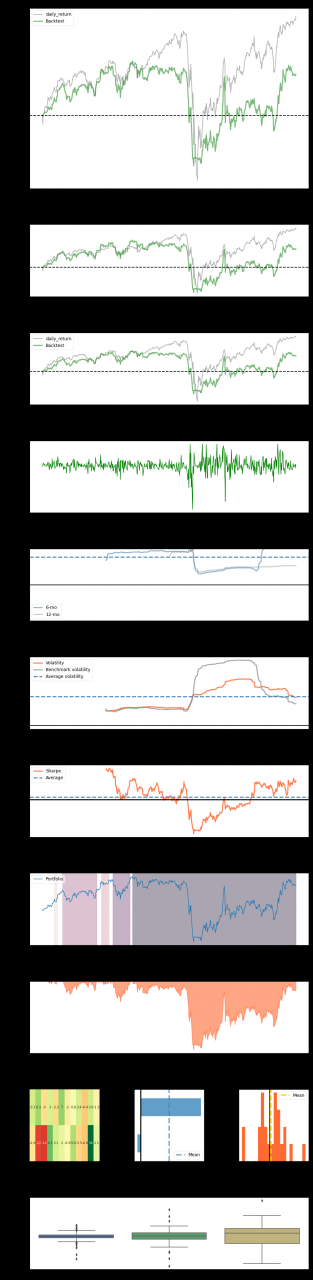
finally, it’s out of the question:
The automatic token of Python interface is passed into the header

The automatic token of Python interface is passed into the header

(1) Create login request to get token

#Test case class for login screen
# Import logging class for setting logging information
from Logs.Log import Logger
#Import configuration file class to read public data
from Readini.Read import Readini
# Import excel class for reading data in excel
from DataExcel.readExcel import ExcelUtil
#import request package
import requests
import json
from Public.PageObject import SendRequest
#import json package
import unittest
import json
from builtins import str
#Set the parameters related to reading the login
excel = ExcelUtil(Readini().get_ini_value('Excel','exccelini')).dict_data()
def token():
    # Set message header information
     header=eval(excel[0]['header'])
     # set url data
     url = excel[0]['Url']
    # Set the parameter information
     param=excel[0]['payload']
     # Convert the set parameter information to json format data
     # Set the request type
     type=excel[0]['Method']

    #Send a post login request
     response=SendRequest().send_request(type,url,data=param,header=header)
     #Get token data
     token=response.json()['data']['access_token']
     #Convert the token data to a string format
     return str(token)

(2) Create a unittest public initialization class and pass in the token data

from selenium import webdriver
import unittest
#Create unitest initialization public class
from Logs.Log import Logger
log=Logger('Interface automation result').getlog()
from TOKEN.PublicToken import token
import json
class TestBase(unittest.TestCase):

    #Interface initialization begins
    @classmethod
    def setUpClass(cls):
        log.info('Interface automation test started')
        # Pass in the obtained token as the initialized token data
        cls.token=token()


    #End of interface initialization
    @classmethod
    def tearDownClass(cls):
        log.info('End of interface automation test')


if __name__ == '__main__':
    unittest.main() #Main function for executing a program that has been written

(3) Pass in the token obtained during initialization to the header

Import logging class for setting up logging information
from Logs.Log import Logger
#Import profile class to read public data
from Readini.Read import Readini
#import excel class for reading data in excel
from DataExcel.readExcel import ExcelUtil
# Set the parameters related to reading logins
excel = ExcelUtil(Readini().get_ini_value('Excel','exccelini')).dict_data()
#Set the log type parameter
log = Logger('login interface log execution result').getlog()
# Inherit unittest initialization class
from ChanDao.TestBase import TestBase
#import request package
import requests
from Public.PageObject import SendRequest
import unittest
import json
from Readini.Read import Readini


class Pinlun(TestBase):

  def  test_1_pinglun_success(self):
     '''Login successful'''
    # Set message header information
     header=eval(Readini().get_ini_value('header','headers'))
     #eval(excel[0]['header'])
     #add token information like in the headers header
     header['Admin-Authorization']=self.token
     log.info(header)
     # Set the url data
     url = 'http://localhost:8090/api/admin/posts/comments'
     # log.info('The exit url address is:' + url)
     # Set the parameter information
     param={'page':'0','size':'10','keyword':'68'}
     # Convert the set parameter information to json format data
    # log.info(param)
     # Set the request type
     type='get'
     log.info(type)

    #Send get login request
     response=SendRequest().send_request(type,url,param,header=header)
     print(response.json())


    #Get the status code of the login response, do the assertion
     # self.assertEqual(response.status_code,excel[0]['StatusCode'])
     # log.info('Response status code is 200, login successful')

# Set the main function to execute the written login script
if __name__ == '__main__':
    unittest.main()

Note:
1. To get the token, you need to call the login interface
2. Pass the token into the setup function of unittest
3. Finally, pass the token into the header

Abnormal [System.InvalidOperationException: custom type mapping for ‘xxx’ is not specified or is not a solution

In the use of C # code to get data from Oracle database, but because it is an object-oriented way, the model object in C # is also established in Oracle, and the corresponding mapping should be done in the Oracle connection code of C #.

When running, this exception is thrown:

ex=System.InvalidOperationException: Custom type mapping not specified with 'dataSource='xxxxxxx' schemaName='xxx' typeName='xxx' or the mapping is invalid
   at Oracle.DataAccess.Types.OracleUdt.GetFactory(OracleUdtDescriptor udtDesc)
   at Oracle.DataAccess.Client.OracleParameter.SetUDTFromArray(OracleConnection conn, Object array, Int32 i)
   at Oracle.DataAccess.Client.OracleParameter.PreBind_Collection(OracleConnection conn)
   at Oracle.DataAccess.Client.OracleParameter.PreBind(OracleConnection conn, IntPtr errCtx, Int32 arraySize)
   at Oracle.DataAccess.Client.OracleCommand.ExecuteReader(Boolean requery, Boolean fillRequest, CommandBehavior behavior)
   at Oracle.DataAccess.Client.OracleDataAdapter.Fill(DataTable[] dataTables, Int32 startRecord, Int32 maxRecords, IDbCommand command, CommandBehavior behavior)
   at System.Data.Common.DbDataAdapter.Fill(DataTable dataTable)
   at HCC.Base.Comm.Dao.OraHelper.ExecuteDataTableSp(String dbkey, String procName, List`1 prams) 

Through various searches, it is found that the source of the problem lies in accidentally writing the udttypename wrong in the mapping code, which leads to this exception. Correct the spelling of udttypename to make the code work properly.


[Solved] ORA-21525: attribute number or (collection element at index) string violated its constraints

Exception: 

ORA-21525: attribute number or (collection element at index) string violated its constraints

Cause: Attribute value or collection element value violated its constraint.

Action: Change the value of the attribute or collection element such that it meets its constraints. The constraints are specified as part of the attribute or collection element’s schema information.


Error reason:

When passing data to stored procedures in C #, the user-defined object of Oracle is used. However, when passing in, some obj fields will throw this exception if the length of the value finally passed in is greater than that of the type definition. For example, this time type number (3) was passed in 1100


as like as two peas, it will probably have other problems, and it will also throw out this exception, which is not exactly the same as this encounter, but as a reference for solving problems.

[Solved] The type or namespace name ‘Service’ does not exist Error

The reason for this exception may be that the corresponding assembly is not introduced into the project. Generally speaking, the problem is solved after the required assembly is introduced. Sometimes there is a strange problem. For example, project B is a class library. Project a refers to the class of project B, such as userservice. Project B is also introduced into the reference of project A. However, when compiling in project a, an error is reported, saying that the type or namespace name ‘userservice’ does not exist in the namespace ‘xxx’ (are you missing an assembly reference?)

Now, for example, is there anything related to warning

The referenced assembly ” XXX.Service.dll ” could not be resolved because it has a dependency on ” System.ServiceModel.Web , Version=4.0.0.0, Culture=neutral, PublicKeyToken=31bf3856ad364e35″ which is not in the currently targeted framework “.NETFramework,Version=v4.0, Profile=Client”. Please remove references to assemblies not in the targeted framework or consider retargeting your project.

That is to say, because the Framework version used by project a and project B is different, the class of a cannot be used in project B. At this point, as long as the Framework version of the project is reset to make the two projects consistent, the problem is solved.