[Solved] Installation failed due to: ‘INSTALL_FAILED_SHARED_USER_INCOMPATIBLE: Package com.

1. No system signature is added

If you have not added the system signature, find the following codes at the header of the AndroidManifest.xml file and delete it:

android:sharedUserId="android.uid.system"

2. Added system signature

  1. Check whether there is any problem with the system signature itself or the joining method?
  2. If there is no problem with the system signature, there should already be an APK in the system, and the current APK should be added to the system uid. At this time, you should first delete the APK that exists in the system, and then reboot.
adb root
adb uninstall com.xxx.xxxx
adb reboot

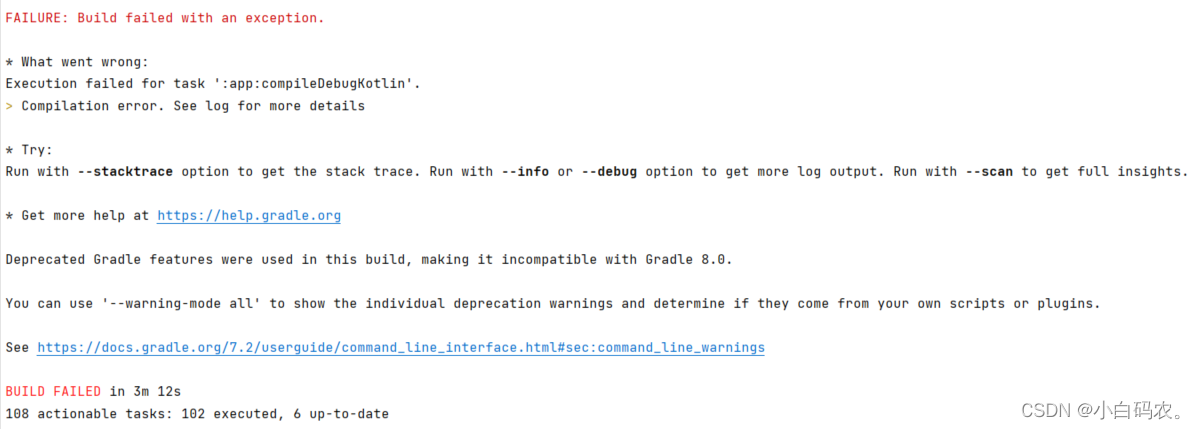
[How to Solve] Task :app:compileDebugKotlin FAILED

Question:

After changing the app ID and the module name of the Android project, this problem occurred in the compilation.

Solution:

1. tried to unify kotlin version, Android Studio Tools -> Kotlin -> Configure Kotlin Plugin Updates
Check the current Kotlin version, and find kotlin-version in the project (different projects show different ways, usually in build.gradle), change the Kotlin version of the project to the version on Android Studio, and then recompile, it failed.

2. before reporting this error log, look up, you know the problem, is the program code has reported red place, just a matter of habit, each time the red part of the log down to see, resulting in a delay of a good while.

[Solved] JAVA HttpClient Send Https request certificate error:PKIX path building failed:

Recently, when using httpclient to connect with the third-party SMS interface, a certificate invalidation error was reported during the local test.

1. Post request of Encapsulated HttpClient:

public static Map<String, Object> postReq(String URL, Map<String, Object> paramMap, Map<String, String> headers) throws Exception {
        Map<String, Object> map = new HashMap<String, Object>();

        RequestConfig requestConfig = RequestConfig.custom()
                .setConnectTimeout(2000) // Set the connection timeout, in milliseconds
                .setConnectionRequestTimeout(1000)
                .setSocketTimeout(5000) // timeout for requesting data, in milliseconds
                .build();
        HttpRequestRetryHandler myRetryHandler = new HttpRequestRetryHandler() {
            @Override
            public boolean retryRequest(IOException exception, int executionCount, HttpContext context) {
                return false;
            }
        };

        try (CloseableHttpClient client = HttpClients.custom()
                .setDefaultRequestConfig(requestConfig)
                .setRetryHandler(myRetryHandler)
                .build()) {

            HttpPost httpPost = new HttpPost(URL);
            if (paramMap != null) {
                JSONObject paramJson = new JSONObject(paramMap);
                StringEntity paramEntity = new StringEntity(paramJson.toString(), "UTF-8");
                paramEntity.setContentType("application/json; charset=utf-8");
                httpPost.setEntity(paramEntity);
            }
            httpPost.setConfig(requestConfig);

            if (headers != null && !headers.isEmpty()) {
                for (String key : headers.keySet()) {
                    String value = headers.get(key);
                    httpPost.setHeader(key, value);
                }
            }

            CloseableHttpResponse response = client.execute(httpPost);

            HttpEntity entity = response.getEntity();

            if (entity != null) {
                String responseStr = EntityUtils.toString(entity, "UTF-8");
                if (responseStr.isEmpty()) {
                    responseStr = "{}";
                }

                int statusCode = response.getStatusLine().getStatusCode();
                if (HttpServletResponse.SC_OK == statusCode) {
                    try {
                        JSONObject dataJson = (JSONObject) JSONObject.parse(responseStr);
                        map = new HashMap<>(dataJson);
                    } catch (Exception e) {
                        map.put("reponse", responseStr);
                    }
                } else {
                    return map;
                }
            }
            response.close();
        }
        return map;
    }

However, an error will be reported when accessing some self signed HTTPS requests. This problem is caused by the invalid link certificate, because the self signed certificate will be recognized as an unsafe link.

sun.security.validator.ValidatorException: PKIX path building failed: sun.security.provider.certpath.SunCertPathBuilderException: unable to find valid certification path to requested target

2. Solutions

  1. Set the security certificate of jdk according to the online method -> No work
  2. Set maven to ignore the certificate checksum -> no work
  3. Yml file configuration httpclient ignore SSL checksum, seems to have no effect.
  4. Finally used the method of modifying the code, the principle is also to ignore the certificate checksum, but the code produced the effect, it is estimated that the construction is related to the Httpclient.


Modify the original code

// Ignore SSL Security Certification
**SSLConnectionSocketFactory scsf = new SSLConnectionSocketFactory(
        SSLContexts.custom().loadTrustMaterial(null, new TrustSelfSignedStrategy()).build(),
        NoopHostnameVerifier.INSTANCE);**

try (CloseableHttpClient client = **HttpClients.custom().setSSLSocketFactory(scsf)**
        .setDefaultRequestConfig(requestConfig)
        .setRetryHandler(myRetryHandler)
        .build()) {
[Solved] socket failed: EPERM (Operation not permitted)

Reason & Solution:

1. The network permission is not enabled
2 HTTP is not supported

Add network permissions to AndroidManifest.xml

<uses-permission android:name="android.permission.INTERNET" />
<uses-permission android:name="android.permission.ACCESS_NETWORK_STATE" />

If the error is still reported, add the following to the Application in the AndroidManifest.xml file

android:usesCleartextTraffic="true"

Reason: On Android 9.0 machines, http access is not supported by default, all network access must use https. of course Android has supported https in several earlier versions, except that http is not supported by default using https on 9.0.

If the above operation can not be solved, please uninstall the application first, and then run it again.

[Solved] Docker Start nginx error: driver failed programming external connectivity on endpoint nginx

@[TOC](Docker start nginx error: Error response from daemon: driver failed programming external connectivity on endpoint nginx (6307a83f775bf316440e9b843841d808a84dded1b805b204484e41a73835f24a): (iptables failed: iptables –wait -t nat -A DOCKER -p tcp -d 0/0 –dport 80 -j DNAT –to-destination 172.17.0.6:80 ! -i docker0: iptables: No chain/target/match by that name.)

Problem Background
When starting nginx using docker, an error is reported

[root@localhost conf.d]# docker start nginx 
Error response from daemon: driver failed programming external connectivity on endpoint nginx (6307a83f775bf316440e9b843841d808a84dded1b805b204484e41a73835f24a):  (iptables failed: iptables --wait -t nat -A DOCKER -p tcp -d 0/0 --dport 80 -j DNAT --to-destination 172.17.0.6:80 ! -i docker0: iptables: No chain/target/match by that name.

Solution:

1. Before starting the nginx of docker, the firewall was closed, which led to an error in the link. You can restart docker to re-establish the link

systemctl restart docker

Restart nginx

docker start nginx

[Solved] Servers Install matlab 2018a error: license checkout failed -8

Servers Install matlab 2018a error: license checkout failed -8


Solution:

  • Located under the licence folder in the installation path
  • Open the license_standalone.lic file with Notepad
  • Replace “SIGH=” with “TS_OK SIGN=”

Refer to the official website solution

https://www.mathworks.com/matlabcentral/answers/91874-why-do-i-receive-license-manager-error-103

[Solved] E xx: xxxx:xx ERR thread 0x536753929472 setscheduler failed Operation not permitted

E xx: xxxx:xx ERR thread 0x536753929472 setscheduler failed Operation not permitted

The “setscheduler failed Operation not permitted” error occurred when setting the thread priority via sched_setscheduler.

int ret = sched_setscheduler(pthread_gettid_np((pthread_t)pHandle), SCHED_RR, &prio);


Solution:
add the following contents to the process startup parameters:

capabilities SYS_NICE

init.target.rc

service xxxxxx /system/vendor/bin/xxxxxx
    class core
    user system
    group camera input graphics
    disabled
    onrestart restart evs_driver
    onrestart restart qcarcam_hal
    capabilities SYS_NICE

[Solved] Linux Error: Failed to start bean ‘webServerStartStop‘; nested exception is org.springframework.

💛 Environment: windows10, centos7.5.1804

linux_debug:Failed to start bean ‘webServerStartStop’; nested exception is org. springframework. boot.

1. Error information

2022-07-08 18:12:25.088 ERROR 33600 --- [           main] o.s.boot.SpringApplication               : Application run failed

org.springframework.context.ApplicationContextException: Failed to start bean 'webServerStartStop'; nested exception is org.springframework.boot.web.server.WebServerException: Unable to start embedded Tomcat server
	at org.springframework.context.support.DefaultLifecycleProcessor.doStart(DefaultLifecycleProcessor.java:181) ~[spring-context-5.3.21.jar!/:5.3.21]
	at org.springframework.context.support.DefaultLifecycleProcessor.access$200(DefaultLifecycleProcessor.java:54) ~[spring-context-5.3.21.jar!/:5.3.21]
	at org.springframework.context.support.DefaultLifecycleProcessor$LifecycleGroup.start(DefaultLifecycleProcessor.java:356) ~[spring-context-5.3.21.jar!/:5.3.21]
	at java.lang.Iterable.forEach(Iterable.java:75) ~[na:1.8.0_333]
	at org.springframework.context.support.DefaultLifecycleProcessor.startBeans(DefaultLifecycleProcessor.java:155) ~[spring-context-5.3.21.jar!/:5.3.21]
	at org.springframework.context.support.DefaultLifecycleProcessor.onRefresh(DefaultLifecycleProcessor.java:123) ~[spring-context-5.3.21.jar!/:5.3.21]

2. Problem description

When running the jar package made by springboot project on Linux;

If the above problem occurs, port 8080 is occupied;

3. Solutions

Close the occupied 8080 port;

3.1 windows

Enter in CMD

# Find the corresponding pid
netstat -ano | findstr 8080

## out:TCP 0.0.0.0:8080 0.0.0.0:0 LISTENING 6148

Close the PID number corresponding to the port, assuming that port 8080 corresponds to the process number with process number 123

taskkill /pid 6148 -t -f

3.2 linux

Enter in CMD

# Find the corresponding pid
netstat -ano | grep 8080

## out:TCP 0.0.0.0:8080 0.0.0.0:0 LISTENING 6148

Close the PID number corresponding to the port, assuming that port 8080 corresponds to the process number with process number 123

kill -9 PID 123