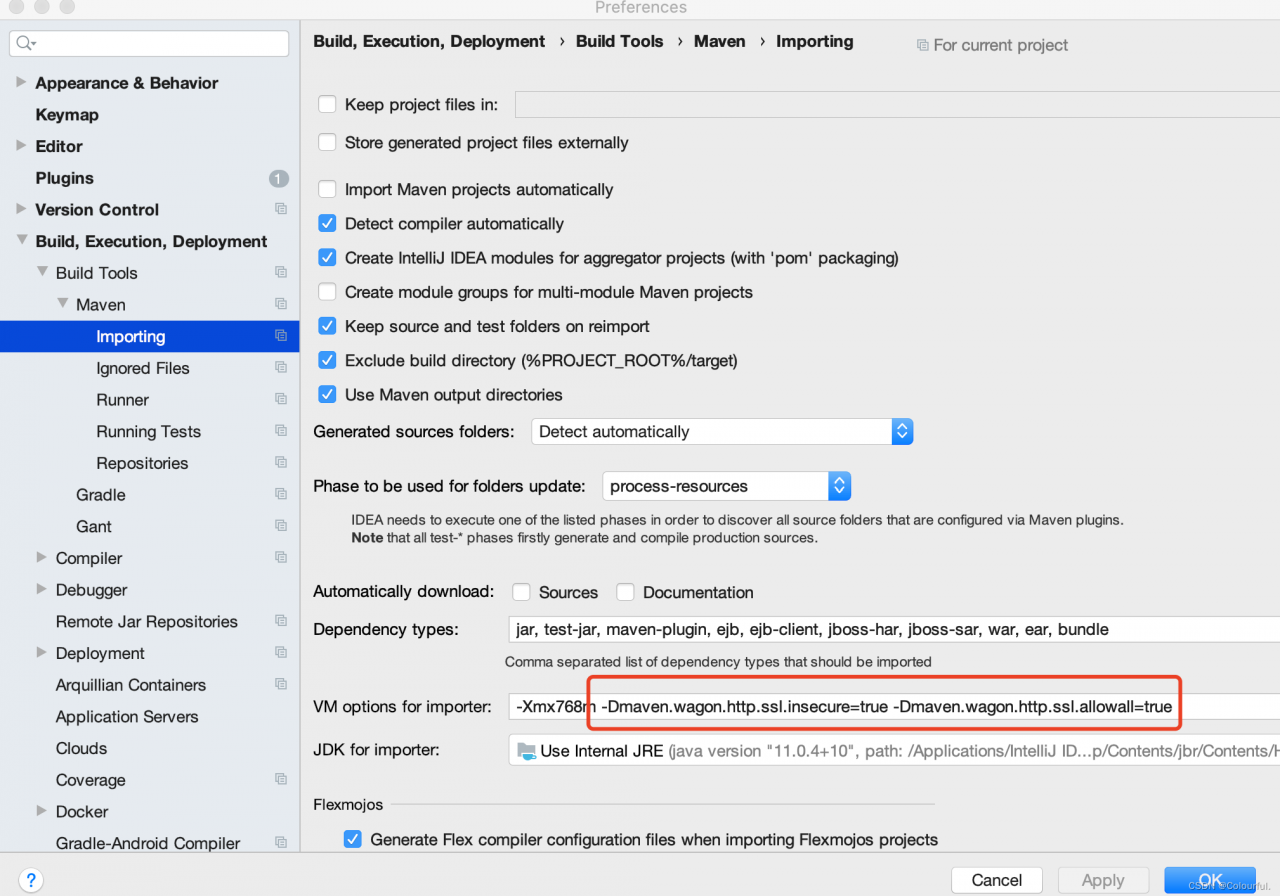
ES Startup error: ERROR: [2] bootstrap checks failed

ERROR: [2] bootstrap checks failed
[1]: max file descriptors [4096] for elasticsearch process is too low,   increase to at least [65536]

Reason: Generally, you can check whether the following nodes are present in the elastic.yaml configuration file in the es installation directory

elsearch soft nofile 65536
elsearch hard nofile 65536

If not, then you need to configure it, and replace the elsearch with your own server user.

There is also a possibility that the above error is still reported even though the server has been configured, possibly due to the fact that the current logged-in user has not synchronized the configuration due to a server reboot.
Use su ~ xx to re-login to solve the problem.

[Solved] Jedis connect and operate Redis error: Failed to create socket和connect timed out

error messages:

SLF4J: Failed to load class "org.slf4j.impl.StaticLoggerBinder".
SLF4J: Defaulting to no-operation (NOP) logger implementation
Exception in thread "main"redis.clients.jedis.exceptions.JedisConnectionException: Failed to create socket.
java.net.SocketTimeoutException: connect timed out

Reason: Unable to load class “org . slf4j . impl . staticloggerbinder”, no operation (NOP) logger implementation by default, cannot create socket, resulting in connection timeout.

Solution:

Step 1: add import dependency first (because a class cannot be loaded, it means that there is no dependency in the library, so it needs to import dependency)

<!-- https://mvnrepository.com/artifact/redis.clients/jedis -->
<dependency>
    <groupId>redis.clients</groupId>
    <artifactId>jedis</artifactId>
    <version>3.9.0</version>
</dependency>
<dependency>
    <groupId>com.alibaba</groupId>
    <artifactId>fastjson</artifactId>
    <version>1.2.68.sec10</version>
</dependency>
<dependency>
    <groupId>org.slf4j</groupId>
    <artifactId>slf4j-nop</artifactId>
    <version>1.7.6</version>
</dependency>
<dependency>
    <groupId>org.slf4j</groupId>
    <artifactId>slf4j-simple</artifactId>
    <version>2.0.0-alpha7</version>
</dependency>

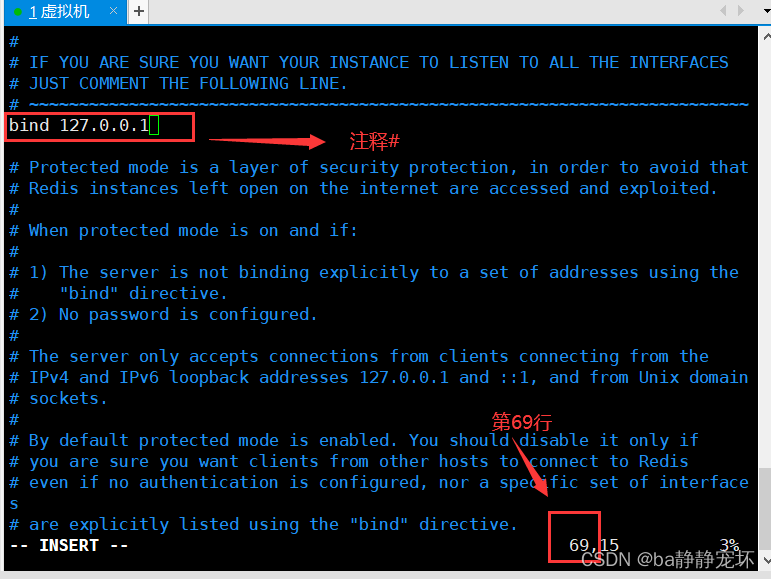
Step 2: Comment out bind 127.0.0.1 on line 69 of the redis.conf configuration file. Commenting out bind 127.0.0.1 means that all client access is available, which is equivalent to bind 0.0.0.0

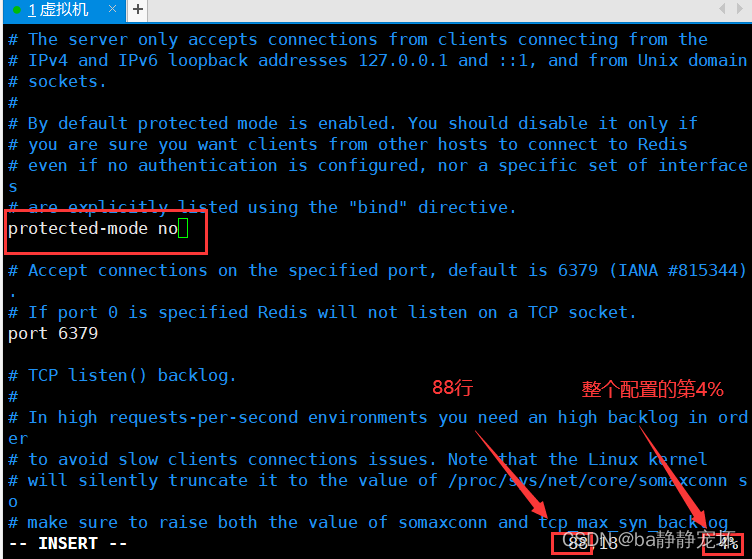
Step 3: Change yes to no in protected-mode yes on line 88

Step 4: Kill the redis process and restart it
ps -ef |grep redis
kill the redis process port number
redis-server . /xiaoConfig/redis-conf
redis-cli -p 6379

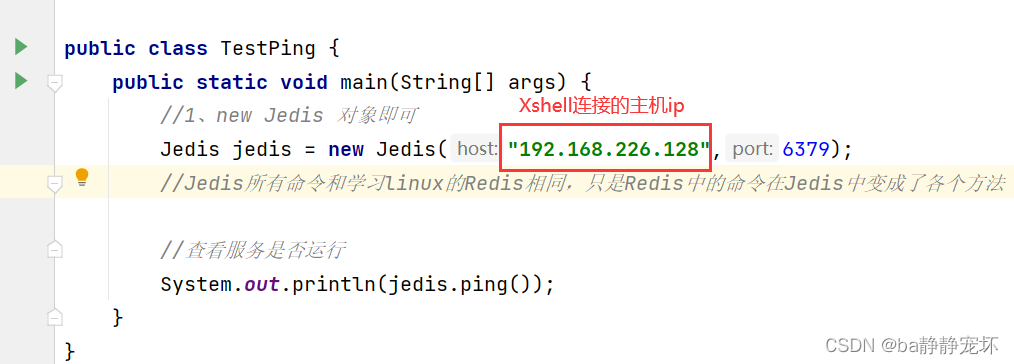
Step 5: Connecting to Redis in idea by manipulating jedis
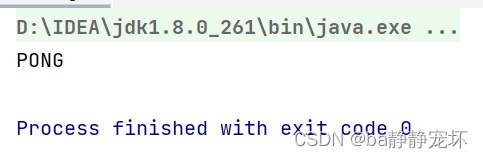
finally successful:

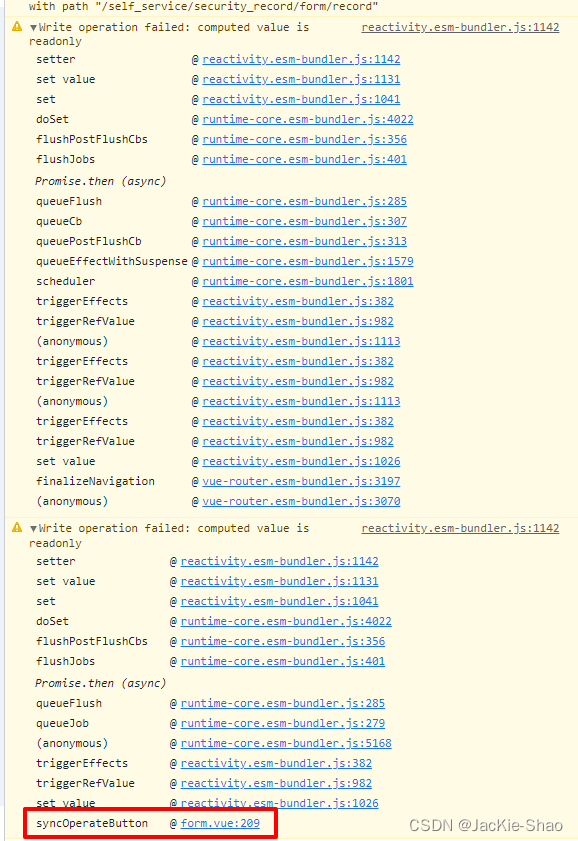
[Solved] Vue3.2 component computed Error: Write operation failed: computed value is readonly

<template>
	<component
        ref="formComponent"
        :is="formComponent"
    />
</template>

<script setup lang='ts'>
	const mapComp: any = {
	  Record
	};
	const formComponent = computed(() => {
	  return mapComp[route.params.type as keyof typeof mapComp];
	});
</script>

Then the browser reports two warnings


After modification:

<template>
	<component
        ref="formComponent"
		:is="mapComp[route.params.type as string]"
    />
</template>

<script setup lang='ts'>
	import {useRoute} from 'vue-router'
	const route = useRoute()
	
	const mapComp: any = {
	  Record
	};
	const formComponent = ref<string>(route.params.type as string);
</script>

At this point, the problem is solved

[Solved] java.lang.UnsatisfiedLinkError: dlopen failed: /lib/arm64/libc++_shared.so not found

java.lang.UnsatisfiedLinkError: dlopen failed: /lib/arm64/libc++_shared.so not found

1. Error description

When using other so libraries, sometimes you may encounter libc++_shared.so library cannot be found:

java.lang.UnsatisfiedLinkError: dlopen failed: "/data/app/com.niuba.demo-t5NvrZc62MoQOW2PzC1Rvw==/lib/arm64/libc++_shared.so" not found


2. Cause of error

The so library used depends on the libc++_shared.so library file

3. Solutions

Go to any ndk version directory in the ndk directory, there are various versions in the llvm-libc++\libs directory

For example:

ndk\23.1.7779620\sources\cxx-stl\llvm-libc++\libs


[Solved] Pytorch Error: PytorchStreamReader failed reading zip archive failed finding central directory

Pytoch reports an error:

PytorchStreamReader failed reading zip archive: failed finding central directory

Error reporting position

An error is reported if the pre training model is not downloaded

resnet101 = torchvision.models.resnet101(pretrained=True)

Solution:

Delete the file C:\Users\Username/.cache\torch\hub\checkpoints.pth

[Solved] open failed: ENOENT (No such file or directory)

open failed: ENOENT (No such file or directory)

1. Error description

The following error occurred while writing the file to sdcard:

open failed: ENOENT (No such file or directory)

2. Error analysis

At first, I thought I forgot to add read-write permission, which was checked.

Finally, when I think of android10 onwards, in addition to the dynamic application of permissions, you must add in the Application node of AndroidManifest.xml of the main application.

android:requestLegacyExternalStorage="true"

3. Solution

Add the following codes in the Application node of AndroidManifest.xml of the main application:

android:requestLegacyExternalStorage="true"


[Solved] Failed to start bean ‘documentationPluginsBootstrapper’; nested exception is java.lang.NullPointerException

# org.springframework.context.ApplicationContextException: Failed to start bean ‘documentationPluginsBootstrapper’; nested exception is java.lang.NullPointerException

First, The relevant configurations in my pom.xml are as follows

    <parent>
        <groupId>org.springframework.boot</groupId>
        <artifactId>spring-boot-starter-parent</artifactId>
        <version>2.7.1</version>
        <relativePath/> <!-- lookup parent from repository -->
    </parent>
    <dependencies>
        <dependency>
            <groupId>org.springframework.boot</groupId>
            <artifactId>spring-boot-starter-web</artifactId>
        </dependency>

        <dependency>
            <groupId>org.springframework.boot</groupId>
            <artifactId>spring-boot-starter-test</artifactId>
            <scope>test</scope>
        </dependency>

        <!--swagger-->
        <dependency>
            <groupId>io.springfox</groupId>
            <artifactId>springfox-swagger2</artifactId>
            <version>2.9.2</version>
        </dependency>
        <dependency>
            <groupId>io.springfox</groupId>
            <artifactId>springfox-swagger-ui</artifactId>
            <version>2.9.2</version>
        </dependency>
    </dependencies>
    <build>
        <plugins>
            <plugin>
                <groupId>org.springframework.boot</groupId>
                <artifactId>spring-boot-maven-plugin</artifactId>
            </plugin>
        </plugins>
    </build>

At this point, my spring-boot-starter version may not match the swagger version, and the following error is reported

org.springframework.context.ApplicationContextException: Failed to start bean 'documentationPluginsBootstrapper'; nested exception is java.lang.NullPointerException

Because Springfox uses path matching based on AntPathMatcher, while Spring Boot 2.6.X uses PathPatternMatcher.

Solution:

Configurate in application.properties:

spring.mvc.pathmatch.matching-strategy=ANT_PATH_MATCHER

The problem can be solved.

[Solved] Swashbuckle.AspNetCore.SwaggerGen.SwaggerGeneratorException: Failed to generate Operation

Error Messages:
ErrorMessage: Swashbuckle.AspNetCore.SwaggerGen.SwaggerGeneratorException: Failed to generate Operation for action - PMToolkit.API.Controllers.ReportController.GetOrderReportFilesList (PMToolkit.API). See inner exception\r\n ---\u003E Swashbuckle.AspNetCore.SwaggerGen.SwaggerGeneratorException: Failed to generate schema for type - System.Collections.Generic.IEnumerable\u00601[PMToolkit.API.Database.Models.OrderReportFile]. See inner exception\r\n ---\u003E System.InvalidOperationException: Can\u0027t use schemaId \u0022$OrderOption\u0022 for type \u0022$PMToolkit.API.Database.OrderOption\u0022. The same schemaId is already used for type \u0022$PMToolkit.API.Controllers.DelayOrdersController\u002BOrderOption\u0022\r\n   at Swashbuckle.AspNetCore.SwaggerGen.SchemaRepository.RegisterType(Type type, String schemaId)\r\n   at Swashbuckle.AspNetCore.SwaggerGen.SchemaGenerator.GenerateReferencedSchema(DataContract dataContract, SchemaRepository schemaRepository, Func\u00601 definitionFactory)\r\n   at Swashbuckle.AspNetCore.SwaggerGen.SchemaGenerator.GenerateConcreteSchema(DataContract dataContract, SchemaRepository schemaRepository)\r\n   at Swashbuckle.AspNetCore.SwaggerGen.SchemaGenerator.GenerateSchemaForMember(Type modelType, SchemaRepository schemaRepository, MemberInfo memberInfo, DataProperty dataProperty)\r\n   at Swashbuckle.AspNetCore.SwaggerGen.SchemaGenerator.CreateObjectSchema(DataContract dataContract, SchemaRepository schemaRepository)\r\n   at Swashbuckle.AspNetCore.SwaggerGen.SchemaGenerator.\u003C\u003Ec__DisplayClass10_0.\u003CGenerateConcreteSchema\u003Eb__3()\r\n   at Swashbuckle.AspNetCore.SwaggerGen.SchemaGenerator.GenerateReferencedSchema(DataContract dataContract, SchemaRepository schemaRepository, Func\u00601 definitionFactory)\r\n   at Swashbuckle.AspNetCore.SwaggerGen.SchemaGenerator.GenerateConcreteSchema(DataContract dataContract, SchemaRepository schemaRepository)\r\n   at Swashbuckle.AspNetCore.SwaggerGen.SchemaGenerator.GenerateSchemaForType(Type modelType, SchemaRepository schemaRepository)\r\n   at Swashbuckle.AspNetCore.SwaggerGen.SchemaGenerator.GenerateSchema(Type modelType, SchemaRepository schemaRepository, MemberInfo memberInfo, ParameterInfo parameterInfo)\r\n   at Swashbuckle.AspNetCore.SwaggerGen.SchemaGenerator.CreateArraySchema(DataContract dataContract, SchemaRepository schemaRepository)\r\n   at Swashbuckle.AspNetCore.SwaggerGen.SchemaGenerator.\u003C\u003Ec__DisplayClass10_0.\u003CGenerateConcreteSchema\u003Eb__1()\r\n   at Swashbuckle.AspNetCore.SwaggerGen.SchemaGenerator.GenerateConcreteSchema(DataContract dataContract, SchemaRepository schemaRepository)\r\n   at Swashbuckle.AspNetCore.SwaggerGen.SchemaGenerator.GenerateSchemaForType(Type modelType, SchemaRepository schemaRepository)\r\n   at Swashbuckle.AspNetCore.SwaggerGen.SchemaGenerator.GenerateSchema(Type modelType, SchemaRepository schemaRepository, MemberInfo memberInfo, ParameterInfo parameterInfo)\r\n   at Swashbuckle.AspNetCore.SwaggerGen.SwaggerGenerator.GenerateSchema(Type type, SchemaRepository schemaRepository, PropertyInfo propertyInfo, ParameterInfo parameterInfo)\r\n   --- End of inner exception stack trace ---\r\n   at Swashbuckle.AspNetCore.SwaggerGen.SwaggerGenerator.GenerateSchema(Type type, SchemaRepository schemaRepository, PropertyInfo propertyInfo, ParameterInfo parameterInfo)\r\n   at Swashbuckle.AspNetCore.SwaggerGen.SwaggerGenerator.CreateResponseMediaType(ModelMetadata modelMetadata, SchemaRepository schemaRespository)\r\n   at Swashbuckle.AspNetCore.SwaggerGen.SwaggerGenerator.\u003C\u003Ec__DisplayClass19_0.\u003CGenerateResponse\u003Eb__2(String contentType)\r\n   at System.Linq.Enumerable.ToDictionary[TSource,TKey,TElement](IEnumerable\u00601 source, Func\u00602 keySelector, Func\u00602 elementSelector, IEqualityComparer\u00601 comparer)\r\n   at System.Linq.Enumerable.ToDictionary[TSource,TKey,TElement](IEnumerable\u00601 source, Func\u00602 keySelector, Func\u00602 elementSelector)\r\n   at Swashbuckle.AspNetCore.SwaggerGen.SwaggerGenerator.GenerateResponse(ApiDescription apiDescription, SchemaRepository schemaRepository, String statusCode, ApiResponseType apiResponseType)\r\n   at Swashbuckle.AspNetCore.SwaggerGen.SwaggerGenerator.GenerateResponses(ApiDescription apiDescription, SchemaRepository schemaRepository)\r\n   at Swashbuckle.AspNetCore.SwaggerGen.SwaggerGenerator.GenerateOperation(ApiDescription apiDescription, SchemaRepository schemaRepository)\r\n   --- End of inner exception stack trace ---\r\n   at Swashbuckle.AspNetCore.SwaggerGen.SwaggerGenerator.GenerateOperation(ApiDescription apiDescription, SchemaRepository schemaRepository)\r\n   at Swashbuckle.AspNetCore.SwaggerGen.SwaggerGenerator.GenerateOperations(IEnumerable\u00601 apiDescriptions, SchemaRepository schemaRepository)\r\n   at Swashbuckle.AspNetCore.SwaggerGen.SwaggerGenerator.GeneratePaths(IEnumerable\u00601 apiDescriptions, SchemaRepository schemaRepository)\r\n   at Swashbuckle.AspNetCore.SwaggerGen.SwaggerGenerator.GetSwagger(String documentName, String host, String basePath)\r\n   at Swashbuckle.AspNetCore.Swagger.SwaggerMiddleware.Invoke(HttpContext httpContext, ISwaggerProvider swaggerProvider)\r\n   at Steeltoe.Management.Endpoint.CloudFoundry.CloudFoundrySecurityMiddleware.Invoke(HttpContext context)\r\n   at Microsoft.AspNetCore.Diagnostics.DeveloperExceptionPageMiddleware.Invoke(HttpContext context).


Solution:
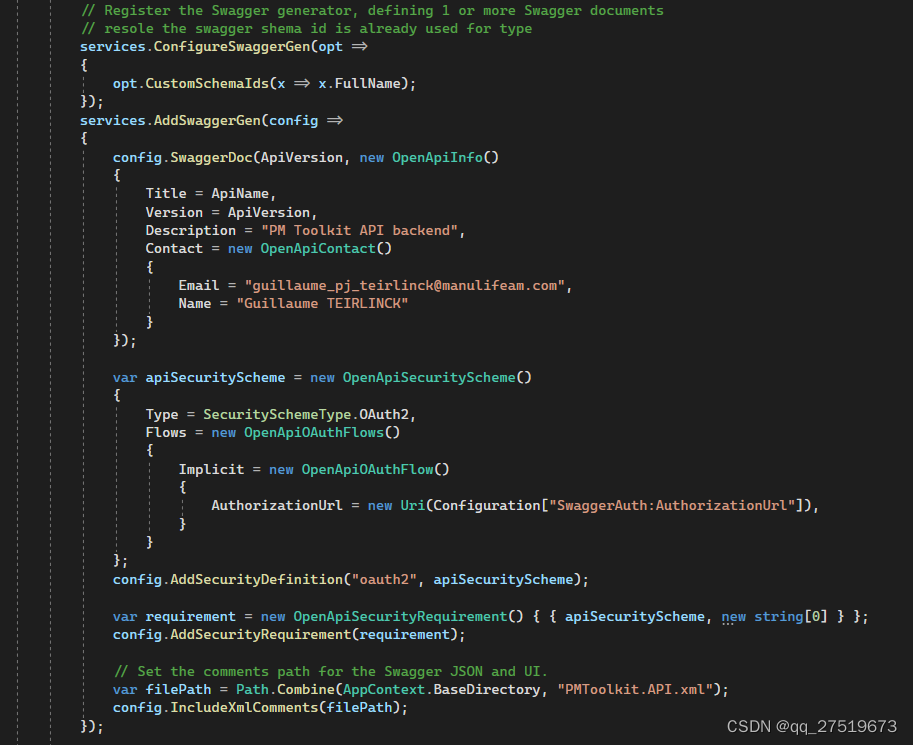
You must add a swagger config as below:

services.ConfigureSwaggerGen(opt =>
{
	opt.CustomSchemaIds(x => x.FullName);
});

[Solved] Pytorch Error: PytorchStreamReader failed reading zip archive failed finding central directory

Pytoch reports an error: pytochstreamreader failed reading zip archive: failed finding central directory

Error reporting position

An error is reported if the pre training model is not downloaded

resnet101 = torchvision.models.resnet101(pretrained=True)

Solution:

Download the files from the above URL and put them in the location of the path behind to replace the weights that have not been downloaded

[Solved] M1 Chip MacBook Pro Error: snappy-java FAILED_TO_LOAD_NATIVE_LIBRARY

Solution:

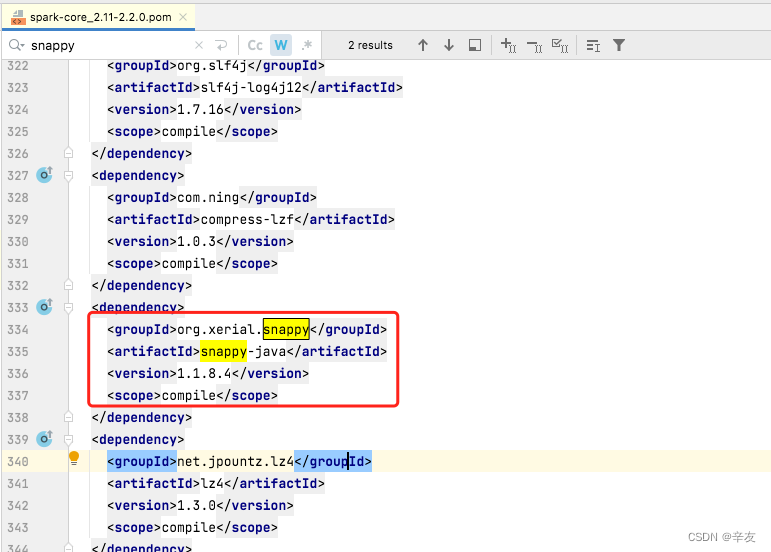
Directly find the xml file that introduces the dependency (I am the xml file of spark-core), change the version of snappy-java in it to 1.1.8.4. just reload it.

    <dependency>
      <groupId>org.xerial.snappy</groupId>
      <artifactId>snappy-java</artifactId>
      <version>1.1.8.4</version>
      <scope>compile</scope>
    </dependency>


How to Solve: (Detailed exploration process)

The MacBook Pro with the new M1 pro chip arrived a few days ago, and I couldn’t wait to try it out. Because the chip uses the ARM instruction set, the previous Intel chip computers used the X86 instruction set, so there were inevitably some problems. However, after a year of adaptation, there are basically no major problems, so after a few days of trying, I decided to use the machine for work production.

Because I want to install Java, at first I used the traditional Intel version of jdk (because the main use is jdk1.8, and Oracle only did the adaptation of jdk17 for the arm version), and I feel that some programs in the development will not be executed so fast (and 18 MacBook Pro execution speed is about the same), because after all, it has to go through Rosetta2 translate. Therefore, after using it for a few days, I replaced the Intel version of jdk with the ARM version of jdk, but there is a problem in the documentation, the direct download link given in the documentation is not the ARM version, I found that the execution has been using the intel version of java after installation, then I found that the download link is wrong, you need to manually download the real ARM version of jdk from the official website.

After installing the arm version of jdk, the compilation speed is really improved, but when executing the spark program locally, I encountered such a problem, the detailed log is as follows:

Caused by: org.xerial.snappy.SnappyError: [FAILED_TO_LOAD_NATIVE_LIBRARY] no native library is found for os.name=Mac and os.arch=aarch64
	at org.xerial.snappy.SnappyLoader.findNativeLibrary(SnappyLoader.java:331)
	at org.xerial.snappy.SnappyLoader.loadNativeLibrary(SnappyLoader.java:171)
	at org.xerial.snappy.SnappyLoader.load(SnappyLoader.java:152)
	at org.xerial.snappy.Snappy.<clinit>(Snappy.java:47)
	at org.apache.parquet.hadoop.codec.SnappyDecompressor.decompress(SnappyDecompressor.java:62)
	at org.apache.parquet.hadoop.codec.NonBlockedDecompressorStream.read(NonBlockedDecompressorStream.java:51)
	at java.io.DataInputStream.readFully(DataInputStream.java:195)
	at java.io.DataInputStream.readFully(DataInputStream.java:169)
	at org.apache.parquet.bytes.BytesInput$StreamBytesInput.toByteArray(BytesInput.java:205)
	at org.apache.parquet.column.values.dictionary.PlainValuesDictionary$PlainBinaryDictionary.<init>(PlainValuesDictionary.java:89)
	at org.apache.parquet.column.values.dictionary.PlainValuesDictionary$PlainBinaryDictionary.<init>(PlainValuesDictionary.java:72)
	at org.apache.parquet.column.Encoding$1.initDictionary(Encoding.java:90)
	at org.apache.parquet.column.Encoding$4.initDictionary(Encoding.java:149)
	at org.apache.spark.sql.execution.datasources.parquet.VectorizedColumnReader.<init>(VectorizedColumnReader.java:103)
	at org.apache.spark.sql.execution.datasources.parquet.VectorizedParquetRecordReader.checkEndOfRowGroup(VectorizedParquetRecordReader.java:280)
	at org.apache.spark.sql.execution.datasources.parquet.VectorizedParquetRecordReader.nextBatch(VectorizedParquetRecordReader.java:225)
	at org.apache.spark.sql.execution.datasources.parquet.VectorizedParquetRecordReader.nextKeyValue(VectorizedParquetRecordReader.java:137)
	at org.apache.spark.sql.execution.datasources.RecordReaderIterator.hasNext(RecordReaderIterator.scala:39)
	at org.apache.spark.sql.execution.datasources.FileScanRDD$$anon$1.hasNext(FileScanRDD.scala:105)
	at org.apache.spark.sql.execution.datasources.FileScanRDD$$anon$1.nextIterator(FileScanRDD.scala:177)
	at org.apache.spark.sql.execution.datasources.FileScanRDD$$anon$1.hasNext(FileScanRDD.scala:105)
	at org.apache.spark.sql.catalyst.expressions.GeneratedClass$GeneratedIterator.scan_nextBatch$(Unknown Source)
	at org.apache.spark.sql.catalyst.expressions.GeneratedClass$GeneratedIterator.processNext(Unknown Source)
	at org.apache.spark.sql.execution.BufferedRowIterator.hasNext(BufferedRowIterator.java:43)
	at org.apache.spark.sql.execution.WholeStageCodegenExec$$anonfun$8$$anon$1.hasNext(WholeStageCodegenExec.scala:395)
	at org.apache.spark.sql.catalyst.expressions.GeneratedClass$GeneratedIterator.agg_doAggregateWithKeys$(Unknown Source)
	at org.apache.spark.sql.catalyst.expressions.GeneratedClass$GeneratedIterator.processNext(Unknown Source)
	at org.apache.spark.sql.execution.BufferedRowIterator.hasNext(BufferedRowIterator.java:43)
	at org.apache.spark.sql.execution.WholeStageCodegenExec$$anonfun$8$$anon$1.hasNext(WholeStageCodegenExec.scala:395)
	at scala.collection.Iterator$$anon$11.hasNext(Iterator.scala:408)
	at org.apache.spark.shuffle.sort.BypassMergeSortShuffleWriter.write(BypassMergeSortShuffleWriter.java:125)
	at org.apache.spark.scheduler.ShuffleMapTask.runTask(ShuffleMapTask.scala:96)
	at org.apache.spark.scheduler.ShuffleMapTask.runTask(ShuffleMapTask.scala:53)
	at org.apache.spark.scheduler.Task.run(Task.scala:108)
	at org.apache.spark.executor.Executor$TaskRunner.run(Executor.scala:335)
	... 3 more

org.xerial.snappy is a compressed/uncompressed library, I am using spark version 2.2.0, which depends on snappy 1.1.2.6. The contents of this version are as follows:
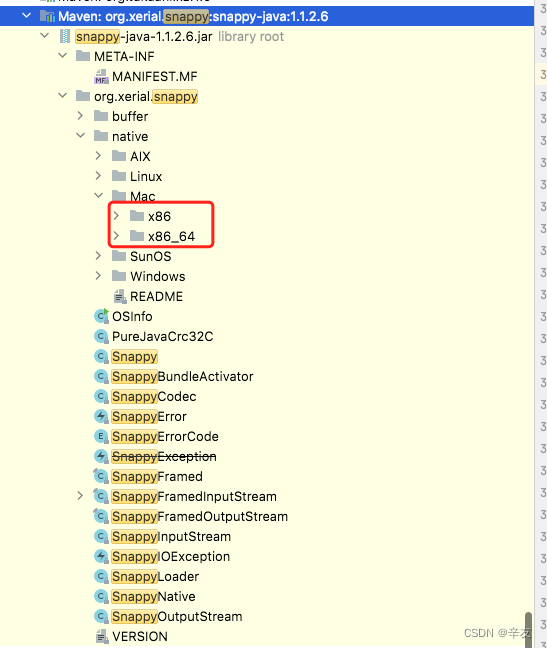
As you can see, this version of snappy only supports x86 and x86_64 for Mac systems, not arm64. Just find the dependency that introduces snappy-java and upgrade its version directly to the latest version.

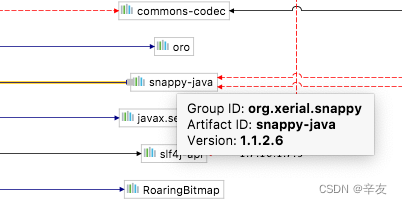
Searching through IDEA’s dependency graph, I found that the library was imported by spark-core, my version of spark-core is 2.2.0 and the snappy-java introduced is 1.1.2.6. As shown in the figure:
The latest version of snappy-java is 1.1.8.4 in the mvnrepository, so replace the original version in the spark-core xml file directly, as shown in the figure
Reload the dependency and execute it again. The code executes smoothly and the problem is solved.