Solution of error in CAD license detection
Reason: the optimization software has shut down the auto start service of Autodesk.
Solution of error in CAD license detection
Reason: the optimization software has shut down the auto start service of Autodesk.
Go test, report an error;
Error in go test panic: reflect: reflect. Value. Set using addressable value [recovered].
Solution: generally, there is an error of using unaddressable value, which indicates that the pointer value passed is incorrect. For example, if the pointer address needs to be passed, but the value is passed. At that time, I had a hunch that DB should have passed a non pointer when finding. After verification, it was.
So, the summary is: when updating in Gorm, you can not pass the pointer (if you want to use the returned primary key, you still need to pass the pointer), but when querying, you must pass it, even if it is slice or map type.
Questions

solve
Lack of dependency, just install Python dependency
yum update -y nss curl libcurl
Error occurred while running tensorflow:
AttributeError: module 'tensorflow' has no attribute 'InteractiveSession'This is not the first mock exam error in the package, because the module Session has been removed in the new Tensorflow 2 version, and the code is changed to:
sess = tf.InteractiveSession()Replace with:
sess = tf.compat.v1.InteractiveSession()Similarly, if there are similar “TF. * *” codes in the code, you should add “compat. V1.” after them.
If you are not used to it, you can reduce the version of tensorflow
pip install tensorflow==1.14Error content
Fatal error in launcher: Unable to create process using '"e:\program
files\programdata\python3.9\python.exe"  "E:\Program Files\ProgramData
\Python39\Scripts\pip.exe" ': ???????????
Solution
python -m pip install --upgrade pip
Problem solving
there is a problem with PIP. Updating PIP through Python will delete the wrong PIP and install the updated pip
The error is as follows:
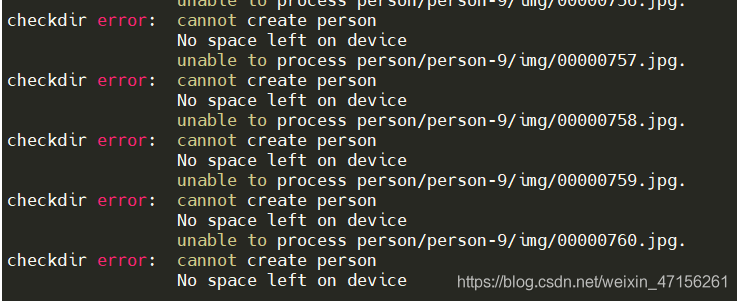
solution: add sudo before unzip command, such as sudo unzip person.zip
Decompress multiple compressed packages: unzip ‘*. Zip’
When I want to convert a column of dates in the data frame into the date format of panda, I encountered this kind of error.
reader = pd.read_csv(f'new_files/2020-12-22-5-10.csv', usecols=['passCarTime'],dtype={'passCarTime':'string'})
pd.to_datetime(reader.passCarTime.head())
Out[98]:
0   2020-12-22 10:00:00
1   2020-12-22 10:00:00
2   2020-12-22 10:00:00
3   2020-12-22 10:00:00
4   2020-12-22 10:00:00
Name: passCarTime, dtype: datetime64[ns]
pd.to_datetime(reader.passCarTime)
Traceback (most recent call last):
  File "D:\PyCharm2020\python2020\lib\site-packages\pandas\core\arrays\datetimes.py", line 2085, in objects_to_datetime64ns
    values, tz_parsed = conversion.datetime_to_datetime64(data)
  File "pandas\_libs\tslibs\conversion.pyx", line 350, in pandas._libs.tslibs.conversion.datetime_to_datetime64
TypeError: Unrecognized value type: <class 'str'>
During handling of the above exception, another exception occurred:
Traceback (most recent call last):
  File "D:\PyCharm2020\python2020\lib\site-packages\IPython\core\interactiveshell.py", line 3427, in run_code
    exec(code_obj, self.user_global_ns, self.user_ns)
  File "<ipython-input-99-e1b00dc18517>", line 1, in <module>
    pd.to_datetime(reader.passCarTime)
  File "D:\PyCharm2020\python2020\lib\site-packages\pandas\core\tools\datetimes.py", line 801, in to_datetime
    cache_array = _maybe_cache(arg, format, cache, convert_listlike)
  File "D:\PyCharm2020\python2020\lib\site-packages\pandas\core\tools\datetimes.py", line 178, in _maybe_cache
    cache_dates = convert_listlike(unique_dates, format)
  File "D:\PyCharm2020\python2020\lib\site-packages\pandas\core\tools\datetimes.py", line 465, in _convert_listlike_datetimes
    result, tz_parsed = objects_to_datetime64ns(
  File "D:\PyCharm2020\python2020\lib\site-packages\pandas\core\arrays\datetimes.py", line 2090, in objects_to_datetime64ns
    raise e
  File "D:\PyCharm2020\python2020\lib\site-packages\pandas\core\arrays\datetimes.py", line 2075, in objects_to_datetime64ns
    result, tz_parsed = tslib.array_to_datetime(
  File "pandas\_libs\tslib.pyx", line 364, in pandas._libs.tslib.array_to_datetime
  File "pandas\_libs\tslib.pyx", line 591, in pandas._libs.tslib.array_to_datetime
  File "pandas\_libs\tslib.pyx", line 726, in pandas._libs.tslib.array_to_datetime_object
  File "pandas\_libs\tslib.pyx", line 717, in pandas._libs.tslib.array_to_datetime_object
  File "pandas\_libs\tslibs\parsing.pyx", line 243, in pandas._libs.tslibs.parsing.parse_datetime_string
  File "D:\PyCharm2020\python2020\lib\site-packages\dateutil\parser\_parser.py", line 1374, in parse
    return DEFAULTPARSER.parse(timestr, **kwargs)
  File "D:\PyCharm2020\python2020\lib\site-packages\dateutil\parser\_parser.py", line 649, in parse
    raise ParserError("Unknown string format: %s", timestr)
dateutil.parser._parser.ParserError: Unknown string format: passCarTime
I’m not a professional, and my English is not good. I can’t understand what’s wrong. I have seen that there is no missing value in the date column of the file, and there is no date that does not conform to the format… This is very strange, welcome to leave a message, thanks in advance!
Solution
When converting, add a parameter errors ='coerce '.
reader = pd.read_csv(f'new_files/2020-12-22-5-10.csv', usecols=['passCarTime'],dtype={'passCarTime':'string'})
reader.passCarTime = pd.to_datetime(reader.passCarTime,errors='coerce')
reader.passCarTime.head()
Out[120]:
0   2020-12-22 10:00:00
1   2020-12-22 10:00:00
2   2020-12-22 10:00:00
3   2020-12-22 10:00:00
4   2020-12-22 10:00:00
Name: passCarTime, dtype: datetime64[ns]
reader.info()
<class 'pandas.core.frame.DataFrame'>
RangeIndex: 307707 entries, 0 to 307706
Data columns (total 1 columns):
 #   Column       Non-Null Count   Dtype
---  ------       --------------   -----
 0   passCarTime  307703 non-null  datetime64[ns]
dtypes: datetime64[ns](1)
memory usage: 2.3 MB
Problem: Server development badlands problem
Problem solved.
Execute the following commands on the server, choose any one of them, and restart hue afterwards
yum install cyrus-sasl-plain cyrus-sasl-devel cyrus-sasl-gssapi
sudo yum install apache-maven ant asciidoc cyrus-sasl-devel cyrus-sasl-gssapi gcc gcc-c++ krb5-devel libxml2-devel libxslt-devel make mysql mysql-devel openldap-devel python-devel sqlite-devel gmp-devel
1. Turn off grammar checking
When Android applications are packaged, there will be a series of syntax checks, such as the placement of a layout file, which is cumbersome;
In build. Gradle under the module, configure as follows: check the syntax and ignore some minor syntax errors;
android {
    lintOptions {
        checkReleaseBuilds false
        // Or, if you prefer, you can continue to check for errors in release builds,
        // but continue the build even when errors are found:
        abortOnError false
    }
}
2. Log processing
According to the compilation type buildconfig.debug in the current compilation configuration, select whether to print the log;
public final class BuildConfig {
  public static final boolean DEBUG = Boolean.parseBoolean("true");
  public static final String APPLICATION_ID = "cn.zkhw.midi";
  public static final String BUILD_TYPE = "debug";
  public static final int VERSION_CODE = 1;
  public static final String VERSION_NAME = "0.1";
}
If the current version is release, the value of buildconfig.debug is false;
Example of development log tool class log:
public class L {

    public static void i(String TAG, String msg) {
        if (BuildConfig.DEBUG)
            Log.i(TAG, msg);
    }
}
3. Release compiler optimization configuration
In general, the release release version needs the following configuration;
android {
    buildTypes {
        debug {
        }

        release {
            zipAlignEnabled true
            shrinkResources true
            minifyEnabled true
            proguardFiles getDefaultProguardFile('proguard-android.txt'), 'proguard-rules.pro'
        }
    }
}
This is due to the syntax problem of SQL statements, and everyone’s situation is different
mine is
Original: select teacherno, teachername, vote from t_ Vote
reports an error
change to: select * from t_ Vote
success
Questions
In the custom click event function, there is an error calling SetData, indicating that it is undefined
reason
The current this refers to the instance object of the success function
delTaskTap(e){
    wx.showModal({
      title:'Tips',
      content:'Do I have to clear all my to-do lists?',
      success:function(res){
        if(res.confirm){
          this.setData({
            taskText:[]
          })
          console.log('Clear all to-do items')
        }
        else if(res.cancel){
          console.log('Not clearing all to-do items')
        }
      }
    })
terms of settlement
delTaskTap(e){
    var that=this
    wx.showModal({
      title:'Tips',
      content:'Do I have to clear all my to-do lists?',
      success:function(res){
        if(res.confirm){
          that.setData({
            taskText:[]
          })
          console.log('Clear all to-do items')
        }
        else if(res.cancel){
          console.log('Not clearing all to-do items')
        }
      }
    })
Solution
Read the configuration file in another way
original code: CF = configparser. Configparser ()
Replace with:
CF = configparser. Rawconfigparser ()