[error record] Android App packaging error (entry name ‘assets / xxx. XML’ merged)

Contents of articles

1、 2. Solutions

1、 Error information


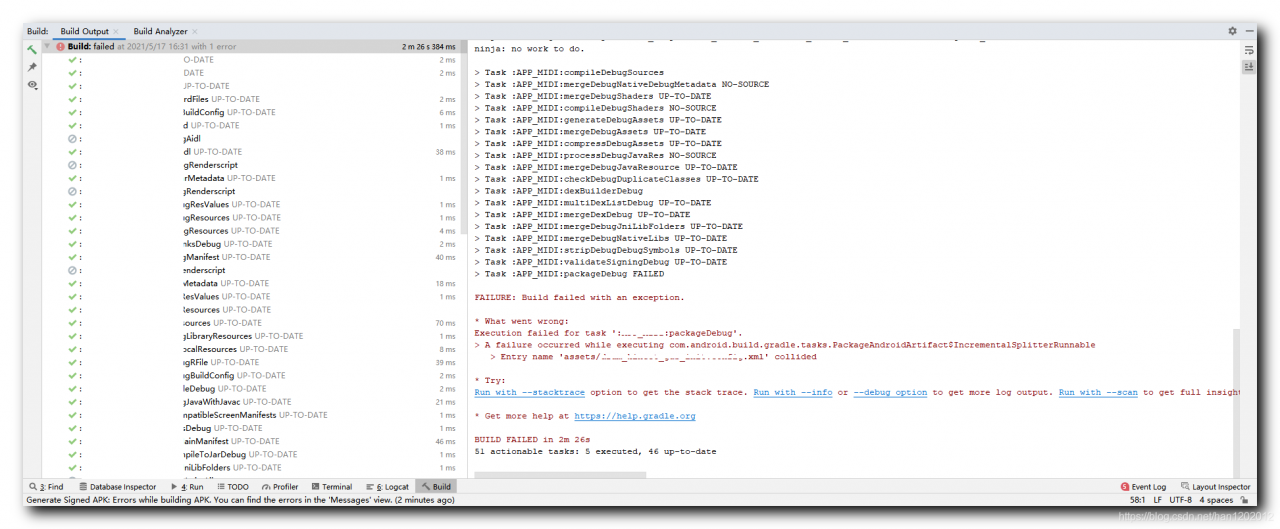
When packaging and compiling Android applications, the following error is reported:;

FAILURE: Build failed with an exception.

* What went wrong:
Execution failed for task ':app:packageDebug'.
> A failure occurred while executing com.android.build.gradle.tasks.PackageAndroidArtifact$IncrementalSplitterRunnable
   > Entry name 'assets/xxx.xml' collided

* Try:
Run with --stacktrace option to get the stack trace. Run with --info or --debug option to get more log output. Run with --scan to get full insights.

* Get more help at https://help.gradle.org

BUILD FAILED in 2m 26s
51 actionable tasks: 5 executed, 46 up-to-date
2、 Solutions


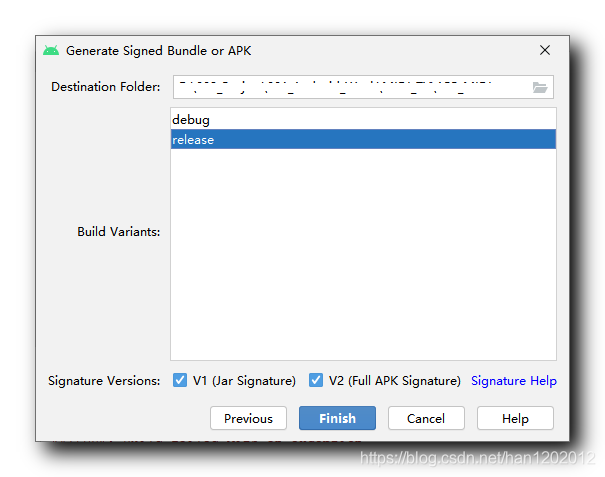
The reason for the above error is that there is already a file in the target path to generate APK. Just delete the APK installation package generated last time;
Vscode setting console. Log () shortcut method

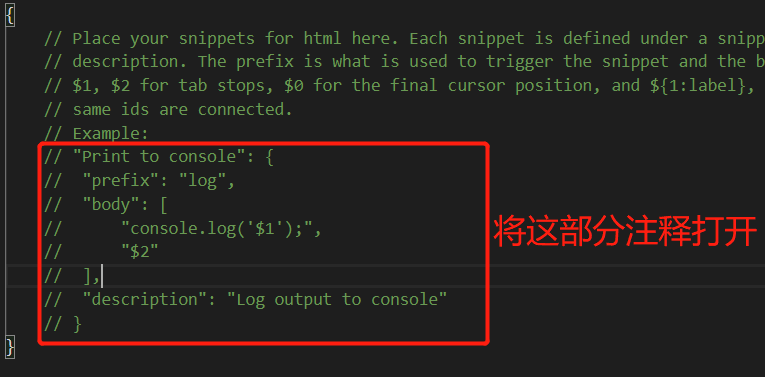
Console.log is a very frequently used code in our daily front-end development, so how can we quickly type it in the vscode Compiler. In fact, it’s very simple, just two steps:

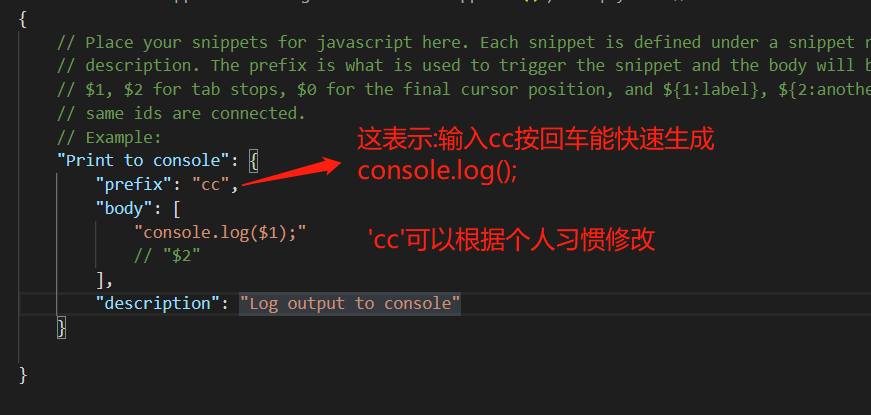
1. Open the file in vscode → preferences → user code fragment → search JavaScript in the search box and select JavaScript. JSON 2. Then we can open the key comment code in it

  After opening, you can modify the code appropriately to see your personal habits

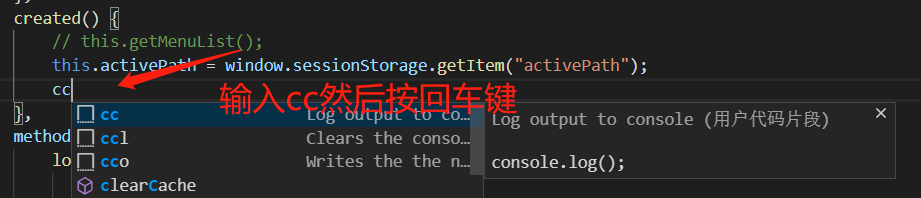
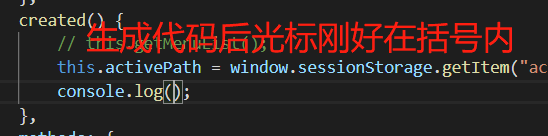
After saving, see the effect:

  The effect of carriage return is as follows:

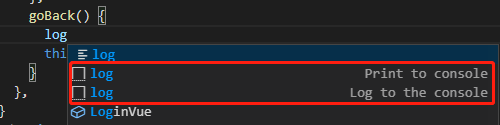
If you continue to use log as the keyword, choose the one in the figure below, otherwise console. Log () will not be displayed


ERROR 2000 (HY000): Unknown MySQL error

After the installation of mysql5.7 physical machine, modify the binlog log in my.cnf, restart mysql, log in and connect to MySQL with the client of the machine, and report error 2000 (HY000): unknown MySQL error. This error will also be reported when mysqldump exports data of all tables,

solve:

1. When using systemctl restart mysqld, you can’t connect by using Navicat, but after using systemctl stop mysqld, you can connect by using systemctl start mysqld, but you still can’t export data by using mysqldump connection.

2. Directly back up the data file on MySQL, and then use docker to install mysql5.7, copy the data file to/var/lib/MySQL, a permission error will be reported, and then change the permission to chown mysql:mysql datadir Can be used normally, user name root password root

reference resources: https://dba.stackexchange.com/questions/91712/whats-causing-this-error-2000-hy000-unknown-mysql-error

[Solved] Failed to execute/bin/bash: resource temporarily unavailable

[[email protected] config]# su – mform
Last login: Mon Apr 16 14:08:05 CST 2018 on pts/4
su: failed to execute /bin/bash: Resource temporarily unavailable
[[email protected] config]#
[[email protected] config]#
[[email protected] config]# egrep -v “$|#” /etc/security/limits.d/20-nproc.conf

     soft    nproc     4096

root soft nproc unlimited
[[email protected] config]# su – mform
Last login: Mon Apr 16 14:16:25 CST 2018 on pts/4
su: failed to execute /bin/bash: Resource temporarily unavailable
[[email protected] config]#
[[email protected] config]#
[[email protected] config]#
#change the default numble 4096 to 8192
[[email protected] config]# vim /etc/security/limits.d/20-nproc. conf
[[email protected] config]# egrep -v “$|#” /etc/security/limits.d/20-nproc.conf

     soft    nproc     8192

root soft nproc unlimited
[[email protected] config]# su – mform
Last login: Mon Apr 16 14:16:49 CST 2018 on pt s/4
[[email protected] ~]$ id
uid=1002(mform) gid=1003(mform) groups=1003(mform)

Git-2.16.1.2-64-bit Error: cannot spawn git: Function not implemented

Git 2.16.1.Windows.2 Error: Cannot spawn Git: Function not implemented
Just delete it and replace it with a new version such as Git 2.15.0
Debugged for a long time is not good, really can not stand, re-download a version, the result is very smooth.
Git branch feature/test
Git branch -d feature/test git branch -d feature/test
Git status checks the current status
Git diff sees the changes
Git add. Add changes to the local cache
Git commit -m “update”
Git push origin feature/test pushes local branches to remote libraries
Git branch -a to see all branches
git reset –hard head
Git config –global credential. Helper store eliminates the need to enter the code
every time

Error: could not fork new process for connection: Resource temporarily unavailable

The target user has too many processes or threads.
alone without each process limit Linux threads, just on the system process of the total limit
(thread is essentially on Linux has Shared address space of the process),
to check the number of threads:
the cat/proc/sys/kernel/threads – Max
to increase the number of threads:
echo 100000 > /proc/sys/kernel/threads-max
There is also a limit to the number of processes (and threads) that a single user can create, ulimit/getrlimit details about these limits.

Solution: from. Import ft2font importerror: DLL load failed: the specified module cannot be found

    1. This is an error in matplotlib. Win +R opens a command prompt;

PIP install matplotlib Open Anaconda Prompt and activate the environment you want to apply. a>ate tensorflow-gpu
nd install :>
PIP install matplotlib not yet, just to the IDE to terminal, there

pip install matplotlib
# If it doesn't work, it's in the terminal
conda install matplotlib

How to Solve Python Importerror: DLL load failed: unable to find the specified program using tensorflow

preface
There are various problems encountered during the use of TensorFlow. It is helpful to write them down for review and future learning
Problem description
When TensorFlow is installed in Anaconda, the following problem is encountered:

>>> import tensorflow
Traceback (most recent call last):
  File "<stdin>", line 1, in <module>
  File "D:\Anaconda\envs\dl\lib\site-packages\tensorflow\__init__.py", line 24, in <module>
    from tensorflow.python import pywrap_tensorflow  # pylint: disable=unused-import
  File "D:\Anaconda\envs\dl\lib\site-packages\tensorflow\python\__init__.py", line 59, in <module>
    from tensorflow.core.framework.graph_pb2 import *
  File "D:\Anaconda\envs\dl\lib\site-packages\tensorflow\core\framework\graph_pb2.py", line 6, in <module>
    from google.protobuf import descriptor as _descriptor
  File "D:\Anaconda\envs\dl\lib\site-packages\google\protobuf\descriptor.py", line 47, in <module>
    from google.protobuf.pyext import _message
ImportError: DLL load failed: The specified program could not be found.

The solution
Protobuf was upgraded yesterday when Object-Detection was installed, so if you call back the version of Protobuf, you should be fine.

pip install protobuf==3.6.0

Problem solving / etc/ rc.local The boot entry of the file configuration is invalid

Fixed issue: The boot entry for /etc/rc.local file configuration does not work
Start by looking at the contents of the /etc/rc.local file to find the cause of the problem.

[root@localhost ~]# cat /etc/rc.local
#!/bin/bash
# THIS FILE IS ADDED FOR COMPATIBILITY PURPOSES
#**这This file was added for compatibility**
# It is highly advisable to create own systemd services or udev rules
# to run scripts during boot instead of using this file.
#** It is highly advisable to create your own systemd services or udev rules to run scripts during boot instead of using this file. ***
# In contrast to previous versions due to parallel execution during boot
# This script will NOT be run after all other services.
#** In contrast to previous versions due to parallel execution during boot # this script will NOT be run after all other services. **Please note that you must run 'parallel execution during boot'.
# Please note that you must run 'chmod +x /etc/rc.d/rc.local' to ensure
# that this script will be executed during boot.
#** Please note that you must run 'chmod +x /etc/rc.d/rc.local' to ensure # that this script will be executed during boot.
touch /var/lock/subsys/local
#**Create the file /var/lock/subsys/local**

According to the prompt, it may not execute because the file permissions are insufficient. So, first look at the permissions for the /etc/rc.local file.

[root@localhost ~]# ll /etc/rc.local
-rw-r--r--. 1 root root 13 Apr 21 23:06 /etc/rc.local -> rc.d/rc.local

/etc/rc.d/rc.local = /etc/rc.local = /etc/rc.local = /etc/rc.local = /etc/rc.local = /etc/rc.local = /etc/rc.local = /etc/rc.local = /etc/rc.local

[root@localhost ~]# chmod +x /etc/rc.d/rc.local
[root@localhost ~]# ll /etc/rc.d/rc.local 
-rwxr-xr-x. 1 root root 13 Apr  21 23:06 /etc/rc.d/rc.local

After restarting the server, I found that the boot items set in the /etc/rc.local file are working properly.

Springboot Error: There was an unexpected error (type = internal server error, status = 500)

There was an unexpected error (type=Internal Server Error, status=500).
This error was found in running springboot.

There was an unexpected error (type=Internal Server Error, status=500).
Authentication failed for token submission [org.apache.shiro.authc. UsernamePasswordToken – null, rememberMe=false]. Possible unexpected error?(Typical or expected login exceptions should extend from AuthenticationException).
I had to rewrite it and found out that it was caused by Maven and the Thymeleaf dependency was added incorrectly.
Maybe I wrote it and @{} didn’t work correctly, so I took one from the internet and got the wrong one.
The original dependency was this

<dependency>
   <groupId>org.springframework.boot</groupId>
   <artifactId>spring-boot-starter-thymeleaf</artifactId>
</dependency>

I ended up with this

<!-- https://mvnrepository.com/artifact/org.thymeleaf/thymeleaf -->
<dependency>
    <groupId>org.thymeleaf</groupId>
    <artifactId>thymeleaf</artifactId>
    <version>3.0.12.RELEASE</version>
</dependency>

Git Pull Error: RPC failed; curl 56 OpenSSL SSL_read: SSL_ERROR_SYSCALL, errfno 10054

The following error occurs when git pull

error: RPC failed; curl 56 OpenSSL SSL_read: SSL_ERROR_SYSCALL, errfno 10054
fatal: The remote end hung up unexpectedly
fatal: early EOF
fatal: unpack-objects failed

Execute the pull command again after the following Settings

git config http.postBuffer 524288000

This command sets the size of the communication cache. The previous error was caused by too much synchronized data.
The config parameters here can be seen in the config file in the file directory

[core]
	repositoryformatversion = 0
	filemode = false
	bare = false
	logallrefupdates = true
	symlinks = false
	ignorecase = true
[remote "origin"]
	url = 

https://github.com/…….


	fetch = +refs/heads/*:refs/remotes/origin/*
[branch "master"]
	remote = origin
	merge = refs/heads/master
[gui]
	wmstate = normal
	geometry = 841x483+111+65 321 218
[http]
	postBuffer = 524288000


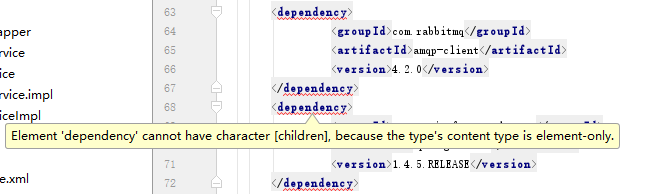
How to Solve Error: Element ‘dependency’ cannot have character [children], because the type’s content type is element-

The phenomenon is as follows:

The reason:
It’s when you copy it, you bring some special symbols.
Solution:
Copy that string of code to NotPad ++ or text, and then copy it into your compiler, and you’ll solve the problem