Copying between containers is not supported

Solution: add multiple slashes to the path split line

Copying between containers is not supported
Solution: add multiple slashes to the path split line
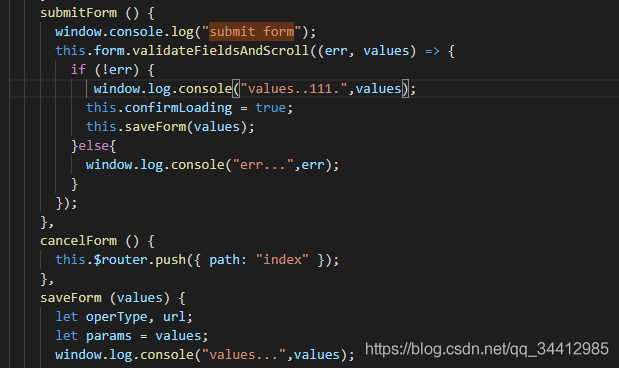
Vue + antd writes wrong output statements, resulting in no error report and no form submission. In fact, the method of submitting form has not been completed
This error report means that I don’t have the right to install and delete because I didn’t use my own computer. At the beginning, I didn’t notice the black window. This problem indicates that I don’t have the right to install and delete. Because you are not using your own computer, I didn’t notice that the default identity of Win + R is the current user, not the administrator, so you need to run CMD as an administrator.
Steps: 1. Open my computer, and the cmd.exe file is located on Disk C — & gt; Window folder — & gt; System32 folder, right-click to run as administrator.
2. At this time, execute the MySQL – install command again, and the installation is successful.
I have also configured environment variables here, but there is no exception after checking that CMD does not take effect globally. So I add the absolute path of bin folder to path directly. At this time, the MySQL command takes effect globally. If a small partner encounters the same problem, you can try this solution.
It is said on the Internet that my.ini or my.cnf files should be changed so that they can be used. I didn’t use them. I used the following method
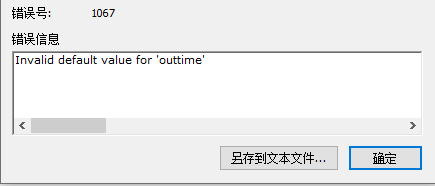
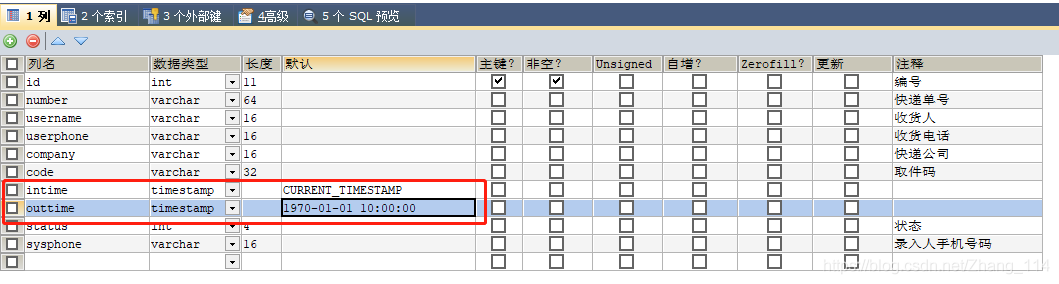
My problem is that when creating database tables visually, I choose timestamp as the data type and report an error
solution: add current to the default value_ The value of timestamp can be from 10:00:00 on January 1, 1970 to 23:59:59 on December 31, 2037
Intro
When clone comes from a GitHub warehouse, an error is reported as follows:
leung@wuyujin coderepo % git clone https://github.com/spring-guides/gs-consuming-web-service.git
Cloning into 'gs-consuming-web-service'...
fatal: unable to access 'https://github.com/spring-guides/gs-consuming-web-service.git/': LibreSSL SSL_connect: SSL_ERROR_SYSCALL in connection to github.com:443
leung@wuyujin coderepo % git clone https://github.com/spring-guides/gs-consuming-web-service.git
Cloning into 'gs-consuming-web-service'...
fatal: unable to access 'https://github.com/spring-guides/gs-consuming-web-service.git/': LibreSSL SSL_connect: SSL_ERROR_SYSCALL in connection to github.com:443
leung@wuyujin coderepo %
Core error: libressl_ connect: SSL_ ERROR_ SYSCALL in connection to github. com:443
It’s about SSL authentication.
to configure
The GIT configuration of the current user will be written in the . Gitconfig configuration file in the current user directory (if there is no new touch ~ /. Gitconfig )
take user wuyujin as an example, the full path of GIT configuration file is:
windows: C:
linux: /home/wuyujin /. Gitconfig
MacBook: /users/wuyujin /. Gitconfig
Git can be configured in two ways:
through the command line setting, the corresponding configuration items will be automatically written to the configuration file (premise: you know how to write the command)
directly modify the configuration file (premise: you know the format/rules of the configuration file)
Command required:
git config --global http.sslVerify false
git config --global https.sslVerify false
The effect is that the configuration file is written as follows:
[http]
        sslVerify = false
[https]
        sslVerify = false
In addition, user. Name user. Email and other parameters can be set (not necessary here).
shell
leung@wuyujin coderepo % git config --global http.sslVerify false
leung@wuyujin coderepo % git config --global https.sslVerify false

leung@wuyujin coderepo % more ~/.gitconfig

[http]
        sslVerify = false
[https]
        sslVerify = false
leung@wuyujin coderepo %
Once again, clone, success.
Another possibility
When you clone a warehouse, open a new window clone another window. report errors.
One clone at a time will not report an error.
That is: parallel clone -- & gt; Serial clone
1. Run the MVN – V command and report an error. Java.io.filenotfoundexception: F:: (java-maven-apache-maven-3.6.3) bin…/conf/logging
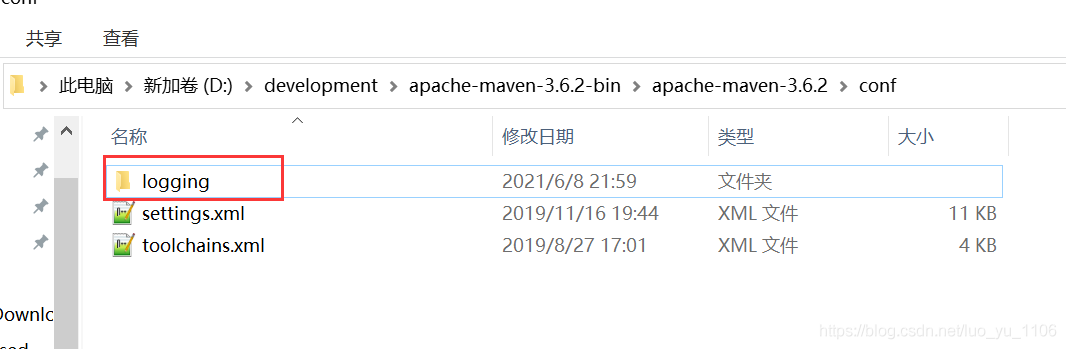
just create a logging folder
2. My java development and learning journey; Java NiO reports java.nio.charset.malformedinputexception: input length = 1 exception
I show that all encoding in idea is set to UTF-8, and check
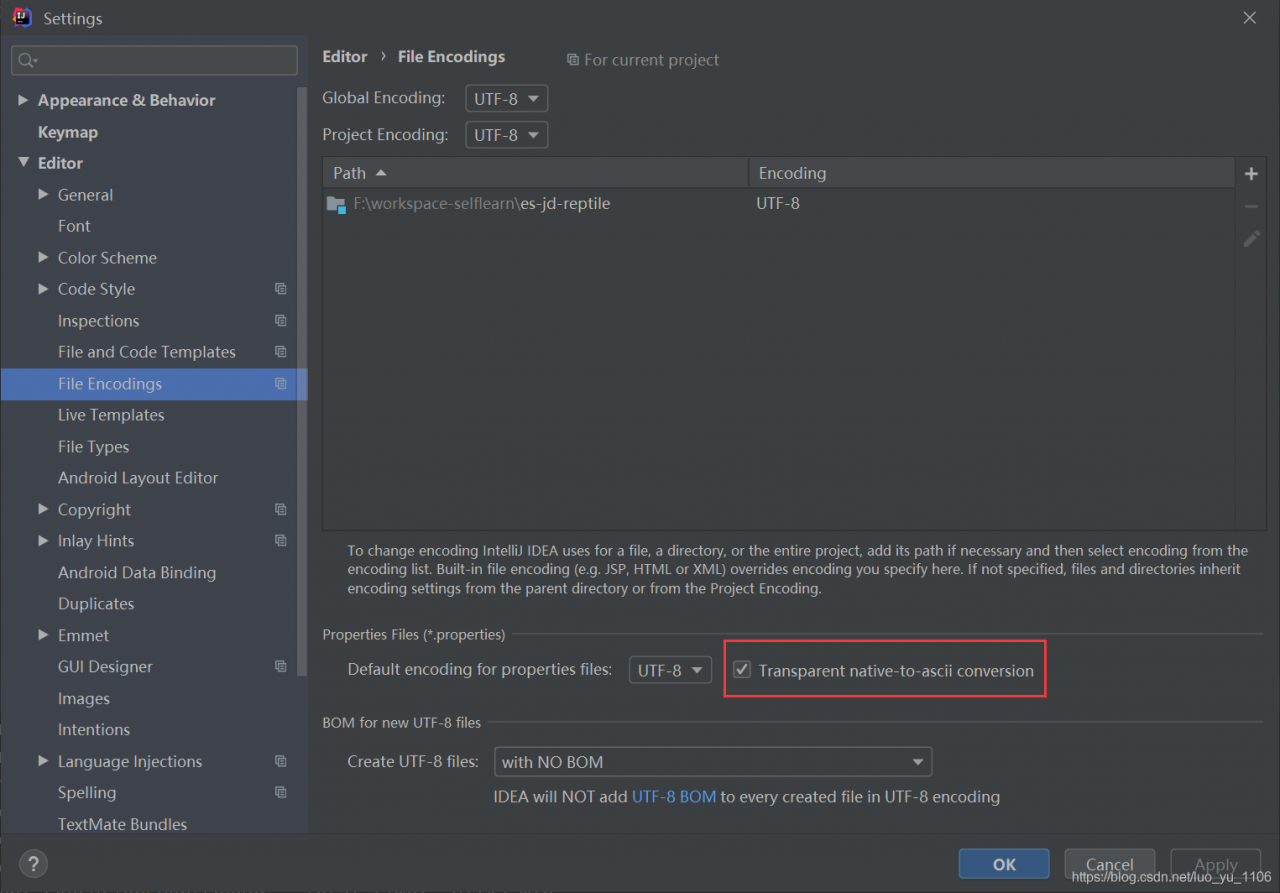
, but it still can’t
and then read this blog: https://blog.csdn.net/ouyang_ Peng/article/details/46462379
, delete the Chinese garbled code in application.properties and rewrite it in Chinese.
By the way, when using terminal to build MVN package in idea, you can add – x,
that is
mvn package -X
In this way, you can see the specific error log
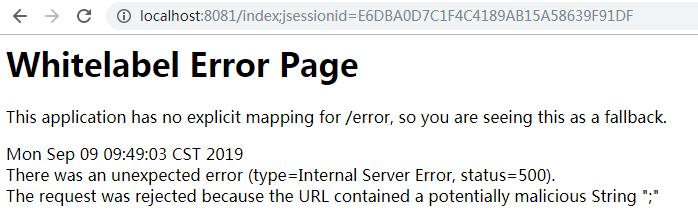
error
The request was rejected because the URL contained a potentially malicious String “;”
2019-09-09 10:39:30,149 ERROR (DirectJDKLog.java:182)- Servlet.service() for servlet [dispatcherServlet] in context with path [] threw exception
org.springframework.security.web.firewall.RequestRejectedException: The request was rejected because the URL contained a potentially malicious String ";"
	at org.springframework.security.web.firewall.StrictHttpFirewall.rejectedBlacklistedUrls(StrictHttpFirewall.java:265)
	at org.springframework.security.web.firewall.StrictHttpFirewall.getFirewalledRequest(StrictHttpFirewall.java:245)
	at org.springframework.security.web.FilterChainProxy.doFilterInternal(FilterChainProxy.java:194)
	at org.springframework.security.web.FilterChainProxy.doFilter(FilterChainProxy.java:178)
	at org.springframework.web.filter.DelegatingFilterProxy.invokeDelegate(DelegatingFilterProxy.java:357)
	at org.springframework.web.filter.DelegatingFilterProxy.doFilter(DelegatingFilterProxy.java:270)
	at org.apache.catalina.core.ApplicationFilterChain.internalDoFilter(ApplicationFilterChain.java:193)
	at org.apache.catalina.core.ApplicationFilterChain.doFilter(ApplicationFilterChain.java:166)
	at org.springframework.web.filter.RequestContextFilter.doFilterInternal(RequestContextFilter.java:99)
	at org.springframework.web.filter.OncePerRequestFilter.doFilter(OncePerRequestFilter.java:107)
	at org.apache.catalina.core.ApplicationFilterChain.internalDoFilter(ApplicationFilterChain.java:193)
	at org.apache.catalina.core.ApplicationFilterChain.doFilter(ApplicationFilterChain.java:166)
	at org.springframework.web.filter.HttpPutFormContentFilter.doFilterInternal(HttpPutFormContentFilter.java:109)
	at org.springframework.web.filter.OncePerRequestFilter.doFilter(OncePerRequestFilter.java:107)
	at org.apache.catalina.core.ApplicationFilterChain.internalDoFilter(ApplicationFilterChain.java:193)
	at org.apache.catalina.core.ApplicationFilterChain.doFilter(ApplicationFilterChain.java:166)
	at org.springframework.web.filter.HiddenHttpMethodFilter.doFilterInternal(HiddenHttpMethodFilter.java:81)
	at org.springframework.web.filter.OncePerRequestFilter.doFilter(OncePerRequestFilter.java:107)
	at org.apache.catalina.core.ApplicationFilterChain.internalDoFilter(ApplicationFilterChain.java:193)
	at org.apache.catalina.core.ApplicationFilterChain.doFilter(ApplicationFilterChain.java:166)
	at org.springframework.web.filter.CharacterEncodingFilter.doFilterInternal(CharacterEncodingFilter.java:200)
	at org.springframework.web.filter.OncePerRequestFilter.doFilter(OncePerRequestFilter.java:107)
	at org.apache.catalina.core.ApplicationFilterChain.internalDoFilter(ApplicationFilterChain.java:193)
	at org.apache.catalina.core.ApplicationFilterChain.doFilter(ApplicationFilterChain.java:166)
	at org.apache.catalina.core.StandardWrapperValve.invoke(StandardWrapperValve.java:198)
	at org.apache.catalina.core.StandardContextValve.invoke(StandardContextValve.java:96)
	at org.apache.catalina.authenticator.AuthenticatorBase.invoke(AuthenticatorBase.java:496)
	at org.apache.catalina.core.StandardHostValve.invoke(StandardHostValve.java:140)
	at org.apache.catalina.valves.ErrorReportValve.invoke(ErrorReportValve.java:81)
	at org.apache.catalina.core.StandardEngineValve.invoke(StandardEngineValve.java:87)
	at org.apache.catalina.connector.CoyoteAdapter.service(CoyoteAdapter.java:342)
	at org.apache.coyote.http11.Http11Processor.service(Http11Processor.java:803)
	at org.apache.coyote.AbstractProcessorLight.process(AbstractProcessorLight.java:66)
	at org.apache.coyote.AbstractProtocol$ConnectionHandler.process(AbstractProtocol.java:790)
	at org.apache.tomcat.util.net.NioEndpoint$SocketProcessor.doRun(NioEndpoint.java:1459)
	at org.apache.tomcat.util.net.SocketProcessorBase.run(SocketProcessorBase.java:49)
	at java.util.concurrent.ThreadPoolExecutor.runWorker(ThreadPoolExecutor.java:1149)
	at java.util.concurrent.ThreadPoolExecutor$Worker.run(ThreadPoolExecutor.java:624)
	at org.apache.tomcat.util.threads.TaskThread$WrappingRunnable.run(TaskThread.java:61)
	at java.lang.Thread.run(Thread.java:748)
***Springboot2.0 + Spring Security ***
We can findorg.springframework.security.web.firewall.StrictHttpFirewall
/**
 * <p>
 * Determines if semicolon is allowed in the URL (i.e. matrix variables). The default
 * is to disable this behavior because it is a common way of attempting to perform
 * <a href="https://www.owasp.org/index.php/Reflected_File_Download">Reflected File Download Attacks</a>.
 * It is also the source of many exploits which bypass URL based security.
 * </p>
 * <p>For example, the following CVEs are a subset of the issues related
 * to ambiguities in the Servlet Specification on how to treat semicolons that
 * led to CVEs:
 * </p>
 * <ul>
 *     <li><a href="https://pivotal.io/security/cve-2016-5007">cve-2016-5007</a></li>
 *     <li><a href="https://pivotal.io/security/cve-2016-9879">cve-2016-9879</a></li>
 *     <li><a href="https://pivotal.io/security/cve-2018-1199">cve-2018-1199</a></li>
 * </ul>
 *
 * <p>
 * If you are wanting to allow semicolons, please reconsider as it is a very common
 * source of security bypasses. A few common reasons users want semicolons and
 * alternatives are listed below:
 * </p>
 * <ul>
 * <li>Including the JSESSIONID in the path - You should not include session id (or
 * any sensitive information) in a URL as it can lead to leaking. Instead use Cookies.
 * </li>
 * <li>Matrix Variables - Users wanting to leverage Matrix Variables should consider
 * using HTTP parameters instead.
 * </li>
 * </ul>
 *
 * @param allowSemicolon should semicolons be allowed in the URL. Default is false
 */
public void setAllowSemicolon(boolean allowSemicolon) {
	if (allowSemicolon) {
		urlBlacklistsRemoveAll(FORBIDDEN_SEMICOLON);
	} else {
		urlBlacklistsAddAll(FORBIDDEN_SEMICOLON);
	}
}
Mentioned here, if you want a semicolon, please reconsider because it is a very common source of security bypass. Here are some common reasons why users need semicolons and alternatives:
Include JSESSIONID in the path-You should not include the session ID (or any sensitive information) in the URL, as it may lead to leakage. Instead, cookies are used.
@SpringBootApplication
public class Application {

    public static void main(String[] args) {
        SpringApplication.run(Application.class, args);
    }

    @Bean
    public HttpFirewall allowUrlSemicolonHttpFirewall() {
        StrictHttpFirewall firewall = new StrictHttpFirewall();
        firewall.setAllowSemicolon(true);
        return firewall;
    }
}
If the security restriction is released, the error will not be encountered, and it is not suitable for applications with very high security requirements.
Today, when using POI to do an Excel export, a null pointer error is always reported. Later, after I carefully searched through the log, I found the real problem;
The error is as follows:
type Exception report
message Request processing failed; nested exception is java.lang.NullPointerException
description The server encountered an internal error that prevented it from fulfilling this request.
exception
org.springframework.web.util.NestedServletException: Request processing failed; nested exception is java.lang.NullPointerException
	org.springframework.web.servlet.FrameworkServlet.processRequest(FrameworkServlet.java:973)
	org.springframework.web.servlet.FrameworkServlet.doGet(FrameworkServlet.java:852)
	javax.servlet.http.HttpServlet.service(HttpServlet.java:624)
	org.springframework.web.servlet.FrameworkServlet.service(FrameworkServlet.java:837)
	javax.servlet.http.HttpServlet.service(HttpServlet.java:731)
	org.apache.tomcat.websocket.server.WsFilter.doFilter(WsFilter.java:52)
	com.bool.filter.RequestFilter.doFilterInternal(RequestFilter.java:37)
	org.springframework.web.filter.OncePerRequestFilter.doFilter(OncePerRequestFilter.java:108)
	org.springframework.web.filter.CharacterEncodingFilter.doFilterInternal(CharacterEncodingFilter.java:88)
	org.springframework.web.filter.OncePerRequestFilter.doFilter(OncePerRequestFilter.java:108)
	com.bool.filter.CorsFilter.doFilter(CorsFilter.java:31)
root cause
java.lang.NullPointerException
	java.io.ByteArrayInputStream.<init>(ByteArrayInputStream.java:106)
	com.bool.controller.DetectionController.historyRecordDownkoad(DetectionController.java:264)
	sun.reflect.NativeMethodAccessorImpl.invoke0(Native Method)
	sun.reflect.NativeMethodAccessorImpl.invoke(NativeMethodAccessorImpl.java:57)
	sun.reflect.DelegatingMethodAccessorImpl.invoke(DelegatingMethodAccessorImpl.java:43)
	java.lang.reflect.Method.invoke(Method.java:606)
	org.springframework.web.method.support.InvocableHandlerMethod.invoke(InvocableHandlerMethod.java:215)
	org.springframework.web.method.support.InvocableHandlerMethod.invokeForRequest(InvocableHandlerMethod.java:132)
	org.springframework.web.servlet.mvc.method.annotation.ServletInvocableHandlerMethod.invokeAndHandle(ServletInvocableHandlerMethod.java:104)
	org.springframework.web.servlet.mvc.method.annotation.RequestMappingHandlerAdapter.invokeHandleMethod(RequestMappingHandlerAdapter.java:749)
	org.springframework.web.servlet.mvc.method.annotation.RequestMappingHandlerAdapter.handleInternal(RequestMappingHandlerAdapter.java:690)
	org.springframework.web.servlet.mvc.method.AbstractHandlerMethodAdapter.handle(AbstractHandlerMethodAdapter.java:83)
	org.springframework.web.servlet.DispatcherServlet.doDispatch(DispatcherServlet.java:945)
	org.springframework.web.servlet.DispatcherServlet.doService(DispatcherServlet.java:876)
	org.springframework.web.servlet.FrameworkServlet.processRequest(FrameworkServlet.java:961)
	org.springframework.web.servlet.FrameworkServlet.doGet(FrameworkServlet.java:852)
	javax.servlet.http.HttpServlet.service(HttpServlet.java:624)
	org.springframework.web.servlet.FrameworkServlet.service(FrameworkServlet.java:837)
	javax.servlet.http.HttpServlet.service(HttpServlet.java:731)
	org.apache.tomcat.websocket.server.WsFilter.doFilter(WsFilter.java:52)
	com.bool.filter.RequestFilter.doFilterInternal(RequestFilter.java:37)
	org.springframework.web.filter.OncePerRequestFilter.doFilter(OncePerRequestFilter.java:108)
	org.springframework.web.filter.CharacterEncodingFilter.doFilterInternal(CharacterEncodingFilter.java:88)
	org.springframework.web.filter.OncePerRequestFilter.doFilter(OncePerRequestFilter.java:108)
	com.bool.filter.CorsFilter.doFilter(CorsFilter.java:31)
note The full stack trace of the root cause is available in the Apache Tomcat/7.0.77 logs.
However, this is not the problem; when I debugged, I found another cause of the error;
java.lang.IllegalArgumentException: The workbook already contains a sheet with this name
The workbook already contains a piece of this name;
Okay, I found the problem.
solution:
Just modify the sheet page name in the export template;
Because many test environments are installed on this Ubuntu system, but due to the restart or power failure of the virtual server, every time the IP changes, the environment must be updated, so the ip of the environment needs to be configured as static, once and for all.
According to the previous experience of configuring Ubuntu static ip, directly vi /etc/network/interfaces configured static ip under this file, and it did not take effect after resetting the network.
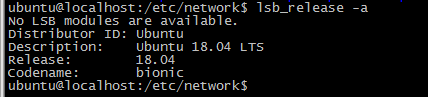
So I checked the ubuntu version, it was 18.04, and Baidu found that “ubuntu has given up the fixed IP configuration in /etc/network/interfaces since 17.10. Even the configuration will not take effect. Instead, it is changed to netplan and the configuration is written In /etc/netplan/01-netcfg.yaml or a yaml file with a similar name”, so I configured according to the method found, but I encountered a lot of errors and almost vomited blood. Write down the errors I encountered here.
1, the beginning of the configuration is as follows: in the implementation apply netplan error message occurs Invalid YAML at //etc/netplan/01-netcfg.yaml line 11 column 11 : mapping values are not allowed in this context
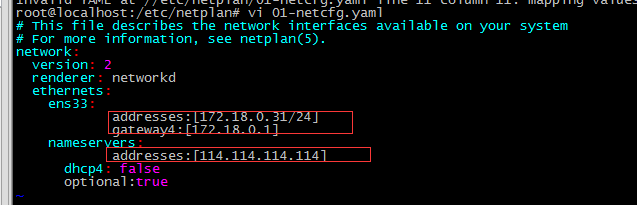
Solution: yaml is a hierarchical structure and needs to be indented. A colon (:) means a dictionary, a hyphen (-) means a list, and there must be a space after the colon.
2. After adding a space after the colon (as shown below), execute netplan apply and report an error: Invalid YAML at //etc/netplan/01-netcfg.yaml line 11 column 6: did not find expected key
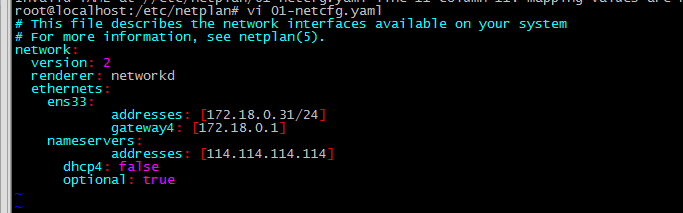
Solution: nameservers should be the fourth layer like gateway4, and the addresses after nameservers should be the fifth layer
The correct number of layers is as follows:
3. After solving according to the above method, execute netplan apply and report an error as shown below : Error in network definition //etc/netplan/01-netcfg.yaml line 8 column 16: expected scalar
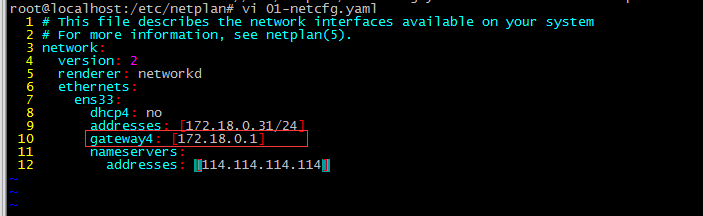
Solution: The address of gateway4 does not have square brackets. After the modification, restart the network service and it will be normal ( netplan apply )
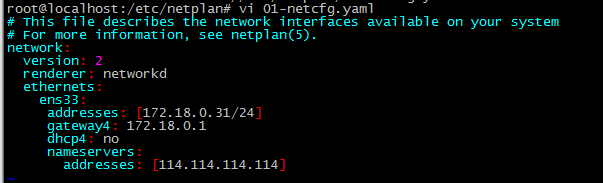
So the correct configuration format should be as follows: In this way, the static ip is successfully configured
Errors that I did not encounter:
Report an error
java.lang.ClassNotFoundException: org.apache.ibatis.session.SqlSession
or
java.lang.ClassNotFoundException: org.mybatis.spring.SqlSessionFactoryBean
Obviously, it is because the class cannot be found: the SqlSession class or SqlSessionFactoryBean cannot be found
Solution:
Forget to add mybatis dependency and mybatis-spring when integrating ssm
<dependency>
  <groupId>org.mybatis</groupId>
  <artifactId>mybatis-spring</artifactId>
  <version>${mybatis-spring.version}</version>
</dependency>
<dependency>
  <groupId>org.mybatis</groupId>
  <artifactId>mybatis</artifactId>
  <version>${mybatis.version}</version>
</dependency>The
version used is:
<mybatis.version>3.4.1</mybatis.version>
<mybatis-spring.version>1.3.0</mybatis-spring.version>
carried out:
ceph-deploy mon create-initial
Error:
[ceph_deploy][ERROR] KeyNotFoundError: Could not find keyring file: /etc/ceph/ceph.client.admin.keyring on host node1
[ceph_deploy][ERROR] KeyNotFoundError: Could not find keyring file: /etc/ceph/ceph.client.admin.keyring on host node2
[ceph_deploy][ERROR] KeyNotFoundError: Could not find keyring file: /etc/ceph/ceph.client.admin.keyring on host node3
solve:
ceph auth get-or-create client.admin mon’allow *’mds’allow *’osd’allow *’–o /etc/ceph/ceph.client.admin.keyring
or
ceph-create-keys –id node1
ceph-create-keys –id node2
ceph-create-keys –id node3
Error 2:
[ceph_deploy.mon][ERROR]Some monitors have still not reached quorum:
[ceph_deploy.mon][ERROR]node1
solve:
It can’t be solved for the time being, I have solved the error 3 after starting from the beginning:
————————————————– ———————————–
Implementation: rbd list
Error 3:
2018-08-19 10:31:08.047481 7f1f6c1d7700 0 – 192.168.4.1:0/3336722177 >> 192.168.4.2:6804/9634 pipe(0x55db04d46b20 sd=4 :0 s=1 pgs=0 cs=0 l=1 c=0x55db04d45db0).fault
Troubleshooting:
[root@node1 ceph-cluster]# ll /dev/vdb{1,2}
brw-rw—-. 1 root disk 252, 17 Aug 19 10:24 /dev/vdb1
brw-rw—-. 1 root disk 252, 18 Aug 19 10:24 /dev/vdb2
The problem is: the owner of /dev/vdb1 /dev/vdb2 is not ceph
solve:
[root@node1 ceph-cluster]# ll /dev/vdb{1,2}
brw-rw—-. 1 ceph ceph 252, 17 Aug 19 10:24 /dev/vdb1
brw-rw—-. 1 ceph ceph 252, 18 Aug 19 10:24 /dev/vdb2
chown ceph.ceph /dev/vdb{1,2}
[root@node1 ceph-cluster]# ll /dev/vdb{1,2}
brw-rw—-. 1 ceph ceph 252, 17 Aug 19 10:24 /dev/vdb1
brw-rw—-. 1 ceph ceph 252, 18 Aug 19 10:24 /dev/vdb2
[root@node1 ceph-cluster]# ceph-deploy osd activate node1:/dev/vdc1 node1:/dev/vdd1
[root@node1 ceph-cluster]# ceph-deploy osd activate node2:/dev/vdc1 node2:/dev/vdd1
[root@node1 ceph-cluster]# ceph-deploy osd activate node3:/dev/vdc1 node3:/dev/vdd1
1. Change the table method.
It may be that your account does not allow remote login, only localhost. At this time, as long as you are on the localhost computer, after logging in to MySQL, change the “host” item in the “user” table in the “mysql” database, and change the name from “localhost” to “%”
mysql - u root - p

mysql > use mysql;

mysql > update  user  set host =  ' % '  where  user  =  ' root ' ;

mysql > select host, user  from  user ;
Note: Personally feel that it is not suitable!
[Error content]: SQL Error (2013): Lost connection to MySQL server at’waiting for initial communication packet’, system error: 0
[Error generation process]: Appears when connecting to MySQL.
[Solution]: Open my.ini, find the [mysqld] item, add a sentence after it: skip-name-resolve, save, and restart the mysql service~
The above is the full text introduction to solve MySQL Error (2013): Lost connection to MySQL server at waiting for initial communication packet, I hope it will be helpful for you to learn and use the database.
2. Authorization law.
1) For example, if you want myuser to use mypassword to connect to the mysql server from any host.
GRANT  ALL  PRIVILEGES  ON  * . *  TO  ' myuser ' @ ' % ' IDENTIFIED BY  ' mypassword '  WITH  GRANT  OPTION ;

FLUSH    PRIVILEGES ;
2) If you want to allow the user myuser to connect to the mysql server from the host whose ip is 192.168.1.6, and use mypassword as the password
GRANT  ALL  PRIVILEGES  ON  * . *  TO  ' myuser ' @ ' 192.168.1.3 ' IDENTIFIED BY  ' mypassword '  WITH  GRANT  OPTION ;

FLUSH    PRIVILEGES ;
3) If you want to allow the user myuser to connect to the dk database of the mysql server from the host whose ip is 192.168.1.6, and use mypassword as the password
GRANT  ALL  PRIVILEGES  ON dk. *  TO  ' myuser ' @ ' 192.168.1.3 ' IDENTIFIED BY  ' mypassword '  WITH  GRANT  OPTION ;

FLUSH    PRIVILEGES ;
The first method I used 1), and finally execute a statement mysql>FLUSH RIVILEGES to make the modification effective.
There is another method, but I haven’t tried it personally, I can find it on csdn.net, you can take a look.
Run on the machine where mysql is installed:
1. d: / mysql / bin /> mysql    - h localhost    - u root   // This should be able to enter the MySQL server

2. mysql > GRANT    ALL    PRIVILEGES    ON    * . *    TO    ' root ' @ ' % '    WITH    GRANT    OPTION   // Give any host access to data

3. mysql > FLUSH    PRIVILEGES   //The modification takes effect

4. mysql > EXIT   // Exit the MySQL server
In this way, you can log in as root on any other host!