[Solved] But was actually of type ‘com. Sun. Proxy. $proxy**‘

error:Caused by: org.springframework.beans.factory.BeanNotOfRequiredTypeException: Bean named '****' is expected to be of type '****' but was actually of type 'com.sun.proxy.$Proxy**'The solution to the problem.
The code inside my controller is.

@Autowired
private UserServiceImpl userServiceImpl;

The solution is to change the userserviceimpl implementation class to the userservice interface, and that’s it.

After solving the problem, the code is as follows:

@Autowired
private UserService userServiceImpl;

The specific reason is that the interface should be used to receive the proxy object, so as to obtain the proxy object.

Error when manipulating files: zipfile.BadZipFile: File is not a zip file

When writing code, the recorder pursues decoupling, and wants the program to see if the path file exists. The OS module is usually used to operate the file or path. If it does not exist, the file is created under the current path for subsequent operations. As far as I know, the OS module does not give a method to create a file, which requires us to complete the “road safety first” through another way. At that time, we used the general with open to create a file. OK, no problem. The creation was successful. The next problem is the error of zipfile.badzipfile: file is not a zip file during data storage, It’s said that the file that is not zip is rushing to work. Suddenly, it’s a flash of inspiration. When the pandas module is used, it’s just that the file can be operated. In the end, the overall code has not changed. The only change is to attach the code at the step of creating the file

def isfile(self, file):
        print(file)
        if not os.path.isfile(file):
            df = pd.DataFrame(columns=['name', 'shake number', 'weibo', 'profile', 'estimated sales']) # Create a table object, without creating the content first
            df.to_excel(self.filr, index=False) # Save the object as an .xlsx file
        return file

Call the function to execute retuan and return the path URL for subsequent operation

[Solved] This application has no explicit mapping for /error, so you are seeing this as a fallback

This application has no explicit mapping for /error, so you are seeing this as a fallback

Today, we use spring boot to build a background weather project. The database we use is weather and the table name is city. Adding annotations in the control layer writes getmapping as restmapping, which leads to errors. Fill in the address bar with localhost: port number/database table name/list. Only in this way can it be displayed normally

[Solved] org.mongodb.driver.cluster – Exception in monitor thread while connecting to server node1:27017

spring   An error was reported when the boot project started to connect mongodb.

2021-06-09 17:10:34,663 INFO  org.mongodb.driver.cluster - Exception in monitor thread while connecting to server node1:27017
com.mongodb.MongoSocketException: node1
	at com.mongodb.ServerAddress.getSocketAddresses(ServerAddress.java:211)
	at com.mongodb.internal.connection.SocketStream.initializeSocket(SocketStream.java:75)
	at com.mongodb.internal.connection.SocketStream.open(SocketStream.java:65)
	at com.mongodb.internal.connection.InternalStreamConnection.open(InternalStreamConnection.java:128)
	at com.mongodb.internal.connection.DefaultServerMonitor$ServerMonitorRunnable.run(DefaultServerMonitor.java:117)
	at java.lang.Thread.run(Thread.java:745)
Caused by: java.net.UnknownHostException: node1
	at java.net.Inet6AddressImpl.lookupAllHostAddr(Native Method)
	at java.net.InetAddress$2.lookupAllHostAddr(InetAddress.java:928)
	at java.net.InetAddress.getAddressesFromNameService(InetAddress.java:1323)
	at java.net.InetAddress.getAllByName0(InetAddress.java:1276)
	at java.net.InetAddress.getAllByName(InetAddress.java:1192)
	at java.net.InetAddress.getAllByName(InetAddress.java:1126)
	at com.mongodb.ServerAddress.getSocketAddresses(ServerAddress.java:203)
	... 5 common frames omitted

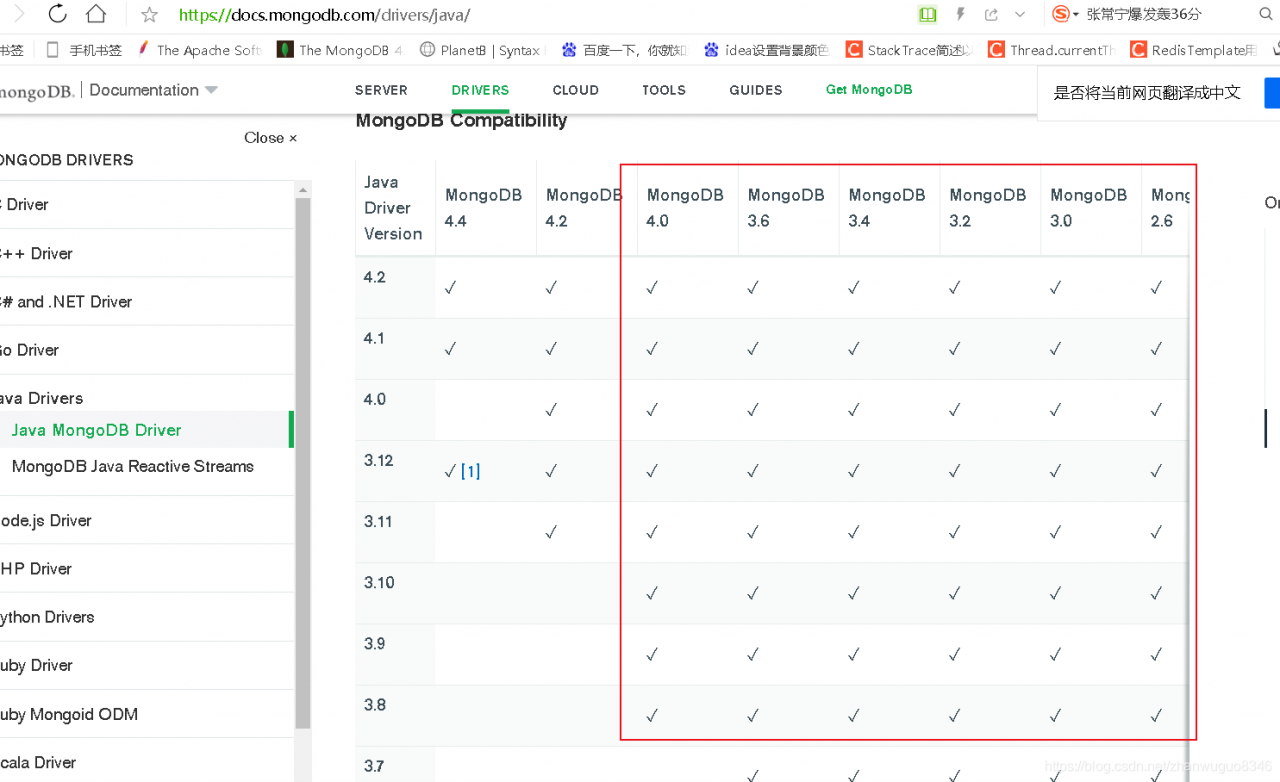
Because it’s a new project, Mongo library belongs to other projects. This is just a test application. So the first doubt is that the project version driver is not compatible with mongodb library. After replacing other versions of mongodb library, it is OK.

Detailed explanation

View the

<dependency>
        <groupId>org.springframework.data</groupId>
        <artifactId>spring-data-mongodb</artifactId>
        <version>2.1.3.RELEASE</version>
    </dependency>

Because of spring   Mongodb driver is also the official driver of encapsulated mongodb. When you enter the spring data mongodb project, you can see that the official version of mongodb driver is 3.8.2
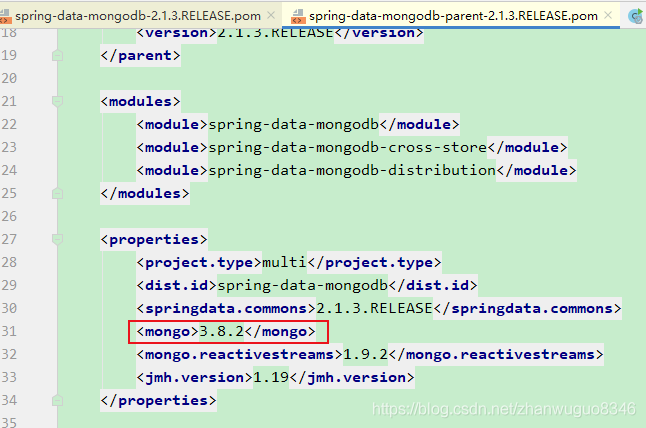
Then go to the official website of mongodb to see that version 3.8 supports version 4.0 database at most. I started testing with the 4.2 library (Official website https://docs.mongodb.com/drivers/java/)
So that’s it.
Golang Warning: Error string should not be capitalized or end with punctuation mark

Error string should not be capitalized or end with punctuation mark
The error string should not be capitalized or punctuated

When we use errors. New (“AAA.”) or fmt.Errorf(“Aaa.”)   When the form returns error information, the text content should not start with a capital letter or end with a punctuation mark.

Only modify according to the warning, remove the beginning of capital letter and the end of punctuation. Errors. New (“AAA”)

FileNotFoundError: Could not find module ‘D:\Anaconda3\envs\labe\Library\bin\geos_c.dll‘ [Solved]

Solution:
FileNotFoundError: Could not find module
‘D:\Anaconda3\envs\LabelImg\label\bin\geos_c.dll’ (or one of its dependencies).
Try using the full path with constructor syntax.(or one of its dependencies). Try using the full path with constructor syntax.

1, most people are not importing the “shapely” dependency. You only need to import it

pip install shapely

2. Import this or report an error, basically it is wrong with your Python version.

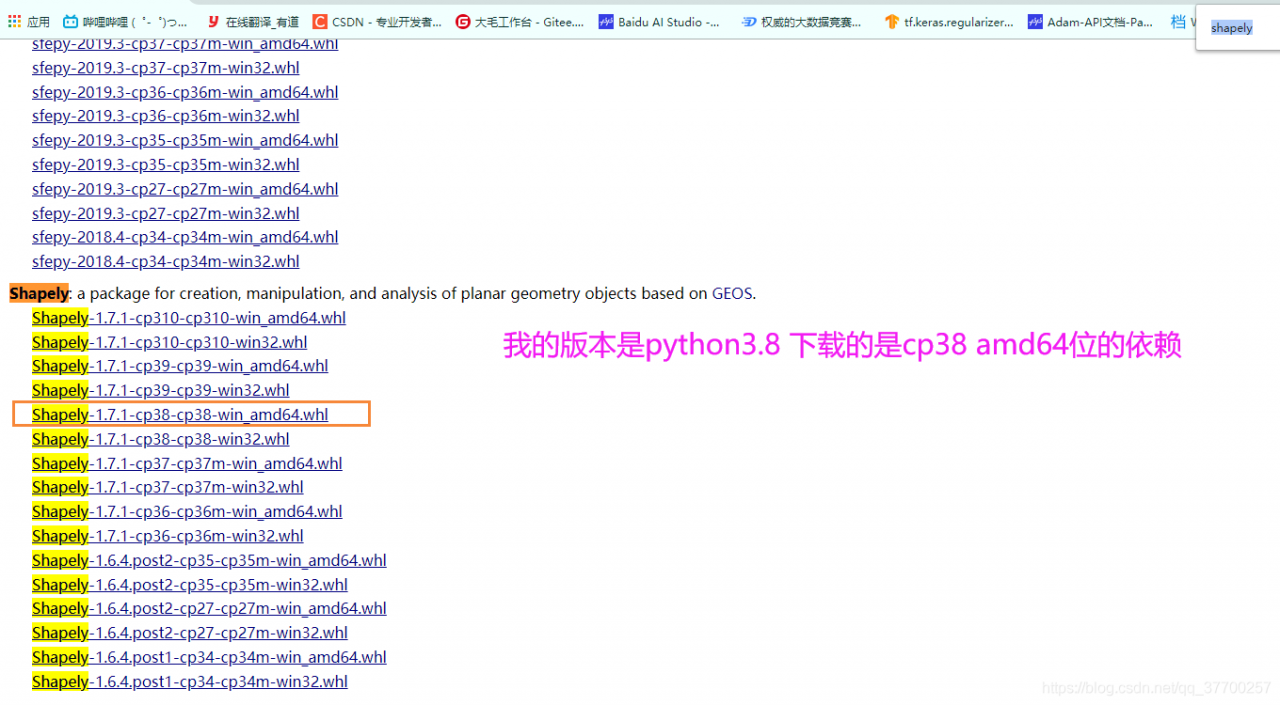
To download the corresponding. WHL file, the link is as follows: https://www.lfd.uci.edu/~gohlke/pythonlibs/#shapely , after entering the website, Ctrl + F can find shapely, and select the version up or down according to your own version( The author is python3.8)

#First uninstall the downloaded shapely
pip uninstall shapely
#then download the local cp38 version of shapely
pip install D:\PyCharm\Pro\OCR\PaddleOCR\PPOCRLabel\BACK\Shapely-1.7.1-cp38-cp38-win_amd64.whl

Ctypes DLL Error: FileNotFoundError: Could not find module ‘***_dll.dll‘ (or one of its dependencies).

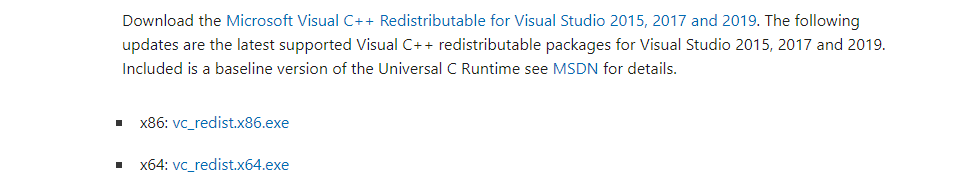
Generally speaking, a 32-bit DLL can run on a 64 bit computer, so it has nothing to do with the number of bits in the computer. First of all, make sure that the path of the DLL file is correct. If it is correct, you will still report this error, that is, the environment is missing. Baidu search Microsoft Visual C++   2019。

Installation of X86 x64 depends on the two environments

For the record, a lot of mistakes on the Internet delayed the whole day.