AttAttributeError: module ‘typing‘ has no attribute ‘NoReturn‘

Problem Description:

an error is reported when installing tensorflow GPU = = 1.4.1 in the virtual environment with Python version 3.6.0

AttAttributeError: module ‘typing’ has no attribute ‘NoReturn’

Cause analysis:

Python version is too low. Python has changed a lot since 3.6

Solution:

install a newer version of python, and you can solve the problem above 3.6.2

2021-07-27 Android studio:Installed build tools revision 31.0.0 is corrupted.Remove and install ag

There is a problem with version 31.0.0. You can choose another version
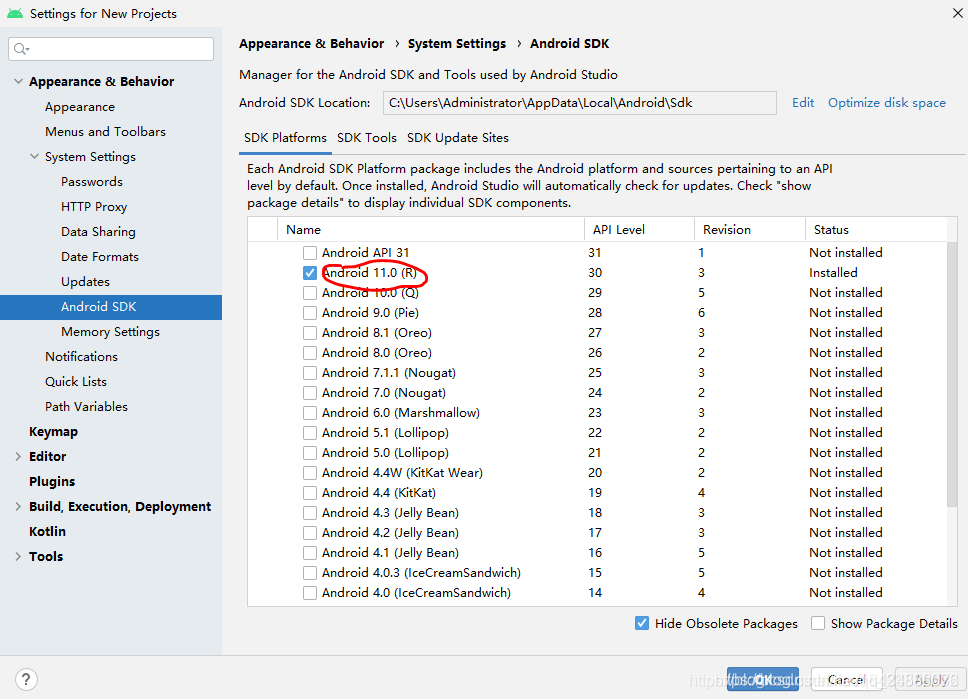
first go to tools – & gt; Uninstall 31.0.0 in SDK manager, Download Android R (API 30: version 11)

after that, modify the three variables compilesdkversion, buildtoolsversion and targetsdkversion in APP/build.gradle file
compileSdkVersion 30
buildToolsVersion “30.0.0”
targetSdkVersion 30

UserWarning: Failed to initialize NumPy: No module named ‘numpy.core._multiarray_umath‘

This error is usually caused by the mismatch of numpy versions, and the related MKL libraries are also uninstalled

pip unstall numpy
pip unstall mkl-service

Then PIP reinstall it

I just don’t know why I can’t solve it with CONDA uninstall + reinstall. Just replace it with PIP. It seems that there is a difference between uninstall and installed library?

Docker CentOS Failed to get D-Bus connection: Operation not permitted

Question

The CentOS container is started based on docker. You need to use systemctl start XXX to start the service in the CentOS container. An error occurred:

Failed to get D-Bus connection: Operation not permitted

reason

The permission of ptrace system call. By default, the container does not have permission to ptrace process.

resolvent

When starting the container, turn on the privileged mode through privileged = true , and start it with /usr/SBIN/init as the entry command, for example:

docker run -d -name centos7 --privileged=true centos:7 /usr/sbin/init

After entering the container with the command docker exec - it centos7/bin/bash , you can start the service internally with systemctl start .


(END)

[Solved] RuntimeError: cublas runtime error : resource allocation failed at

[root@bsyocr server-train]# tail trainall210722_6.log.txt
File “/home/server-train/pytorch_pretrained/modeling.py”, line 300, in forward
mixed_query_layer = self.query(hidden_states)
File “/usr/local/lib64/python3.6/site-packages/torch/nn/modules/module.py”, line 547, in __call__
result = self.forward(*input, **kwargs)
File “/usr/local/lib64/python3.6/site-packages/torch/nn/modules/linear.py”, line 87, in forward
return F.linear(input, self.weight, self.bias)
File “/usr/local/lib64/python3.6/site-packages/torch/nn/functional.py”, line 1371, in linear
output = input.matmul(weight.t())
RuntimeError: cublas runtime error : resource allocation failed at /pytorch/aten/src/THC/THCGeneral.cpp:216

RuntimeError: CUDA out of memory. error when running the model Checked a lot of related content, the reason is: GPU memory memory is not enough Briefly summarize the solution: change the batch_size to a smaller size

Modify the pad.size of bert from 2048 -> 1024

(node:2233) UnhandledPromiseRejectionWarning: Error: EACCES: permission denied, mkdir ‘/usr/loca~‘

UnhandledPromiseRejectionWarning: Unhandled promise rejection. This error originated either by throwing inside of an async function without a catch block, or by rejecting a promise which was not handled with .catch(). To terminate the node process on unhandled promise rejection, use the CLI flag `–unhandled-rejections=strict` (see https://nodejs.org/api/cli.html#cli_unhandled_rejections_mode). (rejection id: 1)
(node:2233) [DEP0018] DeprecationWarning: Unhandled promise rejections are deprecated. In the future, promise rejections that are not handled will terminate the Node.js process with a non-zero exit code.

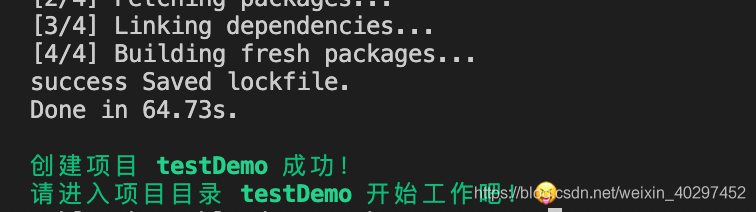
When you encounter the above error when initializing a project with taro, this is due to insufficient permissions. Add sudo before the initialization command taro init, i.e.
Initialize command by:

taro init

Replace with:

sudo taro init

It can be created successfully!

[Solved] Failed to set attribute: Invalid input data or parameter

Arm64 swconfig failed to configure VLAN

Failed to set attribute: invalid input data or parameter

Kernel version: linux-5.20.26
phenomenon:

root@OpenWrt:/usr/lib# swconfig dev switch0 vlan 2 set ports "1 2 3"
Failed to set attribute: Invalid input data or parameter

Ref:
https://forum.openwrt.org/t/ath79-kernel-5-4-swconfig-libnl-tiny-issue/50689
https://github.com/MartB/openwrt/commit/df051318503ff41c6214fa845e447dcfc5d1a1d8
Reason: The problem with libnl-tiny can be solved by using libnl-3 instead

--- a/package/network/config/swconfig/Makefile
+++ b/package/network/config/swconfig/Makefile
@@ -14,27 +14,26 @@ PKG_MAINTAINER:=Felix Fietkau <[email protected]>
 PKG_LICENSE:=GPL-2.0
 
 include $(INCLUDE_DIR)/package.mk
-include $(INCLUDE_DIR)/kernel.mk
 
 define Package/swconfig
   SECTION:=base
   CATEGORY:=Base system
-  DEPENDS:=+libuci +libnl-tiny
+  DEPENDS:=+libuci +libnl
   TITLE:=Switch configuration utility
 endef
 
 TARGET_CPPFLAGS := \
        -D_GNU_SOURCE \
-       -I$(STAGING_DIR)/usr/include/libnl-tiny \
+       -I$(STAGING_DIR)/usr/include/libnl3\
+       -I$(LINUX_DIR)/include \
        -I$(PKG_BUILD_DIR) \
-       $(TARGET_CPPFLAGS) \
-       -I$(LINUX_DIR)/user_headers/include
+       $(TARGET_CPPFLAGS)
 
 define Build/Compile
        CFLAGS="$(TARGET_CPPFLAGS) $(TARGET_CFLAGS)" \
        $(MAKE) -C $(PKG_BUILD_DIR) \
                $(TARGET_CONFIGURE_OPTS) \
-               LIBS="$(TARGET_LDFLAGS) -lnl-tiny -lm -luci -lubox"
+               LIBS="-L$(STAGING_DIR)/usr/lib -lnl-genl-3 -lnl-3 -lm -luci -lubox"
 endef

Opencv Python realizes the paint filling function in PS, one click filling color and the possible reasons for opencv’s frequent errors

First of all, first solve the opencv error problem, once up on the error report headache
cv2.error: OpenCV(4.5.3) C:\Users\runneradmin\AppData\Local\Temp\pip-req-build-z4706ql7\opencv\modules\highgui\src\window.cpp:1274: error: (-2:Unspecified error) The function is not implemented. Rebuild the library with Windows, GTK+ 2.x or Cocoa support. If you are on Ubuntu or Debian, install libgtk2.0-dev and pkg-config, then re-run cmake or configure script in function ‘cvShowImage’

This version is probably not downloaded well, delete and start again


pip uninstall opencv-python

Then download the command

pip3 install opencv-contrib-python

Nice successfully solved the problem. Of course, there may be errors in the path with Chinese or spaces, and sometimes errors will be reported.

No more code, no more nonsense

import cv2 as cv
import numpy as np

def fill_color_demo(image):    #Define the function to fill the color with one click
    Img2 = image.copy() # make a copy of the input image
    h, w = image.shape[:2] #Get the length and width of the image
    mask = np.zeros([h+2, w+2],np.uint8) #mask must be row and column plus 2, and must be uint8 single-channel array, fill the edges need more than 2 pixels, otherwise it will report an error
    cv.floodFill(Img2, mask, (100, 100), (127, 127, 127), (100, 100, 100), (50, 50 ,50), cv.FLOODFILL_FIXED_RANGE)
    #cv.floodFill, parameter 1,: indicates the input image, parameter 2: indicates the mask of a single channel, parameter 3: indicates the starting point of the flooding algorithm, parameter 4 indicates the color of the fill, and parameters 5,6 indicate the maximum positive and negative difference between the currently observed pixel point and the neighboring pixel points
    #x coordinates are from left to right, y coordinates are from top to bottom
    cv.imshow("result", Img2) # display the result image

img = cv.imread('. /1.jpg') # read in the image
cv.imshow('input', img) #Show the input image
fill_color_demo(img) #Transfer the input image into the defined fill color function
cv.waitKey(0)    

Then there is the result, as shown below
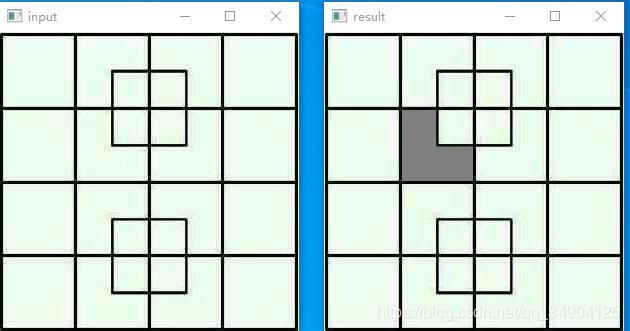
On the left is the original image of input and on the right is the output image. The color is (127127) gray and the coordinates are (100100). You can change the color coordinates as you like. It’s still very fun

Remember to like, pay attention to and collect
maven.TestGenerateMojo.execute(TestGenerateMojo.java:65) [How to Solve]

When packing the module, the following error occurs:

Error:(80,77) java:, org.springframework.aot.maven.TestGenerateMojo.execute(TestGenerateMojo.java:65), org.apache.maven.plugin.DefaultBuildPluginManager.executeMojo(DefaultBuildPluginManager.java:137), org.apache.maven.lifecycle.internal.MojoExecutor.execute(MojoExecutor.java:210), org.apache.maven.lifecycle.internal.MojoExecutor.execute(MojoExecutor.java:156), org.apache.maven.lifecycle.internal.MojoExecutor.execute(MojoExecutor.java:148), org.apache.maven.lifecycle.internal.LifecycleModuleBuilder.buildProject(LifecycleModuleBuilder.java:117), org.apache.maven.lifecycle.internal.LifecycleModuleBuilder.buildProject(LifecycleModuleBuilder.java:81), org.apache.maven.lifecycle.internal.builder.singlethreaded.SingleThreadedBuilder.build(SingleThreadedBuilder.java:56), org.apache.maven.lifecycle.internal.LifecycleStarter.execute(LifecycleStarter.java:128), org.apache.maven.DefaultMaven.doExecute(DefaultMaven.java:305), org.apache.maven.DefaultMaven.doExecute(DefaultMaven.java:192), org.apache.maven.DefaultMaven.execute(DefaultMaven.java:105), org.apache.maven.cli.MavenCli.execute(MavenCli.java:957), org.apache.maven.cli.MavenCli.doMain(MavenCli.java:289), org.apache.maven.cli.MavenCli.main(MavenCli.java:193), sun.reflect.NativeMethodAccessorImpl.invoke0(Native Method), sun.reflect.NativeMethodAccessorImpl.invoke(NativeMethodAccessorImpl.java:62), sun.reflect.DelegatingMethodAccessorImpl.invoke(DelegatingMethodAccessorImpl.java:43), java.lang.reflect.Method.invoke(Method.java:498), org.codehaus.plexus.classworlds.launcher.Launcher.launchEnhanced(Launcher.java:282), org.codehaus.plexus.classworlds.launcher.Launcher.launch(Launcher.java:225), org.codehaus.plexus.classworlds.launcher.Launcher.mainWithExitCode(Launcher.java:406), org.codehaus.plexus.classworlds.launcher.Launcher.main(Launcher.java:347), org.codehaus.classworlds.Launcher.main(Launcher.java:47)]

Later corrected the pom.xml, for build, there will be a plug-in comments up on the good:

<build>
        <plugins>
            <plugin>
                <groupId>org.springframework.boot</groupId>
                <artifactId>spring-boot-maven-plugin</artifactId>
                <version>2.1.6.RELEASE</version>
                <configuration>
                    <classifier>${repackage.classifier}</classifier>
                </configuration>
            </plugin>

			<plugin>
				<groupId>org.apache.maven.plugins</groupId>
				<artifactId>maven-compiler-plugin</artifactId>
				<configuration>
					<source>1.8</source>
					<target>1.8</target>
				</configuration>
			</plugin>

            <!--<plugin>
                <groupId>org.springframework.experimental</groupId>
                <artifactId>spring-aot-maven-plugin</artifactId>
                <version>${spring-native.version}</version>
                <executions>
                    <execution>
                        <id>test-generate</id>
                        <goals>
                            <goal>test-generate</goal>
                        </goals>
                    </execution>
                    <execution>
                        <id>generate</id>
                        <goals>
                            <goal>generate</goal>
                        </goals>
                    </execution>
                </executions>
            </plugin>-->
            <plugin>
                <groupId>org.apache.maven.plugins</groupId>
                <artifactId>maven-surefire-plugin</artifactId>
                <version>2.22.2</version>
                <configuration>
                    <skip>true</skip>
                    <argLine>-Dfile.encoding=UTF-8</argLine>
                </configuration>
            </plugin>
        </plugins>
    </build>

At present, it is judged that the plug-in I commented out reported an error.

Oracle 12.2.0.1 opatch lsinventory Error: LsInventorySession failed: RawInventory gets null OracleHomeInfo

[grid@node1 ~]$ opatch lsinventory -detail -oh /u01/app/12.2.0/grid
Oracle Interim Patch Installer version 12.2.0.1.25
Oracle Home : /u01/app/12.2.0/grid
Central Inventory : /u01/app/oraInventory
from : /u01/app/12.2.0/grid/oraInst.loc
OPatch version : 12.2.0.1.25
OUI version : 12.2.0.1.4
Log file location : /u01/app/12.2.0/grid/cfgtoollogs/opatch/opatch2021-07-22_11-46-24AM_1.log
List of Homes on this system:
Home name= OraDB12Home1, Location= “/u01/app/oracle/product/12.2.0/db_1”
LsInventorySession failed: RawInventory gets null OracleHomeInfo
OPatch failed with error code 73

Codes:

[grid@node1 ~]$ cd $ORACLE_HOME
[grid@node1 grid]$ cd oui
[grid@node1 oui]$ cd bin/
[grid@node1 bin]$ ls -l attachHome.sh 
-rwxr-x--- 1 grid oinstall 276 Jul 21 19:11 attachHome.sh
[grid@node1 bin]$ sh attachHome.sh 
Starting Oracle Universal Installer...

Checking swap space: must be greater than 500 MB.   Actual 2557 MB    Passed
The inventory pointer is located at /etc/oraInst.loc
'AttachHome' was successful.
[grid@node1 bin]$ opatch lsinventory -detail -oh /u01/app/12.2.0/grid
Oracle Interim Patch Installer version 12.2.0.1.25
Copyright (c) 2021, Oracle Corporation.  All rights reserved.


Oracle Home       : /u01/app/12.2.0/grid
Central Inventory : /u01/app/oraInventory
   from           : /u01/app/12.2.0/grid/oraInst.loc
OPatch version    : 12.2.0.1.25
OUI version       : 12.2.0.1.4
Log file location : /u01/app/12.2.0/grid/cfgtoollogs/opatch/opatch2021-07-22_11-51-26AM_1.log

Lsinventory Output file location : /u01/app/12.2.0/grid/cfgtoollogs/opatch/lsinv/lsinventory2021-07-22_11-51-26AM.txt
--------------------------------------------------------------------------------
Local Machine Information::
Hostname: node1
ARU platform id: 226
ARU platform description:: Linux x86-64

Installed Top-level Products (1): 

Oracle Grid Infrastructure 12c                                       12.2.0.1.0
There are 1 products installed in this Oracle Home.


Installed Products (99): 

Assistant Common Files                                               12.2.0.1.0
Automatic Storage Management Assistant                               12.2.0.1.0
BLASLAPACK Component                                                 12.2.0.1.0