Ruoyi-cloud Integrated mybatis-plus Error: Unknown column ‘search_value‘ in ‘field list‘

Project scenario:
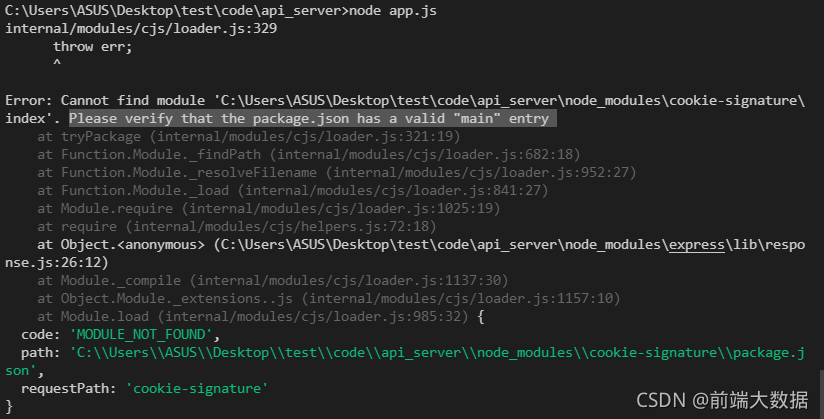
ruoyi cloud converts mybatis into mybatis plus, executes the querywrapper method, and always reminds of the error. Cause: java.sql.sqlsyntax errorexception: unknown column ‘search_ Value ‘in’ field list ‘
but the corresponding entity class did not find this field. After some efforts, the answer was found in an article, and finally the problem was solved!


Problem Description:

problem screenshot: 


Cause analysis:

because the database does not have this field, ruoyi cloud integrates baseentity, which contains this error field</ font>


Solution:

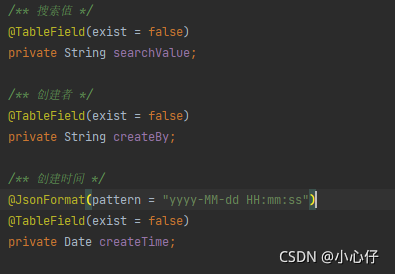
add annotation @tablefield (exist = false) to the corresponding entity class

[Solved] Odrive gui Error: Do not use the development server in a productioun and supported version of the Socket

WARNING: Do not use the development server in a production environment. · Issue #446 · PaddlePaddle/VisualDL (github.com) https://github.com/PaddlePaddle/VisualDL/issues/446

The above is for reference

To set the parameters, then odrive_ The name of server depends on what the odrive GUI reports as an error, and it can be changed by comparison

set FLASK_APP=odrive_server
set FLASK_ENV=development

Then the version problem was solved by mistake

pip install --upgrade python-socketio==4.6.0

pip install --upgrade python-engineio==3.13.2

pip install --upgrade Flask-SocketIO==4.3.1

After upgrading windows 11, Wireshark can’t get list of interfaces: packetgetadapternames reports an error

Question

After win10 is upgraded to win11, Wireshark displays Wireshark can’t get list of interfaces: packetgetadapternames: the system cannot find the specified path
packetgetadapternames is an API of WinPcap. Wireshark captures packets based on WinPcap or npcap. When installing Wireshark, an npcap or usbpcap will be automatically installed. I guess npcap or usbpcap may disappear after upgrading the system, so uninstall Wireshark and reinstall it. Just install npcap or usbpcap

solve

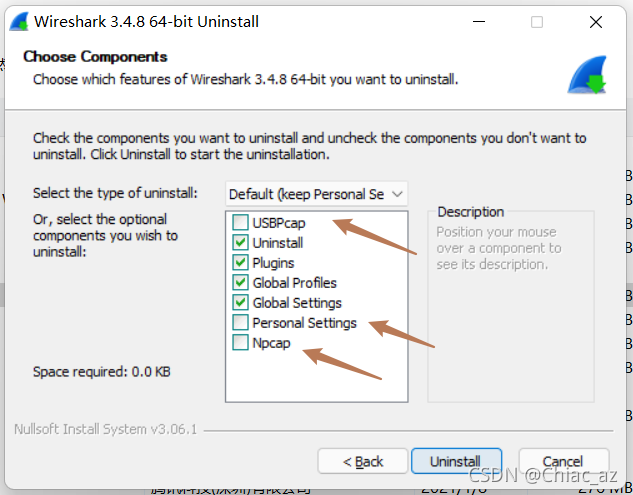
Remember to check all these options when uninstalling

The installation of ThinkPHP reported an error. Could not find package topthink / think with stability stable

Install ThinkPHP and execute the command

composer create-project topthink/think tp5 --prefer-dist

report errors

 [InvalidArgumentException]
Could not find package topthink/think with stability stable.

resolvent:

    delete the previous image

    composer config -g --unset repos.packagist
    
      run the install ThinkPHP command

      composer create-project topthink/think tp5 --prefer-dist
      

      success!!!

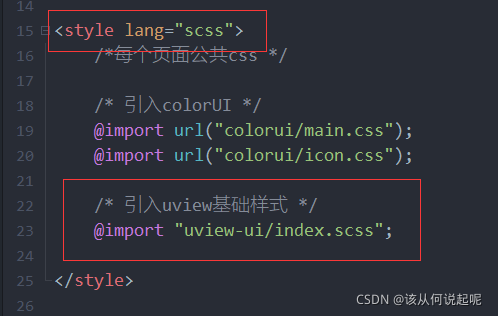
Uniapp uses CMD to import uview. An error is reported, and the file search fails: ‘uview UI’‘

Uniapp uses CMD to import uview. An error is reported, and the file search fails: ‘uview UI’

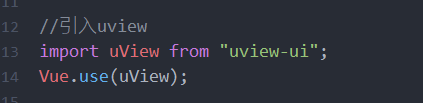
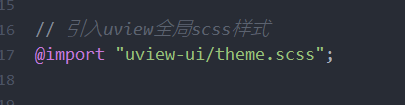
Note: do not use CMD to import uview plug-in. If you use local file import, the problem does not exist and can be imported normally.

1.App.vue

2.main.js

3.pages.json

4.uni.scss

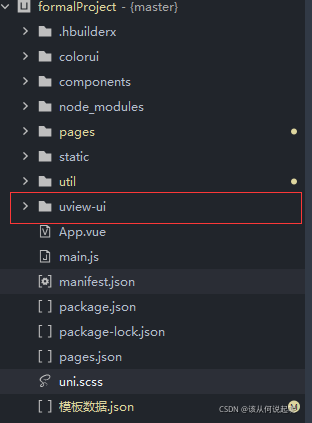
5. Uview is imported into the project root directory

Solve the problem of raspberry pie using GStreamer. Importerror: cannot import name XXX introspection typelib not found

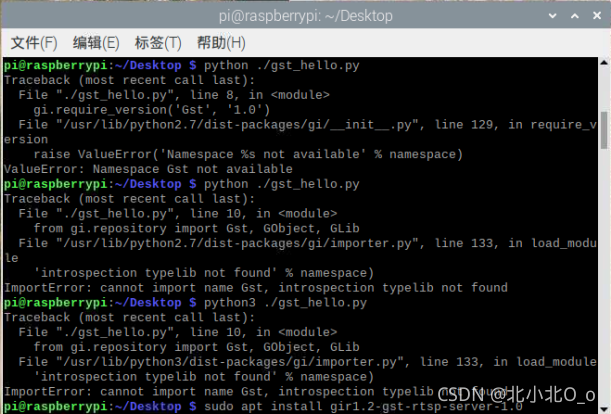
GStreamer is a video streaming framework. When it is first used after installation, an error will be reported when using the Hello World routine in the official doc, as follows:

ImportError: cannot import name GstRtspServer, introspection typelib not found


```python
#!/usr/bin/env python3
import sys

import gi

gi.require_version('GLib', '2.0')
gi.require_version('GObject', '2.0')
gi.require_version('Gst', '1.0')

from gi.repository import Gst, GObject, GLib

pipeline = None
bus = None
message = None

# initialize GStreamer
Gst.init(sys.argv[1:])

# build the pipeline
pipeline = Gst.parse_launch(
    "playbin uri=https://www.freedesktop.org/software/gstreamer-sdk/data/media/sintel_trailer-480p.webm"
)

# start playing
pipeline.set_state(Gst.State.PLAYING)

# wait until EOS or error
bus = pipeline.get_bus()
msg = bus.timed_pop_filtered(
    Gst.CLOCK_TIME_NONE,
    Gst.MessageType.ERROR | Gst.MessageType.EOS
)

# free resources
pipeline.set_state(Gst.State.NULL)

“209151;”

sudo apt-get install gir1.2-gst-rtsp-server-1.0

Vue project, browser error: referenceerror: H is not defined

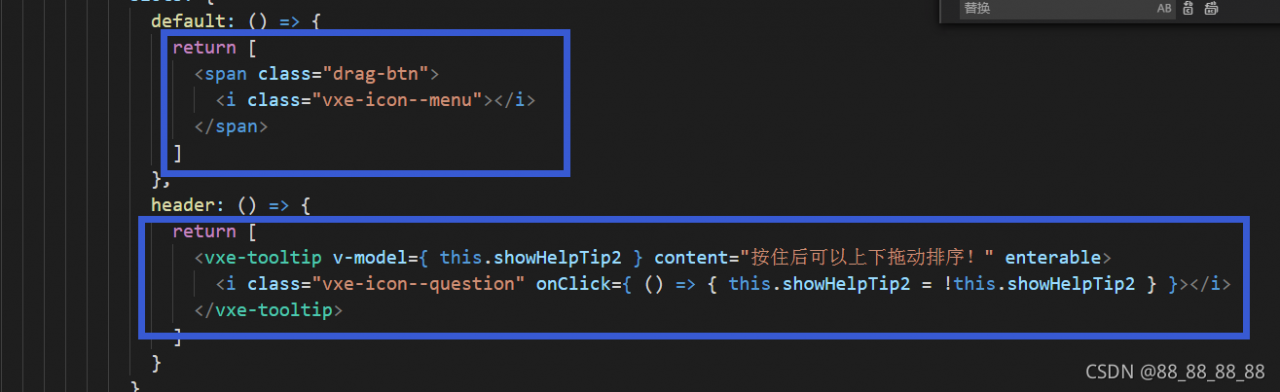
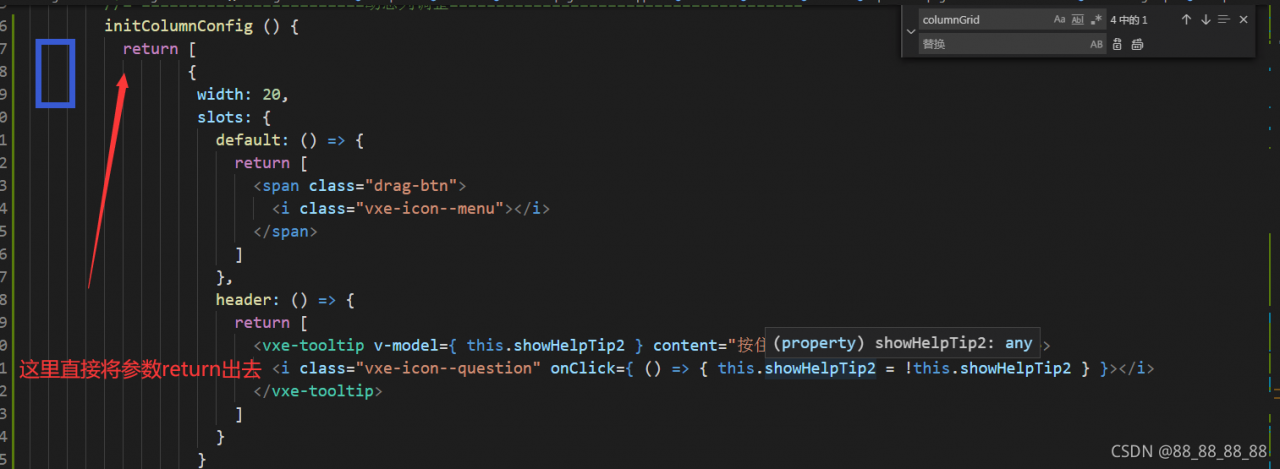
JSX syntax
encounters this error: check whether there are parameters similar to the code structure in the picture in your data() {
}. This belongs to JSX syntax and can also render components directly. However, in some specific scenarios, the browser console will report
referenceerror: H is not defined. This error
solution: create a new method in methods () {} and clip the parameters of the whole structure above to the method. The parameters in the data that you called before the template code block is changed from calling the methods to solving the problem from the method,

Solution to the flash back, error report and unexpected exit of idea MAC windows

First of all, let’s talk about the reason why I have this problem
when I use idea, because I am shy in my pocket, I use improper means to crack idea indefinitely, and then because I am stupid and improper operation, idea exits unexpectedly and can’t enter the flash screen
finally, through repeated search on the Internet, the strength of nine cattle and two tigers was wasted, and finally a solution was found. I share it with you here.

The problem is that it appears in the idea. Vmoptions file. For some cracking, you need to add a path to crack the JRE package in this file. The problem appears here.

So the first solution I think of is to find this file, modify it back, or delete it directly
so I found the idea.vmoptions file in the bin directory of the idea installation directory. Then delete it, and the result still doesn’t work.

Then I tried to uninstall the software and reinstall it with another version, which still didn’t work.

This shows that the idea.vmoptions file under the installation package is not the root of the problem

Because every time we start, the file idea.vmoptions in the installation directory is not loaded
instead, the file under C: \ users \ user name \. Intellijidea2018.1 \ config \ plugins
. Mac is located in users/computer user name/library/preferences/intellijidea2019.3
if not, go to if not, go to: application support/JetBrains/intellijidea2020.1 under library /. After finding it, delete it and start the idea again.