Ubuntu14.04 Error:
fatal error: linux/videodev.h: No such file or directory
Solution:
sudo apt-get install libv4l-dev

sudo ln -s /usr/include/libv4l1-videodev.h  /usr/include/linux/videodev.h
Ubuntu14.04 Error:
fatal error: linux/videodev.h: No such file or directory
Solution:
sudo apt-get install libv4l-dev
sudo ln -s /usr/include/libv4l1-videodev.h /usr/include/linux/videodev.h
@[TOC] (solution: C + +: internal compiler error: killed (program cc1plus))
1. Problems
Blogger installs sophus Library in VMware virtual machine, and an error occurs when executing make command, as shown in the following figure
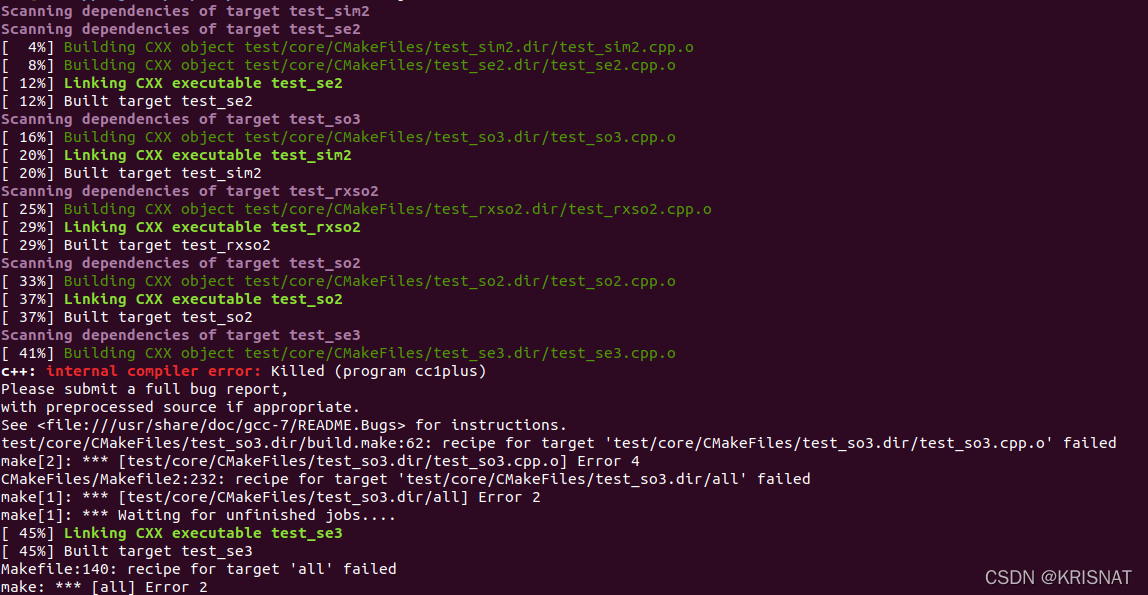
2. Analyze problems
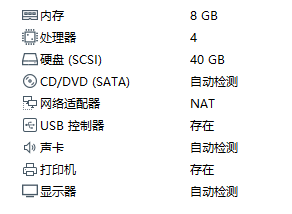
Multi party search to determine that the memory allocated to the Ubuntu system in VMware is too small. (the corresponding Ubuntu system installed on the physical machine is that the swap partition is too small)
3. Problem-solving
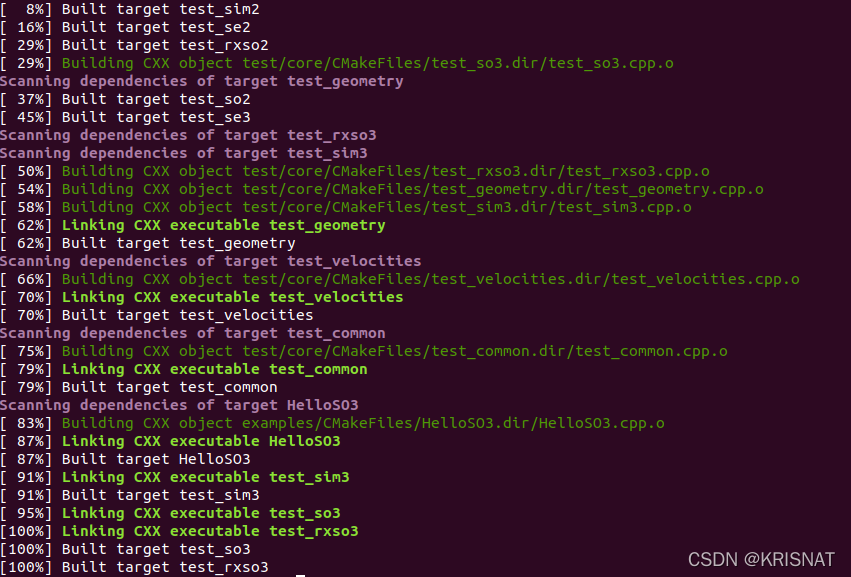
Shut down the virtual machine -> Increase virtual machine memory to 8g -> Re execute the make command -> Problem solving
When resttemplate is used to request restful interface, the returned JSON data will always be parsed into XML data for processing under specific circumstances, and then the error in the title will appear:
Error while extracting response for type [] and content type [application/xml;charset=UTF-8]; nested exception is org.springframework.http.converter.HttpMessageNotReadableException: JSON parse error: Unexpected character ‘5’ (code 53) in content after ‘<‘ (malformed start element?).
at [row,col {unknown-source}]: [1,15395]; nested exception is com. fasterxml. jackson. databind. JsonMappingException: Unexpected character ‘5’ (code 53) in content after ‘<‘ (malformed start element?).
According to the error information, it seems that the response header marks the return type as [application/XML; charset = UTF-8], but the actual situation is that all the returned data is [application/JSON; charset = UTF-8].
After tracing the resttemplate source code, it is found that the instance created by new resttemplate (httprequestfactory()) will have 7 Converters:
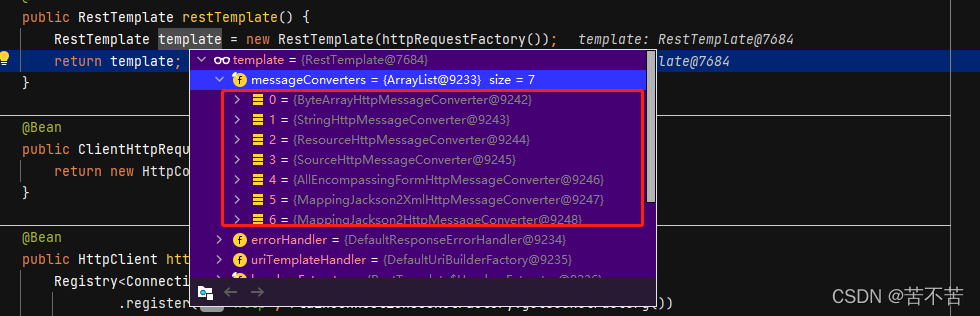
Continue to track the exchange of the resttemplate. When performing type conversion on the response, all converters in the current instance will be iterated, and then select a converter that supports the current type for execution. Use canread to judge:
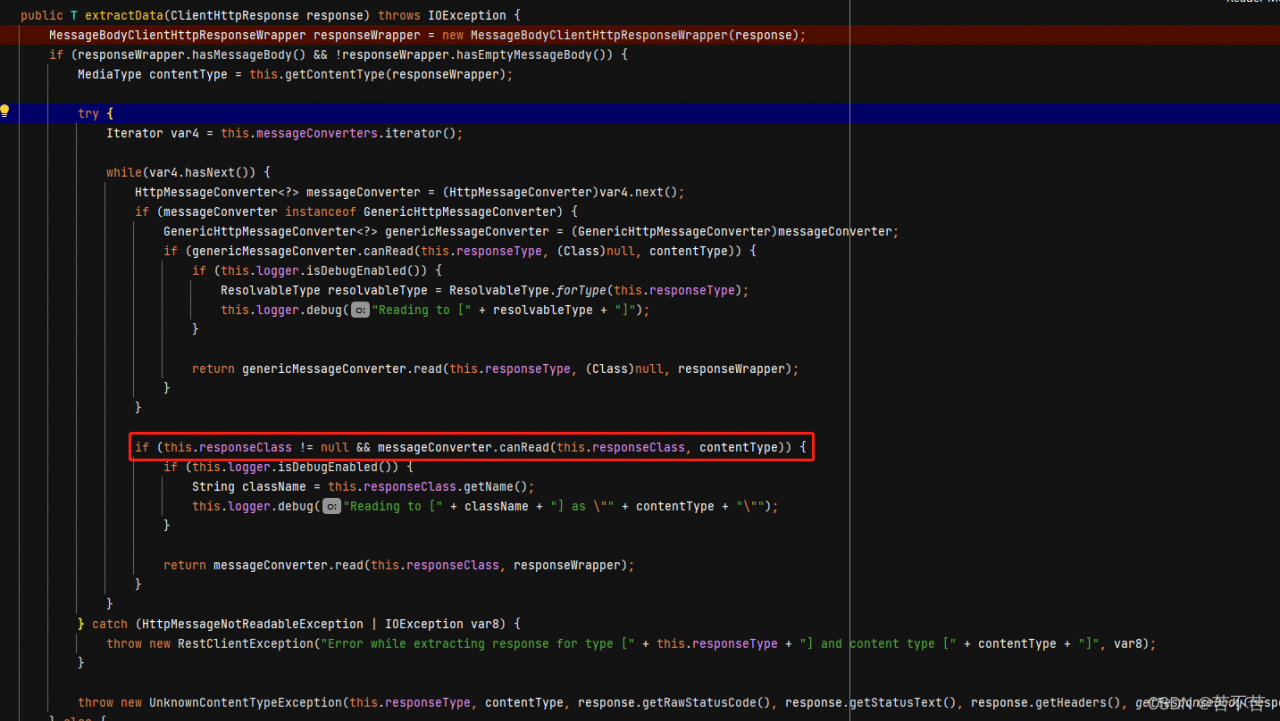
At this time, the problem is found. Under certain circumstances, the contenttype of the response header is read as “application/XML”. However, the real data at this time is still in JSON format. Therefore, if the converter for XML format is deleted, the iterator will look for the next executable converter, mappingjackson2httpmessageconverter. Or change the order of the two to reduce the priority of XML.
Solution:
1: Delete XML converter
    @Bean
    public RestTemplate restTemplate() {
        RestTemplate template = new RestTemplate(httpRequestFactory());
        // Exclude xml parsing converters to avoid parsing json data as xml
        List<HttpMessageConverter<?>> collect = template.getMessageConverters().stream().filter(m -> !(m instanceof MappingJackson2XmlHttpMessageConverter)).collect(Collectors.toList());
        template.setMessageConverters(collect);
        return template;
    }
2: Reduce XML converter priority
    @Bean
    public RestTemplate restTemplate() {
        RestTemplate template = new RestTemplate(httpRequestFactory());
        // Turn down the priority of xml parsing
        int xml = 0, json = 0;
        List<HttpMessageConverter<?>> messageConverters = template.getMessageConverters();
        for (int i = 0; i < messageConverters.size(); i++) {
            HttpMessageConverter<?> h = messageConverters.get(i);
            if (h instanceof MappingJackson2XmlHttpMessageConverter) {
                xml = i;
            } else if (h instanceof MappingJackson2HttpMessageConverter) {
                json = i;
            }
        }
        Collections.swap(template.getMessageConverters(), xml, json);

        return template;
    }
Just when I was writing the program of sending sine wave with single chip microcomputer, I encountered these two errors. I searched a lot on the Internet and read some information
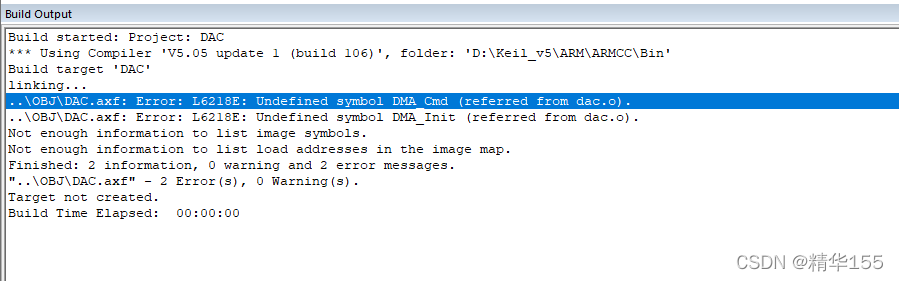
Solution:
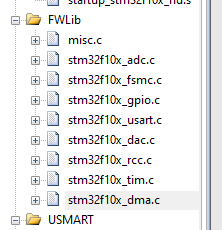
Specifically, I just look at my project file fwlib, which lacks DMA firmware library, and then add it.
1. Execute
npm install
The following errors are reported
gyp ERR! configure error
gyp ERR! stack Error: Can't find Python executable "python", you can set the PYTHON env variable.
gyp ERR! stack     at PythonFinder.failNoPython (/home/h5/my-vue/node_modules/node-gyp/lib/configure.js:484:19)
gyp ERR! stack     at PythonFinder.<anonymous> (/home/h5/my-vue/node_modules/node-gyp/lib/configure.js:406:16)
gyp ERR! stack     at F (/home/h5/my-vue/node_modules/which/which.js:68:16)
gyp ERR! stack     at E (/home/h5/my-vue/node_modules/which/which.js:80:29)
gyp ERR! stack     at /home/h5/my-vue/node_modules/which/which.js:89:16
gyp ERR! stack     at /home/h5/my-vue/node_modules/isexe/index.js:42:5
gyp ERR! stack     at /home/h5/my-vue/node_modules/isexe/mode.js:8:5
gyp ERR! stack     at FSReqCallback.oncomplete (fs.js:192:21)
gyp ERR! System Linux 4.18.0-305.19.1.el8_4.x86_64
gyp ERR! command "/home/soft/nodejs/bin/node" "/home/h5/my-vue/node_modules/node-gyp/bin/node-gyp.js" "rebuild" "--verbose" "--libsass_ext=" "--libsass_cflags=" "--libsass_ldflags=" "--libsass_library="
gyp ERR! cwd /home/up/down/122/whxmapp-vue/node_modules/node-sass
gyp ERR! node -v v14.17.5
gyp ERR! node-gyp -v v3.8.0
gyp ERR! not ok
2. Solution:
Update and upgrade NPM
sudo npm install npm@latest -gRecently, I want to try the KTX expansion Library of Android core in the project:
implementation "androidx.core:core-ktx:1.7.0"
After adding dependency, we happily start to use various concise syntax sugars provided by KTX to fly happily~
Once running, wow, I reported an error:
Android resource linking failed /Users/xxx/.gradle/caches/transforms-2/files-
2.1/5d04bb4852dc27334fe36f129faf6500/res/values/values.xml:115:5-162:25:
 AAPT: error: resource android:attr/lStar not found.
Solution 1:
If the dependency method is
AndroidX.Core: core-ktx:+
you need to replace it with a specific version
AndroidX.core:core-ktx:1.6.0
Solution 2:
If the version is 1.7.0, the compilesdkversion of the project is 31, because my project is 30, an error will be reported and changed to 1.6.0 version is good
error in pycallgraph setup command: use_2to3 is invalid.
Solution:
Downgrade setuptools>=58 –> <58
pip install setuptools==57.5.0I recently upgraded QT from QT5.12.9 to QT5.15.2, and the compiler reported error C4996: 'QWheelEvent::pos': Use position()
Reson and Solution:
It’s easy to see that the new version has changed QWheelEvent::pos to QWheelEvent::position, and the code changes pos to position.
Environmental description
Server: CentOS 7
docker: 20.10 12
kubeadm:v1. 23.1
Kubernetes:v1. twenty-three point one
Exception description
After docker and k8s related components are installed, there is a problem when executing kubedm init initializing the master node
execute the statement
kubeadm init \
--apiserver-advertise-address=Server_IP \
--image-repository registry.aliyuncs.com/google_containers \
--kubernetes-version=v1.23.1 \
--pod-network-cidr=10.244.0.0/16 \
--service-cidr=10.96.0.0/12
Error reporting exception
[kubelet-check] The HTTP call equal to 'curl -sSL http://localhost:10248/healthz' failed with error: Get "http://localhost:10248/healthz": dial tcp 127.0.0.1:10248: connect: connection refused.
According to the prompt following the error, you can use journalctl -XEU kubelet or journalctl -XEU kubelet -L to view the detailed error information. If you can’t see it completely, you can directly use the direction keys to adjust the error information.
This is
[root@k8s-node01 ~]# journalctl -xeu kubelet
Dec 24 20:24:13 k8s-node01 kubelet[9127]: I1224 20:24:13.456712    9127 cni.go:240] "Unable to update cni config" err="no
Dec 24 20:24:13 k8s-node01 kubelet[9127]: I1224 20:24:13.476156    9127 docker_service.go:264] "Docker Info" dockerInfo=&{
Dec 24 20:24:13 k8s-node01 kubelet[9127]: E1224 20:24:13.476236    9127 server.go:302] "Failed to run kubelet" err="failed
Dec 24 20:24:13 k8s-node01 systemd[1]: kubelet.service: main process exited, code=exited, status=1/FAILURE
Dec 24 20:24:13 k8s-node01 systemd[1]: Unit kubelet.service entered failed state.
Dec 24 20:24:13 k8s-node01 systemd[1]: kubelet.service failed.
Move the direction key to the right to view the details of the fourth line
ID:ZYIL:OO24:BWLY:DTTB:TDKT:D3MZ:YGJ4:3ZOU:7DDY:YYPQ:DPWM:ERFV Containers:0 ContainersRunning:0 ContainersPaused:0 Contain
 to run Kubelet: misconfiguration: kubelet cgroup driver: \"systemd\" is different from docker cgroup driver: \"cgroupfs\"
Error reporting reason
In fact, according to the above error information, it is caused by the inconsistency between k8s and docker’s CGroup driver
k8s is SYSTEMd, while docker is cgroupfs
Yes
docker info
Check CGroup driver: SYSTEMd or cgroupfs are displayed. K8s defaults to cgroupfs
Solution:
Modify the cgroup driver of docker to systemd
edit the configuration file of docker, and create it if it does not exist
vi /etc/docker/daemon.json
Modified to
{
…
“exec-opts”: [“native.cgroupdriver=systemd”]
…
}
Then restart Dockers
systemctl restart docker
Re kubedm init
Error running ‘Tomcat: run’: cannot run program “Tomcat: run” (in directory “D: \ myideaproject \ springmvc \ spring \ Web”): CreateProcess error = 2, the system cannot find the specified file.
reason:
You need to use the MVN Tomcat: run command.
The following problems may occur during operation
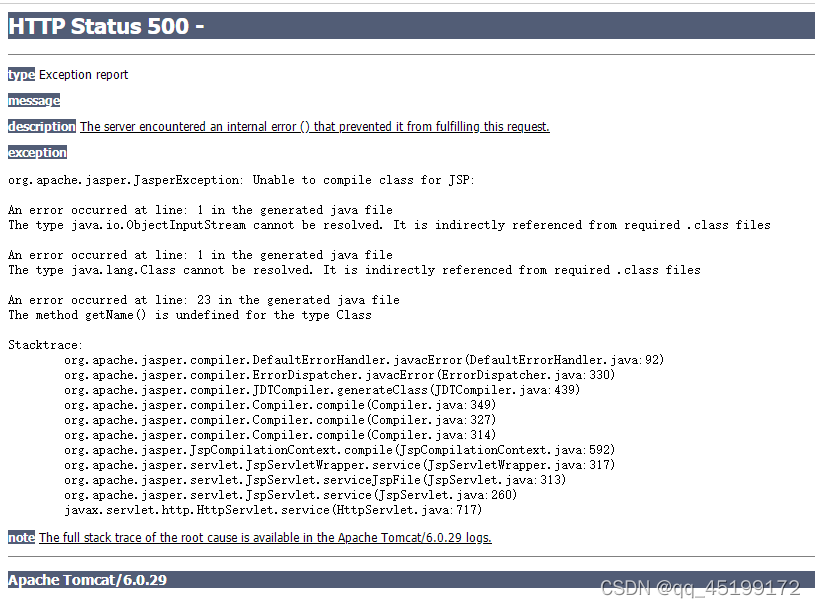
The reason may be that there is a problem with Maven’s default Tomcat. The solution is to add a Tomcat plug-in
Add the following codes to pom.xml
<plugin>
  <groupId>org.apache.tomcat.maven</groupId>
  <artifactId>tomcat7-maven-plugin</artifactId>
  <version>2.2</version>
  <configuration>
    <port>8080</port>
    <path>/</path>
  </configuration>
</plugin>
Then start with the MVN tomcat7: run command
Error: The superclass, ‘Animal’, has no unnamed constructor that takes no arguments.
Problem Description:
Because the constructor cannot inherit
an error is reported during inheritance, which prompts that the constructor in the parent class is composed of parameters. You need to write the constructor in the subclass and pass the constructor of the parent class to parameters
class Animal {
  String name;
  int age;
  Animal(this.name, this.age);

  void printInfo() {
    print('$name is $age years old');
  }
}

//Inherit Animal class by extends keyword
class Cat extends Animal {

}

void main(List<String> args) {
  Cat cat = new Cat();
 print( cat.name);
}
Solution:
Super keyword
Try declaring a zero argument constructor in ‘Animal’, or declaring a constructor in Cat that explicitly invokes a constructor in ‘Animal’.dart(no_default_super_constructor)
Try declaring a zero parameter constructor in “animal” or a constructor that explicitly calls the constructor in “animal” in cat.dart (no default super constructor)
class Animal {
  String name;
  int age;
  Animal(this.name, this.age);

  void printInfo() {
    print('$name is $age years old');
  }
}

//Inherit Animal class by extends keyword
class Cat extends Animal {
  Cat(String name, int age) : super(name, age);

}

void main(List<String> args) {
  Cat cat = new Cat("Huahua",3);
 print( cat.name);
}
ubuntu18.04 ROS:melodic python2.7
 File "/home/bionic/yuxiangROS_handeye/catkin_ws/src/handeye-calib-master/src/handeye-calib/src/handeye/handeye_calibration_backend_opencv.py", line 29, in HandeyeCalibrationBackendOpenCV
    'Park': cv2.CALIB_HAND_EYE_PARK,
AttributeError: 'module' object has no attribute 'CALIB_HAND_EYE_PARK'
[base_hand_on_eye_calib-1] process has died [pid 15724, exit code 1, cmd /home/bionic/yuxiangROS_handeye/catkin_ws/src/handeye-calib-master/src/handeye-calib/src/handeye/base_hand_on_eye_calib.py __name:=base_hand_on_eye_calib __log:=/home/bionic/.ros/log/600b94f2-660e-11ec-93c4-94c691a2c1c1/base_hand_on_eye_calib-1.log].
log file: /home/bionic/.ros/log/600b94f2-660e-11ec-93c4-94c691a2c1c1/base_hand_on_eye_calib-1*.log
all processes on machine have died, roslaunch will exit
shutting down processing monitor...
... shutting down processing monitor complete
It should be the opencv version
I used the Q2 command and succeeded
Q1.pip install transforms3d
Q2.python -m pip install opencv-contrib-python, and then follow @yangbenbo 's advice, this problem is done(thank you).
Q3.after the two qusetion, Q3 is normal automaticaly.I just want to test the single node to debug(rqt_easy_handeye), thanks for your advice, it works.