Category Archives: Linux

Errors encountered when configuring static ip on Ubuntu 18.04

Description:

Because many test environments are installed on this Ubuntu system, but due to the restart or power failure of the virtual server, every time the IP changes, the environment must be updated, so the ip of the environment needs to be configured as static, once and for all.

According to the previous experience of configuring Ubuntu static ip, directly vi /etc/network/interfaces configured static ip under this file, and it did not take effect after resetting the network.

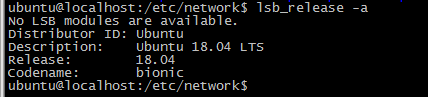
So I checked the ubuntu version, it was 18.04, and Baidu found that “ubuntu has given up the fixed IP configuration in /etc/network/interfaces since 17.10. Even the configuration will not take effect. Instead, it is changed to netplan and the configuration is written In /etc/netplan/01-netcfg.yaml or a yaml file with a similar name”, so I configured according to the method found, but I encountered a lot of errors and almost vomited blood. Write down the errors I encountered here.
1, the beginning of the configuration is as follows: in the implementation apply netplan error message occurs Invalid YAML at //etc/netplan/01-netcfg.yaml line 11 column 11 : mapping values are not allowed in this context
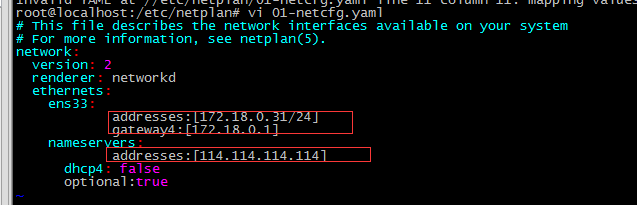
Solution: yaml is a hierarchical structure and needs to be indented. A colon (:) means a dictionary, a hyphen (-) means a list, and there must be a space after the colon.

2. After adding a space after the colon (as shown below), execute netplan apply and report an error: Invalid YAML at //etc/netplan/01-netcfg.yaml line 11 column 6: did not find expected key
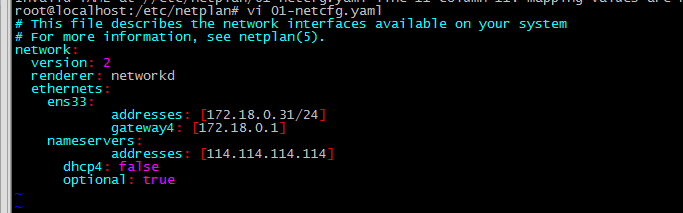
Solution: nameservers should be the fourth layer like gateway4, and the addresses after nameservers should be the fifth layer

The correct number of layers is as follows:

The first layer- network:
The second layer-ethernets:
The third layer- ens33:
The fourth layer- addresses: [172.18.0.31/24]
The fourth floor–gateway4: 172.18.0.1
The fourth layer-nameservers:
The fifth layer- addresses: [114.114.114.114, 8.8.8.8]

3. After solving according to the above method, execute netplan apply and report an error as shown below : Error in network definition //etc/netplan/01-netcfg.yaml line 8 column 16: expected scalar
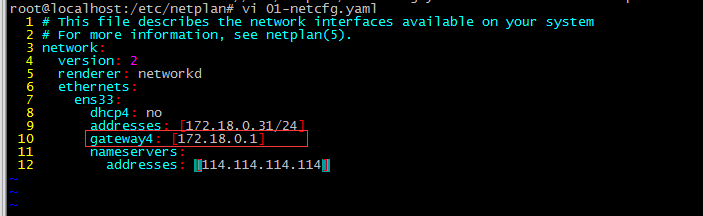
Solution: The address of gateway4 does not have square brackets. After the modification, restart the network service and it will be normal netplan apply )


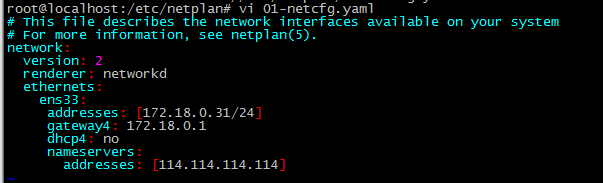
So the correct configuration format should be as follows: In this way, the static ip is successfully configured
 

Errors that I did not encounter:
A similar error appears: line8 column 6:cloud not find expected’:’ #The   prompt is a colon: no space is added after it
A similar error occurred: netplan found character that cannot start any token , #The prompt is that the configuration document is not written according to five levels, and the next level must be one or more empty than the previous level.
In short: here an error is reported when the network is restarted, most of which are incorrect levels, incorrect format, and no spaces

Solve the error report of the find command: paths must precede expression

I want to clear some pdf files in the server /tmp directory, about 10,000 files, when I execute the command

find /tmp -maxdepth 1 -mtime 30 -name *.pdf

An error occurred:

find : paths must precede expression
Usage: find [-H] [-L] [-P] [path...] [expression]

Then I checked it on the Internet, and I found an article. It probably said: When searching for multiple files, you need to add single quotation marks. Double quotation marks have always been used. I didn’t expect to use single quotation marks when looking for multiple files. Well, I learned another trick. After modification:
find ./ -mtime +30 -type f -name’*.php’
so that no more errors will be reported after execution, and a small problem will be solved.
Example explanation:
# Enter the tmp directory Create 4 new text files
# cd /tmp
# touch {1,2,3,4}.txt
# find .-name *.txt
find: paths must precede expression: 2.txt

This prompt appears because the asterisk is expanded to For all files in the current directory, such matching will of course be wrong. Look at this to know:
# echo *
1.txt 2.txt 3.txt 4.txt
# echo’*’
*
# echo \*
*

If you want the asterisk not to be expanded, you need to add parentheses or backslashes to escape , Knowing these we will know how to find
# find. -Name’*.txt’
find.
-Name ‘*.txt’ ./4.txt
./2.txt
./3.txt
./1.txt #Or
use backslash to
 find .-name \*.txt
./4.txt
./2.txt
./3.txt
./1.txt

Nginx Startup Error: “/var/run/nginx/nginx.pid” failed” [How to Solve]

problem:

  After restarting the virtual machine, restarting nginx again will report an error: open() “/var/run/nginx/nginx.pid” failed (2: No such file or directory)

Solution:

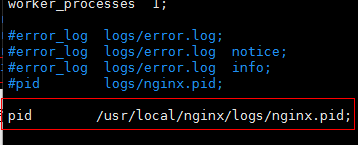
  (1) Enter the cd /usr/local/nginx/conf/ directory and edit the configuration file nginx.conf;

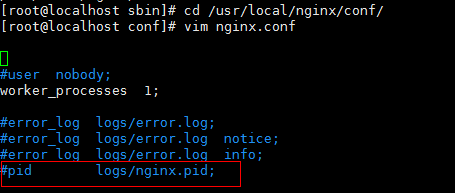
  (2) There is a comment in the configuration file: #pid logs/nginx.pid;

 (3) Release the comment and modify it to: pid /usr/local/nginx/logs/nginx.pid;

  (4) Create a logs directory under the /usr/local/nginx directory: mkdir /usr/local/nginx/logs

  (5) Start nginx service: /usr/local/nginx/sbin/nginx

[Solved] Job for network.service failed because the control process exited with error code. See “systemctl st

Job for network.service failed because the control process exited with error code. See “systemctl status network.service” and “journalctl -xe” for details.

1、 The xshell is down and the reconnection failed. First Ping to see if the network is connected. Second, restart the network service and find an error. Third, view the error information according to the prompt. Fourth, solutions. First, check whether the configuration file is wrong. Second, there may be a conflict with the network manager service. Just close the service directly

3. If the two methods 1 and 2 still fail, try to delete all the other irrelevant network card location files under/etc/sysconfig/network scripts to avoid unnecessary influence. 5. Verify the network

Standby for a while, found that xshell connection failed, found that network connection failed, and restart failed.

1、 The xshell is down and the reconnection failed. Ping first to see if the network is connected

[root@db01 ~]# ping www.google.com
ping: www.google.com: Unknown name or service

2、 Restart the network service and find an error

[root@db01 ~]# systemctl restart network
Job for network.service failed because the control process exited with error code. See "systemctl status network.service" and "journalctl -xe" for details.

3、 Check the error information according to the prompt

[root@db01 ~]# systemctl status network.service
● network.service - LSB: Bring up/down networking
   Loaded: loaded (/etc/rc.d/init.d/network; bad; vendor preset: disabled)
   Active: failed (Result: exit-code) since 四 2021-06-03 05:23:42 CST; 23s ago
     Docs: man:systemd-sysv-generator(8)
  Process: 8821 ExecStart=/etc/rc.d/init.d/network start (code=exited, status=1/FAILURE)

6月 03 05:23:42 db01 network[8821]: RTNETLINK answers: File exists
6月 03 05:23:42 db01 systemd[1]: network.service: control process exited, code=e...s=1
6月 03 05:23:42 db01 systemd[1]: Failed to start LSB: Bring up/down networking.
6月 03 05:23:42 db01 systemd[1]: Unit network.service entered failed state.
6月 03 05:23:42 db01 systemd[1]: network.service failed.
Hint: Some lines were ellipsized, use -l to show in full.

4、 Solutions

1. Check whether the configuration file is wrong

[root@db01 ~]# cat /etc/sysconfig/network-scripts/ifcfg-ens33
TYPE=Ethernet
BOOTPROTO=static
DEFROUTE=yes
NAME=ens33
UUID=b5672928-cbbb-4428-a752-8bd9c14098e7
····
DEVICE=ens33
ONBOOT=yes
IPADDR=192.168.10.102
PREFIX=24
GATEWAY=192.168.10.2
DNS1=114.114.114.114
DNS2=8.8.8.8
DNS3=119.29.29.29
[root@db01 ~]# ip a
1: lo: <LOOPBACK,UP,LOWER_UP> mtu 65536 qdisc noqueue state UNKNOWN group default qlen 1000
    link/loopback 00:00:00:00:00:00 brd 00:00:00:00:00:00
    inet 127.0.0.1/8 scope host lo
       valid_lft forever preferred_lft forever
    inet6 ::1/128 scope host 
       valid_lft forever preferred_lft forever
2: ens33: <BROADCAST,MULTICAST> mtu 1500 qdisc noop state DOWN group default qlen 1000
    link/ether 00:0c:29:3f:0f:29 brd ff:ff:ff:ff:ff:ff
3: virbr0: <NO-CARRIER,BROADCAST,MULTICAST,UP> mtu 1500 qdisc noqueue state DOWN group default qlen 1000
    link/ether 52:54:00:3a:15:b7 brd ff:ff:ff:ff:ff:ff
    inet 192.168.122.1/24 brd 192.168.122.255 scope global virbr0
       valid_lft forever preferred_lft forever
4: virbr0-nic: <BROADCAST,MULTICAST> mtu 1500 qdisc pfifo_fast master virbr0 state DOWN group default qlen 1000
    link/ether 52:54:00:3a:15:b7 brd ff:ff:ff:ff:ff:ff

2. There may be a conflict with the NetworkManager service. Just close the service directly

[root@db01 ~]# systemctl stop NetworkManager
[root@db01 ~]# systemctl restart network

3. If both methods 1 and 2 fail after verification, try to delete all other irrelevant network card location files under/etc/sysconfig/network scripts to avoid unnecessary influence

[root@db01 network-scripts]# ls
ifcfg-ens33      ifdown-ipv6      ifdown-tunnel  ifup-isdn    ifup-TeamPort
ifcfg-ens33.bak  ifdown-isdn      ifup           ifup-plip    ifup-tunnel
ifcfg-lo         ifdown-post      ifup-aliases   ifup-plusb   ifup-wireless
ifdown           ifdown-ppp       ifup-bnep      ifup-post    init.ipv6-global
ifdown-bnep      ifdown-routes    ifup-eth       ifup-ppp     network-functions
ifdown-eth       ifdown-sit       ifup-ib        ifup-routes  network-functions-ipv6
ifdown-ib        ifdown-Team      ifup-ippp      ifup-sit
ifdown-ippp      ifdown-TeamPort  ifup-ipv6      ifup-Team

5、 Verification Network

[root@db01 ~]# ping www.google.com
PING www.baidu.com (39.156.66.14) 56(84) bytes of data.
64 bytes from 39.156.66.14 (39.156.66.14): icmp_seq=1 ttl=128 time=55.8 ms
64 bytes from 39.156.66.14 (39.156.66.14): icmp_seq=2 ttl=128 time=42.8 ms
^C
--- www.baidu.com ping statistics ---
2 packets transmitted, 2 received, 0% packet loss, time 1000ms
rtt min/avg/max/mdev = 42.825/49.312/55.800/6.491 ms
[root@db01 ~]# 

[Solved] Win10 and Linux address reading format is different (CV2. Error: opencv (4.2.0)/Io/opencv…)

img = cv2.resize(img, (512, 1024))
cv2.error: OpenCV(4.2.0) /io/opencv/modules/imgproc/src/resize. cpp:4045 : error: (-215:Assertion failed) ! ssize.empty() in function ‘resize’

The code can run normally in win10, but the above error is reported in Linux. My analysis is due to the different address reading formats between win10 and Linux.

img   = cv2.imread(item['path'])
#item['path']:'./data/TuSimple/LaneDetection\clips/0313-2/42120/20.jpg'

There is a ‘\’ in the address of item [‘path ‘], which results in an error in Linux operation
so change the’ \ ‘in the address of item [‘path’] to ‘/’

item['path']=item['path'].replace('\\', '/')#Add this code
img   = cv2.imread(item['path'])

The upgrade of Ubuntu results in an error in the compilation of Android Jack [Two Method to Solve]

Error log:

Ensuring Jack server is installed and started
FAILED: setup-jack-server
/bin/bash -c "(prebuilts/sdk/tools/jack-admin install-server prebuilts/sdk/tools/jack-launcher.jar prebuilts/sdk/tools/jack-server-4.11.ALPHA.jar  2>&1 || (exit 0) ) && (JACK_SERVER_VM_ARGUMENTS=\"-Dfile.encoding=UTF-8 -XX:+TieredCompilation\" prebuilts/sdk/tools/jack-admin start-server 2>&1 ||
 exit 0 ) && (prebuilts/sdk/tools/jack-admin update server prebuilts/sdk/tools/jack-server-4.11.ALPHA.jar 4.11.ALPHA 2>&1 || exit 0 ) && (prebuilts/sdk/tools/jack-admin update jack prebuilts/sdk/tools/jacks/jack-4.32.CANDIDATE.jar 4.32.CANDIDATE || exit 47 )"
Jack server already installed in "~/.jack-server"
Launching Jack server java -XX:MaxJavaStackTraceDepth=-1 -Djava.io.tmpdir=/tmp -Dfile.encoding=UTF-8 -XX:+TieredCompilation -cp ~/.jack-server/launcher.jar com.android.jack.launcher.ServerLauncher
Jack server failed to (re)start, try 'jack-diagnose' or see Jack server log
SSL error when connecting to the Jack server. Try 'jack-diagnose'
ninja: build stopped: subcommand failed.
10:11:50 ninja failed with: exit status 1

Problems caused by JDK automatic upgrade

Method 1:

Delete tlsv1 and tlsv1.1 under jdk.tls.disabledalgorithms in/etc/java-8-openjdk/security/java.security

Then install Jack again  ( Jack needs to modify the port number after unloading and reloading)

It needs to be implemented
mmm   prebuilts/sdk/tools/
jack-admin   uninstall-server  & amp;& amp;   jack-admin   kill-server
make   setup-jack-server

Method 2:


diff --git a/prebuilts/sdk/tools/jack b/prebuilts/sdk/tools/jack
index ae291f4..16eb180 100755
--- a/prebuilts/sdk/tools/jack
+++ b/prebuilts/sdk/tools/jack
@@ -134,7 +134,7 @@ HTTP_CODE=$(curl -f $JACK_EXTRA_CURL_OPTIONS \
      -F "version=$JACK_VERSION;type=application/vnd.jack.select-exact;version=1" \
      -F "pwd=$JACK_PWD;type=text/plain$CHARSET_ARGUMENT" \
      --noproxy ${SERVER_HOST} \
-     https://${SERVER_HOST}:$SERVER_PORT_SERVICE/jack \
+     http://${SERVER_HOST}:$SERVER_PORT_SERVICE/jack \
      )
 
 CURL_CODE=$?
diff --git a/prebuilts/sdk/tools/jack-admin b/prebuilts/sdk/tools/jack-admin
index ee193fc..c964bc5 100755
--- a/prebuilts/sdk/tools/jack-admin
+++ b/prebuilts/sdk/tools/jack-admin
@@ -136,7 +136,7 @@ updateProgram () {
        -F "jar=@$2;type=application/octet-stream" \
        -F "force=$FORCE_INSTALLATION;type=text/plain$CHARSET_ARGUMENT" \
        --noproxy ${SERVER_HOST} \
-       https://${SERVER_HOST}:$SERVER_PORT_ADMIN/$1 \
+       http://${SERVER_HOST}:$SERVER_PORT_ADMIN/$1 \
        )
   handleHttpErrors $?$HTTP_CODE
 
@@ -159,7 +159,7 @@ isServerRunning () {
          -X GET \
          -H "Accept: text/plain$CHARSET_ARGUMENT" \
          --noproxy ${SERVER_HOST} \
-         https://${SERVER_HOST}:$SERVER_PORT_ADMIN/server \
+         http://${SERVER_HOST}:$SERVER_PORT_ADMIN/server \
          )
     CURL_CODE=$?
     if [ $CURL_CODE -eq 0 ]; then
@@ -196,7 +196,7 @@ waitServerStarted () {
          -X GET \
          -H "Accept: text/plain$CHARSET_ARGUMENT" \
          --noproxy ${SERVER_HOST} \
-         https://${SERVER_HOST}:$SERVER_PORT_ADMIN/server \
+         http://${SERVER_HOST}:$SERVER_PORT_ADMIN/server \
          )
     CURL_CODE=$?
     if [ $CURL_CODE -eq 7 ] || [ $CURL_CODE -eq 35 ] || [ $CURL_CODE -eq 58 ] || [ $CURL_CODE -eq 60 ] || [ $CURL_CODE -eq 77 ]; then
@@ -226,7 +226,7 @@ listProgramVersion () {
        -X GET \
        -H "Accept: text/plain$CHARSET_ARGUMENT" \
        --noproxy ${SERVER_HOST} \
-       https://${SERVER_HOST}:$SERVER_PORT_ADMIN/$1 \
+       http://${SERVER_HOST}:$SERVER_PORT_ADMIN/$1 \
        )
   handleHttpErrors $?$HTTP_CODE
   exec 3>&-
@@ -336,7 +336,7 @@ case $COMMAND in
              --data "$4" \
              -H "Content-Type:application/vnd.jack.select-exact;version=1" \
              --noproxy ${SERVER_HOST} \
-             https://${SERVER_HOST}:$SERVER_PORT_ADMIN/$2 \
+             http://${SERVER_HOST}:$SERVER_PORT_ADMIN/$2 \
              )
         CURL_CODE=$?
         if [ $CURL_CODE -eq 22 ]; then
@@ -365,7 +365,7 @@ case $COMMAND in
          --no-buffer --write-out '%{http_code}' --silent --connect-timeout $JACK_CONNECTION_TIMEOUT \
          -X POST \
          --noproxy ${SERVER_HOST} \
-         https://${SERVER_HOST}:$SERVER_PORT_ADMIN/server/stop \
+         http://${SERVER_HOST}:$SERVER_PORT_ADMIN/server/stop \
          )
     handleHttpErrors $?$HTTP_CODE ;;
 
@@ -382,7 +382,7 @@ case $COMMAND in
          -X GET \
          -H "Accept: text/plain$CHARSET_ARGUMENT" \
          --noproxy ${SERVER_HOST} \
-         https://${SERVER_HOST}:$SERVER_PORT_ADMIN/stat \
+         http://${SERVER_HOST}:$SERVER_PORT_ADMIN/stat \
          )
     handleHttpErrors $?$HTTP_CODE
     exec 3>&- ;;
@@ -398,7 +398,7 @@ case $COMMAND in
          -X GET \
          -H "Accept: text/plain$CHARSET_ARGUMENT" \
         --noproxy ${SERVER_HOST} \
-         https://${SERVER_HOST}:$SERVER_PORT_ADMIN/launcher/log \
+         http://${SERVER_HOST}:$SERVER_PORT_ADMIN/launcher/log \
          )
     handleHttpErrors $?$HTTP_CODE
     exec 3>&- ;;
@@ -500,7 +500,7 @@ case $COMMAND in
          --form "limit=$LIMIT;type=text/plain$CHARSET_ARGUMENT" \
          --form "count=$COUNT;type=text/plain$CHARSET_ARGUMENT" \
          --noproxy ${SERVER_HOST} \
-         https://${SERVER_HOST}:$SERVER_PORT_ADMIN/launcher/log/level \
+         http://${SERVER_HOST}:$SERVER_PORT_ADMIN/launcher/log/level \
          )
     handleHttpErrors $?$HTTP_CODE ;;
 
@@ -515,7 +515,7 @@ case $COMMAND in
          --no-buffer --write-out '%{http_code}' --silent --connect-timeout $JACK_CONNECTION_TIMEOUT \
          -X POST \
          --noproxy ${SERVER_HOST} \
-         https://${SERVER_HOST}:$SERVER_PORT_ADMIN/gc \
+         http://${SERVER_HOST}:$SERVER_PORT_ADMIN/gc \
          )
     handleHttpErrors $?$HTTP_CODE ;;
 
diff --git a/prebuilts/sdk/tools/jack-server-3.0.ENGINEERING.jar b/prebuilts/sdk/tools/jack-server-3.0.ENGINEERING.jar
new file mode 100755
index 0000000..551073f
Binary files /dev/null and b/prebuilts/sdk/tools/jack-server-3.0.ENGINEERING.jar differ
diff --git a/prebuilts/sdk/tools/jack_server_setup.mk b/prebuilts/sdk/tools/jack_server_setup.mk
old mode 100644
new mode 100755
index fd6a134..a2b6714
--- a/prebuilts/sdk/tools/jack_server_setup.mk
+++ b/prebuilts/sdk/tools/jack_server_setup.mk
@@ -15,7 +15,8 @@
 #
 LOCAL_PATH:= $(call my-dir)
 
-jack_server_version := 4.8.ALPHA
+#jack_server_version := 4.8.ALPHA
+jack_server_version := 3.0.ENGINEERING
 jack_server_jar := $(LOCAL_PATH)/jack-server-$(jack_server_version).jar


Then reinstall jack (you need to change the port number after jack uninstall and reinstall)
You need to execute
mmm prebuilts/sdk/tools/
jack-admin uninstall-server && jack-admin kill-server
make setup-jack-server

Refer:
https://stackoverflow.com/questions/67330554/is-openjdk-upgrading-to-8u292-break-my-aosp-build-system

Resolving yum source-related issues: Cannot retrieve metalink for repository: epel/x86_64. Please verify its path and try again

Loaded plug-ins: fastestmirror
Loading mirror speeds from cached hostfile
One of the configured repositories failed (none),
and yum doesn’t have enough cached data to continue. At this point the only
safe thing yum can do is fail. There are a few ways to work “fix” this:

 1. Contact the upstream for the repository and get them to fix the problem.

 2. Reconfigure the baseurl/etc. for the repository, to point to a working
    upstream. This is most often useful if you are using a newer
    distribution release than is supported by the repository (and the
    packages for the previous distribution release still work).

 3. Run the command with the repository temporarily disabled
        yum --disablerepo=<repoid> ...

 4. Disable the repository permanently, so yum won't use it by default. Yum
    will then just ignore the repository until you permanently enable it
    again or use --enablerepo for temporary usage:

        yum-config-manager --disable <repoid>
    or
        subscription-manager repos --disable=<repoid>

 5. Configure the failing repository to be skipped, if it is unavailable.
    Note that yum will try to contact the repo. when it runs most commands,
    so will have to try and fail each time (and thus. yum will be be much
    slower). If it is a very temporary problem though, this is often a nice
    compromise:

        yum-config-manager --save --setopt=<repoid>.skip_if_unavailable=true

Cannot retrieve metalink for repository: epel/x86_64. Please verify its path and try again


Follow the prompts to correct the source.

cd /etc/yum.repos.d
vi epel.repo 

The revised contents are as follows:

[epel]
name=Extra Packages for Enterprise Linux 7 - $basearch
baseurl=http://mirrors.aliyun.com/epel/7/$basearch
#metalink=https://mirrors.aliyun.com/metalink?repo=epel-7&arch=$basearch
failovermethod=priority
enabled=1
gpgcheck=1
gpgkey=file:///etc/pki/rpm-gpg/RPM-GPG-KEY-EPEL-7

[epel-debuginfo]
name=Extra Packages for Enterprise Linux 7 - $basearch - Debug
baseurl=http://mirrors.aliyun.com/epel/7/$basearch/debug
#metalink=https://mirrors.aliyun.com/metalink?repo=epel-debug-7&arch=$basearch
failovermethod=priority
enabled=0
gpgkey=file:///etc/pki/rpm-gpg/RPM-GPG-KEY-EPEL-7
gpgcheck=1

[epel-source]
name=Extra Packages for Enterprise Linux 7 - $basearch - Source
baseurl=http://mirrors.aliyun.com/epel/7/SRPMS
#metalink=https://mirrors.aliyun.com/metalink?repo=epel-source-7&arch=$basearch
failovermethod=priority
enabled=0
gpgkey=file:///etc/pki/rpm-gpg/RPM-GPG-KEY-EPEL-7
gpgcheck=1

Execute the following command:

yum clean all
yum makecache
yum update
yum install -y git

Yum installation and use returned to normal.

[Solved] Login with Ubuntu graphical interface, error sorry, that didn’t work.please try again

Sorry, that didn’t work.please try again

Today, I just finished installing Ubuntu 20.04. After setting the root password, I found that the root login would report such an error:
sorry, that didn’t work.please try again

In fact, there is no problem with the command line login, which indicates that it is not the password, but the desktop environment.

vi /etc/pam.d/gdm-autologin
#Note "auth requied pam_succeed_if.so user != root quiet success"

vi /etc/pam.d/gdm-password
#Note "auth requied pam_succeed_if.so user != root quiet success"

AFTER THE GIT SOURCE CODE IS INSTALLED, AN ERROR IS REPORTED /USR/BIN/GIT: NO SUCH FILE OR DIRECTORY

phenomenon

After installing a git from the source code today, the following error was reported after executing the git command:

$ git - version
 -bash: /usr/bin/git: No such file or directory

Analysis process

At first I thought it was a problem with the PATH path. Checking the PATH path found that it was normal, and it shouldn’t be the case when the command could not be found.

$ echo $PATH
 /usr/local/bin:/bin:/usr/bin:/usr/local/sbin:/usr/sbin:/sbin:/home/admin/ bin
$ abcd
- bash: ABCD: the Command not found
$ /usr/local/bin/git - version
git version 2.17 . 0

It can be seen that the git command is under the PATH path and should be installed normally, because the absolute path can be used normally

And the error that the command cannot be found should be command not found

As the root user, it is normal to execute git –version. At first, I thought it was the admin user who set some variables, which led to the fixed search under /usr/bin when executing the git command.

Later, I found out that there is no such parameter

Finally found the answer on stackoverflow, the link is as follows:

https://stackoverflow.com/questions/19698901/why-is-git-looking-in-the-wrong-directory-for-the-git-installation-os-x

It turns out that the old git path I uninstalled in advance is /usr/bin/git, and then the newly installed git is under /usr/local/bin, and the terminal session saves the original path. Reopen the new terminal to solve the problem.

Anaconda prompt running environment.yml [How to Solve]

Download the project from GitHub, then open Anaconda Prompt, cd all the way to the directory where environment.yml is located, and

conda env create -f environment.yml

Next reported error.

WARNING: A space was detected in your requested environment path
‘D:\Program Files\miniconda3\envs\nerf’
Spaces in paths can sometimes be problematic.
Collecting package metadata (repodata.json): done
Solving environment: failed
ResolvePackageNotFound: – imagemagick

environment.yml script:

# To run: conda env create -f environment.yml
name: nerf
channels:
    - conda-forge
dependencies:
    - python=3.7
    - pip
    - cudatoolkit=10.0
    - tensorflow-gpu==1.15
    - numpy
    - matplotlib
    - imageio
    - imageio-ffmpeg
    - configargparse
    - imagemagick

Modify the environment.yml script:

PIP: the following must be indented (Python)

# To run: conda env create -f environment.yml
name: nerf
channels:
    - conda-forge
dependencies:
    - python=3.7
    - pip
    - cudatoolkit=10.0
    - numpy
    - matplotlib
    - imageio
    - imageio-ffmpeg
    - configargparse
    - pip:
        - imagemagick
        - tensorflow-gpu==1.15

Report error again

If there are the following errors, most of them are syntax errors, check environment.yml carefully

>>>>>>>>>>>>>>>>>>>>>> ERROR REPORT <<<<<<<<<<<<<<<<<<<<<<
>    ruamel_yaml.parser.ParserError: while parsing a block collection
      in "<unicode string>", line 6, column 5:
            - python=3.7
            ^ (line: 6)
    expected <block end>, but found '?'
      in "<unicode string>", line 14, column 5:
            -pip:
            ^ (line: 14)

Solve the problem

[Solved] Linux error: SSH_exchange_identification: read: Connection reset by peer

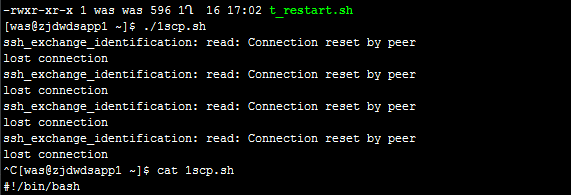
Linux error SSH_exchange_identification: read: Connection reset by peer

Problem Description:

ssh_ exchange_ identification: read: Connection reset by peer


Cause of the problem:

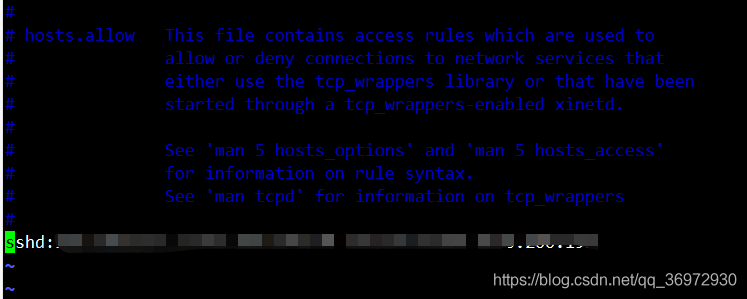
check whether SSH connection restriction is enabled
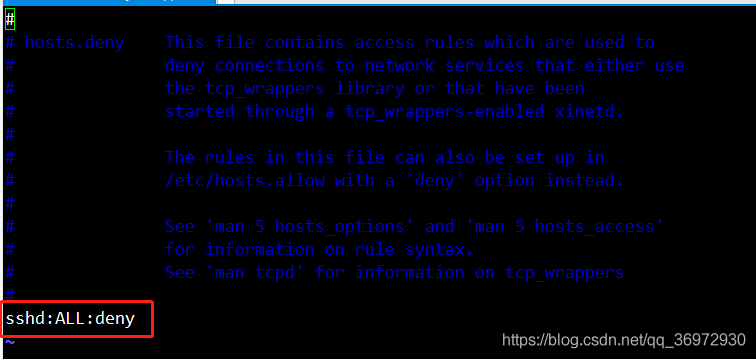
VIM/etc/hosts. Allow
VIM/etc/hosts. Deny


resolvent:

if SSH connection restriction is enabled, add the IP of the source address to hosts.allow
effective in real time, no need to restart the service

Mac opens Terminal and reports an error -bash:: command not found

Problem Description:  

When opening Terminal on Mac system, an error -bash:: command not found was reported.

problem analysis:

The error does not affect the use of Terminal, so it is ignored. But after modifying the .bash_profile file, in order to make the configuration effective, using the source command also reported an error -bash:: command not found.

At first I thought it was because the source command could not be found, and I added /bin to the environment variable, but still reported this error.

The problem is in trouble.

Searching on the Internet, I found that most of the problems are similar to -bash:nginx: command not found, that is to say, there is a command between the two ::, but the specific command cannot be found. But the current error report did not see this command, but a space, which means that the space is also regarded as a command, which means that a space is written in .bash_profile, which is considered as a command to be executed by the system.

Open .bash_profile, and no spaces are seen. Copy the contents of the file to a text editor, and no spaces are seen.

In order to troubleshoot, I plan to comment out all the commands, let go of the commands line by line, and then execute the source command to see which line is reporting the error. Found that the workload is too large.

I accidentally opened .bash_profile with VS Code, and found an exception, as follows:

Remove this special character, source again, and no more errors will be reported.

It can be seen that the system executes this special character as a command, but cannot find this command, and this command is displayed as a space in the terminal, which leads to the above error.