Category Archives: JavaScript

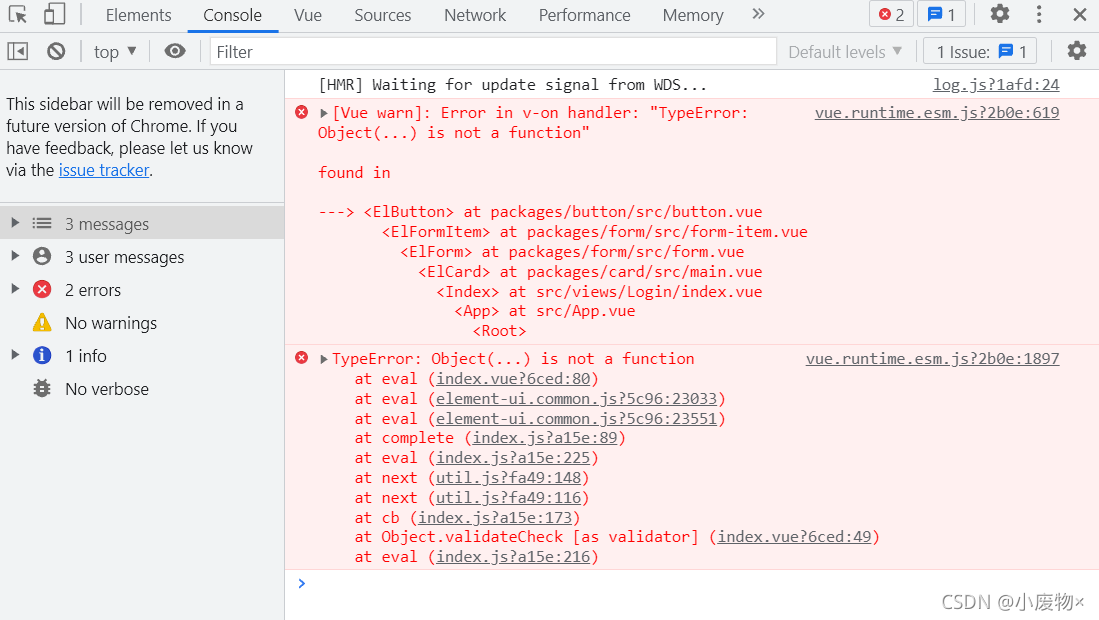
[Vue warn]: Error in v-on handler: “TypeError: Object(…) is not a function“

The record appears in Vue
[Vue warn]: error in v-on handler: "typeerror: object (...) is not a function"

when referencing an external file, it is only partially referenced, so it was originally referenced in a deconstruction mode. I forgot to add
{}

// Wrong
import loginAPI from '@/api'

// Right
import { loginAPI } from '@/api'

[Solved] ERROR Error: Cannot find module ‘vue-loader-v16/package.json‘

Error Message:
ERROR  Error: Cannot find module ‘vue-loader-v16/package.json’
Error: Cannot find module ‘vue-loader-v16/package.json’
at Function.Module._resolveFilename (module.js:555:15)
at Function.Module._load (module.js:482:25)
at Module.require (module.js:604:17)
at require (internal/module.js:11:18)
at api.chainWebpack.webpackConfig (D:\3\data\dashboard\node_modules\_@[email protected]@@vue\cli-service\lib\config\base.js:114:23)
at webpackChainFns.forEach.fn (D:\3\data\dashboard\node_modules\_@[email protected]@@vue\cli-service\lib\Service.js:236:40)
at Array.forEach (<anonymous>)
at Service.resolveChainableWebpackConfig (D:\3\data\dashboard\node_modules\_@[email protected]@@vue\cli-service\lib\Service.js:236:26)
at Service.resolveWebpackConfig (D:\3\data\dashboard\node_modules\_@[email protected]@@vue\cli-service\lib\Service.js:240:48)
at PluginAPI.resolveWebpackConfig (D:\3\data\dashboard\node_modules\_@[email protected]@@vue\cli-service\lib\PluginAPI.js:132:25)
npm ERR! code ELIFECYCLE
npm ERR! errno 1
npm ERR! [email protected] serve: `vue-cli-service serve`
npm ERR! Exit status 1
npm ERR!
npm ERR! Failed at the [email protected] serve script.
npm ERR! This is probably not a problem with npm. There is likely additional logging output above.
npm ERR! A complete log of this run can be found in:
npm ERR!     C:\Users\lenovo\AppData\Roaming\npm-cache\_logs\2021-09-22T07_50_43_187Z-debug.log
Solution: Execute the following commands:
cnpm i vue-loader-v16

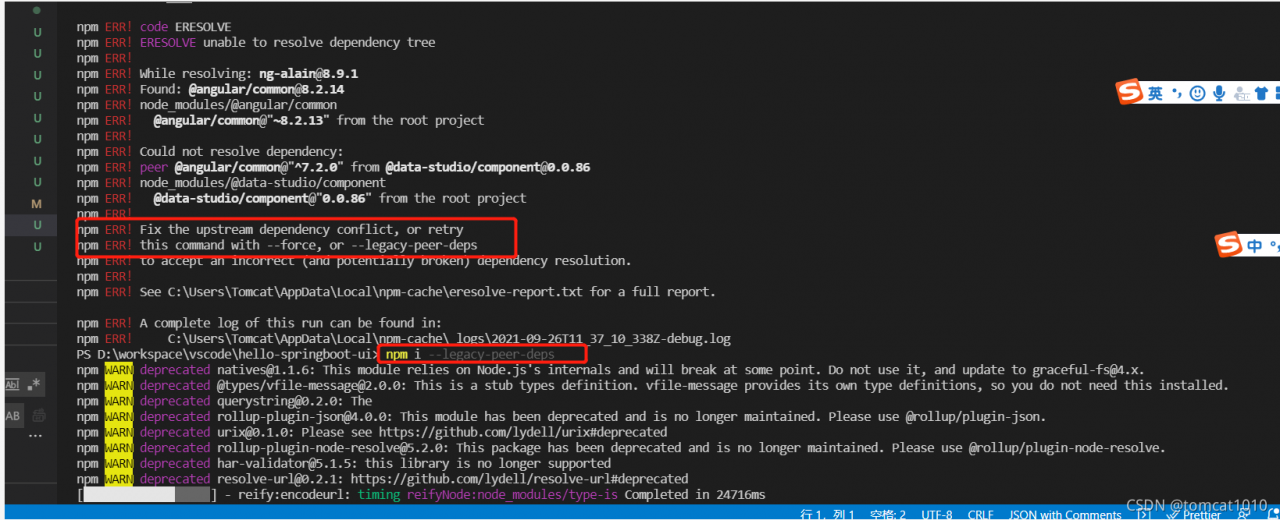
[Solved] Npm install Error: verbose stack Error: unable to resolve dependency tree

[environment]

[email protected]

[email protected]

1. Analysis reason:

After investigation, 1. It is found that there is peer dependency in package.json, indicating the version of angular 7. X, which is incompatible with the version of angular 8. X that the current project depends on, resulting in compilation errors.

2, in addition, the original use of npm 6.x install is no problem, because npm 7.x on peer dependency compatibility requirements are higher, so the error is reported.

2. Solution:

Method 1: — force or — legacy peer DEPs

npm install –force

npm   install –legacy-peer-deps

Method 2:

Modify the dependency definition package.json of the problem component and the component version that peer dependency depends on.

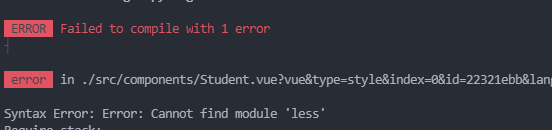
Syntax Error: Error: Cannot find module ‘less‘ [How to Solve]

Question: syntax error: error: cannot find module ‘less’

Cause: the installed version of less loader does not match that of less

pay more attention to warnings during installation to avoid this problem.
there is a prompt during installation. You must install the corresponding less version for use with

Solution: install the corresponding version (pay more attention to warnings in the future)

Echarts Partially introduced error: TypeError: Cannot read property ‘findAxisModel’ of undefined

When introducing dependencies locally in echarts, if there are dependencies that need to be used, an error will be reported if they are not introduced. For example, when using histogram + polar coordinates to display a ring chart, if Ploar is not introduced, an error will be reported in the title. At this time, just introduce this dependency:

require("echarts/lib/component/polar")

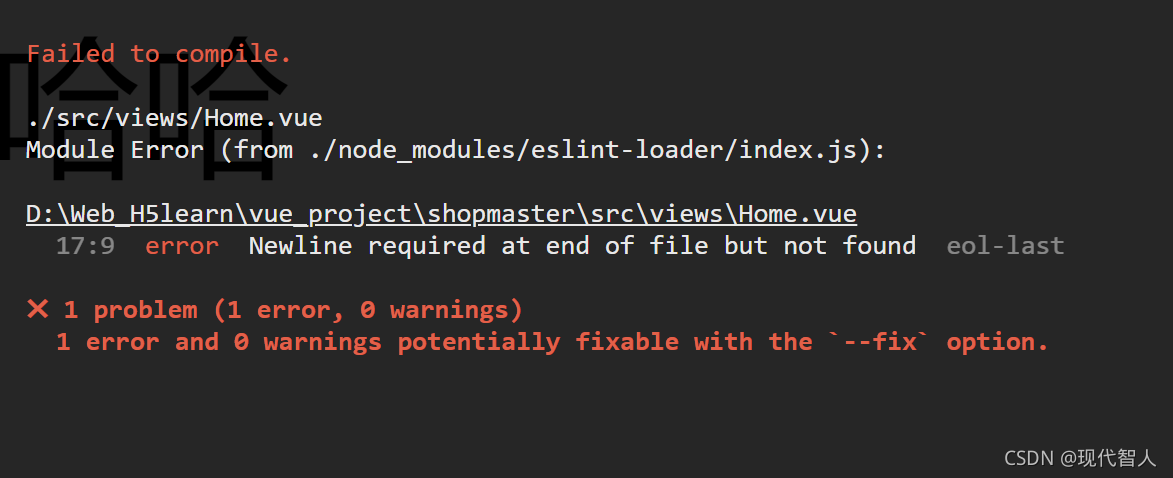
How to Solve VUE Error: Mixed spaces and tabs

Cause of the problem: the project uses eslint specification code, and your code violates the specification

The first scheme (recommended): format the code through the editor and unify the indentation method

The second method: turn off the verification of spaces and tabs by eslin
Vue version 3.0:
1, find build – & gt; webpack.base.config.js。 Comment or remove the reference to eslint loader.

{
      test: /\.(js|vue)$/,
      loader: 'eslint-loader',
      enforce: 'pre',
      include: [resolve('src'), resolve('test')],
      options: {
        formatter: require('eslint-friendly-formatter'),
        emitWarning: !config.dev.showEslintErrorsInOverlay
      }
}

2. Restart the project

Vue 3.0 +:
configure the rules of eslin in package.json. Eslintconfig

 {
      "name": "xxxx",
      "version": "0.1.0",
      "private": true,
      "scripts": {
        "serve": "vue-cli-service serve",
        "build": "vue-cli-service build",
        "lint": "vue-cli-service lint"
      },
      "dependencies": {
        xxx
      },
      "devDependencies": {
       xxx
      },
     
      "eslintConfig": {
        "root": true,
        "env": {
          "node": true
        },
        "extends": [
          "plugin:vue/essential",
          "eslint:recommended"
        ],
        "parserOptions": {
          "parser": "babel-eslint"
        },
        "rules": {
          "no-console": "off",
          "no-debugger": "off",
          "no-mixed-spaces-and-tabs": "off"
        }
     
      },
      "browserslist": [
        "> 1%",
        "last 2 versions",
        "not dead"
      ]
 }

The third other method:
create a vue.config.js

module.exports = {
	lintOnSave:false 
}
How to Solve Vue cli configuration SCSS global variable error

It is configured according to the online tutorial, but it still reports errors. The error information is as follows:

Module build failed (from ./node_modules/sass-loader/dist/cjs.js):

    width: $sideBarWidth !important;
          ^
      Undefined variable: "$sideBarWidth".

Baidu has a problem with the version of SASS loader
// in sass version 9, additionaldata is used, in sass version 8, prependdata is used, and in other versions, data
my version is 7.1.0, so finally changing the key name to data solves the problem

in vue.config.js, the configuration is as follows:

module.exports = {
    ...
	css: {
	  //   extract: true // Whether to use the css separation plugin ExtractTextPlugin (open skeleton screen must be this configuration)
	    // css presetter configuration item
	    // use additionalData in sass version 9 use prependData in version 8, other versions, use data
	    // semicolon here; required
	    loaderOptions: {
	      sass: {
	        data: '@import "./src/styles/variables.scss";'
	      }
	    },
	  },
	 ...
},

Note: semicolon after the configuration file path; Media query expression must begin with ‘(‘

The toast light prompt of vant in Vue reports an error

Toast light prompt for using vant component library in Vue

Record the toast light prompt in vant today, and use it according to the methods in the official documents. It can’t be used if an error is found
this is what the document says

Toast.success('success');
Toast.fail('fail');

After referencing vant in main.js, directly call toast to report an error
the actual usage is as follows:

this.$toast.success("success");
this.$toast.fail("fail");

Like calling routing, you need to click this.

Vue Error: component has been registered but not used [Two Methods to Solve]

reason:

eslint the code checks that you registered the component but did not use it, and then reports an error. For example, code:

For example, the file component is registered in Vue , but it is not actually used:

...
  import File from "../../components/file";
  export default {
    components: {Pagination, File},
...

At this time, you can cancel the registration. Of course, sometimes we don’t want to cancel and don’t change the code. There are two solutions:

Method 1:

Modify the package. JSON
in package.JSON , find rules under eslintconfig , and add "Vue/no unused components": "off" 

Method 2:

If there is a eslintrc.JS file in the project, you can add it as well:

rules: {
  "vue/no-unused-components": "off"
}

Either of the two can be used. Restart the project after modification. Note: if both files are modified, the eslintrc.JS file has higher priority.