Category Archives: JavaScript

[Vue warn]: Failed to resolve directive: XXX [How to Solve]

There are two reasons for this error:

1. Misspelling of instruction words

2. Vue.Directive() is not written before new Vue

// Wrong

import Vue from 'vue';
import App from './app.vue';

new Vue({ 
  render: h => h(App),
}).$mount('#A-demo');
 
Vue.directive('focus', {
  inserted(el){
    el.focus();
  }
})


// Right

import Vue from 'vue';
import App from './app.vue';

Vue.directive('focus', {
  inserted(el){
    el.focus();
  }
})

new Vue({ 
  render: h => h(App),
}).$mount('#A-demo');
 

[Solved] error C:\Users\HP\Desktop\VueProject\vue_cli\node_modules\node-sass: Command failed.Exit code: 1

Vue-cli scaffolding to build a Vue project reports an error due to the installation of node-sass:

error C:\Users\HP\Desktop\VueProject\vue_cli\node_modules\node-sass: Command failed.
Exit code: 1
Command: node scripts/build.js
Arguments:
Directory: C:\Users\HP\Desktop\VueProject\vue_cli\node_modules\node-sass
Output:
Building: C:\Program Files\nodejs\node.exe C:\Users\HP\Desktop\VueProject\vue_cli\node_modules\node-gyp\bin\node-gyp.js rebuild --verbose --libsass_ext= --libsass_cflags= --libsass_ldflags= --libsass_library=
gyp info it worked if it ends with ok
gyp verb cli [
gyp verb cli   'C:\\Program Files\\nodejs\\node.exe',
gyp verb cli   'C:\\Users\\HP\\Desktop\\VueProject\\vue_cli\\node_modules\\node-gyp\\bin\\node-gyp.js',
gyp verb cli   'rebuild',
gyp verb cli   '--verbose',
gyp verb cli   '--libsass_ext=',
gyp verb cli   '--libsass_cflags=',
gyp verb cli   '--libsass_ldflags=',
gyp verb cli   '--libsass_library='
gyp verb cli ]
gyp info using [email protected]
gyp info using [email protected] | win32 | x64
gyp verb command rebuild []
gyp verb command clean []
gyp verb clean removing "build" directory
gyp verb command configure []
gyp verb download using dist-url https://oss.npmmirror.com/dist/node
gyp verb check python checking for Python executable "python2" in the PATH
gyp verb `which` failed Error: not found: python2
gyp verb `which` failed     at getNotFoundError (C:\Users\HP\Desktop\VueProject\vue_cli\node_modules\which\which.js:13:12)
gyp verb `which` failed     at F (C:\Users\HP\Desktop\VueProject\vue_cli\node_modules\which\which.js:68:19)
gyp verb `which` failed     at E (C:\Users\HP\Desktop\VueProject\vue_cli\node_modules\which\which.js:80:29)
gyp verb `which` failed     at C:\Users\HP\Desktop\VueProject\vue_cli\node_modules\which\which.js:89:16
gyp verb `which` failed     at C:\Users\HP\Desktop\VueProject\vue_cli\node_modules\isexe\index.js:42:5
gyp verb `which` failed     at C:\Users\HP\Desktop\VueProject\vue_cli\node_modules\isexe\windows.js:36:5
gyp verb `which` failed     at FSReqCallback.oncomplete (node:fs:198:21)
gyp verb `which` failed  python2 Error: not found: python2
gyp verb `which` failed     at getNotFoundError (C:\Users\HP\Desktop\VueProject\vue_cli\node_modules\which\which.js:13:12)
gyp verb `which` failed     at F (C:\Users\HP\Desktop\VueProject\vue_cli\node_modules\which\which.js:68:19)
gyp verb `which` failed     at E (C:\Users\HP\Desktop\VueProject\vue_cli\node_modules\which\which.js:80:29)
gyp verb `which` failed     at C:\Users\HP\Desktop\VueProject\vue_cli\node_modules\which\which.js:89:16
gyp verb `which` failed     at C:\Users\HP\Desktop\VueProject\vue_cli\node_modules\isexe\index.js:42:5
gyp verb `which` failed     at C:\Users\HP\Desktop\VueProject\vue_cli\node_modules\isexe\windows.js:36:5
gyp verb `which` failed     at FSReqCallback.oncomplete (node:fs:198:21) {
gyp verb `which` failed   code: 'ENOENT'
gyp verb `which` failed }
gyp verb check python checking for Python executable "python" in the PATH
gyp verb `which` succeeded python C:\Users\HP\anaconda3\python.EXE
gyp ERR! configure error
gyp ERR! stack Error: Command failed: C:\Users\HP\anaconda3\python.EXE -c import sys; print "%s.%s.%s" % sys.version_info[:3];
gyp ERR! stack   File "<string>", line 1
gyp ERR! stack     import sys; print "%s.%s.%s" % sys.version_info[:3];
gyp ERR! stack                                ^
gyp ERR! stack SyntaxError: invalid syntax
gyp ERR! stack
gyp ERR! stack     at ChildProcess.exithandler (node:child_process:397:12)
gyp ERR! stack     at ChildProcess.emit (node:events:390:28)
gyp ERR! stack     at maybeClose (node:internal/child_process:1064:16)
gyp ERR! stack     at Process.ChildProcess._handle.onexit (node:internal/child_process:301:5)
gyp ERR! System Windows_NT 10.0.19043
gyp ERR! command "C:\\Program Files\\nodejs\\node.exe" "C:\\Users\\HP\\Desktop\\VueProject\\vue_cli\\node_modules\\node-gyp\\bin\\node-gyp.js" "rebuild" "--verbose" "--libsass_ext=" "--libsass_cflags=" "--libsass_ldflags=" "--libsass_library="
gyp ERR! cwd C:\Users\HP\Desktop\VueProject\vue_cli\node_modules\node-sass
gyp ERR! node -v v16.13.0
gyp ERR! node-gyp -v v3.8.0
gyp ERR! not ok
Build failed with error code: 1
 ERROR  command failed: yarn


wrong reason:
The nodejs version is too high, my version is 16.x

Solution:
win+R open the cmd window and enter

node -v

Check the installed node version. If it is not v14.3.0, uninstall the original version and reinstall nodejs of v14.3.0.

Create the project again and solve it successfully!
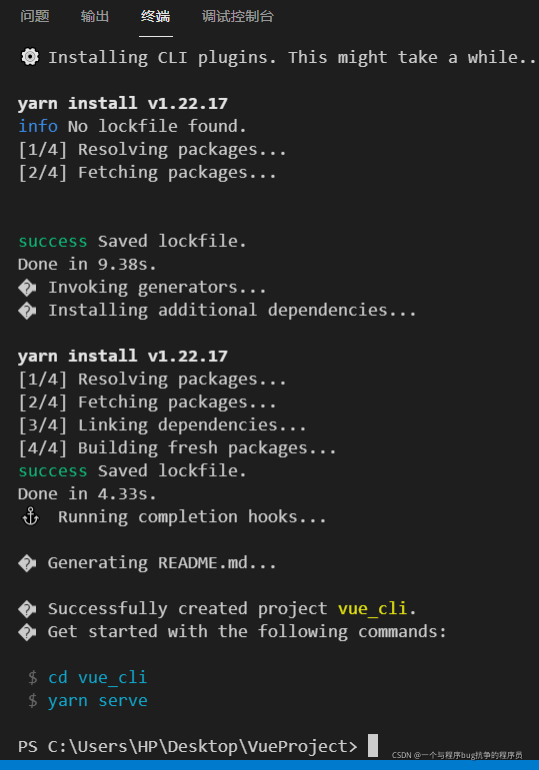
Nodejs download address of v14.3.0 is attached:


Vue-cli Failed to download repo vuejs-templates/webpack [How to Solve]

Error reason:
as shown in the title, command Vue init webpack Vue through Vue cli tool_ An error is reported when the portal creates a Vue project, indicating that the connection timed out because the intranet cannot be downloaded. The screenshot of the timeout error is as follows:

Solution:
to create offline, we need to download Vue templates/webpack in GitHub warehouse, and then extract it locally.

1. First, create a new .Vue templates directory under the root directory of each user. Note the dot (.)

2. Go to the Internet to download webpack
the download address is: https://github.com/vuejs-templates/webpack After downloading, unzip it to the. Vue templates directory under the local user directory.

3. The downloaded compressed package is webpack-development.zip. After decompression, we need to change the directory name to webpack

4. In this way, we will conduct Vue init webpack When using the Vue_portal command, you need to bring the parameter — offline, which means offline initialization

Failed to resolve async component default: ChunkLoadError: Loading chunk 7 failed

Vue project, it says that vue-router.esm.js suddenly reports an error? 8c4f: 16 [Vue router] failed to resolve async component default: chunkloaderror: loading chunk 7 failed. I really can’t find anything wrong,

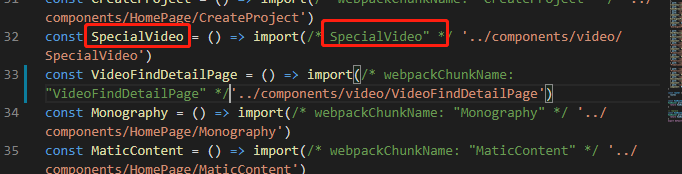
through the prompt, it’s said that there was a routing error. I reinstalled less according to what I wrote on the Internet, but it didn’t work. Later, I inadvertently changed the name of the lazy load of the route a little, What’s going on? I still haven’t found it. If you have the same problem, you can try to change the wrong route name. In the following figure/*specialvideo*/change the name and store it. The error disappears. I don’t know why

Jest Vue $route error [How to Modify]

Jest Vue $route reported an error

When you run jest, you will always report errors in the page that uses $route. When you add the following code to jest, you will report other errors

FALSE:

test('Create groupManage data', async (done) => {
    wrapper.vm.$nextTick(() => {
      })
      done()
    })
  })

Finally, it was found that the correct router
was not added to the jest file:

import VueRouter from 'vue-router'

describe('groupManage', () => {
  const wrapper = mount(groupManage, {
    global: {
      plugins: [ElementPlus, VueRouter, store],  // Remember to add VueRouter
      mocks: {
        $route: {
          params: {
            image_uuid: '3'   // the data you may use in vue page
          }
        }
      }
    }
  })
})

Another: createlocalvue has been cancelled in the new Vue test utils

The date selector Report Null Error in element is cleared

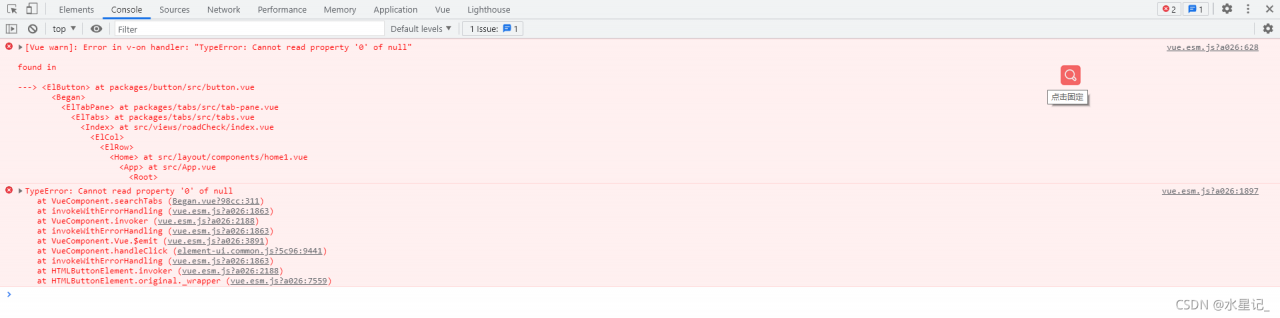
Recently, a small bug was found when using the date selector in element. When I clear the selected date and click search again, the console will report an error, as shown in the following figure:

After troubleshooting, I found that this problem occurs because when we click clear, the value value bound by V-model will change from a value to a null, so the console will report an error. There are also many solutions, such as re assigning value before the next call; Or you can also listen to the value of the V-model, and then solve the problem through judgment. The method I use is to directly judge the value of the V-model, and then assign the value if it meets the conditions. The specific implementation code is as follows:

core code:

//Event Methods
searchTabs() {
// parameters needed on the backend
let data = {
    sjlx: this.sjlx,
    pageNumber: this.pageSize,
    pageSize: this.pageNumber,
    zfry: this.road.enforce,
    jcjg: this.road.testing,
    sfcf: this.road.other,
    startTime: "",//start time
    endTime: "",//end time
}
// By determining the value of the v-model binding, it must be an Array value and must have two values
if (this.road.dateTime && Array.isArray(this.road.dateTime) && this.road.dateTime.length == 2) {
    // Assign the judged value to the startTime and endTime in data above
    data.startTime = new Date(this.road.dateTime[0]) // start time
    data.endTime = new Date(this.road.dateTime[1]) // end time
}
}

Full code:

html

 <div>
     <el-date-picker
             v-model="road.dateTime"
             type="datetimerange"
             start-placeholder="start-date"
             end-placeholder="end-date"
             :default-time="['12:00:00']"
             value-format="yyyy-MM-dd"
     >
     </el-date-picker>
 </div>

js

export default {
    data() {
        return {
        		pageNumber: 1, //Current page number
                pageSize: 10, //how many items are displayed on a page
          		//search criteria
                road: {
                    dateTime: "", //date
                    enforce: "", //Road enforcement officer
                    testing: "", //testing results
                    whether: "", //whether to penalize
                },
        }
    },
    methods:{
         	//Search
            searchTabs() {
                // parameters needed on the back end
                let data = {
                    sjlx: this.sjlx,
                    pageNumber: this.pageSize,
                    pageSize: this.pageNumber,
                    zfry: this.road.enforce,
                    jcjg: this.road.testing,
                    sfcf: this.road.other,
                    startTime: "",//start time
                    endTime: "",//end time
                }
                // By determining the value of the v-model binding, it must be an Array value and must have two values
                if (this.road.dateTime && Array.isArray(this.road.dateTime) && this.road.dateTime.length == 2) {
                    // Assign the judged value to the startTime and endTime in data above
                    data.startTime = new Date(this.road.dateTime[0]) // start time
                    data.endTime = new Date(this.road.dateTime[1]) // end time
                }
                // call the interface pass data to the backend
                search(data).then(res => {
                    // console.log(res, "search)....")
                    this.tableData = res.data.records
                    this.pageTotal = res.data.total
                })
            },
    }
}

So far, the problem has been solved.

React project is packaged and set as required Error [How to Solve]

./node_modules/antd/es/style/index.less (./node_modules/css-loader/dist/cjs.js??ref–6-oneOf-7-1!./node_modules/postcss-loader/src??postcss!./node_modules/resolve-url-loader??ref–6-oneOf-
7-3!./node_modules/less-loader/dist/cjs.js??ref–6-oneOf-7-4!./node_modules/antd/es/style/index.less)
ValidationError: Invalid options object. Less Loader has been initialized using an options object that does not match the API schema.

This is the problem with the less-loader version

yarn remove less-loader
yarn add [email protected]

[Solved] NPM err! Cannot read property ‘parent’ of null npm ERR! A complete log of this run can be found in: npm ERR!

Error reporting: NPM err! Cannot read property ‘parent’ of null npm ERR! A complete log of this run can be found in: npm ERR! C:\Users\Aren\AppData\Local\npm-cache_logs\2021-04-06T02_00_29_654z-debug.log
reason: in the project dependency package, the node-sass module requires node-gyp
and node-gyp; It also needs to rely on Python 2.7 and Microsoft’s VC + + build tools for compilation, but Windows operating system will not install Python 2.7 and VC + + build tools by default

Solution:
1. Use the administrator to open CMD

2. Install node-gyp
command

npm install -g node-gyp

3. Configure and install python2.7 and VC + + build tools
because node-gyp needs to rely on python2.7 and Microsoft’s VC + + build tools for compilation, but Windows operating system will not install python2.7 and VC + + build tools by default

Install python2.7 and VC + + build tools dependencies for node-gyp configuration:

npm install --global --production windows-build-tools

4. Check whether the installation is successful and restart NPM install

Vue Use scss Error: this.getOptions is not a function [How to Solve]

Background: an error is reported when installing sass for NPM

Installing sass through NPM

npm install node-sass
npm intall sass-loader

The above command installs the latest version. The reason for the error is that the latest version causes getoptions() incompatibility. The solution is to uninstall sass loader node sass and install the lower version. The commands are as follows

npm uninstall sass-loader //uninstall
npm install [email protected]  //install 8.0
npm uninstall --save node-sass
npm install [email protected] 

How to Solve Props value transfer International Language error

Props value transfer – International Language – error reporting problem

The calling component finds that the label is dead. Because it wants to be lazy, it plans to transfer the value of the label to the value assignment through props.

  props: {
    labelName: {
      type: String,
      default: this.$t('common_rpt_department')
    }
  },`

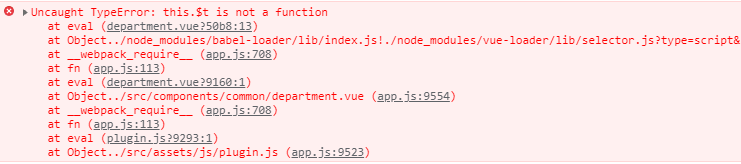
If you write directly at the beginning, an error is reported on the page

solution:

  props: {
    labelName: {
      type: String,
      default () {
        return this.$t('common_rpt_department')
      }
    }
  },

Done!