Category Archives: JavaScript

[Solved] Install The Latest Version of Jest Error: TypeError: Cannot read property ‘instrument‘ of undefined

Background:

In order to add jest to the existing projects, many pits have been stepped on. The pits are listed as follows, the adopted solutions, new problems and final treatment methods.

First of all, my project is vue2, and the Babel of package.json is @ Babel, so the following problems will occur. The handling method of this version is to use the CLI plug-in to start jest instead of the Babel version; If it is Babel version, the normal NPM install – G jest configuration script is enough, which will be described later; The jest installation of vue3 is simpler and is not covered in this article.

Pit 1: it runs directly in Vue project and reports an error

requires Babel "^7.0.0-0", but was loaded with "6.26.3". If you are sure you have a compatible version of @babel/core, it is likely that something in your build process is loading the wrong version. Inspect the stack trace of this error to look for the first entry that doesn't mention "@babel/core" or "babel-core" to see what is calling Babe

Tried:

npm install --save-dev "babel-core@^7.0.0-bridge.0"

Various @Babel or Babel are also installed

But it didn’t work. It is speculated that the conflict is caused by jest’s own package.

Pit 2: then upgrade jest to the latest version, 27 +. report errors

TypeError: Cannot read property 'instrument' of undefined

What should I do?It seems that we can’t find a good method on the Internet. Then go to GitHub and see the projects that @ Babel + vue2 + jest can run. Here are the minimum installation items.

Solution:

npm install @vue/test-utils -D
npm install @vue/cli-service -D
npm install @vue/cli-plugin-unit-jest -D

Jest.conf.js is placed in the root directory, or in the tests directory, or whatever you want

module.exports = {
  preset: '@vue/cli-plugin-unit-jest',
  collectCoverage: false
}

Package.json configuration script and configuration file directory

"scripts": {
   "test:unit": "vue-cli-service test:unit --config ./tests/jest.conf.js",
}

If you report an error:
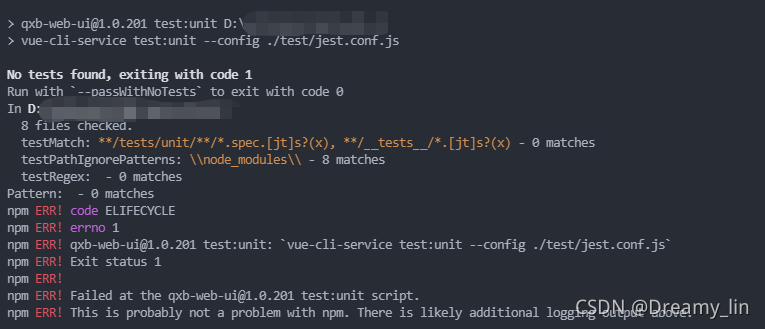
solution: description of the error information. The paths do not match and the test file cannot be found, so change the directory to tests/unit.

Error reporting:
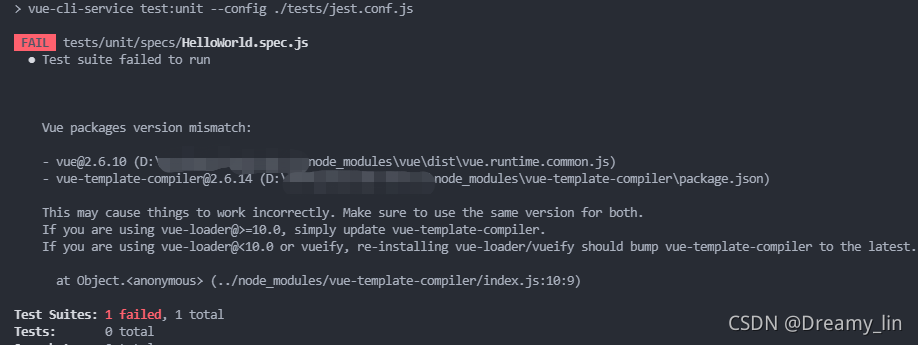
solution: according to the error reporting information, Vue template compiler and Vue need to be the same version, so install the Vue version corresponding to Vue template compiler. My is NPM install Vue template- [email protected]

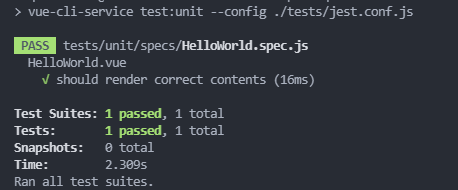
So far, the unit test is running, and I’m always excited
supplement:

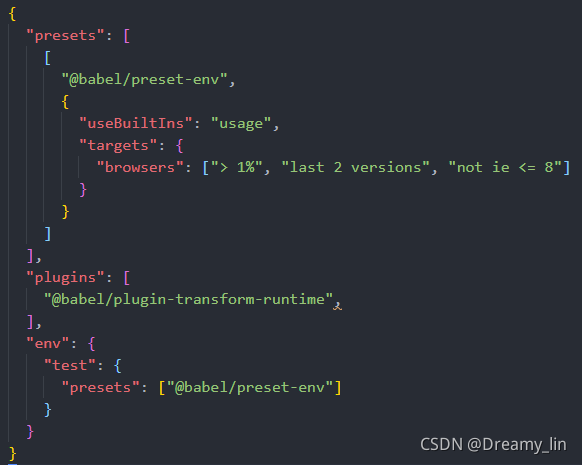
My project can run without changing the. Babelrc file
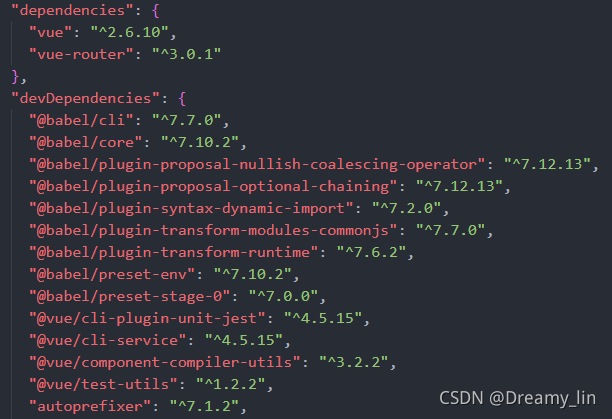
My package.json:
Here, for the installation and configuration of the Babel version of jest, first look at the package. JSON
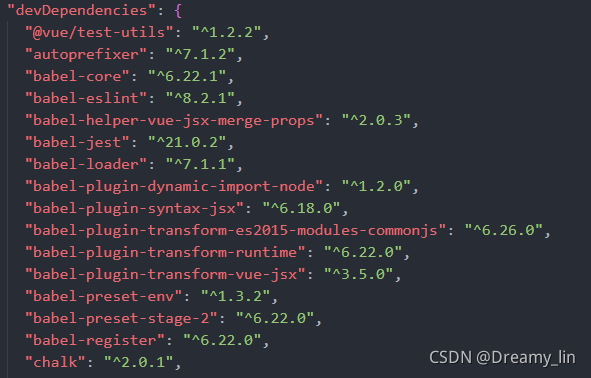

Simply start a project
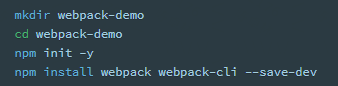
install jest
Global: NPM install – G jest or local: NPM install – D jest
specify the test script in package.json:
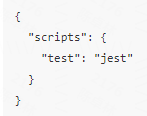
run the script to test.

Finally, for TS, you need to install additional packages and configure additional. If you can’t find it on the Internet, go to GitHub.
[Solved] Binding onclick event in JS: for loop: error uncaught typeerror: cannot set properties of undefined (setting ‘classname’)

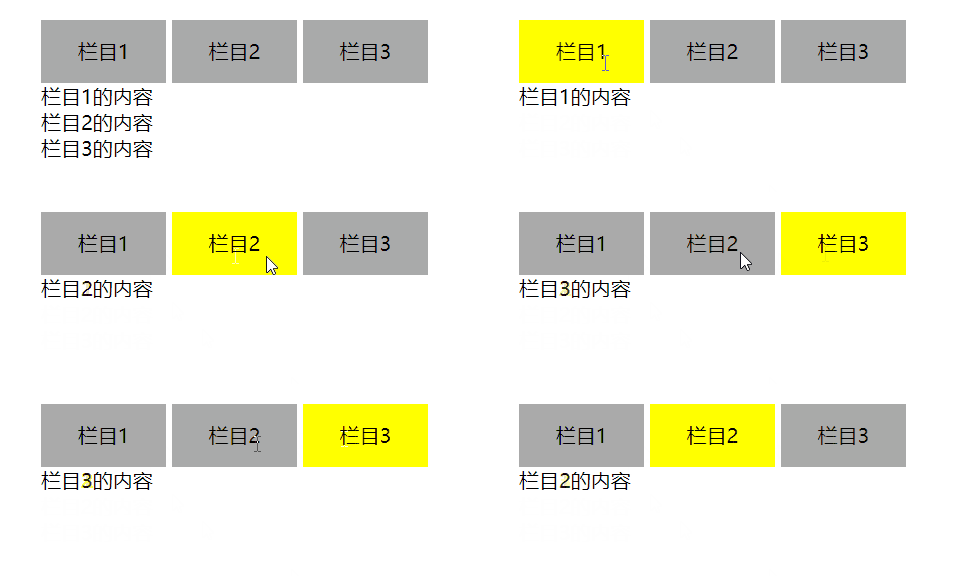
I want to achieve the following effects: click the column above to switch the content of the column below

Write the code as follows (mainly see the JS part)

<!DOCTYPE html>
<html lang="en">
<head>
    <meta charset="UTF-8">
    <meta http-equiv="X-UA-Compatible" content="IE=edge">
    <meta name="viewport" content="width=device-width, initial-scale=1.0">
    <title>Document</title>
    <style>
        .tab{
            display: inline-block;
            width: 100px;
            height: 50px;
            background-color: #aaa;
        }
        .current{
            background-color: yellow;
        }
        .content{
            display: none;
        }
    </style>
</head>
<body>
    <div class = "tab">
        <div class = "tab_list">
            <li>栏目1</li>
            <li>栏目2</li>
            <li>栏目3</li>
        </div>
        <div class = "tab_con" style="display: block;">栏目1的内容</div>
        <div class = "tab_con">栏目2的内容</div>
        <div class = "tab_con">栏目3的内容</div>
    </div>

    <script>
        var tab_list = document.querySelector(".tab_list").querySelectorAll("li");
        var tab_con = document.querySelectorAll(".tab_con");
        
        for(var i = 0;i<tab_list.length;i++){
            tab_list[i].onclick = function(){
                for(var j = 0;j<tab_list.length;j++){
                    tab_list[j].className = "tab";
                }
                tab_list[i].className = "tab red";

                for(var j = 0;j<tab_con.length;j++){
                    tab_con[j].style.display = "none";
                }
                tab_con[i].style.display = "block";

            }
        }


    </script>
</body>
</html>

The result shows an error: uncaught typeerror: cannot set properties of undefined (setting 'classname') at htmldivelement.Tab.<computed>.onclick

Baidu tested it and found the following code:

<script>
        var tab_list = document.querySelector(".tab_list").querySelectorAll("li");
        var tab_con = document.querySelectorAll(".tab_con");
        
        for(var i = 0;i<tab_list.length;i++){
            tab_list[i].onclick = function(){
                console.log("栏目" + i + "被点击了");
            }
        }


    </script>

In printing, I is 3 instead of 0, 1 and 2.

After consulting the data, we know that:

In the for loop, for each tab_List is bound to the onclick event to listen, but when the function is executed, I has ended the loop, so the printout is 3.

That is, the event listening function in the for loop needs to avoid using the loop variable I

So, if tab is involved_List [i], we can use this; If tab is involved_Con [i], that is, use I to get other elements, so we can give tab_List adds an attribute index, and then in the onclick function, we get this attribute, that is, we get the I we want

The code is as follows:

<!DOCTYPE html>
<html lang="en">
<head>
    <meta charset="UTF-8">
    <meta http-equiv="X-UA-Compatible" content="IE=edge">
    <meta name="viewport" content="width=device-width, initial-scale=1.0">
    <title>Document</title>
    <style>
        *{
            margin: 0;
            padding: 0;
        }
        .tab{
            width: 400px;
            margin: 100px auto;
        }
        .tab .tab_list li{
            display: inline-block;
            width: 100px;
            height: 50px;
            line-height: 50px;
            text-align: center;
            background-color: #aaa;
        }
        .tab .tab_list .current{
            background-color: yellow;
        }
        .content{
            display: none;
        }
    </style>
</head>
<body>
    <div class = "tab">
        <div class = "tab_list">
            <li>栏目1</li>
            <li>栏目2</li>
            <li>栏目3</li>
        </div>
        <div class = "tab_con" style="display: block;">栏目1的内容</div>
        <div class = "tab_con">栏目2的内容</div>
        <div class = "tab_con">栏目3的内容</div>
    </div>

    <script>
        var tab_list = document.querySelector(".tab_list").querySelectorAll("li");
        var tab_con = document.querySelectorAll(".tab_con");
        
        for(var i = 0;i<tab_list.length;i++){
            tab_list[i].setAttribute("index",i);
            tab_list[i].onclick = function(){
                var index = this.getAttribute("index");
                console.log("栏目" + index + "被点击了");
                for(var j = 0;j<tab_list.length;j++){
                    tab_list[j].className = "";
                }
                tab_list[index].className = "current";
                console.log(this.className);
                for(var j = 0;j<tab_con.length;j++){
                    tab_con[j].style.display = "none";
                }
                tab_con[index].style.display = "block";

            }
        }
    </script>
</body>
</html>

[Solved] Angular basic create component error: Is it missing an @NgModule annotation

Error message

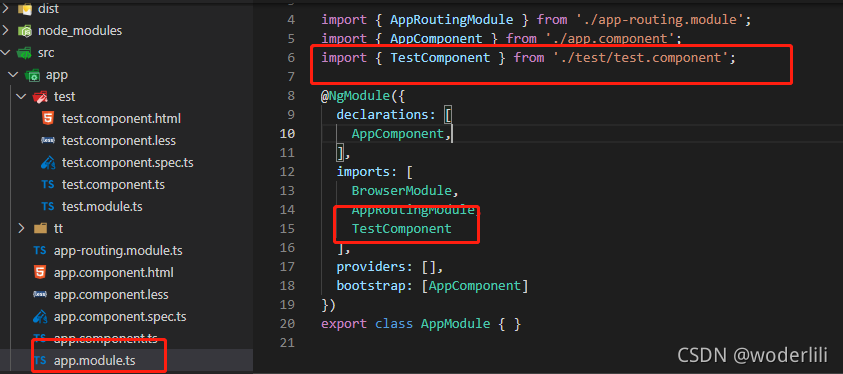
Error: src/app/test/test.component.ts:8:14 - error NG6002: Appears in the NgModule.imports of AppModule, but could not be resolved to an NgModule class.
Is it missing an @NgModule annotation?

Error code


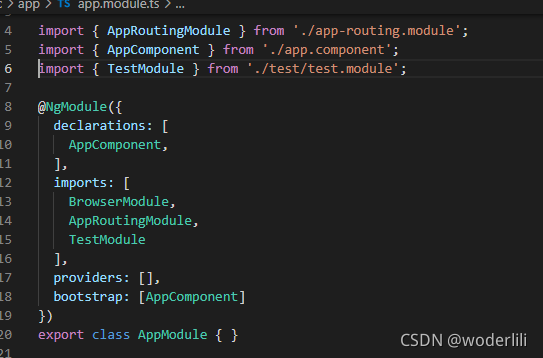
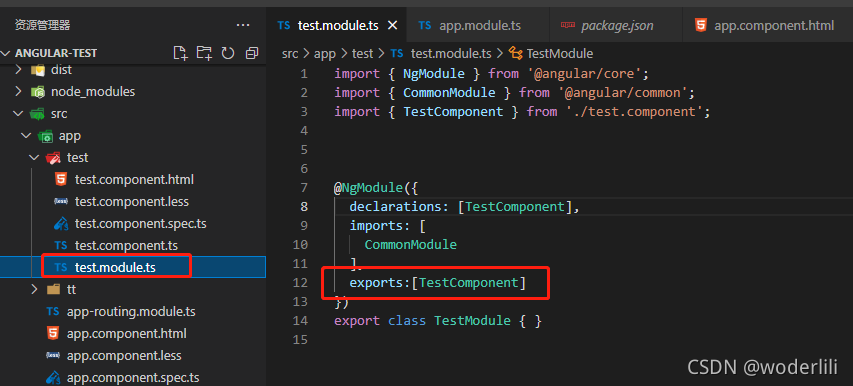
reason: TestComponent is imported incorrectly in app.module.ts file, so TestModule should be imported
correct import:

Note: a component can only belong to one module. After introducing testcomponent in test.module.ts, testcomponent cannot be imported in declarations in app.module.ts, Otherwise, an error will be reported in the browser!

[Solved] Vue item error: Regeneratorruntime is not defined

Project scenario:

The company’s official website project built with Vue scaffold


Problem Description:

async/await is used when processing asynchrony. It is found that the console reports an error regeneratorruntime is not defined


Cause analysis:

The project uses Babel, and Babel needs some auxiliary functions when translating ES6 syntax. When there is no module to encapsulate these auxiliary functions, it will report similar not defined.

Regeneratorruntime is an auxiliary function generated by Babel for async/await compatible syntax. Regenerator runtime is not defined. Obviously, the package of regenerator runtime is missing.


Solution:

    1. install transform runtime
yarn add  @babel/plugin-transform-runtime -D

Configure Babel (I use Babel 7.0 as Babel.Config.JS)

plugins: [
    
    [
      "@babel/plugin-transform-runtime"
    ]
    
  ]

Restart the service and find that there is no error when running

[Solved] Vue calls style loader error: Module build failed: CssSyntaxError

Vue uses style loader to add CSS style to Dom and reports an error

ERROR in ./src/css/normal.css
Module build failed: CssSyntaxError

(1:1) Unknown word

> 1 | var content = require("!!./normal.css");
    | ^
  2 | 
  3 | if (typeof content === 'string') {

 @ ./src/main.js 11:0-27
npm ERR! code ELIFECYCLE
npm ERR! errno 2
npm ERR! [email protected] build: `webpack`
npm ERR! Exit status 2
npm ERR!
npm ERR! Failed at the [email protected] build script.
npm ERR! This is probably not a problem with npm. There is likely additional logging output above.

The loader sequence you configured in the webpack.config.js file may be wrong
original code

const path=require('path')
module.exports={
  entry: './src/main.js',
  output: {
    path:path.resolve(__dirname,'dist'),
    filename:'bundle.js'
  },
  module: {
    rules: [
      {
        test: /\.css$/,
        use: ['css-loader','style-loader']
      },

    ]
  }
}

Code after modification

const path=require('path')
module.exports={
  entry: './src/main.js',
  output: {
    path:path.resolve(__dirname,'dist'),
    filename:'bundle.js'
  },
  module: {
    rules: [
      {
        test: /\.css$/,
        use: ['style-loader','css-loader']
      },

    ]
  }
}

This is because when multiple loaders are configured, the program is read from right to left

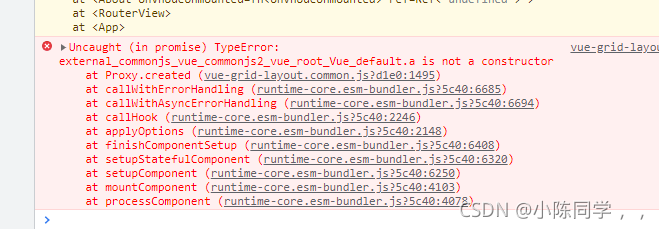
[Solved] Uncaught (in promise) TypeError: XXX.a is not a constructor

Tips:

Solution:

Step 1:

npm add vue-grid- [email protected] -beta1

Step 2:
Import vuegridlayout from ‘Vue grid layout’ in
mian.js

Add: .use (vuegridlayout)
createapp (APP).use (Axios).use (router).use (vuegridlayout).mount (‘#app’)

Because Vue grid layout is vue2, but you use vue3, you need to install the dependencies and related configurations of vue3

Node rsa Library Error [InvalidAsn1Error]: Expected 0x2: got 0x30

Node RSA library, read the key file, add and remove the secret report error

throw newInvalidAsn1Error(‘Expected 0x’ + tag.toString(16) +
^

Error [InvalidAsn1Error]: Expected 0x2: got 0x30

The reason is the key file format problem

Pkcs1: public key (- — begin RSA public key ——) and private key (- — begin RSA private key ——) pkcs8: public key (- — begin RSA public key ——) and private key (- — begin private key—

To put it simply, delete the word RSA in the public key and private key

The node RSA library is formatted in this way.

[Vue warn]: Error in render: “TypeError: Cannot read properties of undefined

   [Vue warn]: Error in render: "TypeError: Cannot read properties of undefined

Cause: rendering error:

Conclusion: in the expression A.B.C, if there is no object B in object a, then reading the value in object A.B.C will naturally report an error. If it is a two-level expression A.B, no error will be reported and undefined will be returned, The third floor will report an error

Solution:


    <!-- Use the error report directly -->
    {{sku[0].skuName}}

    <!--  Solution  -->
    <template v-if="sku[0]"> {{sku[0].skuName}}</template>