Prophet was successfully installed before, but the following error occurred when the computer was changed. Record it
if Microsoft Visual C + + 14.0 is missing, download a visual studio installer, https://docs.microsoft.com/en-us/visualstudio/install/install-visual-studio?view=vs -In 2019, you can install visual studio 2017
if the error is plot, install plot
If an error is reported, exception ignored in: ‘stanfit4anon_ Model, Download pystan, delete the pystan package in the site packages under CONDA, delete the cache of pystan in appdata \ local \ temp under the user, and then reinstall it.
Category Archives: How to Fix
Resourcemanger reported an error: the port is unavailable
standby The resourcemanger machine reports that the port is unavailable, port 8088 is normal, the process is running, and the log is normal
Solution ideas
1. Log in to the two resourcemanger machines and check whether the/var/log/Hadoop yarn/Hadoop Hadoop resourcemanager-emr-header-1.cluster *. Log logs contain error messages
2. Check whether there is an automatically pulled log: startup_ MSG: starting ResourceManager to judge whether active standby switching has occurred
2021-08-10 17:58:01,750 INFO org.apache.hadoop.yarn.server.resourcemanager.ResourceManager: Already in standby state
3. Check the standby log and find the problem: I can’t connect ZK and keep trying to reconnect. ZK connection exception lasts for a long time. It may not be reconnected due to timeout, and it may enter the terminated state.
This is because there is a problem with the ResourceManager state of header-1. The state of HA and the state of hazookeeperconnectionstate are terminated.
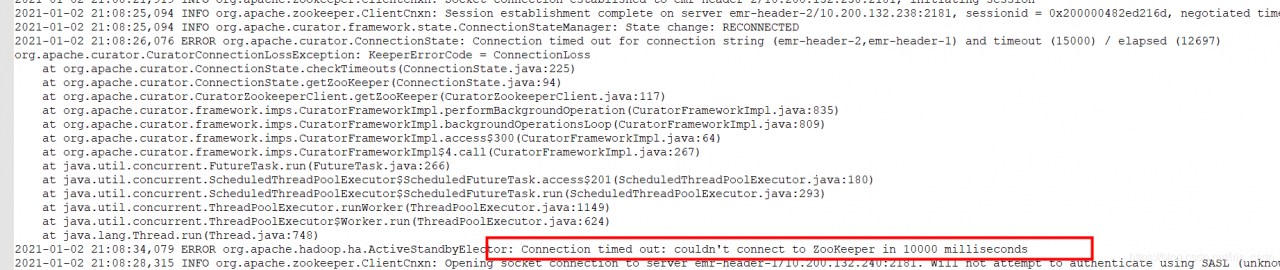
4. Status can be by running on header-1, curl http://localhost:8088/ws/v1/cluster/info

Normal active connection, (active RM) is OK, and yarn service is OK:
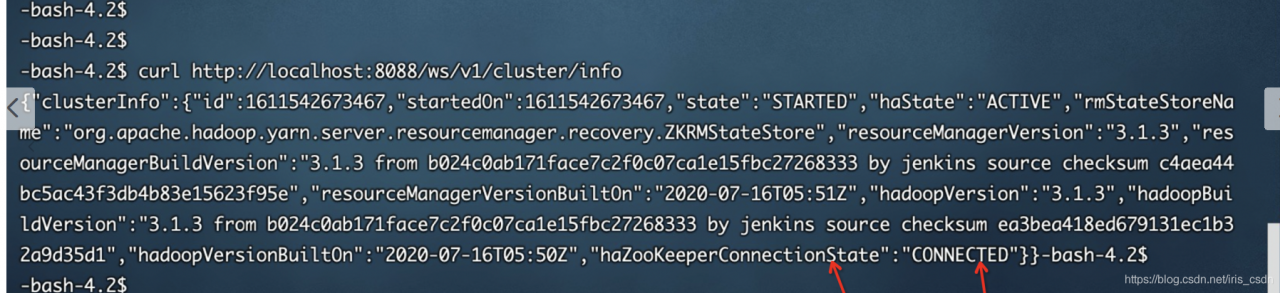
5. Solution: ARN active RM can provide normal services. The standby RM is in a wrong state. When restarting active ha later, it may not be switched in time. Restart standby RM to solve the problem.
Solution to the segmentation fault of single chain table in C language
The title is a collection of single linked list operations, including the establishment, deletion, insertion, printing, release and other operations of linked list.
The code runs correctly in CodeBlocks, and an error is displayed when it is submitted to the OJ platform of the school.
The segmentation fault section is wrong, mainly because the array is out of bounds, the pointer is abnormal, and the memory area that should not be accessed is accessed. Single linked list mainly involves pointer operation. After checking that the array is correct (not used in this topic), it mainly checks the pointer.
This is the previous code:
#include <stdio.h>
#include <stdlib.h>

typedef struct student
{
    long int num;
    float score;
    struct student *next;
}Node,*Link;

Link creatlink(void)
{
    Link head,node,rear;
    long int p;
    float q;
    head = (Link)malloc(sizeof(Node));
    head -> next = NULL;
    rear = head;
    while(scanf("%ld %f",&p,&q))
    {
        if(p == 0&&q == 0)
        {
            break;
        }
        node = (Link)malloc(sizeof(Node));
        node -> num = p;
        node -> score = q;
        rear -> next = node;
        rear = node;
    }
    rear -> next = NULL;
    return head;
}

void printlink(struct student *head)
{
    Link p;
    p = head -> next;
    while(p != NULL)
    {
        printf("%ld %.2f\n",p -> num,p -> score);
        p = p -> next;
    }
}

Link dellink(Link head,long int k)
{
    if(head == NULL||head -> next == NULL)
        exit(0);
    Link p,q;
    p = head -> next;
    q = head;
    while(p != NULL)
    {
        if(p -> num == k)
        {
            q -> next = p -> next;
            free(p);
        }
        else
        {
            q = p;
            p = p -> next;
        }
    }
    return head;
}

Link insertlink(Link head,Link stu)
{
    Link p,node,q;
    p = head;
    q = p -> next;
    while(q != NULL&&q -> num < stu -> num)
    {
        p = p -> next;
        q = p -> next;
    }
    if(q == NULL)
        p -> next = NULL;
    node = (Link)malloc(sizeof(Node));
    node -> num = stu -> num;
    node -> score = stu -> score;
    node -> next = p -> next;
    p -> next = node;
    return head;
}

void freelink(Link head)
{
    Link p;
    while(p != NULL)
    {
        p = head;
        head = head -> next;
        free(p);
    }
}

int main()
{
    struct student *createlink(void);
    struct student *dellink(struct student *, long);
    struct student *insertlink(struct student *, struct student *);
    void printlink(struct student *);
    void freelink(struct student *);
    struct student *head, stu;
    long del_num;
    head= creatlink();
    scanf("%ld", &del_num);
    head= dellink(head, del_num);
    scanf("%ld%f", &stu.num, &stu.score);
    head= insertlink(head, &stu);
    scanf("%ld%f", &stu.num, &stu.score);
    head= insertlink(head, &stu);
    printlink(head);
    freelink(head);
    return 0;
}
After excluding the error of other functions, it is finally found that the error occurs in the most insignificant release linked list function. It is found that the while loop end flag is wrong, and the head is always one step faster than the P pointer. If P= If NULL is the loop end flag, the loop is completed when the point pointed by the head is null and P points to the last node. At this time, P is not null, so the loop has to continue and the head has to move back. At this time, the head pointer becomes a wild pointer and has no point, so an error will be reported.
After modification, transpose the while loop end flag to head= Null, when p points to the last node and head is null, the node pointed to by P will be released, and the loop will end without wild pointer.
The modified release single linked list function is:
void freelink(Link head)
{
    Link p;
    while(head != NULL)
    {
        p = head;
        head = p -> next;
        free(p);
    }
}
After modification, submit it to OJ platform again and pass it correctly.
Error 404 reported by spring MVC access Servlet
Idea created a springmvc project. Remember the error: 404
there was no error in accessing the servlet and the configuration file. Later, configure the support for the @ controller tag in springmvc.xml
<mvc:annotation-driven />
Successfully solved!
An error is reported when the file in hive parquet format is written in the Flink connection
Version: cdh6.3.2
flick version: 1.13.2
CDH hive version: 2.1.1
Error message:
java.lang.NoSuchMethodError: org.apache.parquet.hadoop.ParquetWriter$Builder.<init>(Lorg/apache/parquet/io/OutputFile;)V
	at org.apache.flink.formats.parquet.row.ParquetRowDataBuilder.<init>(ParquetRowDataBuilder.java:55) ~[flink-parquet_2.11-1.13.2.jar:1.13.2]
	at org.apache.flink.formats.parquet.row.ParquetRowDataBuilder$FlinkParquetBuilder.createWriter(ParquetRowDataBuilder.java:124) ~[flink-parquet_2.11-1.13.2.jar:1.13.2]
	at org.apache.flink.formats.parquet.ParquetWriterFactory.create(ParquetWriterFactory.java:56) ~[flink-parquet_2.11-1.13.2.jar:1.13.2]
	at org.apache.flink.table.filesystem.FileSystemTableSink$ProjectionBulkFactory.create(FileSystemTableSink.java:624) ~[flink-table-blink_2.11-1.13.2.jar:1.13.2]
	at org.apache.flink.streaming.api.functions.sink.filesystem.BulkBucketWriter.openNew(BulkBucketWriter.java:75) ~[flink-table-blink_2.11-1.13.2.jar:1.13.2]
	at org.apache.flink.streaming.api.functions.sink.filesystem.OutputStreamBasedPartFileWriter$OutputStreamBasedBucketWriter.openNewInProgressFile(OutputStreamBasedPartFileWriter.java:90) ~[flink-table-blink_2.11-1.13.2.jar:1.13.2]
	at org.apache.flink.streaming.api.functions.sink.filesystem.BulkBucketWriter.openNewInProgressFile(BulkBucketWriter.java:36) ~[flink-table-blink_2.11-1.13.2.jar:1.13.2]
	at org.apache.flink.streaming.api.functions.sink.filesystem.Bucket.rollPartFile(Bucket.java:243) ~[flink-dist_2.11-1.13.2.jar:1.13.2]
	at org.apache.flink.streaming.api.functions.sink.filesystem.Bucket.write(Bucket.java:220) ~[flink-dist_2.11-1.13.2.jar:1.13.2]
	at org.apache.flink.streaming.api.functions.sink.filesystem.Buckets.onElement(Buckets.java:305) ~[flink-dist_2.11-1.13.2.jar:1.13.2]
	at org.apache.flink.streaming.api.functions.sink.filesystem.StreamingFileSinkHelper.onElement(StreamingFileSinkHelper.java:103) ~[flink-dist_2.11-1.13.2.jar:1.13.2]
	at org.apache.flink.table.filesystem.stream.AbstractStreamingWriter.processElement(AbstractStreamingWriter.java:140) ~[flink-table-blink_2.11-1.13.2.jar:1.13.2]
	at org.apache.flink.streaming.runtime.tasks.CopyingChainingOutput.pushToOperator(CopyingChainingOutput.java:71) ~[flink-dist_2.11-1.13.2.jar:1.13.2]
	at org.apache.flink.streaming.runtime.tasks.CopyingChainingOutput.collect(CopyingChainingOutput.java:46) ~[flink-dist_2.11-1.13.2.jar:1.13.2]
	at org.apache.flink.streaming.runtime.tasks.CopyingChainingOutput.collect(CopyingChainingOutput.java:26) ~[flink-dist_2.11-1.13.2.jar:1.13.2]
	at org.apache.flink.streaming.api.operators.CountingOutput.collect(CountingOutput.java:50) ~[flink-dist_2.11-1.13.2.jar:1.13.2]
	at org.apache.flink.streaming.api.operators.CountingOutput.collect(CountingOutput.java:28) ~[flink-dist_2.11-1.13.2.jar:1.13.2]
	at StreamExecCalc$35.processElement(Unknown Source) ~[?:?]
	at org.apache.flink.streaming.runtime.tasks.CopyingChainingOutput.pushToOperator(CopyingChainingOutput.java:71) ~[flink-dist_2.11-1.13.2.jar:1.13.2]
	at org.apache.flink.streaming.runtime.tasks.CopyingChainingOutput.collect(CopyingChainingOutput.java:46) ~[flink-dist_2.11-1.13.2.jar:1.13.2]
	at org.apache.flink.streaming.runtime.tasks.CopyingChainingOutput.collect(CopyingChainingOutput.java:26) ~[flink-dist_2.11-1.13.2.jar:1.13.2]
	at org.apache.flink.streaming.api.operators.CountingOutput.collect(CountingOutput.java:50) ~[flink-dist_2.11-1.13.2.jar:1.13.2]
	at org.apache.flink.streaming.api.operators.CountingOutput.collect(CountingOutput.java:28) ~[flink-dist_2.11-1.13.2.jar:1.13.2]
	at org.apache.flink.table.runtime.operators.source.InputConversionOperator.processElement(InputConversionOperator.java:128) ~[flink-table-blink_2.11-1.13.2.jar:1.13.2]
	at org.apache.flink.streaming.runtime.tasks.CopyingChainingOutput.pushToOperator(CopyingChainingOutput.java:71) ~[flink-dist_2.11-1.13.2.jar:1.13.2]
	at org.apache.flink.streaming.runtime.tasks.CopyingChainingOutput.collect(CopyingChainingOutput.java:46) ~[flink-dist_2.11-1.13.2.jar:1.13.2]
	at org.apache.flink.streaming.runtime.tasks.CopyingChainingOutput.collect(CopyingChainingOutput.java:26) ~[flink-dist_2.11-1.13.2.jar:1.13.2]
	at org.apache.flink.streaming.api.operators.CountingOutput.collect(CountingOutput.java:50) ~[flink-dist_2.11-1.13.2.jar:1.13.2]
	at org.apache.flink.streaming.api.operators.CountingOutput.collect(CountingOutput.java:28) ~[flink-dist_2.11-1.13.2.jar:1.13.2]
	at org.apache.flink.streaming.api.operators.StreamSourceContexts$ManualWatermarkContext.processAndCollectWithTimestamp(StreamSourceContexts.java:322) ~[flink-dist_2.11-1.13.2.jar:1.13.2]
	at org.apache.flink.streaming.api.operators.StreamSourceContexts$WatermarkContext.collectWithTimestamp(StreamSourceContexts.java:426) ~[flink-dist_2.11-1.13.2.jar:1.13.2]
	at org.apache.flink.streaming.connectors.kafka.internals.AbstractFetcher.emitRecordsWithTimestamps(AbstractFetcher.java:365) ~[flink-connector-kafka_2.11-1.13.2.jar:1.13.2]
	at org.apache.flink.streaming.connectors.kafka.internals.KafkaFetcher.partitionConsumerRecordsHandler(KafkaFetcher.java:183) ~[flink-connector-kafka_2.11-1.13.2.jar:1.13.2]
	at org.apache.flink.streaming.connectors.kafka.internals.KafkaFetcher.runFetchLoop(KafkaFetcher.java:142) ~[flink-connector-kafka_2.11-1.13.2.jar:1.13.2]
	at org.apache.flink.streaming.connectors.kafka.FlinkKafkaConsumerBase.run(FlinkKafkaConsumerBase.java:826) ~[flink-connector-kafka_2.11-1.13.2.jar:1.13.2]
	at org.apache.flink.streaming.api.operators.StreamSource.run(StreamSource.java:110) ~[flink-dist_2.11-1.13.2.jar:1.13.2]
	at org.apache.flink.streaming.api.operators.StreamSource.run(StreamSource.java:66) ~[flink-dist_2.11-1.13.2.jar:1.13.2]
	at org.apache.flink.streaming.runtime.tasks.SourceStreamTask$LegacySourceFunctionThread.run(SourceStreamTask.java:269) ~[flink-dist_2.11-1.13.2.jar:1.13.2]
2021-08-15 10:45:37,863 INFO  org.apache.flink.runtime.resourcemanager.slotmanager.DeclarativeSlotManager [] - Clearing resource requirements of job e8f0af4bb984507ec9f69f07fa2df3d5
2021-08-15 10:45:37,865 INFO  org.apache.flink.runtime.executiongraph.failover.flip1.RestartPipelinedRegionFailoverStrategy [] - Calculating tasks to restart to recover the failed task cbc357ccb763df2852fee8c4fc7d55f2_0.
2021-08-15 10:45:37,866 INFO  org.apache.flink.runtime.executiongraph.failover.flip1.RestartPipelinedRegionFailoverStrategy [] - 1 tasks should be restarted to recover the failed task cbc357ccb763df2852fee8c4fc7d55f2_0.
2021-08-15 10:45:37,867 INFO  org.apache.flink.runtime.executiongraph.ExecutionGraph
According to the guidelines given on the official website of Flink:
add the Flink parquet dependency package and parquet-hadoop-1.11.1.jar and parquet-common-1.11.1.jar packages. The above error still exists and the specified construction method cannot be found.
reason:
In CDH hive version: the version in parquet-hadoop-bundle.jar is inconsistent with that in Flink parquet.
**
resolvent:
**
1. Because the Flink itself has provided the Flink parquet package and contains the corresponding dependencies, it is only necessary to ensure that the dependencies provided by the Flink are preferentially loaded when the Flink task is executed. Flink parquet can be packaged and distributed with the code
2. Because the package versions are inconsistent, you can consider upgrading the corresponding component version. Note that you can’t simply adjust the version of parquet-hadoop-bundle.jar. After viewing it from Maven warehouse, there are no available packages to use. And: upgrade the version of hive or reduce the version of Flink.
Troubleshooting of errors in installing elasticsearch
When elasticsearch is installed, various errors are reported during startup. The summary is as follows:
Error 1
Java.lang.runtimeexception: can not run elasticsearch as root
solution: use a non root user to start es
Error report 2
max virtual memory areas vm.max_ map_ count [65530] is too low, increase to at least [262144]
Solution:
switch root user
VI / Etc/sysctl. Conf
add the last line
vm.max_ map_ Count = 655360
execute the command: sysctl – P
Error reporting 3
the default discovery settings are unsuitable for production use; at least one of [discovery.seed_ hosts, discovery.seed_ providers, cluster.initial_ master_ nodes] must be configured
Solution:
in the config directory of elasticsearch, modify the elasticsearch.yml configuration file and add the following configuration to the configuration file:
cluster.initial_ master_ nodes: [“node-1”]
Error reporting 4
Max file descriptors [4096] for elasticsearch process is too low, increase to at least [65536]
the maximum number of files opened simultaneously in each process is too small. You can view the current number through the following two commands
ulimit -Hn
ulimit -Sn
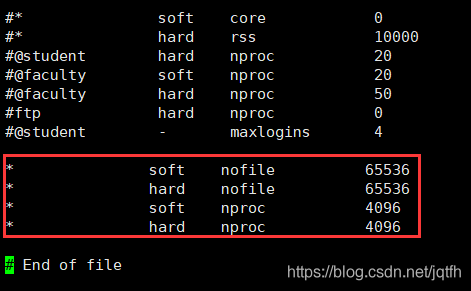
Switch the root user, modify the/etc/security/limits.conf file, add the configuration, and log in again after the user exits
*               soft    nofile          65536
*               hard    nofile          65536
Error reporting 5
max number of threads [3818] for user [es] is too low, increase to at least [4096]
The problem is the same as above. The maximum number of threads is too low. Modify the configuration file/etc/security/limits.conf (and question 4 is a file) and add the configuration
*               soft    nproc           4096
*               hard    nproc           4096
It can be viewed through the command
ulimit -Hu
ulimit -Su
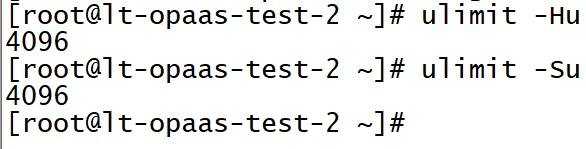
Modified file:
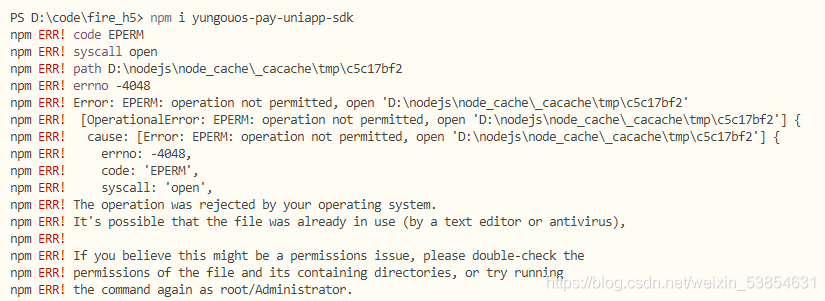
Error in installing NPM for uniapp
NPM installation
npm i yungouos-pay-uniapp-sdk
Error reporting
solution:
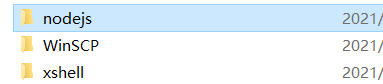
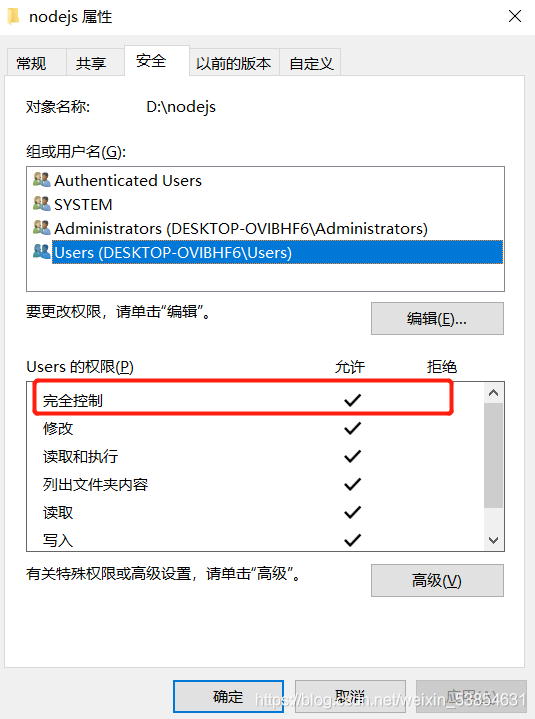
find the installation directory of nodejs, right-click the attribute
set users to fully control users
OK!
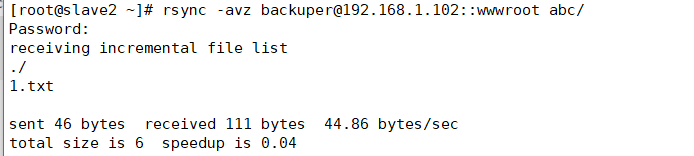
Rsync client synchronization error
Rsync client synchronization error

Error reason: the password is entered correctly but cannot be synchronized
Solution: because the permission of the account password file on the server is not 600, you need to set the permission to 600 to synchronize it
QT operation directly crashes, and the error is the process was ended forcefully
1. The possible causes are: a variable is declared but not initialized, but a variable declared but not initialized is called directly somewhere, which will cause the QT operation to crash directly and report the error the process was ended forcefully
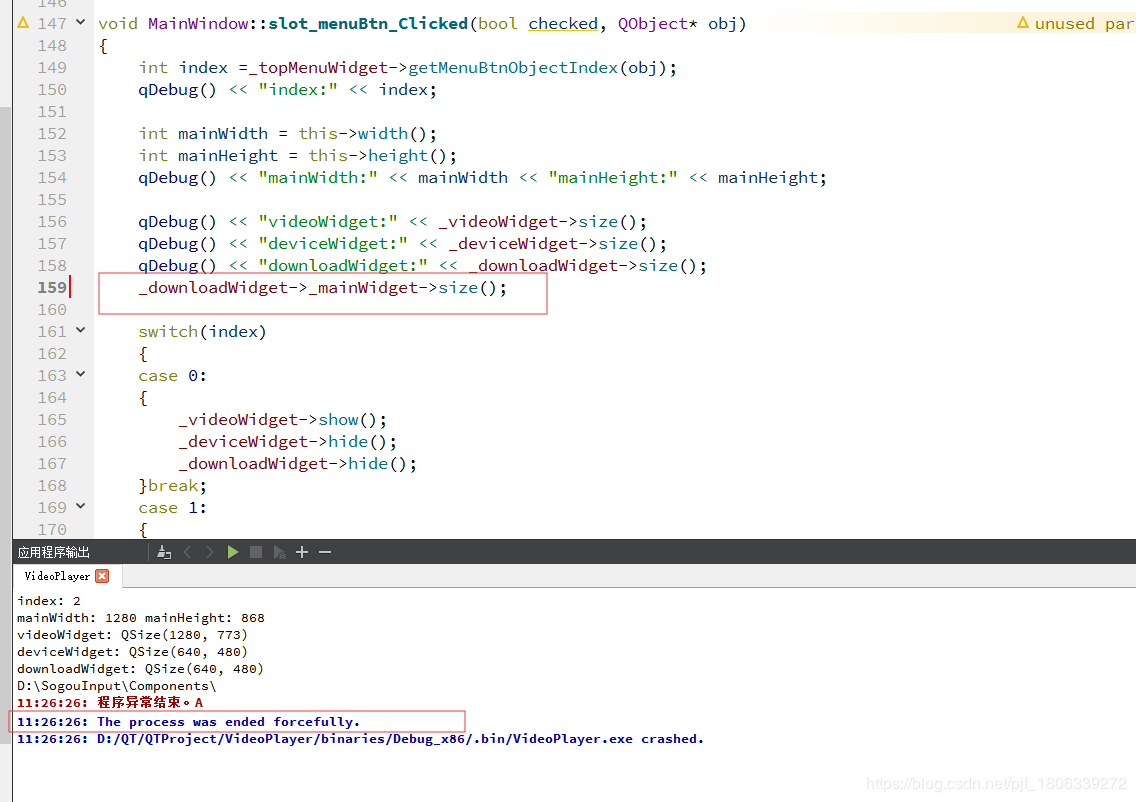
Figure 1
For personal reasons, the initialization of declared variables is annotated, so the operation will directly crash and report an error
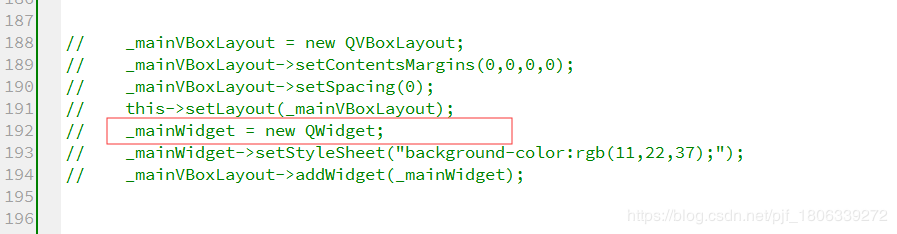
Figure 2
NPM installØin sprintf- [email protected] Wealth: not available https://github.com/nhn/raphael.git/ “
npm install –registry= https://registry.npm.taobao.org
Command installation error
stuck in sprintf- [email protected] Checking installable status for a short time, Then an error is reported as follows (the domestic network speed of this link should be slow):
fatal: unable to access‘ https://github.com/nhn/raphael.git/ ’

test according to the online method: search the. Gitconfig file (generally in the user directory of Disk C, such as C: \ users * \ path), Then add the following paragraph:
[url “HTTPS://”]
instead of = git://
then the following error is reported:
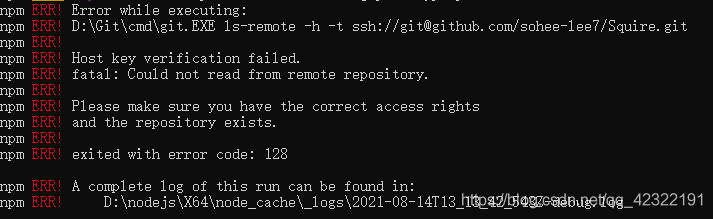
it can be seen from the above figure that there are problems in the installation of some other packages because HTTPS is replaced with git, that is, HTTPS and git cannot be used all. In addition, I guess that the above paragraph of code should mean replacing the website, So I changed the above code as follows:
[url]“ https://github.com/nhn/raphael.git/ ”]
insteadOf = git://github.com/nhn/raphael.git/
Then
NPM install — registry= https://registry.npm.taobao.org
Then you can run Vue element admin successfully. The screenshot after success is as follows:
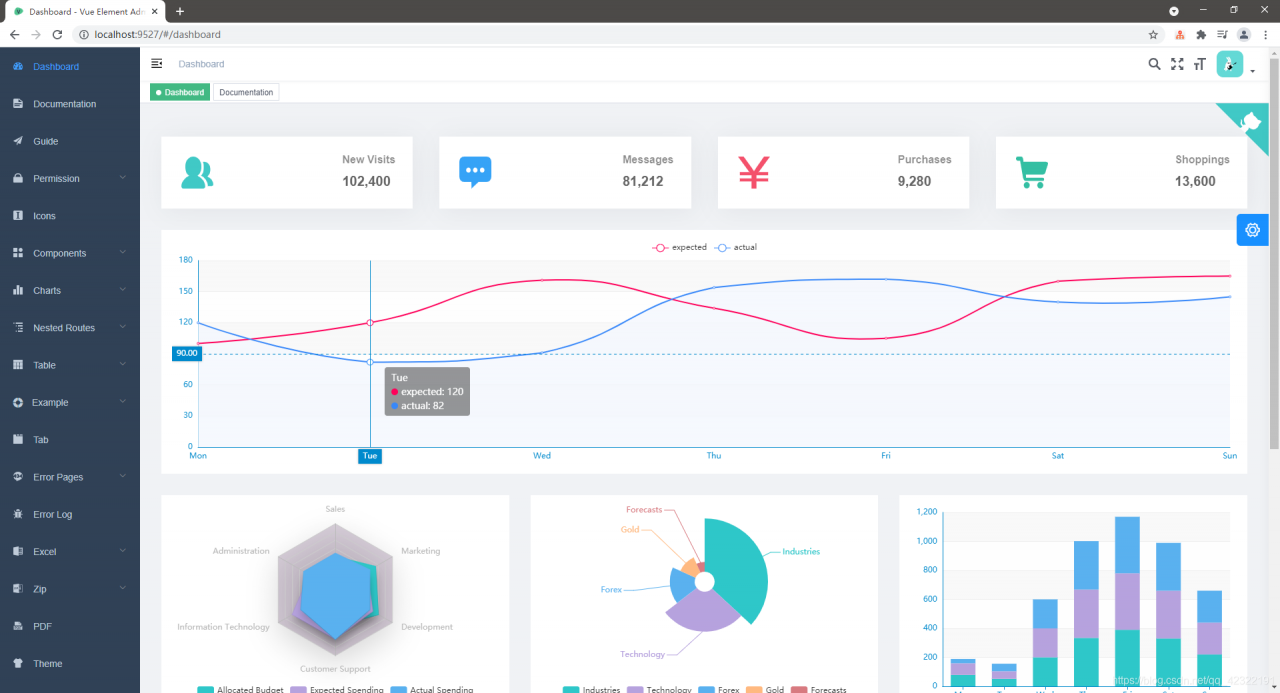
VScode Updated Error: Couldn‘t start dlv dap [How to Solve]
visio studio code port` is ignored with the ‘dlv-dap’
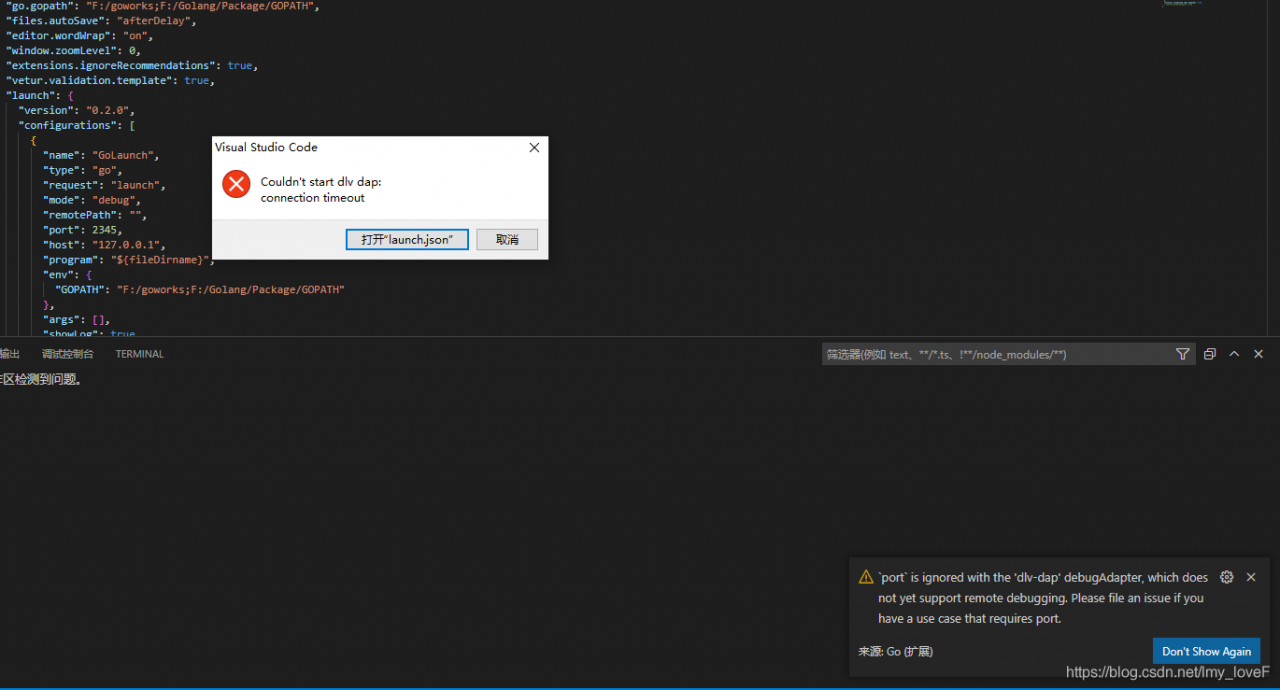 Solution: Add to the configuration file, “debugAdapter”: “legacy”,
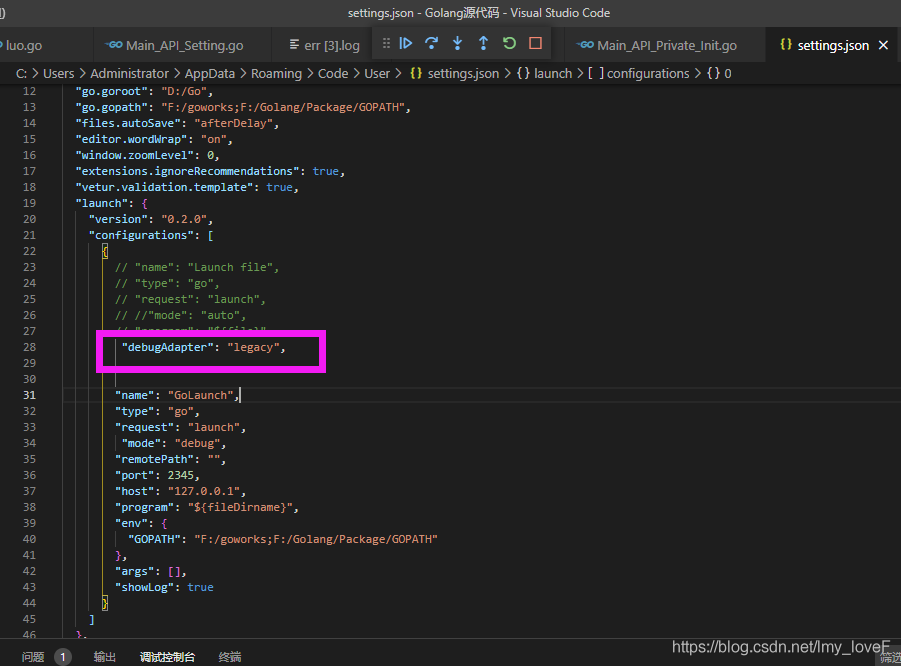
Solution: Add to the configuration file, “debugAdapter”: “legacy”,
[Solved] CAP_IMAGES: can‘t find starting number (in the name of file)
Solve cap_ IMAGES: can’t find starting number (in the name of file)
1. Solutions
1. Confirm that the output file type matches FourCC. For details, please refer to the official website http://www.fourcc.org/codecs.php 。
simply use. Avi with videowriter:: FourCC (‘m ‘,’ J ‘,’ p ‘,’ g ‘)
I found a post on the Internet saying that FourCC was used in the old version, but it’s not used now. It’s wrong. For opencv4.3. X, FourCC is still used. When compiling, add videowriter:: FourCC (‘x’, ‘x’, ‘x’, ‘x’) to the class name.
2. If step 1 is correct but still reports an error:
linux platform: reinstall ffmpeg, then recompile opencv and install it. When compiling opencv, cmake needs to add the parameter – dwith_ FFMPEG=ON。
window platform: the output file type can be changed to. MP4. This method is lazy and does not need to install ffmpeg.
The following explains in detail why the lazy law can take effect.
2. Error code
#define VIDEO_OUTPUT_PATH "D:\\test_project\\output.avi"

int main()
{
	Mat frame;

	frame = imread("xxx.jpg");

	VideoWriter vWriter(VIDEO_OUTPUT_PATH, CAP_OPENCV_MJPEG, 30, Size(frame.cols, frame.rows));
	//Using CAP_OPENCV_MJPEG for the above parameters is wrong haha, VideoWriter::fourcc('M', 'J', 'P', 'G') is the correct parameter
	int frameNum = 90;
	while (frameNum) {
		vWriter << dst;
		frameNum--;
	}

	return 0;
}
3. Error log
[ERROR:0] global C:\build\master_winpack-build-win64-vc14\opencv\modules\videoio\src\cap.cpp (563) cv::VideoWriter::open VIDEOIO(CV_IMAGES): raised OpenCV exception:

OpenCV(4.5.1) C:\build\master_winpack-build-win64-vc14\opencv\modules\videoio\src\cap_images.cpp:253: error: (-5:Bad argument) CAP_IMAGES: can't find starting number (in the name of file): D:\\test_project\\output.avi in function 'cv::icvExtractPattern'
4. Error analysis
The above two sentences are error messages at runtime
the first sentence is the exception received when videowriter:: open is running
the second sentence is the specific exception content:
OpenCV(4.5.1) C:\build\master_ winpack-build-win64-vc14\opencv\modules\videoio\src\cap_ images.cpp:253: error: (-5:Bad argument) CAP_ IMAGES: can’t find starting number (in the name of file): D:\test_ Project \ output.avi in function ‘CV:: icvextractpattern’
we can get the following information from the error log:the error log is generated by the file cap_ Images.cpp line 253 is printed. It seems that there is a problem with the file name. Specifically, it is the </ OL> printed in the CV:: icvextractpattern function
Next, let’s look at the opencv source code and find out what’s wrong with my file name
5. Opencv source code analysis
//The icvExtractPattern function is found in opencv\modules\videoio\src\cap.cpp
std::string icvExtractPattern(const std::string& filename, unsigned *offset)
{
     size_t len = filename.size(); //record the length of the filename


	。。。。。。 // a bunch of operations, don't care


        pos = filename.rfind('/'); //find the last "/" in the file name
#ifdef _WIN32
        if (pos == std::string::npos)
            pos = filename.rfind('\\'); //for window systems, find the last "\\" in the filename
#endif
        if (pos ! = std::string::npos)
            pos++;
        else
            pos = 0;

        while (pos < len && !isdigit(filename[pos])) pos++; //key point of filename error

        if (pos == len) //throw exception if position is equal to filename length

Translated with www.DeepL.com/Translator (free version)
        {
            CV_Error_(Error::StsBadArg, ("CAP_IMAGES: can't find starting number (in the name of file): %s", filename.c_str()));
        }

}
The above code should find the file type to be output from the output file name
because the key point while (POS & lt; len && amp; ! isdigit(filename[pos])) pos++; The implementation here is that if the character referred to by POS in the file name is not a number, then POS will point to the next character with + +. It seems that the reason is to find the file name with number of children
therefore, an idea occurred. Set the file type of the output file to MP4, and then the problem was solved.
#define VIDEO_ OUTPUT_ PATH “D:\test_ Project \ output. Avi ”
is changed to:
#define video_ OUTPUT_ PATH “D:\test_ project\output.mp4”
If it is helpful, you may wish to praise and pay attention to support.