Category Archives: How to Fix

Vs Code Python relative path error

#Question  

FileNotFoundError: [Errno 2] No such file or directory:’./XXX’

When ensuring that the file/directory does exist, the probability is the problem of the current running path of the program. Whether the code runner or the terminal is running, the default current path of vs code is not the path where the program file is located, so using the relative path to find the file will report an error.

#Settle

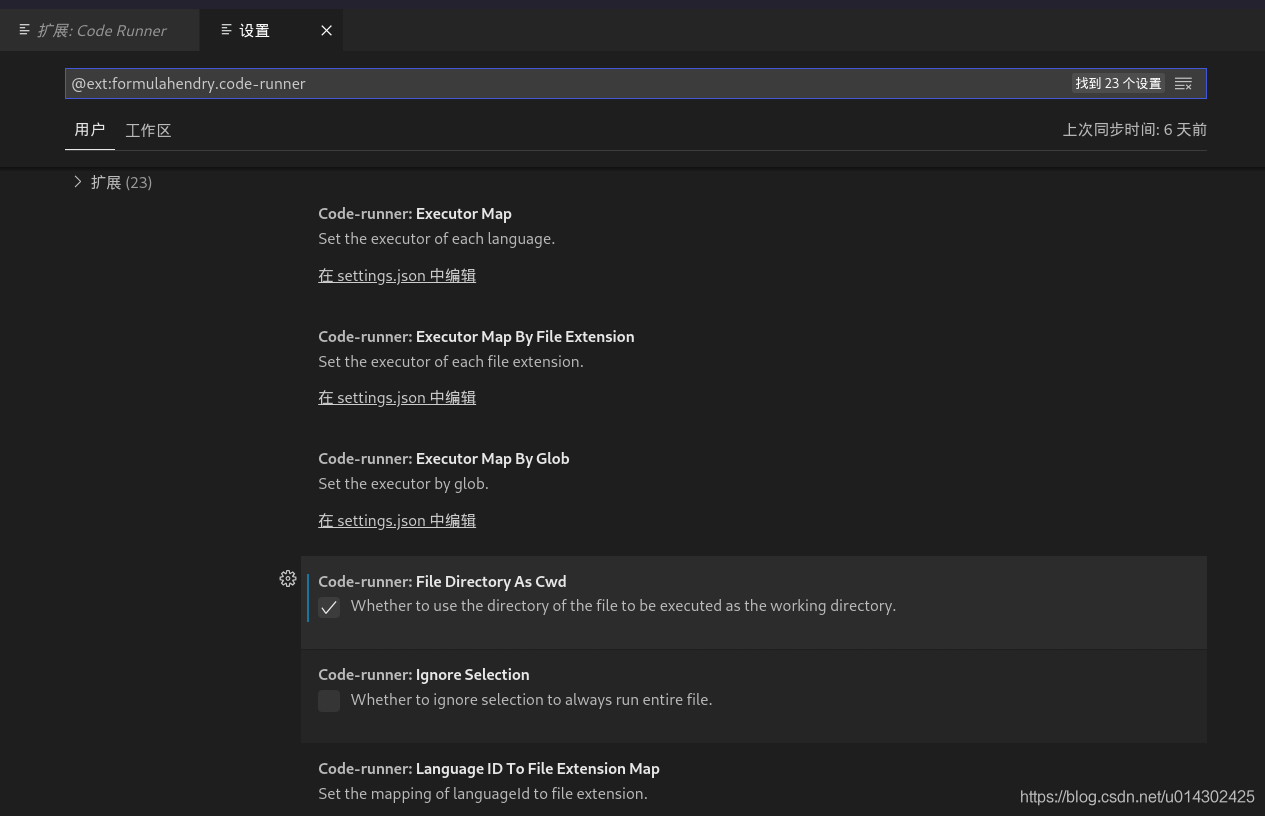
1. For code runner, modify its settings in expansion and check the option of file directory as CWD.

  2. For terminal operation, CD to the directory of program files first.

Processing method of eslint verification error

Processing method of eslint verification error

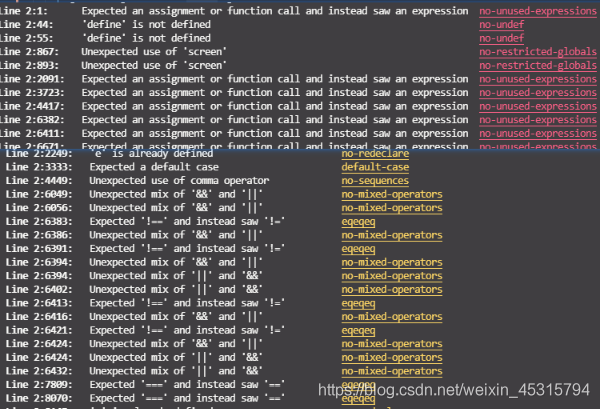
When encountering the eslint verification rule, the following errors or warnings are reported:

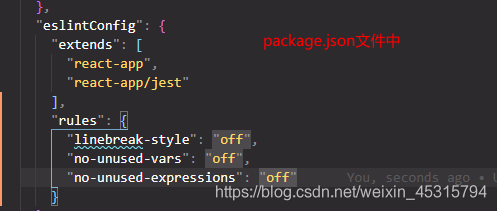
1. When encountering no unused vars, no unused expressions, no undef, no restricted globals and other errors, you can verify that the function is turned off by configuring the rules in eslint
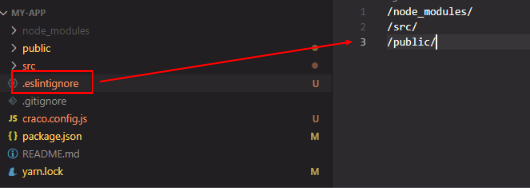
2. If there are too many errors and warnings when encountering a file (such as the imported plug-in min.js), you can create it in the root file = & gt Eslintcore (don’t forget the previous point) and configure it, as shown in the following figure:
/SRC/view = & gt; The view file under SRC file ignores the verification
[ Insert picture description here]( https://img-blog.csdnimg.cn/49aecec84d054cc5a2e4eae7fe6fbbda.png#pic_ center

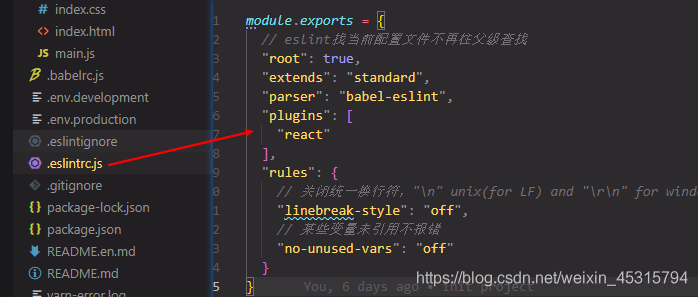
1. If eslint is configured in a separate file

Configure the required verification rules in the created. Eslintrc.js, as shown in the following figure:

2. Referenced scaffolds, such as create react app

Configure verification rules in package.json:

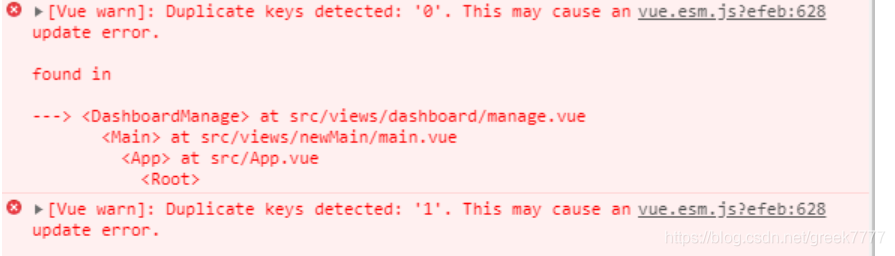
Vue console reports an error duplicate keys detected: ‘XXXX’. This may cause an update error. Solution

Q: the Vue console reports an error duplicate keys detected: ‘XXXX’. This may cause an update error. Solution

Analysis: duplicate key: ‘0’. 0 ‘may cause an update error; This problem usually occurs because there are multiple V-for loops on the same page, and the key of the loop is index. You can define the key as a unique value, such as code or ID. this can be solved
A: the value of the drop-down box must be unique. Check the value of the drop-down box

Caused by: org.springframework.beans.factory.beancreationexception: error creating be

Java packaging error:
caused by: org.springframework.beans.factory.beancreationexception: error creating bean with name ‘org.springframework.transaction.annotation.proxytransactionmanagementconfiguration’: initialization of bean failed; Needed exception is org.springframework.beans.factory.nosuchbeandefinitionexception: no bean named ‘org.springframework.context.annotation.configurationclasspostprocessor.importregistry’ available

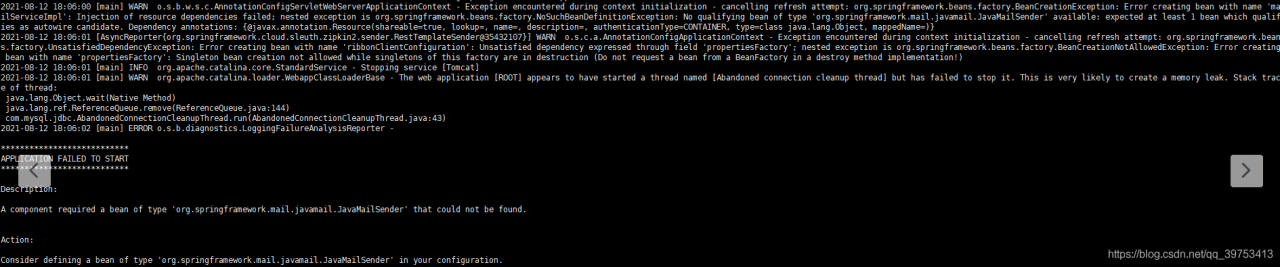
click the picture to see that it is actually an error message from javamailsender. First, check whether the configuration file is configured to send mail

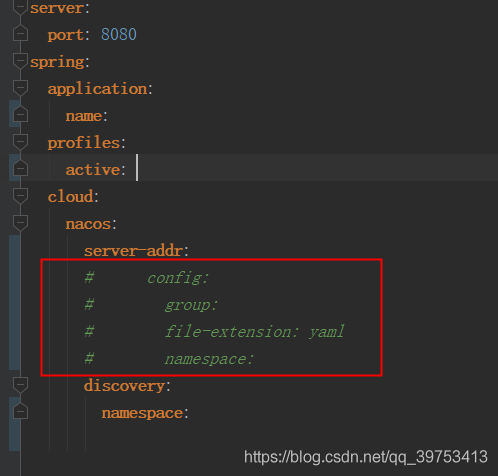
If the project is used with Nacos, check the local configuration file xxx.yml to see if the Nacos configuration is annotated. As shown in the following figure, if the annotation is, you can uncomment it.

The problem of error reporting in Ranger connection hive is solved

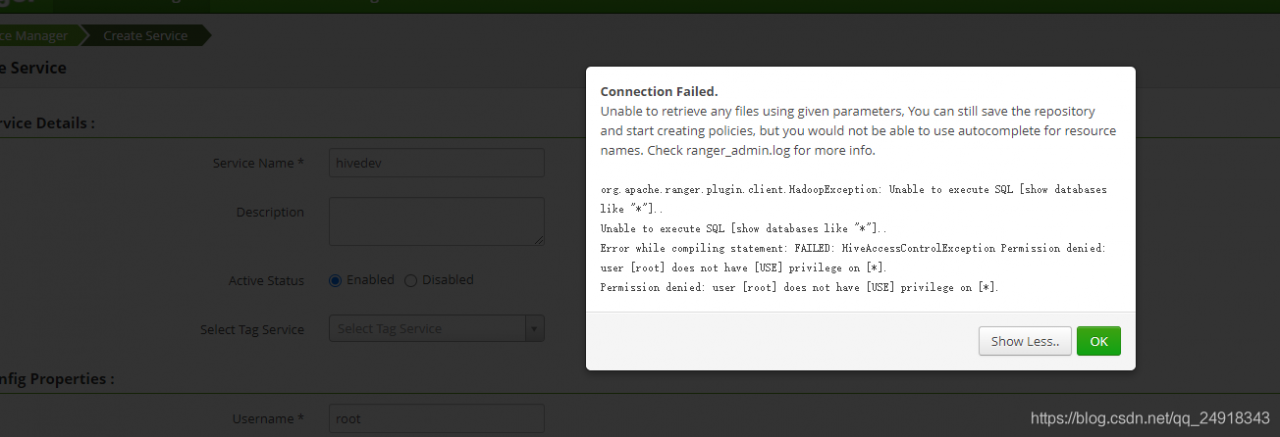
After installing the ranger-1.2.0-hive-plugin plugin, the error is reported in the rangerui interface
org.apache.ranger.plugin.client.HadoopException: Unable to execute SQL [show databases like “*”]..
Unable to execute SQL [show databases like “*”]..
Error while compiling statement: FAILED: HiveAccessControlException Permission denied: user [root] does not have [USE] privilege on [*].
Permission denied: user [root] does not have [USE] privilege on [*].

Also we will get the same error when we connect with beeline -u jdbc:hive2://localhost:10000 in the backend
Error: Error while compiling statement: FAILED: HiveAccessControlException Permission denied: user [anonymous] does not have [USE] privilege on [*] (state=42000,code=40000)

Error report after solving git push origin master

After Solving git push origin master , there is an error:

remote: Permission to `USer-A/project.git` denied to `User-B`.
fatal: unable to access `https://github.com/User-A/project.git/`: The requested URL returned error: 403

Environment: git version 2.24.3 (apple git-128)

The user.name I set in Git is the same as the name of GitHub

Solution:

    1. into your own project
cd [project_path]
      1. Edit URL in. Git/config
vim .git/config

You will see the following code block

[core]
        repositoryformatversion = 0
        filemode = true
        bare = false
        logallrefupdates = true
        ignorecase = true
        precomposeunicode = true
[user]
        name = user-A
        email = [email protected]
[remote "origin"]
        url = https://github.com/User-A/project.git
        fetch = +refs/heads/*:refs/remotes/origin/*

[UNK]
url = https://github.com/User-A/project.git
[email protected]/User-A/project.git

then [UNK] git push origin master,[UNK];

Password for 'https://[email protected]':

Just enter the password

Solution to null pointer error in array

1. Problem description

Here is the object array

 LocHistory[] history = new LocHistory[list2.size()];

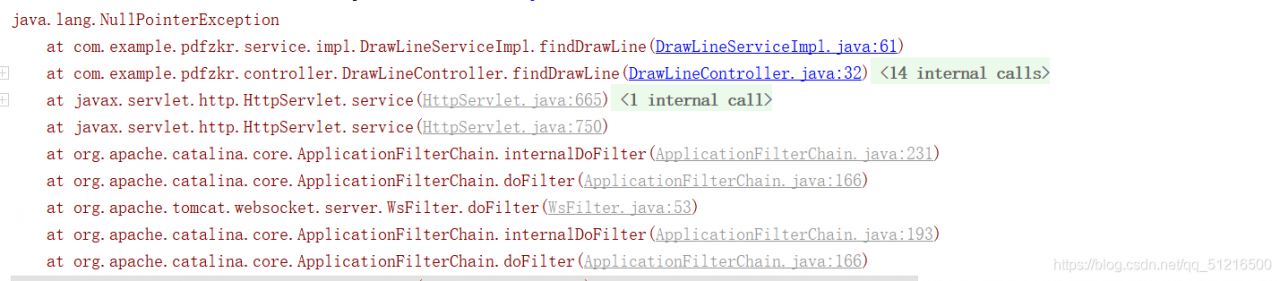
When assigning a value to the history object, the following error is reported

2. Reasons for error reporting

LocHistory[] history = new LocHistory[list2.size()]; Only the size of the array is given, but the instantiated object is not given at the corresponding position. The premise to obtain history [i] is that there is an object under coordinate I.

3. Solutions

Create a new object for each object reference
History [i] = new lochistory();

The specific codes are as follows:

 LocHistory[] history = new LocHistory[list2.size()];
            for (int i = 0; i < list2.size(); i++) {
             history[i] = new LocHistory();
             String PageX = list2.get(i).getPageX();
             String PageY = list2.get(i).getPageY();
                history[i].setPageX(PageX);
                history[i].setPageY(PageY);

An error is reported when compiling OpenVPN

configure: error: lzo enabled but missing

The solution is to manually install this LZO

wget http://www.oberhumer.com/opensource/lzo/download/lzo-2.06.tar.gz 
tar zxvf lzo-2.06.tar.gz 
cd lzo-2.06 
./configure --prefix=/usr/local/ 
make && make install

Android 8.1 compilation error Jack server problem

Compile Android 8.1 and report errors related to Jack server
Jack server is an Android source code compilation tool. Used in Android 6.0 ~ Android 8.1 source code. Later versions are obsolete.

Error type 1:
communication error with Jack server (58), try ‘Jack diagnosis’ or see Jack server log
failed to contact Jack server: problem reading/home/user3 /. Jack server/client.pem. Try’ Jack diagnosis’

Error type 2:
Jack server failed to (RE) start, try ‘Jack diagnose’ or see Jack server log

Solution 1:

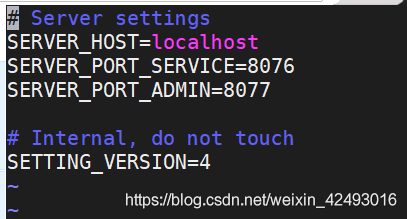
Open ~ /. Jack settings and ~ /. Jcak server/config.properties to change to other port numbers. Like 8976/8977
note that the two corresponding port numbers in the two files should be consistent
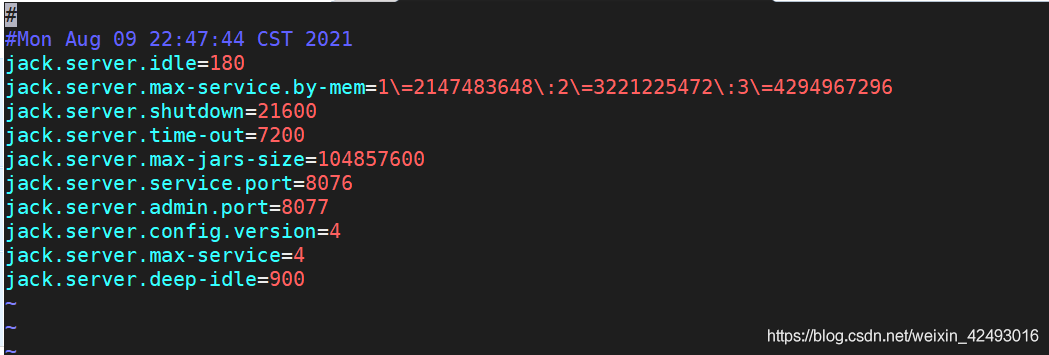
idea 2:
delete ~ /. Jack settings and ~ /. Jcak server/config.properties and recompile

Idea 3: JDK version problem
in my practice, openjdk1.8.0.292 will report that the port is occupied
the test method runs./prebuilds/SDK/tools/Jack diagnosis
printing the log will prompt that the port is occupied. For other unused ports, this is still the case
the solution is to use the JDK provided with the Android source code. Path: prebuilds/JDK/
you can also download other versions of openjdk, such as 1.8.0.141
uninstall the server JDK,
remove the openjdk (if installed). First, check which openjdk package is installed.

dpkg –list | grep -i jdk

To remove the openjdk package:

apt-get purge openjdk*

Check that all openjdk packages have been uninstalled:

dpkg –list | grep -i jdk

Configure the Android directory JDK to ~ /. Bashrc

export JAVA_ Home = {absolute path of your own Android source code} prebuilds/JDK/jdk8/Linux x86
export JRE_ HOME=

J

A

V

A

H

O

M

E

/

j

r

e

e

x

p

o

r

t

C

L

A

S

S

P

A

T

H

=

.

:

{JAVA_ HOME}/jre export CLASSPATH=.:

JAVAH​OME/jreexportCLASSPATH=.:{JAVA_ HOME}/lib:

J

R

E

H

O

M

E

/

l

i

b

e

x

p

o

r

t

P

A

T

H

=

.

:

{JRE_ HOME}/lib export PATH=.:

JREH​OME/libexportPATH=.:{JAVA_ HOME}/bin:$PATH

Effective changes:
source ~ /. Bashrc
recompile.