Category Archives: How to Fix

An error is reported when the jeecg boot project connects to the MySQL database running on docker

An error is reported when the jeecg boot project connects to the MySQL database running on docker. The error information is:

2021-08-23 11:39:45.271 [MyScheduler_QuartzSchedulerThread] ERROR druid.sql.Statement:149 - {conn-10004, pstmt-20010} execute error. SELECT TRIGGER_NAME, TRIGGER_GROUP, NEXT_FIRE_TIME, PRIORITY FROM QRTZ_TRIGGERS WHERE SCHED_NAME = 'MyScheduler' AND TRIGGER_STATE = ?AND NEXT_FIRE_TIME <= ?AND (MISFIRE_INSTR = -1 OR (MISFIRE_INSTR != -1 AND NEXT_FIRE_TIME >= ?)) ORDER BY NEXT_FIRE_TIME ASC, PRIORITY DESC
java.sql.SQLSyntaxErrorException: Table 'water-cloud-dev.QRTZ_TRIGGERS' doesn't exist
	at com.mysql.cj.jdbc.exceptions.SQLError.createSQLException(SQLError.java:120)
	at com.mysql.cj.jdbc.exceptions.SQLError.createSQLException(SQLError.java:97)
	at com.mysql.cj.jdbc.exceptions.SQLExceptionsMapping.translateException(SQLExceptionsMapping.java:122)
	at com.mysql.cj.jdbc.ClientPreparedStatement.executeInternal(ClientPreparedStatement.java:953)
	at com.mysql.cj.jdbc.ClientPreparedStatement.executeQuery(ClientPreparedStatement.java:1003)
	at com.alibaba.druid.filter.FilterChainImpl.preparedStatement_executeQuery(FilterChainImpl.java:3240)
	at com.alibaba.druid.filter.FilterEventAdapter.preparedStatement_executeQuery(FilterEventAdapter.java:465)
	at com.alibaba.druid.filter.FilterChainImpl.preparedStatement_executeQuery(FilterChainImpl.java:3237)
	at com.alibaba.druid.wall.WallFilter.preparedStatement_executeQuery(WallFilter.java:647)
	at com.alibaba.druid.filter.FilterChainImpl.preparedStatement_executeQuery(FilterChainImpl.java:3237)
	at com.alibaba.druid.filter.FilterEventAdapter.preparedStatement_executeQuery(FilterEventAdapter.java:465)
	at com.alibaba.druid.filter.FilterChainImpl.preparedStatement_executeQuery(FilterChainImpl.java:3237)
	at com.alibaba.druid.proxy.jdbc.PreparedStatementProxyImpl.executeQuery(PreparedStatementProxyImpl.java:181)
	at com.alibaba.druid.pool.DruidPooledPreparedStatement.executeQuery(DruidPooledPreparedStatement.java:227)
	at org.quartz.impl.jdbcjobstore.StdJDBCDelegate.selectTriggerToAcquire(StdJDBCDelegate.java:2613)
	at org.quartz.impl.jdbcjobstore.JobStoreSupport.acquireNextTrigger(JobStoreSupport.java:2844)
	at org.quartz.impl.jdbcjobstore.JobStoreSupport$41.execute(JobStoreSupport.java:2805)
	at org.quartz.impl.jdbcjobstore.JobStoreSupport$41.execute(JobStoreSupport.java:2803)
	at org.quartz.impl.jdbcjobstore.JobStoreSupport.executeInNonManagedTXLock(JobStoreSupport.java:3864)
	at org.quartz.impl.jdbcjobstore.JobStoreSupport.acquireNextTriggers(JobStoreSupport.java:2802)
	at org.quartz.core.QuartzSchedulerThread.run(QuartzSchedulerThread.java:287)

Error reason: the MySQL database running on docker is case sensitive

Solution (I):

Delete the MySQL container and re create a new container with the case sensitive parameter lower_ case_ table_ Names = 1, for example:

docker run --name mysql -p 3306:3306 -e MYSQL_ROOT_PASSWORD=123456 -d mysql --lower_case_table_names=1

Solution (II):

1. Run the docker PS command to view the MySQL container ID:

C:\Users\Administrator>docker ps
CONTAINER ID   IMAGE     COMMAND                  CREATED      STATUS          PORTS                                                  NAMES
86136bf6eebe   redis     "docker-entrypoint.s…"   3 days ago   Up 54 minutes   0.0.0.0:6379->6379/tcp, :::6379->6379/tcp              redis
5721f675c819   mysql     "docker-entrypoint.s…"   4 days ago   Up 54 minutes   0.0.0.0:3306->3306/tcp, :::3306->3306/tcp, 33060/tcp   mysql

2. Run the docker exec command to enter the MySQL container:

C:\Users\Administrator>docker exec -it 5721f675c819 bash
root@5721f675c819:/#

3. Run the apt get update command to update the software:

root@5721f675c819:/#apt-get update
Get:1 http://deb.debian.org/debian buster InRelease [122 kB]
Get:2 http://security.debian.org/debian-security buster/updates InRelease [65.4 kB]
Get:3 http://repo.mysql.com/apt/debian buster InRelease [21.5 kB]
Get:4 http://repo.mysql.com/apt/debian buster/mysql-8.0 amd64 Packages [8341 B]
Get:5 http://deb.debian.org/debian buster-updates InRelease [51.9 kB]
Get:6 http://deb.debian.org/debian buster/main amd64 Packages [7907 kB]
Get:7 http://security.debian.org/debian-security buster/updates/main amd64 Packages [301 kB]
80% [6 Packages 6149 kB/7907 kB 78%]                                                                                                       28.3 kB/s 1min 2s^Get:8 http://deb.debian.org/debian buster-updates/main amd64 Packages [15.2 kB]
Fetched 8492 kB in 7min 56s (17.8 kB/s)
Reading package lists... Done

4. Run the apt get install VIM command to install the VIM editor:

root@5721f675c819:/#apt-get install vim
Reading package lists... Done
Building dependency tree
Reading state information... Done
The following additional packages will be installed:
  vim-common vim-runtime xxd
Suggested packages:
  ctags vim-doc vim-scripts
The following NEW packages will be installed:
  vim vim-common vim-runtime xxd
0 upgraded, 4 newly installed, 0 to remove and 0 not upgraded.
Need to get 7390 kB of archives.
After this operation, 33.7 MB of additional disk space will be used.
Do you want to continue?[Y/n] y
Get:1 http://deb.debian.org/debian buster/main amd64 xxd amd64 2:8.1.0875-5 [140 kB]
Get:2 http://deb.debian.org/debian buster/main amd64 vim-common all 2:8.1.0875-5 [195 kB]
Get:3 http://deb.debian.org/debian buster/main amd64 vim-runtime all 2:8.1.0875-5 [5775 kB]
53% [3 vim-runtime 3612 kB/5775 kB 63%]                                                                                                   16.6 kB/s 3min 27s
Get:4 http://deb.debian.org/debian buster/main amd64 vim amd64 2:8.1.0875-5 [1280 kB]
83% [4 vim 152 kB/1280 kB 12%]                                                                                          84% [4 vim 233 kB/1280 kB 18%]       Fetched 7390 kB in 5min 35s (22.0 kB/s)
debconf: delaying package configuration, since apt-utils is not installed
Selecting previously unselected package xxd.
(Reading database ... 9284 files and directories currently installed.)
Preparing to unpack .../xxd_2%3a8.1.0875-5_amd64.deb ...
Unpacking xxd (2:8.1.0875-5) ...
Selecting previously unselected package vim-common.
Preparing to unpack .../vim-common_2%3a8.1.0875-5_all.deb ...
Unpacking vim-common (2:8.1.0875-5) ...
Selecting previously unselected package vim-runtime.
Preparing to unpack .../vim-runtime_2%3a8.1.0875-5_all.deb ...
Adding 'diversion of /usr/share/vim/vim81/doc/help.txt to /usr/share/vim/vim81/doc/help.txt.vim-tiny by vim-runtime'
Adding 'diversion of /usr/share/vim/vim81/doc/tags to /usr/share/vim/vim81/doc/tags.vim-tiny by vim-runtime'
Unpacking vim-runtime (2:8.1.0875-5) ...
Selecting previously unselected package vim.
Preparing to unpack .../vim_2%3a8.1.0875-5_amd64.deb ...
Unpacking vim (2:8.1.0875-5) ...
Setting up xxd (2:8.1.0875-5) ...
Setting up vim-common (2:8.1.0875-5) ...
Setting up vim-runtime (2:8.1.0875-5) ...
Setting up vim (2:8.1.0875-5) ...
update-alternatives: using /usr/bin/vim.basic to provide /usr/bin/vim (vim) in auto mode
update-alternatives: using /usr/bin/vim.basic to provide /usr/bin/vimdiff (vimdiff) in auto mode
update-alternatives: using /usr/bin/vim.basic to provide /usr/bin/rvim (rvim) in auto mode
update-alternatives: using /usr/bin/vim.basic to provide /usr/bin/rview (rview) in auto mode
update-alternatives: using /usr/bin/vim.basic to provide /usr/bin/vi (vi) in auto mode
update-alternatives: warning: skip creation of /usr/share/man/da/man1/vi.1.gz because associated file /usr/share/man/da/man1/vim.1.gz (of link group vi) doesn't exist
update-alternatives: warning: skip creation of /usr/share/man/de/man1/vi.1.gz because associated file /usr/share/man/de/man1/vim.1.gz (of link group vi) doesn't exist
update-alternatives: warning: skip creation of /usr/share/man/fr/man1/vi.1.gz because associated file /usr/share/man/fr/man1/vim.1.gz (of link group vi) doesn't exist
update-alternatives: warning: skip creation of /usr/share/man/it/man1/vi.1.gz because associated file /usr/share/man/it/man1/vim.1.gz (of link group vi) doesn't exist
update-alternatives: warning: skip creation of /usr/share/man/ja/man1/vi.1.gz because associated file /usr/share/man/ja/man1/vim.1.gz (of link group vi) doesn't exist
update-alternatives: warning: skip creation of /usr/share/man/pl/man1/vi.1.gz because associated file /usr/share/man/pl/man1/vim.1.gz (of link group vi) doesn't exist
update-alternatives: warning: skip creation of /usr/share/man/ru/man1/vi.1.gz because associated file /usr/share/man/ru/man1/vim.1.gz (of link group vi) doesn't exist
update-alternatives: warning: skip creation of /usr/share/man/man1/vi.1.gz because associated file /usr/share/man/man1/vim.1.gz (of link group vi) doesn't exist
update-alternatives: using /usr/bin/vim.basic to provide /usr/bin/view (view) in auto mode
update-alternatives: warning: skip creation of /usr/share/man/da/man1/view.1.gz because associated file /usr/share/man/da/man1/vim.1.gz (of link group view) doesn't exist
update-alternatives: warning: skip creation of /usr/share/man/de/man1/view.1.gz because associated file /usr/share/man/de/man1/vim.1.gz (of link group view) doesn't exist
update-alternatives: warning: skip creation of /usr/share/man/fr/man1/view.1.gz because associated file /usr/share/man/fr/man1/vim.1.gz (of link group view) doesn't exist
update-alternatives: warning: skip creation of /usr/share/man/it/man1/view.1.gz because associated file /usr/share/man/it/man1/vim.1.gz (of link group view) doesn't exist
update-alternatives: warning: skip creation of /usr/share/man/ja/man1/view.1.gz because associated file /usr/share/man/ja/man1/vim.1.gz (of link group view) doesn't exist
update-alternatives: warning: skip creation of /usr/share/man/pl/man1/view.1.gz because associated file /usr/share/man/pl/man1/vim.1.gz (of link group view) doesn't exist
update-alternatives: warning: skip creation of /usr/share/man/ru/man1/view.1.gz because associated file /usr/share/man/ru/man1/vim.1.gz (of link group view) doesn't exist
update-alternatives: warning: skip creation of /usr/share/man/man1/view.1.gz because associated file /usr/share/man/man1/vim.1.gz (of link group view) doesn't exist
update-alternatives: using /usr/bin/vim.basic to provide /usr/bin/ex (ex) in auto mode
update-alternatives: warning: skip creation of /usr/share/man/da/man1/ex.1.gz because associated file /usr/share/man/da/man1/vim.1.gz (of link group ex) doesn't exist
update-alternatives: warning: skip creation of /usr/share/man/de/man1/ex.1.gz because associated file /usr/share/man/de/man1/vim.1.gz (of link group ex) doesn't exist
update-alternatives: warning: skip creation of /usr/share/man/fr/man1/ex.1.gz because associated file /usr/share/man/fr/man1/vim.1.gz (of link group ex) doesn't exist
update-alternatives: warning: skip creation of /usr/share/man/it/man1/ex.1.gz because associated file /usr/share/man/it/man1/vim.1.gz (of link group ex) doesn't exist
update-alternatives: warning: skip creation of /usr/share/man/ja/man1/ex.1.gz because associated file /usr/share/man/ja/man1/vim.1.gz (of link group ex) doesn't exist
update-alternatives: warning: skip creation of /usr/share/man/pl/man1/ex.1.gz because associated file /usr/share/man/pl/man1/vim.1.gz (of link group ex) doesn't exist
update-alternatives: warning: skip creation of /usr/share/man/ru/man1/ex.1.gz because associated file /usr/share/man/ru/man1/vim.1.gz (of link group ex) doesn't exist
update-alternatives: warning: skip creation of /usr/share/man/man1/ex.1.gz because associated file /usr/share/man/man1/vim.1.gz (of link group ex) doesn't exist
update-alternatives: using /usr/bin/vim.basic to provide /usr/bin/editor (editor) in auto mode
update-alternatives: warning: skip creation of /usr/share/man/da/man1/editor.1.gz because associated file /usr/share/man/da/man1/vim.1.gz (of link group editor) doesn't exist
update-alternatives: warning: skip creation of /usr/share/man/de/man1/editor.1.gz because associated file /usr/share/man/de/man1/vim.1.gz (of link group editor) doesn't exist
update-alternatives: warning: skip creation of /usr/share/man/fr/man1/editor.1.gz because associated file /usr/share/man/fr/man1/vim.1.gz (of link group editor) doesn't exist
update-alternatives: warning: skip creation of /usr/share/man/it/man1/editor.1.gz because associated file /usr/share/man/it/man1/vim.1.gz (of link group editor) doesn't exist
update-alternatives: warning: skip creation of /usr/share/man/ja/man1/editor.1.gz because associated file /usr/share/man/ja/man1/vim.1.gz (of link group editor) doesn't exist
update-alternatives: warning: skip creation of /usr/share/man/pl/man1/editor.1.gz because associated file /usr/share/man/pl/man1/vim.1.gz (of link group editor) doesn't exist
update-alternatives: warning: skip creation of /usr/share/man/ru/man1/editor.1.gz because associated file /usr/share/man/ru/man1/vim.1.gz (of link group editor) doesn't exist
update-alternatives: warning: skip creation of /usr/share/man/man1/editor.1.gz because associated file /usr/share/man/man1/vim.1.gz (of link group editor) doesn't exist
root@5721f675c819:/etc/mysql# apt-get install vim
Reading package lists... Done
Building dependency tree
Reading state information... Done
vim is already the newest version (2:8.1.0875-5).
0 upgraded, 0 newly installed, 0 to remove and 0 not upgraded.
root@5721f675c819:/#

5. Enter MySQL configuration folder:

root@5721f675c819:/# cd /etc/mysql
root@5721f675c819:/etc/mysql# ls
conf.d  my.cnf  my.cnf.fallback

6. Modify my.cnf configuration file:

root@5721f675c819:/etc/mysql# vi my.cnf
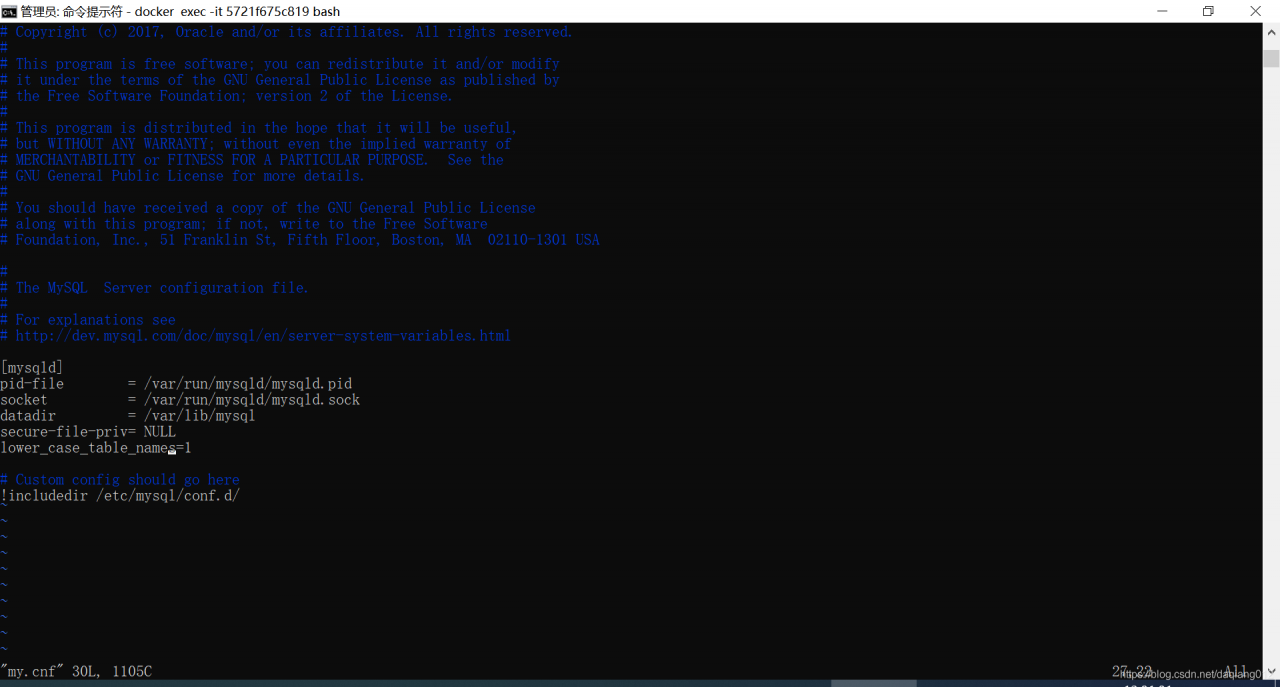
6. Restart MySQL service:
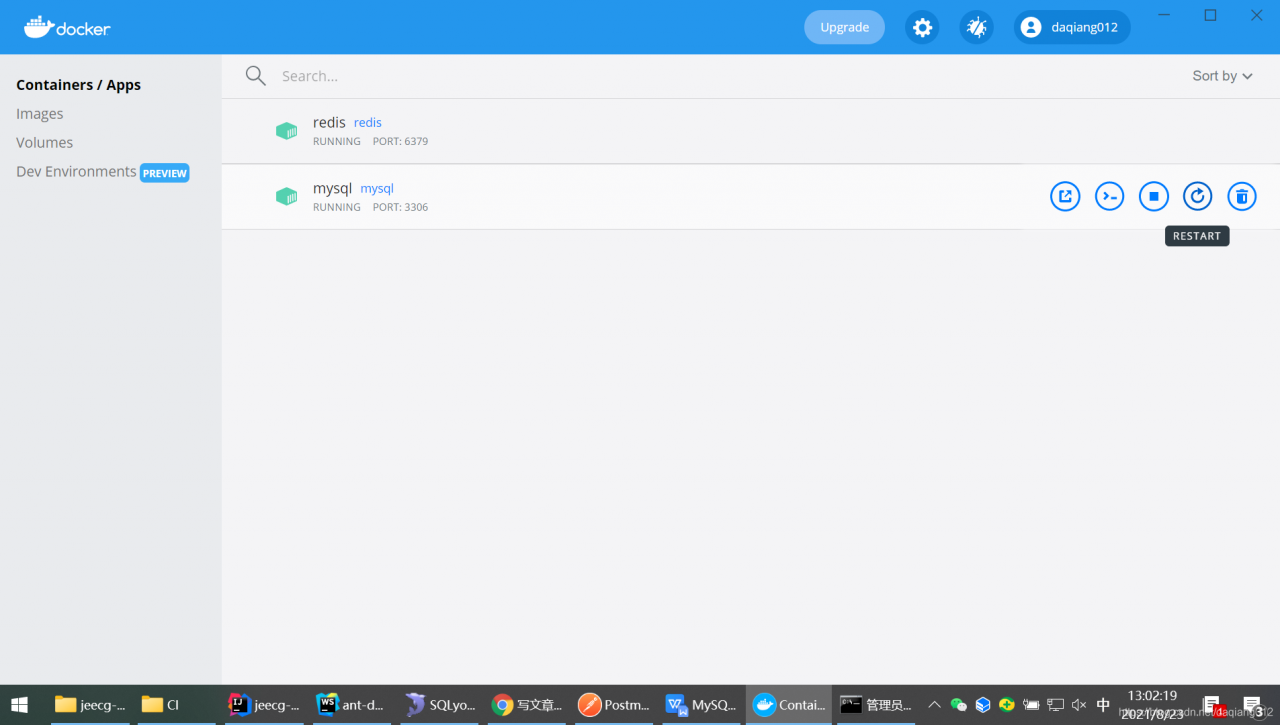
Note: restart may fail.

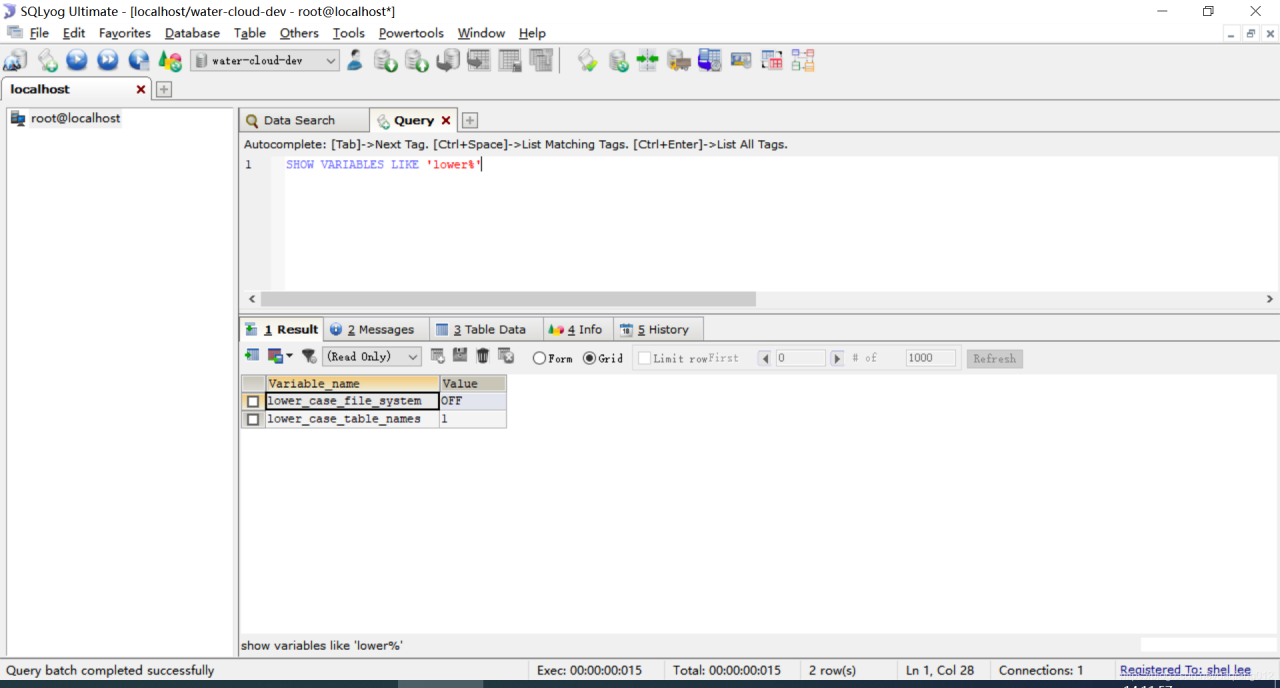
7. View modification results:
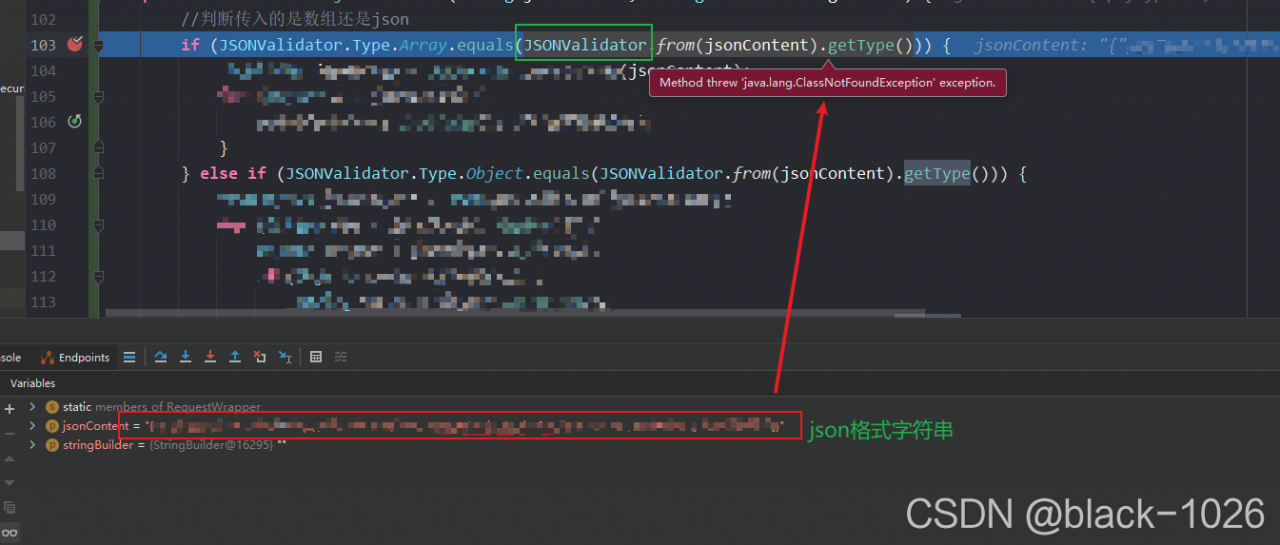
The project uses fastjason to report an error

The project uses fastjason to report an error

java.lang.ClassNotFoundException: com.alibaba.fastjson.JSONValidator

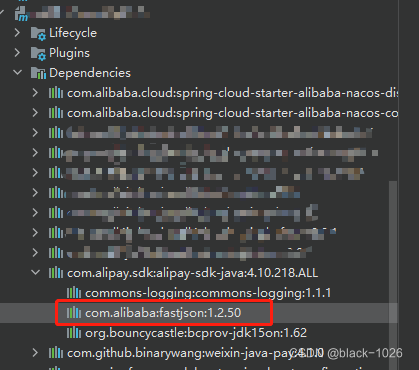
The error shows that the jsonvalidator class cannot be found. Open the Maven interface of idea to find the related dependencies

display the dependency of this module Alipay SDK Java. The version of fastjson under this dependency is 1.2.50

Jsonvalidator is a later version

resolvent:

Introduce a new dependency in the POM file under the root directory, using fastjson version 1.2.75

<dependency>
    <groupId>com.alibaba</groupId>
    <artifactId>fastjson</artifactId>
    <version>1.2.75</version>
</dependency>

Graphiz error: filenotfounderror [How to Solve]

First, PIP install graphviz in CMD

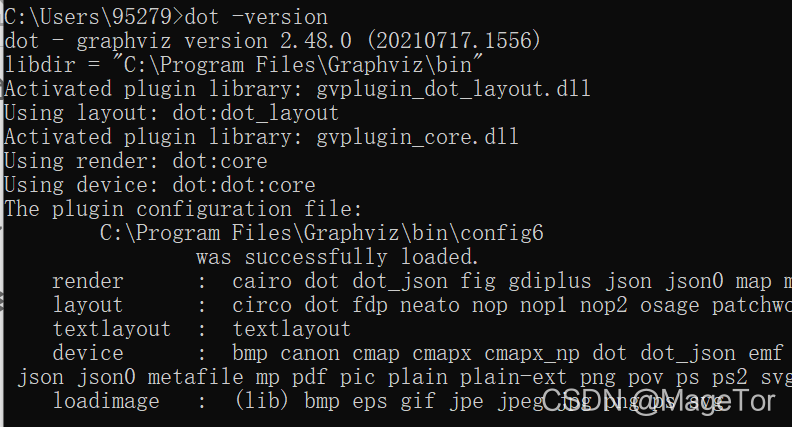
Then CMD enter dot – version. If displayed:

Note: PIP install graphviz was not successfully installed because only the python calling interface of graphviz is installed. If you use it, you also need to download the installation file of graphviz. At this time, go to the official website to download:

Graphviz official website

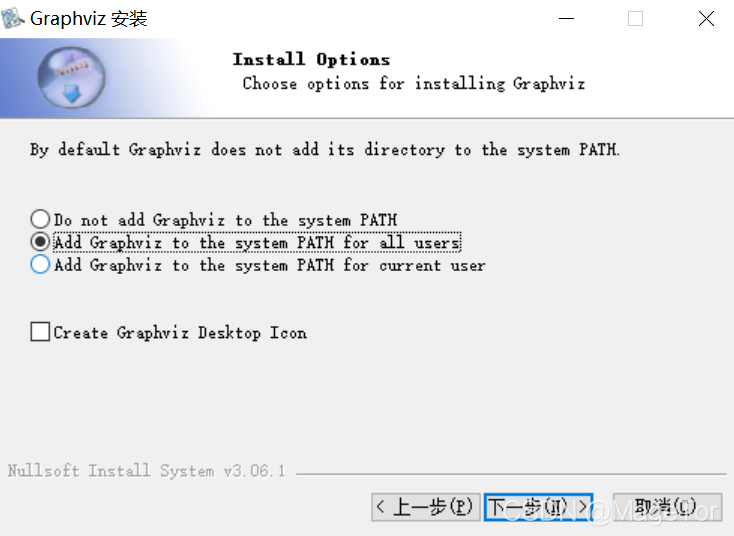
After downloading and opening, remember to select the add path here

Re-open CMD and enter dot – version. The installation is successful when you see this

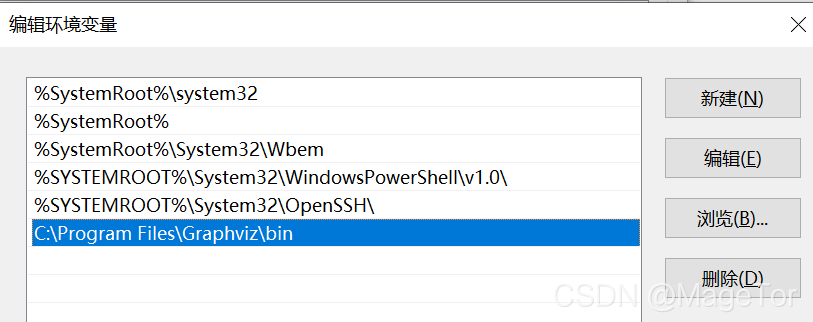
After installation, the error filenotfounderror is still reported. Right-click my computer – advanced system settings – environment variable, select “path” to open the environment, and the blue part can see that the path of Mingming Graphviz already exists

Enter in CMD

import os

os.environ[‘PATH’]

Restart the computer

NPM installs dependent packages and reports an error node gyp rebuild… Solution

Abnormal information

npm ERR! code 1
npm ERR! path D:\demo\node_modules\node-sass
npm ERR! command failed
npm ERR! command C:\Windows\system32\cmd.exe /d /s /c node scripts/build.js
npm ERR! Building: C:\Program Files\nodejs\node.exe D:\demo\node_modules\node-gyp\bin\node-gyp.js rebuild --verbose --libsass_ext= --libsass_cflags= --libsass_ldflags= --libsass_library=
npm ERR! gyp info it worked if it ends with ok
npm ERR! gyp verb cli [
npm ERR! gyp verb cli   'C:\\Program Files\\nodejs\\node.exe',
npm ERR! gyp verb cli   'D:\\demo\\node_modules\\node-gyp\\bin\\node-gyp.js',
npm ERR! gyp verb cli   'rebuild',
npm ERR! gyp verb cli   '--verbose',
npm ERR! gyp verb cli   '--libsass_ext=',
npm ERR! gyp verb cli   '--libsass_cflags=',
npm ERR! gyp verb cli   '--libsass_ldflags=',
npm ERR! gyp verb cli   '--libsass_library='
npm ERR! gyp verb cli ]
npm ERR! gyp info using [email protected]
npm ERR! gyp info using [email protected] | win32 | x64
npm ERR! gyp verb command rebuild []
npm ERR! gyp verb command clean []
npm ERR! gyp verb clean removing "build" directory
npm ERR! gyp verb command configure []
npm ERR! gyp verb check python checking for Python executable "python2" in the PATH
npm ERR! gyp verb `which` failed Error: not found: python2
npm ERR! gyp verb `which` failed     at getNotFoundError (D:\demo\node_modules\which\which.js:13:12)
npm ERR! gyp verb `which` failed     at F (D:\demo\node_modules\which\which.js:68:19)
npm ERR! gyp verb `which` failed     at E (D:\demo\node_modules\which\which.js:80:29)
npm ERR! gyp verb `which` failed     at D:\demo\node_modules\which\which.js:89:16
npm ERR! gyp verb `which` failed     at D:\demo\node_modules\isexe\index.js:42:5
npm ERR! gyp verb `which` failed     at D:\demo\node_modules\isexe\windows.js:36:5
npm ERR! gyp verb `which` failed     at FSReqCallback.oncomplete (node:fs:195:21)
npm ERR! gyp verb `which` failed  python2 Error: not found: python2
npm ERR! gyp verb `which` failed     at getNotFoundError (D:\demo\node_modules\which\which.js:13:12)
npm ERR! gyp verb `which` failed     at F (D:\demo\node_modules\which\which.js:68:19)
npm ERR! gyp verb `which` failed     at E (D:\demo\node_modules\which\which.js:80:29)
npm ERR! gyp verb `which` failed     at D:\demo\node_modules\which\which.js:89:16
npm ERR! gyp verb `which` failed     at D:\demo\node_modules\isexe\index.js:42:5
npm ERR! gyp verb `which` failed     at D:\demo\node_modules\isexe\windows.js:36:5
npm ERR! gyp verb `which` failed     at FSReqCallback.oncomplete (node:fs:195:21) {
npm ERR! gyp verb `which` failed   code: 'ENOENT'
npm ERR! gyp verb `which` failed }
npm ERR! gyp verb check python checking for Python executable "python" in the PATH
npm ERR! gyp verb `which` succeeded python C:\Users\Administrator\AppData\Local\Programs\Python\Python39\python.EXE
npm ERR! gyp ERR! configure error
npm ERR! gyp ERR! stack Error: Command failed: C:\Users\Administrator\AppData\Local\Programs\Python\Python39\python.EXE -c import sys; print "%s.%s.%s" % sys.version_info[:3];
npm ERR! gyp ERR! stack   File "<string>", line 1
npm ERR! gyp ERR! stack     import sys; print "%s.%s.%s" % sys.version_info[:3];
npm ERR! gyp ERR! stack                       ^
npm ERR! gyp ERR! stack SyntaxError: invalid syntax
npm ERR! gyp ERR! stack
npm ERR! gyp ERR! stack     at ChildProcess.exithandler (node:child_process:326:12)
npm ERR! gyp ERR! stack     at ChildProcess.emit (node:events:394:28)
npm ERR! gyp ERR! stack     at maybeClose (node:internal/child_process:1067:16)
npm ERR! gyp ERR! stack     at Process.ChildProcess._handle.onexit (node:internal/child_process:301:5)
npm ERR! gyp ERR! System Windows_NT 10.0.19042
npm ERR! gyp ERR! command "C:\\Program Files\\nodejs\\node.exe" "D:\\demo\\node_modules\\node-gyp\\bin\\node-gyp.js" "rebuild" "--verbose" "--libsass_ext=" "--libsass_cflags=" "--libsass_ldflags=" "--libsass_library="
npm ERR! gyp ERR! cwd D:\demo\node_modules\node-sass
npm ERR! gyp ERR! node -v v16.3.0
npm ERR! gyp ERR! node-gyp -v v3.8.0
npm ERR! gyp ERR! not ok
npm ERR! Build failed with error code: 1

npm ERR! A complete log of this run can be found in:
npm ERR!     C:\Users\Administrator\AppData\Local\npm-cache\_logs\2021-06-22T01_36_13_984Z-debug.log

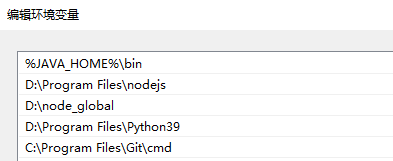
Configure environment variables

This is to exclude path customization without permission

NODE_ PATH=D:\node_ global\node_ modules

Put the critical path forward in the path

Global install cnpm

npm config set registry http://registry.npm.taobao.org/
npm i cnpm

Install windows platform compilation environment

npm install -g node-gyp
npm install –global –production windows-build-tools

Change the node sass version in package.json

“Node sass”: “~ 4.12.0” changed to “node sass”: “v4.13.0”

Delete node under root directory_ Modules folder

Cnpm reinstall

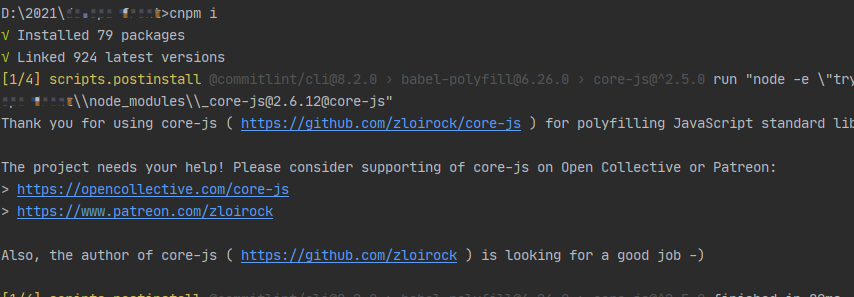
cnpm i

Upgrade to IntelliJ idea 2021.2 and start the project with an error

Upgrade to IntelliJ idea 2021.2 and start the project with an error

Problem description solution

Problem description

Upgrade to IntelliJ idea 2021.2 and start the project with an error.

Unrecognized option: --add-opens=jdk.compiler/com.sun.tools.javac.code=ALL-UNNAMED

Solution

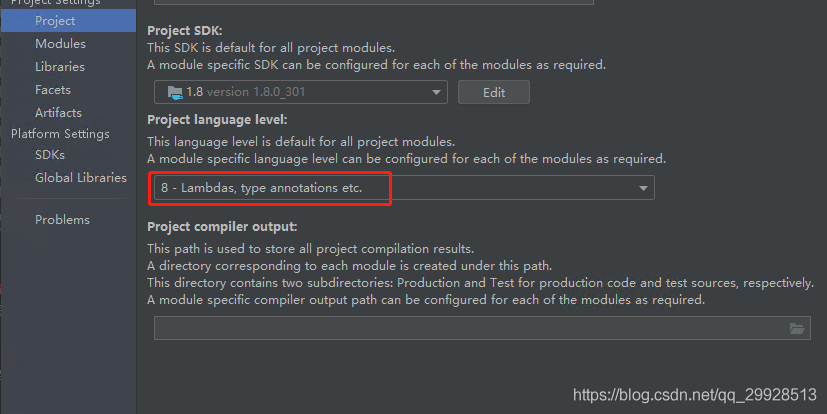
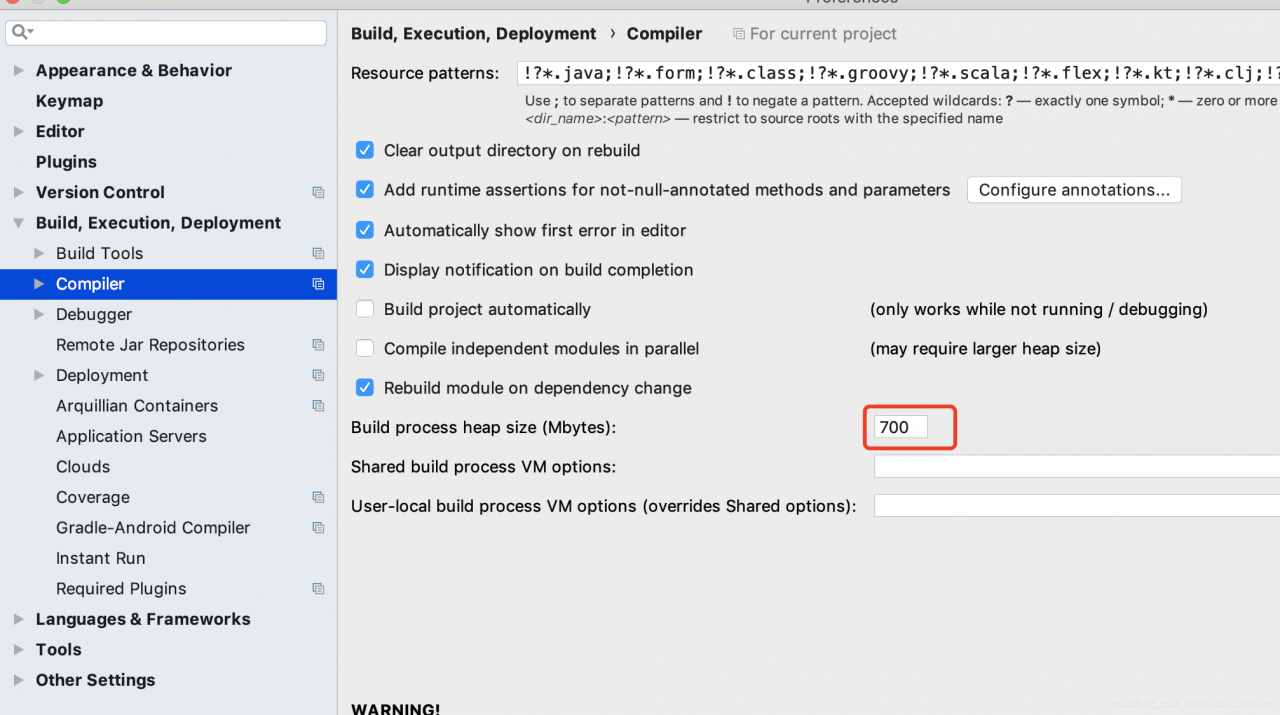
File – project structure,
modify as shown in the figure

[comment: httpmessagenotreadableexception: JSON parse error: invalid UTF-8 start byte 0xa0]

In these two days, a simple and small requirement was developed iteratively. The post request received the parameters from the front end and converted the received JSON format into the corresponding POJO. However, the program reported the following exceptions in the process of receiving the request:

org.springframework.http.converter.HttpMessageNotReadableException: JSON parse error: Invalid UTF-8 start byte 0xa0; nested exception is com.fasterxml.jackson.core.JsonParseException: Invalid UTF-8 start byte 0xa0 at [Source: java.io.PushbackInputStream@664c6a7d; line: 1, column: 61]

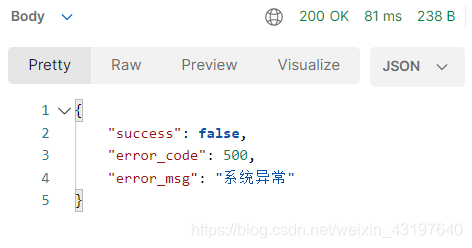
And because the front-end code has not been tested in the test environment, because it is tested using postman, 500 system abnormal error messages also appear in postman.

After a long time of searching on the Internet, I tried to set the content type attribute of the request response header, but it didn’t work and still reported an error;

After that, we also carefully checked whether there was a problem in the code, checked the @ requestbody annotation to receive JSON format data and convert it into the corresponding POJO, and the field properties are correct;

Finally, it is found in some blogs that it may also be the reason for Chinese spaces in JSON data, which is inspired.

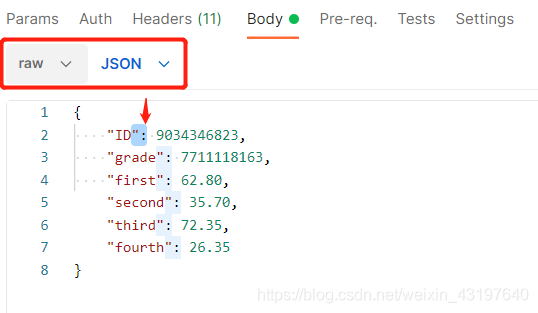
After checking, use postman tool to select JSON strings with the same format, and the cursor will be displayed together. It is found that individual characters of Queshi do not correspond completely.

Check the corresponding sample

There is no exact correspondence

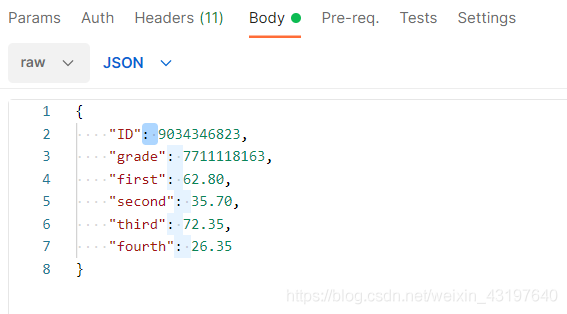
After modification

Test, success

In fact, it can also be seen from the error message that it is a JSON parsing error, which roughly means that it is an invalid Chinese byte at the beginning.

Error occurs when configuring nginx installation information. / configure: error: the HTTP rewrite module requires the PCRE library. You can

An error occurred during:

Linux terminal running nginx configuration information: (after running, it is found that the last line needs to be modified)

./configure \
--prefix=/usr/local/nginx \
--pid-path=/var/run/nginx/nginx.pid \
--lock-path=/var/lock/nginx.lock \
--error-log-path=/var/log/nginx/error.log \
--http-log-path=/var/log/nginx/access.log \
--with-http_gzip_static_module \
--http-client-body-temp-path=/var/temp/nginx/client \
--http-proxy-temp-path=/var/temp/nginx/proxy \
--http-fastcgi-temp-path=/var/temp/nginx/fastcgi \
--http-uwsgi-temp-path=/var/temp/nginx/uwsgi \
--http-scgi-temp-path=/var/temp/nginx/scgi \
--add-module=/usr/local/fastdfs/fastdfs-nginx-module-1.22/src

Therefore, after modifying the last line and running again, the contents shown in the error report appear

(modify last line)

./configure \
--prefix=/usr/local/nginx \
--pid-path=/var/run/nginx/nginx.pid \
--lock-path=/var/lock/nginx.lock \
--error-log-path=/var/log/nginx/error.log \
--http-log-path=/var/log/nginx/access.log \
--with-http_gzip_static_module \
--http-client-body-temp-path=/var/temp/nginx/client \
--http-proxy-temp-path=/var/temp/nginx/proxy \
--http-fastcgi-temp-path=/var/temp/nginx/fastcgi \
--http-uwsgi-temp-path=/var/temp/nginx/uwsgi \
--http-scgi-temp-path=/var/temp/nginx/scgi \
--add-module=/usr/local/software/fastdfs/fastdfs-nginx-module-1.22/src

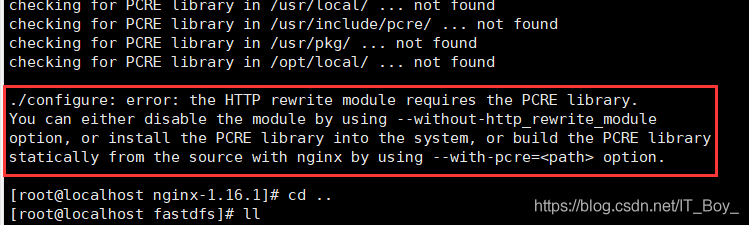
Specific error reporting:

  Text content of error report:

./configure: error: the HTTP rewrite module requires the PCRE library.
You can either disable the module by using --without-http_rewrite_module
option, or install the PCRE library into the system, or build the PCRE library
statically from the source with nginx by using --with-pcre=<path> option.

Error content analysis:

The reason is that the PCRE package is not installed and you are not allowed to rewrite the previously configured content,

terms of settlement:

Run the following installation commands in Linux:

yum -y install pcre-devel

  After installation, run your modified configuration information again

./configure \
--prefix=/usr/local/nginx \
--pid-path=/var/run/nginx/nginx.pid \
--lock-path=/var/lock/nginx.lock \
--error-log-path=/var/log/nginx/error.log \
--http-log-path=/var/log/nginx/access.log \
--with-http_gzip_static_module \
--http-client-body-temp-path=/var/temp/nginx/client \
--http-proxy-temp-path=/var/temp/nginx/proxy \
--http-fastcgi-temp-path=/var/temp/nginx/fastcgi \
--http-uwsgi-temp-path=/var/temp/nginx/uwsgi \
--http-scgi-temp-path=/var/temp/nginx/scgi \
--add-module=/usr/local/software/fastdfs/fastdfs-nginx-module-1.22/src

what you think?

ginseng https://www.cnblogs.com/tudou1179006580/p/14875457.html

ginseng https://blog.csdn.net/yuntiank/article/details/8548147?locationNum=12

ginseng https://www.huaweicloud.com/articles/13235540.html

Springboot integrates quartz timed task trigger_ State error resolution

Background

For Java projects, quartz is used to schedule tasks, and then a strange problem occurs. When adding job scheduling, it is found that the status of write scheduled tasks directly becomes error, or it becomes error after running once or twice. At that time, I was still wondering how this could happen. It is OK to check the log and send modern codes without errors. Manual execution is OK. Then I found that two services are running the same database

Quartz timing task is configured in the database

Then it is found that a server has a very old version of code, so that the corresponding job class cannot be found at runtime, and then the state directly changes to error. Just turn off the older services. Or the two service codes are consistent

terms of settlement

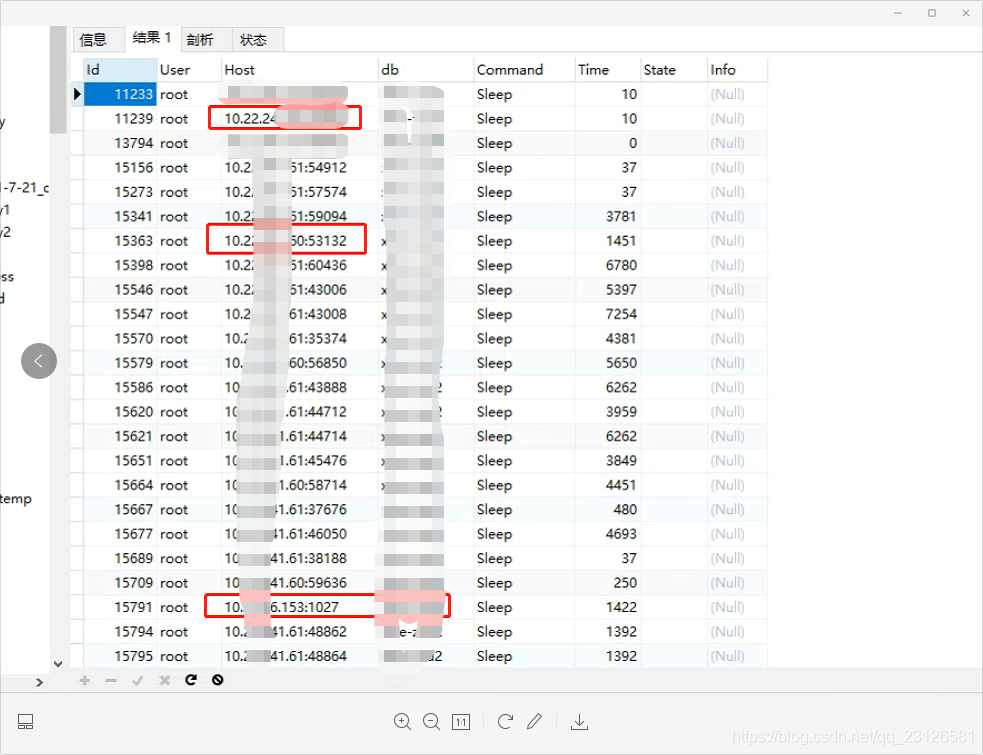
1. Check which service processes are scheduled in the current database

SQL command:   show   processlist;

It will display the of all processes accessing the database you specify

  Then find the corresponding server, update the code or stop one of the services

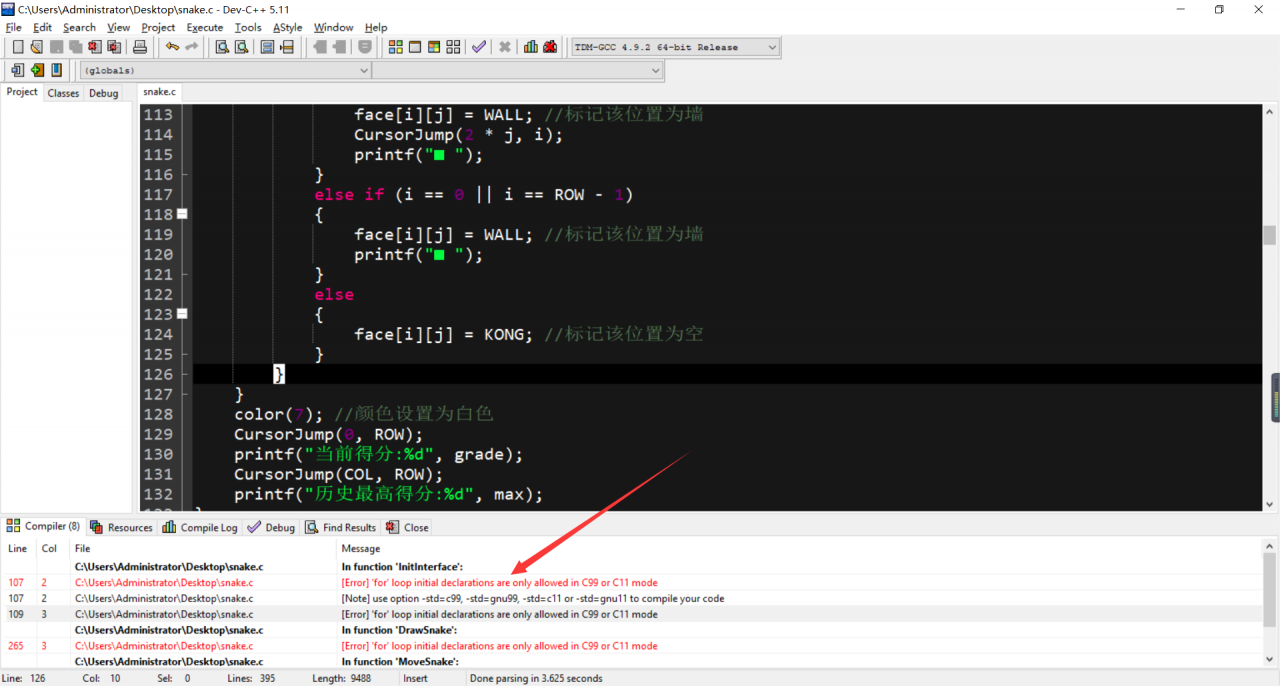
[Solved] Dev-C++ [Error] ‘for‘ loop initial declarations are only allowed in C99 or C11 mode

When writing C language program with DEV-C + +:

[Error] ‘for’ loop initial declarations are only allowed in C99 or C11 mode

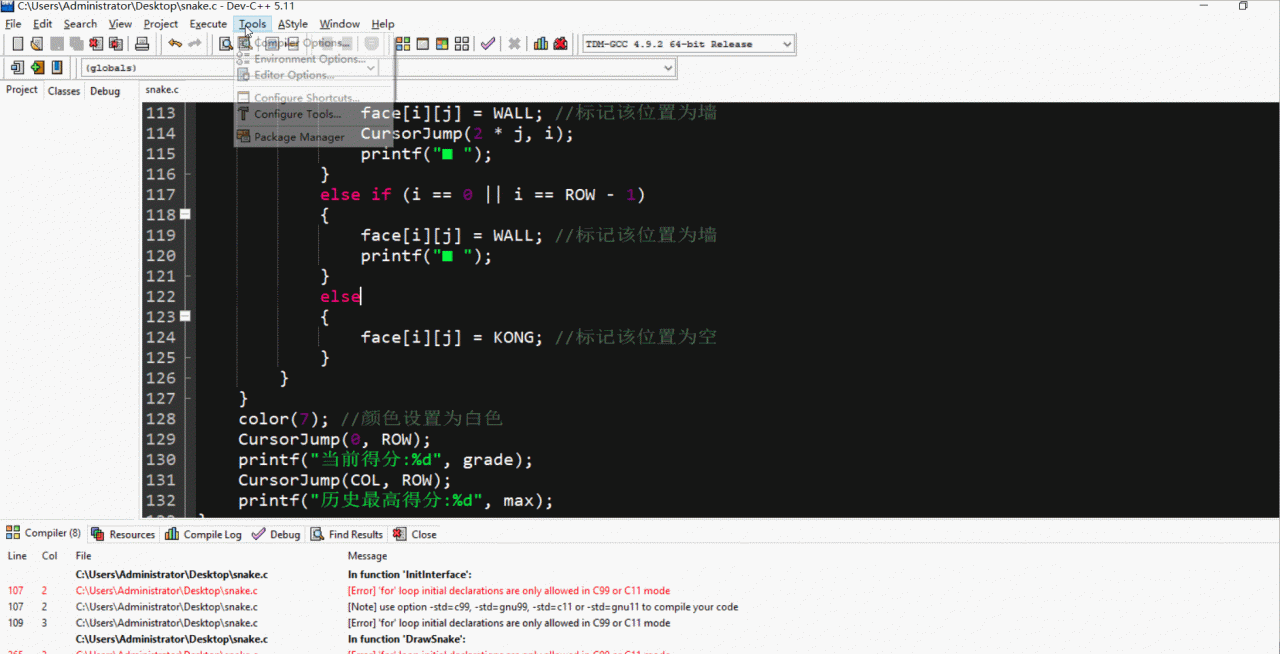
Variables declared in the for loop are only allowed in C99 or C11 mode. You need to select C99 in the language standard under tools/compiler option/code generation.

The results are as follows:

Error running ‘Tomcat 8.5.31’: Unable to open debugger port

This problem indicates that a port occupies the current port. For example, if you want to start tomact, but a tomact service has been started, an error will be reported

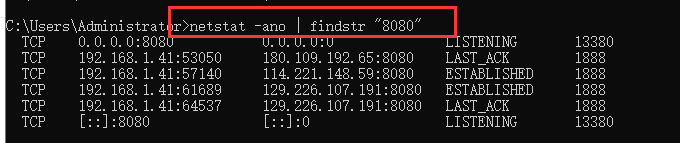
Shows the details of 8068 port occupation

netstat -ano | findstr "8080"


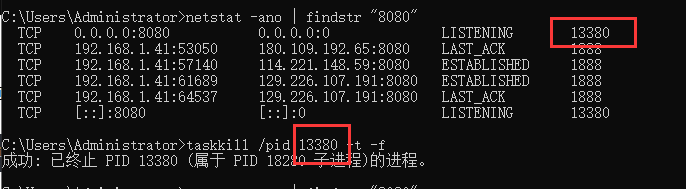
Query which application occupies the port (according to PID)

tasklist | findstr "20344"

Force kill specified port (according to PID)

taskkill /pid 13800 -t -f

You can also close the process according to the program name

taskkill /f /t /im java.exe

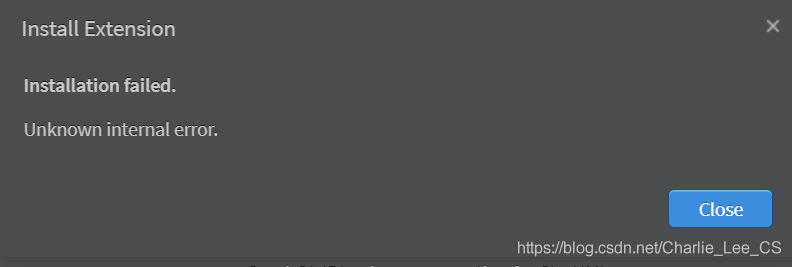
Solution to unknown internal error in StarUML installation extension


StarUML version: 4.0.0

Many solutions have been tried before because of this. Finally, it is found that the official manual states:

To install an extension manually:
1.Get an extension as a .zip file.
2.Extract the file on the extensions path.
	/Users/<user>/Library/Application 	Support/StarUML/extensions/user for Mac OS.
	C:\Users\<user>\AppData\Roaming\StarUML\extensions\user for Windows.
	~/.config/StarUML/extensions/user for Linux.
3.Check a folder in the extensions path and :file:main.js file in the folder.
4.Restart StarUML.

For example:

    there is a link to the extension on the official website. GitHub downloads the release version, copies it, decompresses it and restarts it. The official manual will always drop God