because my colleague used expired automatic renewal API for PayPal, many functions were limited, so my colleague asked me to help her integrate the latest automatic renewal demo, which happened to be available on National Day, so I wrote the following case
1. Maven rely on
 <dependencies>
        <dependency>
            <groupId>org.springframework.boot</groupId>
            <artifactId>spring-boot-starter-web</artifactId>
            <version>2.3.3.RELEASE</version>
        </dependency>
        <dependency>
            <groupId>com.alibaba</groupId>
            <artifactId>fastjson</artifactId>
            <version>1.2.73</version>
        </dependency>
        <dependency>
            <groupId>org.json</groupId>
            <artifactId>json</artifactId>
            <version>20200518</version>
        </dependency>
        <dependency>
            <groupId>com.paypal.sdk</groupId>
            <artifactId>rest-api-sdk</artifactId>
            <version>LATEST</version>
        </dependency>
        <dependency>
            <groupId>org.projectlombok</groupId>
            <artifactId>lombok</artifactId>
            <version>1.18.12</version>
        </dependency>
    </dependencies>
2. Since the SDK for automatic renewal is outdated, the new SDK for automatic renewal does not have a Java SDK yet, so you need to request the PayPal API interface by way of HTTP
outdated API document address:
 1. https://developer.paypal.com/docs/api/payments.billing-agreements/v1/

 2. https://developer.paypal.com/docs/api/payments.billing-plans/v1/
utils class
package com.ratta.util;

import org.springframework.http.HttpEntity;
import org.springframework.http.HttpHeaders;
import org.springframework.http.HttpMethod;
import org.springframework.http.ResponseEntity;
import org.springframework.web.client.RestTemplate;

import java.util.Map;


/**
 * RestTemplate 远程调用工具类
 *
 * @author bright
 * @createDate 2020-08-29
 */
public class RestTemplateUtils {

    private final static RestTemplate restTemplate = new RestTemplate();

    // ----------------------------------GET-------------------------------------------------------

    /**
     * GET请求调用方式
     *
     * @param url          请求URL
     * @param responseType 返回对象类型
     * @return ResponseEntity 响应对象封装类
     */
    public static <T> ResponseEntity<T> get(String url, Class<T> responseType) {
        return restTemplate.getForEntity(url, responseType);
    }

    /**
     * GET请求调用方式
     *
     * @param url          请求URL
     * @param responseType 返回对象类型
     * @param uriVariables URL中的变量,按顺序依次对应
     * @return ResponseEntity 响应对象封装类
     */
    public static <T> ResponseEntity<T> get(String url, Class<T> responseType, Object... uriVariables) {
        return restTemplate.getForEntity(url, responseType, uriVariables);
    }

    /**
     * GET请求调用方式
     *
     * @param url          请求URL
     * @param responseType 返回对象类型
     * @param uriVariables URL中的变量,与Map中的key对应
     * @return ResponseEntity 响应对象封装类
     */
    public static <T> ResponseEntity<T> get(String url, Class<T> responseType, Map<String, ?> uriVariables) {
        return restTemplate.getForEntity(url, responseType, uriVariables);
    }

    /**
     * 带请求头的GET请求调用方式
     *
     * @param url          请求URL
     * @param headers      请求头参数
     * @param responseType 返回对象类型
     * @param uriVariables URL中的变量,按顺序依次对应
     * @return ResponseEntity 响应对象封装类
     */
    public static <T> ResponseEntity<T> get(String url, Map<String, String> headers, Class<T> responseType, Object... uriVariables) {
        HttpHeaders httpHeaders = new HttpHeaders();
        httpHeaders.setAll(headers);
        return get(url, httpHeaders, responseType, uriVariables);
    }

    /**
     * 带请求头的GET请求调用方式
     *
     * @param url          请求URL
     * @param headers      请求头参数
     * @param responseType 返回对象类型
     * @param uriVariables URL中的变量,按顺序依次对应
     * @return ResponseEntity 响应对象封装类
     */
    public static <T> ResponseEntity<T> get(String url, HttpHeaders headers, Class<T> responseType, Object... uriVariables) {
        HttpEntity<?> requestEntity = new HttpEntity<>(headers);
        return exchange(url, HttpMethod.GET, requestEntity, responseType, uriVariables);
    }

    /**
     * 带请求头的GET请求调用方式
     *
     * @param url          请求URL
     * @param headers      请求头参数
     * @param responseType 返回对象类型
     * @param uriVariables URL中的变量,与Map中的key对应
     * @return ResponseEntity 响应对象封装类
     */
    public static <T> ResponseEntity<T> get(String url, Map<String, String> headers, Class<T> responseType, Map<String, ?> uriVariables) {
        HttpHeaders httpHeaders = new HttpHeaders();
        httpHeaders.setAll(headers);
        return get(url, httpHeaders, responseType, uriVariables);
    }

    /**
     * 带请求头的GET请求调用方式
     *
     * @param url          请求URL
     * @param headers      请求头参数
     * @param responseType 返回对象类型
     * @param uriVariables URL中的变量,与Map中的key对应
     * @return ResponseEntity 响应对象封装类
     */
    public static <T> ResponseEntity<T> get(String url, HttpHeaders headers, Class<T> responseType, Map<String, ?> uriVariables) {
        HttpEntity<?> requestEntity = new HttpEntity<>(headers);
        return exchange(url, HttpMethod.GET, requestEntity, responseType, uriVariables);
    }

    // ----------------------------------POST-------------------------------------------------------

    /**
     * POST请求调用方式
     *
     * @param url          请求URL
     * @param responseType 返回对象类型
     * @return
     */
    public static <T> ResponseEntity<T> post(String url, Class<T> responseType) {
        return restTemplate.postForEntity(url, HttpEntity.EMPTY, responseType);
    }

    /**
     * POST请求调用方式
     *
     * @param url          请求URL
     * @param requestBody  请求参数体
     * @param responseType 返回对象类型
     * @return ResponseEntity 响应对象封装类
     */
    public static <T> ResponseEntity<T> post(String url, Object requestBody, Class<T> responseType) {
        return restTemplate.postForEntity(url, requestBody, responseType);
    }

    /**
     * POST请求调用方式
     *
     * @param url          请求URL
     * @param requestBody  请求参数体
     * @param responseType 返回对象类型
     * @param uriVariables URL中的变量,按顺序依次对应
     * @return ResponseEntity 响应对象封装类
     */
    public static <T> ResponseEntity<T> post(String url, Object requestBody, Class<T> responseType, Object... uriVariables) {
        return restTemplate.postForEntity(url, requestBody, responseType, uriVariables);
    }

    /**
     * POST请求调用方式
     *
     * @param url          请求URL
     * @param requestBody  请求参数体
     * @param responseType 返回对象类型
     * @param uriVariables URL中的变量,与Map中的key对应
     * @return ResponseEntity 响应对象封装类
     */
    public static <T> ResponseEntity<T> post(String url, Object requestBody, Class<T> responseType, Map<String, ?> uriVariables) {
        return restTemplate.postForEntity(url, requestBody, responseType, uriVariables);
    }

    /**
     * 带请求头的POST请求调用方式
     *
     * @param url          请求URL
     * @param headers      请求头参数
     * @param requestBody  请求参数体
     * @param responseType 返回对象类型
     * @param uriVariables URL中的变量,按顺序依次对应
     * @return ResponseEntity 响应对象封装类
     */
    public static <T> ResponseEntity<T> post(String url, Map<String, String> headers, Object requestBody, Class<T> responseType, Object... uriVariables) {
        HttpHeaders httpHeaders = new HttpHeaders();
        httpHeaders.setAll(headers);
        return post(url, httpHeaders, requestBody, responseType, uriVariables);
    }

    /**
     * 带请求头的POST请求调用方式
     *
     * @param url          请求URL
     * @param headers      请求头参数
     * @param requestBody  请求参数体
     * @param responseType 返回对象类型
     * @param uriVariables URL中的变量,按顺序依次对应
     * @return ResponseEntity 响应对象封装类
     */
    public static <T> ResponseEntity<T> post(String url, HttpHeaders headers, Object requestBody, Class<T> responseType, Object... uriVariables) {
        HttpEntity<Object> requestEntity = new HttpEntity<Object>(requestBody, headers);
        return post(url, requestEntity, responseType, uriVariables);
    }

    /**
     * 带请求头的POST请求调用方式
     *
     * @param url          请求URL
     * @param headers      请求头参数
     * @param requestBody  请求参数体
     * @param responseType 返回对象类型
     * @param uriVariables URL中的变量,与Map中的key对应
     * @return ResponseEntity 响应对象封装类
     */
    public static <T> ResponseEntity<T> post(String url, Map<String, String> headers, Object requestBody, Class<T> responseType, Map<String, ?> uriVariables) {
        HttpHeaders httpHeaders = new HttpHeaders();
        httpHeaders.setAll(headers);
        return post(url, httpHeaders, requestBody, responseType, uriVariables);
    }

    /**
     * 带请求头的POST请求调用方式
     *
     * @param url          请求URL
     * @param headers      请求头参数
     * @param requestBody  请求参数体
     * @param responseType 返回对象类型
     * @param uriVariables URL中的变量,与Map中的key对应
     * @return ResponseEntity 响应对象封装类
     */
    public static <T> ResponseEntity<T> post(String url, HttpHeaders headers, Object requestBody, Class<T> responseType, Map<String, ?> uriVariables) {
        HttpEntity<Object> requestEntity = new HttpEntity<Object>(requestBody, headers);
        return post(url, requestEntity, responseType, uriVariables);
    }

    /**
     * 自定义请求头和请求体的POST请求调用方式
     *
     * @param url           请求URL
     * @param requestEntity 请求头和请求体封装对象
     * @param responseType  返回对象类型
     * @param uriVariables  URL中的变量,按顺序依次对应
     * @return ResponseEntity 响应对象封装类
     */
    public static <T> ResponseEntity<T> post(String url, HttpEntity<?> requestEntity, Class<T> responseType, Object... uriVariables) {
        return restTemplate.exchange(url, HttpMethod.POST, requestEntity, responseType, uriVariables);
    }

    /**
     * 自定义请求头和请求体的POST请求调用方式
     *
     * @param url           请求URL
     * @param requestEntity 请求头和请求体封装对象
     * @param responseType  返回对象类型
     * @param uriVariables  URL中的变量,与Map中的key对应
     * @return ResponseEntity 响应对象封装类
     */
    public static <T> ResponseEntity<T> post(String url, HttpEntity<?> requestEntity, Class<T> responseType, Map<String, ?> uriVariables) {
        return restTemplate.exchange(url, HttpMethod.POST, requestEntity, responseType, uriVariables);
    }

    // ----------------------------------PUT-------------------------------------------------------

    /**
     * PUT请求调用方式
     *
     * @param url          请求URL
     * @param responseType 返回对象类型
     * @param uriVariables URL中的变量,按顺序依次对应
     * @return ResponseEntity 响应对象封装类
     */
    public static <T> ResponseEntity<T> put(String url, Class<T> responseType, Object... uriVariables) {
        return put(url, HttpEntity.EMPTY, responseType, uriVariables);
    }

    /**
     * PUT请求调用方式
     *
     * @param url          请求URL
     * @param requestBody  请求参数体
     * @param responseType 返回对象类型
     * @param uriVariables URL中的变量,按顺序依次对应
     * @return ResponseEntity 响应对象封装类
     */
    public static <T> ResponseEntity<T> put(String url, Object requestBody, Class<T> responseType, Object... uriVariables) {
        HttpEntity<Object> requestEntity = new HttpEntity<Object>(requestBody);
        return put(url, requestEntity, responseType, uriVariables);
    }

    /**
     * PUT请求调用方式
     *
     * @param url          请求URL
     * @param requestBody  请求参数体
     * @param responseType 返回对象类型
     * @param uriVariables URL中的变量,与Map中的key对应
     * @return ResponseEntity 响应对象封装类
     */
    public static <T> ResponseEntity<T> put(String url, Object requestBody, Class<T> responseType, Map<String, ?> uriVariables) {
        HttpEntity<Object> requestEntity = new HttpEntity<Object>(requestBody);
        return put(url, requestEntity, responseType, uriVariables);
    }

    /**
     * 带请求头的PUT请求调用方式
     *
     * @param url          请求URL
     * @param headers      请求头参数
     * @param requestBody  请求参数体
     * @param responseType 返回对象类型
     * @param uriVariables URL中的变量,按顺序依次对应
     * @return ResponseEntity 响应对象封装类
     */
    public static <T> ResponseEntity<T> put(String url, Map<String, String> headers, Object requestBody, Class<T> responseType, Object... uriVariables) {
        HttpHeaders httpHeaders = new HttpHeaders();
        httpHeaders.setAll(headers);
        return put(url, httpHeaders, requestBody, responseType, uriVariables);
    }

    /**
     * 带请求头的PUT请求调用方式
     *
     * @param url          请求URL
     * @param headers      请求头参数
     * @param requestBody  请求参数体
     * @param responseType 返回对象类型
     * @param uriVariables URL中的变量,按顺序依次对应
     * @return ResponseEntity 响应对象封装类
     */
    public static <T> ResponseEntity<T> put(String url, HttpHeaders headers, Object requestBody, Class<T> responseType, Object... uriVariables) {
        HttpEntity<Object> requestEntity = new HttpEntity<Object>(requestBody, headers);
        return put(url, requestEntity, responseType, uriVariables);
    }

    /**
     * 带请求头的PUT请求调用方式
     *
     * @param url          请求URL
     * @param headers      请求头参数
     * @param requestBody  请求参数体
     * @param responseType 返回对象类型
     * @param uriVariables URL中的变量,与Map中的key对应
     * @return ResponseEntity 响应对象封装类
     */
    public static <T> ResponseEntity<T> put(String url, Map<String, String> headers, Object requestBody, Class<T> responseType, Map<String, ?> uriVariables) {
        HttpHeaders httpHeaders = new HttpHeaders();
        httpHeaders.setAll(headers);
        return put(url, httpHeaders, requestBody, responseType, uriVariables);
    }

    /**
     * 带请求头的PUT请求调用方式
     *
     * @param url          请求URL
     * @param headers      请求头参数
     * @param requestBody  请求参数体
     * @param responseType 返回对象类型
     * @param uriVariables URL中的变量,与Map中的key对应
     * @return ResponseEntity 响应对象封装类
     */
    public static <T> ResponseEntity<T> put(String url, HttpHeaders headers, Object requestBody, Class<T> responseType, Map<String, ?> uriVariables) {
        HttpEntity<Object> requestEntity = new HttpEntity<Object>(requestBody, headers);
        return put(url, requestEntity, responseType, uriVariables);
    }

    /**
     * 自定义请求头和请求体的PUT请求调用方式
     *
     * @param url           请求URL
     * @param requestEntity 请求头和请求体封装对象
     * @param responseType  返回对象类型
     * @param uriVariables  URL中的变量,按顺序依次对应
     * @return ResponseEntity 响应对象封装类
     */
    public static <T> ResponseEntity<T> put(String url, HttpEntity<?> requestEntity, Class<T> responseType, Object... uriVariables) {
        return restTemplate.exchange(url, HttpMethod.PUT, requestEntity, responseType, uriVariables);
    }

    /**
     * 自定义请求头和请求体的PUT请求调用方式
     *
     * @param url           请求URL
     * @param requestEntity 请求头和请求体封装对象
     * @param responseType  返回对象类型
     * @param uriVariables  URL中的变量,与Map中的key对应
     * @return ResponseEntity 响应对象封装类
     */
    public static <T> ResponseEntity<T> put(String url, HttpEntity<?> requestEntity, Class<T> responseType, Map<String, ?> uriVariables) {
        return restTemplate.exchange(url, HttpMethod.PUT, requestEntity, responseType, uriVariables);
    }

    // ----------------------------------DELETE-------------------------------------------------------

    /**
     * DELETE请求调用方式
     *
     * @param url          请求URL
     * @param responseType 返回对象类型
     * @param uriVariables URL中的变量,按顺序依次对应
     * @return ResponseEntity 响应对象封装类
     */
    public static <T> ResponseEntity<T> delete(String url, Class<T> responseType, Object... uriVariables) {
        return delete(url, HttpEntity.EMPTY, responseType, uriVariables);
    }

    /**
     * DELETE请求调用方式
     *
     * @param url          请求URL
     * @param responseType 返回对象类型
     * @param uriVariables URL中的变量,与Map中的key对应
     * @return ResponseEntity 响应对象封装类
     */
    public static <T> ResponseEntity<T> delete(String url, Class<T> responseType, Map<String, ?> uriVariables) {
        return delete(url, HttpEntity.EMPTY, responseType, uriVariables);
    }

    /**
     * DELETE请求调用方式
     *
     * @param url          请求URL
     * @param requestBody  请求参数体
     * @param responseType 返回对象类型
     * @param uriVariables URL中的变量,按顺序依次对应
     * @return ResponseEntity 响应对象封装类
     */
    public static <T> ResponseEntity<T> delete(String url, Object requestBody, Class<T> responseType, Object... uriVariables) {
        HttpEntity<Object> requestEntity = new HttpEntity<Object>(requestBody);
        return delete(url, requestEntity, responseType, uriVariables);
    }

    /**
     * DELETE请求调用方式
     *
     * @param url          请求URL
     * @param requestBody  请求参数体
     * @param responseType 返回对象类型
     * @param uriVariables URL中的变量,与Map中的key对应
     * @return ResponseEntity 响应对象封装类
     */
    public static <T> ResponseEntity<T> delete(String url, Object requestBody, Class<T> responseType, Map<String, ?> uriVariables) {
        HttpEntity<Object> requestEntity = new HttpEntity<Object>(requestBody);
        return delete(url, requestEntity, responseType, uriVariables);
    }

    /**
     * 带请求头的DELETE请求调用方式
     *
     * @param url          请求URL
     * @param headers      请求头参数
     * @param responseType 返回对象类型
     * @param uriVariables URL中的变量,按顺序依次对应
     * @return ResponseEntity 响应对象封装类
     */
    public static <T> ResponseEntity<T> delete(String url, Map<String, String> headers, Class<T> responseType, Object... uriVariables) {
        HttpHeaders httpHeaders = new HttpHeaders();
        httpHeaders.setAll(headers);
        return delete(url, httpHeaders, responseType, uriVariables);
    }

    /**
     * 带请求头的DELETE请求调用方式
     *
     * @param url          请求URL
     * @param headers      请求头参数
     * @param responseType 返回对象类型
     * @param uriVariables URL中的变量,按顺序依次对应
     * @return ResponseEntity 响应对象封装类
     */
    public static <T> ResponseEntity<T> delete(String url, HttpHeaders headers, Class<T> responseType, Object... uriVariables) {
        HttpEntity<Object> requestEntity = new HttpEntity<Object>(headers);
        return delete(url, requestEntity, responseType, uriVariables);
    }

    /**
     * 带请求头的DELETE请求调用方式
     *
     * @param url          请求URL
     * @param headers      请求头参数
     * @param responseType 返回对象类型
     * @param uriVariables URL中的变量,与Map中的key对应
     * @return ResponseEntity 响应对象封装类
     */
    public static <T> ResponseEntity<T> delete(String url, Map<String, String> headers, Class<T> responseType, Map<String, ?> uriVariables) {
        HttpHeaders httpHeaders = new HttpHeaders();
        httpHeaders.setAll(headers);
        return delete(url, httpHeaders, responseType, uriVariables);
    }

    /**
     * 带请求头的DELETE请求调用方式
     *
     * @param url          请求URL
     * @param headers      请求头参数
     * @param responseType 返回对象类型
     * @param uriVariables URL中的变量,与Map中的key对应
     * @return ResponseEntity 响应对象封装类
     */
    public static <T> ResponseEntity<T> delete(String url, HttpHeaders headers, Class<T> responseType, Map<String, ?> uriVariables) {
        HttpEntity<Object> requestEntity = new HttpEntity<Object>(headers);
        return delete(url, requestEntity, responseType, uriVariables);
    }

    /**
     * 带请求头的DELETE请求调用方式
     *
     * @param url          请求URL
     * @param headers      请求头参数
     * @param requestBody  请求参数体
     * @param responseType 返回对象类型
     * @param uriVariables URL中的变量,按顺序依次对应
     * @return ResponseEntity 响应对象封装类
     */
    public static <T> ResponseEntity<T> delete(String url, Map<String, String> headers, Object requestBody, Class<T> responseType, Object... uriVariables) {
        HttpHeaders httpHeaders = new HttpHeaders();
        httpHeaders.setAll(headers);
        return delete(url, httpHeaders, requestBody, responseType, uriVariables);
    }

    /**
     * 带请求头的DELETE请求调用方式
     *
     * @param url          请求URL
     * @param headers      请求头参数
     * @param requestBody  请求参数体
     * @param responseType 返回对象类型
     * @param uriVariables URL中的变量,按顺序依次对应
     * @return ResponseEntity 响应对象封装类
     */
    public static <T> ResponseEntity<T> delete(String url, HttpHeaders headers, Object requestBody, Class<T> responseType, Object... uriVariables) {
        HttpEntity<Object> requestEntity = new HttpEntity<Object>(requestBody, headers);
        return delete(url, requestEntity, responseType, uriVariables);
    }

    /**
     * 带请求头的DELETE请求调用方式
     *
     * @param url          请求URL
     * @param headers      请求头参数
     * @param requestBody  请求参数体
     * @param responseType 返回对象类型
     * @param uriVariables URL中的变量,与Map中的key对应
     * @return ResponseEntity 响应对象封装类
     */
    public static <T> ResponseEntity<T> delete(String url, Map<String, String> headers, Object requestBody, Class<T> responseType, Map<String, ?> uriVariables) {
        HttpHeaders httpHeaders = new HttpHeaders();
        httpHeaders.setAll(headers);
        return delete(url, httpHeaders, requestBody, responseType, uriVariables);
    }

    /**
     * 带请求头的DELETE请求调用方式
     *
     * @param url          请求URL
     * @param headers      请求头参数
     * @param requestBody  请求参数体
     * @param responseType 返回对象类型
     * @param uriVariables URL中的变量,与Map中的key对应
     * @return ResponseEntity 响应对象封装类
     */
    public static <T> ResponseEntity<T> delete(String url, HttpHeaders headers, Object requestBody, Class<T> responseType, Map<String, ?> uriVariables) {
        HttpEntity<Object> requestEntity = new HttpEntity<Object>(requestBody, headers);
        return delete(url, requestEntity, responseType, uriVariables);
    }

    /**
     * 自定义请求头和请求体的DELETE请求调用方式
     *
     * @param url           请求URL
     * @param requestEntity 请求头和请求体封装对象
     * @param responseType  返回对象类型
     * @param uriVariables  URL中的变量,按顺序依次对应
     * @return ResponseEntity 响应对象封装类
     */
    public static <T> ResponseEntity<T> delete(String url, HttpEntity<?> requestEntity, Class<T> responseType, Object... uriVariables) {
        return restTemplate.exchange(url, HttpMethod.DELETE, requestEntity, responseType, uriVariables);
    }

    /**
     * 自定义请求头和请求体的DELETE请求调用方式
     *
     * @param url           请求URL
     * @param requestEntity 请求头和请求体封装对象
     * @param responseType  返回对象类型
     * @param uriVariables  URL中的变量,与Map中的key对应
     * @return ResponseEntity 响应对象封装类
     */
    public static <T> ResponseEntity<T> delete(String url, HttpEntity<?> requestEntity, Class<T> responseType, Map<String, ?> uriVariables) {
        return restTemplate.exchange(url, HttpMethod.DELETE, requestEntity, responseType, uriVariables);
    }

    // ----------------------------------通用方法-------------------------------------------------------

    /**
     * 通用调用方式
     *
     * @param url           请求URL
     * @param method        请求方法类型
     * @param requestEntity 请求头和请求体封装对象
     * @param responseType  返回对象类型
     * @param uriVariables  URL中的变量,按顺序依次对应
     * @return ResponseEntity 响应对象封装类
     */
    public static <T> ResponseEntity<T> exchange(String url, HttpMethod method, HttpEntity<?> requestEntity, Class<T> responseType, Object... uriVariables) {
        return restTemplate.exchange(url, method, requestEntity, responseType, uriVariables);
    }

    /**
     * 通用调用方式
     *
     * @param url           请求URL
     * @param method        请求方法类型
     * @param requestEntity 请求头和请求体封装对象
     * @param responseType  返回对象类型
     * @param uriVariables  URL中的变量,与Map中的key对应
     * @return ResponseEntity 响应对象封装类
     */
    public static <T> ResponseEntity<T> exchange(String url, HttpMethod method, HttpEntity<?> requestEntity, Class<T> responseType, Map<String, ?> uriVariables) {
        return restTemplate.exchange(url, method, requestEntity, responseType, uriVariables);
    }

    /**
     * 获取RestTemplate实例对象,可自由调用其方法
     *
     * @return RestTemplate实例对象
     */
    public static RestTemplate getRestTemplate() {
        return restTemplate;
    }

}
3. BO class
ApplicationContextBO
package com.ratta.bo;

import lombok.Data;

import java.io.Serializable;

/**
 * @author: bright
 * @date:Created in 2020/10/6 18:50
 * @describe :
 */
@Data
public class ApplicationContextBO implements Serializable {
    /**
     * 该标签将覆盖PayPal网站上PayPal帐户中的公司名称
     */
    private String brand_name;

    /**
     * 贝宝付款体验显示的BCP 47格式的页面区域设置。PayPal支持五个字符的代码。
     * 例如,da-DK,he-IL,id-ID,ja-JP,no-NO,pt-BR,ru-RU,sv-SE,th-TH,zh-CN,zh-HK,或zh-TW。
     */
    private String locale;

    /**
     * 送货地址的来源位置。 可能的值为:
     * GET_FROM_FILE。在贝宝网站上获得客户提供的送货地址。
     * NO_SHIPPING。从PayPal网站编辑送货地址。推荐用于数字商品。
     * SET_PROVIDED_ADDRESS。获取商家提供的地址。客户无法在PayPal网站上更改此地址。如果商家未通过地址,则客户可以在PayPal页面上选择地址。
     * 默认值:GET_FROM_FILE。
     */
    private String shipping_preference;

    /**
     * 将标签名称配置为订阅同意体验Continue或Subscribe Now为订阅同意体验配置。 可能的值为:
     * CONTINUE。将客户重定向到PayPal订阅同意页面后,将出现“继续”按钮。当您要控制订阅的激活并且不希望PayPal激活订阅时,请使用此选项。
     * SUBSCRIBE_NOW。将客户重定向到PayPal订阅同意页面后,将显示立即订阅按钮。当您希望贝宝激活订阅时,请使用此选项。
     * 默认值:SUBSCRIBE_NOW
     */
    private String user_action;


    /**
     * 客户和商家的付款首选项。目前仅支持PAYPAL付款方式。
     */
    private PaymentMethodBO payment_method;

    /**
     * 客户批准付款后将客户重定向到的URL
     */
    private String return_url;

    /**
     * 客户取消付款后,将客户重定向到的URL
     */
    private String cancel_url;

}
BillingCyclesBO
package com.ratta.bo;

import lombok.Data;

import java.io.Serializable;

/**
 * @author: bright
 * @date:Created in 2020/10/6 16:54
 * @describe :
 */
@Data
public class BillingCyclesBO implements Serializable {


    private PricingSchemeBO pricing_scheme;

    /**
     * 此结算周期的频率详细信息。
     */
    private FrequencyBO frequency;

    /**
     * 计费周期的任期类型。如果计划具有试用周期,则每个计划仅允许2个试用周期。 可能的值为:
     * REGULAR。定期的结算周期。
     * TRIAL。试用帐单周期。
     */
    private String tenure_type;

    /**
     * 在其他计费周期中,该周期的运行顺序。例如,试用计费周期的sequence值为,
     * 1而普通计费周期的的sequence值为2,因此试用周期在常规周期之前运行。
     */
    private Integer sequence;

    /**
     * 此计费周期执行的次数。试验结算周期才能执行的有限次数(间值1和999对total_cycles)。
     * 定期计费周期可以执行无限倍(值0对total_cycles)或有限次数(间值1和999对total_cycles)
     */
    private Integer total_cycles;
}
FixedPriceBO
package com.ratta.bo;

import lombok.Data;

import java.io.Serializable;

/**
 * @author: bright
 * @date:Created in 2020/10/6 17:08
 * @describe :
 */
@Data
public class FixedPriceBO implements Serializable {
    /**
     * 标识货币的三字符ISO-4217货币代码。
     */
    private String currency_code;

    /**
     * 该值可能是:
     * 整数,例如: JPY此类通常不是小数。
     * TND此类货币的小数部分可细分为千分之一。
     * 有关货币代码所需的小数位数
     */
    private String value;
}
FrequencyBO
package com.ratta.bo;

import lombok.Data;

import java.io.Serializable;

/**
 * @author: bright
 * @date:Created in 2020/10/6 16:57
 * @describe :
 */
@Data
public class FrequencyBO implements Serializable {
    /**
     * 订阅收费或计费的时间间隔。 可能的值为:
     * DAY。每日结算周期。
     * WEEK。每周结算周期。
     * MONTH。每月结算周期。
     * YEAR。每年的帐单周期。
     */
    private String interval_unit;

    /**
     * 订阅者计费之后的时间间隔数。例如,如果interval_unit是DAY用interval_count的 2,
     * 该订阅收费每两天一次。下表列出了最大允许值interval_count的每个interval_unit
     */
    private Integer interval_count;
}
PaymentMethodBO
package com.ratta.bo;

import lombok.Data;

import java.io.Serializable;

/**
 * @author: bright
 * @date:Created in 2020/10/6 19:01
 * @describe :
 */
@Data
public class PaymentMethodBO implements Serializable {
    /**
     * 客户在商家站点上选择的付款方式。
     * 默认值:PAYPAL。
     */
    private String payer_selected;

    /**
     * 商家首选的付款方式。 可能的值为:
     * UNRESTRICTED。接受来自客户的任何类型的付款。
     * IMMEDIATE_PAYMENT_REQUIRED。仅接受客户的即时付款。例如,
     * 信用卡,贝宝余额或即时ACH。确保在捕获时,付款不具有“待处理”状态。
     * 默认值:UNRESTRICTED。
     */
    private String payee_preferred;
}
PaymentPreferencesBO
package com.ratta.bo;

import lombok.Data;

import java.io.Serializable;

/**
 * @author: bright
 * @date:Created in 2020/10/6 17:11
 * @describe :
 */
@Data
public class PaymentPreferencesBO implements Serializable {
    /**
     * 服务的初始设置费用
     */
    private SetupFeeBO setup_fee;

}
PlanBO
package com.ratta.bo;

import lombok.Data;

import java.io.Serializable;

/**
 * @author: bright
 * @date:Created in 2020/10/6 16:52
 * @describe :
 */
@Data
public class PlanBO implements Serializable {
    /**
     * 产品的ID。
     */
    private String product_id;

    /**
     * 计划名称。
     */
    private String name;

    /**
     * 计划的详细说明。
     */
    private String description;

    /**
     * 用于试用计费和常规计费的一系列计费周期。一个计划最多可以有两个试用周期,而只有一个常规周期
     */
    private BillingCyclesBO[] billing_cycles;

    /**
     * 订阅的付款首选项。
     */
    private PaymentPreferencesBO payment_preferences;
}
PricingSchemeBO
package com.ratta.bo;

import lombok.Data;

import java.io.Serializable;

/**
 * @author: bright
 * @date:Created in 2020/10/6 17:07
 * @describe :
 */
@Data
public class PricingSchemeBO implements Serializable {
    /**
     * 订阅收取的固定金额。固定金额的更改适用于现有和将来的订阅。
     * 对于现有订阅,价格更改后10天内的付款不受影响
     */
    private FixedPriceBO fixed_price;
}
ProductsBO
package com.ratta.bo;

import lombok.Data;

import java.io.Serializable;

/**
 * @author: bright
 * @date:Created in 2020/10/6 15:51
 * @describe :
 */
@Data
public class ProductsBO implements Serializable {
    private String name;
    private String description;
    private String type;
    private String category;
    private String image_url;
    private String home_url;
}
SetupFeeBO
package com.ratta.bo;

import lombok.Data;

import java.io.Serializable;

/**
 * @author: bright
 * @date:Created in 2020/10/6 17:13
 * @describe :
 */
@Data
public class SetupFeeBO implements Serializable {
    /**
     * 标识货币的三字符ISO-4217货币代码。
     */
    private String currency_code;

    /**
     * 该值可能是:
     * 整数,例如: JPY此类通常不是小数。
     * TND此类货币的小数部分可细分为千分之一。
     * 有关货币代码所需的小数位数
     */
    private String value;

}
SubscriptionsBO
package com.ratta.bo;

import lombok.Data;

import java.io.Serializable;

/**
 * @author: bright
 * @date:Created in 2020/10/6 18:42
 * @describe :
 */
@Data
public class SubscriptionsBO implements Serializable {
    /**
     * 计划的ID。
     */
    private String plan_id;

    /**
     * 订阅开始的日期和时间
     */
    private String start_time;

    /**
     * 应用程序上下文,可在使用PayPal进行订阅批准过程中自定义付款人的体验
     */
    private ApplicationContextBO application_context;

}
4. Create product
4.1 PayPalClient
package com.ratta.pay;

import com.paypal.base.rest.OAuthTokenCredential;
import com.paypal.base.rest.PayPalRESTException;
import org.springframework.http.HttpHeaders;

import java.util.HashMap;
import java.util.Map;
import java.util.UUID;

/**
 * @author: bright
 * @date:Created in 2020/10/6 15:40
 * @describe :
 */
public class PayPalClient {
    public static String getAccessToken() throws PayPalRESTException {
        Map<String, String> configurationMap = new HashMap<String, String>();
        configurationMap.put("service.EndPoint",
                "https://api.sandbox.paypal.com");
        OAuthTokenCredential merchantTokenCredential = new OAuthTokenCredential(
                "ARGZmv8TNRTjnyqnQe7xtJz04Ac15ul4V3HOtrWXezi9VhB_BQciFA5lUvqAC2nMvOC1IbAUGh34QYPb", "EPxpigopwLf5x3PuNZX5t2xWJB3BuGuxQe4EguvLiRDMKINO-amP29LATnep5uhX3YHIYR2YzCfUKKii", configurationMap);
        String accessToken = merchantTokenCredential.getAccessToken();
        return accessToken;
    }

    public static HttpHeaders setHttpHeaders() throws PayPalRESTException {
        HttpHeaders httpHeaders = new HttpHeaders();
        httpHeaders.set("Content-Type", "application/json");
        httpHeaders.set("Authorization", getAccessToken());
        httpHeaders.set("PayPal-Request-Id", UUID.randomUUID().toString());
        return httpHeaders;
    }
}
4.2CreateProducts
package com.ratta.pay;

import com.alibaba.fastjson.JSONArray;
import com.alibaba.fastjson.JSONObject;
import com.paypal.base.rest.PayPalRESTException;
import com.ratta.bo.ProductsBO;
import com.ratta.util.RestTemplateUtils;
import org.springframework.http.ResponseEntity;

/**
 * @author: bright
 * @date:Created in 2020/10/6 16:32
 * @describe : 创建产品
 */
public class CreateProducts {
    public static String CreateProducts(ProductsBO products) throws PayPalRESTException {
        ResponseEntity<String> responseEntity = RestTemplateUtils.post("https://api.sandbox.paypal.com/v1/catalogs/products", PayPalClient.setHttpHeaders(), products, String.class);
        JSONObject jsonObject = JSONArray.parseObject(responseEntity.getBody());
        return jsonObject.get("id").toString();
    }

    public static void main(String[] args) throws PayPalRESTException {
        ProductsBO products = new ProductsBO();
        products.setName("超级会员一个月");
        products.setDescription("超级会员一个月");
        products.setCategory("SOFTWARE");
        products.setType("SERVICE");
        products.setImage_url("https://member.quicktvod.com/static/img/Mexico.jpg");
        products.setHome_url("https://member.quicktvod.com/static/img/Mexico.jpg");
        String id = CreateProducts.CreateProducts(products);
        System.out.println(id);
    }
}
4.3 CreatePlan
package com.ratta.pay;

import com.alibaba.fastjson.JSONArray;
import com.alibaba.fastjson.JSONObject;
import com.paypal.base.rest.PayPalRESTException;
import com.ratta.bo.*;
import com.ratta.util.RestTemplateUtils;
import org.springframework.http.ResponseEntity;

/**
 * @author: bright
 * @date:Created in 2020/10/6 17:16
 * @describe :  创建计费计划
 */
public class CreatePlan {
    public static String createPlan(PlanBO plan) throws PayPalRESTException {
        ResponseEntity<String> responseEntity = RestTemplateUtils.post("https://api.sandbox.paypal.com/v1/billing/plans", PayPalClient.setHttpHeaders(), plan, String.class);
        JSONObject jsonObject = JSONArray.parseObject(responseEntity.getBody());
        return jsonObject.get("id").toString();
    }

    public static void main(String[] args) throws PayPalRESTException {
        PlanBO plan = new PlanBO();
        //CreateProducts获取的产品id
        plan.setProduct_id("PROD-3C545082EG6201054");
        plan.setName("super服务一个月");
        plan.setDescription("自动续费");
        BillingCyclesBO billingCycles = new BillingCyclesBO();
        FrequencyBO frequency = new FrequencyBO();
        //设置付款频率
        frequency.setInterval_unit("DAY");
        frequency.setInterval_count(1);
        billingCycles.setFrequency(frequency);

        PricingSchemeBO pricingScheme = new PricingSchemeBO();
        FixedPriceBO fixedPrice = new FixedPriceBO();
        fixedPrice.setCurrency_code("USD");
        fixedPrice.setValue("10");
        pricingScheme.setFixed_price(fixedPrice);
        billingCycles.setPricing_scheme(pricingScheme);

        billingCycles.setTotal_cycles(36);
        billingCycles.setSequence(1);
        billingCycles.setTenure_type("REGULAR");
        BillingCyclesBO[] billingCyclesArray = {billingCycles};
        plan.setBilling_cycles(billingCyclesArray);
        //设置初始金额
        PaymentPreferencesBO paymentPreferences = new PaymentPreferencesBO();
        SetupFeeBO setupFee = new SetupFeeBO();
        setupFee.setCurrency_code("USD");
        setupFee.setValue("10");
        paymentPreferences.setSetup_fee(setupFee);
        plan.setPayment_preferences(paymentPreferences);
        String id = createPlan(plan);
        System.out.println(id);
    }
}
4.4 CreateSubscriptions
package com.ratta.pay;

import com.paypal.base.rest.PayPalRESTException;
import com.ratta.bo.ApplicationContextBO;
import com.ratta.bo.PaymentMethodBO;
import com.ratta.bo.SubscriptionsBO;
import com.ratta.util.RestTemplateUtils;
import org.json.JSONArray;
import org.json.JSONObject;
import org.springframework.http.ResponseEntity;

import java.util.HashMap;
import java.util.Map;

/**
 * @author: bright
 * @date:Created in 2020/10/6 18:37
 * @describe : 创建订阅
 */
public class CreateSubscriptions {
    public static Map<String, String> createSubscriptions(SubscriptionsBO subscriptions) throws PayPalRESTException {
        Map<String, String> map = new HashMap<>();
        ResponseEntity<String> responseEntity = RestTemplateUtils.post("https://api.sandbox.paypal.com/v1/billing/subscriptions", PayPalClient.setHttpHeaders(), subscriptions, String.class);
        org.json.JSONObject jsonObject = new org.json.JSONObject(responseEntity.getBody());
        JSONArray object = (org.json.JSONArray) jsonObject.get("links");
        String url = "";
        for (Object o : object) {
            JSONObject jsonObj = (JSONObject) o;
            if (jsonObj.get("rel").toString().equals("approve")) {
                url = jsonObj.get("href").toString();
            }
        }
        map.put("id", jsonObject.get("id").toString());
        map.put("url", url);
        return map;
    }

    public static void main(String[] args) throws PayPalRESTException {
        SubscriptionsBO subscriptions = new SubscriptionsBO();
        subscriptions.setPlan_id("P-583780980U484121DL56REYY");
        subscriptions.setStart_time("2020-10-08T23:50:00Z");
        ApplicationContextBO applicationContext = new ApplicationContextBO();
        applicationContext.setBrand_name("yoostar");
        applicationContext.setCancel_url("https://www.example.com");
        applicationContext.setReturn_url("https://www.example.com");
        applicationContext.setLocale("en-US");
        applicationContext.setUser_action("SUBSCRIBE_NOW");
        applicationContext.setShipping_preference("GET_FROM_FILE");
        PaymentMethodBO paymentMethod = new PaymentMethodBO();
        paymentMethod.setPayee_preferred("UNRESTRICTED");
        paymentMethod.setPayer_selected("PAYPAL");
        applicationContext.setPayment_method(paymentMethod);
        subscriptions.setApplication_context(applicationContext);
        Map<String, String> map = createSubscriptions(subscriptions);
        System.out.println(map.get("id"));
        System.out.println(map.get("url"));

    }
}
4.5 CancelSubscriptions
package com.ratta.pay;

import com.paypal.base.rest.PayPalRESTException;
import com.ratta.util.RestTemplateUtils;
import org.springframework.http.ResponseEntity;

/**
 * @author: bright
 * @date:Created in 2020/10/7 8:32
 * @describe : 取消订阅
 */
public class CancelSubscriptions {
    public static void cancelSubscriptions(String subscriptionsId) throws PayPalRESTException {
        RestTemplateUtils.post("https://api.sandbox.paypal.com/v1/billing/subscriptions/" + subscriptionsId + "/cancel", PayPalClient.setHttpHeaders(), "", String.class);
    }

    public static void main(String[] args) throws PayPalRESTException {
        cancelSubscriptions("I-GX16952AV2TL");
    }
}
5. Official document address
 1. https://developer.paypal.com/docs/subscriptions/integrate/#5-go-live
 2. https://developer.paypal.com/docs/api/subscriptions/v1/
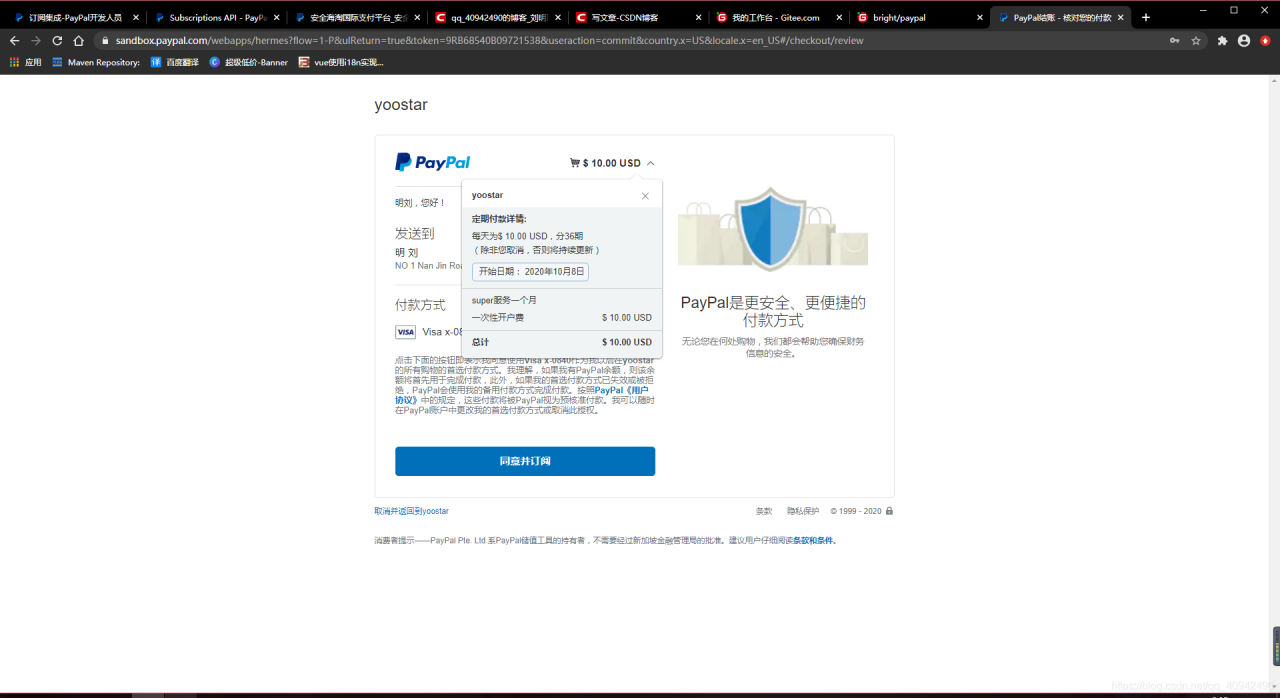
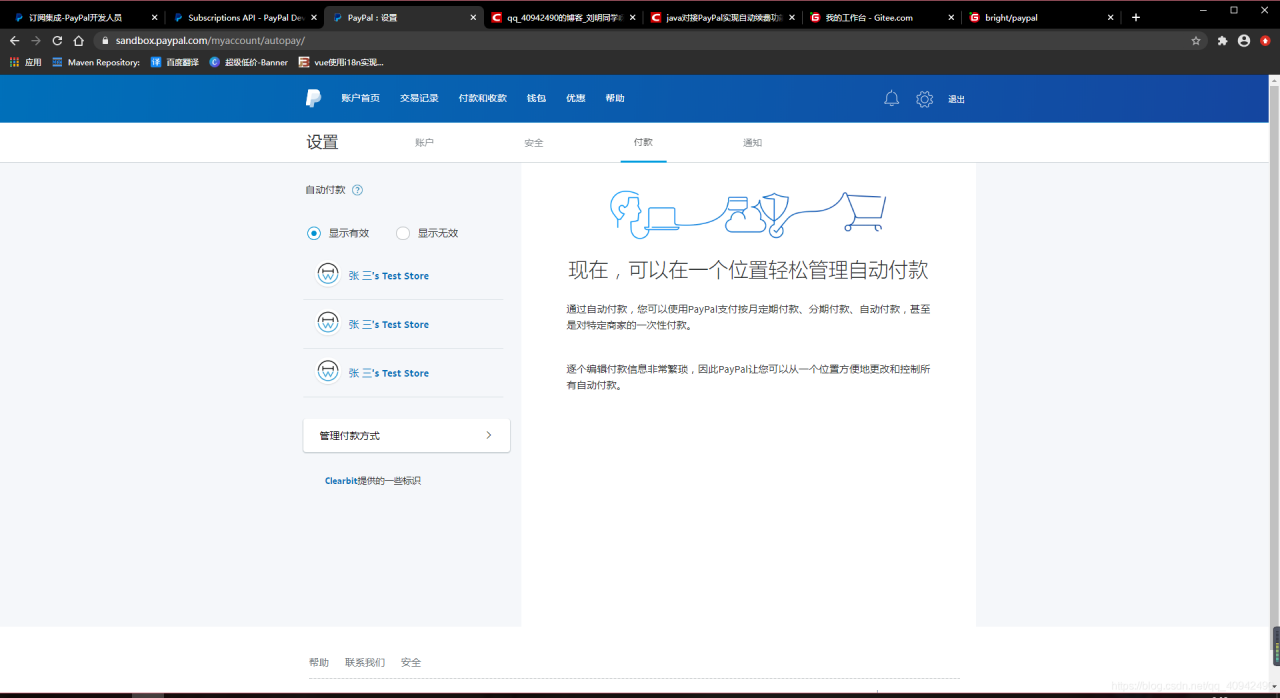
git address: https://gitee.com/bright-boy/paypal.git
QQ 694475668 you are welcome to send a reward oh