Category Archives: How to Fix

Extension of image edge by Python opencv

original image

expands the image outwards according to the pixel value of the image boundary, expanding 50 pixels in each direction.
a = cv2. CopyMakeBorder (img, 50,50,50,50, cv2. BORDER_REPLICATE)

near the boundary of the 50 pixels fold out (axisymmetric) :
a = cv2. CopyMakeBorder (img, 50,50,50,50, cv2 BORDER_REFLECT)

constant fill:

a = cv2.copymakeborder (img,50,50,50, cv2.border_constant,value=[0,255,0])

Attributeerror: ‘dataframe’ object has no attribute ‘IX’ error

“AttributeError: ‘DataFrame’ object has no attribute ‘ix'”

recently reported when using the ix method of DataFrame

after searching on the Internet, is removed from the series.ix and dataframe.ix method at the beginning of pandas’ 1.0.0 version.

my solution: use the loc method of DataFrame or the iloc method instead.

check pandas

for details


reference: https://hacpai.com/article/1581255121678

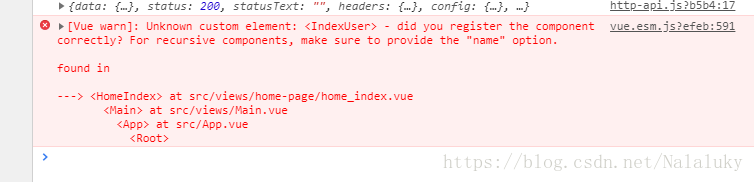
Vue error: did you register the component correctly? For.., make sure to provide the “name” option (solved)

P> question:
did you register the component?For recursive components, make sure to provid the "name" option

For recursive components, make sure to provid the “name” option

import ComponentA from './ComponentA.vue'
import ComponentB from './ComponentB.vue'
export default {
  component: {
    ComponentA,ComponentB
  },
  // ...
}

solution:
to correct component

import ComponentA from './ComponentA.vue'
import ComponentB from './ComponentB.vue'
export default {
  components: {
    ComponentA,ComponentB
  },
  // ...
}

How many pieces of data can list store in Java?

from the perspective of language, java.util.List is an interface, under which there are multiple N implementations, the most commonly used are ArrayList and LinkedList and its various inheritance or synchronization implementation (such as Vector/Queue/Stack)
ArrayList inside is to take the array storage, then the upper limit is Integer.MAX_VALUE
LinkedList inside is a LinkedList, theoretically infinite

also, everything in the List is in memory (although you can implement one yourself), so how much you can put depends on the size and type of stuff you’re putting. The
size aspect is easy to calculate, if one object is 1K, then 400,000 will take up at least 400M memory (not counting other usage).
virtual machine memory classification, if it is a common object, generally use the Heap space, if it is a constant or something like string.intern (), then use the Permanent Generation.

in actual development, the default memory size of virtual machine varies according to different virtual machine implementations. The maximum heap size can be adjusted with -xmx when the application is launched, such as adjusting the maximum heap size to 2G:

java -Xmx2048m cn.gefostudio.App

adjust the maximum size of the immortal band to 1G:

java -XX:MaxPermSize=1024m cn.gefostudio.App

HTML using title attribute to display text with mouse hover

mouse hover display text, HTML use title attribute can achieve the effect of text display, this attribute is more practical, the need for friends can refer to

< A href=# title=” here is the text displayed “> hello< /a>

when we hover over hello last time we will have text and here is the text that is displayed.

Pass parameters to the YML file, ansible playbook command

extract: https://ansible-book.gitbooks.io/ansible-first-book/content/yong_ming_ling_xing_chuan_di_can_shu.html

= ansible-books.io/ansible-first-book/content/yong_ming_ling_xing_chuan_di_can_shu.html

passes the parameter

from the command line

defines the command line variable

in the release.yml file, hosts and user are defined as variables that need to be passed from the command line.


  • hosts: ‘{{host}}
    remote_user:’ {{user}}

    the tasks:


    • USES the command line variable

to pass value on the command line:

 ansible-playbook e33_var_in_command.yml --extra-vars "hosts=web user=root" 

The

parameter can also be passed in json format:

ansible-playbook e33_var_in_command.yml --extra-vars "{'hosts':'vm-rhel7-1', 'user':'root'}" 

can also put parameters in the file:


ansible-playbook e33_var_in_command.yml --extra-vars "@vars.json"

Module in linux driver_ platform_ Learning driver macro


Linux driver module_platform_driver macro learning

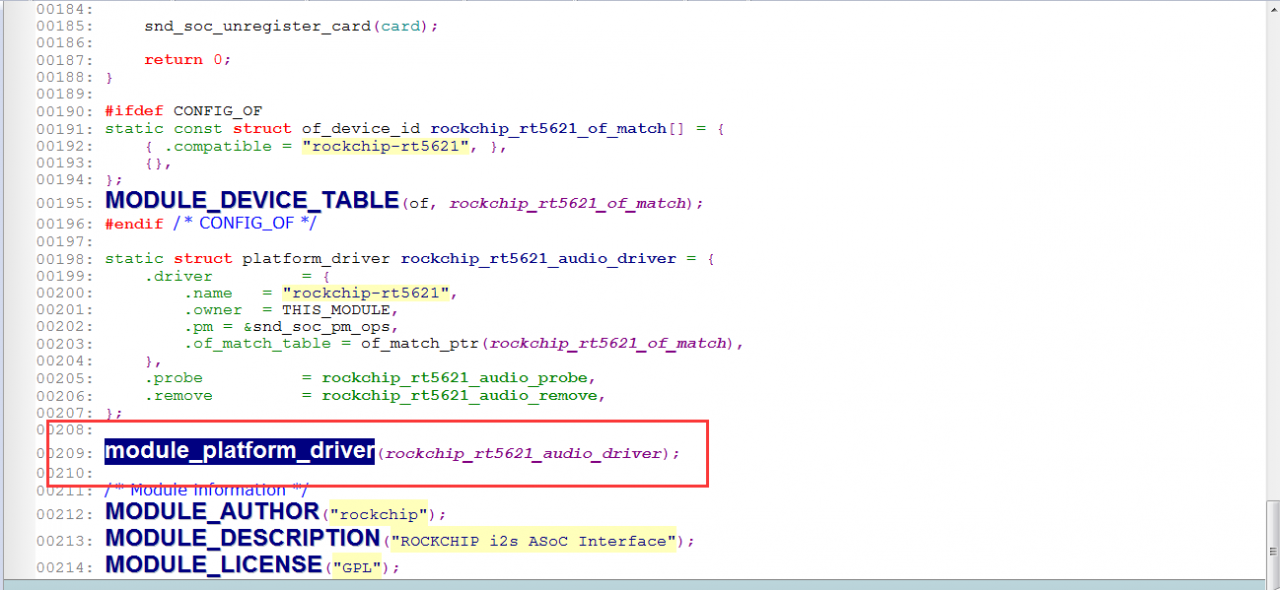
It is common to see this macro module_platform_driver on Linux devices. The following figure shows a character device driver. Today we’re going to learn about this macro.

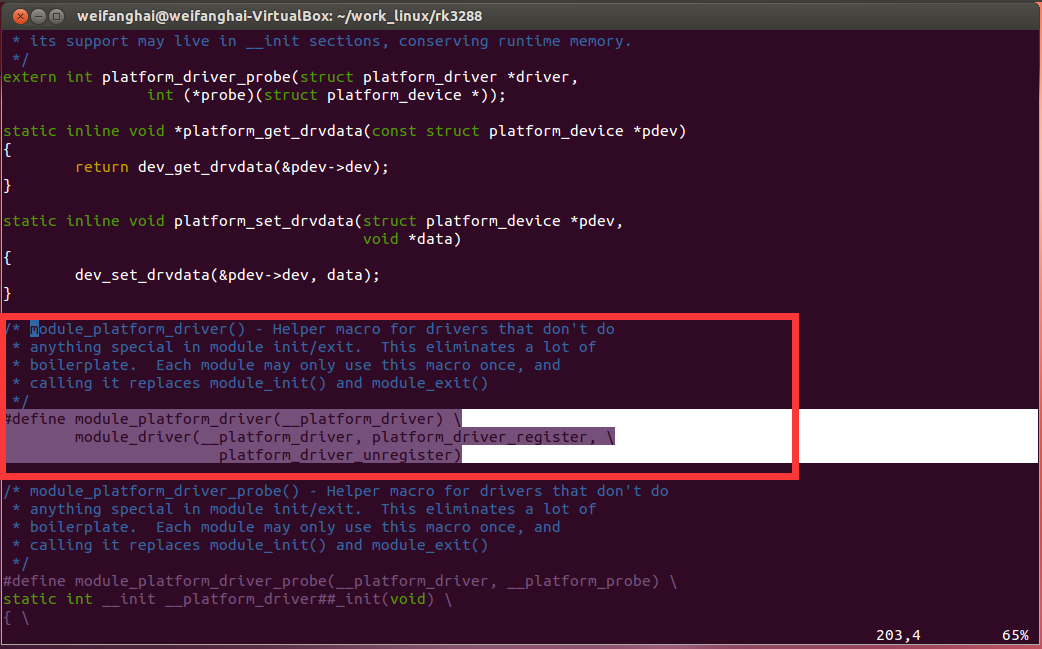
2, the macro is in kernel/include/Linux/platform_device. H defined inside. We find that this calls another macro, module_driver.

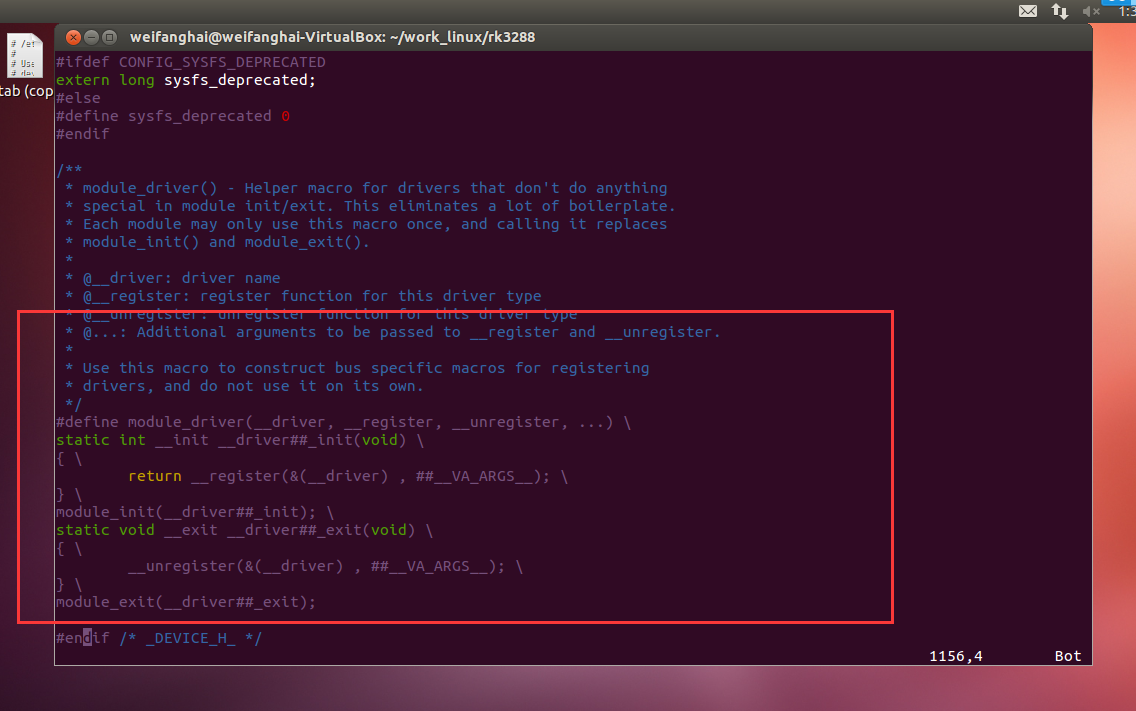
. So where is the module_driver macro defined?For once, the macro is in kernel/include/Linux/device. The definition of h.

The macro module_platform_driver can be used to write much less code. The purpose of the macro is to define the platform driver registration function and the platform driver unregistration function with the specified name, and to register and unregister the platform driver within the function body with the functions platform_driver_register() and Platform_driver_unregister (), respectively.


static int x_init(void)
{
return platform_driver_register(& xxx);
}
module_init(xxx_init);
static void __exit xxx_init(void)
{
return platform_driver_unregister(& xxx);
}
module_exit(xxx_exit);

Time, strftime and strptime in Python

The most common

time.time() returns a floating point number in seconds. But the type that strfTime handles is time.struct_time, which is actually a tuple. Both strpTime and localTime will return this type.

>>> import time
>>> t = time.time()
>>> t
1202872416.4920001
>>> type(t)
<type 'float'>
>>> t = time.localtime()
>>> t
(2008, 2, 13, 10, 56, 44, 2, 44, 0)
>>> type(t)
<type 'time.struct_time'>
>>> time.strftime('%Y-%m-%d', t)
'2008-02-13'
>>> time.strptime('2008-02-14', '%Y-%m-%d')
(2008, 2, 14, 0, 0, 0, 3, 45, -1)

1, strftime usage

strftime can be used to get the current time, you can format the time as a string, and so on, which is pretty handy. However, it should be noted that the acquired time is the time of the server, and pay attention to the time zone issues, such as GAE lying that the time is the 0 time zone of GMT, which needs to be converted by itself.

Strftime ()

strftime ()
we can use the strftime () function to format the time in the desired format

#!/usr/bin/python
import time

t = (2009, 2, 17, 17, 3, 38, 1, 48, 0)
t = time.mktime(t)
print time.strftime("%b %d %Y %H:%M:%S", time.gmtime(t))

#输出:Feb 17 2009 09:03:38

2. Strptime

The

Python time strptime() function parses a time string into a time tuple according to the specified format.
python time date formatting symbol:

  • %y two-digit years are (00-99)
  • %y four-digit years are (000-9999)
  • %m months (01-12)
  • %d months (0-31)
  • %H 24 H hours (0-23)
  • 0

  • 1% I 12-hour hours (01-12)
  • 3% m minutes (00=59)

    4

  • 5% S Second (00-59)
  • %a local simplified name of the week
  • %a local simplified name of the week
  • %b local simplified name of the month
  • %b local complete name of the month
  • %c local corresponding date and time expression
  • 0

  • 1% a day (001-366)
  • 2
  • 3% p local a.m. The number of weeks of the year (00-53) Sunday is the beginning of the week
  • %w (0-6), Sunday is the beginning of the week
  • %w (00-53) Monday is the beginning of the week
  • %x local corresponding date is
  • %x local corresponding time is
  • 0

  • 1 %Z current time zone name
  • 2

  • 3 %% %% %U number itself
  • 4

5

instance:

#!/usr/bin/python
import time

struct_time = time.strptime("30 Nov 00", "%d %b %y")
print "returned tuple: %s " % struct_time

#输出:returned tuple: (2000, 11, 30, 0, 0, 0, 3, 335, -1)


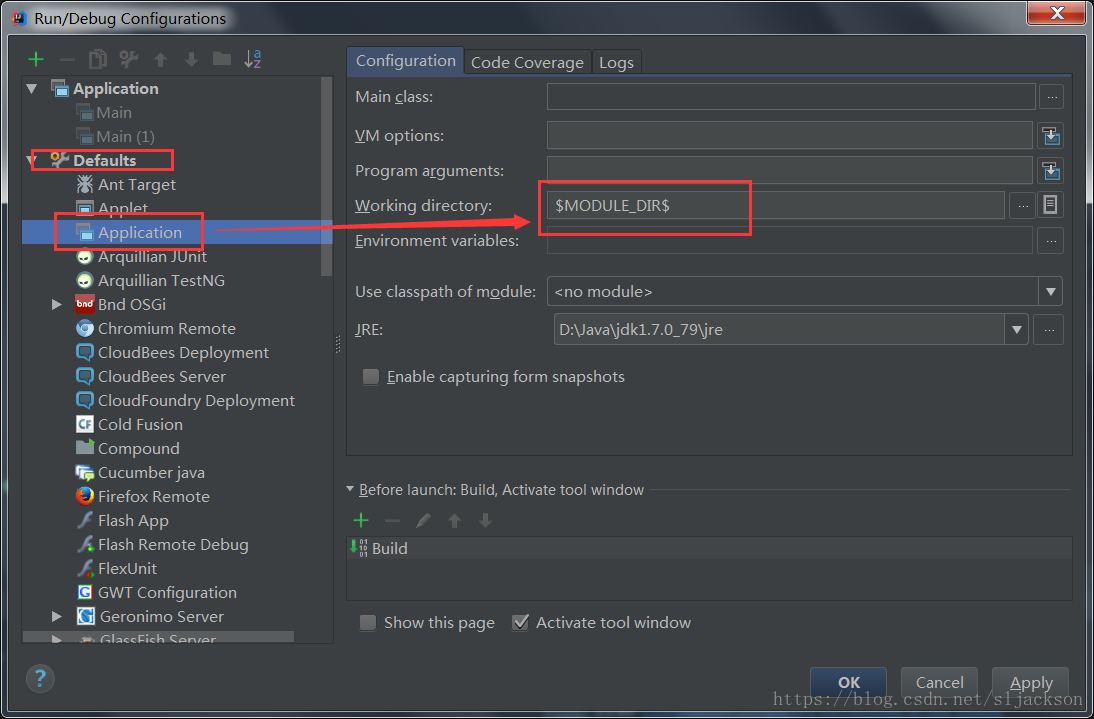
IntelliJ idea sets the default working directory

project more and more, using eclipse felt too card, decided to try the idea.

under multiple modules, system.getproperty (“user.dir”) gets the path to the module when you run the project.

to set the default Working Directory

setting method:

Run -> Edit Configurations -> Working directory


Defaults-> Application

set Working directory to $MODULE_DIR$so that each module gets its own project root path


Centos7 view and close firewall

CentOS 7.0 defaults to firewall as a firewall

view firewall status

firewall-cmd --state

Stop is firewall

systemctl stop firewalld.service

firewall is prohibited to turn on

systemctl disable firewalld.service 

turn off from CentOS 6 and CentOS 7 firewall

close selinux
into /etc/selinux/config file

vi /etc/selinux/config

the SELINUX = instead of enforcing the SELINUX = disabled

confers the non-secret login command

ssh-keygen -t rsa 
ssh-copy-id root@master

scp -P 22 /Users/che/Downloads/jdk-8u161-linux-x64.rpm [email protected]:/software/

 安装: yum install -y jdk-8u161-linux-x64.rpm
 设置环境变量
 cd /usr/java/

 /usr/java/jdk1.8.0_161

 vi /etc/profile

 export JAVA_HOME=/usr/java/jdk1.8.0_161
 export PATH=$JAVA_HOME/bin:$PATH

install hadoop
download installation package
hadoop-26.5.tar.gz

cd /usr/
mv /software/hadoop-2.6.5.tar.gz  ./
解压
tar -xzvf ./hadoop-2.6.5.tar.gz

创建目录
   namenode目录:/data/hadoop/namenode
   data目录:    /data/hadoop/data
   tmp目录:     /data/hadoop/tmp
   mkdir -p /data/hadoop/namenode

配制
   core-site.xml
   hdfs-site.xml
   mapred-site.xml.template   mapred-site.xml
   cp mapred-site.xml.template   mapred-site.xml
   yarn-site.xml 

   slaves   (slave1,slave2)
   masters  (master)

   hadoop-env.sh
   export JAVA_HOME=/usr/java/jdk1.8.0_161

   将master的配制copy到slave1、slave2
   scp -r ./* root@slave1:/software/hadoop-2.6.5/etc/hadoop/

 格式化
   cd hadoop-2.6.5/bin
   ./hdfs namenode -format

 启动
   cd ../sbin/

   ./start-dfs.sh

   ssh-copy-id root@master 

   jps(检查一下)

   ./start-yarn.sh

   cd ../bin

   hadoop fs -ls /
   hadoop fs -mkdir /user

   /software/hadoop-2.6.5/bin

   vi/etc/profile

   export HADOOP_HOME=/software/hadoop-2.6.5
   export PATH=$JAVA_HOME/bin:$HADOOP_HOME/bin:$PATH

   source /etc/profile

   hadoop fs -put /software/hadoop-2.6.5.tar.gz /user

   测试2:
   cd share/hadoop/mapreduce
   hadoop jar ./hadoop-mapreduce-examples-2.6.5.jar pi 5 10

   192.168.1.100:50070
   192.168.1.100:8088

   修改ssh端口
   vim /etc/ssh/sshd_config  

set NTP time synchronization service
, install NTP
yum install -y NTP
2, set NTP service startup
chkconfig NTPD on
service NPTD start