Category Archives: How to Fix

Introduction to the principle of Mali tile based rendering

comes first

a little in-depth understanding of Mali’s architecture, compare the basic process of the existing GPU with that of Mali, and propose the advantages and disadvantages of the GPU. The original address: https://developer.arm.com/graphics/developer-guides/tile-based-rendering
Traditional GPU

the architecture of a traditional GPU is generally called the Immediate mode GPU. The main process is vertex shader and fragment shader executed sequentially. The pseudocode is:

for draw in renderPass:
    for primitive in draw:
        for vertex in primitive:
            execute_vertex_shader(vertex)
        for fragment in primitive:
            execute_fragment_shader(fragment)

The

data stream looks like this:
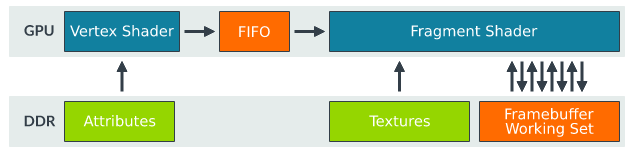
Advantages of


The main advantage of

is that the output from vertex stays on the chip and can be read directly and quickly in the next stage.

shortcomings

if there are large graphics (mostly triangles) that need to be rendered, then the framebuffer will be very large. For example, rendering the color of the entire screen or deep rendering will consume a lot of storage resources, but there are no such resources on the chip, so the DDR will be read frequently. Many operations related to the current frame (such as blending, depth testing or stencil testing) all need to read this working set, so the bandwidth required is huge and the energy consumption is also high. For mobile devices, this way is not conducive to the operation of the device.

Tile-based GPU

so Mali’s GPU proposed the Tile-based concept, which is to divide the image into 16*16 pieces. Rendering in small chunks and writing to DDR solves this problem by reducing the frequency of reading and writing to DDR. But chunking requires knowing the geometry of the entire image, so the operation is broken down into two steps:

  1. first step to perform geometry related operations, and generate tile list.
  2. second step to execute fragment operation on each tile, after completion, write memory

The

pseudocode is as follows:

# Pass one
for draw in renderPass:
    for primitive in draw:
        for vertex in primitive:
            execute_vertex_shader(vertex)
        append_tile_list(primitive)

# Pass two
for tile in renderPass:
    for primitive in tile:
        for fragment in primitive:
            execute_fragment_shader(fragment)

data flow as follows:
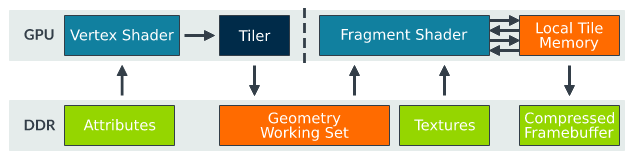
Advantages of

obviously solves the bandwidth problem of the traditional model, because the fragment shader reads a small fragment every time and puts it on the fragment. There is no need to read the memory frequently until the last operation is finished, and then write to the memory. You can even further reduce reads and writes to memory by compressing tiles. In addition, when some areas of the image are fixed, the function is called to determine whether tiles are the same, so as to reduce repeated rendering.

shortcomings

is used to write the output geometry to the DDR after the vertex phase, and then to be read by fragment shader. This is the balance between the overhead of tile writing DDR and the overhead of fragment Shader rendering reading DDR. Another operation, such as Tessellation, is not suitable for the Tile-based GPU.

summary

now the resolution of the screen is getting bigger and bigger from 1080p to 1440p to 4K, you can see, Mali’s architecture will be used on a large scale in the future.

but there are some pitfalls that developers need to avoid. The first is to properly set the Render Pass to take advantage of the features of the architecture; The second is to understand the benefits of this geometric division.
JQ adds a click event to the option of select

when we use the select drop-down list box, we need to select the selected < option> Option triggers an event, in fact < option> There is no event method itself, we only fire in the onChange method in the SELECT.

wants to add an option trigger event, but adding onclick to the option does not trigger the event

add onclick in the select.

solution: add a change to the select event can

< select id=”sumyear” >
< option grade=”0″ value=”a” > Please select year & LT; /option>
< option grade=”1″ value=”b” > 2018< /option>
< option grade=”2″ value=”c” > 2019< /option>

< /select>

$(“#sumyear”).change(function(){
alert($(this).children(‘option:selected’).val());
})

Shell gets the current time of the system and formats it

time=$(date “+%Y%m%d-%H%M%S”)

or

time=$(date “+%Y-%m-%d %H:%M:%S”)

……

in any format you want

echo “${time}”

the above two lines of simple code is that the shell takes the current time and outputs it in the format it wants.

a couple of things to note

  1. date is followed by a space, otherwise the command cannot be recognized, the shell is very strict with the space.
  2. Y shows 4-digit years, such as: 2018; Y displays a 2-digit year, such as: 18. M is for month; M is for minutes. D represents the day, and D represents the current date, i.e. 1/18/18(i.e. 2018.1.18). H represents hours, and H shows months (somewhat muddled). S displays the current second in milliseconds; S displays the current second in seconds.

WSL 2 needs to update its kernel components

welcome to my blog

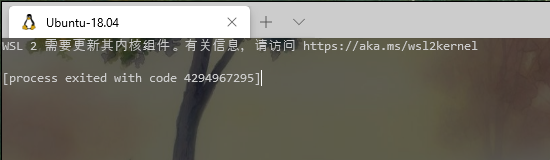
problem description: open win10 terminal display: WSL 2 needs to update its kernel components;

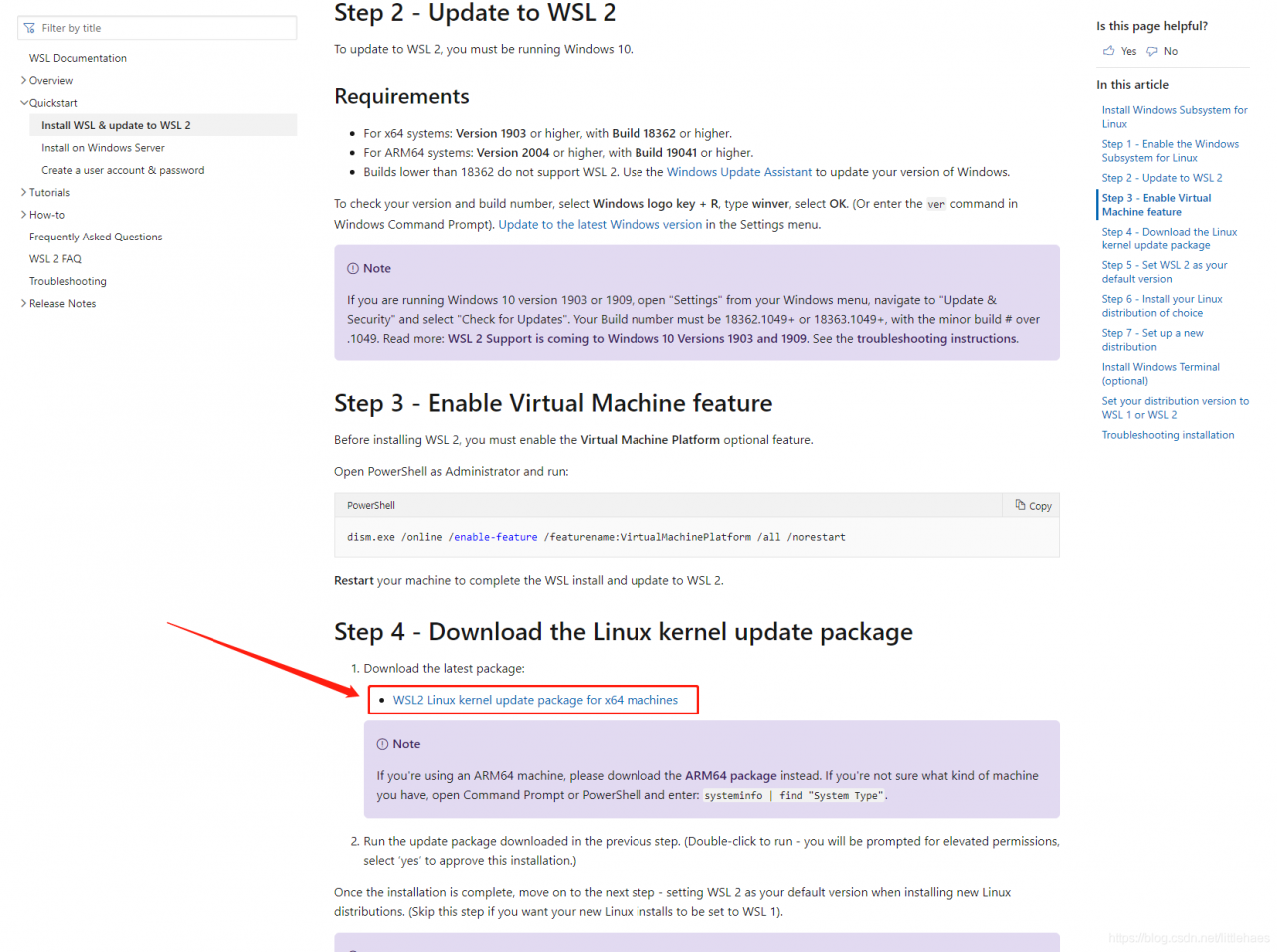
download the upgrade package of WSL2 Linux kernel from Microsoft, download the link, as shown in the figure below, click “this link” to download

install the update package, all the way next, without any additional options

Solution to permission denied

gets an installation file ending in.run, giving it executable permissions. If the SElinux module is enabled, disable it first!

Such as:

# chmod + x NVIDIA – Linux – x86_64-295.59. The run

When you paste

into a directory (myResources), this prompt appears:

Permission denied

is not set, just copy and paste a file, how can that be?

solution:

$ sudo chmod -R 777 myResources

-where
-r refers to all subdirectories and files cascading to the directory
-777 is that all users have the highest permissions

How to select the jar package version for Maven package when the jar package versions referenced by multiple modules are inconsistent

problem description:

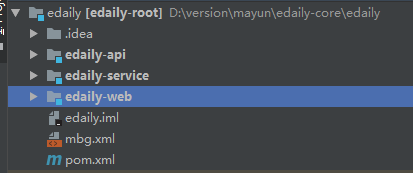
as shown in figure:

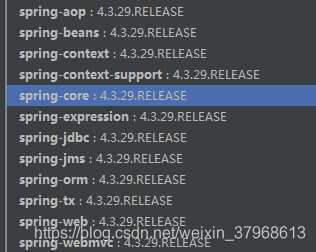
such a project project, where view edaily-service and edaily-web reference jar version is inconsistent. Take the spring version for example: web is 4.3.29
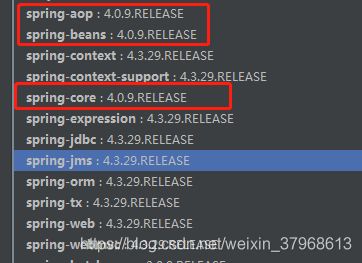
and service is 4.0.9:

. So when maven USES war, does it use 4.0.9 jar or 4.3.29 jar?

solution:

is based on the version referred to by the maven-compiler-plugin POM file:

	<plugin>
		<artifactId>maven-compiler-plugin</artifactId>
		<configuration>
			<source>1.8</source>
			<target>1.8</target>
			<encoding>UTF-8</encoding>
		</configuration>
	</plugin>

maven-compiler-plugin is in edaily-web, so it is packaged as version 4.3.29.

Rockchip sends Mipi 0x32 command

RK提供的常规的mipi指令,比如0x15 0x39 等等,但是SDK本身不支持0x32命令,需要加入以下补丁:

rk3126补丁如下:

kenel使用:
diff --git a/drivers/video/rockchip/screen/lcd_mipi.c b/drivers/video/rockchip/screen/lcd_mipi.c
index 8eeef57..eba303d6 100755
--- a/drivers/video/rockchip/screen/lcd_mipi.c
+++ b/drivers/video/rockchip/screen/lcd_mipi.c
@@ -166,6 +166,7 @@ static void rk_mipi_screen_cmd_init(struct mipi_screen *screen)
 int rk_mipi_screen(void)
 {
     u8 dcs[16] = {0}, rk_dsi_num;
+       u32 *p,data;
     rk_dsi_num = gmipi_screen->mipi_dsi_num;
     if (gmipi_screen->screen_init == 0) {
         rk_mipi_screen_pwr_enable(gmipi_screen);
@@ -211,6 +212,47 @@ int rk_mipi_screen(void)
         if (rk_dsi_num == 2) {
             dsi_enable_video_mode(1, 1);
         }
+             /* Sending 0x22 command and 0x32 commad */
+        p = ioremap(0x20008150, SZ_4);
+        data = ioread32(p);
+        data |= 0x100000;
+        data &= ~0x10;
+        iowrite32(data, p);
+        printk("mipi reg data1 = %x\n",data);
+        //writel(data, 0x20008150);
+        udelay(20);
+        /* 0x22 command */
+        data |= 0x100000;
+        data |= 0x10;
+        iowrite32(data, p);
+        printk("mipi reg data2 = %x\n",data);
+        //  writel(data, 0x20008150);
+        msleep(10);
+        /* 0x32 command */
+        data = ioread32(p);
+        data |= 0x100000;
+        data &= ~0x10;
+        printk("mipi reg data3 = %x\n",data);
+        iowrite32(data, p);
+        udelay(20);
+        iounmap(p);
+        //  writel(data,0x20008150);
+
+        msleep(20);
+        dcs[0] = HSDT;
+        dcs[1] = DTYPE_DCS_SWRITE_0P;
+        dcs[2] = dcs_exit_sleep_mode;
+        dsi_send_packet(0, dcs, 3);
+        if (rk_dsi_num == 2)
+            dsi_send_packet(1, dcs, 3);
+
+        msleep(2);
+
+        dcs[0] = HSDT;
+        dcs[1] = DTYPE_DCS_SWRITE_0P;
+        dcs[2] = dcs_set_display_on;
+        dsi_send_packet(0, dcs, 3);
+
     } else {
         rk_mipi_screen_pwr_enable(gmipi_screen);

UBOOT上使用:
diff --git a/drivers/video/screen/lcd_mipi.c b/drivers/video/screen/lcd_mipi.c
index b9e513c..9146c39 100755
--- a/drivers/video/screen/lcd_mipi.c
+++ b/drivers/video/screen/lcd_mipi.c
@@ -173,6 +173,7 @@ static void rk_mipi_screen_cmd_init(struct mipi_screen *screen)

 int rk_mipi_screen(void) 
 {
+    u32  *p,data;
     u8 dcs[16] = {0}, rk_dsi_num;
     rk_dsi_num = gmipi_screen->mipi_dsi_num;
     if(gmipi_screen->screen_init == 0){
@@ -219,6 +220,29 @@ int rk_mipi_screen(void)
         if(rk_dsi_num == 2){
             dsi_enable_video_mode(1,1);
         }
+        /* Sending 0x22 command and 0x32 commad */
+       // p = ioremap(0xff770418, SZ_4);
+       // data = ioread32(p);
+        data = 0;
+        data |= 0x100000;
+        data &= ~0x10;
+        //iowrite32(data, p);
+        writel(data, 0x20008150);
+        udelay(20);
+        /* 0x22 command */
+        data |= 0x100000;
+        data |= 0x10;
+        //iowrite32(data, p);
+          writel(data, 0x20008150);
+        msleep(10);
+        /* 0x32 command */
+        //data = ioread32(p);
+        data |= 0x100000;
+        data &= ~0x10;
+        //iowrite32(data, p);
+        //iounmap(p);
+          writel(data,0x20008150);
+        msleep(20);
     }
     else{
         rk_mipi_screen_pwr_enable(gmipi_screen);
diff --git a/drivers/video/transmitter/rk32_mipi_dsi.c b/drivers/video/transmitter/rk32_mipi_dsi.c
index 375dfdb..6db1188 100755
--- a/drivers/video/transmitter/rk32_mipi_dsi.c
+++ b/drivers/video/transmitter/rk32_mipi_dsi.c
@@ -986,6 +986,11 @@ static int rk32_mipi_dsi_host_init(struct dsi *dsi)
     //rk32_dsi_set_bits(dsi, 0, outvact_lpcmd_time);   //byte
     //rk32_dsi_set_bits(dsi, 0, invact_lpcmd_time);

+    /* enable send command in low power mode */
+ rk32_dsi_set_bits(dsi, 4, outvact_lpcmd_time);
+    rk32_dsi_set_bits(dsi, 4, invact_lpcmd_time);
+    rk32_dsi_set_bits(dsi, 1, lp_cmd_en);
+
     rk32_dsi_set_bits(dsi, 20, phy_hs2lp_time);
     rk32_dsi_set_bits(dsi, 16, phy_lp2hs_time);

RK3368 patch as follows:

diff –git a/drivers/video/screen/lcd_mipi.c b/drivers/video/screen/lcd_mipi.c
index 257ea7a.. E8e1c0bf 100755
– a/drivers/video/screen/lcd_mipi.
c + + + b/drivers/video/screen/lcd_mipi c
@ @ + 177-177, 6, 7 @ @ static void rk_mipi_screen_cmd_init (struct mipi_screen * screen)

Int rk_mipi_screen (void)
{
p + u32 * and data;
u8 DCS [16] = {0}, rk_dsi_num;
rk_dsi_num = gmipi_screen – & gt; mipi_dsi_num;
if (gmipi_screen – & gt; Screen_init = = 0) {
@ @ – 223, 6 + 224 @ @ int rk_mipi_screen (void)
if (rk_dsi_num = = 2) {
dsi_enable_video_mode (1, 1);

} +/* Sending 0 x22 command and 0 x32 commad */
+// p = ioremap (0 xff770418, SZ_4);
+ // data = ioread32(p);
+ data = 0;
+ data |= 0x040000;
+ data & amp; = ~0x04;
+// iowrite32 (data, p);
+ writel (data, 0 xff770418);
+ udelay (20);
+/* 0 x22 command */
+ data | = 0 x040000;
+ data |= 0x04;
+// iowrite32 (data, p);
+ writel (data, 0 xff770418);
+ msleep (10);
+/* 0 x32 command */
+// data = ioread32 (p);
+ data |= 0x040000;
+ data & amp; = ~0x04;
+// iowrite32 (data, p);
+// iounmap (p);
+ writel (data, 0 xff770418);
+ msleep (20);

} else {
rk_mipi_screen_pwr_enable (gmipi_screen);

Python — a solution to [error 24: too many open files] under Ubuntu


in my last blog, I mentioned that when I used multithreading + coroutine crawler to grab data, when my coroutine number × thread number was very large, it would prompt [Error 24: too many open files] and a series of other errors. This blog is a solution to this problem.


Why does

report this error?You only have a few files open?
this should be the first reaction of most people. When I met this error was also very meng, then wanted to think, it should be me every collaborators process to obtain access to the file handle, so even though you only took up to save data to a file, but when the program runs, there may be many threads or processes have the file handle, the program looks like opened a lot of files.
so the only way to deal with this situation is to change the system default maximum number of files.


Under

ubuntu, you can enter ulimit-n in the terminal to see the current system default maximum number of files, which is usually 1024 by default. Obviously, this value is small for the crawler.
there are two ways to change this default value. Both methods have worked on different machines. The first is simple, but it doesn’t guarantee success. If the first fails, try the second, and you’ll basically solve the problem.


the first method:
directly in the terminal input: ulimit -n 10000
I tried this on my own computer without success, only on the server.


the second method:
input in terminal sudo vim/etc/security/limits the conf to open the file, to the end of the file, the keyboard I insert content:

* soft nofile 10000
* hard nofile 10000

after the above two lines have been written, press Esc to exit edit mode, then press shift and at the same time; Key, type wq! save the file and exit. Then log out and log in again. If you put ulimit -n in the terminal you will get the value you just set.
Windows has not tried, recently rarely logged in Windows, Windows do not know whether there will be such a problem, if encountered, the principle should be the same, according to this idea to find the answer should be able to solve.


above. Welcome to exchange.

To solve the problem of nginx accessing PHP file into download

Nginx browses.php files into downloads: this is because Nginx is not set to pass to the PHP interpreter

when it touches PHP files

  • check if the php-fpm process is working properly
ps aux|grep 'php-fpm'

Open PHP – FPM

  • service php-fpm start
    
    • configure nginx
      ocation ~ \.php$ {
      	fastcgi_pass 127.0.0.1:9000;#php-fpm的默认端口是9000
      	fastcgi_index index.php;
      	fastcgi_param SCRIPT_FILENAME $document_root$fastcgi_script_name;
      	include fastcgi_params;
      }
      

Python how does a. Py file call classes and functions in another. Py file

in the same folder

calls the function:

A.py file:

def add(x,y):
    print('和为:%d'%(x+y))

B.py file:

import A
A.add(1,2)

or

from A import add
add(1,2)

call class:

Amy polumbo y file:

class A:
    def __init__(self,xx,yy):
        self.x=xx
        self.y=yy
    def add(self):
        print("x和y的和为:%d"%(self.x+self.y))

B.py file:

from A import A
a=A(2,3)
a.add()

or

import A
a=A.A(2,3)
a.add()

in different folders

The file path for the a.python file: E:\PythonProject\winycg

P. y file:

import sys
sys.path.append(r'E:\PythonProject\winycg')
'''python import模块时, 是在sys.path里按顺序查找的。
sys.path是一个列表,里面以字符串的形式存储了许多路径。
使用A.py文件中的函数需要先将他的文件路径放到sys.path中'''
import A

a=A.A(2,3)
a.add()


Resolve rabbitmq declarationexception: failed to declare queue exception

exception description

error when creating queue for message sending

org.springframework.amqp.rabbit.listener.BlockingQueueConsumer$DeclarationException: Failed to declare queue(s):[miaosha.queue]
    at org.springframework.amqp.rabbit.listener.BlockingQueueConsumer.attemptPassiveDeclarations(BlockingQueueConsumer.java:721) ~[spring-rabbit-1.7.9.RELEASE.jar:na]
    at org.springframework.amqp.rabbit.listener.BlockingQueueConsumer.start(BlockingQueueConsumer.java:598) ~[spring-rabbit-1.7.9.RELEASE.jar:na]
    at org.springframework.amqp.rabbit.listener.SimpleMessageListenerContainer$AsyncMessageProcessingConsumer.run(SimpleMessageListenerContainer.java:1504) [spring-rabbit-1.7.9.RELEASE.jar:na]
    at java.lang.Thread.run(Thread.java:748) [na:1.8.0_131]
Caused by: java.io.IOException: null
    at com.rabbitmq.client.impl.AMQChannel.wrap(AMQChannel.java:105) ~[amqp-client-4.0.3.jar:4.0.3]
    at com.rabbitmq.client.impl.AMQChannel.wrap(AMQChannel.java:101) ~[amqp-client-4.0.3.jar:4.0.3]
    at com.rabbitmq.client.impl.AMQChannel.exnWrappingRpc(AMQChannel.java:123) ~[amqp-client-4.0.3.jar:4.0.3]
    at com.rabbitmq.client.impl.ChannelN.queueDeclarePassive(ChannelN.java:992) ~[amqp-client-4.0.3.jar:4.0.3]
    at com.rabbitmq.client.impl.ChannelN.queueDeclarePassive(ChannelN.java:50) ~[amqp-client-4.0.3.jar:4.0.3]
    at sun.reflect.NativeMethodAccessorImpl.invoke0(Native Method) ~[na:1.8.0_131]
    at sun.reflect.NativeMethodAccessorImpl.invoke(NativeMethodAccessorImpl.java:62) ~[na:1.8.0_131]
    at sun.reflect.DelegatingMethodAccessorImpl.invoke(DelegatingMethodAccessorImpl.java:43) ~[na:1.8.0_131]
    at java.lang.reflect.Method.invoke(Method.java:498) ~[na:1.8.0_131]
    at org.springframework.amqp.rabbit.connection.CachingConnectionFactory$CachedChannelInvocationHandler.invoke(CachingConnectionFactory.java:1027) ~[spring-rabbit-1.7.9.RELEASE.jar:na]
    at com.sun.proxy.$Proxy261.queueDeclarePassive(Unknown Source) ~[na:na]
    at org.springframework.amqp.rabbit.listener.BlockingQueueConsumer.attemptPassiveDeclarations(BlockingQueueConsumer.java:700) ~[spring-rabbit-1.7.9.RELEASE.jar:na]
    ... 3 common frames omitted
Caused by: com.rabbitmq.client.ShutdownSignalException: channel error; protocol method: #method<channel.close>(reply-code=404, reply-text=NOT_FOUND - no queue 'miaosha.queue' in vhost '/', class-id=50, method-id=10)
    at com.rabbitmq.utility.ValueOrException.getValue(ValueOrException.java:66) ~[amqp-client-4.0.3.jar:4.0.3]
    at com.rabbitmq.utility.BlockingValueOrException.uninterruptibleGetValue(BlockingValueOrException.java:32) ~[amqp-client-4.0.3.jar:4.0.3]
    at com.rabbitmq.client.impl.AMQChannel$BlockingRpcContinuation.getReply(AMQChannel.java:366) ~[amqp-client-4.0.3.jar:4.0.3]
    at com.rabbitmq.client.impl.AMQChannel.privateRpc(AMQChannel.java:229) ~[amqp-client-4.0.3.jar:4.0.3]
    at com.rabbitmq.client.impl.AMQChannel.exnWrappingRpc(AMQChannel.java:117) ~[amqp-client-4.0.3.jar:4.0.3]
    ... 12 common frames omitted

solution

miaosha.queue queue could not be found, an inspection found that the queue was not configured in the @configuration file,

add the relevant queue to the configuration class to

@Configuration
public class MQConfig {

    public static final String MIAOSHA_QUEUE = "miaosha.queue";

    @Bean
    public Queue miaoShaQueue(){
        return new Queue(MIAOSHA_QUEUE,true);
    }
}    

Output the error log of CMD in windows to the txt file: use > > to log.txt

sometimes in Windows to run some CMD commands or command files: batch command files such as.bat,.cmd files,.exe files CMD window will flash back, there will be some error reasons, we would like to see, in order to targeted to solve the problem. At this time can think of is output error to the log file to preserve the view or record the screen software with high frame rate CMD window flash back inside displayed error information.

for now, I’m only going to talk about output to the log .

situation 1: run the command flash back directly in CMD.

solution: enter the command in the newly opened CMD window in the format: command > > log.txt

for example: ipconfig/all> > D:\test\log.txt is to output IP configuration information to the path D:\test\log.txt log file,

if the path is log.txt means output to the current directory,

like ipconfig/all> > Log.txt outputs logs to the C:\Windows\System32 directory, and the program that runs the ipconfig/all command ipconfig.exe is in the C:\Windows\System32 directory


Situation 2: run the.exe (.cmd,.bat, etc.) program

in CMD

solution: in the directory where exe program is located, hold Shift and right-click in the blank, enter the command in the open CMD window, the format is: exe program name > > log.txt

log output path as in scenario 1.

note: double-clicking the.exe,.cmd,.bat file will have the same effect as typing the program name on the CMD command line in scenario 2 to start the program.

USES scenario 2 to process and run visible exe,.cmd,.bat files. It has more advantages than double-clicking to run them. It is more controllable in the whole process, and more parameters can be added to the command line to assist running these files, such as making the run log TXT file.