    List<String> getMatchers(String regex, String source){
        Pattern pattern = Pattern.compile(regex);
        Matcher matcher = pattern.matcher(source);
        List<String> list = new ArrayList<>();
        while (matcher.find()) {
            list.add(matcher.group());
        }
        return list;
    }
Unity about meshcollider collider cannot trigger collision event
Unity cannot collide after adding a mesh collision to an object. It was later found that the properties of the component Is Triggle were ticked off so that normal collisions could occur.
// for the game object, add collision
GameObject blank;
private float moveSpeed = 1.0f;
if (! blank.GetComponent< MeshCollider> ())
{
blank. AddComponent< MeshCollider> (a);
blank. GetComponent< MeshCollider> ().convex = true;
}
// mobile game object
blank.transform.Translate(Vector3.right * Time.deltaTime * speed);
after the normal work.
Host is not allowed to connect to this MySQL server
if you are trying to connect to mysql this error occurs:
ERROR 1130: Host ‘192.168.1.3’ is not allowed to connect to this MySQL server
1. Change table method. Maybe your account doesn’t allow you to log in remotely, only at localhost. At this point, as soon as you log in to mysql on your localhost computer, change the “host” entry in the “user” table in the “mysql” database, and change the “%”
from “localhost”
mysql -u root -p
mysql> use mysql;
mysql> update user set host = ‘%’ where user = ‘root’;
mysql> select host, user from user;
2. Authorization method. For example, if you want myUser to use MyPassword to connect to a mysql server from any host.
GRANT ALL PRIVILEGES ON *.* TO ‘myuser’@’%’ IDENTIFIED BY ‘mypassword’ WITH GRANT OPTION;
if you want to allow user myuser to connect to mysql server from a host with IP of 192.168.1.3, and use mypassword as the password
GRANT ALL PRIVILEGES ON *.* TO ‘root’@’192.168.1.3’ IDENTIFIED BY ‘mypassword’ WITH GRANT OPTION;
GRANT ALL PRIVILEGES ON *.* TO ‘root’@’192.168.1.3’ IDENTIFIED BY ‘1235’ WITH GRANT OPTION;
mysql> flush privileges; This sentence must add!!
Python – get the information of calling function from called function
in a function
def fun():pass
How does the function
know who called it?In a C language, it seems difficult. But in python it’s very simple
import traceback
def fun():
      s =  traceback.extract_stack()
      print '%s Invoked me!'%s[-2][2]
the fun function will tell you who called it and print it out, so let’s try it:
>>> def a():fun()
>>> def b():fun()
>>> a()
a Invoked me!
>>> b()
b Invoked me!
>>>JQuery determines whether a property has hasattr
in JQuery coding, we determine if an element has an attribute. JQuery is easy to determine because of the method hasClass $(“input[name=new]”).hasclass (“new”).
, but sometimes we need to determine other attributes, such as a link with rel or no rel. How do you tell?
If there is an attribute $(“#aid”).attr(“rel”) will return the value of rel, or if there is no rel” undefined”
undefined is undefined type, if($(“#aid”).attr(“rel”)==”undefined”) this judgment may not be true.
because of different types. it is recommended to use an if (typeof ($(” # aid “). Attr (” rel “)) = = “undefined”)
Solution not found by JPS command
this problem is actually quite simple. If you type a Command in the terminal and you are prompted to say that the Command is not found, either because you have not installed the appropriate package or because of a path setting problem. If it’s because of a software package, there’s nothing more to say, just install the appropriate software package. In the other case, the user’s path needs to be set.
JPS this command is located under the bin file in the Java installation directory, and you need to check whether the JAVA_HOME and PATH in the etc/profile are added correctly.
JS prompt cannot read property ‘style’ of undefined
"order": [[6, "asc"]],
Instead of
"order": [[0, "asc"]],
reason, only 3 columns, I chose column 6 to sort…
so there’s a sense that it’s out of bounds, so the error is
<div class="box-body">
    <table class="table table-bordered table-striped" id="mytable" role="grid" aria-describedby="user" style="width: 100%;">
        <thead>
        <tr>
            <th>名字</th>
            <th>年龄</th>
            <th>性别</th>
        </tr>
        </thead>
    </table>
</div>
<script>
var table;
$(function () {
table = $('#mytable').DataTable({
"sScrollY": $(this).height() -280,
"serverSide": true,
"processing": true,
"paging": true,
"lengthChange": false,
"searching": false,
"ordering": false,
"info": true,
"autoWidth": true,
"order": [[0, "asc"]],//按照第几列排序
"pageLength": 10,
"bLengthChange": true,
"oLanguage": lang,
"ajax": {
"url": "${CONTEXT_PATH}/admin/essay/voteList",
"type": "POST",
"dataSrc": "data",
"data": function (d) {
d.extra_search = $("#form").serialize();
}
},
"aoColumnDefs": [ { "bSortable": false, "aTargets": [ 5 ] }],
"columns": [
{"data": "name"},
{"data": "age"},
{"data": "sex"}
]
});
});
</script>
Git pull undo misoperation
git pull undo error
originally wanted to merge the newpbft on github into the local newpbft branch. Since I did not check the current branch, I directly used the git pull origin newpbft, but the newpbft was merged into the master branch.
solution
1, run the git reflog command to view your history of changes, as follows:
fdb70fe HEAD@{0}: pull origin newpbft: Fast-forward
40a9a83 HEAD@{1}: checkout: moving from guan to master
b3fa4c3 HEAD@{2}: commit: copy from newpbft, first init
71bf0ec HEAD@{3}: checkout: moving from newpbft to guan
71bf0ec HEAD@{4}: commit: 1. add moveStore() to clean up certStore and blockStore.
1006d67 HEAD@{5}: commit: 1. Add PBFT branch to Puppeth.
fa3fb56 HEAD@{6}: commit: 1. change some errors about packages and vars
5f40fdc HEAD@{7}: checkout: moving from master to newpbft
40a9a83 HEAD@{8}: clone: from https://github.com/yeongchingtarn/geth-pbft.git
2, then use git reset --hard HEAD@{n}, (n is the reference to which you want to fall back) to fall back.
For example, in the figure above, git reset --hard 40a9a83
Numpy adds a new dimension: newaxis
Newaxis contained in
numpy can add one dimension to the original array
np.newaxis produces a different array
depending on where it is placed
one-dimensional array
x = np.random.randint(1, 8, size=5)

x
Out[48]: array([4, 6, 6, 6, 5])

x1 = x[np.newaxis, :]

x1
Out[50]: array([[4, 6, 6, 6, 5]])

x2 = x[:, np.newaxis]

x2
Out[52]:
array([[4],
       [6],
       [6],
       [6],
       [5]])
as you can see from the above code,
when putting newaxis first
, which used to be 5, now becomes 1
x
< script type=”math/tex” id=”MathJax-Element-124″> \times< /script> 5, so the first dimension has changed, the second dimension has changed
and when you put newaxis in the end, the shape of the new array that you output is 5
x
< script type=”math/tex” id=”MathJax-Element-125″> \times< /script> So 1, that’s another dimension that’s less than /p>
So, where you put newaxis, you’ll see an extra dimension in your shape that’s less than /p b>
is as follows:
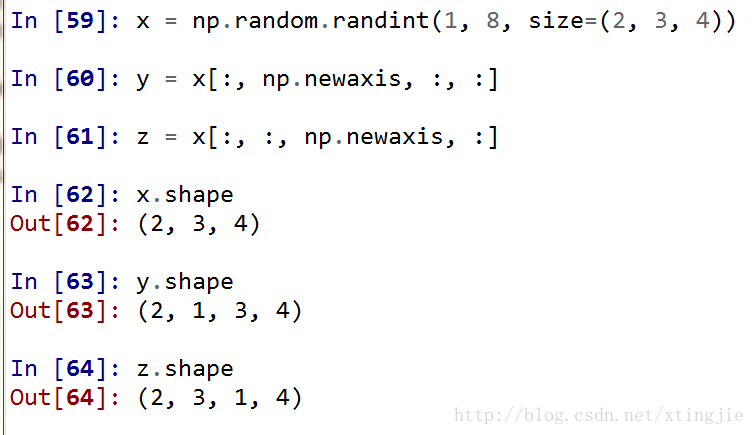
general problem
is often a problem where you need to take a portion of the data out of the array, that is, take a “slice” or a “strip”
, for example, you need to extract a column
from a two-dimensional array
when you take out the dimension becomes one
if we want to reduce it to two dimensions, we need the above method
Linux view folder size, remaining disk space (DU / DF)
1. Introduction
du for directory size, df for disk usage.
2. du
disk usage
(1) basic function
recursively view the sizes of all files under the folder
(2) common parameters:
-h, — human-readable for size (for example: 1K 234M 2G)
-s, — summarize each parameter in the command column calculated the total amount of
(3) other parameters:
-a, — all output the disk amount of all files, not just the directory
— summary size display surface amount, but not the disk amount; Although the surface usage is usually smaller, it can sometimes become larger due to “holes” between sparse files, internal fragments, blocks that are not directly referenced, and so on.
-b, — block-size=
-b, — bytes = — br>-size =1
-c, — total display total information
-d, The filename ending in NUL in the calculated file F corresponds to the space on the disk. If the value of F is “-“, then the filename read from the standard input
-h is equal to — dereference-args (-d)
-h. The — human-readable sizes are displayed in a readable manner (for example, 1K 234M 2G)
— si similar to -h, but using 1000 as the basis for the calculation instead of 1024
-k is equal to — block-size=1K
-l, — count-links if hard connected, Calculate its size
-m is equal to — block-size=1M
-l, — dereference finds the true destination indicated by any symbolic link
-p, — no-dereference does not follow any symbolic link (default)
-0, — null regards each blank line as 0 bytes instead of a newline
-s, — separate dirs does not include subdirectory occupancy
-s,
-x;
-x;
-x;
-x;
-x;
-x;
-x;
-x;
— exclude=PATTERN files that match the PATTERN described in the specified file
— exclude=PATTERN files that match the PATTERN described in the specified file
— max-depth=N display directory total (used with -all calculation files)
calculates depth N when N is the specified value;
— max-depth=0 equals — summarize
— time summarize
— time=WORD display WORD time, not change time: atime, access, use, ctime or status
— time-style= style display time according to the specified style (same as the “date” command) : FORMAT
full-iso, long-iso, iso, +FORMAT
— help display this help information and exit
— version display version information and exit
3. df
df-hl view disk remaining space
df-h view the partition size of each root path
du-sh [directory name] return the size of the directory
du-sm [folder] return the total number of M of the folder
4. The difference between
du is a file-oriented command that only calculates the space occupied by the file, not the space occupied by the file system metadata.
df is calculated based on the overall file system, and the size of the allocated space in the system is determined by the unallocated space in the file system. The DF command can get how much space is taken up by the hard disk and how much space is left, and it can also show how all file systems are using I nodes and disk blocks.
Using apt mirror to build Debian local warehouse
transfer: https://www.cnblogs.com/keithtt/p/7410874.html
apt-mirror is able to download the official image locally and keep the directory structure consistent with it, but it is not possible to modify the mirror repository. If you want to modify the mirrored warehouse, you need to use Reprepro.
1. Apt-mirror
# aptitude update
# aptitude install -y apt-mirror

# dpkg -L apt-mirror
/.
/usr
/usr/bin
/usr/bin/apt-mirror
/usr/share
/usr/share/man
/usr/share/man/man1
/usr/share/man/man1/apt-mirror.1.gz
/usr/share/doc
/usr/share/doc/apt-mirror
/usr/share/doc/apt-mirror/changelog.gz
/usr/share/doc/apt-mirror/changelog.Debian.gz
/usr/share/doc/apt-mirror/copyright
/etc
/etc/cron.d
/etc/cron.d/apt-mirror
/etc/apt
/etc/apt/mirror.list
/var
/var/spool
/var/spool/apt-mirror
/var/spool/apt-mirror/skel
/var/spool/apt-mirror/mirror
/var/spool/apt-mirror/var
2, modify the configuration file and add the source to download (I have added the source for debian_squeeze here)
# vim /etc/apt/mirror.list

set base_path    /docker/debian_mirror
set mirror_path  $base_path/mirror
set skel_path    $base_path/skel
set var_path     $base_path/var
set cleanscript $var_path/clean.sh
set defaultarch  <running host architecture>
set postmirror_script $var_path/postmirror.sh
set run_postmirror 0
set nthreads     40
set _tilde 0

deb-amd64 http://archive.debian.org/debian squeeze main
deb-amd64 http://archive.debian.org/debian squeeze-lts main
3. Manually run apt-mirror to download the mirror
# apt-mirror
Downloading 28 index files using 28 threads...
Begin time: Mon Aug 21 11:24:11 2017
[28]... [27]... [26]... [25]... [24]... [23]... [22]... [21]... [20]... [19]... [18]... [17]... [16]... [15]... [14]... [13]... [12]... [11]... [10]... [9]... [8]... [7]... [6]... [5]... [4]... [3]... [2]... [1]... [0]...
End time: Mon Aug 21 11:24:18 2017

Processing tranlation indexes: [TT]

Downloading 32 translation files using 32 threads...
Begin time: Mon Aug 21 11:24:19 2017
[32]... [31]... [30]... [29]... [28]... [27]... [26]... [25]... [24]... [23]... [22]... [21]... [20]... [19]... [18]... [17]... [16]... [15]... [14]... [13]... [12]... [11]... [10]... [9]... [8]... [7]... [6]... [5]... [4]... [3]... [2]... [1]... [0]...
End time: Mon Aug 21 11:24:20 2017

Processing indexes: [PP]

32.8 GiB will be downloaded into archive.
Downloading 25138 archive files using 40 threads...
Begin time: Mon Aug 21 11:24:23 2017
[40]... [39]... [38]... [37]... [36]... [35]... [34]... [33]... [32]... [31]... [30]... [29]... [28]... [27]... [26]... [25]... [24]... [23]... [22]... [21]... [20]... [19]... [18]... [17]... [16]... [15]... [14]... [13]... [12]... [11]... [10]... [9]... [8]... [7]... [6]... [5]... [4]... [3]... [2]... [1]... [0]...
End time: Mon Aug 21 21:38:48 2017

0 bytes in 0 files and 0 directories can be freed.
Run /docker/debian_mirror/var/clean.sh for this purpose.
4. Set the timing task to synchronize the timing with the official source
# vim /etc/cron.d/apt-mirror
0 0 * * * apt-mirror > /docker/mirror.log 2>&1
5, set publishing directory soft link
# ln -sv /docker/debian_mirror/mirror/archive.debian.org /docker/mirror6, configure nginx publish mirror directory
# cd /usr/local/nginx/conf/vhosts/
# vim debian_mirror.conf

server {
    listen 8081;
    server_name debian_mirror;

    root /docker/mirror
    location/{
        autoindex on;
    }

    access_log /usr/local/nginx/logs/debian_mirror.access.log oupeng_logs;
    error_log /usr/local/nginx/logs/debian_mirror.error.log;
}

# /usr/local/nginx/sbin/nginx -t
# /usr/local/nginx/sbin/nginx -s reload
7, find a debian6 machine to add local source test
# vim /etc/apt/sources.list
deb http://117.119.33.138:8081/debian squeeze main
deb http://117.119.33.138:8081/debian squeeze-lts main

# aptitude update
Hit http://117.119.33.138 squeeze Release.gpg
Ign http://117.119.33.138/debian/ squeeze/main Translation-en
Ign http://117.119.33.138/debian/ squeeze/main Translation-en_US
Get:1 http://117.119.33.138 squeeze-lts Release.gpg [819 B]
Ign http://117.119.33.138/debian/ squeeze-lts/main Translation-en
Ign http://117.119.33.138/debian/ squeeze-lts/main Translation-en_US
Hit http://117.119.33.138 squeeze Release
Get:2 http://117.119.33.138 squeeze-lts Release [34.3 kB]
Hit http://117.119.33.138 squeeze/main amd64 Packages
E: Release file expired, ignoring http://117.119.33.138:8081/debian/dists/squeeze-lts/Release (invalid since 524d 12h 54min 42s)
where the second source squeeze-lts will prompt expiration, add a configuration to the apt configuration file to
# vim /etc/apt/apt.conf
Acquire::Check-Valid-Until false;

# aptitude update
Get:1 http://apt.oupeng.com squeeze Release.gpg [1,655 B]
Ign http://apt.oupeng.com/debian/ squeeze/main Translation-en
Ign http://apt.oupeng.com/debian/ squeeze/main Translation-en_US
Get:2 http://apt.oupeng.com squeeze-lts Release.gpg [819 B]
Ign http://apt.oupeng.com/debian/ squeeze-lts/main Translation-en
Ign http://apt.oupeng.com/debian/ squeeze-lts/main Translation-en_US
Get:3 http://apt.oupeng.com squeeze Release [96.0 kB]
Get:4 http://apt.oupeng.com squeeze-lts Release [34.3 kB]
Get:5 http://apt.oupeng.com squeeze/main amd64 Packages [6,527 kB]
Get:6 http://apt.oupeng.com squeeze-lts/main amd64 Packages [305 kB]
Hit http://apt.puppetlabs.com squeeze Release.gpg
Ign http://apt.puppetlabs.com/ squeeze/dependencies Translation-en
Ign http://apt.puppetlabs.com/ squeeze/dependencies Translation-en_US
Ign http://apt.puppetlabs.com/ squeeze/main Translation-en
Ign http://apt.puppetlabs.com/ squeeze/main Translation-en_US
Hit http://apt.puppetlabs.com squeeze Release
Ign http://apt.puppetlabs.com squeeze/main Sources
Ign http://apt.puppetlabs.com squeeze/dependencies Sources
Ign http://apt.puppetlabs.com squeeze/main amd64 Packages
Ign http://apt.puppetlabs.com squeeze/dependencies amd64 Packages
Hit http://apt.puppetlabs.com squeeze/main Sources
Hit http://apt.puppetlabs.com squeeze/dependencies Sources
Hit http://apt.puppetlabs.com squeeze/main amd64 Packages
Hit http://apt.puppetlabs.com squeeze/dependencies amd64 Packages
Fetched 6,965 kB in 2s (3,148 kB/s)

Current status: 43 updates [+41], 27994 new [+27654].
Regular expressions filter special characters
 String regEx="[`~!@#$%^&*()_\\-+=|{}':;',\\[\\].<>/?~!@#¥%……&*()——+|{}【】‘;:”“’。,、?]";
        Pattern   p   =   Pattern.compile(regEx);
        Matcher   m   =   p.matcher(searchKeyWord);
        searchKeyWord =  m.replaceAll("").trim();
matches Chinese, regular expression: [\u4E00-\u9FA5] because the range of Chinese unicode code is this.
matches Numbers, [0-9 b|.] this matches integers and decimals.
matches English letters, [a-z| a-z] matches upper and lower case English characters.
whitespace characters, [\s] may need to be written [\\s] in the program so that \r,\n,\t,space, and other whitespace characters can match, instead of whitespace characters just adding a ^, write: [^\\s]