Category Archives: How to Fix

[leetcode] zigzag transformation

z-sorts a given string from top to bottom, left to right, based on the number of rows given. For example, if the input string is “LEETCODEISHIRING” and the number of lines is 3, list it like this:

L C I R
E T O E S I I G
E D H N

After

, your output needs to be read line by line from left to right to produce a new string, such as “LCIRETOESIIGEDHN”.
:
string convert(string s, int numRows);

  • example 1:
    input: s = “LEETCODEISHIRING”, numRows = 3
    output: “LCIRETOESIIGEDHN”

  • example 2:
    input: s = “LEETCODEISHIRING”, numRows = 4
    0 output: “LDREOEIIECIHNTSG”
    interpretation :
    LDR
    EOEII
    ECIHN
    TSG

Source:

button force (LeetCode)
link: https://leetcode-cn.com/problems/zigzag-conversion


train of thought (have a reference problem solution)

  • the first idea is to establish a two-dimensional array, violence will character in order fill in the
  • set a says going in the direction of variables, when the z glyph to the first line/change direction when the last line
  • dir represents a string array of rows, according to which line going to judge the next character is inserted into the
  • finally connect string array all, become a string

    code

    class Solution {
    public:
        string convert(string s, int numRows) {
            if(numRows==1)
            {
                return s;
            }
            int n=s.length();
            vector<string> rows(min(n,numRows));
            
            int dir=0;
            bool going=false;
            for(char c : s)
            {
                rows[dir]+=c;
                if(dir==0 || dir==numRows-1) going=!going;
                dir+=going?1:-1;
            }
    
            string a;
            for(string x:rows) 
            {
                a+=x;
            }
            return a;
        }
    };
    

    summary

    • get a new method of traversing strings, but also understand the string connection

About the steps to create Maven’s (WEB) dependency using in idea

steps for creating maven dependencies in idea

  • manually import JSP and Servlet and JSTL dependencies in the pom, so that the project has a web compilation environment
    • JSTL support ‘
    • Servlet compilation environment
    • JSP compilation environment
    • 0

    1

manually imports JSPS and servlets and JSTL dependencies in the pom to give the project a web compilation environment

JSTL supports `

<dependency>
<groupId>javax.servlet</groupId>
<artifactId>jstl</artifactId>
<version>1.2</version>
</dependency>

servlet compilation environment

<dependency>
<groupId>javax.servlet</groupId>
<artifactId>javax.servlet-api</artifactId>
<version>3.1.0</version>
<scope>provided</scope>
</dependency>

JSP compilation environment

<dependency>
<groupId>javax.servlet</groupId>
<artifactId>jsp-api</artifactId>
<version>2.0</version>
<scope>provided</scope>
</dependency>

Rational DMIS 7.1 replacement rack DMIS program

$$DMISLAYER/'ACC2(afterhome)'
$$ ********************************************************************************
(Notes)
$$ RECALIBRATION PROGRAM for ACR1 with ACC2(ACC1)	
$$ RUN THIS PROGRAM AFTER HOMING MACHINE
$$ ********************************************************************************
$$ ___________________
$$
$$ LIABILITY STATEMENT:
$$ ___________________
$$
$$ Entelegence Software Solutions Inc., and their representatives hold no 
$$ liability as to the contents and/or results obtained by using the sample
$$ code below.
$$
$$ The sole purpose of this sample code is to assist customers and third
$$ party CMM application writers in becoming more profficient in the
$$ writing of DMIS CMM application programs.
$$
$$ Entelegence Software Solutions Inc., and their representatives
$$ will not be held liable for injury, death, machine damages, claims
$$ made as a result of the use of this program, nor any other claim as to
$$ it's fit for use.
$$ENDLAYER
$$DMISLAYER/'Read'
$$ ******************** READ THE CALIBRATION FILE *******************************
DECL/REAL,ACR_X[9],ACR_Y[9],ACR_Z[9],ACR_IV,ACR_JV,ACR_KV
DECL/REAL,ACR_SNLENG,ACR_N,ACR_LNJINT
DECL/REAL,PHX_OLD, PHY_OLD, PHZ_OLD, ZZ, PHX_DEV, PHY_DEV, PHZ_DEV
DECL/REAL,PHX_NEW, PHY_NEW, PHZ_NEW
DECL/INTGR,PORTNO
DID(PORTDATA)=DEVICE/STOR,'C:\Vms\Users\Sensor\Acc2calib.data'
OPEN/DID(PORTDATA),DIRECT,INPUT
READ/DID(PORTDATA),ACR_IV,ACR_JV,ACR_KV
DO/PORTNO,1,8,1
  READ/DID(PORTDATA),ACR_X[PORTNO],ACR_Y[PORTNO],ACR_Z[PORTNO]
ENDDO
READ/DID(PORTDATA),ACR_SNLENG,ACR_N,ACR_LNJINT
READ/DID(PORTDATA),PHX_OLD,PHY_OLD,PHZ_OLD
CLOSE/DID(PORTDATA),KEEP
$$ENDLAYER
$$ ***************************MAKE NECESSARY SETTINGS
decl/char,10,calibfil
UNITS/MM,ANGDEC
WKPLAN/XYPLAN
MODE/PROG,MAN
RECALL/D(MCS)
$$ ******************* DEFINE AND SELECT SENSOR WITH ZERO LENGTH 
S(SN_ZERO)=SNSDEF/PROBE,INDEX,POL,0.000000,0.000000,0.000000,0.000000, $
-1.000000,0.000000,2.000000
SNSLCT/S(SN_ZERO)
PRCOMP/OFF
ZZ=PHZ_OLD+ACR_SNLENG
FEDRAT/POSVEL,MPM,3.6
FEDRAT/MESVEL,MPM,0.3
SNSET/APPRCH,6.000000
SNSET/RETRCT,4.000000
SNSET/DEPTH,6.000000
SNSET/SEARCH,12.499300
SNSET/CLRSRF,7.000000
DMESW/COMAND,'ACC2:K,Y0'
DMESW/COMAND,'ACC2:D,L0'
$$ ****************************MEASURE THE AUTORACK DATUMING BALL
TEXT/OPER,' Unlock and remove the autojoint adaptor(PAA1) from the probe head.'
TEXT/OPER,' Automatic measurement of the rack datum ball(8mm) follows.'
F(PHPT)=FEAT/POINT,CART, PHX_OLD, PHY_OLD+8.000000, ZZ, 0.000000, 0.000000, 1.00000
MEAS/POINT,F(PHPT),1
PTMEAS/CART,PHX_OLD,PHY_OLD+8.000000,ZZ,0.000000,0.000000,1.00000
ENDMES
PHZ_NEW = OBTAIN/FA(PHPT),5
PHZ_NEW = PHZ_NEW-ACR_SNLENG
GOTO/PHX_OLD+25.000000,PHY_OLD,ZZ+7
F(PHCR)=FEAT/CIRCLE,INNER,CART, PHX_OLD, PHY_OLD, ZZ-8, 0.000000, $
 0.000000, 1.000000,31.000000
MEAS/CIRCLE,F(PHCR),4
PTMEAS/CART,PHX_OLD+16.500000,PHY_OLD,ZZ-8,1.000000,0.000000,0.000000
GOTO/PHX_OLD+20.000000,PHY_OLD+20.000000,ZZ-8
PTMEAS/CART,PHX_OLD,PHY_OLD+16.500000,ZZ-8,0.000000,1.000000,0.000000
GOTO/PHX_OLD-20.000000,PHY_OLD+20.000000,ZZ-8
PTMEAS/CART,PHX_OLD-16.500000,PHY_OLD,ZZ-8,-1.000000,0.000000,0.000000
GOTO/PHX_OLD-20.000000,PHY_OLD-20.000000,ZZ-8
PTMEAS/CART,PHX_OLD,PHY_OLD-16.500000,ZZ-8,0.000000,-1.000000,0.000000
ENDMES
PHX_NEW = OBTAIN/FA(PHCR),4
PHY_NEW = OBTAIN/FA(PHCR),5
PRCOMP/ON
GOTO/PHX_NEW,PHY_NEW-20,ZZ+50
DMESW/COMAND,'IDLE'
$$ *********** APDATE VDMIS CALIBRATION DATA
DMESW/COMAND,'UPDATEACR:PHX_NEW,PHY_NEW,PHZ_NEW'
DMESW/COMAND,'ACC2:K,Y0'
$$$$$$$$$$$$$$$$$$$$$$$$$$$$$$$$$$$$$$$$$$$$$$$$$$$$$$$$$$$$$$$$$$$$$$$$$$
$$ *********** NEW PORT CENTERs DATA RECALCULATION***********************
PHX_DEV = PHX_NEW - PHX_OLD
PHY_DEV = PHY_NEW - PHY_OLD
PHZ_DEV = PHZ_NEW - PHZ_OLD
DO/PORTNO,1,8,1
  ACR_X[PORTNO] = ACR_X[PORTNO] + PHX_DEV
  ACR_Y[PORTNO] = ACR_Y[PORTNO] + PHY_DEV  
  ACR_Z[PORTNO] = ACR_Z[PORTNO] + PHZ_DEV
ENDDO
$$ ********************REWRITE THE CALIBRATION FILE ****************************
DID(PORTDATA)=DEVICE/STOR,'C:\Vms\Users\Sensor\Acc2calib.data'
OPEN/DID(PORTDATA),DIRECT,OUTPUT,OVERWR
WRITE/DID(PORTDATA),ACR_IV,',',ACR_JV,',',ACR_KV
DO/PORTNO,1,8,1
  WRITE/DID(PORTDATA),ACR_X[PORTNO],',',ACR_Y[PORTNO],',',ACR_Z[PORTNO]
ENDDO
WRITE/DID(PORTDATA),ACR_SNLENG,',',ACR_N,',',ACR_LNJINT
WRITE/DID(PORTDATA),PHX_NEW,',',PHY_NEW,',',PHZ_NEW
CLOSE/DID(PORTDATA),KEEP
TEXT/OPER,'After home recalibration completed ! You can mount PAA1 back.'
ENDFIL

Mybatis custom list collection parser

1. Write type parser

scheme 1: implement TypeHandler rewriting method
package com.aliyun.kuxuandemo.typeHandler;

import org.apache.ibatis.type.*;

import java.sql.*;
import java.util.Arrays;
import java.util.List;

/**
 * Created with IntelliJ IDEA.
 *
 * @author: wb-zcx696752
 * @description:
 * @data: 2020/10/13 11:19 PM
 */

@MappedJdbcTypes(JdbcType.VARCHAR)
@MappedTypes(List.class)
public class ListTypeHandler implements TypeHandler<List<String>> {

    @Override
    public void setParameter(PreparedStatement ps, int i, List<String> parameter, JdbcType jdbcType) throws SQLException {
        StringBuffer sb = new StringBuffer();
        for (String pa : parameter) {
            sb.append(pa).append(",");
        }

        ps.setString(i, sb.toString().substring(0, sb.toString().length() - 1));
    }

    @Override
    public List<String> getResult(ResultSet resultSet, String s) throws SQLException {
        String[] split = resultSet.getString(s).split(",");
        return Arrays.asList(split);
    }

    @Override
    public List<String> getResult(ResultSet resultSet, int i) throws SQLException {
        String[] split = resultSet.getString(i).split(",");
        return Arrays.asList(split);
    }

    @Override
    public List<String> getResult(CallableStatement callableStatement, int i) throws SQLException {
        String[] split = callableStatement.getString(i).split(",");
        return Arrays.asList(split);
    }

}
scheme 2: inherit BaseTypeHandler class, override method
package com.aliyun.kuxuandemo.typeHandler;

import org.apache.ibatis.type.BaseTypeHandler;
import org.apache.ibatis.type.JdbcType;
import org.apache.ibatis.type.MappedJdbcTypes;
import org.apache.ibatis.type.MappedTypes;

import java.sql.CallableStatement;
import java.sql.PreparedStatement;
import java.sql.ResultSet;
import java.sql.SQLException;
import java.util.Arrays;
import java.util.List;

/**
 * Created with IntelliJ IDEA.
 *
 * @author: wb-zcx696752
 * @description:
 * @data: 2020/10/13 12:56 PM
 */
@MappedJdbcTypes(JdbcType.VARCHAR)
@MappedTypes(List.class)
public class ListTypeHandler extends BaseTypeHandler<List<String>> {
    @Override
    public void setNonNullParameter(PreparedStatement preparedStatement, int i, List<String> strings, JdbcType jdbcType) throws SQLException {
        //1.List集合转字符串
        StringBuffer sb = new StringBuffer();
        for (String string : strings) {
            sb.append(string).append(",");
        }
        //2.设置给ps
        preparedStatement.setString(i, sb.toString().substring(0, sb.toString().length() - 1));
    }

    @Override
    public List<String> getNullableResult(ResultSet resultSet, String s) throws SQLException {
        String[] split = resultSet.getString(s).split(",");
        return Arrays.asList(split);
    }

    @Override
    public List<String> getNullableResult(ResultSet resultSet, int i) throws SQLException {
        String[] split = resultSet.getString(i).split(",");
        return Arrays.asList(split);
    }

    @Override
    public List<String> getNullableResult(CallableStatement callableStatement, int i) throws SQLException {
        String[] split = callableStatement.getString(i).split(",");
        return Arrays.asList(split);
    }
}

2. Register the parser in mybatis config. XML

<typeHandlers>
        <typeHandler handler="com.aliyun.kuxuandemo.typeHandler.ListTypeHandler"/>
    </typeHandlers>

3. Use custom type parser

query
@Select("select video_id,corp_id,oss_url,title,category_list,description from video_basic_info " +
            "where video_id=#{VideoID} and corp_id=#{CorpID}")
    @Results({
            @Result(property = "videoId", column = "video_id"),
            @Result(property = "corpId", column = "corp_id"),
            @Result(property = "ossUrl", column = "oss_url"),
            @Result(property = "categoryList", column = "category_list", typeHandler = com.aliyun.kuxuandemo.typeHandler.ListTypeHandler.class)
    })
insert modification
@Update({
            "<script> ",
            "update video_basic_info ",
            "<set> ",
            "<if test = \"Title != null and Title != '' \"> ",
            "title=#{Title}, ",
            "</if> ",
            "<if test = \"Desc != null and Desc != '' \"> ",
            "description=#{Desc}, ",
            "</if> ",
            "<if test = \"Tag != null and Tag.size() > 0 \"> ",
            "category_list=#{Tag,javaType=List,jdbcType=VARCHAR,typeHandler=com.aliyun.kuxuandemo.typeHandler.ArrayTypeHandler} ",
            "</if> ",
            "</set> ",
            "where video_id=#{VideoID} and corp_id=#{CorpID}",
            "</script>"
    })
    int updateVideoBasicInfoTitleDescTag(BaseRequestParameterValidationModel parameter);

Solve the problem of SQL Server limit 2G memory limit installation

records the method of installing sqlserver when the minimum memory limit for Linux installation is not met once.

1. If you previously installed sqlserver but did not succeed, uninstall first (if not installed, skip)

sudo yum remove mssql-server
sudo rm -rf /var/opt/mssql/
sudo rm -rf /opt/mssql/

2. Download the offline installation file (remember: do not install online)

wget https://packages.microsoft.com/rhel/7/mssql-server-2017/mssql-server-14.0.3030.27-1.x86_64.rpm
3. Enter the downloaded file directory to execute the installation command

yum localinstall mssql-server-14.0.3030.27-1.x86_64.rpm

4. Break the memory limit

1) enter sqlserver directory CD /opt/ MSSQL /bin/

2) backup sqlservr file mv sqlservr. Old

3) USES python2 to modify the memory bound binary file (python3 does not support this)

oldfile = open("sqlservr.old", "rb").read()
newfile = oldfile.replace("\x00\x94\x35\x77", "\x00\x80\x84\x1e")
open("sqlservr", "wb").write(newfile)
exit()

5. Sqlserver configuration

sudo /opt/mssql/bin/mssql-conf setup

will run into permission issues :(if not skipped)

execute: chmod 777 sqlservr and then start the service systemctl start mssql-server

then check sqlserver status: systemctl status mssql-server

6. Connect to database:

After the

installation is complete, login with sa may fail to log in

this is a password policy issue, you just need to reset the password for sa

1) stop sqlserver: sudo systemctl stop mssql-server

2) switch directory: CD /opt/ MSSQL /bin

3) reset password command:./mssql-conf set-sa-password

4) after completion, restart sqlserver service: sudo systemctl start mssql-server

is done here (one more way, one more possibility. Good luck!)

Under idea struts.xml The problem of “red” in extends = “struts default”

The phenomenon of

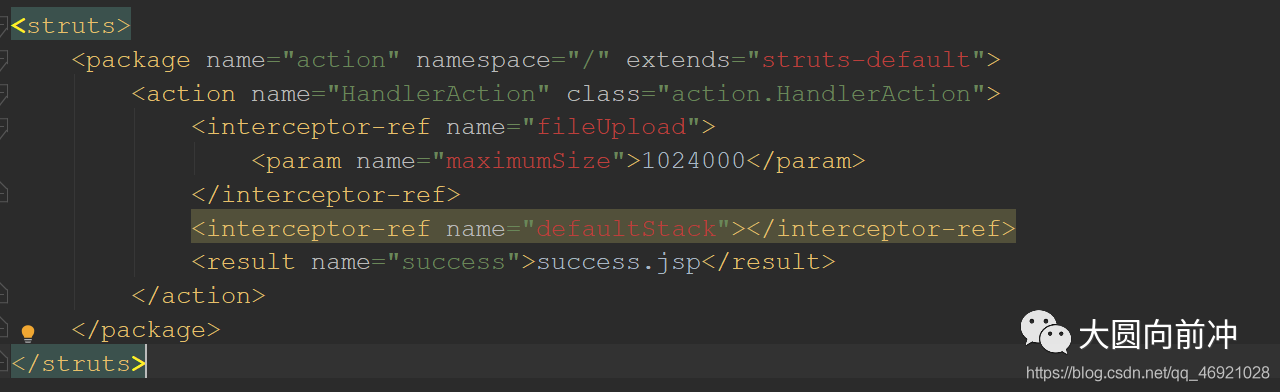
extends= “struts-default” when configuring struts.xml in IDEA, and also goes red when configuring interceptors with properties that don’t have pre-selection hints.

struts.xml itself is not configured incorrectly.


solution

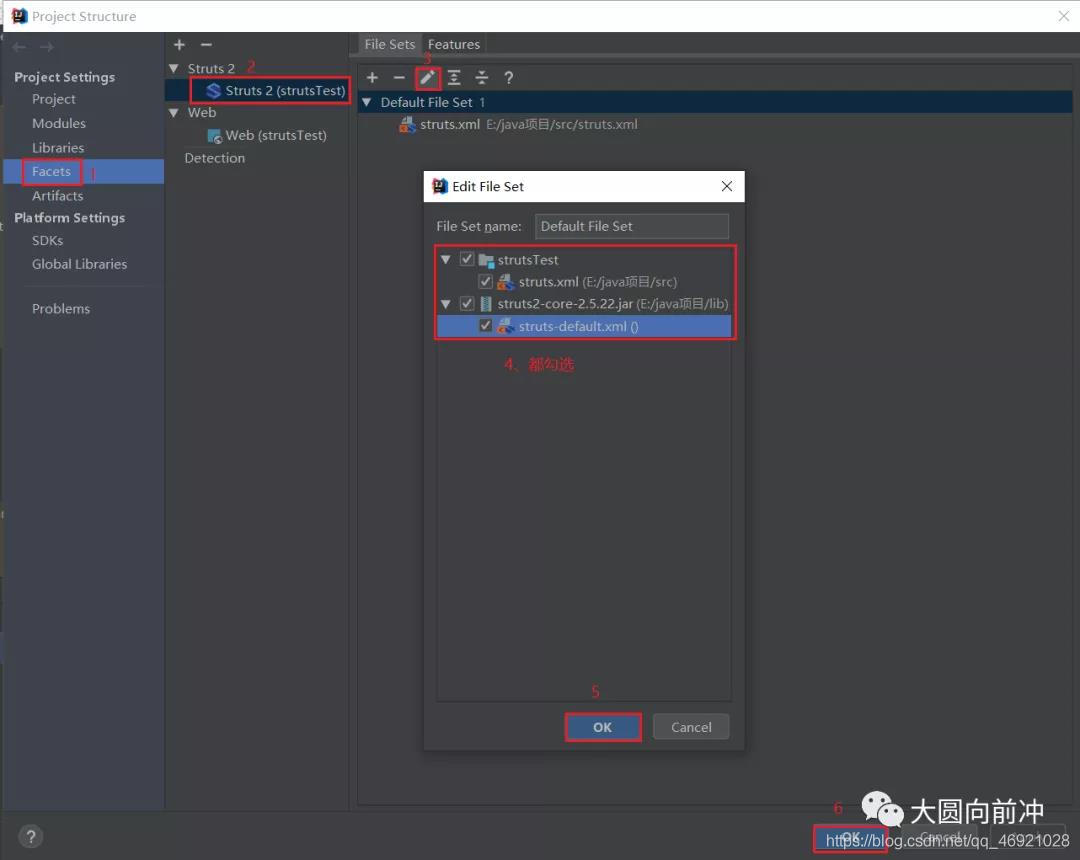
Ctrl+Shift+Alt+S call out Project Structure


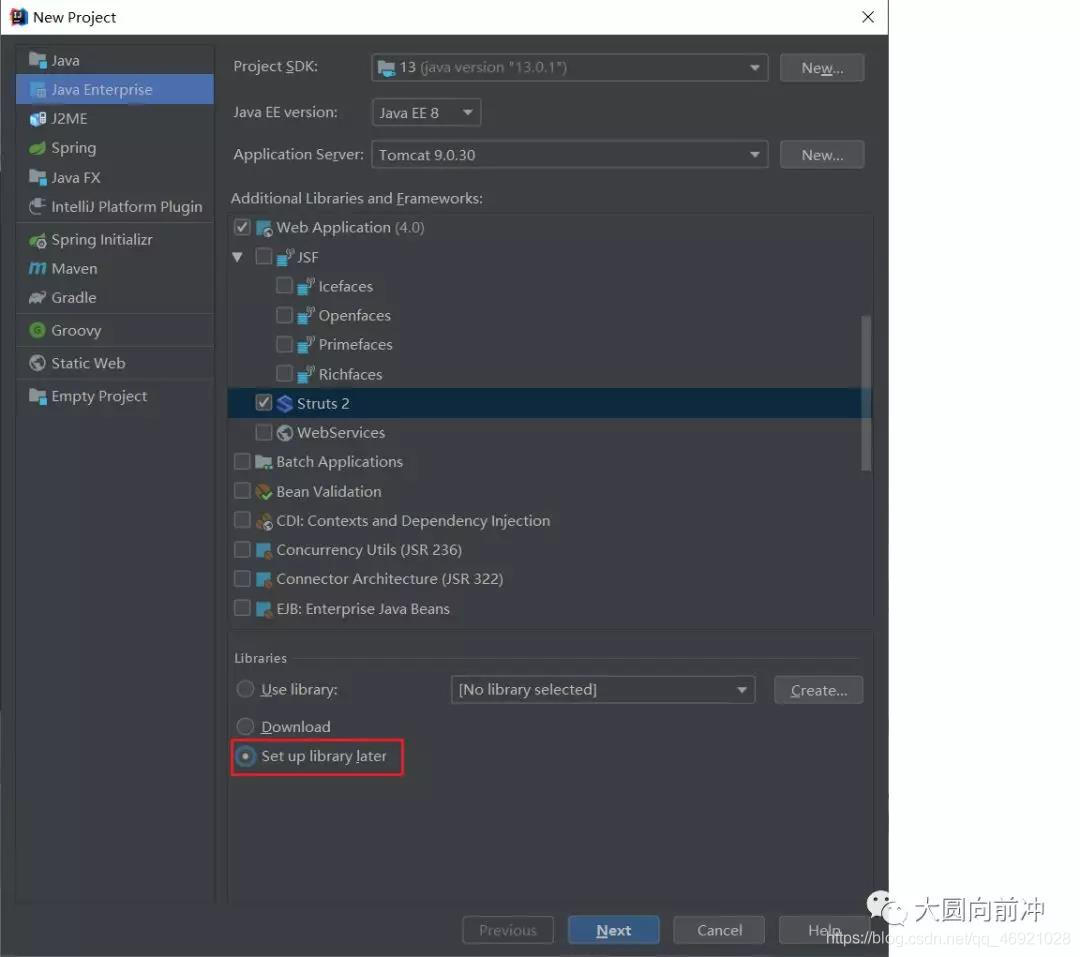
why

when we created the project, we selected the jar package that later imported struts, IDEA could not find the struts-default.xml file in the jar package. After we import the struts jar package, IDEA will not scan whether there is a struts-default.xml file in it. For IDEA, struts-default.xml is missing, so there is no corresponding code prompt for red.

This kind of problem often occurs when you manually add jar packages in struts. The solution is the same as above: manually add XML files.

Matlab realization of user-defined curve and legend

implementation:

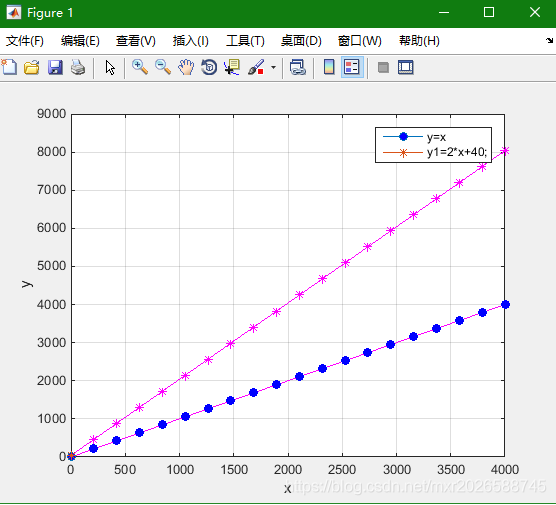
when variable points are dense, use the tag to draw the graph, the graph will be very strange.

this method generates a specified number of tags and draws the legend accurately.

The essence of drawing is to draw lines, draw lines first, then generate a specified number of markers, set symbols for drawing markers, and finally draw legend, display legend.

implementation code is as follows :

clear;
clc;

x = 1:1:4000;
y=x;
figure(1);
N=20;
k=round(linspace(1,size(x,2),N));%自变量范围内产生20个数值
plot(x,y,'m-');%实际曲线
grid on;
hold on;
h0=plot(x(k),y(k),'bo','MarkerFaceColor','b');%标记
f1=plot(x(1),y(1),'o-','MarkerFaceColor','b');%图例用图
% legend(f1,'DDIBFO');


hold on;

y1=2*x+40;
plo

Anaconda + vscode usage problem summary

anaconda+vscode use problem

1, anaconda environment in vscode can not be used in the problem

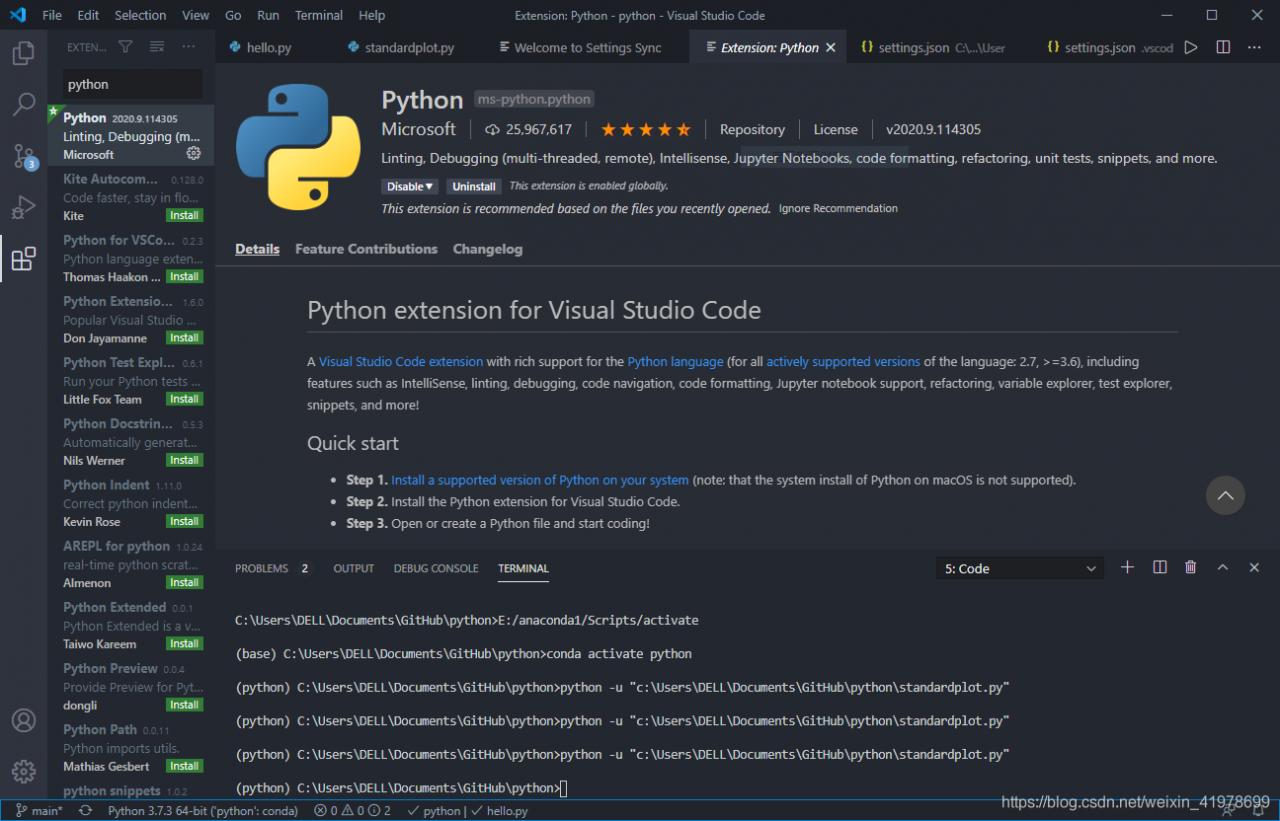
  1. installation plug-in
    python and Anaconda Extension Pack
  2. in Anaconda configure corresponding environment
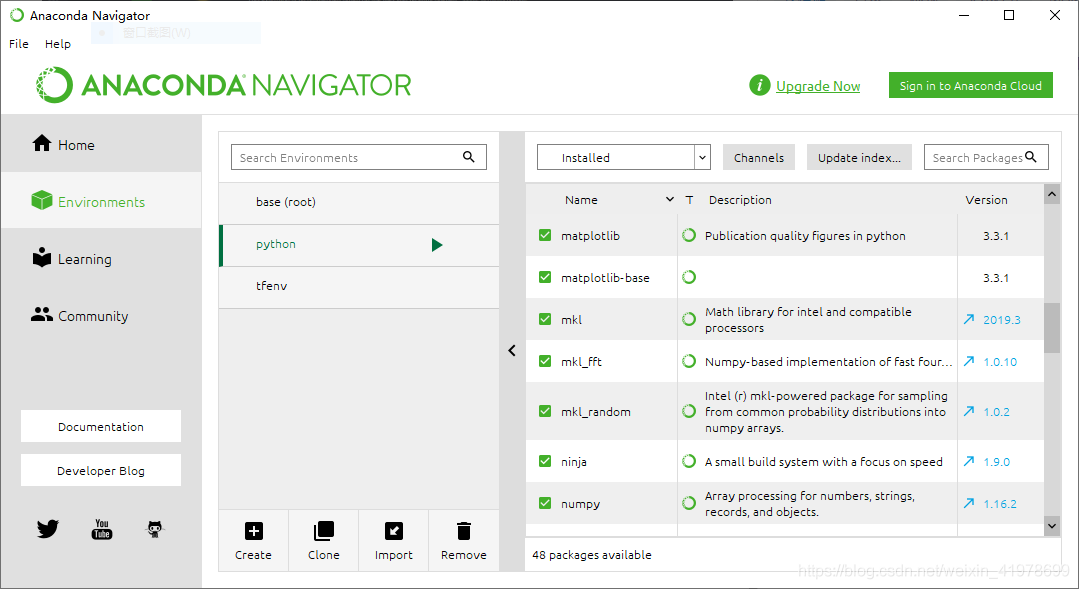
    here in addition to the base I also configure python and tfenv environment, here we take tfenv as an example, we can set the compiler version we want 2.x or 3.x, we can also install the package we want, very convenient.
  3. select our compiler

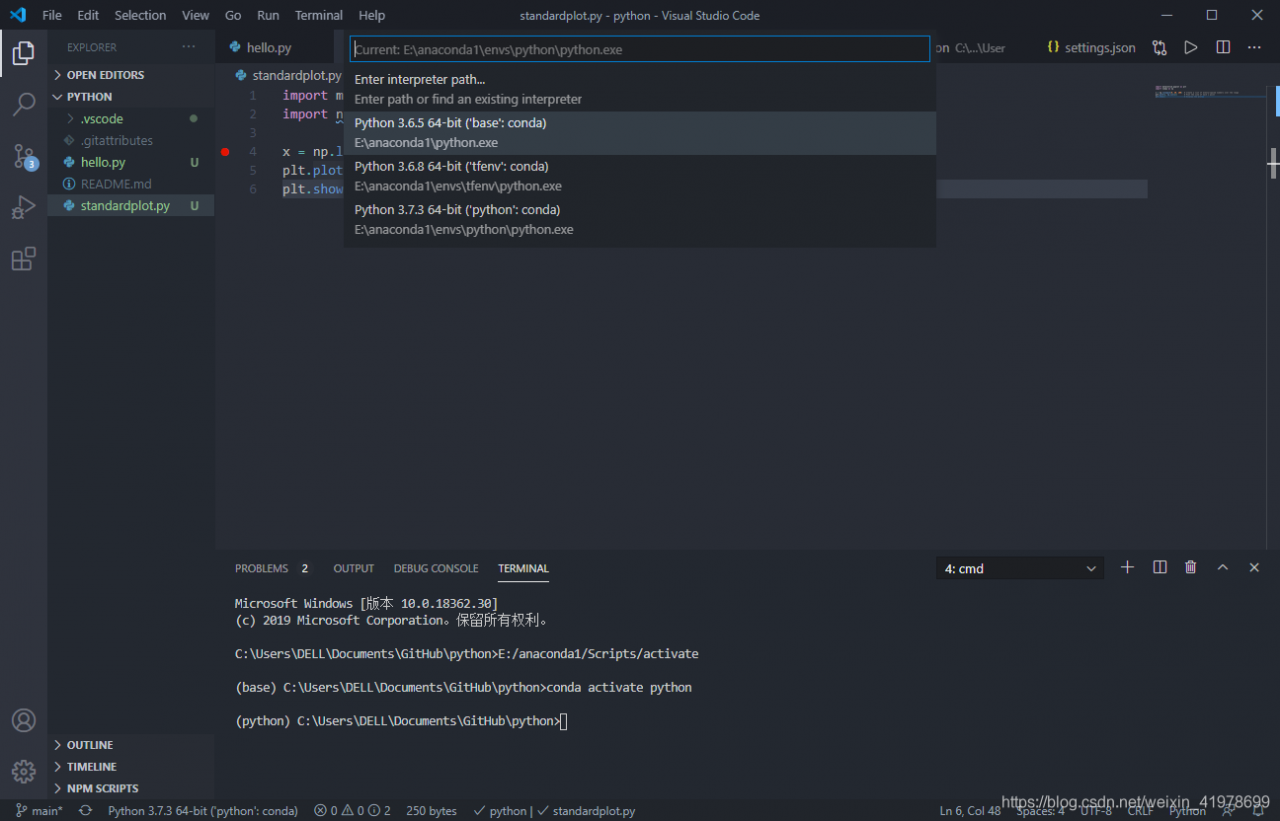
    > in the lower left corner we can choose which interpreter we want to interpreter. Then, from the middle option that appears, we select the pen-to-last one which is tfenv: Conda environment
  4. to install the corresponding package
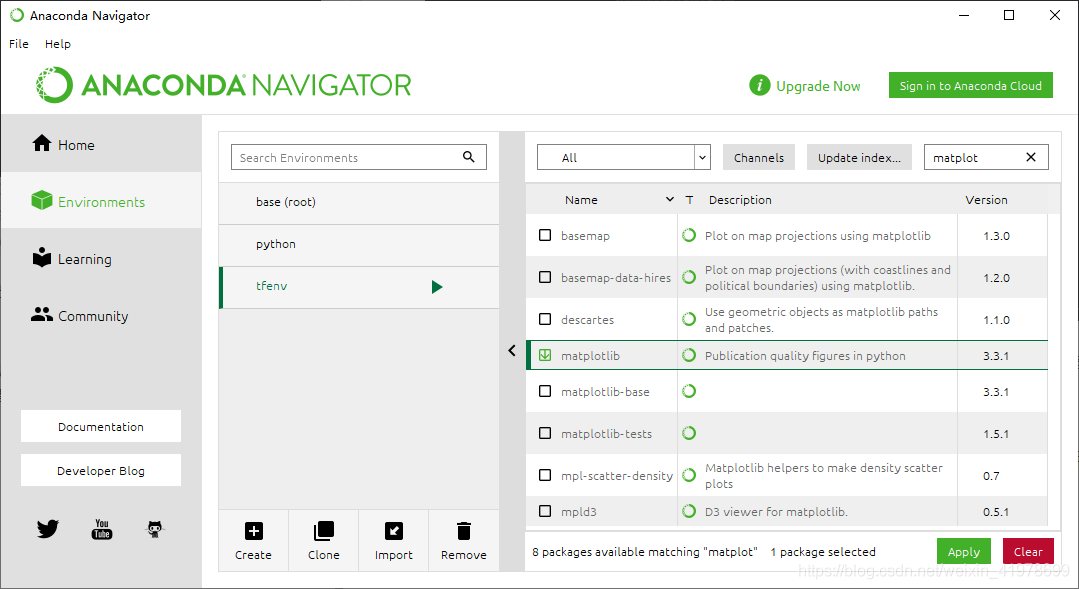
    our program needs the matplotlib package, first we install the package in anaconda, as shown in the figure, click apply (we can also install the matplotlib through the corresponding command of anaconda in CMD, we will not go into details here)

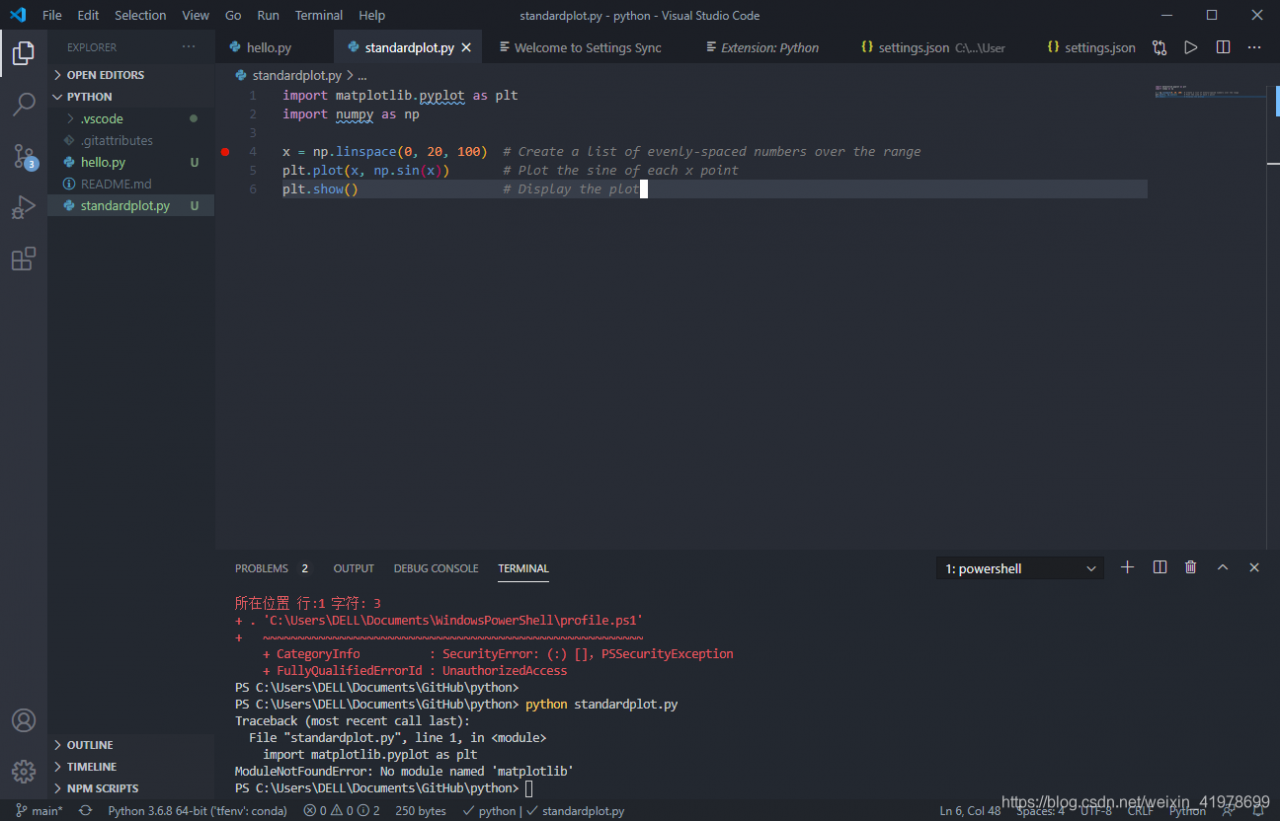
    after we install the matplotlib package, we run as shown in the figure, showing “ModuleNotFoundError: “No module named ‘matplotlib’ is mainly because although we chose the corresponding python.exe interpreter, the environment corresponding to tfenv did not import

    . There are two solutions
  • vscode default terminal is generally powershell: powershell solution
  • set terminal to CMD, then activate the tfenv environment with the command activate tfenv, and there will be no problem in running the program
  • Java cpp-0.11.jar, opencv-windows-x86_ 64.jar,opencv-2.4.11-0.11.jar

    , although you probably know how to import easypr, let’s do it briefly.

    1. import easypr
      File-> import-> Existing Projects into Workspace-> Browse… . Choose your download easypr – Java
    2. import the jar package
      link: https://pan.baidu.com/s/1PXRL2uoeZmmZK4hyY5MJCg
      extraction code: 1234
      this is four outsourcing network location address.
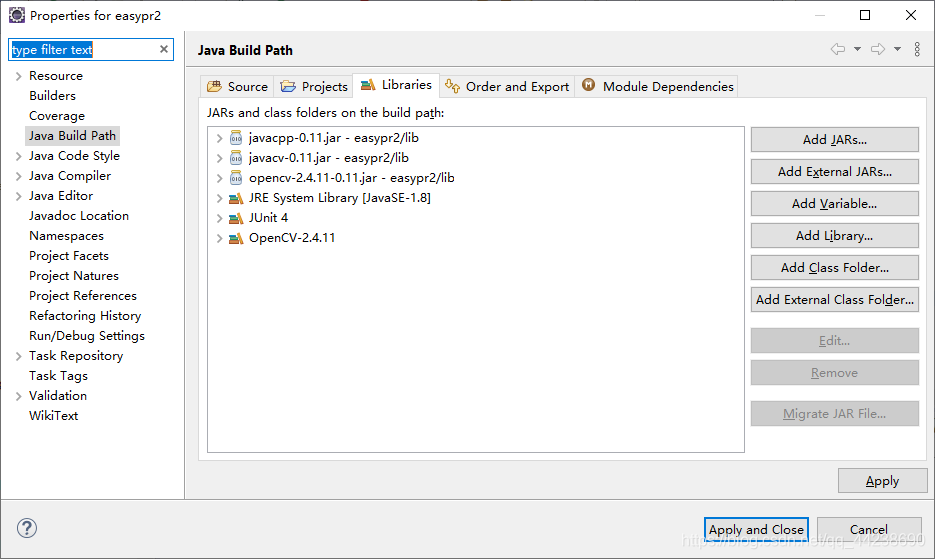
      select import project -> Build Path-> Configure Build Path… ->

    Batch delete process

    automation test, up a lot of Google pages, delete trouble, in the command line to execute, delete all at once, hard

    ps -ef | grep google | awk '{print $2}' | xargs kill -9
    

    Solution to the problem of no C / C + + option in the new project of eclipse

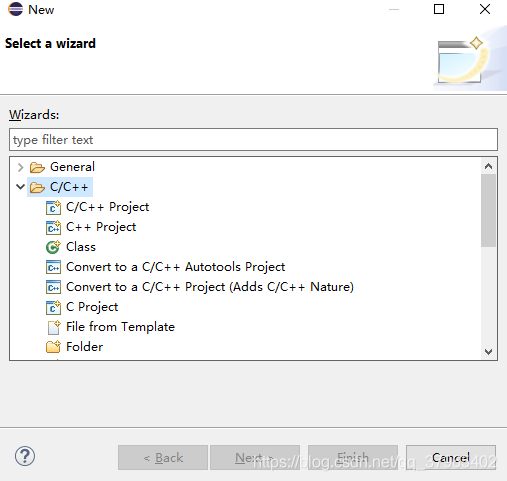
    encountered an eclipse new Project option that did not include C/C++ Project today.

    first declare their installation software and environment (most of the articles xiaobai has seen so far do not explain their own environment to solve the problem, resulting in many xiaobai took a lot of detours).

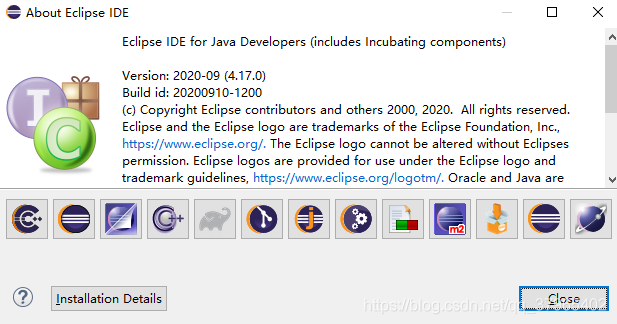
    – installation software: eclipse2020, win64. You can download it for free on your website.

    2 installation environment: JDK14, this version is installed eclipse when the JDK is automatically configured, environment variables are also automatically configured (before manually installed and configured JDK1.7, does not affect the normal work of eclipse).

    Problem with

    3: eclipse cannot create a new C/C++ Project at this point.

    is looking for a lot of solutions online, most of which require MinGW installation, which can be very confusing for xiaobai. Here’s a small white solution.

    four solutions:

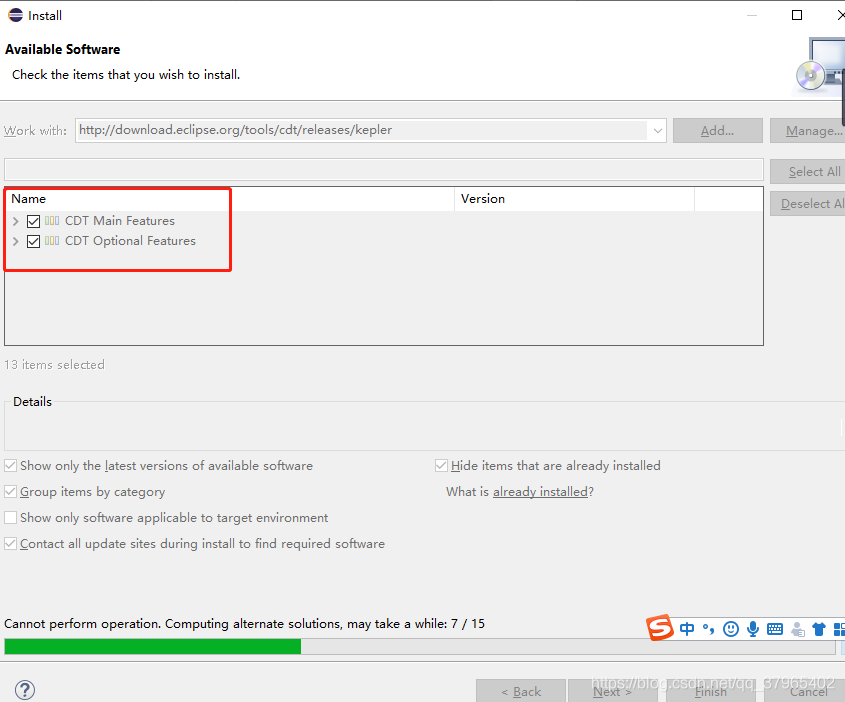
    1. Open eclipse — help-install new software

    2. In the Work with the input url: http://download.eclipse.org/tools/cdt/releases/kepler

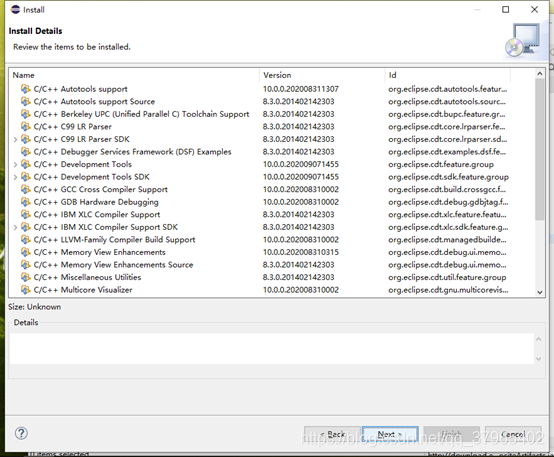
    3. CDT will be loaded later, select all, and click finish

    4. Receive protocol and wait for installation:

    5. Restart eclipse when finished.

    the third time to write a blog, I hope to help xiaobai, welcome criticism and correction, together with progress!