using gedit failed to commit changes to dconf: The connection is closed
error scenario: this error occurs while using the gedit test.c command to edit a test.c document, but the document can open normally.
solution: not met this situation before, thought it was gedit program configuration file loaded to failure, restart the virtual machine directly, and then open the file will still appear this mistake, now is under the root, considering that may be caused by permission problems wrong, switch to the ordinary user directory, and restart the virtual machine, use again is not an error.
error message is as follows:
(gedit:4653): GLib-GIO-CRITICAL **: 01:46:10.281: g_dbus_proxy_new_sync: assertion 'G_IS_DBUS_CONNECTION (connection)' failed

(gedit:4653): dconf-WARNING **: 01:46:10.319: failed to commit changes to dconf: The connection is closed

(gedit:4653): dconf-WARNING **: 01:46:10.326: failed to commit changes to dconf: The connection is closed
Error creating proxy: The connection is closed (g-io-error-quark, 18)
Error creating proxy: The connection is closed (g-io-error-quark, 18)
Error creating proxy: The connection is closed (g-io-error-quark, 18)
Error creating proxy: The connection is closed (g-io-error-quark, 18)
Error creating proxy: The connection is closed (g-io-error-quark, 18)

(gedit:4653): dconf-WARNING **: 01:46:10.676: failed to commit changes to dconf: The connection is closed

(gedit:4653): dconf-WARNING **: 01:46:10.677: failed to commit changes to dconf: The connection is closed

(gedit:4653): dconf-WARNING **: 01:46:10.679: failed to commit changes to dconf: The connection is closed

** (gedit:4653): WARNING **: 01:50:22.009: Set document metadata failed: Setting attribute metadata::gedit-position not supported

(gedit:4653): dconf-WARNING **: 01:50:22.031: failed to commit changes to dconf: The connection is closed
Processing method of SVN error “failed to run the WC DB work queue associated with…”
error screenshot :
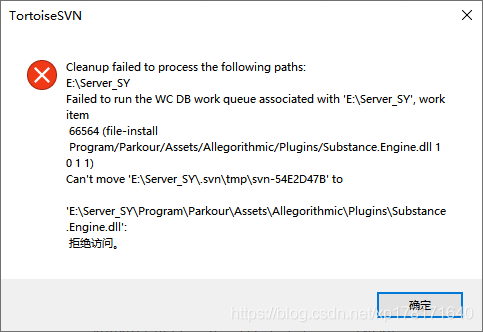
needs sqlite3. Exe.
method 1:
go to sqlite website to download sqlite3. Exe.
, find Precompiled Binaries for Windows and click sqlite-tools-win32-x86-3300100.zip to download
copy the downloaded sqlite3. Exe file to the sibling directory of wc.db in.svn.
start CMD in. SVN directory, execute command: sqlite3. Exe wc.db, enter sqlite command line.
execute command: delete from work_queue.
execute the command: clean up, indicating successful cleaning.
method 2:
sqlite3 wc. Db
select * from work_queue;
delete from work_queue;
clean up;
reference:
SVN: cleanup failed to process the following paths error solution
SVN Clean up failure solution
Error converting jupyter notebook to PDF
nbconvert failed: PDF creating failed, captured latex output:
This is XeTeX, Version 3.14159265-2.6-0.99999 (TeX Live 2018/W32TeX) (preloaded format=xelatex)
restricted \write18 enabled.
entering extended mode
! Undefined control sequence.
< > .\notebook
.tex
?
! Emergency stop.
< > .\notebook
.tex
No pages of output.
Transcript written on ?.
solution:
1, if the file path with Chinese, remove the Chinese
2, find the installation path under the PDF. Py file open
… \site-packages\nbconvert\exporters\pdf.py
#writer = Instance("nbconvert.writers.FilesWriter", args=(), kw={'build_directory': '.'})
writer = Instance("nbconvert.writers.FilesWriter", args=(), kw={'build_directory': ''})
The
and 'build_directory' : '. ' to ' build_directory ':'
GitHub
PHP error Warning: Unknown: failed to open stream: Permission denied in Unknown on line 0 Fatal error:
introduction
project cannot be accessed after porting to the new VPS. Error message:
Warning: Unknown: failed to open stream: Permission denied in on line 0
Fatal error: Unknown: Failed opening required ‘/ var/WWW/project/index. PHP’ (include_path = ‘. :/usr/share/PHP ‘) in the Unknown on line 0
solution
key information: failed to open stream — Permission denied Permission
reason: the project folder as a whole does not have read/write permissions, so PHP cannot parse
solution:
cd /var/www/project/
sudo chmod -R 0755 ./
is the same as 0755 or 0777
Job for network.service Failed because the control process exited with error code. See “SystemC
problem overview
about this problem, the blogger encountered in the process of virtual machine migration. After the migration, the network needs to be reallocated. After the configuration is completed, when the network service is restarted, the error is reported: “Job for network. Service failed because the control process exited with error code. See “systemctl status network. Service” and “journalctl-xe” for details
as follows:

to check the network status, enter the command “systemctl status net.service”, as shown in the figure below:
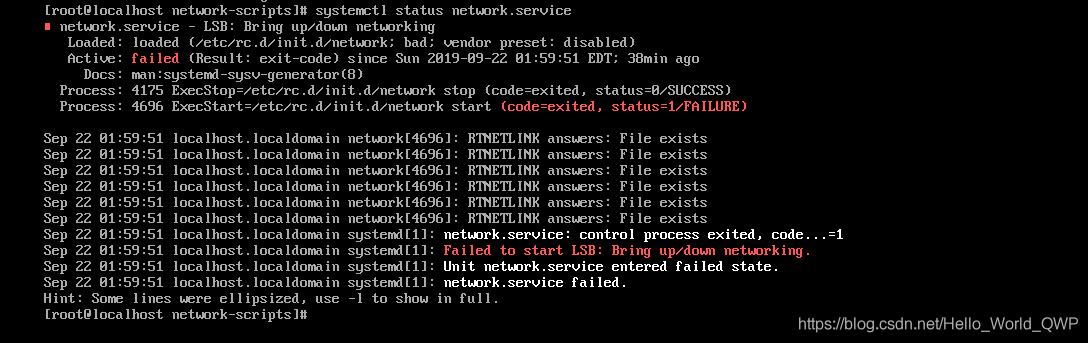
network service failed to start!!
solution
check for a while, finally found is an extra network configuration file, as shown in the figure below:

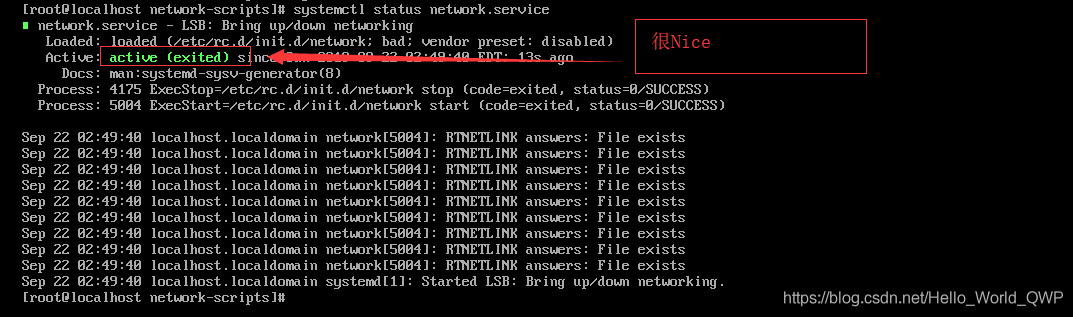
the reason is caused by the old file web services launch failure, delete the old file, found again to restart the network service, altogether OK
1. Delete old file and enter the command “rm-rf ifcfg-ens33.old”;
2. Restart the network service, enter the command “systemctl restart net.service”;
3. To check whether the network service has been started successfully, enter the command “systemctl status net.service”, as shown in the figure below:
supplement
on December 16, 2019
the usual virtual machine network mode is NAT bridging mode, so the virtual machine related services need to be started, as shown in the figure below:
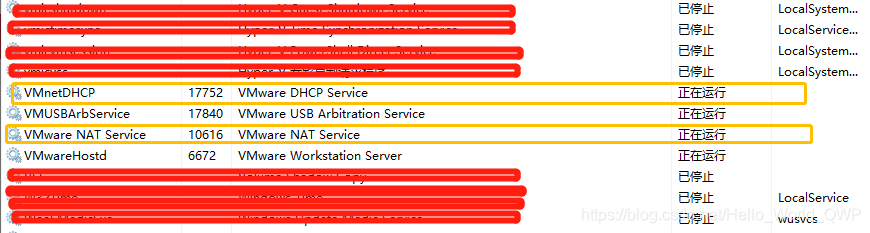
the first one is automatically assigned IP address, the second one is network bridging NAT, these two must be started, otherwise the virtual machine network will not be able to use.
well, the solution for Job for network. Service failed because the control process exited with error code. See “systemc “has been written here.
.
.
The
| as: | hua wang |
| contact the author: | [email protected] |
| to source: | CSDN (Chinese Software Developer Network) |
| the original article: | https://blog.csdn.net/Hello_World_QWP/article/details/101162295 |
| copyright statement: | this article is the original blogger article, please be sure to indicate the source of the blog when reprinting! |
How to Fix failed to Connect to MySQL at localhost:3306 with user root
is a silly question. Is your local (localhost, 127.0.0.1) database password input error…
solution: find your password. PS: I thought my computer crashed. It took a long time to reinstall mysql. Help the forehead
MySQL error set: failed to start mysql.service : Unit mysql.service is masked.
2019 unicorn enterprise to recruit Python engineer standard > > > 
➜  /home/penelope systemctl unmask mysql.service
Removed /etc/systemd/system/mysql.service.
The cause of the
error has not been found yet.
reproduced in: https://my.oschina.net/u/3672057/blog/2934145
Caused by: com.android.builder.dexing.DexArchiveBuilderException: Failed to process D:\….\0.jar
first solution:
adds this dependency to android in build.gradle of a project:
compileOptions {
    targetCompatibility JavaVersion.VERSION_1_8
    sourceCompatibility JavaVersion.VERSION_1_8
}
second solution:
add a configuration in the defaultConfig configuration under android in the project’s build.gradle file:
multiDexEnabled true
the third solution is the one I want to share with you most, because this error report I tried a lot of methods, but it still doesn’t work, and finally because the JVM allocation mechanism memory space caused by the compilation error
add this sentence under gradle.properties for the project:
org.gradle.jvmargs=-Xmx2048m -XX:MaxPermSize=512m -XX:+HeapDumpOnOutOfMemoryError -Dfile.encoding=UTF-8
The problem of failed to create process occurs in pyinstaller package program of Python
method 1:
in the Python installation path to find Scripts file under the pyinstaller-script.py file and open, if the path does not have quotes then put quotes, this situation generally occurs in the pyinstaller version is low
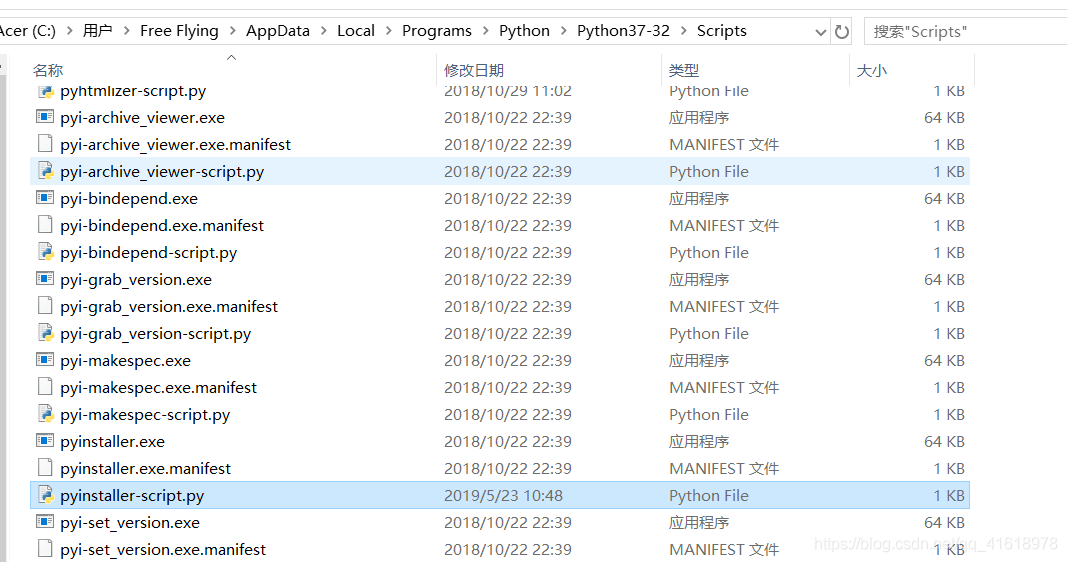
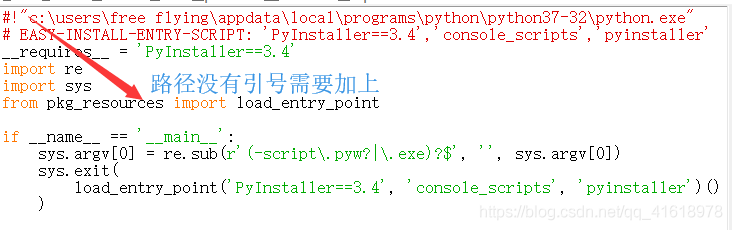
method 2:
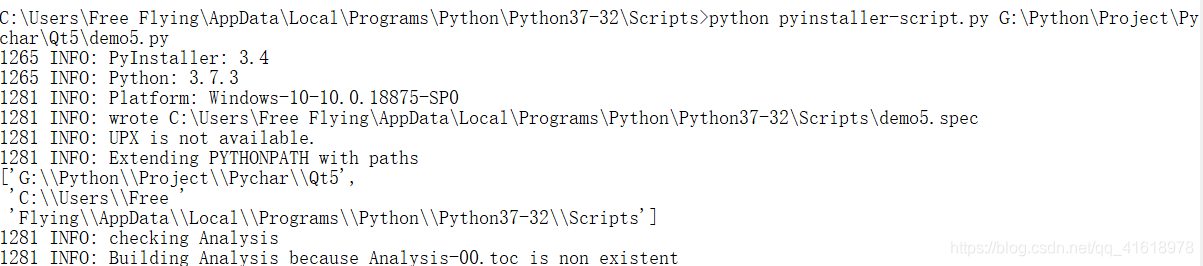
if the file cannot be packaged with quotation marks, then from the DOS command line into the Scripts folder of the Python installation path execute: Python pyinstaller-script.py G:\Python\Project\Pychar\Qt5\demo5.py (replace G:\Python\Project\Pychar\Qt5\demo5.py with the file you need to package yourself)
SSIS Exception: Failed to retrieve long data for column “TS_Description”
question:
Error Desc: Failed to retrieve long data for column”TS_Description”.
When
, go to the package and check in which step you use “TS_Description”.
finds that the step used is a data flow. There’s a yellow warning on it. I can’t remember the specific warning message. (The next time you encounter it, fill in the warning.)
recalls that the table that has not touched destination, as source is a table of other systems, I am not sure whether it has been changed.
then reset the data source and data destination in the data flow, click ok and save. Just run it.
could be that the property of this column in source or destination, such as length, has changed.
solution:
reset data source and data destination, save.
Oracle Data Guard Ping [arc2]: heartbeat failed to connect to standby “. Error is 12514 fault analysis
a set of DG built by my friends, after a long time, it has been reported as the following error:
ORA-12514: TNS:listener does not currentlyknow of service requested in connect descriptor
PING[ARC2]: Heartbeat failed to connect tostandby ‘PD’. Error is 12514.
The most common reason for the
error is static registration, and then DG parameter.
but the parameter here, which I’ve looked at for a long time, is not a problem:
SQL> show parameter dest_2
VALUE
the NAME, TYPE,
———————————————– ——————————
db_create_online_log_dest_2 string
log_archive_dest_2 string SERVICE = PD VALID_FOR = (ONLINE_L
OGFILE PRIMARY_ROLE) DB_UNIQUE
_NAME = PD
During
, I also asked my friend to do a lot of tests, including the reconstruction of password files, thought over the possible problems of DG, but there were still problems.
view related processes: there are no RFS processes in the secondary library, and no LNS processes in the primary library.
SQL> select process, status, thread#,sequence#, block#, blocks from v$managed_standby;
the PROCESS STATUS THREAD# SEQUENCE# BLOCK# BLOCKS
——— ———— ——————– ———- ———-
the ARCH CONNECTED 0 0 0 0
the ARCH CONNECTED 0 0 0 0
the ARCH CONNECTED 0 0 0 0
the ARCH CONNECTED 0 0 0 0
later, I asked my friends to take a look at the tnsping PD again. In fact, I had already asked my friends to take this test at the very beginning.
tnsping is normal, that is, the test network is passable and the listener is normal. This is also something our tnsping can do, but tnsping can’t check whether the service_name or SID in the TNsnames.ora file is correct, so we have friends post both files as well.
connected to this configuration with sqlplus, which also worked.
problem looks very strange, because DG itself has few parameters, I think about all the questions I can think of, but it doesn’t work, then I see the test result written by my friend:
[oracle @ DB11g_ST trace] $tnsping PD
TNS Ping Utility for Linux: Version 11.2.0.1.0-production on 31-jul-2013 16:11:18
Copyright (c) 1997, 2009, Oracle. All rights reserved.
informs the parameter files:
Used TNSNAMES adapter to resolve the alias
Attempting to contact (DESCRIPTION = (ADDRESS = (TCP) PROTOCOL = (HOST = DB11g) (1521) PORT =) (CONNECT_DATA = (= DEDICATED SERVER) (SERVICE_NAME = former)))
OK (10 msec)
is interested in the HOST here, I suspected the problem of firewall before, but the firewall was closed, so I asked my friend to change this to IP address, and it was OK.
SQL> select process, status, thread#,sequence#, block#, blocks from v$managed_standby;
the PROCESS STATUS THREAD# SEQUENCE# BLOCK# BLOCKS
——— ———— ——————– ———- ———-
the ARCH CONNECTED 0 0 0 0
the ARCH CLOSING 1, 156, 2049, 1600
the ARCH CONNECTED 0 0 0 0
the ARCH CONNECTED 0 0 0 0
RFS IDLE 0 0 0 0
RFS IDLE 0 0 0 0
RFS IDLE 0 0 0 0
RFS IDLE 1 157 27 1
this time, the RFS process also appears.
The /etc/hosts file of the
friend host library is copied directly from the past. As follows:
/root @ DB11g_ST ~ # more/etc/hosts
# Do not remove the following line, or various programs
# that require network functionality will fail.
127.0.0.1 DB11g localhost. Localdomain localhost
192.168.0.89 DB11g_ST
192.168.0.88 DB11g
problem is here, DB11g here has a loopback address: 127.0.0.1. Later, my friend commented this out and used the alias test, which worked fine.
is a big part of this problem, where we’ve been thinking about databases and what configurations of databases might cause this problem. Until the root cause of the problem is finally found, which is caused by the configuration of /etc/hosts.
, another friend told me another thing yesterday, they have a materialized view, they can’t refresh, the table is only 2G, it’s not too big. But it just doesn’t refresh. Later is also a long time to study, and finally locate the problem is the firewall, there is a ban on the transmission of large packets, the two sides of the firewall to remove this rule.
due to the process of this fault, we need to reflect that when we deal with the fault, do not always limited to the database level, maybe other configuration, will also cause this problem. In the process of troubleshooting, think of expanding our thinking, not in their own lane thinking rao too long.
rabbitmq management Login Failed