Category Archives: How to Fix

Regarding [java.lang.ClassCastException: java.lang.Integer cannot be cast to java.lang.Boolean], combined with examples

Description:
I use the Groovy language, but it is quite Java compatible, except that it is a weakly typed language relative to Java
Situation:
If a string is null, no unit will be added. The screenshot is shown below, and the data after “Distance (m) :” should be intercepted
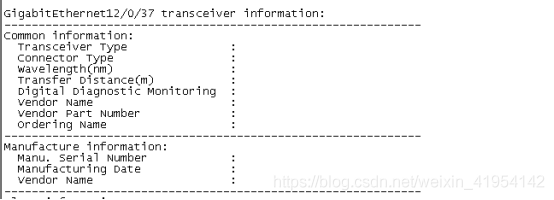
Original script:

 if( !distance.endsWith(")") && !distance.endsWith("m") && distance != null && distance.length() != 0) {
    distance = distance + 'm';
}

Error: Collection exception. Exception information [Java. Lang. ClassCastException: Java. Lang. Integer always be cast to Java. Lang. Boolean]
Later changed the script:

if(!distance.endsWith(")") && !distance.endsWith("m") && distance != null && distance.toString().length() != 0) {
    distance = distance + 'm';
}

Exception resolution. Integer is int the wrapper class, there is no length () this method, the specific introduction, see this post:
https://blog.csdn.net/andyzhaojianhui/article/details/84324466

How to Fix Error sal.h(2367)

Error:

1>C:\Program Files (x86)\Microsoft Visual Studio 11.0\VC\include sal.h(2367): error C2143: syntax error: missing ‘;’ before ‘string’

C:\Program Files (x86)\Microsoft Visual Studio 11.0\VC\include\sal.h(2367): error C2059:Syntax error: ‘string’

C:\Program Files (x86)\Microsoft Visual Studio 11.0\VC\include sal.h(2367): error C2143: syntax error: missing ‘;’ before ‘{‘

C:\Program Files (x86)\Microsoft Visual Studio 11.0\VC\include sal.h(2367): error C2447: ‘{‘: missing function header(Old Formal List?)

I can’t believe you forgot the semicolon after the class statement;

C error C2143 syntax error missing before ‘type’

1. Problem descriptionThe problem display is shown in the figure: All ides are VS2010.

Source code display: Source code is a Fahrenheit to Celsius temperature of the program.

#include <stdio.h>

//void Fahr_Celsius()
int main()
{
	//int fahr, celsius;
	int lower, upper, step;
	lower = 0;
	upper = 300;
	step = 20;
	printf("Hello world!\n");
	int fahr, celsius;
	fahr = lower;
	while (fahr<=upper)
	{
		celsius = 5 * (fahr - 32)/9;
		printf("%d\t%d\n", fahr, celsius);
		fahr = fahr + step;
	}
	return 0;
}

2. Cause of the problem

In C, all variables must be declared before they are used. Declarations are usually placed at the beginning, before any executable statement. Declare the properties used to describe variables, which consist of a type name and a variable scale.

Here because the variable declaration statement on line 12 is placed after the executable statement.

3. Problem solving

Place all variable declarations before all executable statements. The modified code is as follows:

#include <stdio.h>

int main()
{
	int fahr, celsius;
	int lower, upper, step;
	lower = 0;
	upper = 300;
	step = 20;
	printf("Hello world!\n");
	//int fahr, celsius;
	fahr = lower;
	while (fahr<=upper)
	{
		celsius = 5 * (fahr - 32)/9;
		printf("%d\t%d\n", fahr, celsius);
		fahr = fahr + step;
	}
	
	return 0;

}

4. Problem summary
Although this problem is a stipulation of C language, it mainly appears in the compilation stage, which is interpreted by the compiler. This problem will not appear in VS2017, but will appear in VS2010.

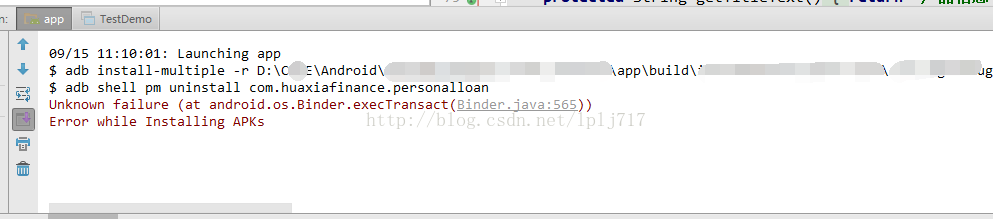
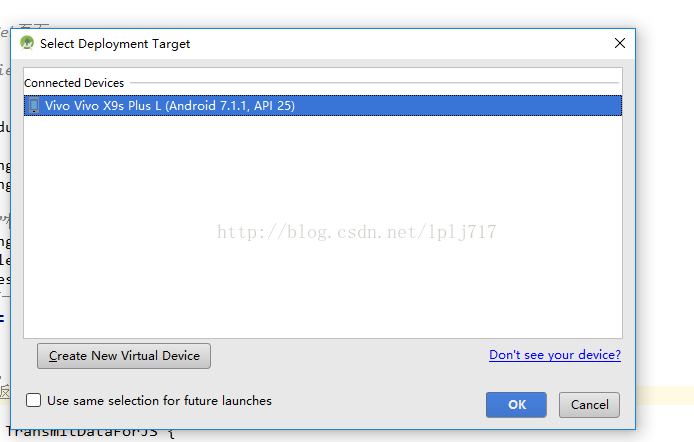
Unknown failure (at android.os.Binder.execTransact(Binder.java:565))Error while Installing APKs

Recently, when I was doing program debugging, I encountered a VIVO mobile phone and was always prompted with this problem. Other VIVO mobile phones did not appear and the phone was connected. Adb can also find this device and open the debugging tool


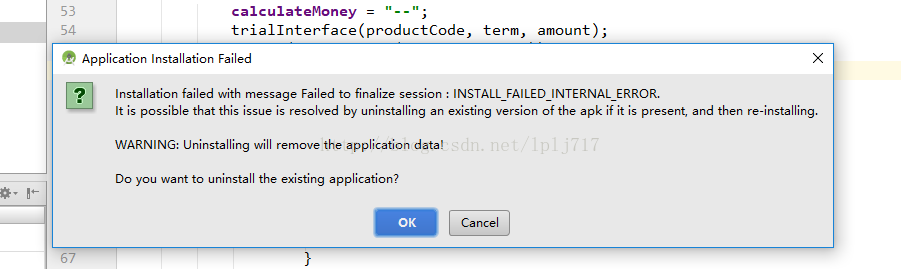
Uninstall and delete the existing application. If you want to uninstall the existing application, click ok and the following error will appear:

Unknown failure (at android.os.Binder.execTransact(Binder.java:565))
Error while Installing APKs

The original application did not uninstall, and then oneself manually uninstall, and clean up the memory, run again or the same results, I thought it was my computer’s problem, change a computer test or the same, this is a little awkward, then look up data, after testing, this method is still effective

File —> Settings – & gt; Build,Execution,Deployment —> Instant Run
Turn off the Enable Instant Run to option and rerun it again

You’ve done all this and you’ll be wondering why you can do it this way?Then take a look at what InstantRun means:
Android Studio2.0 started introducing InstantRun as a way to reduce the amount of time spent updating apps during Run and Debug. While the first Build may take a bit longer to complete, InstantRun pushes updates to the device without having to rebuild a new APK, making it easier to spot changes quickly. Note: InstantRun only supports Gradle versions of 2.0.0 and minSdkVersion of 15 in Build.gralde files. For better use, set the minSdkVrsion above 21.
Android Stuido projects using Gralde2.0.0 and above will default to Instant Run.

Install ubuntu system, report error WslRegisterDistribution failed with error: 0x8007019e

Installing ubuntu on the Windows App Store, WslRegisterDistribution failed with error: 0x8007019e
1. An error:

Installing, this may take a few minutes...
Installation Failed!
Error: 0x8007019e
Press any key to continue...

 
2. Reason:
Windows subsystem support is not installed.
 

3. Solution:
1. Win +x, select Windows PowerShell (administrator)
2. Input:

Enable-WindowsOptionalFeature -Online -FeatureName Microsoft-Windows-Subsystem-Linux

3. Enter, type Y, and restart! 4. Reopen the installed subsystem, wait a few minutes, and enter your account and password.

Unable to connect to MKS:Internal error

Question:
Unable to connect to MKS: internal error when opening the window, we managed to log in to the vCenter Server using the VSphere Client to operate the virtual machine on the host. However, when logging in to the ESXi host using the VSphere Client, we were Unable to open the window of the virtual machine.

Problem Solving:
1. Check whether port 902 on the Client host is occupied, and release if occupied.
    
The port is not occupied
2. Turn on the SSH function of ESXi host and log in to ESXi.
3. Execute service mgmt-vmware restart
Note: Some people may execute this command after the service may appear is not recognized command, some people may not find this MGMT-VMware service, this time can try the following method.
4. Vi/etc/vmwaer/config
Add a
Vmauthd. Server. AlwaysProxy = “TRUE”
Test whether the service is available, do not restart the ESXi host, and then try again.

All the above methods are not good, then reinstall the vCenter Server! Good luck.

error: How to solve stray ‘\342’ in program

I copied a relatively simple code from the Internet, and encountered the following problems when compiling:
Test_getopt.c :9:35: error: stray ‘\342’ in program
. C :9:35: error: stray ‘\200’ in program
. C :9:35: error: stray ‘\235’ in program
test_getopt.c:12:3: error: Stray ‘\342’ in program
test_getopt.c:12:3: error: stray ‘\200’ in program
test_getopt.c:12:3: error: stray ‘\230’ in program
test_getopt.c:12:3: error: Stray ‘\342’ in program
test_getopt.c:12:3: error: stray ‘\200’ in program
test_getopt.c:12:3: error: stray ‘\231’ in program
test_getopt.c:13:4: error: Stray ‘\342’ in program
test_getopt. C :13:4: error: stray ‘\200’ in program
Say, the reason for this problem is that the source code exists in Chinese characters, such as “”,, etc., it can be changed!

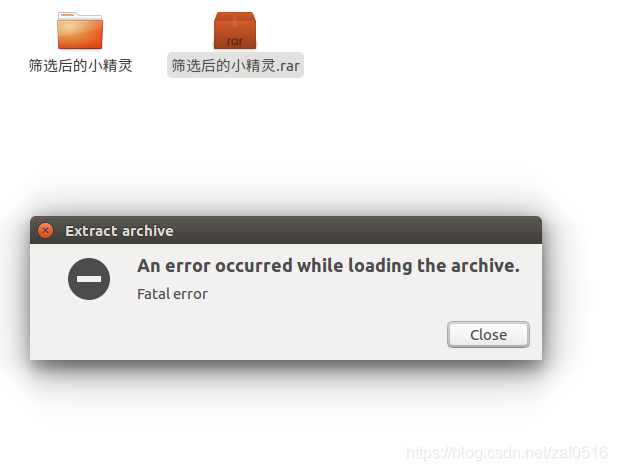
Solution to “An error occurred while loading the archive” appears when decompressing the rar file compressed package

The installation
The reason is that the Linux version does not support RAR commercial/non-free formats by default, we just need to install UNrar.
compression

sudo apt-get install rar

Unpack the function

sudo apt-get install unrar


Reference:

    https://blog.csdn.net/KiWi_VC/article/details/88041211https://blog.csdn.net/songbinxu/article/details/80435665https://www.cnblogs.com/jiu0821/p/9066462.html


The use of Chinese characters in Qt and the solution to the “error C2001: newline in constant” problem

Problem description: In my program, I want to use the following code to change the prompt in the input field to “Please enter your password”. But the program error, unable to recognize Chinese characters.

QLineEdit *passwordEdit;
passwordEdit->setPlaceholderText("Enter your password please");

solution: use QString::fromLocal8Bit() method to transcode Chinese characters, the program can normally recognize Chinese character QString. Change the above code as follows:

    QString str;
    str=str.fromLocal8Bit("Enter your password please");
    passwordEdit->setPlaceholderText(str);

another problem: program error “error C2001: newline in constant”


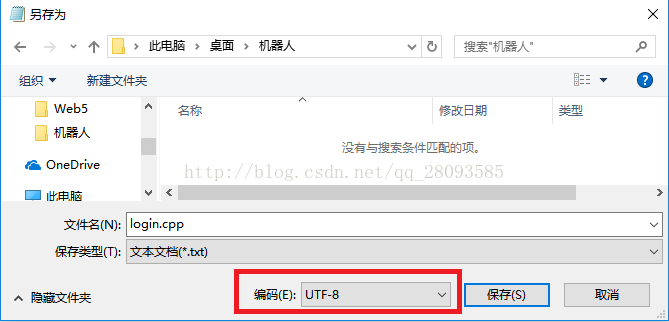
Problem analysis: The encoding mode of the code file Login. CPP is not correct. Changing the encoding mode of the file login. CPP to UTF-8 can solve this problem. The method I used to modify the encoding method of the file was to open the CPP file with notepad software and select the encoding form of the file in the “Save as” window:

After saving the file as UTF-8, reload the file and compile the program. The error disappears and the Chinese character can be displayed normally.

SQL Error: 17059, SQLState: 99999

SQL Error: 17059, SQLState: 99999
Fail to convert to internal representation
The error is that the Hibernate configuration file cannot be converted into information for the corresponding table in the database.
In general, Hibernate field attributes are wrongly written, String type is written as long, number type is written as String and so on, causing the database content cannot be converted to Java class.