The solution
Delete all files except.tex, and run it again. It’s ok!!
Category Archives: How to Fix
R language packages installation failed: Error in install.packages: error reading from connection
Failed to download and install “SP” package:

Solution:
1. If the download is unsuccessful, switch the default download image of Rstudio to the domestic download image;
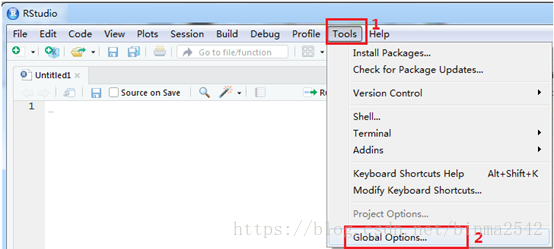
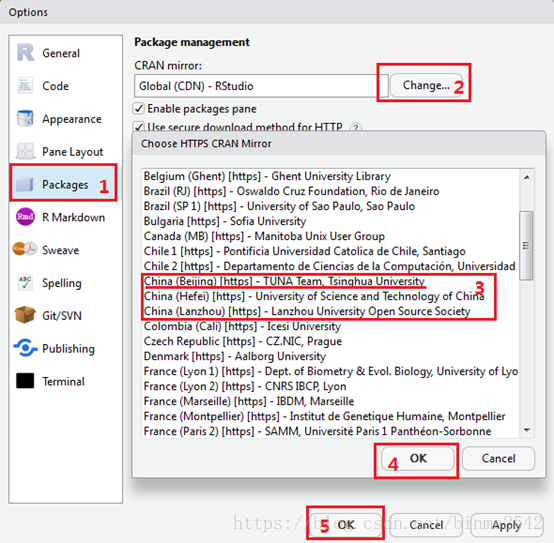
2. There are several domestic download images, if not, try more times. I chose the download image of Peking University;
3. Enter: install. Packages (“sp”) and wait for successful installation.

Solution:
1. If the download is unsuccessful, switch the default download image of Rstudio to the domestic download image;
2. There are several domestic download images, if not, try more times. I chose the download image of Peking University;
3. Enter: install. Packages (“sp”) and wait for successful installation.
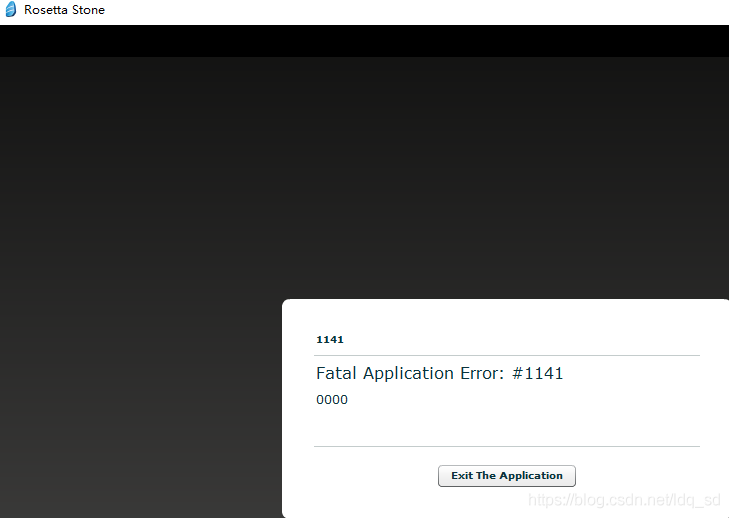
rosetta stone fatal application error: #1141 error (Rosetta stone 1141) solution
The screenshot of the software error section is as follows:
Solution to open Windows services: Right click on my computer to manage. After opening the computer management, it is ok to start the service marked red according to the picture below.
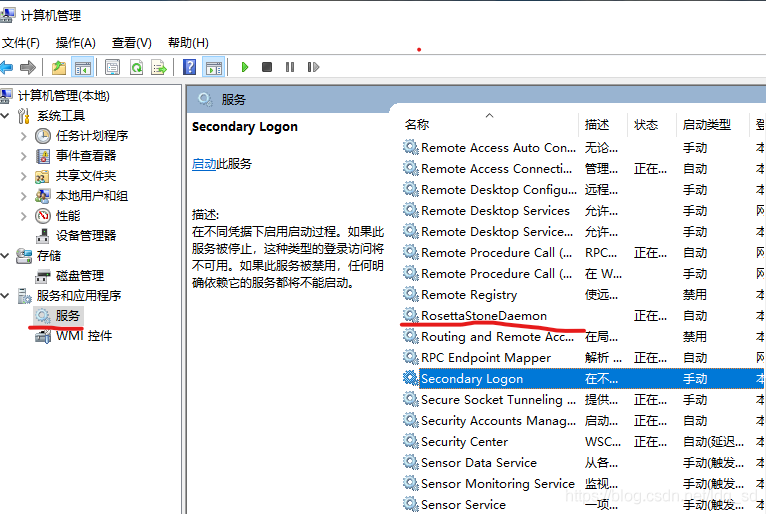
Solution to open Windows services: Right click on my computer to manage. After opening the computer management, it is ok to start the service marked red according to the picture below.
Solve Putty error “Couldn’t agree a key exchange algorithm”
Problem: Using Putty SSH to log in some hosts, I got “Couldn’t agree a key exchange algorithm (available: [email protected], ECDH-sha2-nistp521, ECDH-sha2-nistp384, ECDH-sha2-nistp256)”.
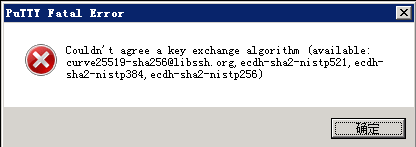
Solution: Update Putty.
The official download address: https://www.ssh.com/ssh/putty.
Solution: Update Putty.
The official download address: https://www.ssh.com/ssh/putty.
cygrunsrv: Error starting a service: QueryServiceStatus: Win32 error 1062: Solution
Source: http://blog.csdn.net/wangxw8746/article/details/9382155
Cause of the problem: Probably the /var/log permissions are not set correctly. First execute mkpasswd and mkGroup to regenerate the permission information, then delete the SSHD service and reconfigure
Solutions:
$ mkpasswd -l > /etc/passwd
$ mkgroup -l > /etc/group
$ cygrunsrv -R sshd
$ ssh-host-config -y
$ cygrunsrv -S sshd
Error: Could not locate Flask application. You did not provide the FLASK_APP environment variable.
Problem description:
Error: Could not locate Flask application. You did not provide the FLASK_APP environment variable.
why
The FLASK_APP environment variable is not set
To solve
Under the win10
Powershell: $env:FLASK_APP="main.py" remember to replace main.py with your own filename
Py main. Py CMD: set FLASK_APP=flasky.py
As opposed to PowerShell… 😈
This application has no explicit mapping for /error, so you are seeing this as a fallback (How to Fix)
directory
I. Error Prompt:
Ii. Reasons:
Iii. Solution 1: Package of the mobile control layer:
4. Solution 2: Add @SpringBootApplication(scanBasePackages=” Controller “)
5. Summarize the reasons for possible errors:
Reason 1:
Reason 2:
Reason 3:
Vi. Cause of Error of Eclipse starting Springboot:
I. Error Prompt:
Ii. Reasons:
Iii. Solution 1: Package of the mobile control layer:
4. Solution 2: Add @SpringBootApplication(scanBasePackages=” Controller “)
5. Summarize the reasons for possible errors:
Reason 1:
Reason 2:
Reason 3:
Vi. Cause of Error of Eclipse starting Springboot:
An error was reported when Springboot was running, other configurations were fine, and after a long look I found the cause.
I. Error Prompt:
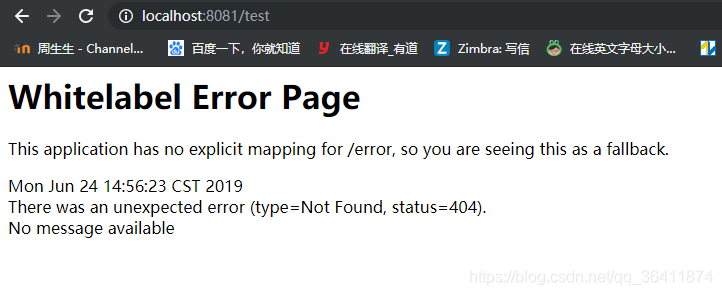
Whitelabel Error Page
This application has no explicit mapping for /error, so you are seeing this as a fallback.
Mon Jun 24 14:56:23 CST 2019
There was an unexpected error (type=Not Found, status=404).
No message available
Ii. Reasons:
Problem with IDEA directory structure, the location of the Application startup class is wrong. To place the Application class on the outermost side, it contains all the subpackages. And my Controller is in the outermost package. The page could not be found.
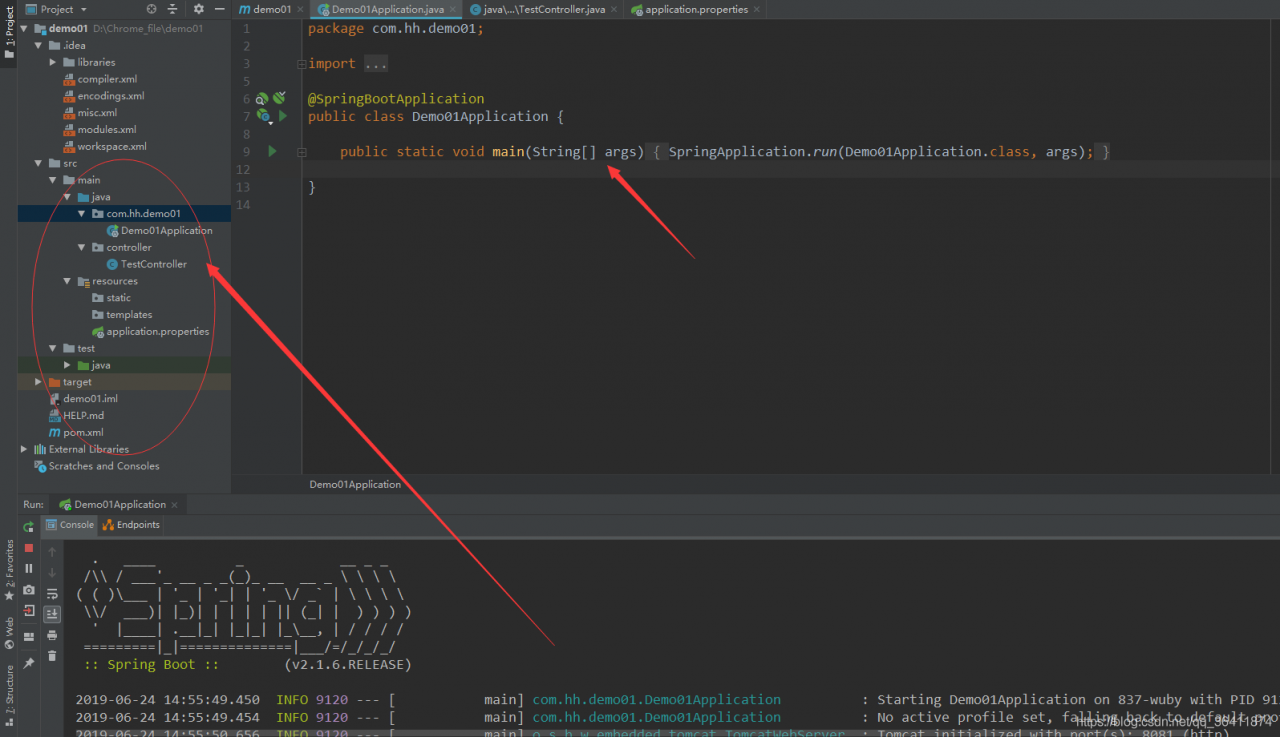
Iii. Solution 1: Package of the mobile control layer:
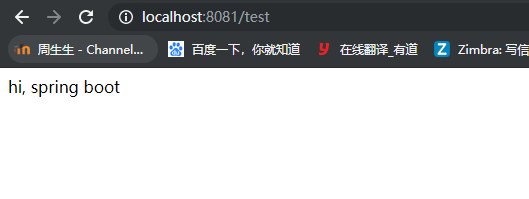
Move the Controller class in, and it will run successfully.
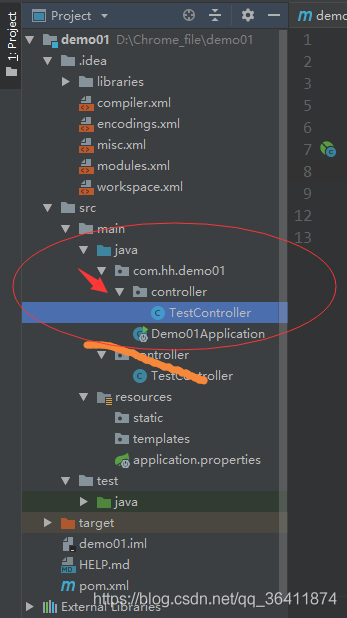
Refresh again and the page will open successfully.
4. Solution 2: Add @SpringBootApplication(scanBasePackages=” Controller “)
In your Demo01Application class that you started, add a comment specifying the location of your Controller, and you can specify the load and solve the problem successfully.
package com.hh.demo01;

import org.springframework.boot.SpringApplication;
import org.springframework.boot.autoconfigure.SpringBootApplication;

@SpringBootApplication(scanBasePackages="controller")
public class Demo01Application {

	public static void main(String[] args) {
		SpringApplication.run(Demo01Application.class, args);
	}

}
5. Summarize the reasons for possible errors:
This exception indicates that the url for the jump page has no corresponding value.
Reason 1:
The Application startup class is not in the right place. To place the Application class on the outermost side, it contains all subpackages
reason :spring-boot automatically loads all components under the package where the startup class is located and under its subpackages.
Reason 2:
In springboot configuration file: application. Yml or application. The properties on the view of the parser configuration problem:
when the spring under the pom file – the boot – starter – paren version used when high:
spring. MVC. The prefix/spring. MVC. The suffix
As spring under the pom file – the boot – starter – paren version low when use:
spring. The prefix/spring. The suffix
Reason 3:
Controller URL path writing problem
@RequestMapping(” XXXXXXXXXXXXXX “)
actual access path and “XXX” does not conform.
Refer to the article: https://www.cnblogs.com/lilinzhiyu/p/7921890.html
Vi. Cause of Error of Eclipse starting Springboot:
When the eclipse deployed project is launched, This application has no explicit mapping for /error, so you are seeing This as a fallback. At the same time, his log shows port 8080 being started.

And my configuration file has configured the port:
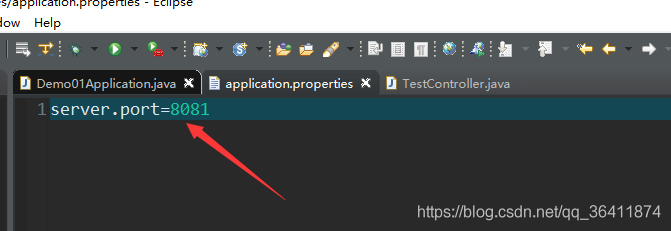
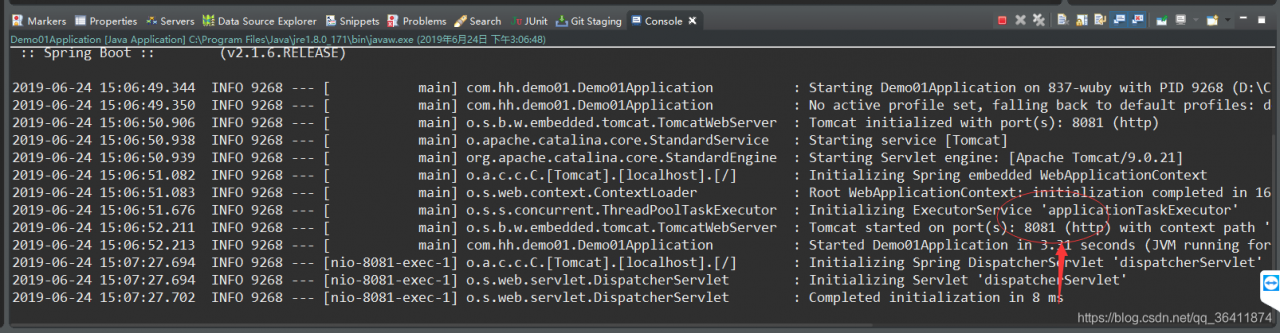
Later, it turned out that it was also because of the location of the package, that is, the above reason 1: the location of the Application startup class is wrong. To place the Application class on the outermost side, you include all subpackages because Spring-Boot automatically loads all components under the package where the startup class is located and under its subpackages.
After changing the position, it starts successfully, and the port is correct and the page is opened correctly.
Personal Summary:
I’m going to have to do some careful checking. 
ionic3 Error cordovaProject.projectConfig.getFileResources is not a function
If such a problem occurs, first delete the original platform, then specify the version number packaging
cordova platform rm android
Cordova platform add [email protected]
cordova platform rm android
Cordova platform add [email protected]
R ggplot Error in .Call.graphics(C_palette2, .Call(C_palette2, NULL)): invalid graphics state
We ran ggplot in R and Error in.call.graphics (C_palette2,.call (C_palette2, NULL)) : invalid graphics State prompt:
Just execute the dev.off() command and reexecute the ggplot command

Just execute the dev.off() command and reexecute the ggplot command
Latex Error pdfTeX error (ext4): \pdfendlink ended up in different nesting level than \pd fstartl
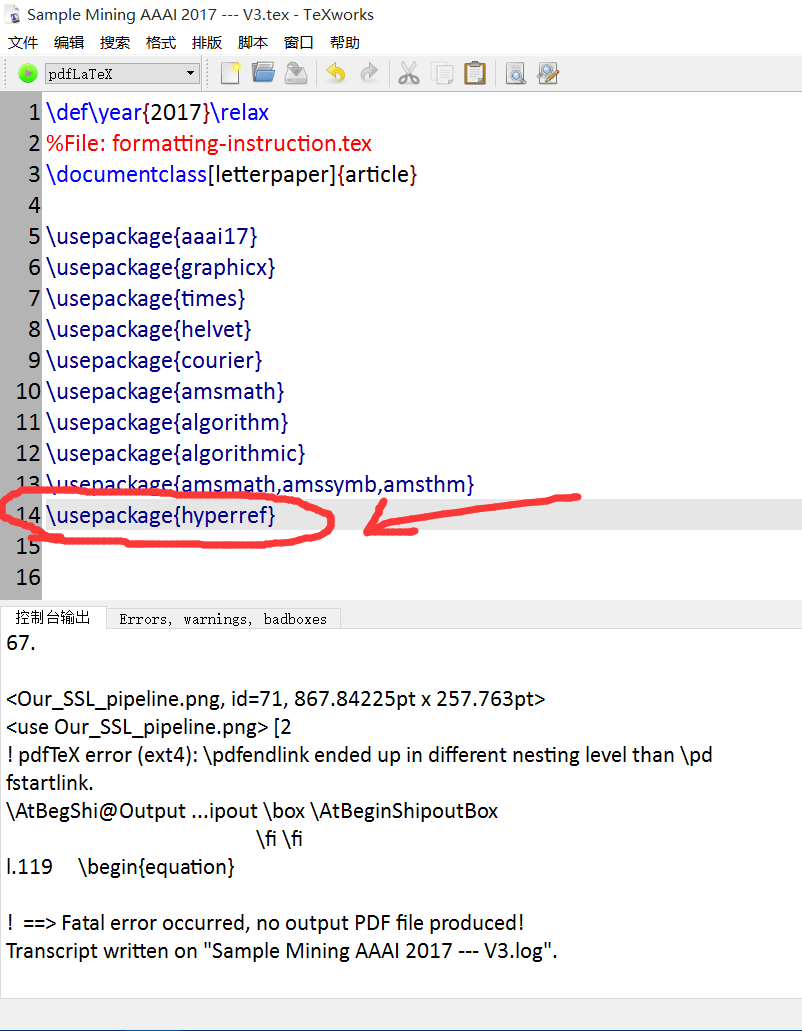
Recently wrote AAAI article, downloaded its template, but the pain is that it always gives an error, plus the references are always wrong:
As follows:
! pdfTeX error (ext4): \pdfendlink ended up in different nesting level than \pd
fstartlink.
\AtBegShi@Output … ipout \box \AtBeginShipoutBox
\fi \fi
l.119 \begin{equation}
! ==> Fatal error occurred, no output PDF file produced!
Transcript written on “Sample Mining AAAI 2017 — V3.log”.
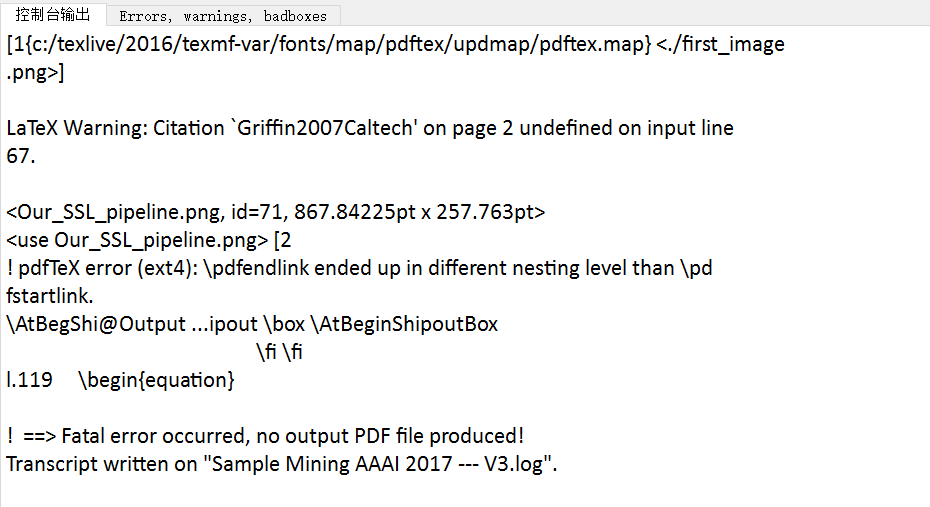
Recently, I finally found out the reason, because it is better not to use hyperlink symbol macro package in this template, could it be incompatible??
You can see that I originally used the macro package \usepackage{hyperref}…
Now comment it out and see if it’s still an error?
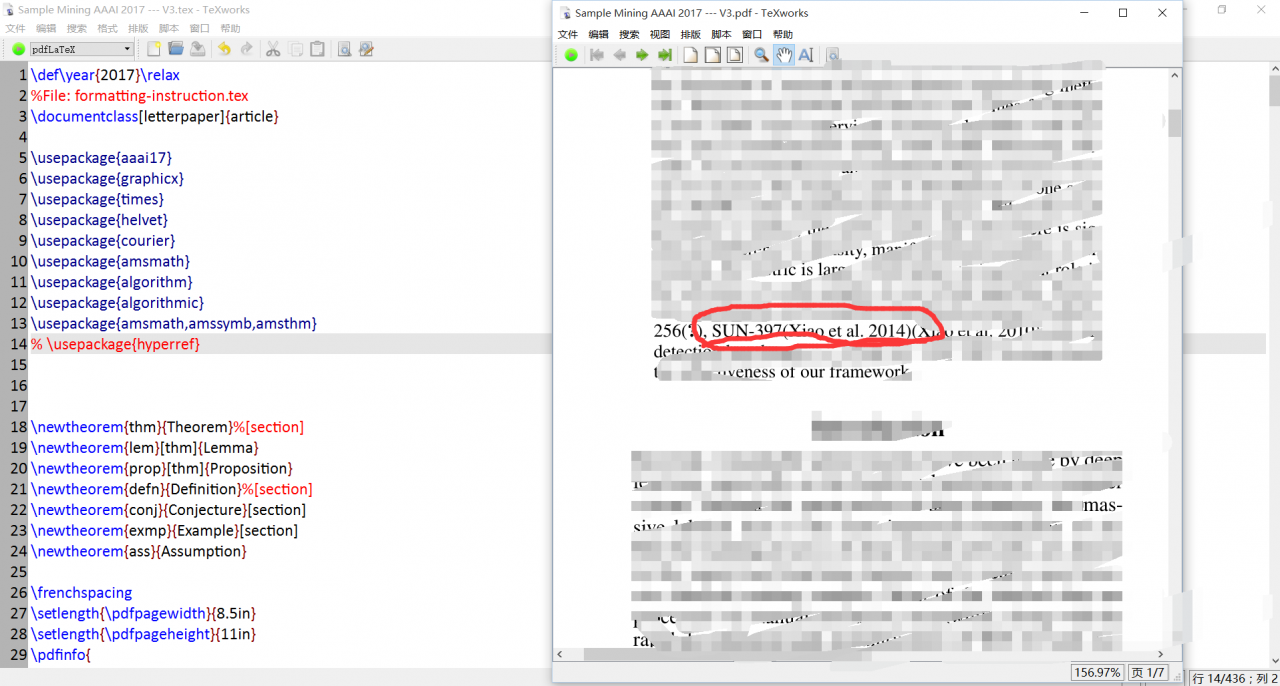
You can see, well, that’s the reason…
Do not use this hyperlinked macro package on AAAI templates… Just..
Tensorflow training could not create cudnn handle: CUDNN_STATUS_INTERNAL_ERROR error
Tensorflow1.10 Gpu: 2080 cuda: 9
Question:
Even if the batchsize is set to 1, there will be a problem when performing the training
could not create cudnn handle: CUDNN_STATUS_INTERNAL_ERROR
Solutions:
Searched a lot of methods, the following list of solutions
A,
Question:
Even if the batchsize is set to 1, there will be a problem when performing the training
could not create cudnn handle: CUDNN_STATUS_INTERNAL_ERROR
Solutions:
Searched a lot of methods, the following list of solutions
A,
config = tf.ConfigProto()
config.gpu_options.per_process_gpu_memory_fraction = 1.0
session = tf.Session(config=config, ...)
It doesn’t work for me…
config = tf.ConfigProto()
config.gpu_options.allow_growth = True
sess = tf.Session(config=config)
It doesn’t work for me…
Three,
Execute SUdo RM-f ~/.nv to solve the problem
It doesn’t work for me…
Four,
Set existing automatic growth in this way; That’s how I solved it,
Note that this is different from the second one, the green one, depending on the tensorFlow version, the import is different, and I’ve listed two;
from tensorflow.compat.v1 import ConfigProto
from tensorflow.compat.v1 import InteractiveSession
From tensorflow import ConfigProto
from tensorflow import InteractiveSession
config = ConfigProto()
config.gpu_options.allow_growth = True
session = InteractiveSession(config=config)
pathspec commit did not match any files known to git
Quotes can actually go wrong.
C:\lysoftware\gitprj\fsdgit>git commit -m ‘first commit’
Error: pathspec ‘commit’ does not match any known git file
C:\lysoftware\gitprj\fsdgit>git submission -m “first submission”
93 document changes, 4453 insertions (+)
Create schema 100644 .classpath
Create mode 100644 .project
Create mode 100644 .settings/org.eclipse.core.resources. create mode 100644 .settings/org.eclipse. jdk .apt.core. create mode 100644 .settings/org.eclipse. jdk .core. create mode 100644 .settings/org.eclipse. jdk .core. prefs
Create schema 100644 .settings/org.eclipse. t2 .core.prefs
C:\lysoftware\gitprj\fsdgit>git commit -m ‘first commit’
Error: pathspec ‘commit’ does not match any known git file
C:\lysoftware\gitprj\fsdgit>git submission -m “first submission”
93 document changes, 4453 insertions (+)
Create schema 100644 .classpath
Create mode 100644 .project
Create mode 100644 .settings/org.eclipse.core.resources. create mode 100644 .settings/org.eclipse. jdk .apt.core. create mode 100644 .settings/org.eclipse. jdk .core. create mode 100644 .settings/org.eclipse. jdk .core. prefs
Create schema 100644 .settings/org.eclipse. t2 .core.prefs