Eslint Babel-Eslint will be put together
npm install eslint babel-eslint -g
or
npm install eslint babel-eslint -DEslint Babel-Eslint will be put together
npm install eslint babel-eslint -g
or
npm install eslint babel-eslint -DThe JWT token permission authentication technology based on Springboot is simply implemented
JWT profile
Json Web Token (JWT) : Json network Token, an open standard based on Json ((RFC 7519) for passing declarations between network application environments. JWT is a lightweight, secure, cross-platform transport format that defines a compact, self-contained way to communicate between two parties using JSON objects to securely transfer information. This information is reliable because of the digital signature.
Implementation steps:
Environmental spring boot
1. Add JWT dependency
 <dependency>
            <groupId>com.auth0</groupId>
            <artifactId>java-jwt</artifactId>
            <version>3.8.1</version>
        </dependency>
        <dependency>
            <groupId>io.jsonwebtoken</groupId>
            <artifactId>jjwt</artifactId>
            <version>0.9.1</version>
        </dependency>
2. Create annotation package </h6 b> under SRC
New custom annotation class JwtToken
package com.qf.tyleryue_one.annotation;

import java.lang.annotation.ElementType;
import java.lang.annotation.Retention;
import java.lang.annotation.RetentionPolicy;
import java.lang.annotation.Target;


@Target({ElementType.METHOD,ElementType.TYPE})
@Retention(RetentionPolicy.RUNTIME)
public @interface JwtToken {
}
3. Create utils package </h6 b> under SRC
Create a new custom JwtUtils utility class
package com.qf.tyleryue_one.utils;

import com.auth0.jwt.JWT;
import com.auth0.jwt.JWTCreator;
import com.auth0.jwt.JWTVerifier;
import com.auth0.jwt.algorithms.Algorithm;
import jdk.internal.org.objectweb.asm.TypeReference;

import java.util.Date;


public class JwtUtils {
    private final static long EXPIRE_TIME=5*60*1000;
    private final static String SECRECT="Tyler_Yue_key";
    public  static  String sign(String userId){
        Date exipre_date = new Date(System.currentTimeMillis() + EXPIRE_TIME);
        JWTCreator.Builder builder = JWT.create();
        builder.withAudience(userId);
        builder.withExpiresAt(exipre_date);
        Algorithm algorithm = Algorithm.HMAC256(SECRECT);
        String sign = builder.sign(algorithm);
        return  sign;
    }

    public  static boolean verifyToken(String token){

        try {
            Algorithm algorithm = Algorithm.HMAC256(SECRECT);
            JWTVerifier build = JWT.require(algorithm).build();
            return  true;
        } catch (Exception e) {
            throw  new RuntimeException("Out of date");
        }

    }
}
4. Create new vo package under SRC
Encapsulates an object that returns the user’s token
package com.qf.tyleryue_one.vo;

import com.alibaba.druid.filter.AutoLoad;
import lombok.AllArgsConstructor;
import lombok.Data;
import lombok.NoArgsConstructor;


@Data
@AllArgsConstructor
@NoArgsConstructor
public class TokenVo {
    private  String usernaem;
    private String token;
}
5. Example of controller layer user login business login with token </h6 b>
package com.qf.tyleryue_one.controller;

import com.qf.tyleryue_one.entity.VueUser;
import com.qf.tyleryue_one.service.VueUserService;
import com.qf.tyleryue_one.utils.JwtUtils;
import com.qf.tyleryue_one.vo.Msg;
import com.qf.tyleryue_one.vo.TokenVo;
import org.springframework.beans.factory.annotation.Autowired;
import org.springframework.stereotype.Controller;
import org.springframework.web.bind.annotation.*;

import java.util.UUID;


@Controller
public class VueUserController {
    @Autowired
    private VueUserService vueUserService;

    @RequestMapping(value = "/dealLogin",method = RequestMethod.POST)
    @CrossOrigin
    @ResponseBody
    public Msg login(@RequestBody VueUser vueUser){
        VueUser vueUser1 = vueUserService.selectByUsername(vueUser.getUsername());

        if (vueUser1!=null){
            if (vueUser1.getPassword().equals(vueUser.getPassword())){
                String userid = UUID.randomUUID().toString();
                String token = JwtUtils.sign(userid);
                TokenVo tokenVo = new TokenVo(vueUser.getUsername(), token);
                return new Msg(200,"Logined",tokenVo);

            }else {
                return  new Msg(403,"password wrong",null);
            }
        }else {
            return new Msg(403,"not exsit",null);
        }
    }
}
</ div>
Install python PIP
You can determine whether it is installed by using the following command:
pip --version     # Python2.x
pip3 --version    # Python3.x
If not already installed, Ubuntu can be installed using the following methods:
sudo apt-get install python-pip
Upgrade matplotlib
View the matplotlib version
pip show matplotlib
And then upgrade
pip install --upgrade matplotlib
Then run rqt_plot
rosrun rqt_plot rqt_plotonReady(){
uni.setNavigationBarTitle({
title:"NAME"
});
},Move to the first line with gg.
In command mode, type :.,$d and the car is gone.
Delete from the current row to the last row.
PX4 Offboard routine running order
run PX4 first, then open Mavros, and finally run the code
website: https://dev.px4.io/master/en/simulation/ros_interface.htm
run PX4:
cd <Firmware_clone>
DONT_RUN=1 make px4_sitl_default gazebo
source ~/catkin_ws/devel/setup.bash    # (optional)
source Tools/setup_gazebo.bash $(pwd) $(pwd)/build/px4_sitl_default
export ROS_PACKAGE_PATH=$ROS_PACKAGE_PATH:$(pwd)
export ROS_PACKAGE_PATH=$ROS_PACKAGE_PATH:$(pwd)/Tools/sitl_gazebo
roslaunch px4 posix_sitl.launch
Running Mavros.
roslaunch mavros px4.launch fcu_url:="udp://:[email protected]:14557"
Operation code:
rosrun offboard_pkg offboard_node
Simply set ref= “table” to the table and execute the following method on the Vue life cycle updated
updated() {
  this.$nextTick(() => {
    this.$refs.table.doLayout();
  })
},
The database looks at all the foreign keys to verify whether a foreign key already exists (mysql).
Find duplicate foreign key names, where used, SQL as follows:
select * from INFORMATION_SCHEMA.KEY_COLUMN_USAGE where CONSTRAINT_NAME='NAME'
If no problem, rename it
Thank you
(node:57300) UnhandledPromiseRejectionWarning: Error: Can't set headers after they are sent.
    at validateHeader (_http_outgoing.js:491:11)
    at ServerResponse.setHeader (_http_outgoing.js:498:3)
In the Node project, you encountered this error while doing module splitting.
is checked to be package.json deleted
"babel-preset-env": "1.3.2",
"babel-preset-es2015": "6.24.1",
"babel-preset-stage-2": "6.24.1"
These three modules cause these three modules not to be deleted.
is originally required by the server to render the json inside the reference file is relative. Node_modules relative to the root directory, so the items below the root directory are related to modules such as vue, Babel-Polyfill, etc.
https://stackoverflow.com/questions/5483213/fatal-git-write-tree-error-building-trees
How to Fix
git reset --mixedThe problem

To explore the
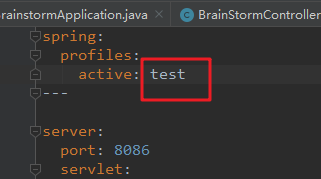
The problem of Proxy error is because the port number is occupied. There are 500 problems in the front end, indicating that there are problems in the back end server, not the proxy in the front-end vue.config. Check that the port number on the back end matches the port number on the front end.
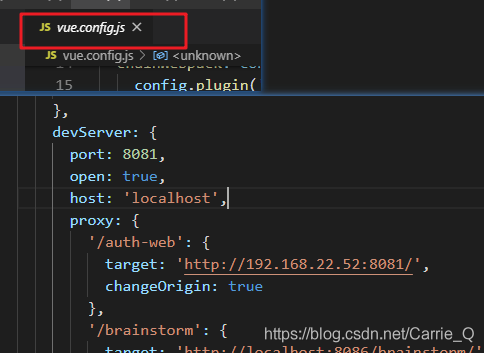
Back end:
where the test environment is called. But the front start local environment,
Fix:
changes the test environment to local
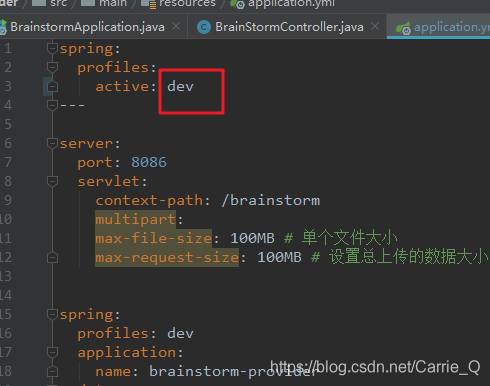
It will run normally
Common web code
Popularize some common signs:
100: Continue
200: Success
400: error requests
401: Unauthorized
403: Server rejects request, prohibits
404: Server could not find the requested page
405: Suppressing the method specified in the request
408: Request for timeout
414: The requested URL is too long for the server to process.
500: Internal server error
505: Server does not support the version of the http protocol used in the request