There is an inexplicable error when writing the code while learning FPGA, syntax Error near?In any case, I did not find out what the error was. Later, I found that there was an error in the input in Chinese and English. The colon “:” should have been in English, but I typed the colon “:” in Chinese.
is ok after modification.
Category Archives: How to Fix
C programming interface of SQLite database (6) result codes and error codes
SQlite database C programming interface (VI) Result Codes and Error Codes by QQ: 253786989 2012-02-07
Standard Codes
Here are the standard return values and error code definitions:
#define SQLITE_OK           0   /* Successful result */
/* beginning-of-error-codes */
#define SQLITE_ERROR        1   /* SQL error or missing database */
#define SQLITE_INTERNAL     2   /* Internal logic error in SQLite */
#define SQLITE_PERM         3   /* Access permission denied */
#define SQLITE_ABORT        4   /* Callback routine requested an abort */
#define SQLITE_BUSY         5   /* The database file is locked */
#define SQLITE_LOCKED       6   /* A table in the database is locked */
#define SQLITE_NOMEM        7   /* A malloc() failed */
#define SQLITE_READONLY     8   /* Attempt to write a readonly database */
#define SQLITE_INTERRUPT    9   /* Operation terminated by sqlite3_interrupt()*/
#define SQLITE_IOERR       10   /* Some kind of disk I/O error occurred */
#define SQLITE_CORRUPT     11   /* The database disk image is malformed */
#define SQLITE_NOTFOUND    12   /* Unknown opcode in sqlite3_file_control() */
#define SQLITE_FULL        13   /* Insertion failed because database is full */
#define SQLITE_CANTOPEN    14   /* Unable to open the database file */
#define SQLITE_PROTOCOL    15   /* Database lock protocol error */
#define SQLITE_EMPTY       16   /* Database is empty */
#define SQLITE_SCHEMA      17   /* The database schema changed */
#define SQLITE_TOOBIG      18   /* String or BLOB exceeds size limit */
#define SQLITE_CONSTRAINT  19   /* Abort due to constraint violation */
#define SQLITE_MISMATCH    20   /* Data type mismatch */
#define SQLITE_MISUSE      21   /* Library used incorrectly */
#define SQLITE_NOLFS       22   /* Uses OS features not supported on host */
#define SQLITE_AUTH        23   /* Authorization denied */
#define SQLITE_FORMAT      24   /* Auxiliary database format error */
#define SQLITE_RANGE       25   /* 2nd parameter to sqlite3_bind out of range */
#define SQLITE_NOTADB      26   /* File opened that is not a database file */
#define SQLITE_ROW         100  /* sqlite3_step() has another row ready */
#define SQLITE_DONE        101  /* sqlite3_step() has finished executing */
/* end-of-error-codes */
Some of these constants are returned only by a specific function, such as the SQLITE_RANGE, which is returned only by the SQlite3_bind_xxx function. Some constants, such as SQLITE_ERROR, only indicate that an error occurred during the execution of the function, but there is no way to know why the error occurred.
Sqlite_false stands for MISUSE of apis. For example, a bind function returns SQlite_ern when a statement is given another parameter after the sqlite3_step function has executed without being reset.
Extended Codes
Standard error codes provide less information about the cause of the error. So sometimes we use extended error codes. The extended error code is based on the standard error code, whose lower order byte is the original standard error code, and then attaches information to its higher order byte “or” to describe the details of the error.
int sqlite3_extended_result_codes(sqlite3*, int onoff);The error codes for these extensions are not enabled by default due to compatibility issues with the client’s legacy programs. Programmers can enable or disable extended error codes by using the SQlite3_extended_result_CODES function.
Here are all the extended error codes (most of which describe SQLITE_IOERR) :
#define SQLITE_IOERR_READ              (SQLITE_IOERR | (1<<8))
#define SQLITE_IOERR_SHORT_READ        (SQLITE_IOERR | (2<<8))
#define SQLITE_IOERR_WRITE             (SQLITE_IOERR | (3<<8))
#define SQLITE_IOERR_FSYNC             (SQLITE_IOERR | (4<<8))
#define SQLITE_IOERR_DIR_FSYNC         (SQLITE_IOERR | (5<<8))
#define SQLITE_IOERR_TRUNCATE          (SQLITE_IOERR | (6<<8))
#define SQLITE_IOERR_FSTAT             (SQLITE_IOERR | (7<<8))
#define SQLITE_IOERR_UNLOCK            (SQLITE_IOERR | (8<<8))
#define SQLITE_IOERR_RDLOCK            (SQLITE_IOERR | (9<<8))
#define SQLITE_IOERR_DELETE            (SQLITE_IOERR | (10<<8))
#define SQLITE_IOERR_BLOCKED           (SQLITE_IOERR | (11<<8))
#define SQLITE_IOERR_NOMEM             (SQLITE_IOERR | (12<<8))
#define SQLITE_IOERR_ACCESS            (SQLITE_IOERR | (13<<8))
#define SQLITE_IOERR_CHECKRESERVEDLOCK (SQLITE_IOERR | (14<<8))
#define SQLITE_IOERR_LOCK              (SQLITE_IOERR | (15<<8))
#define SQLITE_IOERR_CLOSE             (SQLITE_IOERR | (16<<8))
#define SQLITE_IOERR_DIR_CLOSE         (SQLITE_IOERR | (17<<8))
#define SQLITE_IOERR_SHMOPEN           (SQLITE_IOERR | (18<<8))
#define SQLITE_IOERR_SHMSIZE           (SQLITE_IOERR | (19<<8))
#define SQLITE_IOERR_SHMLOCK           (SQLITE_IOERR | (20<<8))
#define SQLITE_IOERR_SHMMAP            (SQLITE_IOERR | (21<<8))
#define SQLITE_IOERR_SEEK              (SQLITE_IOERR | (22<<8))
#define SQLITE_LOCKED_SHAREDCACHE      (SQLITE_LOCKED |  (1<<8))
#define SQLITE_BUSY_RECOVERY           (SQLITE_BUSY   |  (1<<8))
#define SQLITE_CANTOPEN_NOTEMPDIR      (SQLITE_CANTOPEN | (1<<8))
#define SQLITE_CORRUPT_VTAB            (SQLITE_CORRUPT | (1<<8))
#define SQLITE_READONLY_RECOVERY       (SQLITE_READONLY | (1<<8))
#define SQLITE_READONLY_CANTLOCK       (SQLITE_READONLY | (2<<8))
Error Functions
int sqlite3_extended_result_codes(sqlite3*, int onoff);Enable or disable the use of extended error codes for a database connection. Enable extended error codes by passing a non-zero value to the second parameter of the SQlite3_extended_result_CODES function. This function always returns SQLITE_OK, and there is no way to get an extension error code that is currently enabled or off.
int sqlite3_errcode(sqlite3 *db);If a database function operation does not return SQLITE_OK, you can then call the function to get the error code. By default it returns the standard error code, and it may also return an extended error code if the current database connection is enabled.
int sqlite3_extended_errcode(sqlite3 *db);Similar to the SQlite3_errcode function, except that it only returns the extended error code.
const char *sqlite3_errmsg(sqlite3*);
const void *sqlite3_errmsg16(sqlite3*);
Returns an error code string, encoded in UTF-8 or UTF-16. Programmers should either call these functions, get the error code information, or make a copy. The next database operation may invalidate the returned string pointer.
SQlite error handling cannot handle multiple errors simultaneously. For example, if an API function call goes awrong and the programmer fails to check for that error, the next API function call may well return SQlite_ern, indicating that the program is trying to use an invalid data structure. So programmers should check and handle any errors that might occur after each API function call.
In addition, if multiple threads share the same database connection, it is best to encapsulate the core API calls and error-handling code in the Critical section. Programmers can use the SQlite3_db_mutex function to get the mutex pointer to the database connection (a pointer to the SQlite3_mutex object).
Prepare for V2 Version
The following table compares the prepare function of the original version with that of v2 version:
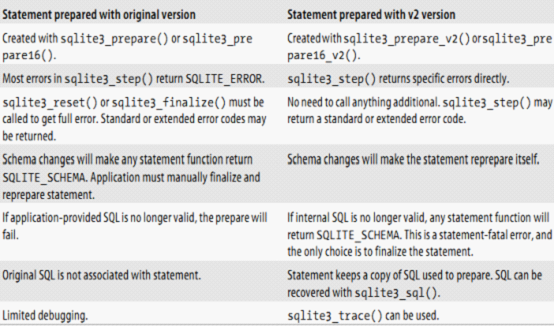
The V2 version of prepare is more concise for error handling and has the schema advantages listed in the table above, so it is recommended to use the V2 version of prepare.
Transactions and Errors
Typically, SQlite operations are in auto-commit mode. SQlite automatically encapsulates each SQL command into a transaction. Error recovery is easy if each statement is encapsulated in its own transaction. Any time SQLite finds itself in the wrong state, it simply rolls back the current transaction. This effectively cancels the current SQL command and returns the database to the state it was in before the error occurred.
However, once the BEGIN TRANSACTION command is executed, SQlite is no longer in autocommit mode. A TRANSACTION is opened and will remain open until either the END TRANSACTION or the COMMIT TRANSACTION command is executed. This allows multiple SQL commands to be encapsulated into a single transaction, allowing a discrete set of commands to execute either all or none (atomic operations), but it also limits SQLite’s error recovery.
When a displayed (explicit) transaction encounters an error during execution, SQLite attempts to cancel the statement just executed. Unfortunately, this is not always possible. If things go badly, SOMETIMES SQlite can just roll back the entire current transaction, with no other option.
The most likely errors to cause a rollback are SQLITE_FULL (database or disk space is full), SQLITE_IOERR (disk IO error or file is locked), SQLITE_BUSY (database lock), SQLITE_NOMEM (out of memory), SQLITE_INTERRUPT (interrupt). If the program is executing a display transaction and receives one of these errors, be prepared to handle the possibility of a transaction being rolled back.
int sqlite3_get_autocommit(sqlite3*);With this function, you can get the current commit status. If a non-zero value is returned, the database is in auto-commit (atutoconmit) mode. If 0 is returned, the database is currently inside an explicit transaction.
If the SQlite database is forced to do a full transaction rollback, the database will once again go into transaction autocommit mode. If the database is not in auto-commit mode, it must be in a transaction, indicating that no rollback is required.
SQlite database C programming interface (VI) Result Codes and Error Codes by QQ: 253786989 2012-02-07
socket error 10035
The server got stuck when I was doing the test yesterday. I found that the server did not return the message when it called the send function. As a result, the thread of message processing was stuck there.
Based on the online data, I can probably tell that either the sender is out of cache or the receiver is out of cache.
And my socket is not set to non-blocking mode, so it’s stuck here with no return.
The solution is to change the socket to non-blocking mode
Based on the online data, I can probably tell that either the sender is out of cache or the receiver is out of cache.
And my socket is not set to non-blocking mode, so it’s stuck here with no return.
The solution is to change the socket to non-blocking mode
In this way, if the send fails, it can return immediately, and the server won’t be stuck there.
At this time, if the send is unsuccessful, the return value of the send is error 10035.
Then I checked the test client and realized that my client did not receive at all.
That’s weird.
Error saving Visio as picture: an error occurred and Visio was unable to complete the export
1. Problem Description:
When using Vison to save as an image, whether in JPG,PNG, or Tiff format, the following error occurs:

2. Reasons for the error:
The image output size is too large.
3. Solutions:
Make the resolution in the output options a little smaller, such as 600X600.
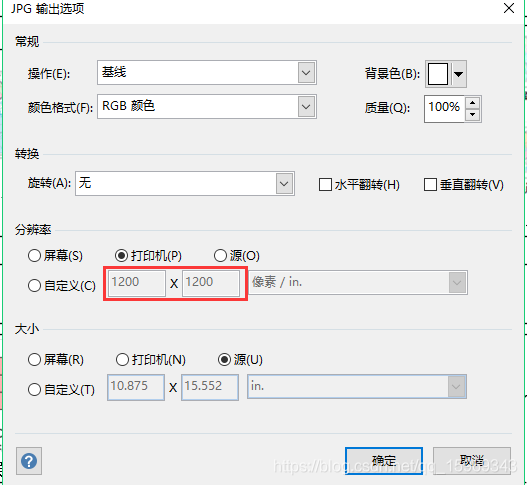
When using Vison to save as an image, whether in JPG,PNG, or Tiff format, the following error occurs:
2. Reasons for the error:
The image output size is too large.
3. Solutions:
Make the resolution in the output options a little smaller, such as 600X600.
Microsoft OLE DB Provider for SQL Server error & #x27;80040e4d & #x27;
<%
Dim oConn, oRS, oRS2, oRS3, oCmd
Set oConn = Server.CreateObject( “ADODB.Connection” )
Set oRS = Server.CreateObject( “ADODB.RecordSet” )
Set oRS2 = Server.CreateObject( “ADODB.RecordSet” )
Set oRS3 = Server.CreateObject( “ADODB.RecordSet” )
Set oRs4 = Server.CreateObject( “ADODB.RecordSet” )
Set oCmd = Server.CreateObject( “ADODB.Command” )
Dim oConn, oRS, oRS2, oRS3, oCmd
Set oConn = Server.CreateObject( “ADODB.Connection” )
Set oRS = Server.CreateObject( “ADODB.RecordSet” )
Set oRS2 = Server.CreateObject( “ADODB.RecordSet” )
Set oRS3 = Server.CreateObject( “ADODB.RecordSet” )
Set oRs4 = Server.CreateObject( “ADODB.RecordSet” )
Set oCmd = Server.CreateObject( “ADODB.Command” )
DBName=”tzjtjl”
sql=”Provider=SQLOLEDB.1;Password=123456;Persist Security Info=True;User ID=sa;Initial Catalog=tzjtjl;Data Source=127.0.0.1;”
‘sql=”Provider=SQLOLEDB.1;Password=tzjtj123#@!;User ID=sa;Persist Security Info=True;Initial Catalog=tzjtj;Data Source=192.168.168.10;”
oConn.open (sql)
‘oConn.open Application(“dsn”)
Function WriteToSysEvent( pSource, pSubKind, pEventID, pUserNo, pComputer )
oConn.Execute( “EXEC sp_InsSysEvents ‘” & pSource & “‘, ‘” & pSubKind & “‘, ” & pEventID & “, ‘” & pUserNo & “‘, ‘” & pComputer & “‘ ” )
End Function
Function VerifyUser(CatelogNo, ExecAction)
sql = “set nocount on select (case when isnull(rights,0) & ” & ExecAction & “=” & ExecAction & ” then 1 else 0 end) from permissions where username='”&session(“username”)&”‘ and catelogno='”&catelogno&”‘ ”
on error resume next
oRS2.open sql, oconn, 3, 3, 1
If oRS2(0) = 1 Then
VerifyUser = TRUE
Else
VerifyUser = False
End If
oRS2.Close
End Function
%>
What should be paid attention to in socket programming — bind socket error: address already in use
When programming Linux networks, you often encounter the following usage errors every time you modify the source code and compile it again:
Bind error: Address already in use
Although the process was forced to end with Ctrl+C, the error still exists. We can still see the process “forced to end” with Ctrl+C with netstat -an |grep 5120 and ps aux |grep 5120. The port is still in use, so we have to kill the process with kill every time, which is very troublesome. Last night, I happened to browse an article titled “5 Hidden Dangers in Linux Socket Programming” on THE IBM website. I suddenly realized that I had a try today and solved the problem as expected. I hereby express my thanks and hope that more coder can read this article and avoid making mistakes.
The main codes are:
int on;
on = 1;
ret = setsockopt( sock, SOL_SOCKET, SO_REUSEADDR, & on, sizeof(on) );
now every time I force the process to end with Ctrl+C, I can still see the port in use with netstat and ps, but the running program will not have the error of “Address already in use”, so the port is reused.
Here is the third pitfall in this article — incorrect address usage
Address usage error (EADDRINUSE)
You can use the Bind API function to bind an address (an interface and a port) to a socket endpoint. You can use this function in your server Settings to limit the interfaces that may have a connection coming. You can also use this function in client Settings to limit the interfaces that should be used for outgoing connections. The most common use of BIND is to associate a port number with a server and use a wildcard address (INADDR_ANY), which allows any interface to be used for incoming connections.
A common problem with BIND is trying to bind to a port that is already in use. The trap is that no active socket may exist, but the binding port is still disabled (bind returns EADDRINUSE), which is caused by the TCP socket state TIME_WAIT. This state remains for about 2 to 4 minutes after the socket is closed. After the TIME_WAIT state exits, the socket is deleted and the address can be rebound without problems.
Waiting for TIME_WAIT to end can be annoying, especially if you’re developing a socket server and need to stop the server to make some changes, and then restart. Fortunately, there is a way to get around the TIME_WAIT state. You can apply the SO_REUSEADDR socket option to the socket so that the port can be reused immediately.
Consider the example in Listing 3. Before binding the address, I call setsockopt with the SO_REUSEADDR option. To allow address reuse, I set the integer parameter (on) to 1 (otherwise, I can set it to 0 to prohibit address reuse).
use the SO_REUSEADDR socket option to avoid address usage errors
int sock, ret, on;
struct sockaddr_in servaddr;
/* Create a new stream (TCP) socket */
sock = socket( AF_INET, SOCK_STREAM, 0 ):
/* Enable address reuse */
on = 1;
ret = setsockopt( sock, SOL_SOCKET, SO_REUSEADDR, & on, sizeof(on) );
/* Allow connections to port 8080 from any available interface */
memset( & servaddr, 0, sizeof(servaddr) );
servaddr.sin_family = AF_INET;
servaddr.sin_addr.s_addr = htonl( INADDR_ANY );
servaddr.sin_port = htons( 45000 );
/* Bind to the address (interface/port) */
ret = bind( sock, (struct sockaddr *)& servaddr, sizeof(servaddr) );
after the SO_REUSEADDR option is applied, the bind API function allows immediate reuse of the address.
Five pitfalls in Linux socket programming
http://www.ibm.com/developerworks/cn/linux/l-sockpit/
ERF and erfc functions
Erf is an error function and c in ERFC is a complementary, so erFC = 1-ERF.
Erf (x) = 2/ SQRT (PI) * Integral from 0 to x of exp(-t^2) DT.
The range is (-1, 1) and the interval length is 2.
Therefore, ERFC is a monotone increasing function, which is often used in the communication principle to calculate the relationship between bit error rate and SNR. The higher the SNR, the lower the bit error rate.
Erf (x) = 2/ SQRT (PI) * Integral from 0 to x of exp(-t^2) DT.
The range is (-1, 1) and the interval length is 2.
Therefore, ERFC is a monotone increasing function, which is often used in the communication principle to calculate the relationship between bit error rate and SNR. The higher the SNR, the lower the bit error rate.
After upgrading php7, PHP program prompts an error: operator not supported for strings in causes and Solutions
PHP Fatal error: [] operator not supported for strings in…
After searching the information, I found that it was caused by the following reasons
When a variable is assigned a second time in the same page, but the inconsistent type of the value causes this error, the variable type can be declared again before the second assignment.
Simply put, it is the result of different types of assignments to the same variable on the same page.
Such as:
$a = “ABC”;
$a [] = “def”;
The solution
To check if your code has the way it was written in the above example, declare a variable once before each assignment or destroy it with the unset() function
Ex. :
$a = “ABC”;
unset($a);
$a [] = “def”;
After searching the information, I found that it was caused by the following reasons
When a variable is assigned a second time in the same page, but the inconsistent type of the value causes this error, the variable type can be declared again before the second assignment.
Simply put, it is the result of different types of assignments to the same variable on the same page.
Such as:
$a = “ABC”;
$a [] = “def”;
The solution
To check if your code has the way it was written in the above example, declare a variable once before each assignment or destroy it with the unset() function
Ex. :
$a = “ABC”;
unset($a);
$a [] = “def”;
Error retrieving device properties for ro.product.cpu.abi:
Copy the company code to your computer after work
An error was detected with flutter
An error was detected with flutter
The 'flutter' tool you are currently running is from a different Flutter repository than the one last used by this package. The repository from which the 'flutter' tool is currently executing will be used insteadThis resets the FlUtterSDK path to the native FlutterSDK path
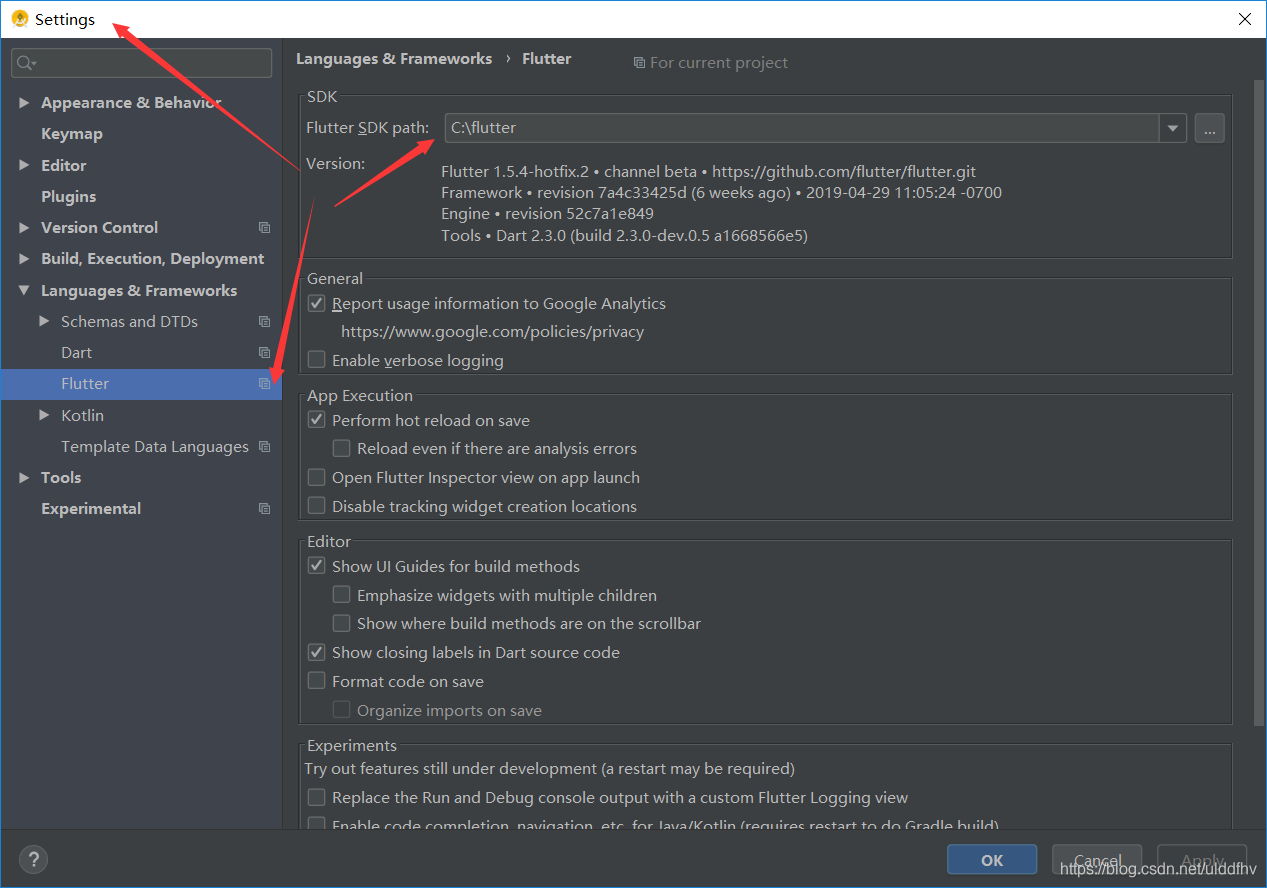
I thought that the flutter packages did not get so that the red color disappeared and the error continued to be reported during the Flutter Run
Error retrieving device properties for ro.product.cpu.abi:
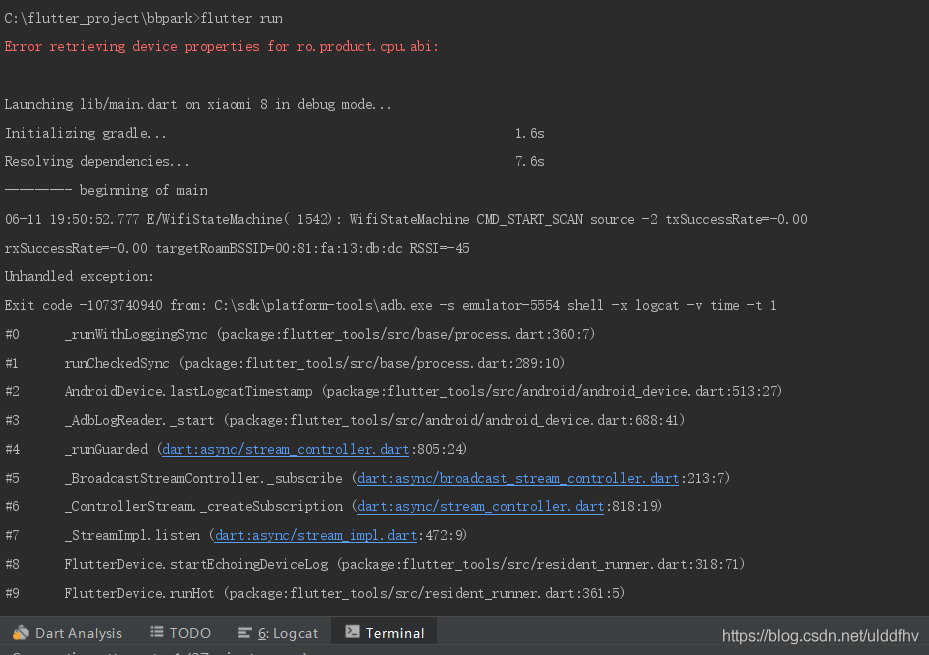
I found the answer on the Internet and found this article because I reinstalled a higher version of androidstudio yesterday
https://blog.csdn.net/u012288928/article/details/91126111
Then I updated the SDK Platform Tools according to the article
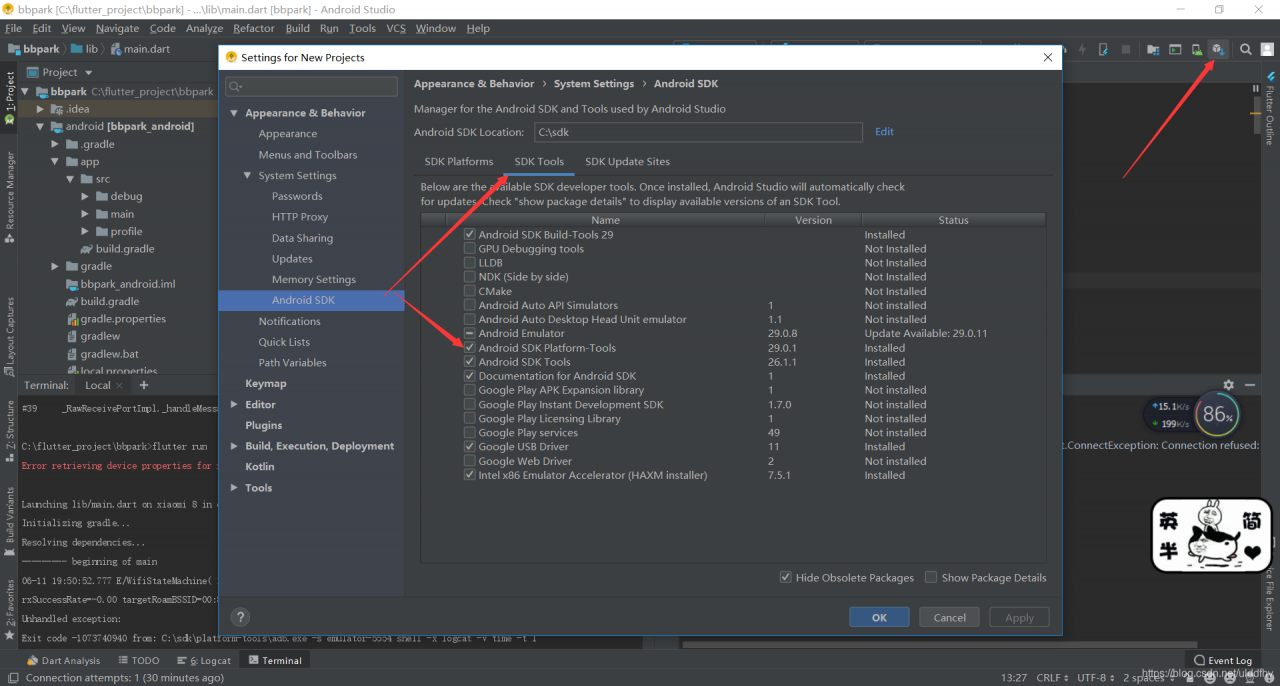
The updated OK
For the record
MS SQL Could not obtain information about Windows NT group/user ‘domain\login’, error code 0x5. [SQ…
An interesting error occurred recently: some jobs on a database server overseas occasionally reported errors, with the following message:
————————————————————————————————————————————————-
Date 2013/9/15 12:00:00
Log Job History (JOB_SYNCHRONIZING_ESCM_DATA_EAV)
Step ID 0
Server EGVNT02
The job name JOB_SYNCHRONIZING_ESCM_DATA_EAV
Step Name (Job Outcome)
Duration 00:04:34
SQL severity 0
SQL message ID 0
Operators who have been notified by E-mail
An operator who has sent a notification over the network
Operators who have been notified by paging
Retry 0
The message
The job failed. Unable to determine if The owner (domain\login) of job JOB_SYNCHRONIZING_ESCM_DATA_EAV has Server Access (Reason: Could not obtain information about Windows NT group/user ‘domain\login’, error code 0x5. [SQLSTATE 42000] (Error 15404)).
————————————————————————————————————————————————-
The database version, Microsoft SQL Server 2008 R2 (RTM) -10.50.1600.1 (X64), was created using domain\ Login, which has the sysadmin Server role but belongs to Domain A and is not A member of the Administator group within the system. The login account for the database-related services is as follows:
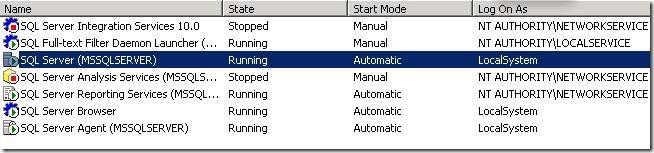
Search the information from the Internet as follows:
This message is thrown if the SQL Server service uses an account that does not have sufficient administrative credentials on the Windows domain. In this situation, the xp_logininfo system stored procedure is run by using the security context of the SQL Server service. Because the account does not have sufficient administrative credentials to enumerate the properties of the user in the domain, the xp_logininfo system stored procedure fails, and you receive the 8198 error. To resolve this problem, change the startup account of the SQL Server service to a Windows domain account.
We need to either run the SQL service under domain account or use SQL authentication
This error message is thrown if the account used by the SQL Server service does not have sufficient administrative credentials. The Windows domain. In this case, the Xp_loginInfo system stored procedure is run in the security context of the SQL Server service. Because the account does not have enough security credentials to enumerate the user’s attributes in the domain, the Xp_loginInfo system stored procedure fails and you receive an 8198 error. To resolve this issue, change the startup account of the SQL Server service to the Windows Domain account.
We need to run the SQL service with the domain account or with SQL authentication.
In fact, it is also very convenient to solve this problem by changing the owner of the job to SA or the account with the role of Sysadmin in the local area. But I’m still confused about the nature of the problem. Why is it that it works most of the time, and occasionally this error occurs?I never understood that.
Resources:
http://www.sqlserver-wiki.com/2012/11/could-not-obtain-information-about.html
Centos7 Yum error downloading packages:
Error downloading packages:
gpm-libs-1.20.7-5.el7.x86_64: [Errno 5] [Errno 2] does not have that file or directory
2:vim-common-7.4.160-4. El7.x86_64: [Errno 5] [Errno 2] does not have that file or directory
2:vim-enhanced-7.4.160-4. El7. X86_64: [Errno 5] [Errno 2] does not have that file or directory
2: Vim-Filesystem 7.4.160-4.el7.x86_64: [Errno 5] [Errno 2] does not have that file or directory
In python3.5, I found that GCC-C ++ was not installed, and then yum installed it. I updated the source of Yum,yum Clean all, and Yum Make Cache, but it didn’t work. Suddenly I remembered that I had deleted the Python under /usr/bin, and I remember the python soft connection pointing to Python 2

Change Python 2 to Python so yum can use it

In the /usr/bin/yum file, the header file refers to this thing
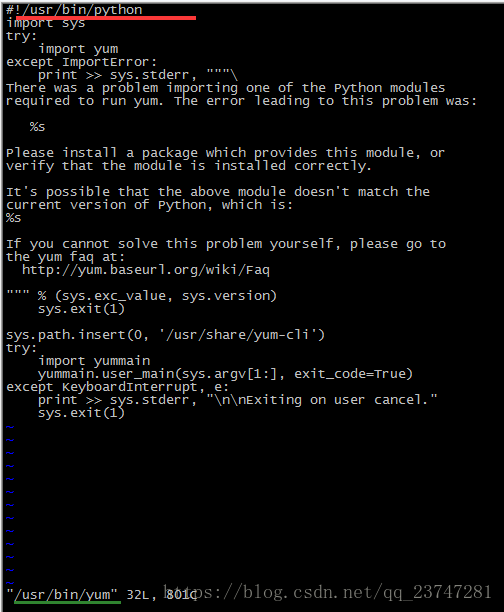
The previous idea was to change the header file to python2, which came up later
When Linux enters a command on the command line, if there is a $character, the TAB key will automatically be preceded by an escape character, which will not achieve the desired effect. To solve this problem, you need to set up, do not let it escape automatically, execute the command (command means open directory extension,-s is open): shopt-s direxpand then support the command just now, press TAB will turn $JAVA_HOME into a real folder, then TAB prompt is very convenient, achieve the ideal effect
CD $JAVA_HOME/ Then press TAB
gpm-libs-1.20.7-5.el7.x86_64: [Errno 5] [Errno 2] does not have that file or directory
2:vim-common-7.4.160-4. El7.x86_64: [Errno 5] [Errno 2] does not have that file or directory
2:vim-enhanced-7.4.160-4. El7. X86_64: [Errno 5] [Errno 2] does not have that file or directory
2: Vim-Filesystem 7.4.160-4.el7.x86_64: [Errno 5] [Errno 2] does not have that file or directory
In python3.5, I found that GCC-C ++ was not installed, and then yum installed it. I updated the source of Yum,yum Clean all, and Yum Make Cache, but it didn’t work. Suddenly I remembered that I had deleted the Python under /usr/bin, and I remember the python soft connection pointing to Python 2
Change Python 2 to Python so yum can use it
In the /usr/bin/yum file, the header file refers to this thing
The previous idea was to change the header file to python2, which came up later
When Linux enters a command on the command line, if there is a $character, the TAB key will automatically be preceded by an escape character, which will not achieve the desired effect. To solve this problem, you need to set up, do not let it escape automatically, execute the command (command means open directory extension,-s is open): shopt-s direxpand then support the command just now, press TAB will turn $JAVA_HOME into a real folder, then TAB prompt is very convenient, achieve the ideal effect
CD $JAVA_HOME/ Then press TAB
res://ieframe.dll/acr_ error.htm Error resolution | IE8 website restore error real feasible solution
Ie8 website restore error real feasible solution, this morning to open the computer, prompted to update the system patch, so the recommended three most important patches installed. On QQ, open the IE8 browser page of QQ space and suddenly switch quickly, and then the website restore error immediately appears, url header res:// IEframe. DLL /acr_error. HTM, after testing QQ space and other interactive websites will appear this problem.
use IE repair, but still not, looked up on the Internet there is no solution, only to see an article that reinstall IE8 can solve this problem. But since it’s a reinstallation of IE, I don’t think this is the solution. At first glance, I suspect the problem was caused by the morning update patch, and the most likely patch is JSON interoperability of Internet Explorer 8.
The real solution to the IE8 web restoration error is to check out the patch on Microsoft’s website: Install this update to improve JSON interoperability with Internet Explorer 8 according to the new ECMAScript (5th edition standard). You may have to restart your computer after installing this update.
solution: remove the JSON interoperability patch for Internet Explorer 8, the patch number KB976662. First go to the control panel – Add/remove program – display update – find the number KB976662 – delete.
ie8 website restore error really feasible solution, delete need to restart, after the test QQ space and other interactive website open normal. Above method is original, in WIN2003+IE8 under the test is feasible.