Category Archives: How to Fix

Error: pathspec ‘origin / xxx’ did not match any file (s) known to GIT

There is a test branch on the project. You can’t see the remote branch by using Git Branch-A. You can directly use the command Git Checkout Test to report the error as follows:

error: pathspec 'origin/test' did not match any file(s) known to git.

Solution:
1. Execute git fetch to fetch updates of all branches
2. You can see the Test branch when executing Git Branch-A (the branch information has been updated).
3. Switch git Checkout Test

Disk read error solution for new hard disk installation

below first said the process of the problems I encountered and the process of solving, more detailed and verbose, if you are more urgent, directly see the last summary.
 
(Problems arise)
In response to my mother’s strong request, I bought some accessories on JINGdong two weeks ago and installed a new machine. I officially eliminated the old desktop computer that I had used for nearly 10 years at home. My mother said that I would not be able to play QQ dream now.
The neighbor saw, also want to update his machine, I basically the same as before and under a single (at the request of the neighbor to add an OPTICAL drive, my home machine is not equipped with optical drive), the weekend back home to install the machine. The installation went well, but there was a very strange problem when installing the OS.
Listen to me slowly.
The hard disk USES Seagate 1TB (ST1000DM003) disk, and the motherboard USES Giga GA-A75KM-D2H disk. At first, I found some problems with these models, but I found it has nothing to do with the hard disk model after I studied it.
First of all, everything worked fine when I installed the system myself.
In the neighbor installed, I use my pre-carved rain forest wind Win7 Ghost plate, the first use of a key in four areas, four areas. (In fact, this function is to do a complete partition image, disk to disk, ghost will automatically adjust the size of the partition in proportion). Then use a key will win7 Ghost to c disk installation, but ghost is always a failure, generally go less than 50% of the card is dead, after a while optical drive read disk also stopped.
Later, if you boot from hard Disk, sometimes failure will prompt that OS cannot be detected, and sometimes failure will prompt “A Disk Read Error Occurred. Press Ctrl+Alt+del to RESTART”.
 
(Disc-Mounted system)
But the hard disk can only be unplugged, attached to my machine as a slave disk, the system installed in.
Now that I’m hanging them all off the slave disk, I’ll use Disk Genius to reprogram the slave disk partitions.
(The knowledge of primary partition, extended partition, logical partition is very important in manual partition, also not complex, a diagram plus three or two sentences can be explained, do not understand the students please baidu yourself first)
Specific methods:
1, copy win7 ghost from the disc image to the hard disk (or mount the image to the virtual optical drive)
2, if you use GHost32, you can directly ghost-> To partition – & gt; From image, when you select the target hard drive, don’t select your own hard drive or it will be a tragedy
(This is what I did for the first time since I already use Disk Genius.) To use the disk image widget, you need to first use software like Disk Genius to convert the primary partition from the disk to a logical partition and assign a drive letter.
3, ghost, note that the drive letters from each partition are probably not in order, need to pay attention to who is the first partition (Disk Genius, Win7 comes with disk management tools can be).
4. Convert from the first partition of the disk to the primary partition and set it to Active.
 
(New questions)
Restart and start from Disk. Once again, “A Disk Read Error Occurred. Press Ctrl+Alt+del to RESTART”. At first I thought I had damaged the hard drive, so I was taken aback (I had just dropped it accidentally). However, after starting with the master disk and entering the system, it was found that each partition of the slave disk was working normally and the files could be read and written normally.
Suspect is the new motherboard problem, will my hard disk unplug, put the neighbor’s disk on my motherboard to restart again, still invalid.
Put my hard drive on the neighbor’s machine and everything’s fine. It’s not the motherboard.
Things have come to an impasse.
 
(Real solution)
When depressed, use Disk Gunius to observe the partition parameters of two hard disks. Because I used to practice assembly when I wrote the operation of the partition table program, on the disk structure and various parameters or more familiar, boring want to calculate the partition capacity and it is not the same. Suddenly it is found that the starting head and sector from the first partition of the disk is not 1,1, but 31,1. This is not normal!
While the normal should be something like this (this picture was re-cut by the laboratory machine when I posted to illustrate the point) :

This means that after the BIOS has read Boot Sector, the primary partition of the boot partition should start at an abnormal position, with an inexplicably blank space in front of it. Disk Read Error occurs when the BIOS loads the operating system with a strict check and thinks it has read something wrong.
This explains why the BIOS will load the OS incorrectly, while the BIOS will load the OS correctly when it is suspended from the disk (follow the boot Sector start/stop parameter, regardless of OS loading).
I think: this may be caused by my conversion of the primary partition to logical partition, and then to the primary partition. Since this logical partition needs an extended partition header to record the starting and ending positions of each logical partition under it, naturally its real free space is moved back, and the primary partition is not moved back.
After knowing this is easy, I manually modify the partition parameters in the software, will start magnetic head and sector to 1,1, so the partition of the natural thing is not, with a new ghost into a system. Mount startup, everything is OK!
 
 
Some other information on the Internet is summarized as follows:
Occurred: “A Disk Read Error Occurred once again. Press Ctrl+Alt+del to RESTART”, there are generally several possibilities:
1. Hardware failure: Data line aging, interface loosing, motherboard aging (capacitor)
Performance: normal use, sudden occurrence of this problem, on and off.
Solution: Clean the ash and reinsert. Check the capacitance. In addition, someone on the Internet said that UDMA support was cancelled in the BIOS. I found the original post, and the original author said that the capacitor was found to swell, and this capacitor is UDMA circuit, so this method is not common, or fix the motherboard/replace the motherboard.
2. Hard disk failure:
Performance: normal use, suddenly this problem, and then continue to do so, and recall the case (hard disk) recently received a large impact.
Solution: Hard disk low grid.
3. Hard disk setup:
Performance: the new system appears, and is likely to be normally accessible from the slave disk on other machines.
Solution: Check the hard disk partition parameters, set the partition of the operating system installation as the primary partition, Active, non-hidden, start cylinder: 0, start head: 1, start sector: 1.
Win10 desktop right click display settings MS- settings:display Or Ms- settings:personalization-background resolvent

The Win10 desktop right-click displays the Settings MS-Settings: Display or MS-Settings: Personalization – Background solution
Description: New solution

Description:
There are a lot of methods on the Internet, pro test some can not be repaired, you can try it first.
solution 1:
1, press WIN+R to call up the run dialog box, and then enter gpedit.msc enter.
2, expand: [computer configuration] – [Windows Settings] – [security Settings] – [local policy] – [security options]. 3. Find “user account control: administrator approval mode for built-in administrator account” on the right and double-click to open it.
4, set to “enabled”, then apply save, finally restart Win10 system.
solution 2:
1. Open task manager (or click CTRL+Shift+ESC)
2. Click “file” – “run new task”
3. Please make sure to check “create this task with administrator”
4. Enter “Powershell” (ignore”)
.In Powershell, enter the following two commands :(second command needs to hit enter)
$manifest = (get-appxpackage microsoft-windows store).installlocation + ‘appxmanifest.xml’ Add-appxpackage-disabledevelopmentmode -Register KaTeX parse Error: Expected ‘ ‘, got ‘EOF’ at end of Input:… |Where-Object {_.installlocation-like “SystemApps”}
6. When finished, close Powershell
7. Restart your computer. 1. Press the win+r key on the keyboard, then type services. MSC
2, the list of services appears.
if the above method cannot be fixed, please use the method, pro test practical.
New solution
1. First download the tinder safety software and install it. Find the Tinder sword in the advanced tool and install it.
2. Open the tinder sword and click the registry
3. Select HKEY_CURRENT_USER\Software\Classes\ms-settings
4. Right-click to delete the ms-settings folder
. Just restart your computer!

Solution to Oracle error 17002

First of all, there was a 12505 error the day before yesterday. I checked it on the Internet and soon solved it. The solution :Oracle_12505 error solution
Today again meet a problem, a habit, online method, found at sixes and sevens, then, to service the block at, oracle sqldeveloper connection need to start listening, I found my listening has not started, then manually start the monitor, to practice again, even, also can go under the DOS startup, entering DOS, direct input:
LSNRCTL start can start
LSNRCTL stop stop service
LSNRCTL status to check the status
In addition, I have changed the location of the configuration file (in the link above)
listener. Ora

# listener.ora Network Configuration File: E:\app\Administrator\product\11.2.0\dbhome_1\network\admin\listener.ora
# Generated by Oracle configuration tools.

SID_LIST_LISTENER =
  (SID_LIST =
    (SID_DESC =
      (SID_NAME = CLRExtProc)
      (ORACLE_HOME = E:\app\Administrator\product\11.2.0\dbhome_1)
      (PROGRAM = extproc)
      (ENVS = "EXTPROC_DLLS=ONLY:E:\app\Administrator\product\11.2.0\dbhome_1\bin\oraclr11.dll")
    )
  )

LISTENER =
  (DESCRIPTION_LIST =
    (DESCRIPTION =
      (ADDRESS = (PROTOCOL = IPC)(KEY = EXTPROC1521))
      (ADDRESS = (PROTOCOL = TCP)(HOST = Administrator)(PORT = 1521))
    )
  )

ADR_BASE_LISTENER = E:\app\Administrator

tnsnames.ora

# tnsnames.ora Network Configuration File: E:\app\Administrator\product\11.2.0\dbhome_1\network\admin\tnsnames.ora
# Generated by Oracle configuration tools.

LISTENER_ORCL =
  (ADDRESS = (PROTOCOL = TCP)(HOST = Administrator)(PORT = 1521))


ORACLR_CONNECTION_DATA =
  (DESCRIPTION =
    (ADDRESS_LIST =
      (ADDRESS = (PROTOCOL = IPC)(KEY = EXTPROC1521))
    )
    (CONNECT_DATA =
      (SID = CLRExtProc)
      (PRESENTATION = RO)
    )
  )

ORCL =
  (DESCRIPTION =
    (ADDRESS = (PROTOCOL = TCP)(HOST = localhost)(PORT = 1521))
    (CONNECT_DATA =
      (SERVER = DEDICATED)
      (SERVICE_NAME = orcl)
    )
  )

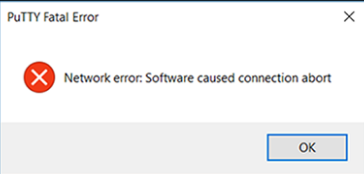
Putty network error: software caused connection abort

After installing Putty today, open and run the general prompt for some time

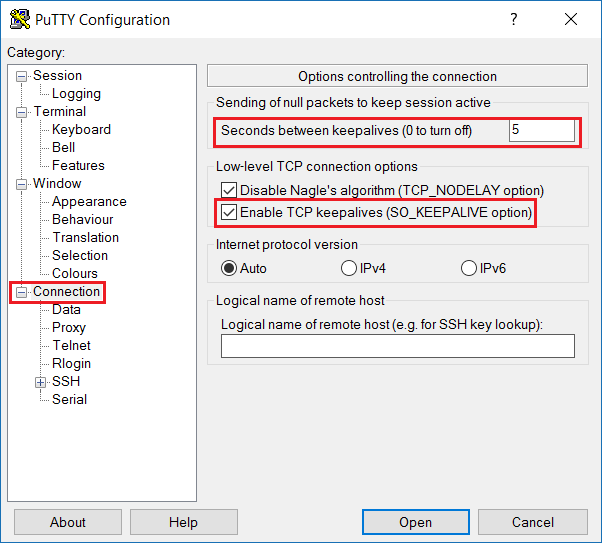
This error is due to the fact that some network routers and firewalls need to track all connections through them. Typically, these firewalls assume that the connection has failed if no data is moving in either direction after an interval. If there is no traffic for a period of time in the session, this can cause the PuTTY session to be unexpectedly shut down by a firewall. To solve this problem, you can configure PuTTY to send empty packets every few seconds and keep TCP active.
The methods are as follows:
Now, click Open to leave the SSH connection idle for a while and see if it remains the same. If you’re using a PuTTY session profile, don’t forget to save your profile with these new Settings. The Settings are as follows:

That will do.

SQL 2005 remote connection error (provider: SQL network interface, error: 28 – the server does not support the requested protocol

Solution: On the server side: Open SQL2005 SQL Server Management Studio program
(1) to connect to the database,
(2) trying to choose the registered under the menu Server
if there are no things out of the window, to update the local Server database engine right click on the select register
(3) on the local hope remote access database, right click on the select SQL Server configuration manager
(4) in the window, Select SQL Server 2005 network configuration in the left tree, select the appropriate database in the sub-set,
(5) and right click on TCP/IP in the right protocol to enable it
I followed this method to do first, and then found that it was still unable to connect to the server, finally use the following method to solve: start — “program –” Microsoft SQL Server 2005–& GT; SQL Server 2005 Peripheral Application Configurator select “Peripheral Application Configurator for Services and Connections” in this SQL server instance select Database Engine -& GT; For remote connections, select both TCP/IP and Named Pipes in the box on the right for local and remote connections

Visio2007 usage record

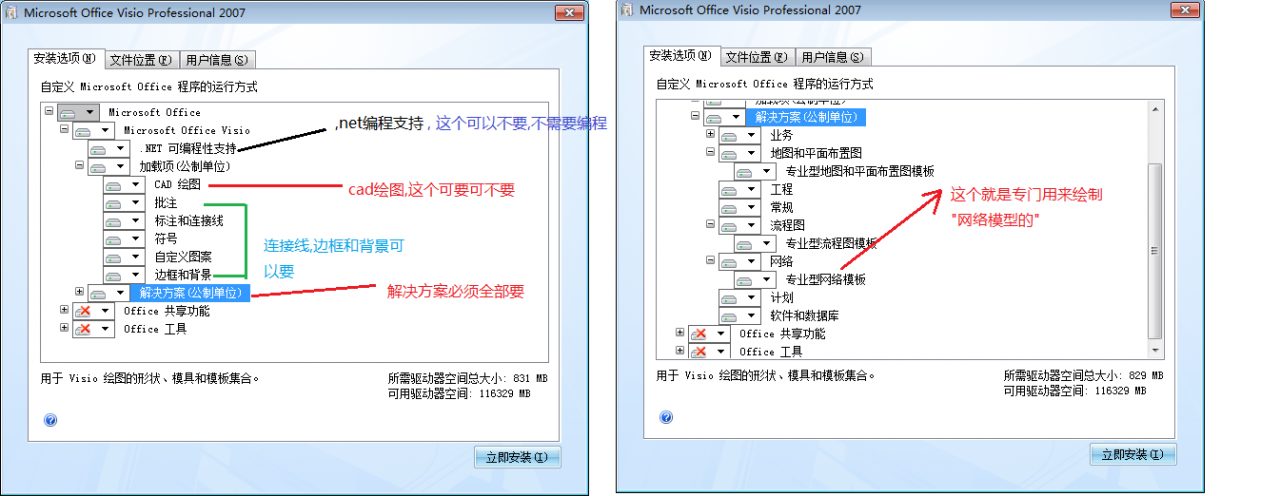
    installation, need to be selective installation, not all components need to install, such as office tools, office sharing functions, visio in.net programmable support does not need to install… Cad in Visio, either installed or not installed… The solution must be installed, or you can’t use the models to draw graphics…


Office Visio Professional 2007 simplified Chinese version
cd-key: w2jjw-4kydp-2ymkw-fx36h-qyvd8
= = = = = = = = = = = = = = = = = = = = = = = = = = = = = = = = = = = = = = = = = = = = = = = = = = = = = = = = = = = = =
Visio is a multi-document drawing program. The best thing about visio is that it offers a number of “molds” or “solutions” that are approximately 416M in size, the main of which is the inclusion of various illustrations. Another major feature is that it provides easy editing of graphics: e.g., zoom/auto connect… The name of the graphic document created by default is “drawing 1,2,3..” . Multiple Windows can be arranged conveniently by tile in the Window menu. The “shapesheet” actually provides the details of the document graphics.. Of course, graphics can also be modified through shapesheet. Other operations, such as toolbar operation customization, online and Offline search help, are the same as Word.
Online help is from: https://support.office.microsoft.com/... , in fact, offline help is available!
= = = = = = = = = = = = = = = = = = = = = = = = = = = = = = = = = = = = = = = = = = = = = = = = =
Display and print and save as Visio;

    printing basically just prints the content of the document area, the background part may print a small part of the content; When you save it as a PNG, you’re basically storing everything in the “whole” range, including everything in the background, into the PNG. And
    you can specify the background color of PNG images, such as the default white, or gray, etc. The full screen “F5” is only for display and cannot be edited.

In Visio, “shapes” can be thought of as “molds,” and “molds” are really just components, widgets, sort of visual programming.
Visio is simple to use: drag and drop/place/connect widgets.
Favorites is a place to save your favorite widgets and drag and drop them when you need to use them instead of looking for them in your library.
Why log in/register?Since browser is a record-free/save-free tool (for good reason, there is no need to keep it). So, want to on a web server to save a user’s personal information, such as: the goods into the shopping cart information, purchase records, the user’s IP/name/tel/used to sell private information, transaction records, search history, information browsing history and so on, then it must be in the database, with the user name/id/tel phone, etc. The user name/id/passwd/tel/phone, is the entrance to the user to view information about yourself, and database information (record/query/show) the primary key of primary key!! But these keys, messages/ data and so on can not be generated by the server itself, can not be generated casually, so it will be provided by the user, how to provide! —> Sign in!!
Actually, there are several tables associated with the user information: the user information table, the shopping cart table, the purchase record table, and the browsing history table. Useid is the foreign key of the following tables.
= = = = = = = = = = = = = = = = = = = = = = = = = = = = = = = = = = = = = = = = = = = = = = = = = = =

    in addition to using automatic line, can also draw a line, draw a line, do not select a line to set, this is only valid for the line, for the subsequent draw invalid…

= = = = = = = = = = = = = = = = = = = = = = = = = = = = = = = = = miscellaneous: = = = = = = = = = = = = = =
council: coun – cil: [k2ns2l] as “pencil” : pencil, pen – cil
pave hawks: [peiv] vt. The town council decided to pave The square. (2) the road is not asphalt. (the road is not asphalt.) Asphalt, asphalt; V. shop…
The street was paved with asphalt. V. the… To cover with grass. = to cover with grass.
The asphalt playgrounds have been grassed over or sown with flowers
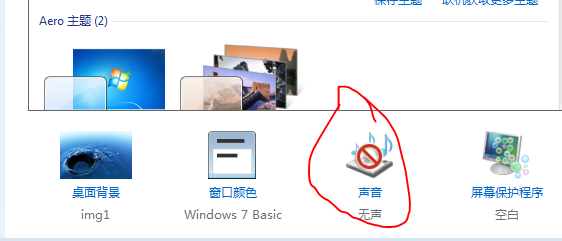
Windows sound theme: When a Windows user does an “invalid “/” illegal” operation, there is always a “flicker window “+ “bang”. The speaker can be shut down, but there is no sound when playing music/video. Use a “silent” sound theme!

For Office/Software and Windows software, almost all document page Settings are in the file menu, and together with the “Print preview/Print page Settings”!
For Visio, the distance of the A4 paper size (210mm * 297mm) is in the “lower left corner”, which is consistent with the usual XOY coordinate system: right up is the positive direction…
About text: When an object is selected, double-click on the object, or click on the “text” tool to add text in pairs. Text and object are associated… To get separate, object-independent text, use the “text” tool if you want to select an object…
Since the drawing tool always has to be dragged to take effect, the “handle” appears after the drawing and waits for adjustment. When the adjustment is finished, just click on the page. Equivalent to the “ok” button
Visio document is similar to Word document, except that Word is mainly used for text processing while Visio is mainly used for displaying/drawing widgets… Both are used to express/convey information, but in different forms. Like: singing and dancing, writing letters and drawing pictures…
The CTRL button is also used to drag and copy, while ctrl_shift_ copies in the same direction as horizontal and vertical.
There are a lot of useful and nice ICONS/images in Visio that you want to export?: Saves the Visio file as: HTML file (a Web file that separates text from images/ICONS). Then make use of HTML document this function: can make a general processing: want to automatically separate text and picture, extract, is to save the file as: HTML document!!

Solution of NPM err! Code elifecycle

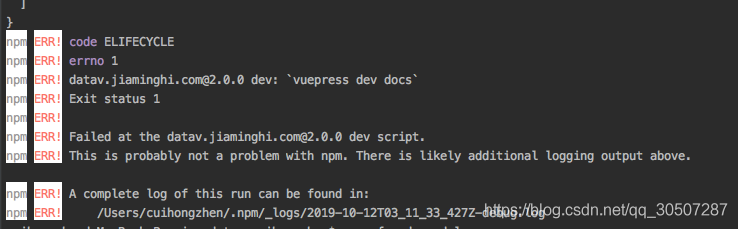
When starting the program using NPM Run Dev, the following error is reported:

npm ERR! code ELIFECYCLE
npm ERR! errno 1
npm ERR! [email protected] dev: `vuepress dev docs`
npm ERR! Exit status 1
npm ERR! 
npm ERR! Failed at the [email protected] dev script.
npm ERR! This is probably not a problem with npm. There is likely additional logging output above.

npm ERR! A complete log of this run can be found in:
npm ERR!     /Users/cuihongzhen/.npm/_logs/2019-10-12T03_11_33_427Z-debug.log


Solutions:

rm -rf node_modules
rm -rf package-lock.json
npm cache clear --force
npm install


[windows] U disk installed system, unable to format the selected partition [error: 0x8004242d]

 
directory
Problem a.
Ii. U disk installation system steps
3. Solve
4. Reference


Problem a.
 
Recently in the antique level computer reinstall the system, considering the introduction of domestic memory, good cheap oh, old computer thrown away, unfortunately, do not throw away the place, fortunately, upgraded once;
 
Since the old computer is the BIOS MBR boot partition, the default installation of Windows 10 is UEFI, so when I use the USB drive to install, I will go to where do you want to install Windows?This step, format the C disk partition, pop-up can not format, [error: 0x8004242D];
 
Ii. U disk installation system steps
 
Briefly record the process:
1. Download address: https://www.microsoft.com/zh-cn/software-download/windows10;
2. Download MediaCreationToolXXX. Exe.
3. Use mediacreationToolxxX. exe to install on usb storage;
4. Modify the BIOS boot item to boot on the U disk;
5. Change the Boot Mode, modify the SATA Mode (old computers, AHCI), explain and illustrate the reference address: https://www.zhihu.com/question/26048255;
6. Save THE BIOS Settings, then plug in the U disk, restart the computer, and follow the steps to install;
 
Normally according to the above operation steps, high probability is no problem; But still can’t for some machines for problems, such as I have met with the latest version of the Win 10 ISO is the default mode of EFI boot (but most old computer’s hard drive seems to be in the form of MBR boot partition, otherwise don’t call the old computers), go to format the partition that step, the next step walk not bottom go to, format the hard disk, is not willing to give up, instead of MBR and GPT will lose data, throw a partition also calculate, the key is to format the hard disk data;
 
I don’t want to format the entire hard disk or lose data, but I still want to boot the partition hard disk in MBR format and then install the Win 10 system. What should I do?
 
3. Solve
 
Delete the EFI directory and xxx. EFI file in the usb boot, restart the computer, and then switch to MBR to install and boot.
 
4. Reference

    http://rufus.ie/; https://baike.baidu.com/item/EFI/2025809?fr=aladdin;


(after)


A solution to 1603 error in installing vCenter server

background
VCeter Server was deployed in a virtual machine of Windows Server 2008 R2. Due to the change of virtual machine network card configuration, vCenter Server related services could not be started. After searching for a solution, I planned to reinstall vCenter Server.
Problems encountered
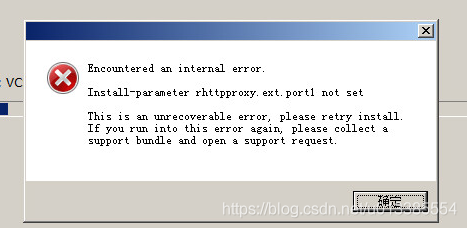
The deployment process blog.csdn.net/shengxia1999/article/details/52353177 mainly refer to this article. Here I mainly explain the problems I have encountered and the solutions. When Encountered with an internal error during the installation process, the specific error message of install-parameter Rhttpproxy. Ext.port1 not Set is shown in the figure below:

 
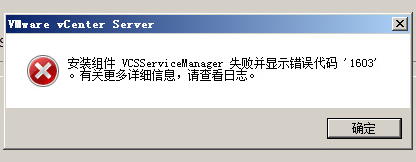
After this error occurs, the installation will exit, and at the end, ‘Installation component VCSServiceManager failed and error code 1603’ will be reported, as shown below:

If this error occurs, you should first check to see if the HTTP port configured during vCenter Server installation is occupied (using the command netstat -nao). If the port is not occupied, use the following method:
1. Delete C:\Program Files\VMware\vCenter Server directory;
2. Restart the virtual machine and reinstall
conclusion
This method may not solve all of these problems, but this is just one solution.