Category Archives: How to Fix

On and off of timer in JS

setInterval()
When a function
is called for a specified period of time:

setInterval(function,time,lang)

function: function to be called or code string to be executed
time: required parameters, every how long to call the function, in milliseconds
lang: optional parameters, running JScript | VBScript | JavaScript
clearInterval()
Means to stop the setInterval timer call function

function getTime() {
        console.log(123);
        if (true) {
            clearInterval(db)
        }
    }

let db = setInterval(getTime, 1000)

setTimeout()
Call a function after a certain time
syntax:

setTimeout(function,time,lang)

Function:
function: required, to be called
time: required, number of milliseconds to wait before executing code
lang: optional, script language: JScript | VBScript | JavaScript

Solve the flash card problem of winfrom project form

Add skin version, add
// to form loading event to make form not flicker
SetStyle(controlstyles.userpaint, true);
SetStyle(ControlStyles.AllPaintingInWmPaint, true);// erase background is prohibited.
SetStyle (ControlStyles. OptimizedDoubleBuffer, true); // double buffering
this.UpdateStyles();

///
///
///
protected override CreateParams CreateParams
{
get
{
CreateParams cp = base.createparams;
cp.ExStyle |= 0x02000000;
return cp;
return cp;
return cp;
}
}

Failed to execute goal org.apache.maven . plugins:maven-surefire-plugin :2.12.4:test

Today and yesterday, when I was doing the project and making progress, I found that MVN install could not succeed
always reported the following error:

[INFO] BUILD FAILURE
[INFO] ------------------------------------------------------------------------
[INFO] Total time: 4.698 s
[INFO] Finished at: 2020-11-15T16:58:47+08:00
[INFO] Final Memory: 11M/217M
[INFO] ------------------------------------------------------------------------
[ERROR] Failed to execute goal org.apache.maven.plugins:maven-surefire-plugin:2.12.4:test (default-test) on project CRMSystem: There are test failures.
[ERROR] 
[ERROR] Please refer to G:\Language Proctice\java\pro\20201109\CRMSystem\target\surefire-reports for the individual test results.
[ERROR] -> [Help 1]
[ERROR] 
[ERROR] To see the full stack trace of the errors, re-run Maven with the -e switch.
[ERROR] Re-run Maven using the -X switch to enable full debug logging.

some puzzled, looked up the information on the Internet but no result

Fortunately, the problem was finally solved and the solution was as follows:
2. In this case, add a method to the current test class and use the @test annotation

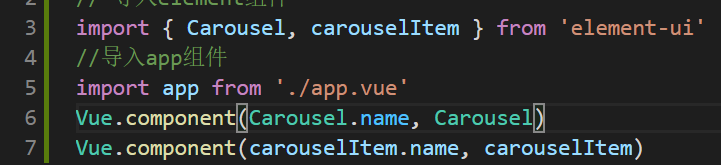
[Vue warn]: Unknown custom element: <el-carousel-item> – did you register the component correctly?

* *
Error:
At the beginning, the blogger saw the newspaper and wondered why it was wrong. It had happened before, but this time it was wrong. At the time of the newspaper, the blogger did not carefully read the reasons for the newspaper’s wrong, so he searched in a disorderly way, but could not find a solution.

**
Solutions:
It turns out that when using the carousel, not only the carousel, but also the carousel-item should be registered. After registration, it will be displayed normally.

Ubuntu 20.04 builds nginx 1.18.0 and MAC file transfer / download to server

Install Nginx, configure firewall and file structure; SFTP transfer download, SCP upload download.
// it is not clear here that it is very similar to the last one.

Nginx
Install Nginx
Apt get update
apt install nginx;
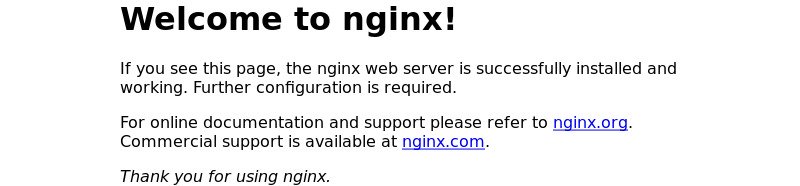
after installation, the service will be automatically executed,
verification: systemctl status nginx;
Configure the firewall
ufw allow 'Nginx;
verification :ufw status;
Successful execution interface

File structure

all Nginx configuration files are located in /etc/nginx directory.
the main configuration file for Nginx is /etc/nginx/nginx.conf. To make the Nginx configuration easier to maintain, it is recommended to create a separate configuration file for each domain. You can have as many server block files as you want.
Nginx server prevents files from being stored in the /etc/nginx/ locations-available directory. Nginx will not use the configuration files found in this directory unless they are linked to the /etc/nginx/ location-enabled directory.
to activate the server block, you need to create a symbolic link (pointer) from the configuration file site in the sites-available directory to the directory sites-enabled.
is recommended to follow standard naming conventions. For example, if your domain name is mydomain.com, then your configuration file should be named /etc/nginx/sites-available/mydomain.com.conf
the/etc/nginx/snippets directory contains can included in the configuration file from the server. If you use repeatable configuration segments, you can refactor these segments into fragments and include the fragment file in the server block.
Nginx log files (access.log and error.log) are located in the /var/log/ Nginx directory. It is suggested that there are different Access, and the error is the log file of each server module.
The MAC sends files to the server
SFTP transfer download
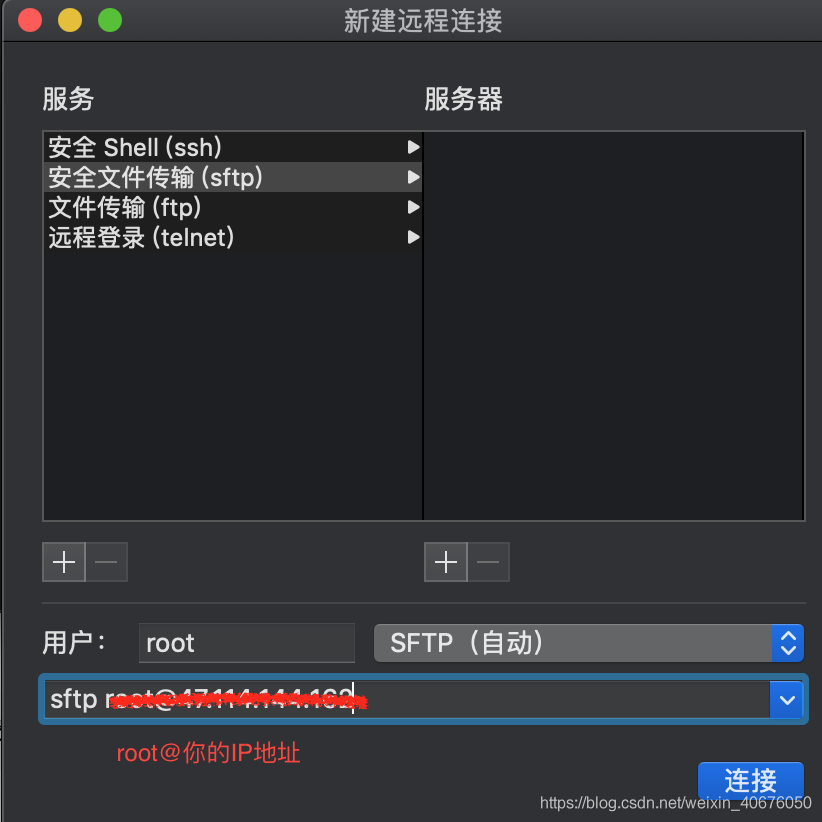
Create a new remote connection in the shell and send it using SFTP (prompted for server password) :

Use put to send command: put local file path remote path ; The
put command cannot upload a folder directly. Can be packaged for delivery.
use the get download command get remote path ;
use bye to exit SFTP :bye.
SCP upload and download
1, from the server to download file SCP username @ servername:/path/filename/Users/MAC/Desktop (local directory)
For example: SCP [email protected]:/root/zouzouzou. TXT/Users/MAC/Desktop is the server/root/zouzouzou. TXT/Users/MAC/downloaded to a local Desktop directory.
[email protected]: SCP - r/raid5 ZXX/my_download/zouzouzou.zip/users/zhuxiaoxia/Desktop
2. Upload local files to the server SCP /path/filename username@servername:/path;
For example, SCP/Users/MAC/Desktop/zouzouzou. TXT [email protected]:/root/
3. Download the whole directory scp-r username@servername:/root/ (remote directory) /Users/ MAC /Desktop (local directory)
For example : scp-r [email protected]:/root/ /Users/ MAC /Desktop/
4. Upload directory to server scp-r local_dir username@servername:remote_dir
For example: scp-r test [email protected]:/root/ upload the test directory under current directory to the server's /root/ directory
Reminder: The target server wants to enable write permission.

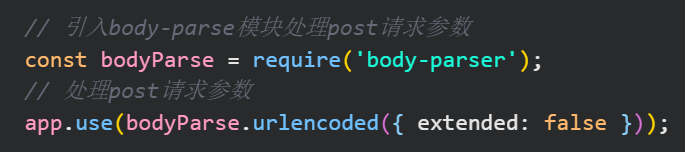
[nodejs] error request aborted after request routing in post mode

The introduction of
I added a new route to my project to try to add some functionality. After the function code was added, I found that the page was loading all the time when I submitted the POST request. At this time, I went to the console and reported something wrong: BadRequestError: Request Aborted
This makes me very confused. Separate test function code and the existing project when it is working well, but can be combined together to die, what is the reason?
why
Encounter the problem first Baidu, but goose Baidu a day also did not Baidu to, basically still do not know what the problem is only an error information request aborted also do not know Baidu what…
Then you can only hard look at the error message in an attempt to discover the cause. First look at the error message: \node_modules\raw-body\index.js:231:10


annotation of these two lines of code is ok, but the problem comes, I can’t change the processing library, how much code should be changed.
Then I still can’t find the reason, and finally in the chat with the boss was the boss out of ! Sure enough, a proper route was run before the function code, and post requests were processed using express-formidable, a formidable component that clashed between the body-parser and express-formidable, causing Request Aborted
django.core.exceptions . improverconfigured: mysqlclient 1.4.0 or new is required; you have

Django. Core. Exceptions. ImproperlyConfigured: mysqlclient 1.4.0 or newer is required; You have solutions for 0.10.1
An error occurred today when replacing mysql database while learning django:
is written in _init_. Py

import pymysql
pymysql.install_as_MySQLdb()

Error: the django. Core. Exceptions. ImproperlyConfigured: mysqlclient 1.4.0 or newer is required; You have 0.10.1.
This is actually a mismatch between django and Pymysql. Python3 is not supported by mysqldb.
1. Tried to comment the python/Lib/site – packages/django/db/backends/mysql/base. Py files
' ' 'if the version & lt; (1, 4, 0): Raise ImproperlyConfigured(' mysqlClient 1.4.0 or Newer is required; You have %s.' % Database.) '
2. Updated version of Django, also useless
Final solution:
init.py is changed to

import pymysql
pymysql.version_info = (1, 4, 13, "final", 0)
pymysql.install_as_MySQLdb()

Specify the Pymysql version directly
Xiaobai learns Python, if there is a mistake, please give me more advice

Differences between VI and VIM in Linux

All Linux systems will be built in vi text compiler
vim has the ability of program editing, is an enhanced version of vi, can take the initiative to distinguish the correctness of grammar with font color, convenient programming. The programming functions of code completion, compilation and error jump are particularly rich.
vi three modes
command line mode
insert mode
insert mode
bottom line mode
command line mode: when users edit files with vi, they initially enter the general mode. In this mode the user can move up and down through the cursor on the “delete” or “the whole line operations” and other operations, also can undertake “copy”, “paste”, such as operation, but cannot edit text
insert mode: text edit users to input, the user can press the ESC key to return to the command line mode
the bottom line: the cursor is located in the bottom of the screen, the user can save to file, or exit the operation, also can set the editing environment, such as looking for a string, line Numbers listed
common command line mode function keys

function keys

function

I

switch to the insert mode, in front of the current cursor insert input text

a

switch line mode, Behind the current cursor insert input text

o

what line mode switch

Ctrl + b

screen back to turn over a page

Ctrl + f

screen forward one page

Ctrl + u

screen turn back half a page

screen turn back half a page

0 (zero) array

cursor to the beginning of the bank

G

cursor to the end of the file

nG

cursor to the first n rows

$

moved to the end of each line cursor line

n

cursor moves down n

/name

after the cursor a called name string

?The name

before the cursor a called name string

x

delete the location of the cursor one character

x

delete the location of the cursor one character at a time before

dd

delete line cursor

NDD

lines from the cursor downward to delete n

yy

copy line cursor

nyy

copy from the cursor down n rows

p

characters paste to the cursor to the buffer

n

recovery before an action

: the set Nu

cancel line number

: set nonu

cancel
Bottom row mode function key

function keys

function

: w

to edit the file to disk

: q

exit vi (system to do modified files giving prompt)

: q!

forced exit vi (to the modified file is saved)

: wq

save and exit

: w/fileame

save a file named filename