Category Archives: How to Fix

An import error is reported in the python. The solution to setting. Pylintrc is invalid

/. Pylintrc problem

because of vs code
, unable to import, searched the pylint setting on the Internet and used the Suggestions in many articles
Pylintrc . Pylintrc set init-hook initialization sys.path method. But no matter how you set it up, those errors don’t go away. Out of the spirit of not giving up until solving the problem, I finally found:

Originally I put the source code on the desktop, python with conda configured virtual environment. Then I ignorantly put . Pylintrc in the folder Scripts and pylint.exe.
Put the RC file on the desktop and solve the problem.

init-hook='import sys; sys.path.append("C:/MySoftware/Miniconda3/envs/tf_env/Lib/site-packages/")'

Just to make fun of how detailed the tutorials are and how elaborate the stuff behind init-hook is without making it clear how the working folder is related to the RC file, resulting in the RC file being set up but not being found by Pylint. Misbehaving! In the official website, the order of pylint to find RC files is clearly written, but it is too inconspicuous, so I searched for a long time.
I like the idea of putting it in a working folder so that each code file can personalize the path it is looking for.
GuzzleHttp cURL error 60: SSL certificate problem: self signed certificate

An error problem
When GuzzleHttp makes an HTTPS request, it reports the following error

cURL error 60: SSL certificate problem: self signed certificate

The solution
The difference between an HTTP request and an HTTPS request is that Guzzle needs to pass in a configuration item in the constructor,

$client = new \GuzzleHttp\Client(['verify' =>false]);

Error loading in flex integration: Java / jdk1.6.0_ 35\jre\bin\server\ jvm.dll

Error loading: \ Java \ jdk1.6.0 _35 \ jre \ bin \ server \ JVM DLL

Error :
complie:
[exec] Error loading: D:\Program Files\Java\jdk1.6.0_35\jre\bin\server\ jvvm. DLL
[exec] Result: 6
Because flash builder is based on eclipse and eclipse is using Java technology and Java needs jre
to run and flash builder needs to run on a 32-bit jre if we have Java installed on 64 then this error will occur

solution
1. Download and install 32 jre
2. Edit FLEX_HOME\bin\jvm.config file and set java.home
for example :
#java.home=
java.home=D:/Program Files/Java/jre6-32

note :FLEX_HOME refers to flex SDK directory, such as D:\Program Files\Adobe Flash Builder 4.6\ SDKS \4.6.0

Can’t create PDF file with font Calibri bold error resolution

Error condition:

%%[ ProductName: Distiller ]%%
Mangal not found, using Courier.
%%[ Error: invalidfont; OffendingCommand: xshow ]%%

Stack:
[141 0]
()


%%[ Flushing: rest of job (to end-of-file) will be ignored ]%%
%%[ Warning: PostScript error. No PDF file produced. ] %%

How to Fix?
are you sure you have Calibri bold installed on your machine? Also, you may go to “Devices and Printers”
right click on Adobe PDF printer choose printer preferences from Adobe PDF settings tab uncheck “Rely on system fonts; do not use documents fonts”

win7 error code 0x80070522

Run the CMD input with the administrator
icacls c:\ /setintegritylevel M
Icacls is a command-line tool that displays or modifies a random access Control list (DACL) on a specified file and applies the stored DACL to files in a specified directory. Icacls.exe replaces the cacls.exe tool for viewing and editing DACL. ICACLS is an updated version of the CACLS tool in Windows Server 2003 SP2 and can be used to reset account control lists (ACLs) in files from the recovery console as well as backup ACLs. Unlike CACLS, ICACLS can correctly pass changes and creation to inherited ACLs. For more information about the use of ICACLS and the commands, you can run “ICACLS /?” at the command prompt. Make a visit. C) Improved upgrade of C) Improved upgrade of C) Improved upgrade of C) Improved

Reproduced in: https://www.cnblogs.com/zedzhao/archive/2010/01/15/1648225.html

HYDU_ create_ Process (. /utils/launch/launch.c:69): execvp error on file.. Error handling

[size=medium] When the MPI program is compiled and compiled through, but the execution times are wrong

[color=red]HYDU_create_process (./utils/launch/launch.c:69): execvp error on file hello (No such file or directory)[/color]

is probably due to the fact that the absolute path is not used when executing the program.

simply execute the program using the absolute path, as follows:

$mpicc -o cpi cpi.c

$mpirun -np 4./cpi (add “./ “) [/size]

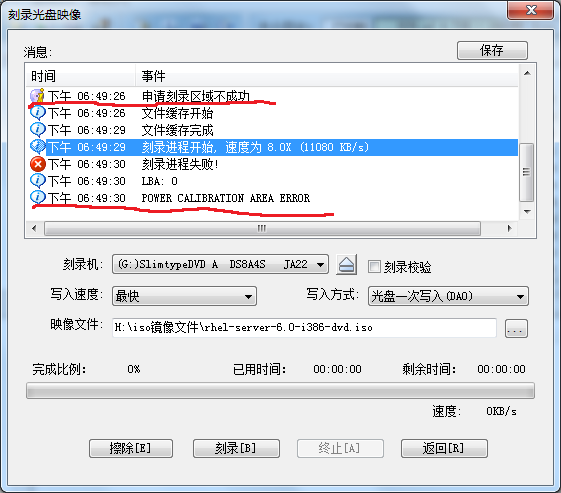
Utraiso recording DVD application area failed power calibration area error


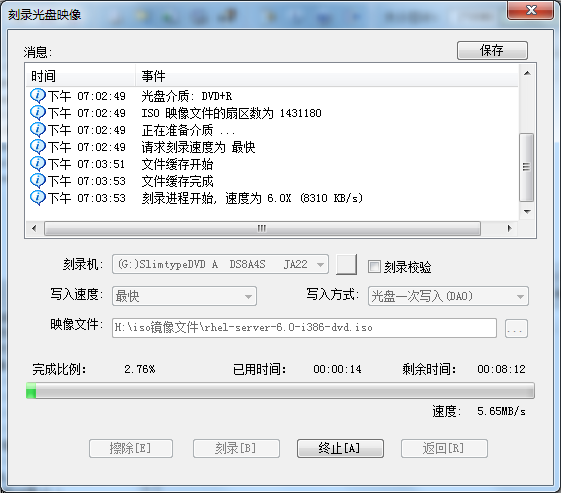
Originally was to burn a RHEL 6.0 system disk, did not expect out of this problem.
As shown in figure:
(UtraISO version 9.5)


Asked the teacher, Google’s answer is as follows: I test \ to describe the following
1, the DVD drive a, how can not burn function, DVD all don’t know how do
2, incompatible, as stated in a b
3, burner is broken c, obviously is normal
4, do not support high-speed write, reduce the speed try D, no
5, head aging e, impossible
— — — — — — — — — — — — — — — — — — — — — — — — — — — — — — — — — — — — — — — I explore solutions — — — — — — — — — — — — — — — — — — — — — — — — — — — — — — — —
Solutions:
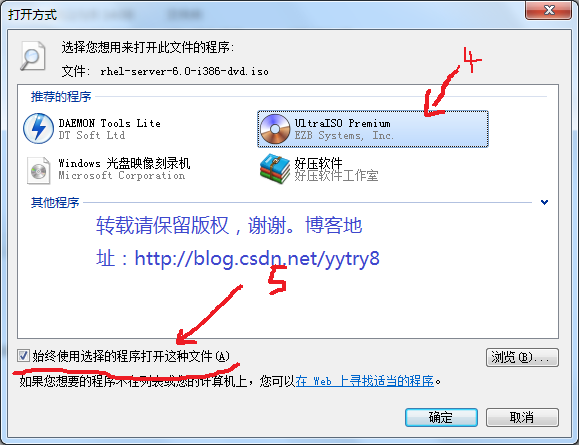
1, select the ISO file to be burned –& GT; 2, right – button –& GT; 3. Opening mode –& GT; 4, UltraISO Premium — — — — — — — — — — – & gt; 5. Always open the file using a selected program –& GT; 6. Yes.
Note: In step 5, always check the box before “Always use the selected program to open such files.”


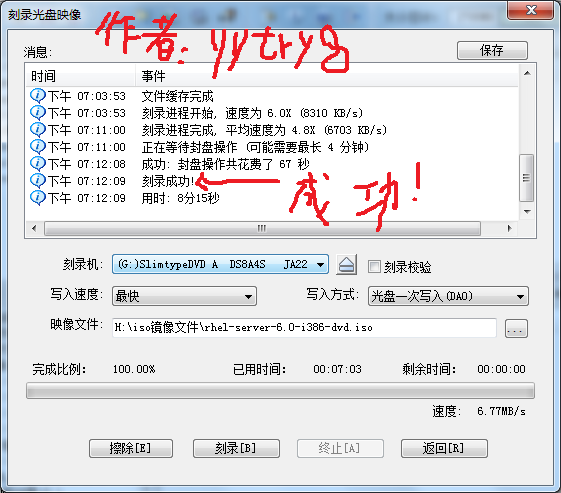
Start burning normally… Drops drops…


Ok, burn successfully.

The author’s blog: http://blog.csdn.net/yytry8

— — — — — — — — — — — — — — — — — — — — — — — — — — — — — — — — — — — — — — – but — — — — — — — — — — — — — — — — — — — — — — — — — — — — — — — — — — — — — — — — — — — — — — — — — — — — — — — — — — — — — — — — — — — — — line — — — — — — — — — — — — — — — — — — — — — — — — — — —

Lenovo-win7 system computer boot prompt error 1962: no operating

The above problem is mainly caused by the boot mode selection error (most of the problems are caused by the original UEFI boot, but the BIOS setting causes the boot failure).
(1) Press F12 and then select?Enter ?Setup?
(2) Then go to SETUP and then to STARTUP. Maybe the fourth or the fifth.
(3) Down to find CSM press enter, then select ENABLE.
(4) In this directory (my computer is, maybe different computers are different), go to BOOT PRIORITY, now go to UEFI FIRST
(5) Now press F10, now SAVE. Then try to restart it.
After this round, there should be no problem. If there are any other problems, you need to check to see if your boot option is selected to boot from hard disk.

Solve fatal error: ‘FFI. H’ file not found

Error installing Rumps in Python:

Modules/objc/libffi_support.h:4:10: fatal error: 'ffi.h' file not found
#include "ffi.h"
         ^
1 error generated.
error: Setup script exited with error: command 'cc' failed with exit status 1

The reason is the lack of libffi library, using BREW can be installed.

$ brew install pkg-config libffi
$ export PKG_CONFIG_PATH=/usr/local/Cellar/libffi/3.0.13/lib/pkgconfig/
$ pip install bcrypt

Installation user interface mode not supported solution

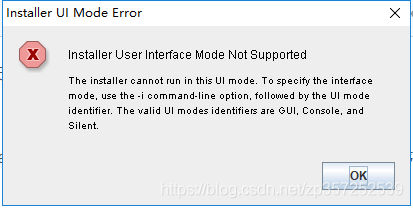
Today, while installing a program, I reported the following error:

Installer User Interface Mode Not Supported, Installer User Interface Mode Not Supported
Before is:

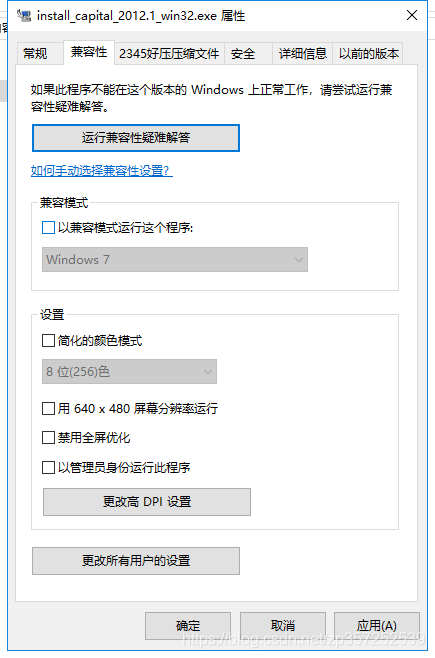
After:

 
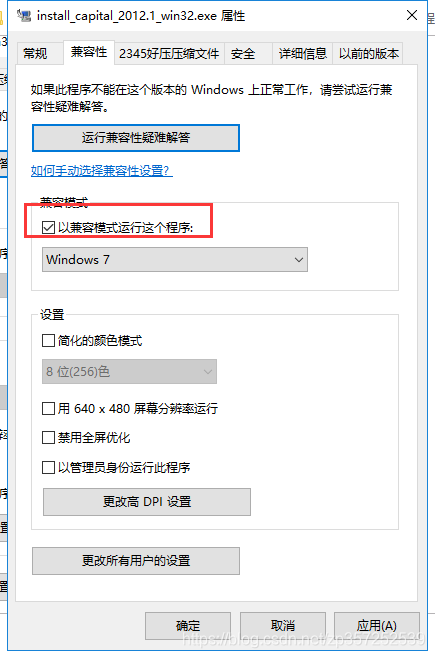
It feels like an incompatibility problem, so just follow past experience and right-click the installer — & GT; Property, under compatibility, check.
Then run it in administrator mode and it’s OK


ERROR 0210: Stuck Key 36

Saturday, December 28, 2002 at 12:02 am
Windows Me Annoyances Discussion Forum
Posted by Jack Gulley (5917 messages posted)

This is a system board POST/BIOS error code (nothing to do with Windows). The ERROR 210: is a standard POST (Power On Self Test) error message that indicates an error with the keyboard. The error condition is that a keyboard scan code was received from the keyboard when none was expected, after the keyboard was Reset. The “Stuck key 36” indicates that scancode 36 was received, indicating that the Right Shift key was stuck down or was pressed when it should not have been.
If this occurs most of the time when you power on your system, then it indicates that this key is sticking down or the key mechanical or electrical parts are broken. Some times blowing out and cleaning out around the keys will resolve this problem. Some times holding the keboard vertical with the front edge down and droping several inches will clear up the problem. Otherwise, you need to replace your keyboard with a new (or at least a working) one.
 

After compiling. Java, the following appears: Note:checkUser.java uses unchecked or unsafe operations.Note :Recompile with -Xlint :unchecked for details.


If it is shown in Chinese, it means:
Note: A.java USES unchecked or unsafe operations.
Note: For details, use -Xlint: Unchecked recompile.
JAVA5.0 generics are used, but the 5.0 generics do not do type checking. For example, ArrayList a =new ArrayList();
a.add(“hello”); There are several solutions to this warning:
1) Prefix a method with @Suppresswarnings (“unchecked”)
2) declare generic types, such as ArrayList< Object> A = new ArrayList< Object> (a);
3) Compile with 1.4 COMPATIBLE JDK, Javac-Source 1.4 test.java
4) You can also view warning messages like Javac Xlint: Unchecked test.java. This will display the detailed warning information