Category Archives: How to Fix

CMake Error: Could not find CMAKE_ROOT !!!

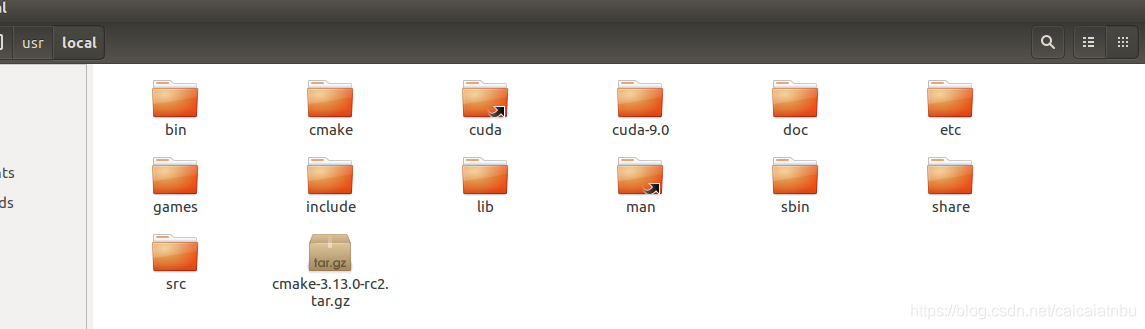
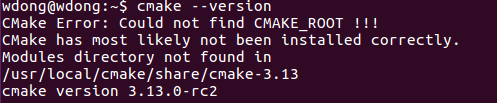
The operation error is shown in the figure below:

CMake version 3.13.0-RC2
The installation package is placed in the /usr/local/directory

Recompile the new version

cd /usr/local/

sudo tar -zxv -f cmake-3.13.0-rc2.tar.gz

sudo mv cmake-3.13.0-rc2 cmake

cd cmake

sudo ./bootstrap --prefix=/usr

sudo make

sudo make install

cmake --version

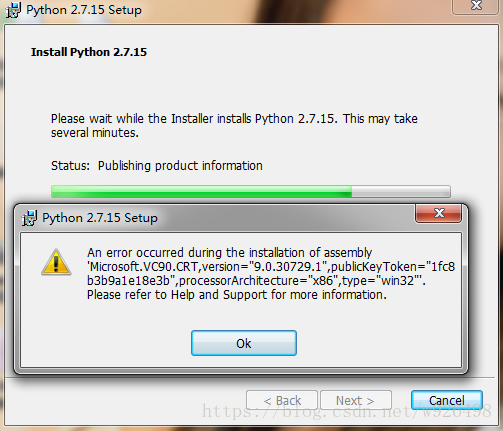
An error occurred during the installation of assembly

It is wrong to install Python. The detailed error information is shown in Figure 1.

Figure 1

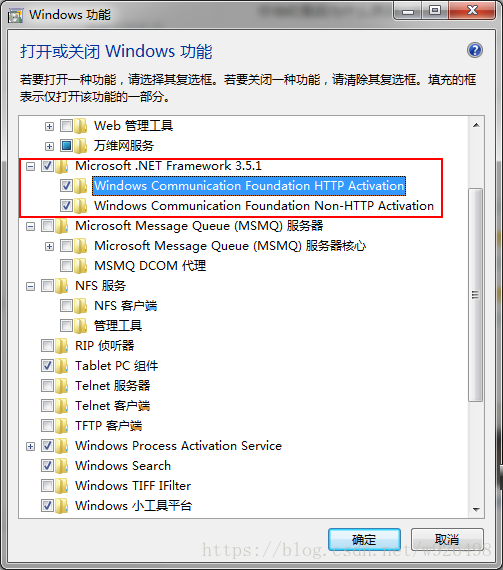
Find the control panel in my Windows 7 system -& GT; Procedures or functions -& GT; Turn Windows on or off
In the pop-up box, change the Microsoft.NET Framework 3.5.1 to check, that is, select all the functions of Microsoft.NET Framework, as shown in Figure 2

Figure 2


Reinstall Python, and you’re done!

Curl HTTPS returned errno 35 (SSL connect error) error

CURL HTTPS returns the ERRNO 35(SSL CONNECT ERROR) ERROR
WeChat payments occasionally fail to get a prepay id.
WeChat pay will be asked to get prepay from WeChat server id (https://api.mch.weixin.qq.com/pay/unifiedorder). After we finished the development (the language is PHP, using WeChat’s payment SDK, and using curl to make requests), on the machine in the test environment, we found almost no failure of requests, but after we went online, we found frequent errors, with a probability of 1/5 or even higher. At the beginning, I did not delve into the reasons and tried again. However, I found that as long as I failed, I would fail again.
The curl error recorded is: errno:35, error: SSL Connect Error.
Search relevant information online, did not find a solution. Contact WeChat technical support, they have no Suggestions, think it is our problem, let us check by ourselves.
On our server, we captured packets by tcpdump: Tcpdump – I eth1 IP host 140.207.69.102-w wxpay.cap, comparing the successful and failed packets (using Wireshark analysis) :


failed packets:

failed packets:

AIX system error one disk error

AIX system error – disk error

System environment:
Operating system: AIX 5.3.8
The Oracle: Oracle 10 gr2
Case Study:
After luns are divided on the array, the disk state is defined after the AIX system recognizes it:
[root@aix214:/]#lsdev -c disk
Hdisk0 defined 06-08-02 Other FC SCSI Disk Drive
Hdisk1 Available 08-08-00-3 0 16 Bit LVD SCSI Disk Drive
Hdisk2 Available 06-08-02 Other FC SCSI Disk Drive
Hdisk3 Available 06-08-02 Other FC SCSI Disk Drive
Conversion “Available” times wrong:
[root@aix214:/]#mkdev -l hdisk0
Method error (/usr/lib/methods/cfgscsidisk):
014-040 Error initializing a device into the kernel.

Query disk information through THE ODM library:
[root@aix214:/]#odmget -q”name=hdisk0″ CuDv

1

2

3

4

5

6

7

8

9

CuDv:


The name =
"hdisk0"


The status =
The 0
The ;; Flag id =
0


The chgstatus =
0


The ddins =
"scsidisk"


The location =
"06-08-02"


The parent =
"fscsi0"


The connwhere =
"1"


The PdDvLn =
"disk/fcp/osdisk"

[root@aix214:/]# odmget-q "name=hdisk2" CuDv (normal disk)

1

2

3

4

5

6

7

8

9

CuDv:


The name =
"hdisk2"


The status =
The 1
The ;; Flag id =
1


The chgstatus =
0


The ddins =
"scsidisk"


The location =
"06-08-02"


The parent =
"fscsi0"


The connwhere =
"2"


The PdDvLn =
"disk/fcp/osdisk"

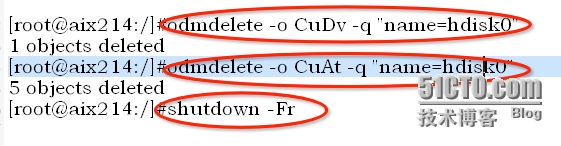
Solution :(clear ODM information)

After system restart:
[root@aix214:/]#lsdev -c disk

1

2

3

4

The hdisk0 Available
06
-08
- 02
Other FC SCSI Disk Drive

The hdisk1 Available
08
-08
-00
-3
,
The 0
The 16
Bit LVD SCSI Disk Drive

The hdisk2 Available
06
-08
- 02
Other FC SCSI Disk Drive

The hdisk3 Available
06
-08
- 02
Other FC SCSI Disk Drive

@ So far, problem solved!

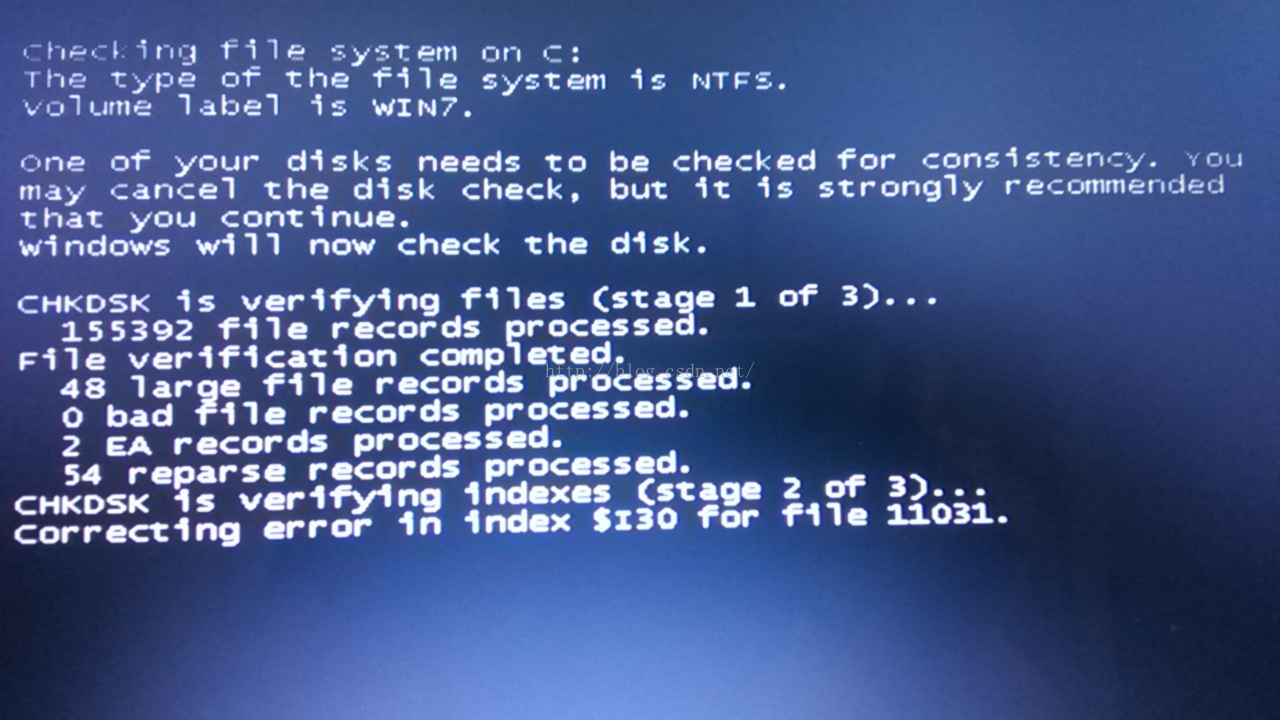
correcting error in index $I30 for file 11031

volume label is win7
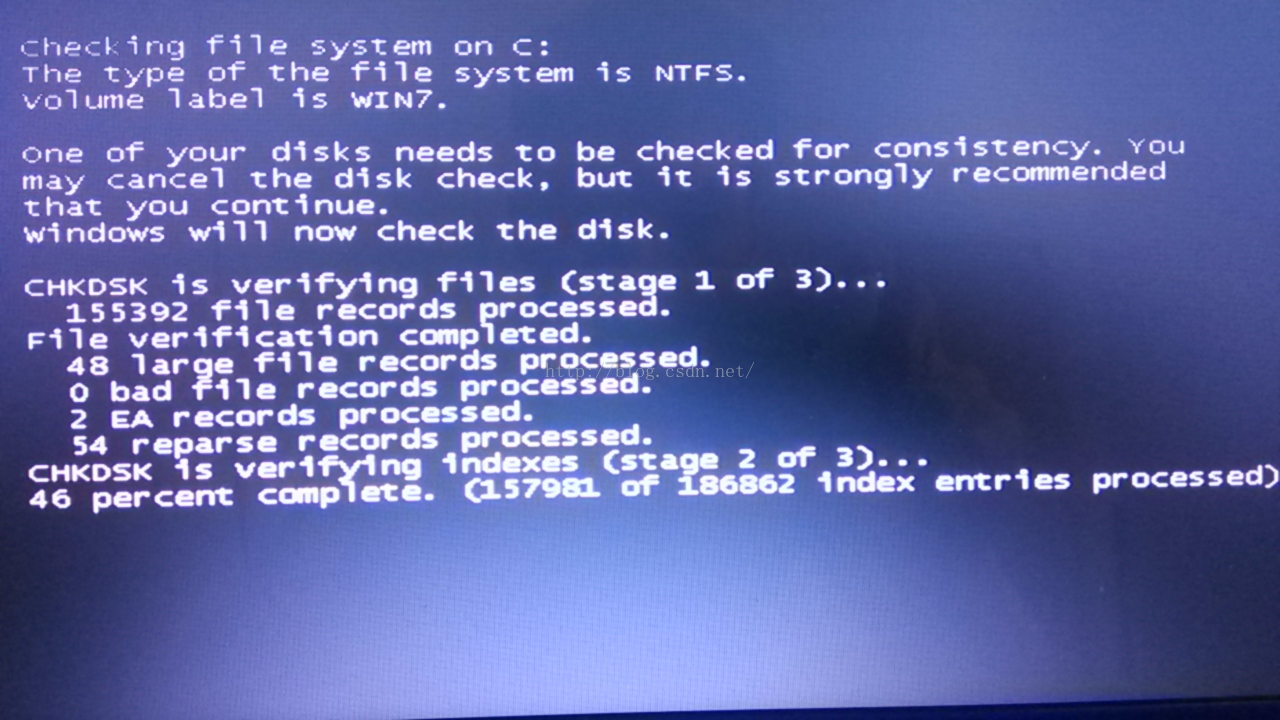
Boot is always into CHKDSK, skip can enter the system, CHKDSK will report an error to stop there, can only restart.
Cause: May be due to an interruption of the previous repair process.
Solution: press F8 to repair the system, restart CHKDSK and enter the system without error, as normal.


php mysqli_ connect_ Error () and mysqli_ connect_ The difference of errno() function

First let’s look at the official definition:

Grammatical definitions:
Definition:
> Mysqli_connect_error () : The function returns an error description of the last connection error.
> Mysqli_connect_errno () : The function returns the error code for the last connection error.

Note: One returns an error description and the other an error code.

Uncaught Error: Script error for ” popper.js “, needed by: bootstrap solution

Uncaught Error: Script error for "popper.js", needed by: bootstrap
https://requirejs.org/docs/errors.html#scripterror
    at makeError (require.js:168)
    at HTMLScriptElement.onScriptError (require.js:1738)

This error is caused by Bootstrap’s dependence on the popper.js component. Bootstrap relies on jQuery or some plug-ins that depend on popper.js.
I found a solution online.

require(["popper"], function(popper) {
    // set popper as required by Bootstrap
    window.Popper = popper;
    require(["bootstrap"], function(bootstrap) {
        // do nothing - just let Bootstrap initialise itself
    });
});

Try it, the problem is still unsolved.
Then start with bootstrap.
The previous code in bootstrap looks like this.

(function (global, factory) {
  typeof exports === 'object' && typeof module !== 'undefined' ?factory(exports, require('popper.js'), require('jquery')) :
  typeof define === 'function' && define.amd ?define(['exports', 'popper.js', 'jquery'], factory) :
  (factory((global.bootstrap = {}),global.Popper,global.jQuery));
}(this, (function (exports,Popper,$) { 'use strict';

Manually change the configuration in RequireJS to require Paths instead of popper.js. My configuration looks like this.

'popper':                 'popper.js/dist/umd/popper.min',

Therefore, directly change the first few lines of bootstrap source code popper.js to popper to solve the problem.
 
However, I think it is inappropriate to change the source code in this way. So he looked for a solution.
 
The ultimate solution is this.

require.config({
  baseUrl: '/vendors',
  paths: {
    'jquery':                 'jquery/dist/jquery.min',
    'bootstrap':              'bootstrap/dist/js/bootstrap',
    'popper':                 'popper.js/dist/umd/popper.min',
    ...
  },
  shim: {
    'bootstrap': ['jquery']
  },
  map: {
    '*': {
      'popper.js': 'popper'
    }
  }
});

The core solution is:

Add a map configuration in the configuration of require

‘popper.js’: ‘popper’
 
And then I met,
Datatables.net – BS4 relies on datatables.net as well.
Add a row to the map to configure:
‘datatables.net’: ‘datatables’

Reproduced in: https://my.oschina.net/justplay/blog/2992283
Busybox encountered input/output error while mounting NFS to TMP file system

Error is as follows
Mount -T NFS 192.168.1.83:/home/ WRR/TMP/WRR
< 4> svc: failed to register lockdv1 RPC service (errno 111).
< 4> lockd_up: makesock failed, error=-111

If I add nolock it will just return. But later copy file card dead. But it’s a little too much.

Then,
The mount -t NFS 192.168.1.83:/home/WRR/web/TMP/WRR
& lt; 4> SVC: failed to register lockdv1 RPC service (110) errno.
the mount: mounting 192.168.1.83:/home/WRR/web on/TMP/WRR failed: Connection timed out

Maybe this error is related to Nfs server permissions, so add the no_root_squard parameter to the server. To continue. There’s still a mistake.

Because the NFS server factor is excluded, then mount is fine (because it’s a little copier). So this is a story that has nothing to do with servers and mounts.

See on the English post (http://forums.xilinx.com/t5/Embedded-Linux/nfs-mount-problem-on-microblaze/td-p/153272)
Something is not running on the Busybox file system. Some additional parameters need to be added.
The mount -o port = 2049, nolock, proto = TCP -t NFS 192.168.103.83:/home/WRR/web/TMP/WRR
It worked. The magic parameters are in port and proto= TCP. The exact cause is unknown.

SCRIPT1002: syntax error File: 0. chunk.js ,SCRIPT5009: ‘Map‘ is undefined File: 0. chunk.js -Solutions

Scene description


The React project starts with NPM run start and works fine in Chrome, Firefox, and Edge, but when Internet explorer opens, the console reports an error with the title
The solution


1.SCRIPT1002: syntax error File: 0. Chunk. Js, Line: 2296, Column: 27
SRC /index.js
add the following and put it on the first line

import 'react-app-polyfill/ie9';
import 'react-app-ployfill/stable;'
import 'fast-text-encoding/text';

Json
find browserslist and add ie9 which is the above support

"browserslist" {
	"production": [
		...,
		"ie>9",
	],
	"development": [
		...
		"ie>9",
	]
},

First, ensure the above module, if not, you can execute NPM install to install
After the module is installed, Internet Explorer opens the project again and the problem is resolved. But then the following problem arises…
2.SCRIPT5022: SyntaxError File: 1. chunk.js, Line: 197681, Column: 38
The error in the Internet Explorer console, the solution:
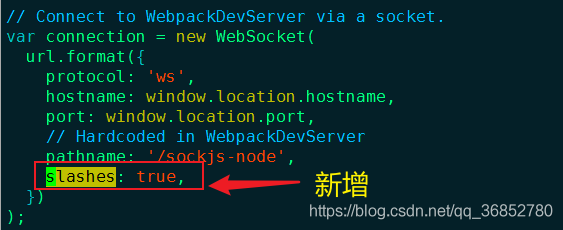
Open the /node_modules/react - dev - utils/webpackHotDevClient js , in the following code to add slashes: true,

then,
goes into the node_moudles folder, delete all contents of the . Cache folder, and clear the cache in Internet explorer.
SCRIPT5009: 'Map' is File: Map is undefined e.chunk.js, Line: 2340,0 Column: 3
I did not solve this error by myself. Due to the company project, NPM install cannot be run on the server's Intranet. Therefore, I provide ideas and hope you can solve it perfectly.
Official advice: https://reactjs.org/docs/javascript-environment-requirements.html
calculate, this has not been solved, sorry...

Unable to open the physical file “d:\***.mdf”. Operating system error 5: “5(Access is denied.)”.

SQL SERVER2008 is installed under Windows 7. An error occurred trying to attach an existing database MDF file,
Unable to open the physical file “d:\***.mdf”. Operating system error 5: “5(Access is denied.)”.
Is to set the SQL Server related account access to the file
Let Management Studio run as an administrator
 

SQL Server 2008 login 4064 error solution

This error is caused by the account being unable to open the default database
Change the default open database for this account.
If, unfortunately, your SA account and Windows authentication are both open to the same database by default, logging in either way is equally useless
If you have an account that you can log in to, just right click on the security – login username property and change the default database to master.
If you cannot log in either way, modify the default database for the SA by following the command below
If you’re unlucky enough to forget your SA password and you can only log in with Windows authentication, and you don’t happen to know the Windows login name,
Ga can only try to find out what the Windows identity login name is
The combination is probably the computer name \Administrator. Run the following command with CMD to change the default open database for an account, sql2005 version below, and change SQLCMD to ISQL
sqlcmd -E -d”master” -Q”exec sp_defaultdb N’sa’, N’master'”

Reproduced in: https://www.cnblogs.com/Jerseyblog/p/4971227.html

Runtime error r6016 problem

The introduction
Life is like a play, every day in the mistakes, but I have been too deep into the play, all the mistakes will be solved.
The problem

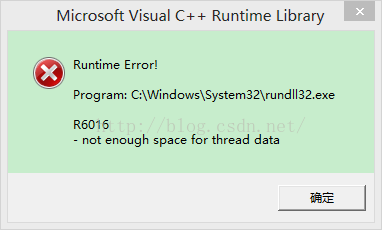
I didn’t know what I ordered today, and then the computer reported a mistake, as shown in the picture below:

Originally thought to ignore it, hurriedly do other things, then think a problem can not compromise ah, if not immediately solved, may cause a bigger problem. So, let’s see how I solved it!
To solve
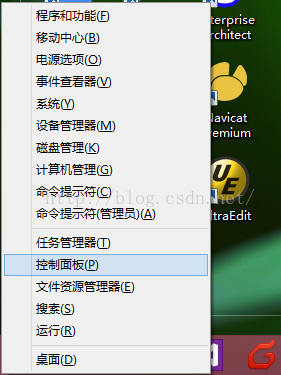
1. Open control panel

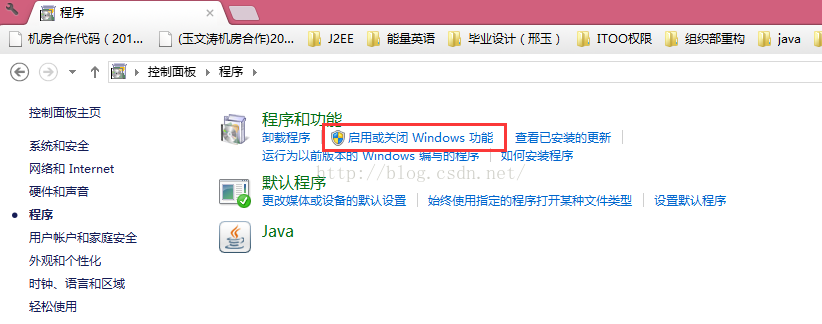
2. Programs — Enable or disable Windows functions

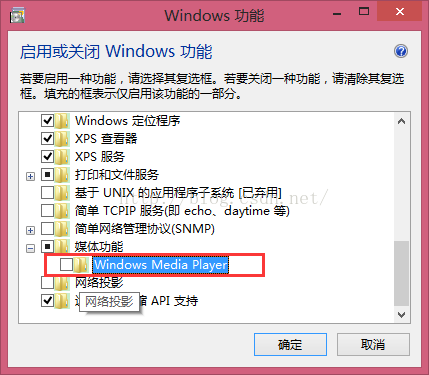
3. Remove the check mark in front of WindowsMedia Player.

conclusion

We are not afraid of small problems, but we are afraid of dragging. No matter how small the problem is, we can’t put up with it. Just like the human body, we don’t care about small problems. Therefore, the teacher teaches us will not be the source power of discovery!!