Category Archives: How to Fix

PHP connection to MySQL database error: call to undefined function MySQL_ connect()

Problem description
I just started to learn PHP, and the system environment is Ubuntu+PHP7.0+Mysql5.7+Apache2.
running a database connection test sample error:

[client 127.0.0.1:37496] PHP Fatal error:  Uncaught Error: Call to undefined function mysql_connect() in /var/www/html/test.php:2\nStack trace:\n#0 {main}\n  thrown in /var/www/html/test.php on line 2

The sample code is:

<?PHP
    $conn=mysql_connect("localhost","root","root");
    if($conn){
        echo"ok";
    }else{
        echo"error";    
    }
?>

The solution
The mysql_connect() function has been deprecated since PHP5.0. In PHP 7.0 it has been deprecated and replaced with this function:

mysqli_connect();

Usage is:

$con=mysqli_connect("localhost","my_user","my_password","my_db");

The description of the official connection: http://php.net/manual/en/function.mysqli-connect.php
the correct test code:

<?PHP
    $conn=mysqli_connect("localhost","root","root");
    if($conn){
        echo"ok";
    }else{
        echo"error";    
    }
?>

conclusion

    in the Ubuntu + PHP7.0 + Mysql5.7 + Apache2 system under the environment of the wrong, because the mysql_connect () function has been deprecated, when following outdated tutorial learning may encounter this error. (note: if it is a Windows system, are more likely to be Apache2 not enable mysql, details on baidu) when running the above test code, interface without any reaction, the error is in the log to consult, log directory in the/var/log/Apache2/error log “.
SCP error: not a regular file

Linux local files are uploaded to the server
SCP/home/liujia/file. TXT [email protected]:1/user/liujia
Download the file from the server
[email protected]:/user/liujia/file1. TXT/home/liujia

The command
SCP [email protected]:/user/liujia// home/liujia
Cp not a regular file
The reason is that this is the equivalent of downloading folders, not files.
The solution is to add the parameter -r
SCP – r [email protected]:/user/liujia// home/liujia
That’s it

Myeclipse10: one step error report solution for cracking replacejar

MyEclipse10 cracked the ReplaceJar one-step error reporting solution
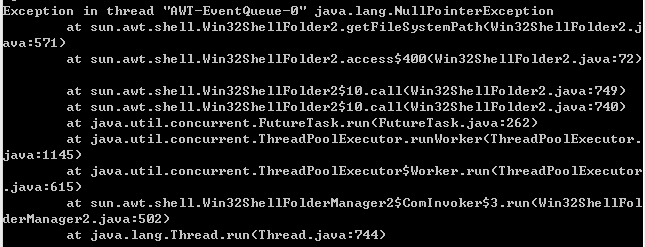
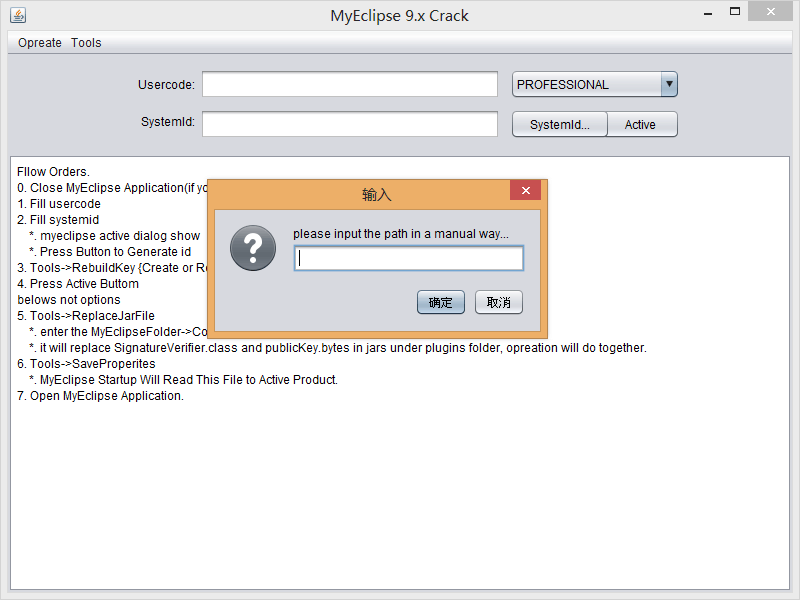
Some time ago MyEclipse10 expired, so I went looking for a hack. There is a great cracker on the web, MyEclipse 9.x Crack. In the ReplaceJar step, following the instructions of the step should bring up a file selection box and select the MyEclipse directory ->; Common-> Plugins directory. However, the file selector cannot pop up here, and if you look at the console, you will find an error message:

It seems to have something to do with the operating system?
Look at the processing code after pressing the ReplaceJar button:

        JFileChooser jf = new JFileChooser();
        jf.setDialogTitle("Please Choose Myeclipse --> Plugin Folder");
        jf.setFileSelectionMode(JFileChooser.DIRECTORIES_ONLY);
        jf.setMultiSelectionEnabled(false);
        jf.setFileFilter(dirctoryFileFilter);
        int returnVal = jf.showOpenDialog(this);
        if (returnVal == JFileChooser.APPROVE_OPTION) {
            File file = jf.getSelectedFile();
            meReplacer.replace(file);
        }

new FileChooser() It seems to have something to do with the operating system. A workaround, however, is to manually enter the path to the plugins directory instead of the fileChooser. Comment out the above code and replace it with the following:

        // some errors occur, so change to this manual way
        String path = JOptionPane.showInputDialog("please input the path in a manual way...");
        if (path != null) {
        File file = new File(path);
        if (file.exists()) {
            meReplacer.replace(file);
        } else {
            JOptionPane.showMessageDialog(this, "The path is not exsit!Please try again", "error", JOptionPane.ERROR_MESSAGE);
        }

Solutions to errors in XML files

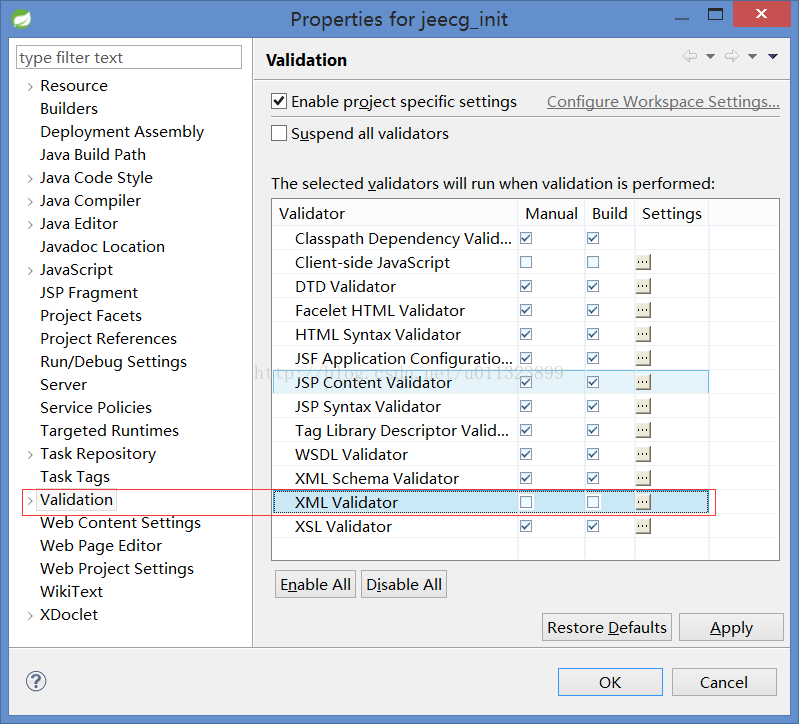
XML files in a project often report errors for no reason, but it does not affect the running of the program, which is really intolerable to people like me, so I searched online, I can turn off the validation of XML, and it will not report errors again. The operation is as follows: Window — Preferences — Validation, as shown in the figure

PS: Also, if you have similar validation errors for other types of files, you can remove the validation for the corresponding file type. At the same time, in order to improve the startup and compilation speed of the project, you can remove the validation of some files appropriately.

Solve the problem of MySQL database report 1055 error

MySql> SELECT * FROM ‘ONLY_FULL_GROUP_BY’ WHERE sql_mode = ‘ONLY_FULL_GROUP_BY’
MySql> delete the ONLY_FULL_GROUP_BY item from my.ini; delete the ONLY_FULL_GROUP_BY item from my.cnf
2. If there is no SQL_MODE item in the configuration item, use SQL statement to modify it
Find out sql_mode value

select @@sql_mode

Remove the only_full_group_by item from the value found and add the other items to the my.ini configuration file

sql-mode=STRICT_TRANS_TABLES,NO_AUTO_CREATE_USER,NO_ENGINE_SUBSTITUTION

Configuration items in my.ini:

 
3. Do not modify any configuration files, but add any_value() to fields that do not need to be grouped

SELECT any_value(id),value FROM role group by value;


Svn notes: error reporting in use

Error reported during use of SVN
1. The Error while creating module: org. Apache.. Subversion javahl. ClientException: Authorization failed
the SVN: authentication failed
Happened: after start SVN service, for the first time to submit project
solution: modify the configuration files of the storage directory svnserve. Conf, passwd, authz:
the first one to open the anonymous access. Modify the svnserve.conf file and change the anon-access value to write
.
modify svnserve.conf file:
en auth-access = write, password-db = passwd, authz-db = authz and set anon-access to none(otherwise error 5 will be reported)
m>y the passwd file:
add user username = password in the form of a

modify authz file: to add

set the permissions on the combination of operation such as:
[/] #
aifa = rw #
@kaifa = rw #
cesh>r # Read-Only
* = #
4
[/] # <>> @kaifa = rw #
ceshi = r # Read-Only
* = #
2. The Filesystem has no item SVN: URL ‘SVN:// localhost/OA/DesignPattern’ non – existent in revision 2

solution:
en this error occurs, we can find what symbol is on the project?And *, we just need to right-click, submit the project again,
and put it into the repository

3. SVN: E200009: Submission failed (details below):
SVN: E200009: “F:\workspace\SVN\SpaceJohnnie\OA\ hello.txt” is not under version control

F:\workspace\SVN\SpaceJohnnie\OA> SVN commit hello.txt
SVN commit hello.txt
br> SVN commit hello.txt

4. SVN: E205007: Commit failed (details below):
SVN: E205007: Unable to get log information using external editor; Consider setting the environment variable $SVN_EDITOR, or
with the –message (-m) or –file (-f) options
n: E205007: No SVN_EDITOR, VISUAL or EDITOR environment variables are set, and
h>o “editor-cmd” option in the runtime configuration parameters

SVN commit hello.txt
br> s>ommit -m “First commit” hello.txt

>commit -m “First commit” hello.txt
5.Item is not readable
SVN: encountered an unreadable path; Access denied.
happened: an error occurred when
access configuration, the anonymous access is not a value to none, namely: anon – access = none
solution:
modify svnserve. Conf file Settings anon – access = none

Summary of Hadoop error handling methods

1. Error message:

org.apache.hadoop.hdfs.server.common.InconsistentFSStateException: Directory /home/maclaren/data/hadoopTempDir/dfs/name is in an inconsistent state: storage directory does not exist or is not accessible.
        at org.apache.hadoop.hdfs.server.namenode.FSImage.recoverTransitionRead(FSImage.java:290)
        at org.apache.hadoop.hdfs.server.namenode.FSDirectory.loadFSImage(FSDirectory.java:87)
        at org.apache.hadoop.hdfs.server.namenode.FSNamesystem.initialize(FSNamesystem.java:311)
        at org.apache.hadoop.hdfs.server.namenode.FSNamesystem.<init>(FSNamesystem.java:292)
        at org.apache.hadoop.hdfs.server.namenode.NameNode.initialize(NameNode.java:201)
        at org.apache.hadoop.hdfs.server.namenode.NameNode.<init>(NameNode.java:279)
        at org.apache.hadoop.hdfs.server.namenode.NameNode.createNameNode(NameNode.java:956)
        at org.apache.hadoop.hdfs.server.namenode.NameNode.main(NameNode.java:965)

>
Change the hadoop. TMP. Dir value of core-site. XML, or make sure to format the NameNode the first time you initialize it, otherwise an error will be reported.
So, be sure to clear all contents of the directory specified by hadoop.temp.dir, and then run
sh hadoop namenode-format

2. Error message:

org.apache.hadoop.hdfs.server.namenode.FSNamesystem: Not able to place enough replicas, still in need of 1

>
The size of dfs.block.size must be set to the right size. I ran it on my laptop and set it to 1024. Modify the HDFS – core. XML

<property>
<name>dfs.block.size</name>
<value>1024</value>
</property>

3. Error message:

org.apache.hadoop.ipc.RPC$VersionMismatch: Protocol org.apache.hadoop.hdfs.protocol.ClientProtocol version mismatch.

>

Replace hadoop-core-0.20-append-r1056497.jar in $HBASE_HOME/lib with hadoop-0.20.2-core-jar

4. Error message:

Caused by: java.io.IOException: Call to /192.168.1.147:9000 failed on local exception: java.io.EOFException
	at org.apache.hadoop.ipc.Client.wrapException(Client.java:1107)
	at org.apache.hadoop.ipc.Client.call(Client.java:1075)
	at org.apache.hadoop.ipc.RPC$Invoker.invoke(RPC.java:225)
	at $Proxy8.getProtocolVersion(Unknown Source)
	at org.apache.hadoop.ipc.RPC.getProxy(RPC.java:396)
	at org.apache.hadoop.ipc.RPC.getProxy(RPC.java:379)
	at org.apache.hadoop.hdfs.DFSClient.createRPCNamenode(DFSClient.java:119)
	at org.apache.hadoop.hdfs.DFSClient.<init>(DFSClient.java:238)
	at org.apache.hadoop.hdfs.DFSClient.<init>(DFSClient.java:203)
	at org.apache.hadoop.hdfs.DistributedFileSystem.initialize(DistributedFileSystem.java:89)
	at org.apache.hadoop.fs.FileSystem.createFileSystem(FileSystem.java:1386)
	at org.apache.hadoop.fs.FileSystem.access$200(FileSystem.java:66)
	at org.apache.hadoop.fs.FileSystem$Cache.get(FileSystem.java:1404)
	at org.apache.hadoop.fs.FileSystem.get(FileSystem.java:254)
	at org.springframework.data.hadoop.fs.HdfsResourceLoader.<init>(HdfsResourceLoader.java:82)
	... 21 more

>

The client Hadoop JAR is not the same as the server JAR. Hdfs-site.xml
Because Eclipse uses Hadoop plug-in to submit jobs, will default to DrWho identity to write the job to the HDFS file system, the corresponding is HDFS /user/hadoop, because DrWho users do not have access to Hadoop directory, so the exception occurs. $hadoop fs-chmod 777 /user/hadoop
$hadoop fs-chmod 777 /user/hadoop

import org.junit.Test And @ test error reporting — solutions

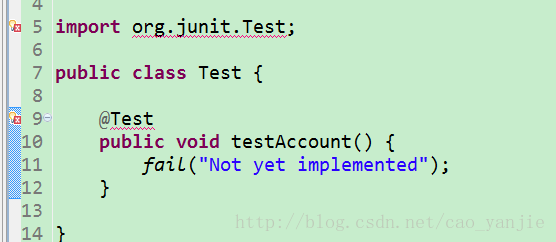
Recently, when I was working on a project with Spring Framework, I found that there were errors in import org.junit.test and @test. If there is no error in package import, the solution is as follows:


Solution 1:
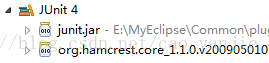
MyEclipse right-click on the Build Path properties of the project and select the Add Libararies screen. Select JUnit to import. Eclipse does the same.
Solution 2:
The reason is that the package in which the Java file resides is anonymous by default.
a new com. XXX. XXX is the name of package, move Java file under the name with respect to ok
Solution 3:
The Java class for writing JUnit tests is named test.java, and if you must use test.java, you can only add @org.jUnit. Test
to the method
Solution 4:
The class name of this Test class should be changed to another class name instead of Test. I have encountered this problem many times because the class name was used Test. After the change, no error was reported normally.

Git error: http request failed

About git is the cause of the error, see the link below
this link for reprint: https://blog.csdn.net/zhang_danf/article/details/45538825
I’m having a problem with the URL version. Update the URL version to solve the problem.

sudo yum update -y nss curl libcurl

New Maven project– pom.xml report errors

Welcome to blog using the Markdown editor
Sometimes when we create new Maven projects, the pom.xml file likes to report errors (especially on the first line!). . However, our Settings configuration and so on are all fine. You may be confused at this point, but that’s okay. Follow these steps and give it a try. It might solve your problem.
The reason: Eclipse integrated Maven had issues (version issues or site access issues), and the newly installed Maven was not successfully added to the M2e plug-in
The solution is as follows:
Step.1 Go to the official website to download the appropriate version of Maven and store it in the appropriate path (or check the missing JAR file in the report — the corresponding error message will provide the URL to download the missing file — copy it to the appropriate path in the local repository).
Step.2 Open Eclipse Preferences -> Maven-> UserSettings changes the Global Settings and UserSettings to conf/settings.xml in Maven that you just downloaded
Step. 3 the Eclipse preferences – & gt; Maven-> * * * Click on Add to Add the Maven folder you just downloaded, and then check your own version instead of using the built-in one
Step.4 After the above two steps, you have successfully integrated the Maven version you downloaded with Eclipse, and then right-click on the project that reported an error before, and right-click Run As ->; Maven clean, then Run As ->; Maven install

ep.5: project right-click ->; Maven-> The Update Project step takes a bit of time and you can see if the Update has been completed by looking at the bottom right corner of the screen.