Category Archives: How to Fix

CMake error: error in configuration process, project files may be invalid

It is very strange that following the installation steps of others, there is a problem, (OK, actually I was in the process of installation, I was typing, I don’t know, press the wrong button)

You can check for specific errors in Cmake:
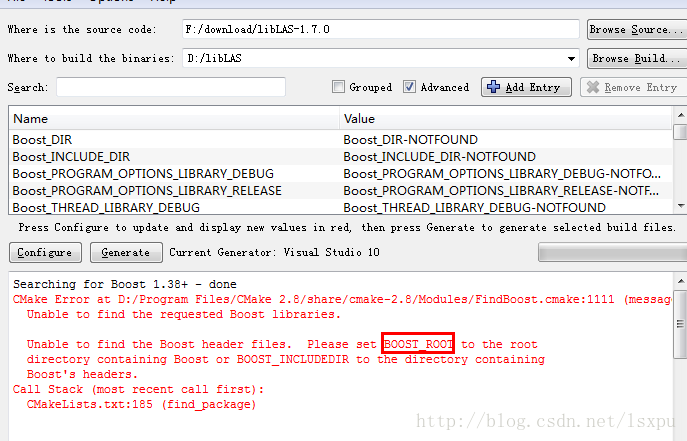
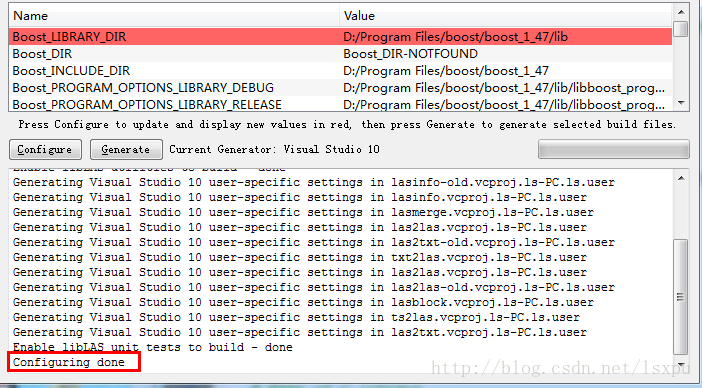
Boost_root is an environment variable that should be used in the process of installing BOOSTPRO. The BOOST_ROOT is an environment variable that should be used in the process of installing BOOSTPRO. The BOOST_ROOT is an environment variable. I added myself to this file
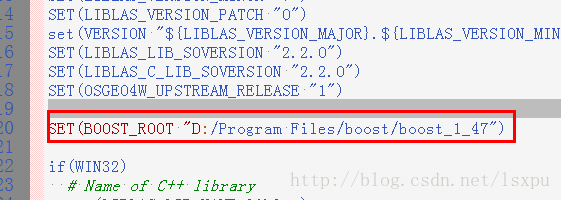
//Configure CMake// Configure
Reference:
【 1 】 http://boostpro.com/download/boost_1_47_setup.exe
【 2 】 Cmake always find a Boost libraries at http://stackoverflow.com/questions/19303430/cmake-cannot-find-boost-libraries
[3] solution: CMake compile time appear the error in the configuration process project files may be invalid at http://blog.sina.com.cn/s/blog_a2d9d5c60100y1at.html

To solve the problem in Windows opencv installation: error configuration process, project files may be invalid

1. Problem description:
CMAKE: OpenCV source code:
error configuration process, project files may be invalid
   
2. One of the solutions
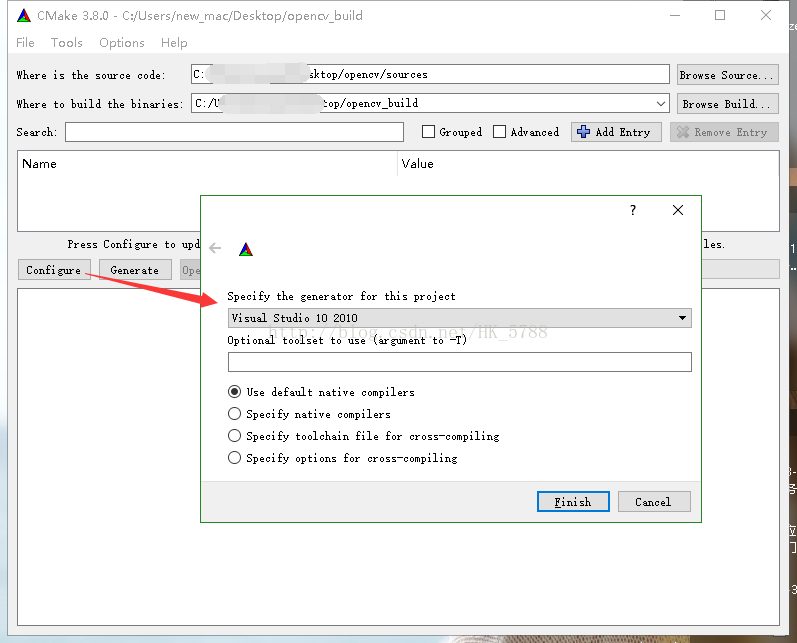
One reason: you did not use CMake to select the VS version on your machine.
For example, VS2010 is installed on my machine. When I configure it, I select the solution of VS2015, which will prompt the above problem.

Solution:
When using the Cmake configuration to generate the corresponding VS solution, I have VS2010 installed on my machine. Here I select the VS2010 solution:

To solve problems in cmake VTK: error configuration process, project files may be invalid

Error resolution occurred while CMake Vtk
Problem description
Problem description:
If you use CMake to compile the VTK source code, the following error is reported:
error configuration process, project files may be invalid
Solution:

https://blog.csdn.net/hk_5788/article/details/70145517 solution is the net friend meet, modify the config parameters
But I still can’t solve the problem, and find the following method can solve it
Solution 2:
click on the File click Delete Cache, clear the Cache, might be because before setting results in failure

Solution: when cmake is compiled, “error in configuration process project files may be invalid” appears

This error can occur with either CMake2.84 or with the current update CMake2.87:
 
Searching the domestic and foreign Internet did not give a feasible way, the result or their own solution
Now the error causes and solutions are as follows:
what went wrong: because is English version, usually didn’t read the installation instructions, according to the default installation and “next” to the next step, the result is to choose what you use in the installation of programming system, such as: Vs2008, vs2010 etc., if a default value for the current installation is not with your current version and do not pay attention to in the use of some details will go wrong, and the output directory already exists in the current setting of error is
solution: The first option is to uninstall and reinstall Cmake, and remember to select the language type when reinstalling it. The second option is to randomly select the correct directory containing cmakelists.txt in the source project box. In the output directory text box, fill in a directory that does not exist, then click Configuer, you will be prompted to create a directory, click “Yes”, a language selection window will pop up, drop down select the language type you are using, that is, you are currently using VS2010 installed;
it can be right for the next step, if again open CMake – GUI. Exe, will be the default language of your choice, won’t go wrong
root cause analysis: when languages die erste installation didn’t choose good, in the running for the first time, the output directory does not pop up when there are language selection window and direct judgment and output of the error message;
Suggestion: The authorities can publish a pop-up language selection window regardless of whether the current output directory exists
 
My installation environment is VS2013+opencv3.0+cmake3.4, but tried a variety of methods on the Internet or not, finally solved the problem through the following:
Download such a file, http://sourceforge.net/projects/opencvlibrary/files/3rdparty/ippicv/, select download ippicv_windows_20141027. Zip
 
3. When CMAKE2.8.12 +PCL1.6+VS2010 is configured under Windows 7 32-bit system, it appears
CMake error: error in configuration process, project files may be invalid

Parse error. Expected a command name, got unquoted argument with text
Solution: Update the version to cmake3.7.

Reproduced in: https://www.cnblogs.com/haoyul/p/4979309.html

Vs2015 64 bit vtk7.1 error handling

Platform:

Win7 64-bit VS2015 VTK7.1

problem 1: link error (almost all functions cannot find their corresponding definitions) :

The reason is that the library (lib) is not well configured.

solution:

1. Item attributes ->; Vc + + directories – & gt; The location where the library directory is added with the corresponding lib

such as: D: \ VTK7.1 \ VTK – bin \ lib \ Debug

2. Connector ->; Input – & gt; Add the required lib (or, like me, all of them) to the dependency, and enter

vtkChartsCore – 7.1. Lib

vtkCommonColor – 7.1. Lib

vtkCommonComputationalGeometry – 7.1. Lib

vtkCommonCore – 7.1. Lib

vtkCommonDataModel – 7.1. Lib

vtkCommonExecutionModel – 7.1. Lib

vtkCommonMath – 7.1. Lib

vtkCommonMisc – 7.1. Lib

vtkCommonSystem – 7.1. Lib

vtkCommonTransforms – 7.1. Lib

vtkDICOMParser – 7.1. Lib

vtkDomainsChemistry – 7.1. Lib

vtkDomainsChemistryOpenGL2-7.1. Lib

vtkFiltersAMR – 7.1. Lib

vtkFiltersCore – 7.1. Lib

vtkFiltersExtraction – 7.1. Lib

vtkFiltersFlowPaths – 7.1. Lib

vtkFiltersGeneral – 7.1. Lib

vtkFiltersGeneric – 7.1. Lib

vtkFiltersGeometry – 7.1. Lib

vtkFiltersHybrid – 7.1. Lib

vtkFiltersHyperTree – 7.1. Lib

vtkFiltersImaging – 7.1. Lib

vtkFiltersModeling – 7.1. Lib

vtkFiltersParallel – 7.1. Lib

vtkFiltersParallelImaging – 7.1. Lib

vtkFiltersProgrammable – 7.1. Lib

vtkFiltersSMP – 7.1. Lib

vtkFiltersSelection – 7.1. Lib

vtkFiltersSources – 7.1. Lib

vtkFiltersStatistics – 7.1. Lib

vtkFiltersTexture – 7.1. Lib

vtkFiltersVerdict – 7.1. Lib

vtkGeovisCore – 7.1. Lib

vtkIOAMR – 7.1. Lib

vtkIOCore – 7.1. Lib

vtkIOEnSight – 7.1. Lib

vtkIOExodus – 7.1. Lib

vtkIOExport – 7.1. Lib

vtkIOGeometry – 7.1. Lib

vtkIOImage – 7.1. Lib

vtkIOImport – 7.1. Lib

vtkIOInfovis – 7.1. Lib

vtkIOLSDyna – 7.1. Lib

vtkIOLegacy – 7.1. Lib

vtkIOMINC – 7.1. Lib

vtkIOMovie – 7.1. Lib

vtkIONetCDF – 7.1. Lib

vtkIOPLY – 7.1. Lib

vtkIOParallel – 7.1. Lib

vtkIOParallelXML – 7.1. Lib

vtkIOSQL – 7.1. Lib

vtkIOVideo – 7.1. Lib

vtkIOXML – 7.1. Lib

vtkIOXMLParser – 7.1. Lib

vtkImagingColor – 7.1. Lib

vtkImagingCore – 7.1. Lib

vtkImagingFourier – 7.1. Lib

vtkImagingGeneral – 7.1. Lib

vtkImagingHybrid – 7.1. Lib

vtkImagingMath – 7.1. Lib

vtkImagingMorphological – 7.1. Lib

vtkImagingSources – 7.1. Lib

vtkImagingStatistics – 7.1. Lib

vtkImagingStencil – 7.1. Lib

vtkInfovisCore – 7.1. Lib

vtkInfovisLayout – 7.1. Lib

vtkInteractionImage – 7.1. Lib

vtkInteractionStyle – 7.1. Lib

vtkInteractionWidgets – 7.1. Lib

vtkLocalExample – 7.1. Lib

vtkNetCDF – 7.1. Lib

vtkNetCDF_cxx – 7.1. Lib

vtkParallelCore – 7.1. Lib

vtkRenderingAnnotation – 7.1. Lib

vtkRenderingContext2D – 7.1. Lib

vtkRenderingContextOpenGL2-7.1. Lib

vtkRenderingCore – 7.1. Lib

vtkRenderingFreeType – 7.1. Lib

vtkRenderingImage – 7.1. Lib

vtkRenderingLOD – 7.1. Lib

vtkRenderingLabel – 7.1. Lib

vtkRenderingOpenGL2-7.1. Lib

vtkRenderingVolume – 7.1. Lib

vtkRenderingVolumeOpenGL2-7.1. Lib

vtkViewsContext2D – 7.1. Lib

vtkViewsCore – 7.1. Lib

vtkViewsInfovis – 7.1. Lib

vtkalglib – 7.1. Lib

vtkexoIIc – 7.1. Lib

vtkexpat – 7.1. Lib

vtkfreetype – 7.1. Lib

vtkglew – 7.1. Lib

vtkhdf5-7.1. Lib

vtkhdf5_hl – 7.1. Lib

vtkjpeg – 7.1. Lib

vtkjsoncpp – 7.1. Lib

vtklibxml2-7.1. Lib

vtkmetaio – 7.1. Lib

vtkmyCommon.lib

vtkmyImaging.lib

vtkmyUnsorted.lib

vtkoggtheora – 7.1. Lib

VTKPNG – 7.1. Lib

vtksqlite – 7.1. Lib

vtksys – 7.1. Lib

vtktiff – 7.1. Lib

vtkverdict – 7.1. Lib

vtkzlib – 7.1. Lib

actually also has the easier way, connector ->; Conventional – & gt; Additional library directory, can be added to the entire folder. (but later tried and found that it did not work, or add it)

problem 2. Runtime error: missing vtkxxx.dll

Solution: The problem is that the environment variables are not configured properly.

Add the corresponding DLL folder in the environment variable PATH, such as my location is D:\VTK7.1\ vtk-res\ bin

Restart VS and run it again without this problem.

question 3. LNK2001
An external symbol that cannot be resolved

“void __cdecl vtkRenderingOpenGL_AutoInit_Construct(void)” (?vtkRenderingOpenGL_AutoInit_Construct@@YAXXZ)

QtVTKhelloworld
E:\code\VTKproject1\QtVTKhelloworld\test.obj

at first I thought it was my opengl installation problem, then looked back to the CMAKE interface,

: VTK_RENDERING_BACKEND
: VTK_RENDERING_BACKEND: OpenGL/OpenGL2

to return to my code, I found my header file declares the VTK_MODULE_INIT (vtkRenderingOpenGL)

then change it to VTK_MODULE_INIT(vtkRenderingOpenGL2) to resolve the error.  

VTK cross compile error

You can report an error from the beginning!
I could not find X11 or any software. In fact, I simply searched manually before!
In fact, I should not manually find these, but according to its error report, directly to the corresponding cmake, find the corresponding path to modify!
Cmake is mainly the header file. H and its path location, as well as the path of some library files.
To sum up the problem, we need to learn more about the functions of CMake, such as cross-compiling.
 
 
On general application in findpackage is https://blog.csdn.net/chengde6896383/article/details/86497016;
Go to the corresponding nodule for the corresponding findxxx.cmake file to solve the problem.

The solution to the error of “no override found for * *” in the use of VTK

This error is caused by not compiling with CMAKE, so some macro definitions and configurations are not initialized, resulting in the factory function of the class being used being unusable. So based on my experience in these days:

    first of all, the example programs such as cone, attribute macro definition in c + + preprocessor “copy” to their own projects; If this error occurs again, use such as VTK_MODULE_INIT(vtkrenderingVolumeOpenGL); Initialize the required modules.

More are still being explored…

VTK: VTK error problem set

To summarize some errors in using VTK:
1. Uncompiled error
These errors are not caused by you using the VTK class incorrectly or by logic problems, but by missing some initialized header files
We need to add the initialization header file in main:

#include <vtkAutoInit.h>

VTK Error: No Override found for ‘VTKVolumetTextureMapper2D ‘.
Error: no override found for ‘vtkRayCastImageDisplayHelper’.
In the main function add:

VTK_MODULE_INIT(vtkRenderingVolumeOpenGL)

Error: No Override found for ‘VTKImageMapper ‘.
In the main function add:

VTK_MODULE_INIT(vtkRenderingOpenGL) 

Error:Could not locate vtkTextRenderer object.
In the main function add:

VTK_MODULE_INIT(vtkRenderingFreeType)

Error: Link to vtkinteractionstyle
In the main function add:

VTK_MODULE_INIT(vtkInteractionStyle) 

VTK6.3.0:Error: No Override found for ‘VTKContextDevice2D’
Add to the main function
VTK_MODULE_INIT(vtkRenderingContextOpenGL)


Incorrect use of VTK classes

1, the ERROR: In D: \ VTK, VTK – 6.3.0, Rendering, OpenGL \ vtkOpenGLDisplayListPainter CXX, line 188
vtkOpenGLDisplayListPainter (000001AC0C582AE0): failed after RenderInternal 1 OpenGL errors detected
0 : (1282) Invalid operation
Test resolved: remove vtkRender ->; Render () function. The unexplained guess is that the render function is called repeatedly
The VTK documentation describes this function:

virtual void vtkRenderer: : Render

(

[virtual]
CALLED BY vtkrenderWindow only. end-user pass your way and call vtkrenderWindow ::Render(). Create an image.
So I’m calling VTKRenderWindow’s render function.
2,

Cause of the problem: Actor is not removed when switching the reconstruction model
Renderer-> RemoveActor removes the old actor before adding a new one
3, the ERROR:
vtkOpenGLExtensionManager (00000232ABF21E00): Extension GL_VERSION_1_2 could not be loaded.
Where the problem occurs: using 3D texture mapping to implement weight building, a bug pops up at runtime,
VTK 3D texture mapping class: VTK VolumetTexturemapper 3D only supports two graphics cards NVIDIA and ATI; The computer’s default graphics card uses an integrated graphics card (which, of course, is not configured to support OpenGL very well) rather than a standalone display. Manually switch to independent display. Detailed switching method: dual graphics card switching

To be continued…

[VTK] cmake compiling VTK

Compile VTK source code with CMKAE
1. Install Cmake
Download the installation package: http://www.cmake.org/download/
Select the.exe file to download and install it on your local computer.
2. Get the VTK source code
2.1 source url: http://www.vtk.org/download/
Download vtk-6.2.0.zip (VTK source code) vtkdata-6.2.0.zip (data) vtkdochtml-6.2.0.tar.gz (help document)
2.2 Unzip to local folder
Unzip vtk-6.2.0.zip to F:\vtk_6.2\ VTK
Unzip vtkdata-6.2.0.zip to F:\vtk_6.2\ VTKData
Unzip vtkdochtml-6.2.0.tar. gz to F:\vtk_6.2\vtkDocHtml
3. Run cmake to compile
Select the Source Code directory as F:\vtk_6.2\ VTK
Select the bin directory after build as F:\vtk_6.2\bin
Click the Configure button, the selection compiler pops up, I chose Visual Studio 2010, automatically scan the required files.
4. Modify Cmake parameter (On is ticked)
4.1 BUILD_EXAMPLES Select ON, which you can use to learn about VTK examples
4.2 BUILD_SHARED_LIBS Select ON to generate dynamic link library DLLs
4.3 MODULE_VTKGUISUPPORTQT Select ON to support QT interface (click Advanced parameters, this option will appear)
4.4 CNAJE_INSTALL_PREFIX = C: \ ProgramFiles \ VTK
Then, click the Configure button again and let CMake scan the configuration file again. When it runs successfully, the red color will disappear from the page. If it still has red color, see what else needs to be selected on the red TAB
At the end of the scan, click the Generate button to Generate the VS project of VTK.
5. Open the VS project of VTK and compile it
Open the vtk.sln project in the F:\vtk_6.2\bin directory
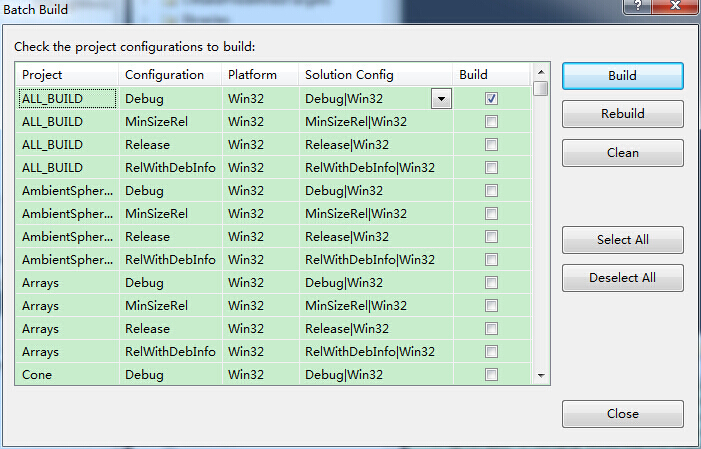
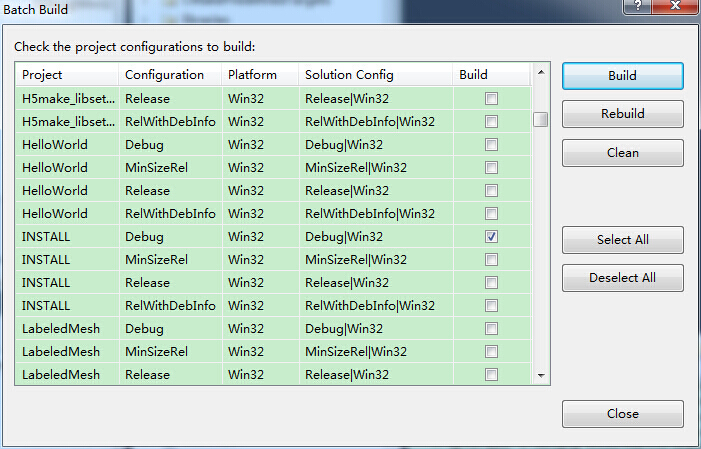
The first step is to select the type of file to output, Debug or Release for ALL_BUILD and INSTALL, as shown in the figure below.

The default Files are in the C: Program Files\VTK folder. Copy it into an environment variable and program it

Report ippicv error during opencv3 compilation

Background:
Ubuntu14.04 is in the process of installing OpenCV3.1
Question:
Unable to compile and install, error is as follows:
— Configuring incomplete, errors occurred!
See also “/ opt/opencv – 3.2.0/3 rdparty/ippicv/CMakeFiles/CMakeOutput log”.
See also “/ opt/opencv – 3.2.0/3 rdparty/ippicv/CMakeFiles/CMakeError log”.
Solution:
Opencv3 to download a ippicv third-party packages, need to download the finished in 3 rdparty/ippicv b791a6eac9ed78d32a7666804320e/downloads/Linux – 808, Download link https://raw.githubusercontent.com/Itseez/opencv_3rdparty/81a676001ca8075ada498583e4166079e5744668/ippicv/ippicv_linux_20151201.tgz

Error: no override found for ‘vtkPolyDataMapper’.

VS2015 + PCL1.8 Execution Error:

Generic Warning: In C:\Build\3rdParty\x64\VTK-7.0.0\Rendering\Core\vtkPolyDataMapper.cxx, line 28
Error: no override found for 'vtkPolyDataMapper'.

Solutions:
https://stackoverflow.com/questions/40086584/errorno-override-found-for-vtkpolydatamapper

 #include <vtkAutoInit.h>
 VTK_MODULE_INIT(vtkRenderingOpenGL);
 VTK_MODULE_INIT(vtkInteractionStyle);

and add “opengl32. lib” to Linker –> Input –> Additional Dependencies。  

Error: no override found for ‘vtkRayCastImageDisplayHelper’.

0 error description
Error in VTK-6.3.0 using VTKVolumerayCastMapper for volume rendering:

Generic Warning: In D:\VTK\VTK-6.3.0\Rendering\Volume\vtkRayCastImageDisplayHelper.cxx, line 20
Error: no override found for 'vtkRayCastImageDisplayHelper'.

1 Solutions
At the beginning of main() add:

VTK_MODULE_INIT(vtkRenderingVolumeOpenGL);

2. Solution Process
How do you know the above VTKrenderingVolumeOpenGL?In VTK Error: No Override Founds for ‘VTKVolumetTextureMapper2D’, a method is already provided, but there are some difficulties in practice. Here is a better method. Here are the detailed steps.
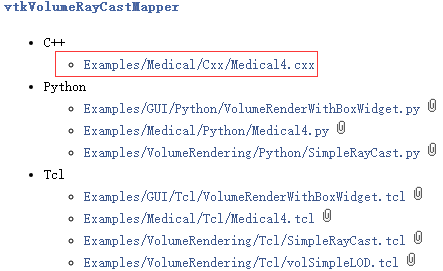
(1) Find a case of VTKVolumerayCastMapper through the help document of VTK-6.3.0:

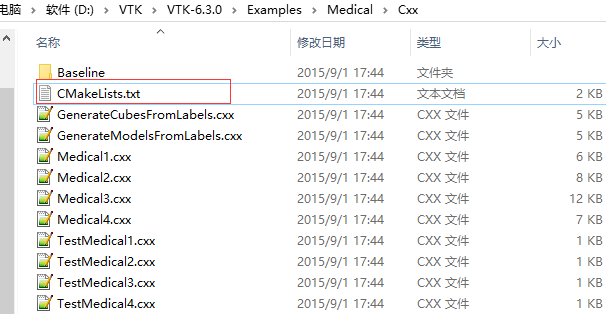
(2) Find the directory of Medical4.cxx (VTK-6.3.0/Examples/Medical/) in the VTK-6.3.0 source code. There is a cMakelists.txt file in it:

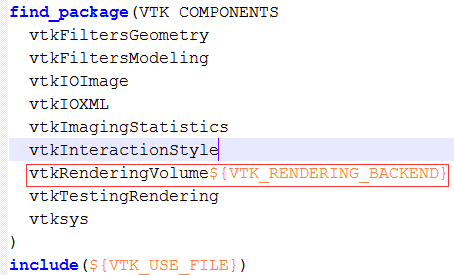
(3) Open the above cmakelist.txt file and find the contents of the find_package section:

VTKRenderingVolume $(VTK_Rendering_Backend) is the module required for VTKVolumerayCastMapper. So what is the value of VTK_RENDERING_BACKEND?
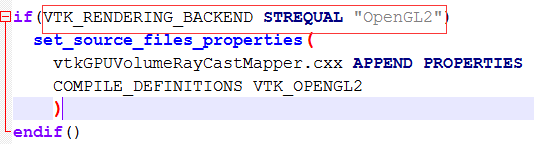
(4) open the VTK 6.3.0/Rendering/Volume/CMakeList. TXT, in its final value judgment about VTK_RENDERING_BACKEND:

So you can guess that VTK_RENDERING_BACKEND refers to a version of OpenGL, either OpenGL or OpenGL2. OpenGL is used by default in VTK-6.3.0 (VTK-7.0.0 has been changed to OpenGL2), so the value of VTK_RENDERING_BACKEND is OpenGL or OpenGL2, and the former is chosen in this paper.