Matlab combined with stm32f407 to develop the program,
error with copymodelfiles ()
causes and solutions:
the simulation model was not saved. Save the simulation model and run it again.
Category Archives: How to Fix
Error response from daemon: Get https://20.0.0.100/v2/: dial tcp 20.0.0.100:443: connect: connection
Error response from: get https://20.0.0.100/v2/ : dial tcp 20.0.0.100:443: connect: connection refused
The reason for this problem is that the docker registry uses HTTPS by default, but the private mirror is built
like HTTP service by default, so the following error occurs when interacting with the private mirror.

Solution:
you must first specify the address of the private warehouse — insure registry
[root@client ~]# vim /usr/lib/systemd/system/docker.service

ExecStart=/usr/bin/dockerd -H fd:// --insecure-registry 20.0.0.10 --containerd=/run/containerd/containerd.sock

[root@client ~]# systemctl daemon-reload
[root@client ~]# systemctl restart docker
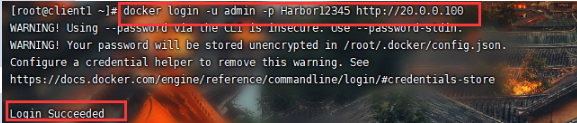
Log in to harbor again:
ModuleNotFoundError: No module named ‘tensorboardX‘
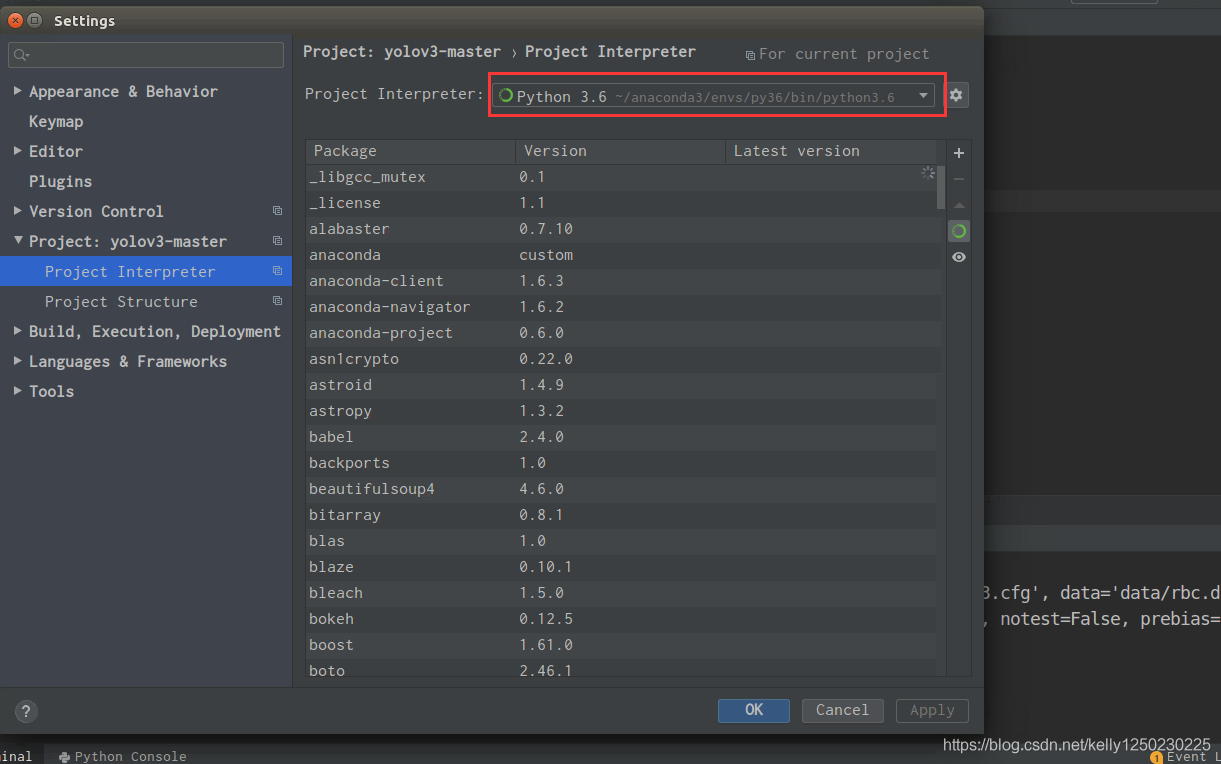
Yesterday, I was trying to run the code that I didn’t run through, so I tossed it on my own machine and virtual machine. As a result, I made a mistake in the environment variable. Here I record it. The error prompt says that I didn’t find ‘tensorboardx’. I checked the command and found that there was also ‘tensorboardx’. So I tried to run the python environment manually and found that the code was running normally, so If you find a similar error, don’t start to install the software as soon as you run, but see if you have installed the software correctly.
JSON parse e rror: Invalid UTF-8 middle byte 0x3f;
Online Tomcat deployment of the project, running process, a table to modify data has been reported error, nothing in the local! Check the console log and report the following error
org.springframework.http.converter.HttpMessageNotReadableException: JSON parse e
rror: Invalid UTF-8 middle byte 0x3f; nested exception is com.fasterxml.jackson.
databind.JsonMappingException: Invalid UTF-8 middle byte 0x3f
 at [Source: (PushbackInputStream); line: 1, column: 73] (through reference chai
n: com.bj.bjmodularsys.entity.SysRoleEntity["name"])
The key part of the error is: JSON parse error: invalid UTF-8 middle byte 0x3f
Reason: the encoding is inconsistent. The encoding format of Tomcat service transmission should be specified as UTF-8
Solution:
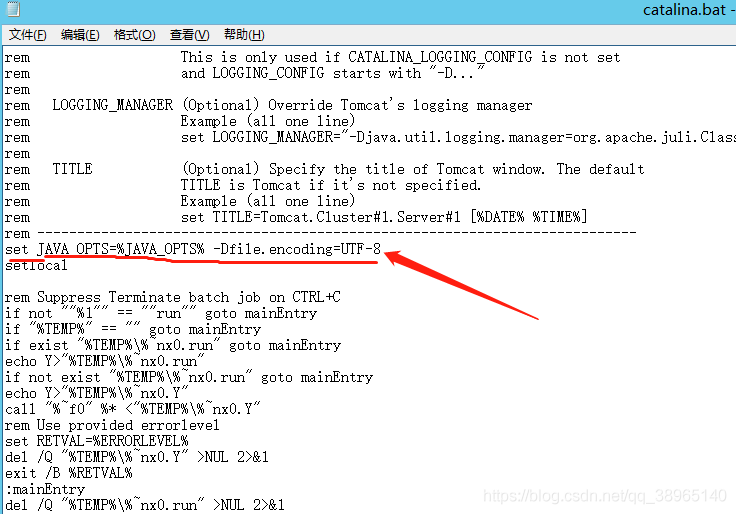
In the bin directory of Tomcat catalina.bat Add the following sentence to the list
set JAVA_ OPTS=%JAVA_ OPTS% – Dfile.encoding=UTF -8
Error running app:Instant Run requires Tools | Android Enable ADB integration‘ to be enabled.
Error generation environment
The
 is generated when running the project in Android studio
Error description
Error running app:Instant Run requires Tools | Android Enable ADB integration' to be enabled.
Cause of error
The project can be started normally before, but it can’t be started after Android studio upgrade

terms of settlement
In the options bar, click Tools – & gt; Android – & gt; enable ADB integration
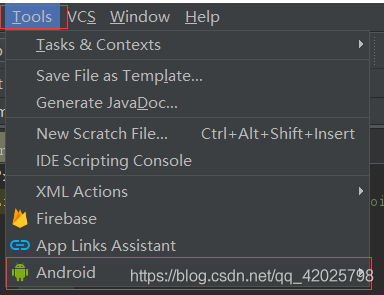
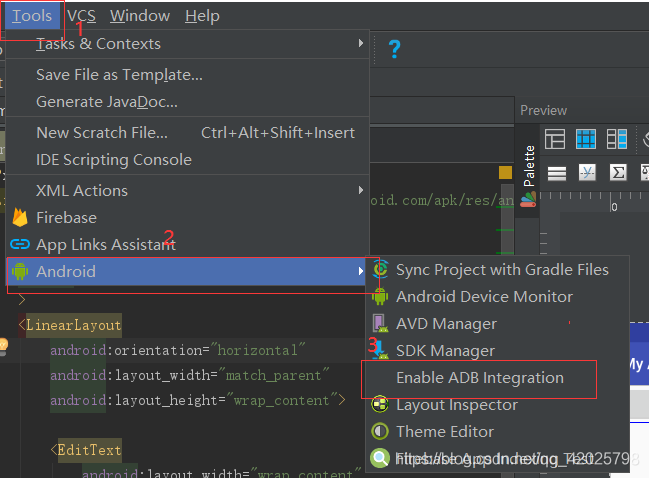
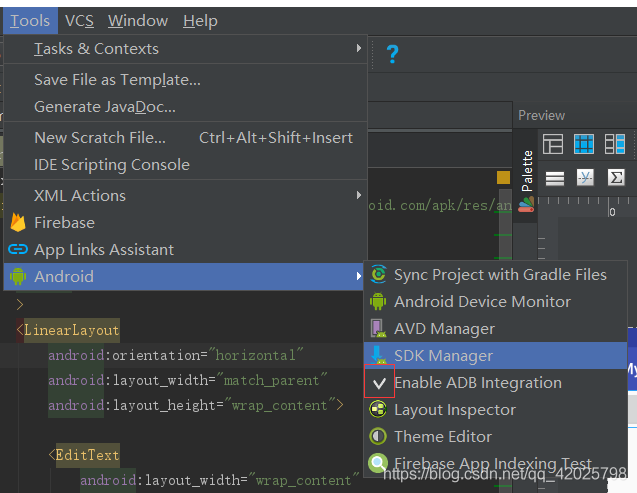
after modification, it is as follows:
there is a tick in front of enable ADB integration.
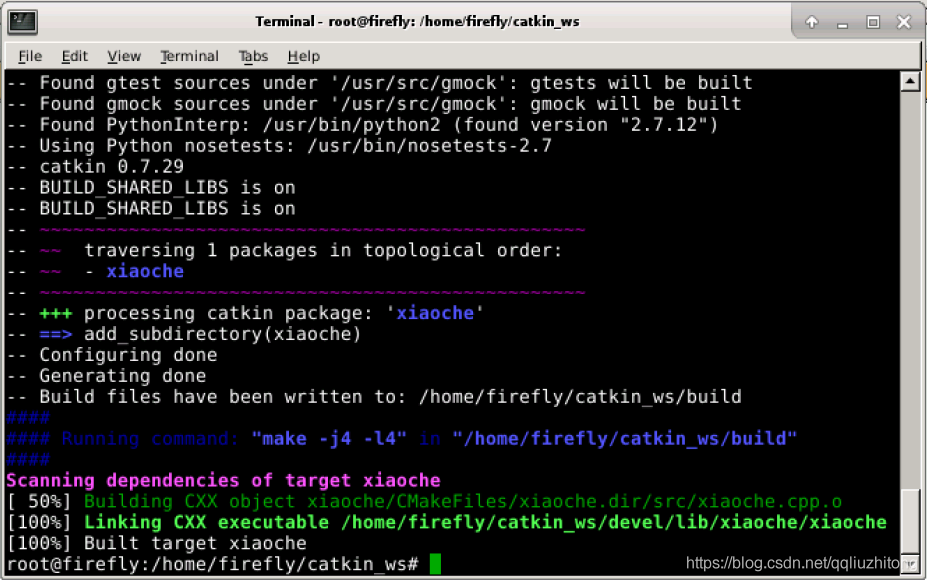
but “catkin_make“ must be invoked in the root of workspace
When editing the main board program on the car through VNC, the following error appears:
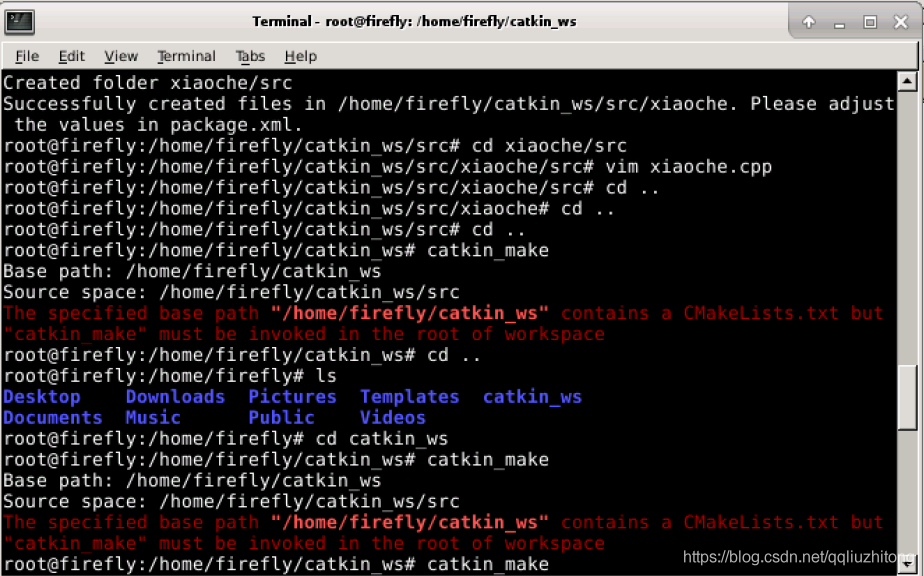
The reason is that when compiling the entire workspace, the generated CMakeLists.txt Put the files here, catkin_ Ws directory, delete this file
If you continue to compile, you will succeed
Common errors and solutions in MapReduce stage
1) Package guide is error prone. Especially text and combinetextinputformat. 2) The first input parameter in mapper must be longwritable or nullwritable, not intwritable.
the error reported is a type conversion exception.
3) java.lang.Exception : java.io.IOException : Legal partition for 13926435656 (4), indicating that partition
is not matched with the number of reducetask, so adjust the number of reducetask. 4) If the number of partitions is not 1, but reductask is 1, do you want to execute the partitioning process. The answer is: no partitioning.
Because in the source code of maptask, the premise of partition execution is to determine whether the number of reducenums is greater than 1. No more than 1 is definitely not implemented.
5) import the jar package compiled in Windows environment into linux environment to run,
Hadoop jar wc.jar com.atguigu.mapreduce . wordcount.WordCountDriver /User/atguigu/
/user/atguigu/output
reports the following error:
exception in thread “main” java.lang.UnsupportedClassVersionError :
com/atguigu/mapreduce/wordcount/WordCountDriver : Unsupported major.minor Version 52.0
the reason is that jdk1.7 is used in Windows environment and JDK1.8 is used in Linux environment.
Solution: unified JDK version.
6) cache pd.txt In the case of small files, the report cannot be found pd.txt File
reason: most of them are path writing errors. There is also to check pd.txt.txt It’s a matter of time. There are also some computers that write relative paths
that cannot be found pd.txt , which can be changed to absolute path. 7) Report type conversion exception.
It’s usually a writing error when setting the map output and final output in the driver function.
If the key output from map is not sorted, an exception of type conversion will be reported.
8) running in cluster wc.jar An error occurred when unable to get the input file.
Reason: the input file of wordcount case cannot be placed in the root directory of HDFS cluster.
9) the following related exceptions appear
exception in thread “main” java.lang.UnsatisfiedLinkError :
org.apache.hadoop . io.nativeio.NativeIO
W
i
n
d
o
w
s
.
a
c
c
e
s
s
0
(
L
j
a
v
a
/
l
a
n
g
/
S
t
r
i
n
g
;
I
)
Z
a
t
o
r
g
.
a
p
a
c
h
e
.
h
a
d
o
o
p
.
i
o
.
n
a
t
i
v
e
i
o
.
N
a
t
i
v
e
I
O
Windows.access0 (Ljava/lang/String;I)Z at org.apache.hadoop . io.nativeio.NativeIO
Windows.access0 (Ljava/lang/String; I) Zatorg.apache.hadoop . io.nativeio.NativeIOWindows .access0(Native Method)
at org.apache.hadoop . io.nativeio.NativeIO $ Windows.access ( NativeIO.java:609 )
at org.apache.hadoop . fs.FileUtil.canRead ( FileUtil.java:977 )
java.io.IOException : Could not locate executable null\bin\ winutils.exe in the Hadoop binaries.
at org.apache.hadoop . util.Shell.getQualifiedBinPath ( Shell.java:356 )
at org.apache.hadoop . util.Shell.getWinUtilsPath ( Shell.java:371 )
at org.apache.hadoop . util.Shell .( Shell.java:364 )
solution: copy hadoop.dll File to the windows directory C::?Windows?System32. Some students need to modify the Hadoop source code.
Scheme 2: create the following package name and NativeIO.java Copy to the package name
10) when customizing the output format, note that the close method in recordwirter must close the stream resource. Otherwise, the data in the output file is empty.
@Override
public void close(TaskAttemptContext context) throws IOException,
InterruptedException {
if (atguigufos != null) {
atguigufos.close ();
}
if (otherfos != null) {
otherfos.close ();
} }
K8s error in installing calico plug-in
reason
Due to different installation methods, my calico failed to start when I installed it. It is estimated that the download of the image failed here. Learning from Baidu’s post, I personally agree with it. It probably means that although the domestic image address has been initialized and modified, the official foreign image will also be pulled when I installed calico
My installation method is: kubectl apply – F https://docs.projectcalico.org/v3.18/manifests/calico.yaml
Error form:
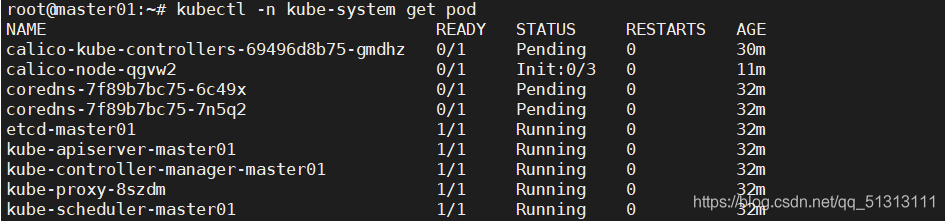
when viewing pod, calico cannot start normally. When using describe to view calico node, the image displayed fails, as shown in the following figure

solve
Using WGet https://docs.projectcalico.org/manifests/calico.yaml Command Download calico.yaml Form a local file

execute kubectl delet – F calico.yaml Delete calico that failed to download before
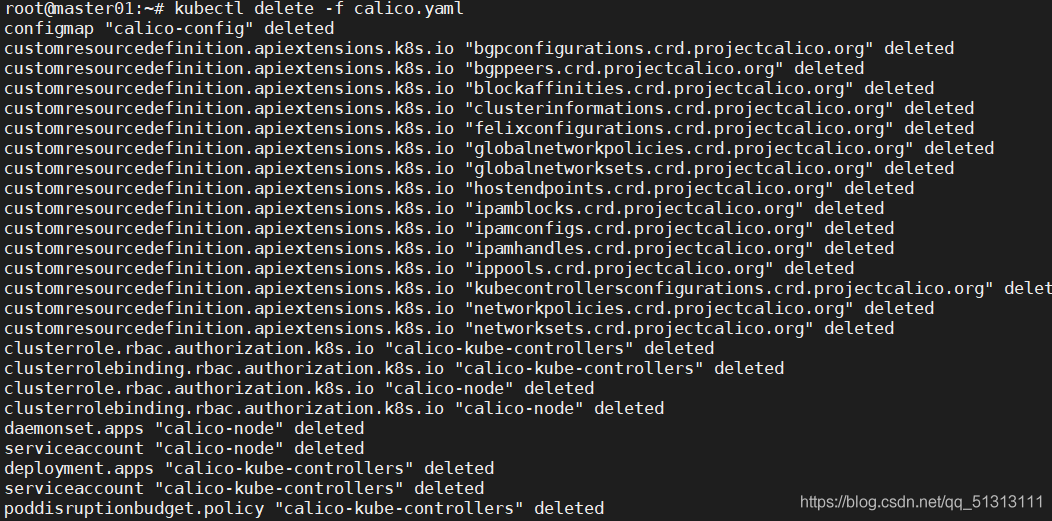
Then execute kubectl apply – F calico.yaml That is
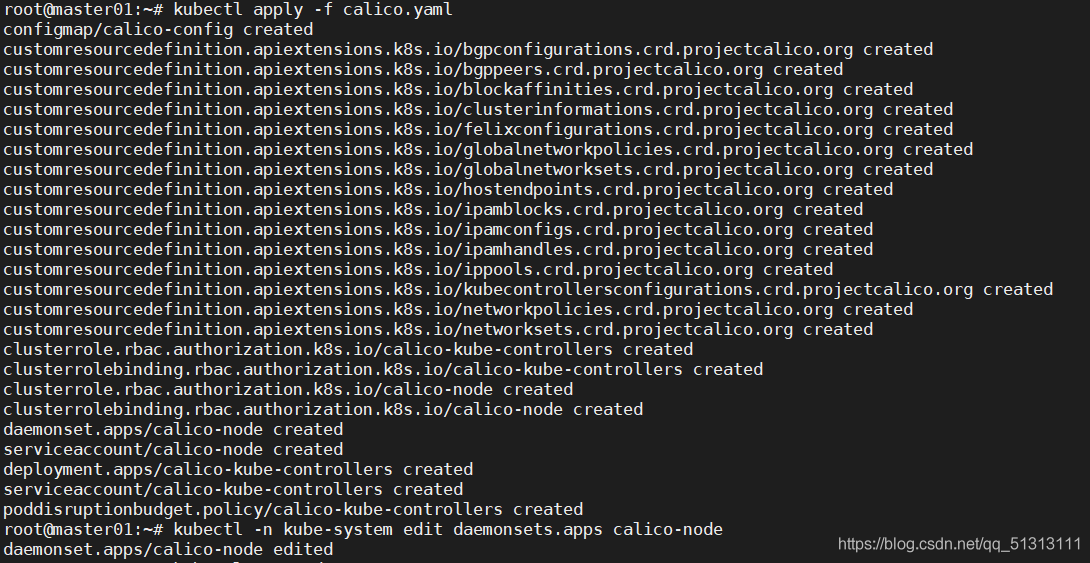
summary
I don’t know why this is so. It’s easy to report an error when downloading and installing directly. Only when the download is completed locally can the installation be successful. Friends with the same problems can try this method
Centos7 network is unreachable
A friend’s centos7 can’t connect to the network normally after it is installed on the virtual machine. I also have this problem. I try to reallocate the address with dhclient, but the system prompts that dhclient is running. I have no choice but to try other methods. After studying it, you can refer to this scheme and try it out. The steps are as follows:
1
CD/etc/sysconfig/network scripts/enter the directory of configuration files related to the network to be modified
2、 Look at the table of contents

At this time, you will find that there is no ifcfg-eth0 file mentioned in the tutorial. Just open the first ifcfg eno file.
If you can’t find a new tutorial, you can’t create one
3、 VI ifcfg eno1677736
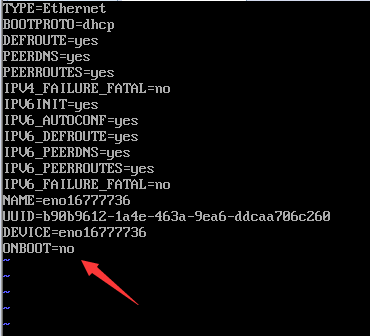
4、 Press the letter I to enter the editing state, and change onboot to yes. Press the ESC key, colon, and then add the letter WQ to save and exit (refer to VI usage)
5、 Service network restart (this command is to restart the network service). If it doesn’t work after the restart, there should be no problem after restarting the Linux system
【docker】 denied: requested access to the resource is denied
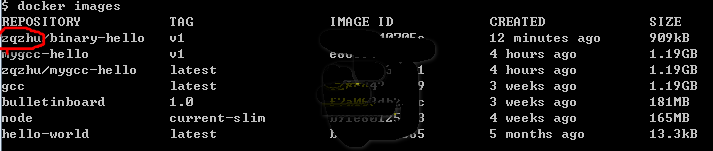
As shown in the question, push the docker image you created to the dockerhub, and the above error appears
cause analysis : when you add a tag to build your own image, you must add the user name of your dockerhub in front of it, as shown in the red circle below, and then push it
Chinese garbled code when vscode calls CMD to run C / C + +
Online did not find a useful way, and finally found in a tutorial B station
Set – & gt; select workspace – & gt; search encoding – & gt; set to GBK
Principle: the default encoding of CMD is GBK, and the default encoding of vscode is UTF-8. Just change the default encoding of vscode’s current workspace, which will not affect other projects.
How to solve the problem of string to CString garbled code?
How to solve the problem of string to CString garbled code?
string str = “hello”;
CString cstr = (CString)str.c_str();
=