Category Archives: How to Fix

Warning – this build will not support IPVS with IPv6

Project scenario:

In Linux system, use the command to decompress and install the keepalived source package.


Problem Description:

To install the keepalived source code package, you have run the following command:

tar -xzvf keepalived-2.2.2.tar.gz
cd keepalived-2.2.2
./configure --prefix=/usr/local/keepalived
yum -y install gcc
./configure --prefix=/usr/local/keepalived
yum -y install openssl openssl-devel
./configure --prefix=/usr/local/keepalived

The third command run result error, solved (solution), the fifth command run result error, solved (solution), in the seventh line re run the command error, the warning message is:

*** WARNING - this build will not support IPVS with IPv6. Please install libnl/libnl-3 dev libraries to support IPv6 with IPVS.

Cause analysis:

The main reason for this error is the lack of libnl core library. Just install libnl and libnl devel.


Solution:

Install libnl and libnl devel:

yum -y install libnl libnl-devel

Rerun the command ./configure -- prefix =/usr/local/kept , the command runs normally, and the problem is solved.

If there are other errors, please refer to:
configure: error: no acceptable C compiler found in $path error resolution
configure: error:!! OpenSSL is not properly installed on your system.!! Error resolution

Error opening device

Debugging QT project found an error, error opening device.
Look at the error and think it’s a hardware problem. Look for this character.

It must have loaded the dynamic library, and the error was printed in the dynamic library.
Deubg step by step found that it was qjson parsing error, Nari???
What is the relationship between qjson parsing and opening device errors?

Then use:

ll@ubuntu:~/QJson/lib$ strings libqjson.so | grep opening

It is found that there is this:
error opening device

Finally, look at the GitHub source code:
https://github.com/flavio/qjson/blob/master/src/parser.cpp

QVariant Parser::parse(QIODevice* io, bool* ok)
{
  d->reset();

  if (!io->isOpen()) {
    if (!io->open(QIODevice::ReadOnly)) {
      if (ok != 0)
        *ok = false;
      qCritical ("Error opening device");
      return QVariant();
    }
  }
  ......
}
 

I think it should be changed to error opening file.
all is file!
That’s all.

Error from Python installation Library: Microsoft Visual C + + 14.0 is required

Error: Microsoft Visual C + + 14.0 is required. Get it with Microsoft Visual C + +

Error: Microsoft Visual C + + 14.0 is required. Get it with “build tools for visual studio”: https://visualstudio.microsoft.com/downloads/

Finally, a Microsoft Visual C + + build tools 2015
is found https://go.microsoft.com/fwlink/?LinkId=691126
The file name is: visual cppbuildtools full, download and install.

Double click visual cppbuilder tools_ full.exe , select the default, click Install, and wait about 10 minutes to complete the installation.
Then install the PIP library.

[robot_launch.launch] is neither a launch file in package [kinova_gazebo] nor is

Problem Description:

[robot_launch.launch] is neither a launch file in package [kinova_gazebo] nor is [kinova_gazebo] a launch file name
The traceback for the exception was written to the log file

terms of settlement:

The error indicates that the corresponding package is not installed in the ROS system. In this case, go to the top of the project file and use catkin_ The make command compiles the file. If it is executed again at this time, an error will still be reported. Then add another statement:

source devel/setup.bash

Will devel/ setup.bash Add to the system, and then run

Common errors in k8s initialization_ [WARNING NumCPU]_ [WARNING SystemVerification]_ WARNING Hostname

Common errors in k8s initialization

[init] Using Kubernetes version: v1.20.5
[preflight] Running pre-flight checks
    1    [WARNING NumCPU]: the number of available CPUs 1 is less than the required 2
    2    [WARNING IsDockerSystemdCheck]: detected "cgroupfs" as the Docker cgroup driver. The recommended driver is "systemd". Please follow the guide at https://kubernetes.io/docs/setup/cri/
    3    [WARNING SystemVerification]: this Docker version is not on the list of validated versions: 20.10.5. Latest validated version: 19.03
    4    [WARNING Hostname]: hostname "k8s" could not be reached
    5    [WARNING Hostname]: hostname "k8s": lookup k8s on 192.168.0.1:53: no such host

Solution:
1. Adjust the number of CPU cores to the current number of cores + 1 (self adaptation)
2. Change the settings to make the container runtime and kubelet use SYSTEMd as CGroup driver https://blog.whsir.com/post-5312.html
3. Re install docker, and the latest verification version of docker is 19.03
4. Configure domain name resolution/etc/hosts
5. Refer to 4

Batch error reporting in Java spring

1、 Questions

Error in starting batch task:

ERROR [com.alibaba.druid.pool.DruidDataSource]
 - {dataSource-1} init error java.sql.SQLException: oracle.jdbc.OracleDriver

2、 Solution

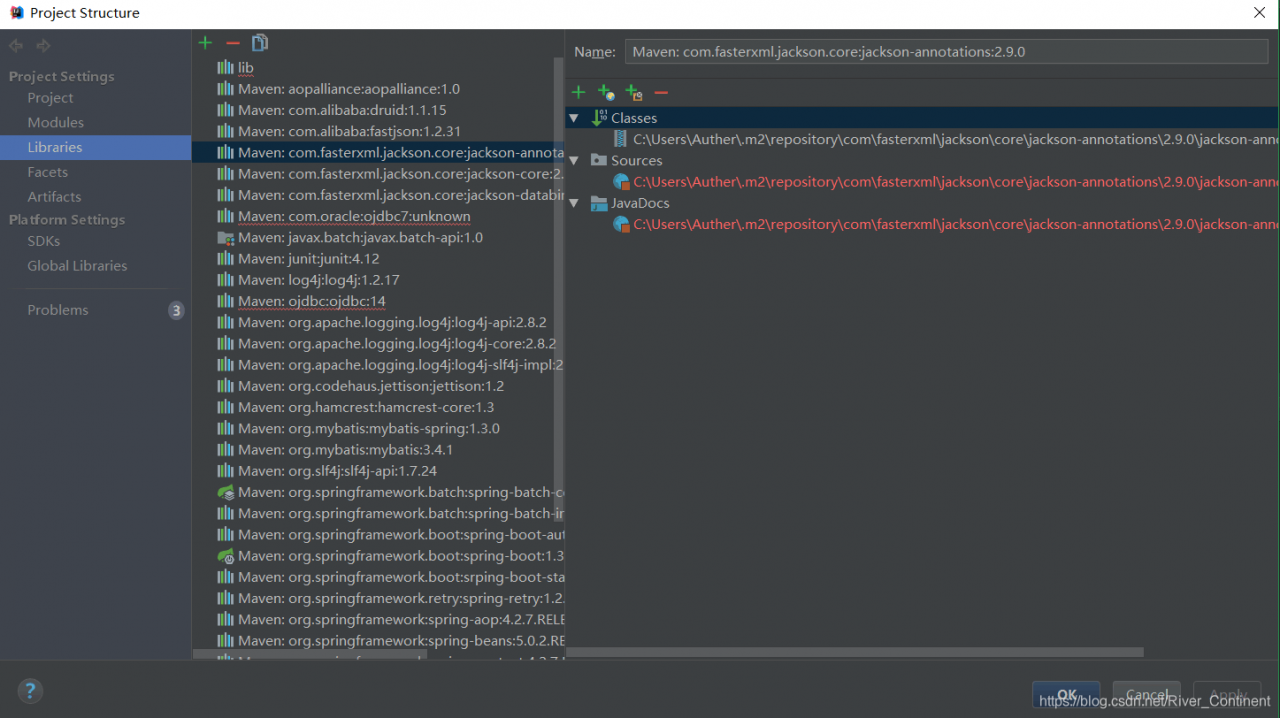
1. The reason is that I don’t have the jar package driven by JDBC, so I found a few on the Internet and asked me to download Ojdbc14 or ojdbc7. 14 is finished, but it’s useless. Ojdbc7 is the wrong version. Later, I opened the library and found that there are problems with both downloads;

You can only delete these invalid jar packages, and then find a JDBC 6 jar package to put on. The result is OK;

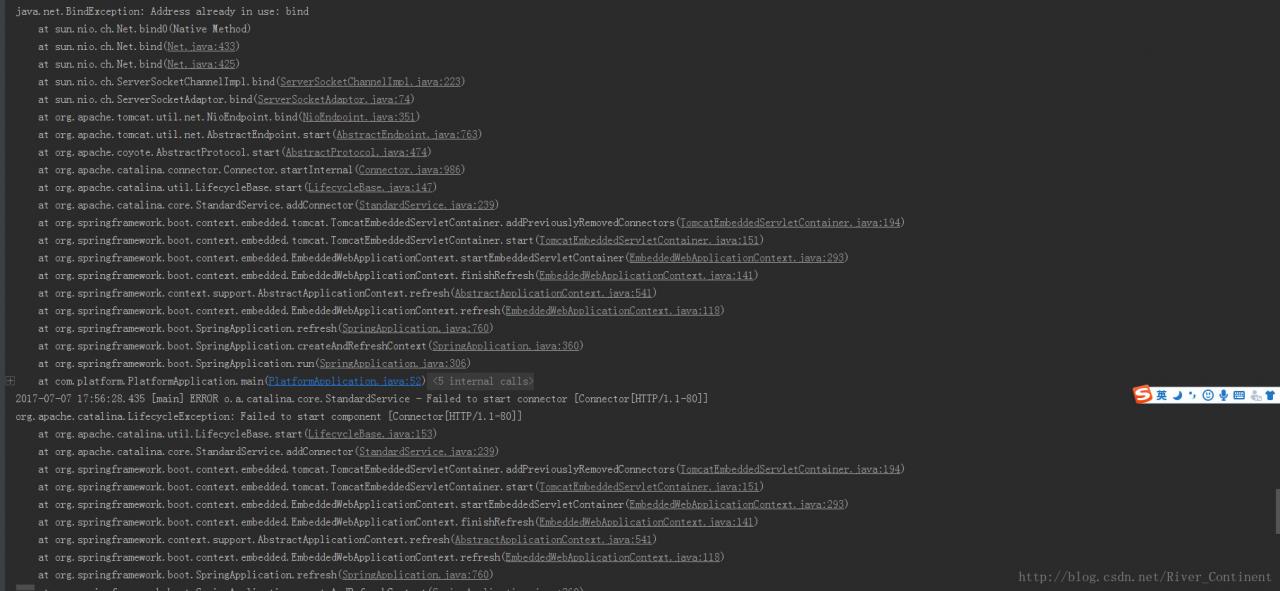
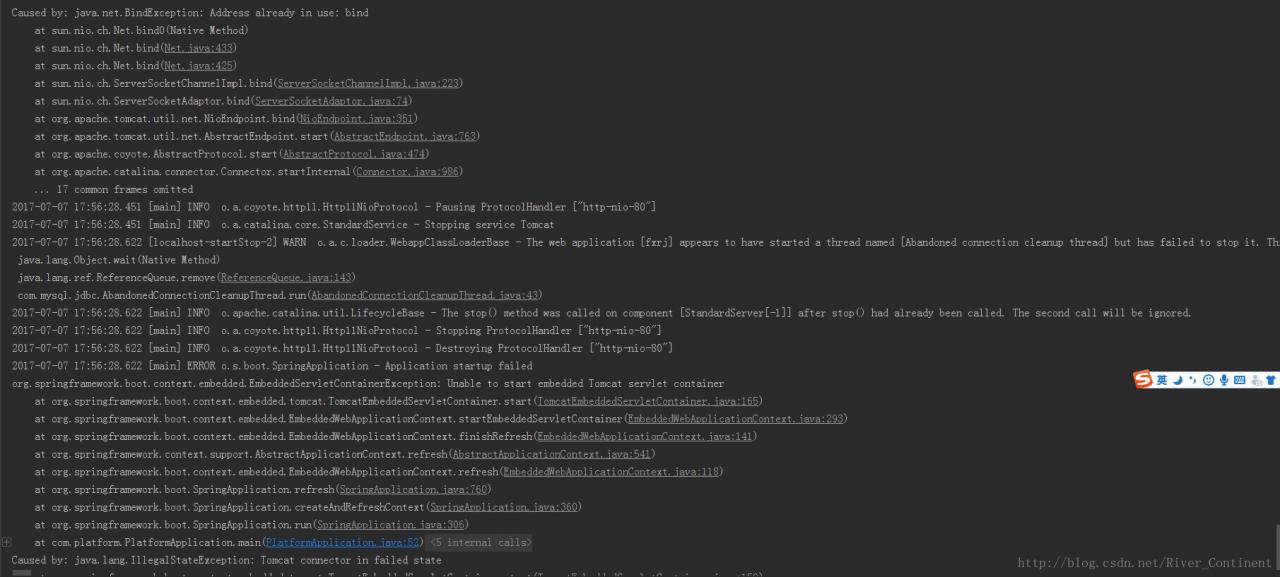
[exception] address already in use: bind

1. Problems:

Bind Exception:Address Already in use;
Failed to start connector;
Address Already in use:bind;
EmbeddedServletContainer Excepiton:Unable to start embedder Tomcat servlet container;
IllegalState Exception:Tomcat connector in failed state;

2. Source code:

None;

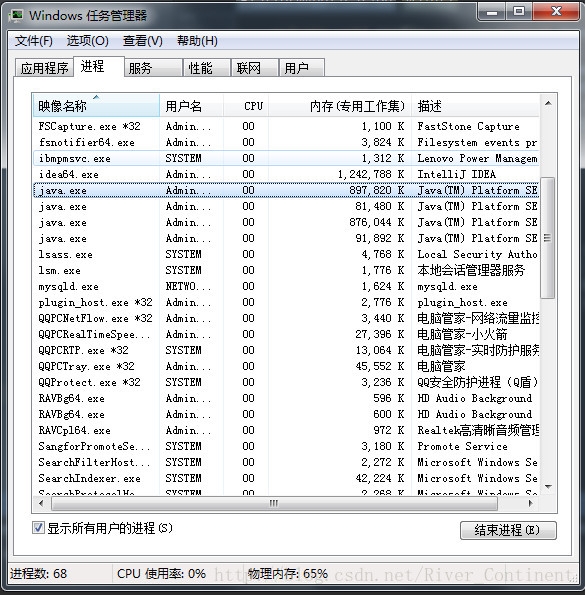
3. Screenshot:

4. Summary:

Here we put it java.exe Turn it all off;

[Java] Java program error: exception_ ACCESS_ VIOLATION (0xc0000005)

When running Java program, error: exception_ ACCESS_ VIOLATION (0xc0000005);
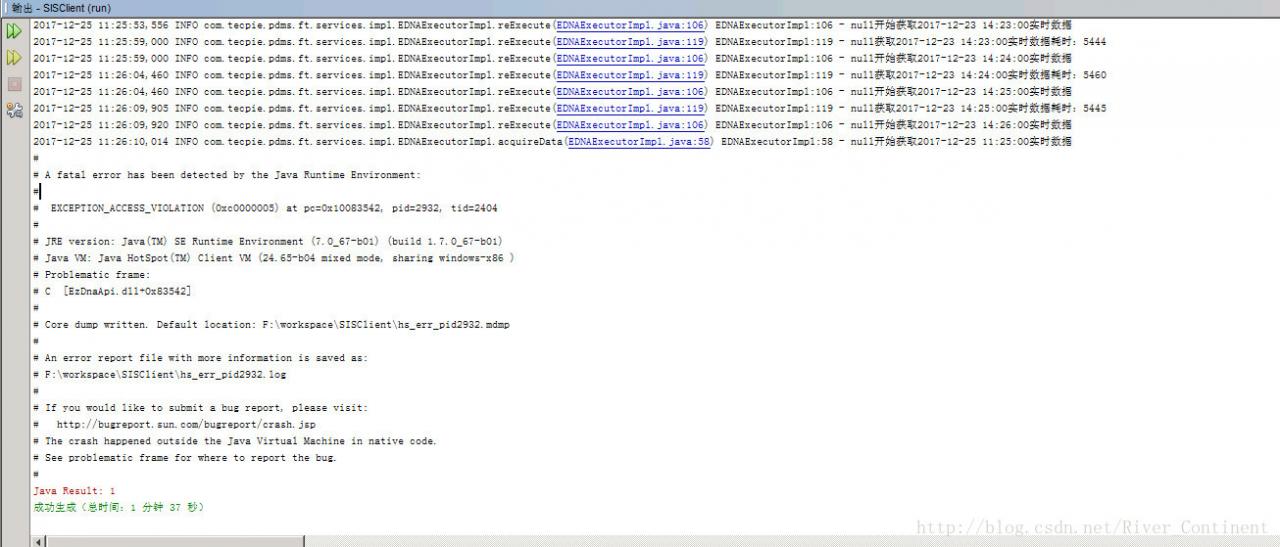
According to the description of the original webpage:
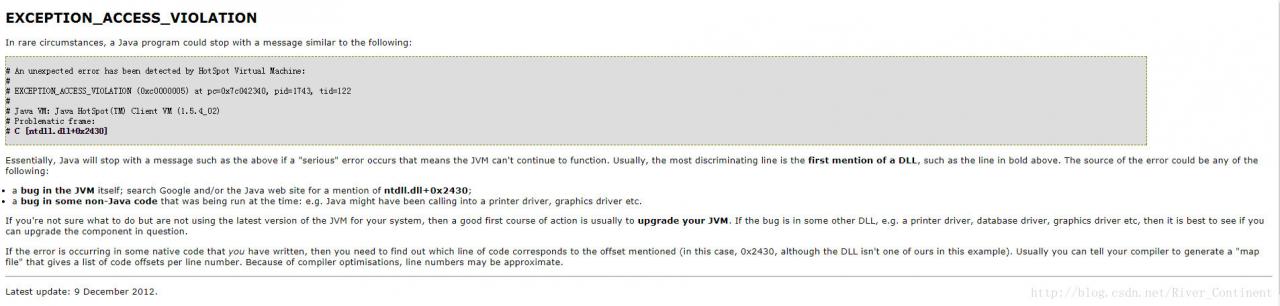
EXCEPTION_ACCESS_VIOLATION

In rare circumstances, a Java program could stop with a message similar to the following:
 An unexpected error has been detected by HotSpot Virtual Machine:
 EXCEPTION_ACCESS_VIOLATION (0xc0000005) at pc=0x7c042340, pid=1743, tid=122
 Java VM: Java HotSpot(TM) Client VM (1.5.4_02)
Problematic frame:
C [ntdll.dll+0x2430]
Essentially, Java will stop with a message such as the above if a "serious" error occurs that means the JVM can't continue to function. Usually, the most discriminating line is the first mention of a DLL, such as the line in bold above. The source of the error could be any of the following:

 1. a bug in the JVM itself; search Google and/or the Java web site for
    a mention of ntdll.dll+0x2430;
 2. a bug in some non-Java code that was being run at the time: e.g.
    Java might have been calling into a printer driver, graphics driver
    etc.

If you're not sure what to do but are not using the latest version of the JVM for your system, then a good first course of action is usually to upgrade your JVM. If the bug is in some other DLL, e.g. a printer driver, database driver, graphics driver etc, then it is best to see if you can upgrade the component in question.

If the error is occurring in some native code that you have written, then you need to find out which line of code corresponds to the offset mentioned (in this case, 0x2430, although the DLL isn't one of ours in this example). Usually you can tell your compiler to generate a "map 

The possible reasons are as follows:
1. A bug in the JVM itself; search Google and/or the Java Web site for
a mention of ntdll.dll +0x2430;
For a bug in the JVM itself, visit Google or the Java website (according to ntdll.dll +A bug in some non java code that was being run at the time: e.g.
java might have been calling into a printer driver, Graphics driver
etc.
a bug in a running non java code may cause the print driver to be called, such as the graphics driver;

Here, my suggestions are:
1. The port number may conflict, so close other unnecessary Java programs;
2 2. For the same Java program, some function may be set to start automatically (which will crowd out the Java program you are using). If there is a pause button, pause the function in the same Java program first (without affecting it), run the part of your own function first, and then start other functions after running this part of your own function;

Welcome to my official account:
[screen bridge community]

[mybatis] error: malformed ognl expression: name! = null and name! = ‘”

1、 Questions

Malformed ognl expression: name! = null and name! = ‘
report an error;
malformed means abnormal;

2、 Solutions and reasons

It turned out to be* Mapper.xml In the document:

<if test ="userId ! null">

The equals sign is missing; the SQL in the automatically generated mybatis file is missing an equals sign

<if test ="userId != null">

Moreover, there should be no space between exclamation mark and equal sign;

No matching editors or conversion strategy found

1、 Questions

Recently, I’ve been building the batch framework of spring, and frequent errors have been reported. It’s a trip to the pit;

Cannot convert value of type 'java.lang.String' to 
required type 'javax.sql.DataSource' for property 'dataSource': 
no matching editors or conversion strategy found

2、 Solution

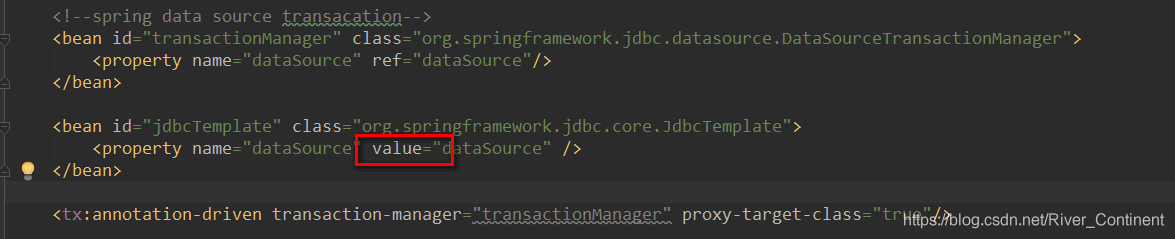
The reason is that [ref] is wrongly written as [value] in the XML configuration of persistence layer;