Category Archives: How to Fix

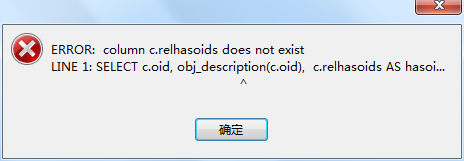
Using Navicat + premium + 11.1 to connect to PG12 version, error: column c.relhasoids does not exist

Phenomenon:
when using Navicat + premium + 11.1 client to connect to PG12, an error was reported:

reason:
the current database version: postgres12 is inconsistent with the client connection tool Navicat + premium + 11.1

Solutions:
1. Upgrade the client version to Navicat premium 12
2. Reduce postgres12 to 11

After solution:

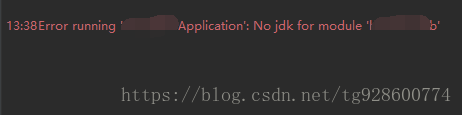
Error running ‘xxxapplication’: no JDK for module ‘xxx’

When I was running the project today, I suddenly found that the project that had been well before could not be started. An error was reported

Error running ‘XXXApplication’: No jdk for module ‘XXX’

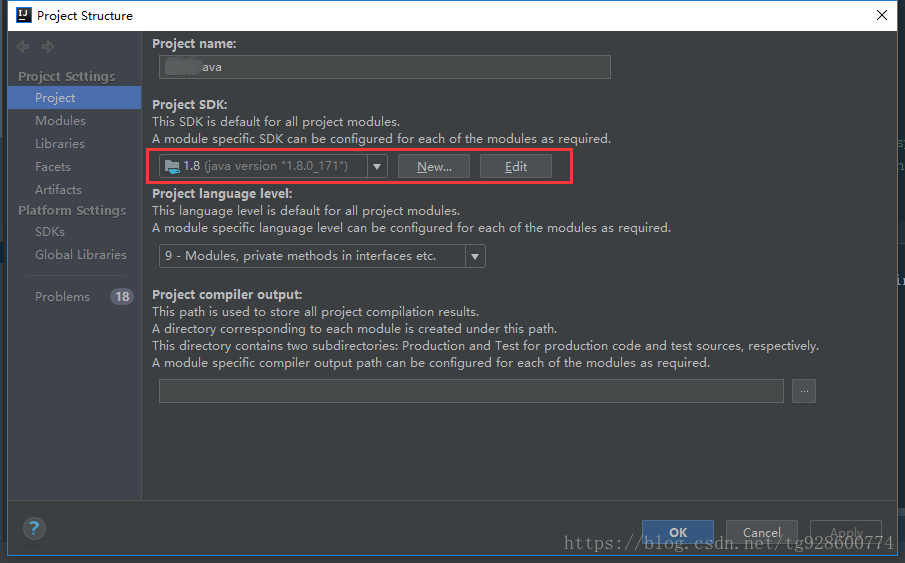
Normally, JDK is set in file – & gt; project structure, and there is no problem after checking

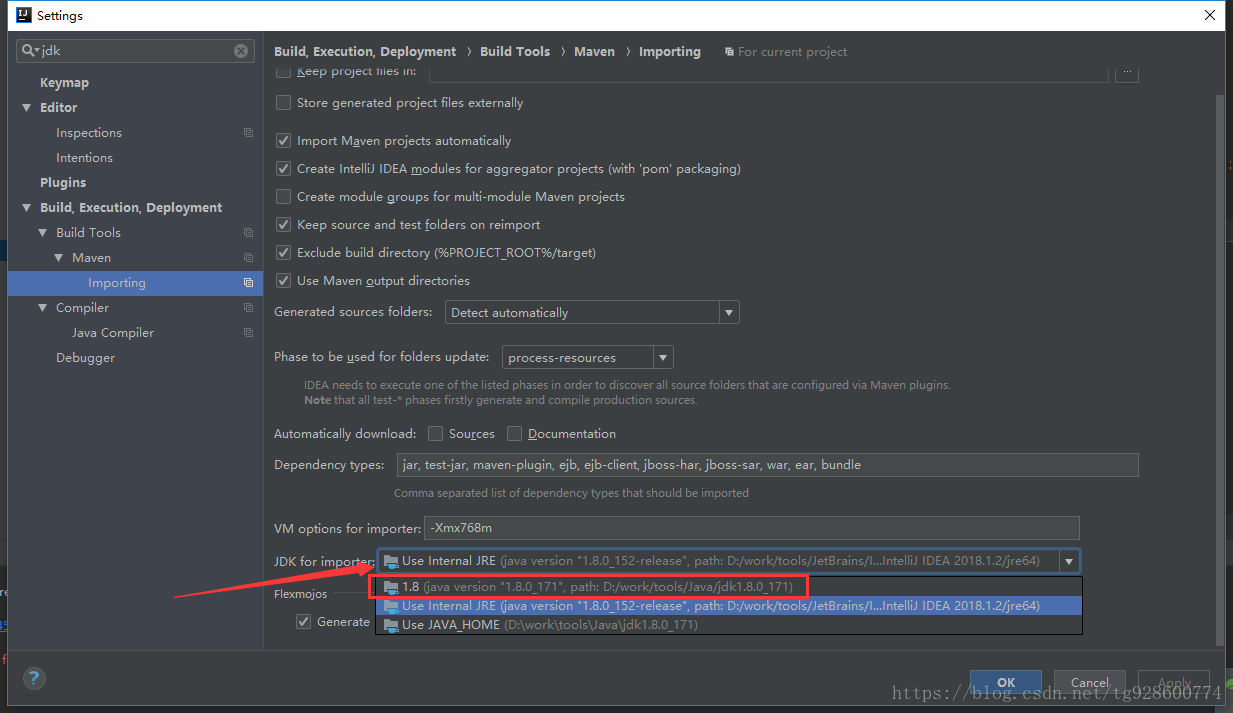
Later, after several twists and turns, through a direct search of JDK in settings, we found that there was such a place

The arrow points to the current state. Change this to the normal 1.8, and the project can run happily


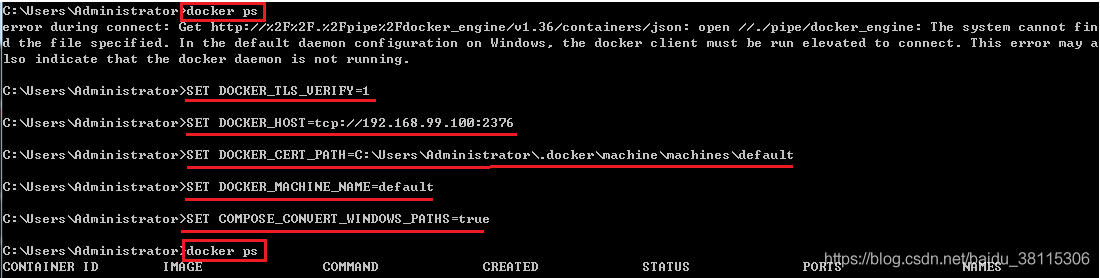
Docker command error during connect: get http://2F2F.2Fpipe2Fdocker_ engine/v1.36/containers/json: open//.

Error during connect: get http://% 2F% 2F.% 2fpipe% 2fdocker_ engine/v1.36/containers/json: open //./pipe/docker_ Engine: the system cannot find the file specified. In the default configuration on windows, the docker client must be run upgraded to connect. This error may also indicate that the docker day is not running.
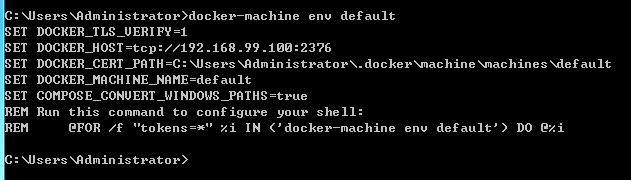
the error message is as follows:

resolvent

1. Execute command: docker machine env default

2. Method 1: copy the displayed command for execution

after execution, execute docker PS and other commands, and you can use it normally
3. Method 2: only the last REM @ for/F "tokens = *"% I in ('docker machine env default ') do @% I The command is executed without REM, that is, @ for/F "tokens = *"% I in ('docker machine env default ') do @% I

after execution, the docker command can be used normally, and the environment variable needs to be set first for each new CMD window.
Note: when using method 2 in bat script, if you directly put for statement into bat script to run, an error will be reported. Change % I in the command to %% I . For details, please refer to my other article, bat script execution for error reporting

When configuring the proxy with Vue, the front-end requests the server-side error 504; the Vue console reports the error occurred while trying to proxy request

Error occurred while trying to proxy request/login/from 127.0.0.1:8080 to http://127.0.0.1 :8081 (ECONNREFUSED) ( https://nodejs.org/api/errors.html#errors_ common_ system_ errors)

I searched for information on the Internet and found various answers. Then I tried several answers and found that there should be a problem with the port,

Finally, change the proxy address to http://127.0.0.1 9090 is the solution!

The docker runtime container reported an error: error response from daemon: OCI runtime create failed

Today, when the virtual machine runs docker image, it always reports an error (the specific reason for the error remains to be analyzed). After checking the system kernel and operating system version, no result is found.

[ root@bogon ~]# cat /etc/redhat-release

CentOS Linux release 7.2.1511 (Core)

[ root@bog [ root@bogon ~]# docker version
Client:
Version: 17.12.1-ce
API version: 1.35
Go version: go1.9.4
Git commit: 7390fc6
Built: Tue Feb 27 22:15:20 2018
OS/Arch: linux/amd64

Server:
Engine:
Version: 17.12.1-ce
API version: 1.35 (minimum version 1.12)
Go version: go1.9.4
Git commit: 7390fc6
Built: Tue Feb 27 22:17:54 2018
OS/Arch: linux/amd64

Experimental: false

Error information:

[ root@bogon yum.repos .d]# docker run -it centos echo haha

docker: Error response from daemon: OCI runtime create failed: unable to retrieve OCI runtime error (open /run/docker/containerd/daemon/ io.containerd.runtime .v1.linux/moby/6602807a7f1a03689a847741b0a10171788f7bed2aa92a4dff35c429b02248d1/ log.json : no such file or directory): docker-runc did not terminate sucessfully: docker-runc: symbol lookup error: docker-runc: undefined symbol: seccomp_ version

resolvent:

Upgrade the system to 7.4

It takes a long time to execute Yum update and wait patiently.

[ root@bogon ~]# cat /etc/redhat-release

CentOS Linux release 7.4.1708 (Core)

[ root@bogon ~]# docker run -it centos echo haha

haha

Another solution is to install a lower version of docker, which is highly dependent on the version of the operating system. You must pay attention to it when installing!

Foreigners interpret it as follows:

RHEL 7.2 is no longer supported and Docker does not test their release against unsupported versions. You need to upgrade your OS, preferably to 7.4, to resolve this issue.

I’ve seen a few people with similar issues in the past few days that resolved this same error message by upgrading their OS. Some of the older packages no longer work with newer docker releases. One of those problems is an outdated libseccomp: https://github.com/moby/moby/issues/35906
Error: path not specified when the docker 1.7 file is uploaded to the container in CentOS

I tried to find many ways to transfer files to the docker container on the Internet, and found a bug in version 1.7

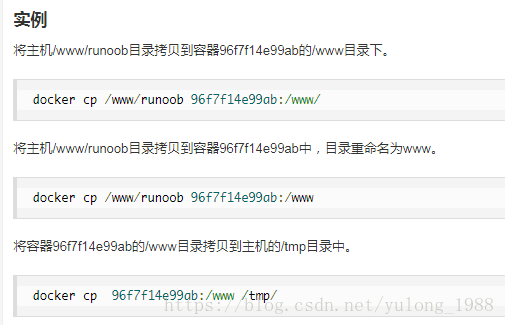
docker cp e0ce13a27784:/home/website/default  /appuweichao/credit_ passport/web/

Error: Path not specified

The error message “error: path not specified” has been fixed in docker 1.8.0.

Error: path not specified

Solution: copy from the host to the container’s Mount directory

First, get the real ID of the container

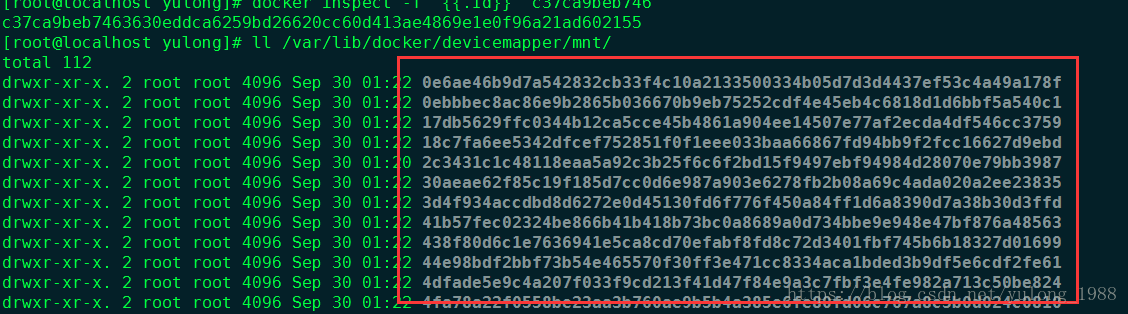
docker inspect -f ‘{{.Id}}’ c37ca9beb746

cp /home/yulong/Downloads/file.txt /var/lib/docker/devicemapper/mnt/c37ca9beb7463630eddca6259bd26620cc60d413ae4869e1e0f96a21ad602155/rootfs/mnt

/var/lib/docker/devicemapper/mnt/c37ca9beb7463630eddca6259bd26620cc60d413ae4869e1e0f96a21ad602155/rootfs/mnt

This folder is actually a local shared folder where the container is mounted

Here are the folders for all the containers

c37ca9beb7463630eddca6259bd26620cc60d413ae4869e1e0f96a21ad602155

After entering the terminal/MNT, you can see it below file.txt It’s a document


Error report in idea compilation Error:Android Dex : [Project] java.lang.OutOfMemoryError : GC overhead limit exceeded

Recommended website http://jingyan.baidu.com/album/9c69d48fa0290013c9024e3f.html

When using IntelliJ idea or Android studio to develop Android applications, if there is a large amount of code, there will be problems when compiling

java.lang.OutOfMemoryError : Java heap space

It’s a mistake. Let’s talk about how to solve this problem.

When using IntelliJ idea or Android studio to develop Android applications, if there is a large amount of code, there will be problems when compiling

java.lang.OutOfMemoryError : Java heap space

Error reported by:

When using IntelliJ idea or Android studio to develop Android applications, if there is a large amount of code, there will be problems when compiling

java.lang.OutOfMemoryError : Java heap space

Error report of:
0

To solve this problem, we need to increase the heap of the corresponding compiler.

Now in the file menu, open the settings interface,
and

Then, in the search box, enter “heap”, and the settings related to heap will be displayed below. Find the corresponding development language settings, and increase heap. In this case, Java heap is not enough, so click Android compiler to increase the corresponding heap.

If the heap of other languages is not enough, turn up the heap in the corresponding menu.

@Solution of error failed to get response from / Vue cli version marker

thank: CSDN@beeegood Questions provided.

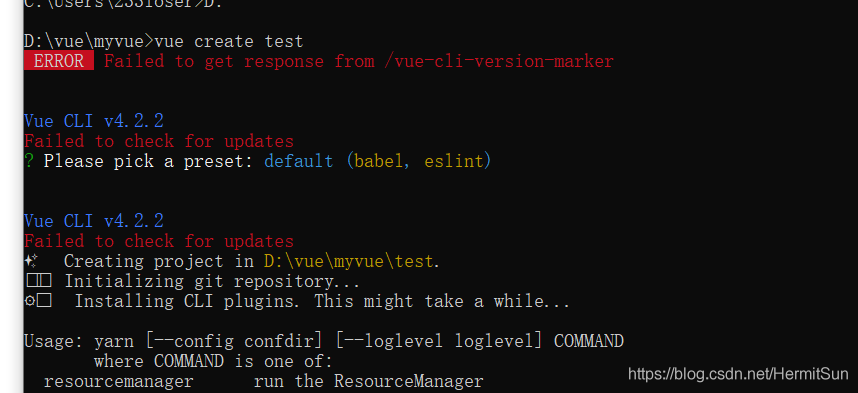
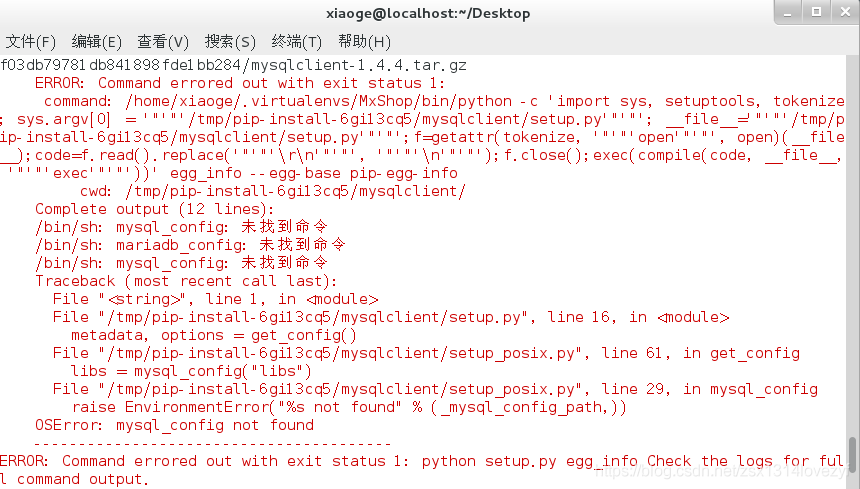
Today, they encountered a very interesting bug. When they created a project with @ Vue/cli, they reported an error, which they had never seen before:

At first, I thought it was a version problem. After all, the error message said update, but the version of CLI was the latest. After asking, the node and NPM versions were also the latest (12.16.1, which was the latest as of the time I wrote this article). Most importantly, there was no old version of Vue cli
That’s very interesting. According to convention, when encountering the front-end problem, the first reaction is to unload and reload

npm uninstall -g @vue/cli
npm cache clean --force
npm install -g @vue/cli

However, it’s useless. After checking for a long time, we can’t find the relevant error report on the Internet, which is very embarrassing.

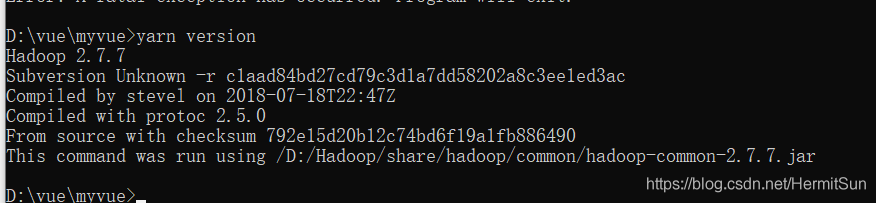
Later, I noticed that there is an output of yarn below. Is the built-in yarn in cli?But this shouldn’t be:

although I think it’s incredible, I still decided to look at the version of yarn. Yarn is highly suspected. Sure enough:

the problem was found. But what is this?Hadoop?

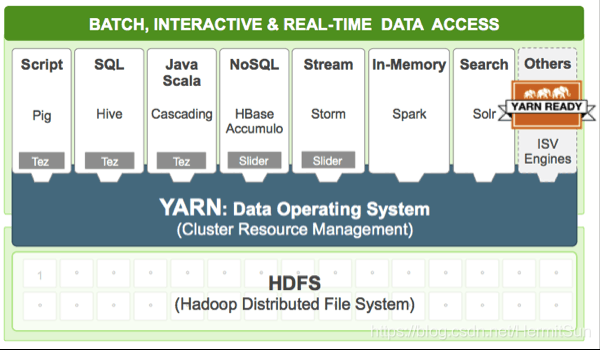
Later, I remembered that yarn is also a part of Hadoop, which is used to schedule resources:

How to read JS file app.ux Global variables in

Fast application definition in app.ux The global variables in the JS file can be obtained through the quick application of the public method getapp (). For details, please refer to the following example code.

app.ux code:

data: {
      AppData: '123456',
}

JS file:

export default {
      getAppData() {
        return getApp().$def.data.AppData
      }
    }

For more details, please refer to:

Quick application development guidance document: https://developer.huawei.com/consumer/cn/doc/development/quickApp-Guides/quickapp-whitepaper

Quick application script:

https://developer.huawei.com/consumer/cn/doc/development/quickApp-References/quickapp-script


Link to the original text: https://developer.huawei.com/consumer/cn/forum/topic/0204411133432620361?fid=18

Original author: mayism

Hadoop — HDFS data writing process

HDFS write data flow

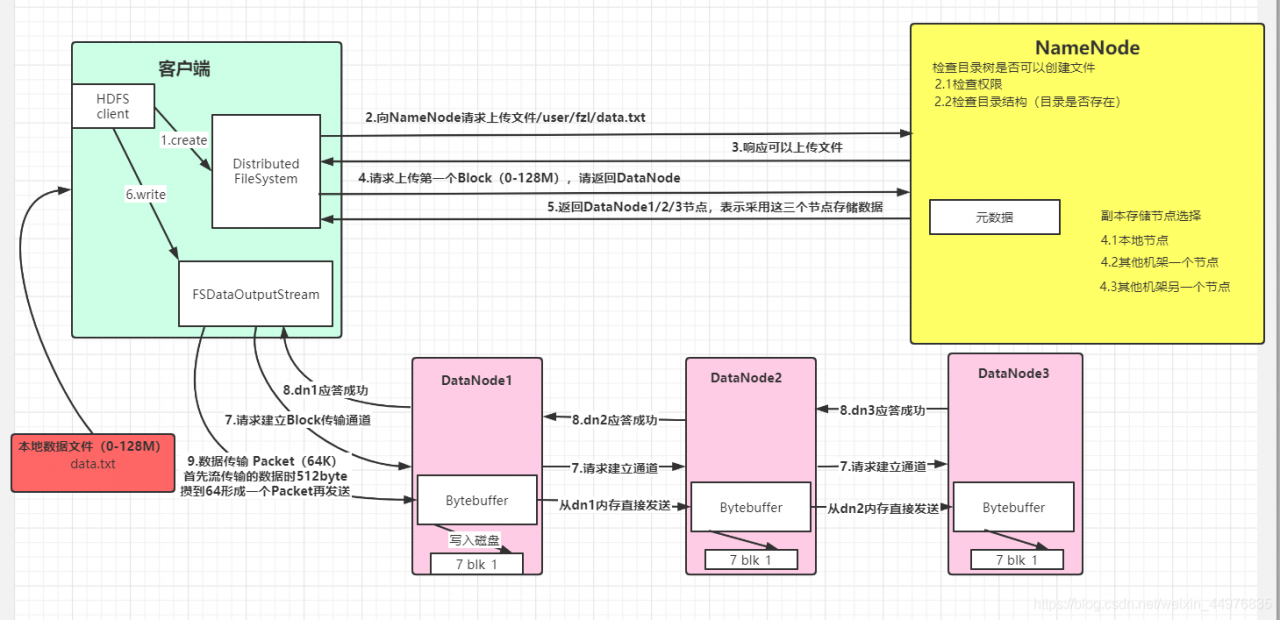
Suppose there is a local file data.txt First, the HDFS client creates a connection object file system. Then the client requests the namenode to upload the file/user/fzl/ data.txtNameNode After receiving the request, respond to the client and upload the file. The client requests to upload the first block (0-128m), please return to datanode, and then namenode returns datanode1, datanode2, datanode3 nodes (considering node distance, load balancing and other factors), indicating that these three nodes will be used to store data. After receiving the return node, the client creates fsdataoutputstream, and then requests datanode1 to establish a block transmission channel, and datanode1 requests to communicate with Da Tanode2 establishes a channel, datanode2 establishes a channel with datanode3, datanode3 responds to datanode2, datanode2 responds to datanode1, datanode1 responds to fsdataoutputstream successfully (pipeline transmission), and then starts to send data in the form of packet (each transmission of stream is a chunk (512byte), saves a packet (64K) and then transmits the packet object). When transmitting to datanode1, datan Ode1 writes the data file to the disk first, and then transfers it to datanode2 directly from memory. Datanode2 and datanode3 are in turn and so on. In this way, the problem that a datanode fails to write after an error is avoided. After all transfers are completed, a data write operation is completed

The flow chart is as follows:

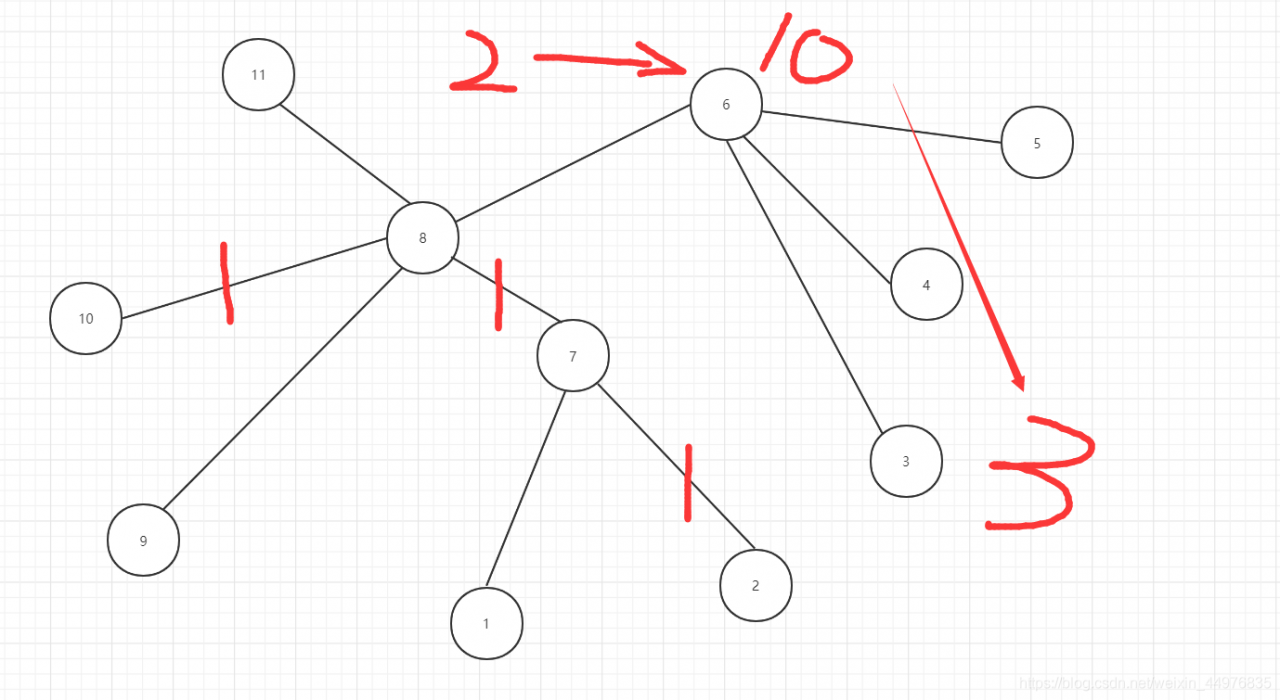
Node distance calculation

Node distance: the sum of the distances from two nodes to the nearest common ancestor

Figure 2-10: node distance: 3

Rack aware

The first copy is on the node where the client is located. If the client is outside the cluster, randomly select a second replica in a random node of another rack, and the third replica in a random node of the rack where the second replica is located