Category Archives: How to Fix

Resourceaccessexception: I / O error on post request for and connection timed out

1. Cause of error:

When the resttemplate is used to call the third-party API, the local test is normal, but when it is deployed to the server, it will report: Dan, 19:06 org.springframework.web . client.ResourceAccessException : I/O error on POST request for "XXX": No route to host (Host unreachable); nested exception is java.net.NoRouteToHostException : no route to host (host unreachable) , at first, I thought that the timeout was not set, so I configured it through online methods

 SimpleClientHttpRequestFactory requestFactory = new SimpleClientHttpRequestFactory();
 requestFactory.setConnectTimeout(10*1000);
 requestFactory.setReadTimeout(10*1000);
 RestTemplate rest = new RestTemplate(requestFactory);	

Deployment or error

2. Solutions

Finally, the interface setting the timeout time is replaced with httpcomponentsclienthttprequestfactory to solve the problem successfully

 HttpComponentsClientHttpRequestFactory requestFactory = new HttpComponentsClientHttpRequestFactory();
 requestFactory.setConnectTimeout(10*1000);
 requestFactory.setReadTimeout(10*1000);
 RestTemplate rest = new RestTemplate(requestFactory);

Docker delete error response from daemon: Conflict: unable to delete xxxxx solution

An error is reported when the docker image is deleted. After docker images , the output is as follows:

REPOSITORY                             TAG                        IMAGE ID            CREATED             SIZE
nvidia/cuda                            9.0-base                   74f5aea45cf6        6 weeks ago         134MB
paddlepaddle/paddle                    1.1.0-gpu-cuda8.0-cudnn7   b3cd25f64a2a        8 weeks ago         2.76GB
hub.baidubce.com/paddlepaddle/paddle   1.1.0-gpu-cuda8.0-cudnn7   b3cd25f64a2a        8 weeks ago         2.76GB
paddlepaddle/paddle                    1.1.0-gpu-cuda9.0-cudnn7   0df4fe3ecea3        8 weeks ago         2.89GB
hub.baidubce.com/paddlepaddle/paddle   1.1.0-gpu-cuda9.0-cudnn7   0df4fe3ecea3

The first image is successfully deleted by docker RMI 74f5aea45cf6 directly. However, the latter two images appear in pairs, and the direct docker RMI deletion fails. The error message is as follows:

Error response from daemon:
conflict: unable to delete b3cd25f64a2a (must be forced) - image 
is referenced in multiple repositories

Solution:

First, specify a name when docker RMI , instead of image ID , and then execute docker RMI - f image ID J

docker rmi paddlepaddle/paddle:1.1.0-gpu-cuda8.0-cudnn7
docker rmi -f b3cd25f64a2a

About error creating bean with name ‘xxxxx’: invocation of init method

The information found on the Internet is that this kind of exception is usually caused by wrong package import, missing, conflict and wrong version.

Before reporting this error again, I added, deleted and modified it pom.xml File, right-click project – & gt; Maven – & gt; update project, project – & gt; clean, etc. these operations are used to modify and update the project as a whole. It’s not good to directly locate the specific reason. So I went through the exception record carefully, and I checked in a java file that reported an error. I found that the point that reported an error was the override annotation. This is the reason why override annotation is not supported. Combined with previous experience, it is judged that the compiler version is low.

Solutions: 1. Right click on the project – & gt; build path – & gt; configure build path (then change the default 1.5 to your own JRE version: specifically, delete 1.5, and then add library – & gt; JRE system library – & gt; workspace default library (generally higher than 1.5, now at least 1.7, 1.8)).

2. Right click Project – & gt; properties – & gt; Java compiler. Remove the check “use compliance from execution environment on the Java build path”. Then, choose your own java version.

Solution of fileuriexposedexception for Android 7.0 behavior change

The source of this article is as follows http://blog.csdn.net/qq_ 27512671/article/details/71439571

When we develop functions related to [sharing files between applications], we often report this runtime exception on Android 7.0. Why do we run the code with no problem below Android 7.0 on Android 7.0 +?This is mainly from a behavior change in Android 7.0!

For Android 7.0-oriented applications, the strictmode API policy implemented by the Android framework prohibits the disclosure of file:// URI outside your application. If an intent containing a file URI leaves your application, the application fails and a fileuriexposedexception occurs. As shown in the figure:
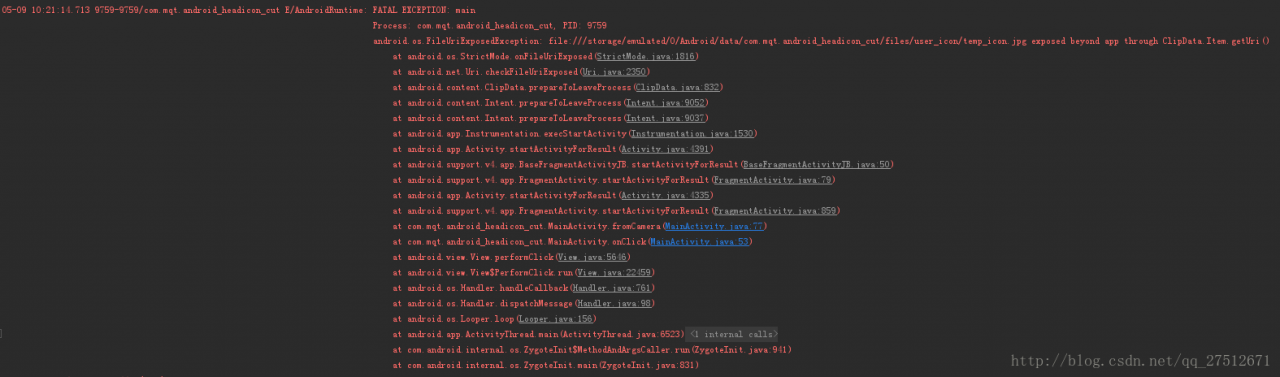
To share files between applications, you should send a content:// URI and grant temporary access to the URI. The easiest way to do this is to use the fileprovider class.

Usage of fileprovider class:

Step 1: define a fileprovider list entry for your application. This entry can declare an XML file, which is used to specify the directory that the application can share.

<manifest xmlns:android="http://schemas.android.com/apk/res/android"
    package="com.example.myapp">
    <application
        ...>
        <provider
            android:name="android.support.v4.content.FileProvider"
            android:authorities="com.example.myapp.fileprovider"
            android:grantUriPermissions="true"
            android:exported="false">
            <meta-data
                android:name="android.support.FILE_PROVIDER_PATHS"
                android:resource="@xml/filepaths" />
        </provider>
        ...
    </application>
</manifest>

In this code, android:authorities Attribute should be unique. It is recommended to use [application package name + fileprovider]. It is recommended to write this android:authorities= ”${applicationId}.file_ The application package name can be found automatically.
The meta data tag specifies a path, which uses the XML file specified by resource to indicate the path:
the XML file is as follows:

<?xml version="1.0" encoding="utf-8"?>
<paths>
    <external-files-path name="bga_upgrade_apk" path="upgrade_apk" />
</paths>

The way to obtain URI should also be treated differently according to the current Android system version

      File dir = getExternalFilesDir("user_icon");
        if (Build.VERSION.SDK_INT > Build.VERSION_CODES.M) {
            icon_path = FileProvider.getUriForFile(getApplicationContext(),
                    "com.mqt.android_headicon_cut.file_provider", new File(dir, TEMP_FILE_NAME));
        } else {
            icon_path = Uri.fromFile(new File(dir, TEMP_FILE_NAME));
        }

So the problem is solved. Paste an example of installing APK adapter 7.0: http://blog.csdn.net/qq_ 27512671/article/details/70224978


Reference:
1 https://developer.android.google.cn/about/versions/nougat/android-7.0-changes.html#accessibility
https://developer.android.google.cn/training/secure-file-sharing/setup-sharing.html#DefineProvider
In C + + cin.getline The difference between () and getline () functions

cin.getline ():
usage: receive a string, which can receive spaces and output. It needs to include & lt; CString & gt;

char m[20];
cin.getline(m,5);
cout<<m<<endl;

Input: jkljkljkl
output: jklj

Receive 5 characters into m, and the last one is’ \ 0 ‘, so only 4 characters can be output;

Extension:
1 cin.getline () actually has three parameters, cin.getline (variables of receiving string, number of receiving characters, end characters)
2. When the third parameter is omitted, the system defaults to ‘\ 0’
3 cin.getline () to read cin.getline When jlkjkljkl is input, jklj is output; when jkaljkljkl is input, JK is output

Getline():
usage: to receive a string, which can receive spaces and output. It needs to include & lt; CString & gt;

string str;
getline(cin,str);
cout<<str<<endl;

Input: jkljkljkl
output: jkljkljkl

Input: JKL jfksldfj jklsjfl
output: JKL jfksldfj jklsjfl

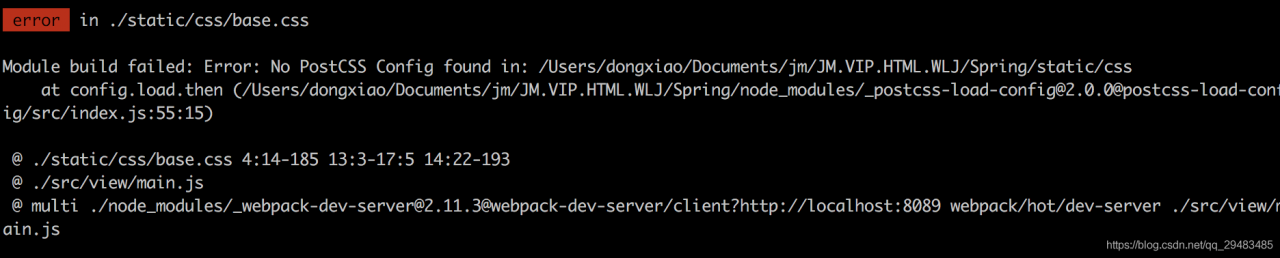
Vue error: no postcss config found solution

Code from git clone:

npm install 

After the dependency is installed, the service is started and an error: no postcss config found appears

npm run dev

terms of settlement:

Create in the project root directory postcss.config.js The configuration content is as follows: you can fix the error problem.

module.exports = {  
  plugins: {  
    'autoprefixer': {browsers: 'last 5 version'}  
  }  
} 


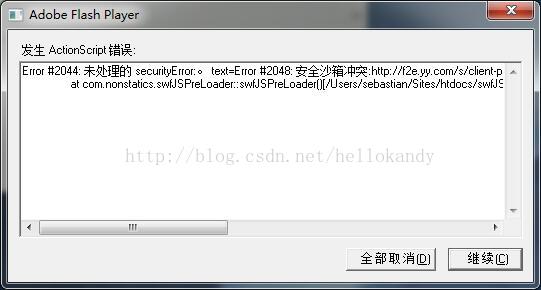
Adobe Flash player error (error # 2044)

Recently, in the project, you need to use flash player to play flash, but after playing for a long time, the following prompt window will pop up:

It is said on the Internet that it is caused by the version of flash player. The solution is to first uninstall the flash player on this computer, and then install the previous version of flash player

Error in upload code of tortoisegit error:1407742E

report errors

When I come back from the festival, I type a code to upload it to GitHub and report an error. Whether it’s idea or tortoise, I report the following error:

fatal: unable to access 'https://github.com error:1407742E :ssl routines:ssl23_get_server_hello:tlsv1 alert protocol version

Baidu is also less than Baidu. Just a few days ago, I saw that the software manager suggested that tortoise git should be updated, so I gave it a try and gave it an update (after the update, I prompted that git bash should be updated again), and the result was solved.

solve

My updated software is the following version
tortoise git-preview-2.5.7.0-20180127-b2d00f8-64 bit.msi And git-2.16.2-64- bit.exe .
The link address is:
0 https://github.com/git-for-windows/git/releases/download/v2.16.2.windows.1/Git-2.16.2-64-bit.exe
https://download.tortoisegit.org/tgit/2.6.0.0/
(tortoise Git is updated from the software manager, with the download address of the official website attached. It should also be feasible in theory.)

If the icon of tortoisegit is not displayed after installation, you can refer to this
section https://jingyan.baidu.com/article/359911f552827957fe0306f8.html

Tomcat error parsing HTTP request header

Tomcat login was configured a few days ago https://localhost : 8080/I found that I didn’t find the reason for the error. Later, others suggested 127.0.0.1:8080. The result was really OK. I was very fascinated

Error parsing HTTP request header Note: further occurrences of HTTP header parsing errors will be logged at DEBUG level.

java.lang.IllegalArgumentException : Invalid character found in method name. HTTP method names must be tokens

at org.apache.coyote .http11. InternalInputBuffer.parseRequestLine ( InternalInputBuffer.java:139 )

at org.apache.coyote .http11.AbstractHttp11 Processor.process (AbstractHttp11 Processor.java:1028 )

at org.apache.coyote .AbstractProtocol$Abstr actConnectionHandler.process ( AbstractProtocol.java:637 )

at org.apache.tomcat . util.net.JIoEndpoint $ SocketProcessor.run ( JIoEndpoint.java:316 )

at java.util.concurrent . ThreadPoolExecutor.runWorker ( ThreadPoolExecutor.java:1145 )

at java.util.concurrent .ThreadPoolExecutor$ Worker.run ( ThreadPoolExecutor.java:615 )

at org.apache.tomcat . util.threads.TaskThread $ WrappingRunnable.run ( TaskThread.java:61 )

at java.lang.Thread .run( Thread.java:745 )