Category Archives: How to Fix

Unity2019.1.02f error cs0104: ‘minattribute’ is an ambiguous reference between

Error importing information downloaded from resource store: postprocessing/Editor/propertydrawers\ MinDrawer.cs (6,34):error CS0104: ‘MinAttribute’ is an ambiguous reference between ‘ UnityEngine.PostProcessing.MinAttribute ‘ and ‘ UnityEngine.MinAttribute ‘。

The solution: to MinDrawer.cs Replace all minattributes in with UnityEngine.PostProcessing.MinAttribute .


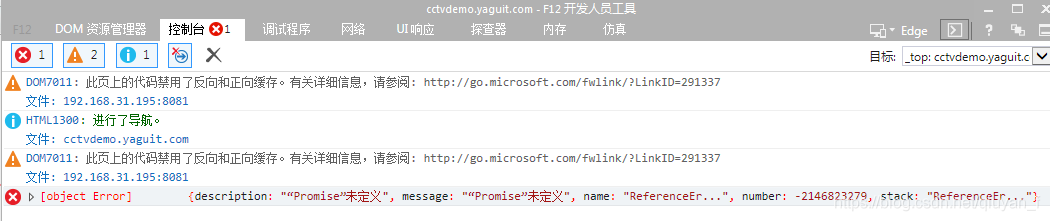
Error in created hook: “referenceerror:” promise “undefined” Vue cli project Google is right, ie reported an error, “promise” undefined“

resolvent:

1. First, download and install “Babel Polyfill” dependency: NPM install — save Babel Polyfill

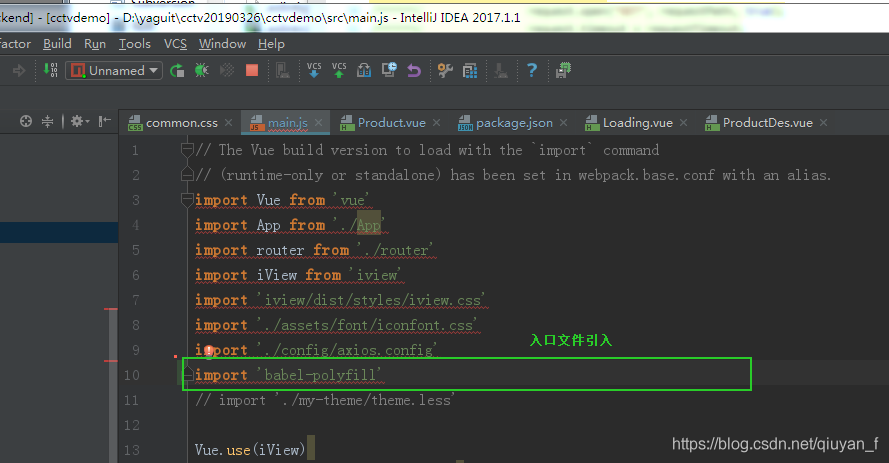
2. Project main.js Import ‘Babel Polyfill’

Error Description: both chrome and FF are good at keeping “ie” data out

Error analysis: the IE kernel reports an error. First, locate the browser compatibility problem, and then read the error: error in created hook: “reference error:” promise “is not defined”. That is to say, promise callback is not supported. Promise is a feature of ES6. That is to say, the IE kernel version is not friendly to ES6 compatibility, and it needs to be degraded to be resolved. As for “Babel Polyfill” You can see the explanation on the official website

https://babeljs.io/docs/en/6.26.3/babel-polyfill

Error in activation of Navicat premium register

Error in activating Navicat with registration machine

Version: Navicat premium 15

Error on decrypt rrequestf code

Processing: disconnect the network and reload Navicat (delete the registry according to the situation)

It is installed on Disk C by default (installation on disk D may not succeed, when the activation code is returned)

Results: it was successful

Springboot: start error reporting after introducing paging plug-in PageHelper

The main errors are as follows:

org.springframework.beans.factory.BeanCreationException: 
Error creating bean with name 'com.github.pagehelper.autoconfigure.PageHelperAutoConfiguration': 
Post-processing of merged bean definition failed; nested exception is java.lang.IllegalStateException: Failed to introspect Class [com.github.pagehelper.autoconfigure.PageHelperAutoConfiguration] from ClassLoader [sun.misc.Launcher$AppClassLoader@764c12b6]

The solution is to change the version of PageHelper to 1.2.3:1

	<dependency>
           <groupId>com.github.pagehelper</groupId>
           <artifactId>pagehelper-spring-boot-starter</artifactId>
           <version>1.2.3</version>
      </dependency>

Note: the spring boot used is version 2.1.2

Springboot startup exception: error creating bean with name ‘permissioncontroller’

Springboot + springdatajpa startup exception: org.springframework.beans . factory.UnsatisfiedDependencyException : Error creating bean with name ‘permissionController’

Error reason: the interface name of springdatajpa does not match the corresponding field in the database

Modify the PID field in the database table to parent_ After the ID field, the findbytypeandpid() method name in permissiondao was forgotten to modify, resulting in Hibernate unable to automatically obtain the corresponding field in the database. Change findbytypeandpid() to findbytypeandparentid().


LoadRunner error — memory violation: exception access_ Solution

Recently, I was doing the performance test of file download. I used LoadRunner tool to report “error: C interpreter run time error: action. C (1613): error – memory violation: exception access” after running for several times_ VIOLATION received.”。 After careful review of the script and scenario analysis, it is found that: in the fopen method of the script, the file operation mode is “W +”, and Encyclopedia:
W + reads and writes in plain text mode, while WB + reads and writes in binary mode.
W + open the read-write file. If the file exists, the length of the file will be zero, that is, the content of the file will disappear. If the file does not exist, the file is created.
Open or create a new binary file in WB write only mode, and only write data is allowed.
WB + read/write mode opens or creates a binary file that allows reading and writing.
The image file I downloaded belongs to binary file,
all the files that must be read and written with WB +, namely fopen (file, “WB +”);
test again, and the error will no longer appear.
Note: if you are using plain text files, you can use w +, if you are downloading binary files, you must use WB mode.
Err: error parsing query: found name, expected identifier, string

When the query filedkey is name, the following error will appear.  select * from mytable where name=”lisi”
ERR: error parsing query: found NAME, expected identifier, string, number, bool at line 1, char 29

Put name in double quotation marks to solve the problem. select * from mytable where “name”=”lisi”

The reason for the problem may be that name is a keyword in influxdb


Gyp err! Build error stack error

Error content:

gyp ERR! build error
gyp ERR! stack Error: `C:\\Program Files (x86)\\Microsoft Visual Studio\\2017\\BuildTools\\MSBuild\\15.0\\Bin\\MSBuild.exe` failed with exit code: 1

Repeat several times and still report an error.
Check the problem. The yarn version is normal, and the image is also a Taobao image.

solve:

1. Execute NPMI – G node gyp command
2. Delete directory/node_ All files under modules
3. Re install.

In addition, it can be seen on the Internet that it may be due to the node version. The node version needs to be lowered. I didn’t try this method. I don’t know if it’s feasible.