Category Archives: How to Fix

Use jstack to output the stack information in Java process to the specified file and analyze it

1. Printing stack information using jstack command

jstack -l pid >> thread.txt

Parameter: – l long lists to print out additional lock information. Jstack – L PID can be used to observe the lock holding status when a deadlock occurs

Examples

jstack -l 7052 >> thread.txt

2. Analyze stack information

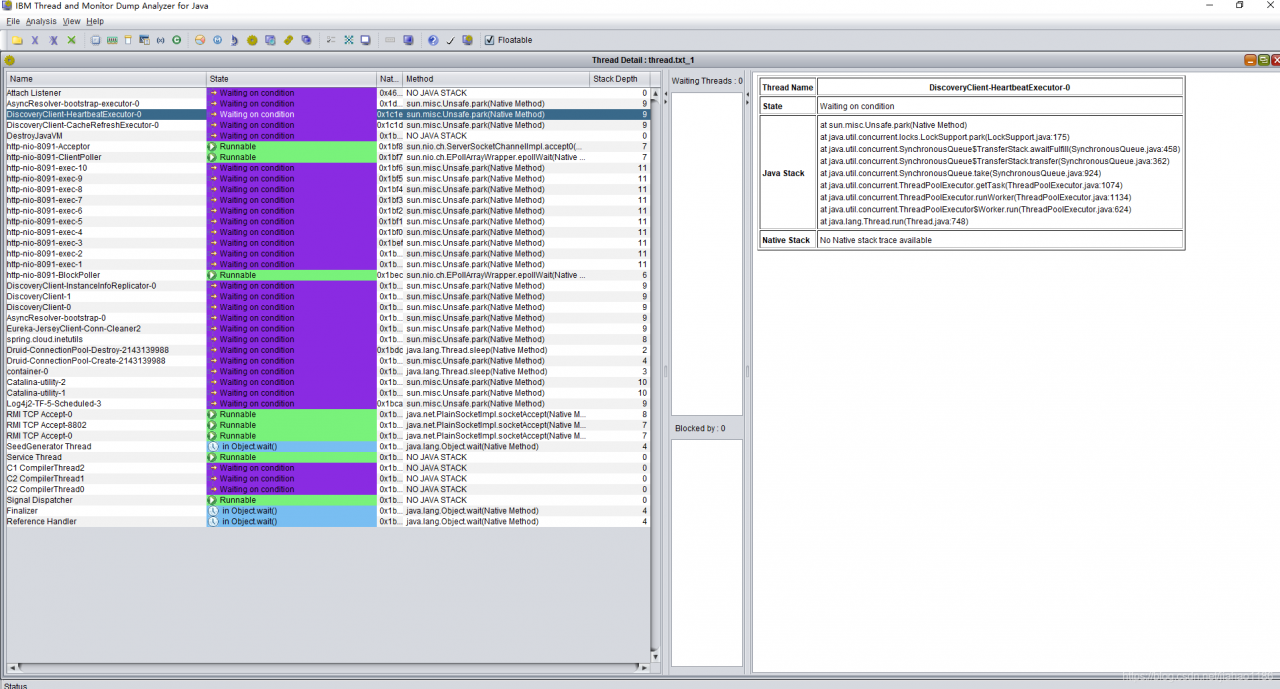
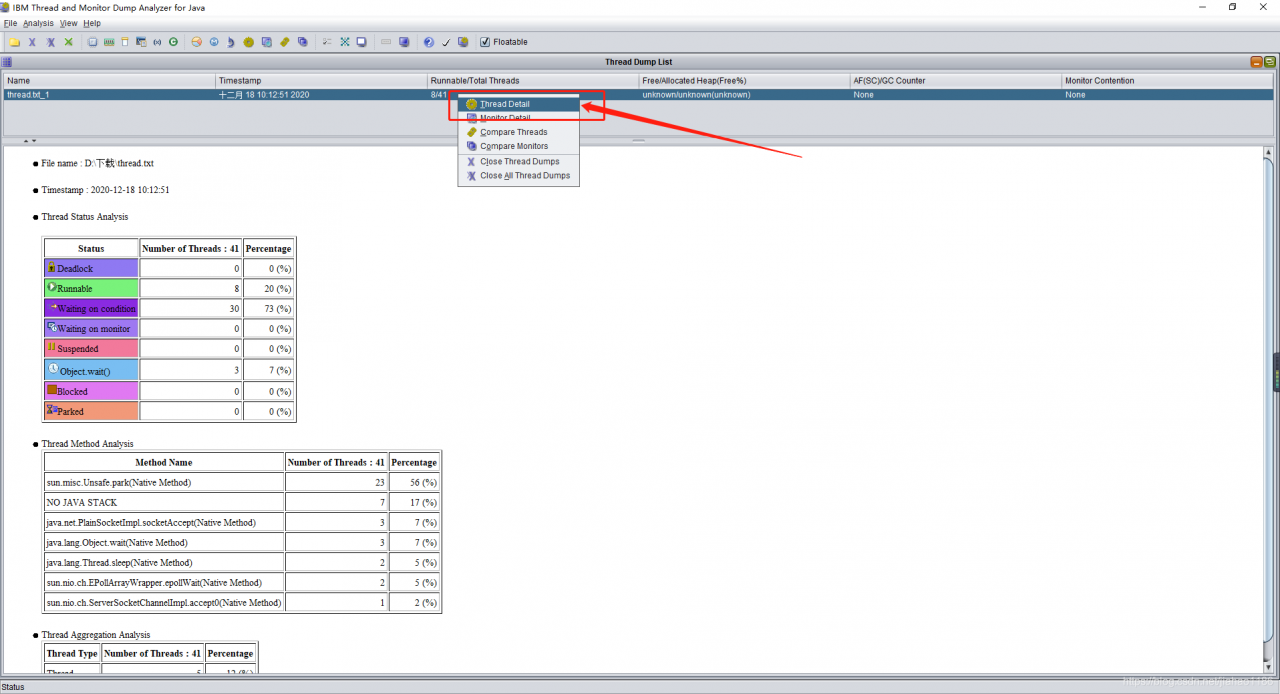
take thread.txt Download it locally and use IBM thread and monitor dump analyzer for Java to open the analysis

Update project manually_ Solution of too large jar package in springboot

1. Problem scenario

Project update, upload the entire jar package, too large, resulting in long upload time, update or upgrade too slow.

2. Solutions

1) Store jars that are not updated frequently in a separate folder LIBS.

2) Frequently updated jars are typed as one jar.

3、 pom.xml to configure

1) The final jar package contains the updated jar package

2) Folder LIBS kicks out jars that are often updated

<build>
        <plugins>
            <plugin>
                <groupId>org.apache.maven.plugins</groupId>
                <artifactId>maven-source-plugin</artifactId>
            </plugin>
            <plugin>
                <groupId>org.apache.maven.plugins</groupId>
                <artifactId>maven-jar-plugin</artifactId>
            </plugin>
            <plugin>
                <groupId>org.apache.maven.plugins</groupId>
                <artifactId>maven-dependency-plugin</artifactId>
                <executions>
                    <execution>
                        <id>copy-dependencies</id>
                        <phase>prepare-package</phase>
                        <goals>
                            <goal>copy-dependencies</goal>
                        </goals>
                        <configuration>
                            <outputDirectory>${project.build.directory}/libs</outputDirectory>
                            <overWriteIfNewer>true</overWriteIfNewer>
                            <includeScope>runtime</includeScope>
                            <excludeGroupIds>com.mp,com.mp.common.spring,com.mp.common.util</excludeGroupIds>
                        </configuration>
                    </execution>
                </executions>
            </plugin>
            <plugin>
                <groupId>org.springframework.boot</groupId>
                <artifactId>spring-boot-maven-plugin</artifactId>
                <configuration>
                    <layout>ZIP</layout>
                    <includes>
                        <include>
                            <groupId>com.mp</groupId>
                            <artifactId>mp-dispatch-service-api</artifactId>
                        </include>
                        <include>
                            <groupId>com.mp.common.spring</groupId>
                            <artifactId>common-spring-jpa</artifactId>
                        </include>
                        <include>
                            <groupId>com.mp.common.spring</groupId>
                            <artifactId>common-spring-base</artifactId>
                        </include>
                        <include>
                            <groupId>com.mp.common.util</groupId>
                            <artifactId>common-util</artifactId>
                        </include>
                    </includes>
                </configuration>
                <executions>
                    <execution>
                        <goals>
                            <goal>repackage</goal>
                            <goal>build-info</goal>
                        </goals>
                    </execution>
                </executions>
            </plugin>
            <plugin>
                <groupId>org.apache.maven.plugins</groupId>
                <artifactId>maven-surefire-plugin</artifactId>
                <configuration>
                    <skip>true</skip>
                </configuration>
            </plugin>
        </plugins>
    </build>


Nginx reverse proxy MySQL

1. Scene

Mysql database in the pure Intranet environment, no public IP, no VPN.

2. Programme

Install nginx on a server with public IP and in the same Intranet environment with MySQL service to realize the routing and forwarding of MySQL access.

3. Nginx installation

Nginx version needs 1.9 or above. Nginx not only implements HTTP reverse proxy, but also supports TCP reverse proxy.

1) When compiling nginx, you need to add the parameter — with stream to load NGX_ stream_ core_ Module

Examples

./configure –prefix=/opt/software/nginx –with-http_ stub_ status_ module –with-http_ ssl_ module –with-stream –with-stream_ ssl_ module –with-pcre=/usr/local/src/pcre-8.35

4. Nginx configuration file nginx.conf

Monitor port 3307 with public IP server, and jump to port 3306 of 172.31.88.27.

Special note: stream should be in the same level directory as HTTP

stream {
    upstream mysql3306 {
        hash $remote_addr consistent;
        server 172.31.88.27:3306 weight=5 max_fails=3 fail_timeout=30s;
    }
	
	 server {
        listen 3307;
        proxy_connect_timeout 10s;
        proxy_timeout 200s;
        proxy_pass mysql3306;
    }
}


The local program cannot access the test environment redis cluster through public IP_ compromise

First, scene description

1. Test environment installation redis6, cluster deployment, three master and three slave. That is to achieve high concurrency, high availability, high security.

2. Redis creates clusters through bind intranet IP.

3. The local and test environment are not in the same LAN, and there is no VPN, so it is impossible to access redis through the test intranet IP.

4. Note: through the redis client, using the public IP + port, you can access redis.

Problem: spring program can’t access redis correctly through IP + port of public network.

Reason: when spring accesses the redis cluster, it first obtains the intranet IP and ports of all nodes in the redis cluster through the configured public IP and ports, and then the program finally accesses redis through the intranet IP and ports.

Second, the solution

1. Install the redis singleton on the test server.

2. Configuration file redis.conf Set daemonize to yes, that is to realize the background startup of redis.

3. In the test environment network security group, add the white list of local environment public IP, open port 6379.

4. Modify the local configuration file in spring program to access redis configuration mode. In this way, all technicians can connect to the test environment redis locally, and each technology does not need to open the redis service locally.

spring:
  redis:
    host: 47.112.108.1
    port: 6379
    timeout: 5000ms
  pool:
    max-active: 8
    min-idle: 0
    max-idle: 8
    max-wait: -1


System architecture and product design of resource scheduling platform

Resource scheduling system, using spring boot to build system framework, spring cloud to achieve governance among multiple services, Eureka to achieve micro service registration and discovery, spring Data realizes the persistent management of all kinds of data; uses multi thread concurrent computing to improve system throughput and efficiency; uses thread asynchronous processing of ancillary business; uses asynchronous monitoring to reduce coupling; uses redis cache technology to reduce database pressure and improve system performance and response rate.

        Based on distributed job, multithread computing and asynchronous monitoring, it realizes the automatic scheduling of resources needed by business, the timing collection of task progress, the calculation of processing rate, the effective prediction of task end time, and the monitoring of resource usage and progress; it uses image to display resource usage to realize real-time monitoring of resources; it has a comprehensive resource usage monitoring mechanism and complete monitoring system Good server heartbeat detection mechanism, and support email early warning.


Explain the performance comparison of contains, exists, any and where in C# list in detail

Test
create a new person class

public class Person
  {
    public Person(string name,int id)
    {
      Name = name;
      Id = id;
    }
    public string Name { get; set; }
    public int Id { get; set; }
 
  }

Initialize a million pieces of data in the list, and then use each method to determine whether Xiaoming is in the list. The code is as follows

static void Main(string[] args)
    {
      List<Person> persons = new List<Person>();
      //Initialize persons data
      for (int i = 0; i < 1000000; i++)
      {
        Person person = new Person("My" + i,i);
        persons.Add(person);
      }
      Person xiaoming=new Person("My999999", 999999);
       
      //The following three methods are used to determine whether persons contain xiaoming
      Stopwatch watch = new Stopwatch();
      watch.Start();
      bool a = persons.Contains(xiaoming);
      watch.Stop();
 
      Stopwatch watch1 = new Stopwatch();
      watch1.Start();
      bool b = persons.Exists(x=>x.Id==xiaoming.Id);
      watch1.Stop();
 
      Stopwatch watch2 = new Stopwatch();
      watch2.Start();
      bool c = persons.Where(x=>x.Id==xiaoming.Id).Any();
      watch2.Stop();
 
      Stopwatch watch3 = new Stopwatch();
      watch3.Start();
      bool d = persons.Any(x => x.Id == xiaoming.Id);
      watch3.Stop();
 
      Console.WriteLine("Contains time:" + watch.Elapsed.TotalMilliseconds);
      Console.WriteLine("Exists time:" + watch1.Elapsed.TotalMilliseconds);
      Console.WriteLine("Where time:" + watch2.Elapsed.TotalMilliseconds);
      Console.WriteLine("Any time:" + watch3.Elapsed.TotalMilliseconds);
      Console.ReadLine();
    }

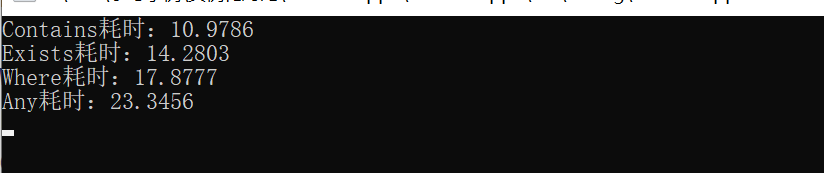
The execution result is shown in the figure below

Conclusion
it can be seen from the figure above that the performance ranking is

Contains > Exists > Where > Any

Note:
no query conditions are allowed in contains

This article about the detailed explanation of C # list contains, exists, any, where performance comparison is introduced here. For more related C # contains, exists, any, where content, please search the previous articles of C # tutorial script home or continue to browse the following related articles. I hope you can support more in the future

Read multiple sheets of an excel file according to npoi

As we all know, npoi components can read and create Excel files when you don’t have Office installed locally. But we usually read the first sheet of C # tutorial of an excel file by default. So if you want to read all the sheets of an excel, what should you do?

Now let’s tell you how to operate npoi to read all sheets of Excel.

First of all, let’s explain how to operate a class created by Excel, which I named execlhelp

using NPOI.HSSF.UserModel;
using NPOI.SS.UserModel;
using NPOI.XSSF.UserModel;
using System;
using System.Collections.Generic;
using System.Data;
using System.IO;
using System.Linq;
using System.Text;
using System.Threading.Tasks;
  
  
  public class ExcelHelper : IDisposable
        {
            private string fileName = null; //file name
            private IWorkbook workbook = null;
            private FileStream fs = null;
            private bool disposed;
  
            public ExcelHelper(string fileName)
            {
                this.fileName = fileName;
                disposed = false;
            }
  
            /// <summary>
            /// Import DataTable data into excel
            /// </summary>
            /// <param name="data">Data to be imported</param>
            /// <param name="isColumnWritten">The column name of the DataTable to import or not</param>
            /// <param name="sheetName">The name of the excel sheet to import</param>
            /// <returns>the number of rows of data to import (the row containing the column name)</returns>
            public int DataTableToExcel(DataTable data, string sheetName, bool isColumnWritten)
            {
                int i = 0;
                int j = 0;
                int count = 0;
                ISheet sheet = null;
  
                fs = new FileStream(fileName, FileMode.OpenOrCreate, FileAccess.ReadWrite);
                if (fileName.IndexOf(".xlsx") > 0) // v-2007
                    workbook = new XSSFWorkbook();
                else if (fileName.IndexOf(".xls") > 0) // v-2003
                    workbook = new HSSFWorkbook();
  
                try
                {
                    if (workbook != null)
                    {
                        sheet = workbook.CreateSheet(sheetName);
                    }
                    else
                    {
                        return -1;
                    }
  
                    if (isColumnWritten == true) //Write the column names to the DataTable
                    {
                        IRow row = sheet.CreateRow(0);
                        for (j = 0; j < data.Columns.Count; ++j)
                        {
                            row.CreateCell(j).SetCellValue(data.Columns[j].ColumnName);
                        }
                        count = 1;
                    }
                    else
                    {
                        count = 0;
                    }
  
                    for (i = 0; i < data.Rows.Count; ++i)
                    {
                        IRow row = sheet.CreateRow(count);
                        for (j = 0; j < data.Columns.Count; ++j)
                        {
                            row.CreateCell(j).SetCellValue(data.Rows[i][j].ToString());
                        }
                        ++count;
                    }
                    workbook.Write(fs); //write to the excel
                    return count;
                }
                catch (Exception ex)
                {
                    Console.WriteLine("Exception: " + ex.Message);
                    return -1;
                }
            }
  
            /// <summary>
            /// Import data from excel to DataTable
            /// </summary>
            /// <param name="sheetName">The name of the excel workbook sheet</param>
            /// <param name="isFirstRowColumn">whether the first row is the column name of the DataTable</param>
            /// <returns>returnedDataTable</returns>
            ///
  
  
                public Dictionary<int,string> ReturnSheetList()
            {
                Dictionary<int, string> t = new Dictionary<int, string>();
                ISheet sheet = null;
                DataTable data = new DataTable();
                int startRow = 0;
                    try
                    {
                        fs = new FileStream(fileName, FileMode.Open, FileAccess.Read);
                        if (fileName.IndexOf(".xlsx") > 0) // 2007
                            workbook = new XSSFWorkbook(fs);
                        else if (fileName.IndexOf(".xls") > 0) // 2003
                            workbook = new HSSFWorkbook(fs);
                        int count = workbook.NumberOfSheets; //get all SheetName
                        for(int i=0;i<count;i++)
                        {
                            sheet = workbook.GetSheetAt(i);
                            if (sheet.LastRowNum > 0)
                            {
                                t.Add(i, workbook.GetSheetAt(i).SheetName);
                            }
                        }
                        return t;
                    }
                    catch (Exception ex)
                    {
                        throw new Exception(ex.Message);
                    }
                   
  
            }<br>        ///index excel
            public DataTable ExcelToDataTable(int index)
            {
                ISheet sheet = null;
                DataTable data = new DataTable();
                int startRow = 0;
                try
                {
                    fs = new FileStream(fileName, FileMode.Open, FileAccess.Read);
                    if (fileName.IndexOf(".xlsx") > 0) // 2007
                        workbook = new XSSFWorkbook(fs);
                    else if (fileName.IndexOf(".xls") > 0) // 2003
                        workbook = new HSSFWorkbook(fs);
                    //int coutnts = workbook.NumberOfSheets;
  
                    sheet = workbook.GetSheetAt(index);
                    //string names= sheet.SheetName;
                    if (sheet != null)
                    {
                        IRow firstRow = sheet.GetRow(0);
                        int cellCount = firstRow.LastCellNum; //The number of the last cell in a row is the total number of columns
  
  
                        for (int i = firstRow.FirstCellNum; i < cellCount; ++i)
                        {
                            ICell cell = firstRow.GetCell(i);
                            CellType c = cell.CellType;
                            if (cell != null)
                            {
                                string cellValue = cell.StringCellValue;
                                if (cellValue != null)
                                {
                                    DataColumn column = new DataColumn(cellValue);
                                    data.Columns.Add(column);
                                }
                            }
                        }
                        startRow = sheet.FirstRowNum + 1;
  
  
                        //The last column of the marker
                        int rowCount = sheet.LastRowNum;
                        for (int i = startRow; i <= rowCount; ++i)
                        {
                            IRow row = sheet.GetRow(i);
                            if (row == null) continue; //Rows with no data are null by default       
  
                            DataRow dataRow = data.NewRow();
                            for (int j = row.FirstCellNum; j < cellCount; ++j)
                            {
                                if (row.GetCell(j) ! = null) // Similarly, cells with no data are null by default
                                    dataRow[j] = row.GetCell(j).ToString(); 
                            }
                            data.Rows.Add(dataRow);
                        }
                    }
  
                    return data;
                }
                catch (Exception ex)
                {
                    return null;
                    throw new Exception(ex.Message);
  
                }
            }
  
            public void Dispose()
            {
                Dispose(true);
                GC.SuppressFinalize(this);
            }
  
            protected virtual void Dispose(bool disposing)
            {
                if (!this.disposed)
                {
                    if (disposing)
                    {
                        if (fs != null)
                            fs.Close();
                    }
  
                    fs = null;
                    disposed = true;
                }
            }
        }<br><br>

The datatabletoexcel method is to export data to excel, and the parameters are annotated in the code, which can be applied directly. Exceltodatatable mainly imports Excel data into databtable. Similarly, parameters are also included in comments. We mainly talk about the returnsheetlist method. Before reading, we need to judge whether the imported excel version is a high version or a low version. This is because npoi provides different operation classes of high and low versions. Versions greater than 03 and less than 07 provide hssfworkbook, and versions less than 07 provide xssfworkbook. then workbook.NumberOfSheets This is mainly to get how many sheets there are in an excel file. We read the sheet according to the loop traversal, and then transfer the name of the sheet name and the corresponding index to a data dictionary for saving. So the data dictionary contains all the content sheets and corresponding indexes of the excel file you imported. With the use of exceltodatatable, you can switch to read different sheets of an excel.

The above is the details of reading multiple sheets of an excel file according to npoi

onnx.onnx_cpp2py_export.checker.ValidationError

onnx.onnx cpp2py export Yeah. checker.ValidationError

“25253rd;”381693rd;”

    import mxnet as mx
    import numpy as np
    from mxnet.contrib import onnx as onnx_mxnet
    import logging

    logging.basicConfig(level=logging.INFO)
    from onnx import checker
    import onnx

    syms = './mxnet/new_model-symbol.json'
    params = './mxnet/new_model-0000.params'

    input_shape = (1, 3, 112, 112)

    onnx_file = './mnist.onnx'

    # Invoke export model API. It returns path of the converted onnx model
    converted_model_path = onnx_mxnet.export_model(syms, params, [input_shape], np.float32, onnx_file)

    # Load onnx model
    model_proto = onnx.load_model(converted_model_path)

Online solution: pip install onnx==1.5.0
After the change, more errors are reported.
onnx.onnx_cpp2py_export.checker.ValidationError: Unrecognized attribute: spatial for operator BatchNormalization
==> Context: Bad node spec: input: “conv_1_conv2d” input: “conv_1_batchnorm_gamma” input: “conv_1_batchnorm_beta” input: “conv_1_batchnorm_moving_mean” input: “conv_1_batchnorm_moving_var” output: “conv_1_batchnorm” name: “conv_1_batchnorm” op_type: “BatchNormalization” attribute { name: “epsilon” f: 0.001 type: FLOAT } attribute { name: “momentum” f: 0.9 type: FLOAT } attribute { name: “spatial” i: 0 type: INT }

Debug | AttributeError: ‘numpy.int64‘ object has no attribute ‘to_pydatetime‘

reason

When using pyfolio , we encountered the following errors:

/usr/local/lib/python3.7/dist-packages/pyfolio/ timeseries.py in gen_ drawdown_ table(returns, top)
1006 recovery,
1007 freq=‘B’))
-> 1008 df_ drawdowns.loc [i, ‘Peak date’] = ( peak.to_ pydatetime()

AttributeError: ‘ numpy.int64 ’ object has no attribute ‘to_ pydatetime’

analysis

Confused, is very confused, after all, the transfer of a problem is also very uncomfortable.
search online, pyfoliogithub issues also has many people make complaints about this problem, such as #520, #652, #653, but more people are same error, no solution. 😦

Solution

Many solutions have been found on the Internet. They have tried one by one. Only the last one works well. Everyone can try it

s1 (Failed)

The /usr/local/lib/python3.7/dist-packages/pyfolio/ timeseries.py 893 line changed to

valley = underwater.index[np.argmin(underwater)] # end of the period

It’s no use, continue to change:

s2 (Failed)

The *. To_ Pydatetime() change to this

pd.to_datetime(peak)
pd.to_datetime(valley
pd.to_datetime(recovery)

Failure, and then repeatedly change those lines of code in the reference websites, mainly for the function that reported the error and def get_ max_ drawdown_ Underwater (underwater):
the code in
failed. It’s better to find a solution without changing the code:

sn (Success)

If we install it in PIP install pyfolio , then we uninstall and install it in GIT. Maybe it’s the latest version or something. In the end, this is the solution:

!pip uninstall pyfolio  # uninstall
!pip install git+https://github.com/quantopian/pyfolio # reinstall

After unloading, restart the code, or del pyfolio Import pyfolio , it is recommended to restart
and then run it again ~
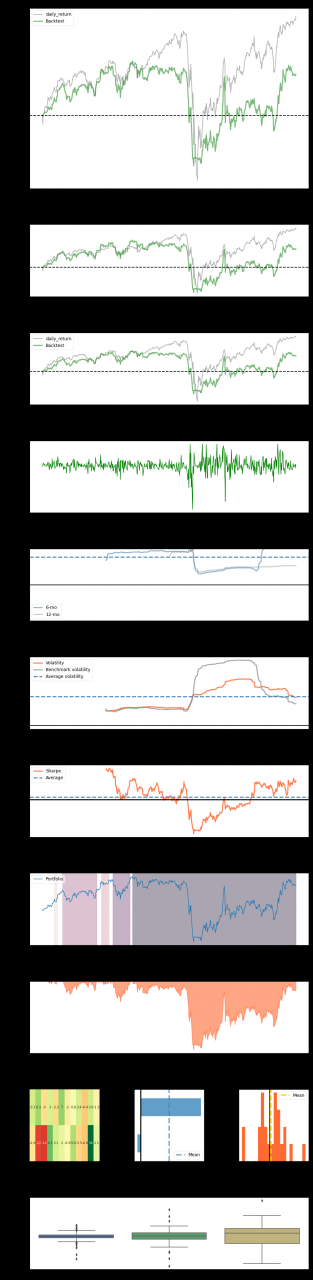
finally, it’s out of the question:
Springboot + mybatis + logback does not print SQL problems on the console

This project uses springboot + mybatis + logback. In order to print SQL on the console, various configurations have been made in the configuration file. All the methods available on the Internet have been tried, but SQL statements are still not printed.

This is indicated in the configuration file logging.level.cn . homecredit.sams.ddme . reconciliation.model.mapper=debug . still do not print SQL statements.

Another SpringBoot project, as like as two peas, is able to print SQL statements on the console. By comparing the differences between the two projects step by step, it is found that the project can be printed after the histrix package is introduced.

<dependency>
     <groupId>org.springframework.cloud</groupId>
     <artifactId>spring-cloud-starter-hystrix</artifactId>
</dependency>


In the end, I don’t know what the reason is, but after introducing this package, the problem is solved.

Note that this is only one of the possible reasons for this problem. In addition, there are many other problems that may result in the inability to print SQL on the console. You need to configure every step.


Solve the problem of incomplete search results of outlook search function

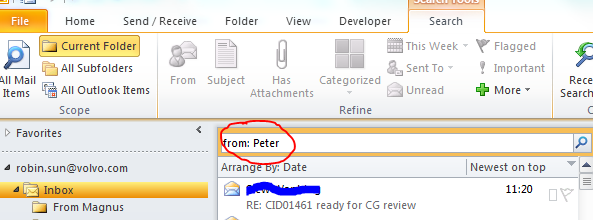
Recently, when I used outlook, I found that the search results were always limited to a certain date when I searched e-mail in my inboxes according to the keywords of people’s names, and the search results were not complete at all.

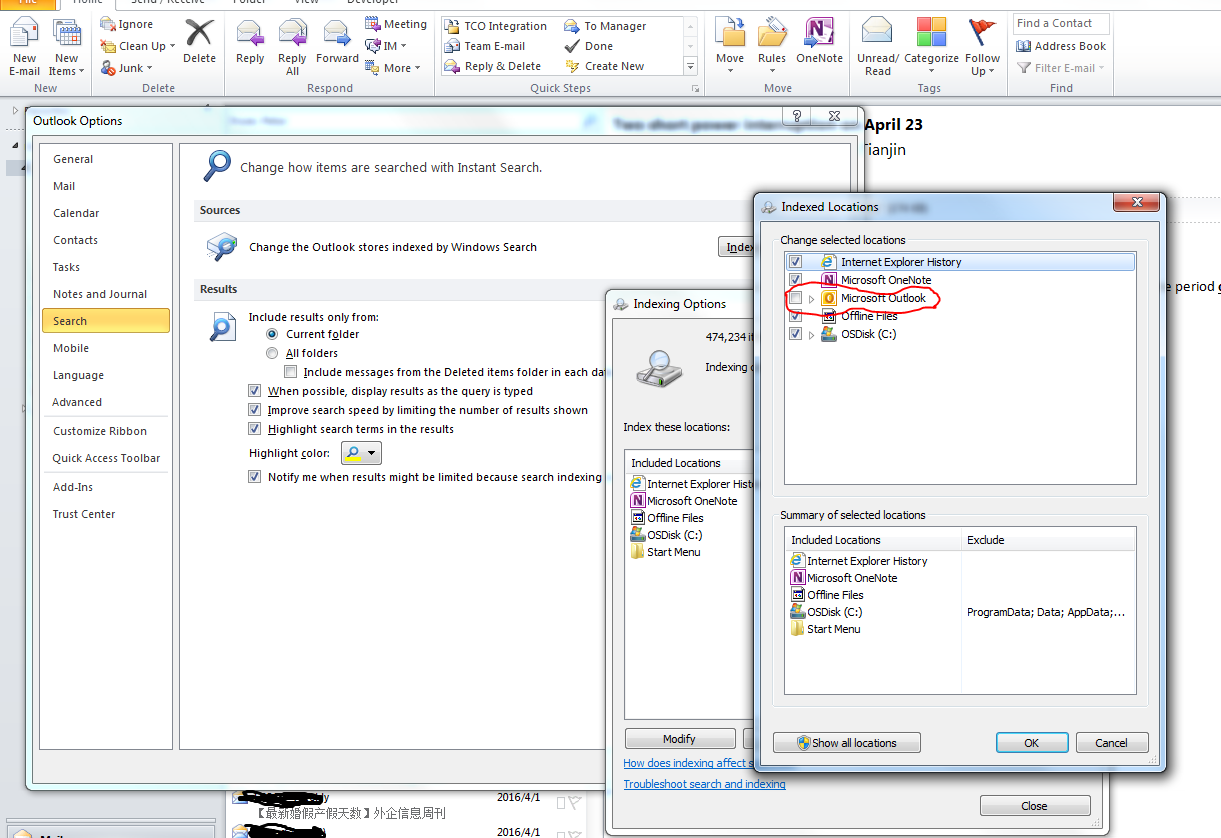
The solution is to go to the file – & gt; Options tab, select search in the pop-up dialog box, then select index option, and then remove the check mark of Microsoft Outlook options in the moidfy dialog box.

After the setting is completed, the search should be conducted according to the keyword of the person’s name, which should be the complete result.


Then I thought, why?Because it could be. When we select Microsoft Outlook in the index options dialog box, that is to say, windows will index the files in outlook. When we use Outlook to search, outlook finds that it is in the index category, so it will look for things in the index directory, and the index directory is not up-to-date, which directly leads to incomplete search results.


If we remove the index option of outlook, outlook finds that it is not in the index category when searching, and will directly search all the files in outlook according to its own algorithm instead of in the index directory, so the result will be very complete and accurate.


In summary, the purpose of index is to speed up the search speed, but if the index directory is not updated in time, it will cause the incompleteness of the search results.

From personal blog: http://www.sunrobin.net

Ajax can’t download file to browser

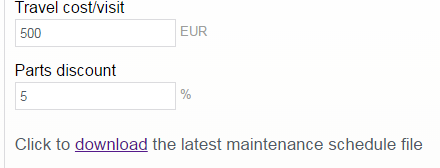
Recently, I encountered such a function when I was working on a website. In the page as shown in the figure, when users need to click the link, they can judge whether the corresponding excel file is stored in the server in an asynchronous ajax way. If not, they will be prompted that they have not found it, and if so, they will download it to the local user.


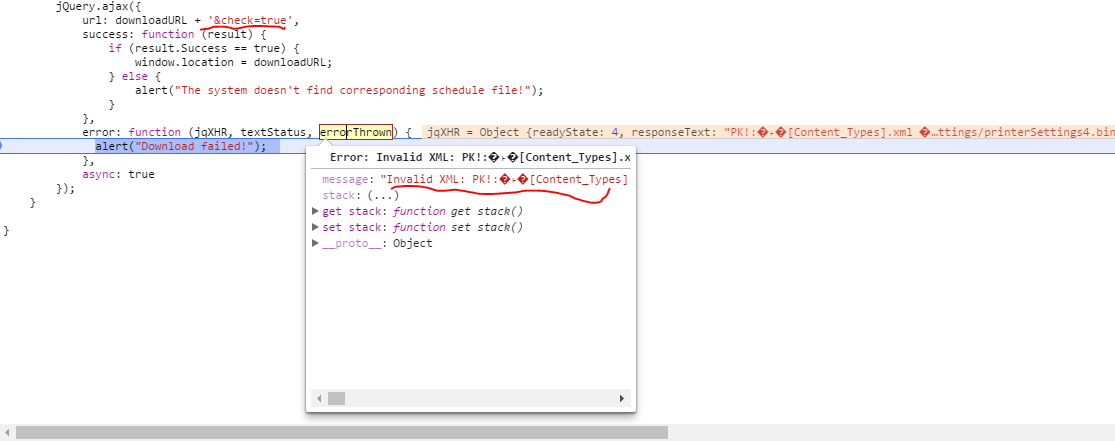
Of course, this is a very simple problem. Just write Ajax in a normal way. But when the server returns the file content to the browser in binary form, the browser’s Ajax throws an error. It’s about parseError, invalid XML, PK, etc.


The reason for this problem is not that there is a problem with the server-side code or JavaScript code, but that downloading files through AJAX is forbidden. For security reasons, JavaScript is not able to save the file to the local, so Ajax takes this into account. It only accepts the return value in XML, Ajax and JSON format, and the binary return format will throw this exception.


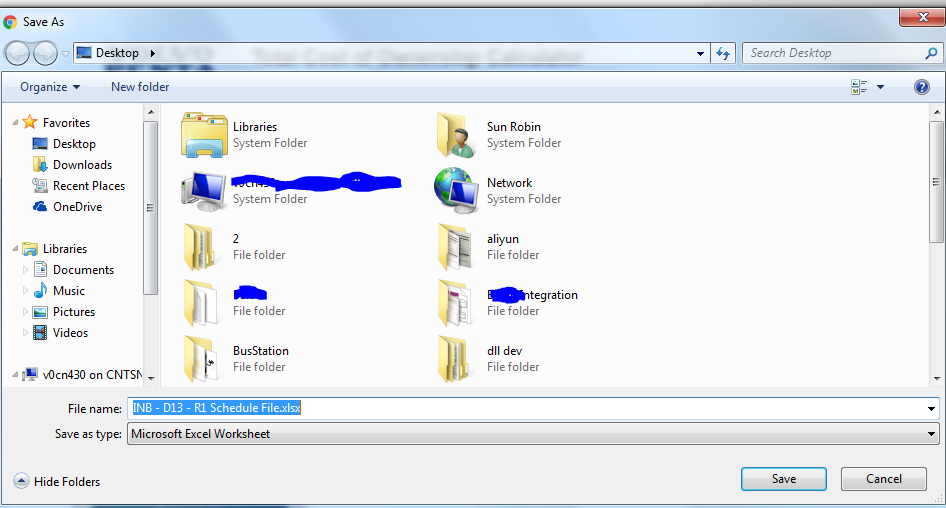
How to solve this problem?use window.location =URL is OK. Some people will ask, such as the above figure, when you click the download link on a certain page, because it has changed window.location Is the current page about to jump?In fact, I use Chrome browser. When I click that link, the next file save dialog box will pop up directly, and the address bar of the page has no change. At this time, if you click save, the file will be kept. If you click cacel, the operation will be cancelled. During the process, the current page will be kept and will not jump to other pages.


From personal blog www.sunrobin.net