Category Archives: How to Fix

JQuery is a solution to the disappearance of listening events after adding elements with append

Suppose you want to append an element in the div with ID target
the original listening event format is:

$(".textBox").mouseover(function() {});

To be amended as follows:

$("#target").on("mouseover", ".textBox", function() {});

Add a dynamic box for target ID all the time, not a dynamic box!!! If you really can’t, just let the body go

Solution for successful but invalid atom minimap installation

To be honest, atom and its plug-ins are very powerful, but the installation process is very painful. I installed the minimap mini map plug-in, but it didn’t work in any way. There was no response in toogle in the menu, and there was almost no information.

Cause of error: I interpret it as a conflict between minimap and other plug-ins. The most controversial plug-in is activate power mode. The combo effect on the right side just occupies the position of the small map. Even if it is disabled, it is not easy to use. It must be uninstalled. At that time, he installed it just for fun. It’s easy to be blind after a long time, so he decisively unloaded it.

Solution: uninstall activate power mode, restart atom and get it done.

Hadoop datanode using JPS to view the solution that can’t be started

Problem Description: after the Hadoop environment is deployed, the process of datanode cannot be seen when running JPS on the slave machine.

Solution: delete all HDFS on slave- site.xml All contents in the datanode folder configured in( dfs.data.dir Parameter), and then initialize the namenode to run

hadoop namenode -format

Reinitialize.

Reason: the namenode has been initialized many times, but the master has not cleared all the initialization data in the datanode folder, which makes the ID generated in the two folders inconsistent. After deleting the initialization data in the datanode folder, the namenode initialization will take effect. Start Hadoop again and use JPS to see the datanode process.

Ubuntu “a user name is not in the sudoer folder. It will be reported. ” Solutions for

If the user name was not created when the system was installed, this problem occurs when using the sudo command.

Solution: input

su

Enter the root password. If you have not set the root password before, please visit the URL settings.
http://blog.csdn.net/baidu_ 27280587/article/details/53285620

After entering the successful root environment, enter

gedit /etc/sudoer

After opening the file, find the

root	ALL=(ALL:ALL) ALL

In this line, add the same line below it, and change root to your user name. Save and close the file, and then use the sudo command, no more errors will be reported.

“XXXXXX is a” namespace “, but here it is used as a” type “

Recently, I encountered this problem several times when learning C #. When writing ArrayList and StringBuilder, the main function will report the error that “XXXXXX is a” namespace “, but it is used as a” type “here. After several times of searching for information, we finally know where the mistake is.

For the convenience of the diagram, you can name the project name directly as the class name. That’s the mistake. The priority of the namespace is higher than the class name. Just change the project name when you create a new project.

In short, avoid duplicate class and project names.

Solution to the error $’\ R’: command not found when executing shell script under Linux

This error is caused by the different coding of windows system and Linux system. The carriage return in windows is , while that in Linux is , so carriage return in scripts written remotely with shell is not recognized by Linux system, but it can not be seen when editing with vim.
Solution: add - B , that is, VIM - B file name , when editing the script file with VIM, so that the open file is "binary mode", you can see the extra things, and the display is ^ m , delete it, save it and run it.

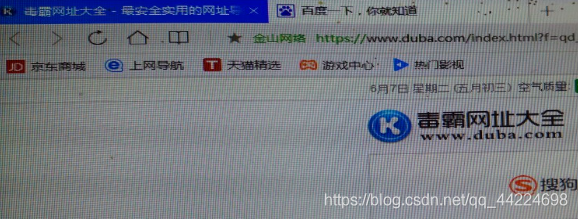
QQ browser open automatically appear two web page solution

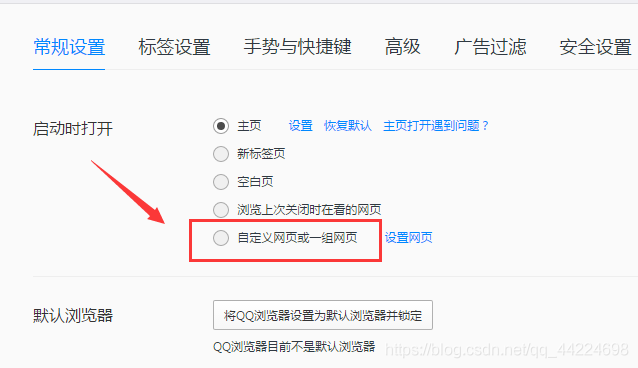
The problem is shown in the figure:

solution:
steps

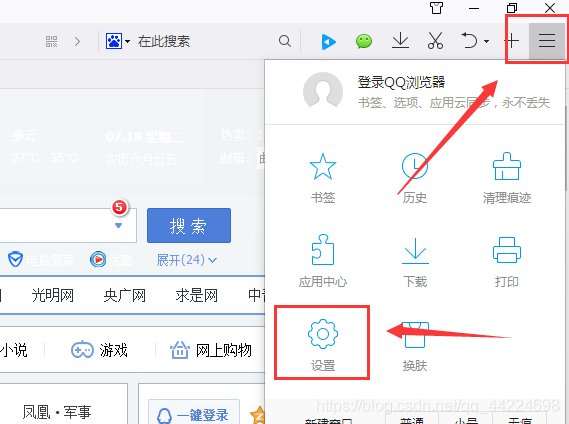
    open the QQ browser, click the “three” icon in the upper right corner, select settings
    , select “custom web page or a group of web pages”, do not select the options recommended by it, you can select the two recommended by it
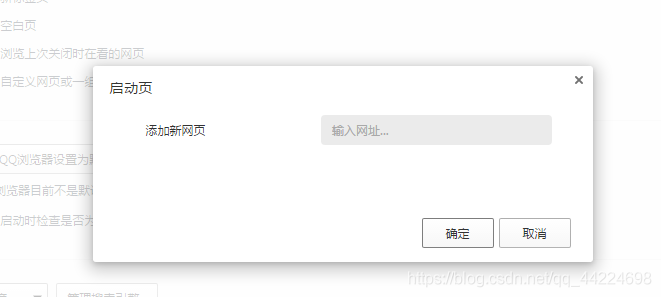
    , you can also choose to set the web page, set your own common website ~

Nucleus plus protection mechanism (based on ARM processor)

(Nucleus Plus is a non open source operating system, only limited code is provided for reference)

1. Nucleus plus protection mechanism

Nucleus plus kernel uses TC for small code protection_ Protect only in TC_ The interrupt is only turned off during protect operation, so the interrupt response and scheduling of Nucleus Plus kernel is more timely than that of μ C/os-iii and ThreadX; mutex is only used for applications (mutex between threads).

TC_ Protect contains two members. One record gets TC_ Thread pointer TC of protect_ tcb_ Another mark is whether there is a thread waiting for TC_ The variable TC of protect_ thread_ waiting。

2、TC_ Protect acquisition (TCT)_ Protect)

Off interrupt

1624         MRS     r1,CPSR                     // Pickup current CPSR
1625         ORR     r1,r1,#LOCKOUT              // Place lockout value in
1626         MSR     CPSR_cxsf,r1                     // Lockout interrupts

Check TC_ Is protect occupied (check TC_ tcb_ Whether the pointer is empty; if it is not occupied, jump to TCT_ Protect_ Available, set TC_ tcb_ The pointer is the pointer of the current thread, and you can turn on the interrupt again. If it is occupied, you will check whether it is occupied. It is similar to the spin lock of Linux kernel, but Nucleus Plus is single core, so the current thread needs to switch out of the CPU.)

1632 TCT_Protect_Loop:
1633         LDR     r1,[r0, #0]                 // Pickup protection owner field
1634         CMP     r1,#0                       // Is there any protection?
1635         BEQ     TCT_Protect_Available       // If NU_NULL, no current protection

Set TC_ thread_ Waiting is 1 (indicates that there is a thread waiting for TC)_ PROTECT)

1642         MOV     r2,#1                       // Build thread waiting flag
1643         STR     r2,[r0, #4]                 // Set waiting field

If TC_ Protect is occupied. Save the context of the current thread and call TCT_ Schedule_ Protected scheduling takes up TC_ Thread of protect (the current thread is the thread with the highest priority and occupies the TC_ The thread of protect has a lower priority. If you don’t actively schedule the thread of low priority, the thread of low priority will never be able to execute, TC_ Protect will never be released)

1648         STR     r0,[sp, #-4]!               // Save r0 on the stack
1649         STR     lr,[sp, #-4]!               // Save lr on the stack
1650         MOV     r0,r3                       // Place current thread into r0
1651         BL      TCT_Schedule_Protected      // Call routine to schedule the
1652                                             // owner of the thread

3、TC_ Protect release (TCT)_ Unprotect)

Check TC_ thread_ Whether waiting is 0. If it is 0, no thread is waiting for TC_ Otherwise, there are higher priority threads waiting for TC_ PROTECT(TC_ There is no interrupt in the process from the acquisition of protect to the release of TC_ Before protect, a higher priority thread may be ready to apply for the same TC_ If there is no thread waiting for TCT_ Unprotect, simply set TC_ tcb_ If the pointer is empty, turn on the interrupt; otherwise, call TCT_ Control_ To_ System rescheduling (waiting for TCT)_ The unprotected thread may not be the thread with the highest priority at this time, but the scheduler obtains the highest priority ready thread for execution;

TCT_ Control_ To_ System checks whether the time slice of the current thread is used up; if it is not used up, it will continue to execute the current thread (to avoid frequent thread switching, so TCT is called)_ Control_ To_ TC is not set before system_ tcb_ If the time slice is used up, set TC_ tcb_ Pointer is empty, TC_ thread_ Waiting is 0 (wait for TC before)_ The thread released by protect is no longer waiting for TC_ Protect. After the thread is scheduled, it returns to TCT_ Protect_ Loop is equivalent to calling TCT again_ Protect, reacquire lock (wait for TC for some reason)_ Thread released by protect is suspended, TC_ thread_ The waiting flag cannot always be set to 1, otherwise other threads will release TC_ When protect, it will mistakenly think that there is a thread waiting for TC_ Protect release), call TCT_ Schedule selects the highest priority ready thread for execution. (thread scheduling reference) https://blog.csdn.net/arm7star/article/details/105565769 “NucleusPLUS interrupt processing (based on ARM processor)”

1783         LDR     r2,[r0, #4]                 // Pickup thread waiting flag
1784         CMP     r2,#0                       // Are there any threads waiting?
1785         BEQ     TCT_Not_Waiting_Unpr        // If not, just release protection

4. Summary

To some extent, the protect mechanism of nucleus plus can be regarded as priority inversion, that is, high priority threads give up CPU to low priority threads. Nucleus plus does not implement dynamic priority, and protect avoids deadlock.
 

How to generate lib library with keil MDK and use lib Library

reference resources: https://xiaopengzhen.blog.csdn.net/article/details/90036247?utm_ medium= distribute.pc_ relevant.none -task-blog-2%7Edefault%7EBlogCommendFromMachineLearnPai2%7Edefault-4.control&dist_ request_ id=1331647.11602.16183926662894565&depth_ 1-utm_ source= distribute.pc_ relevant.none -task-blog-2%7Edefault%7EBlogCommendFromMachineLearnPai2%7Edefault-4.control


1. Organize the source files to be compiled and encapsulate the interface.

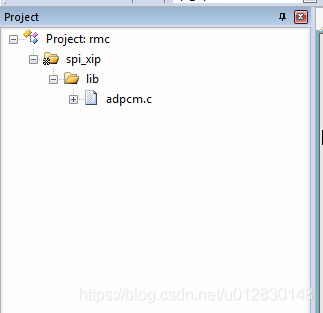
2. Add the source file to the MDK project, for example:

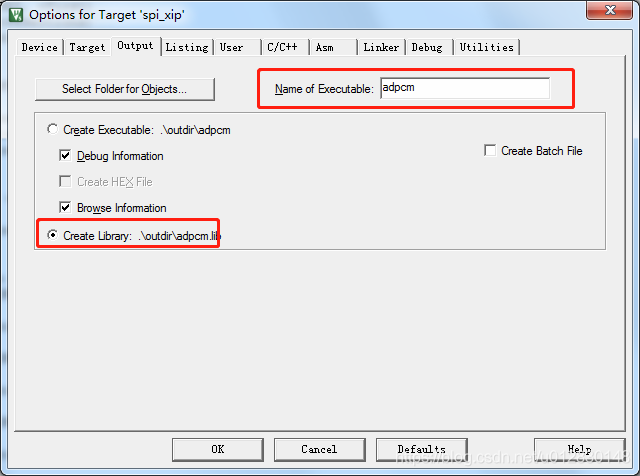
3. Setting in MDK: check create library and set the file name of Lib library

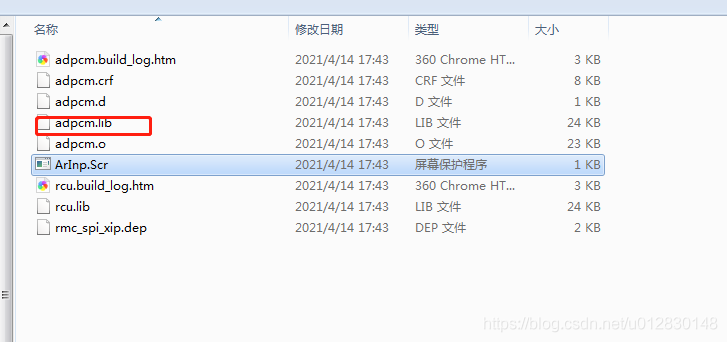
4. Compile and view the output file.

5. How to use it will not be repeated.


Solution of installing Vue cli scaffold error-4048

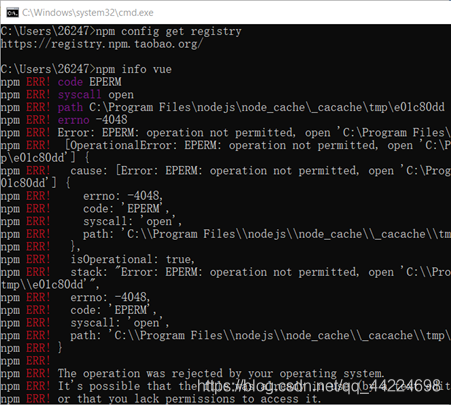
Error report screenshot:

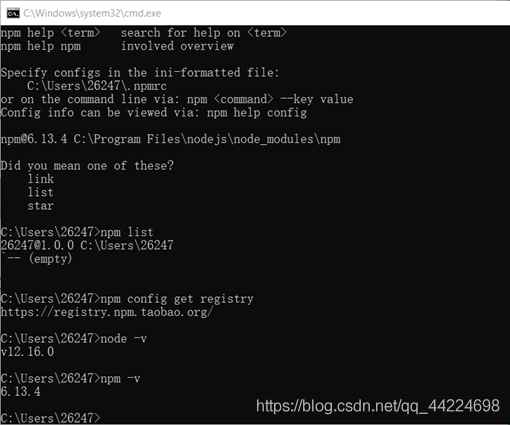
take a look at nodejs version and NPM version:

solution:
there is no permission, you need to use the administrator’s permission
right click the admin permission to run C: Windows/system32\ cmd.exe
If my article is helpful to you, welcome to like, leave a message and pay attention to it. Thank Sanlian!!!
The problem has not been solved!!! 😘😘😘

CSDN: I heard that you are good at playing
GitHub: zhongzhimao
Coupons: coupons

Solution to inaccessibility of Vue cli scaffold project after startup

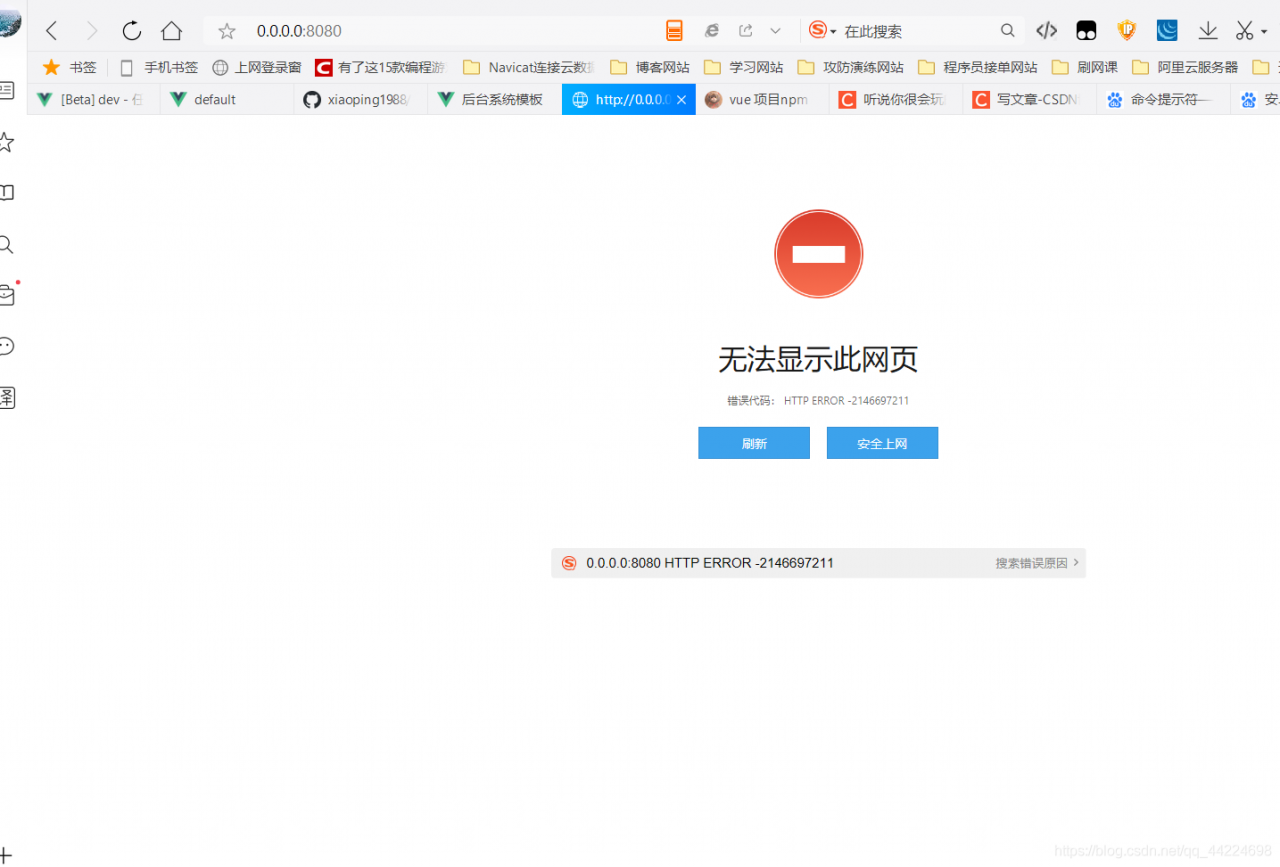
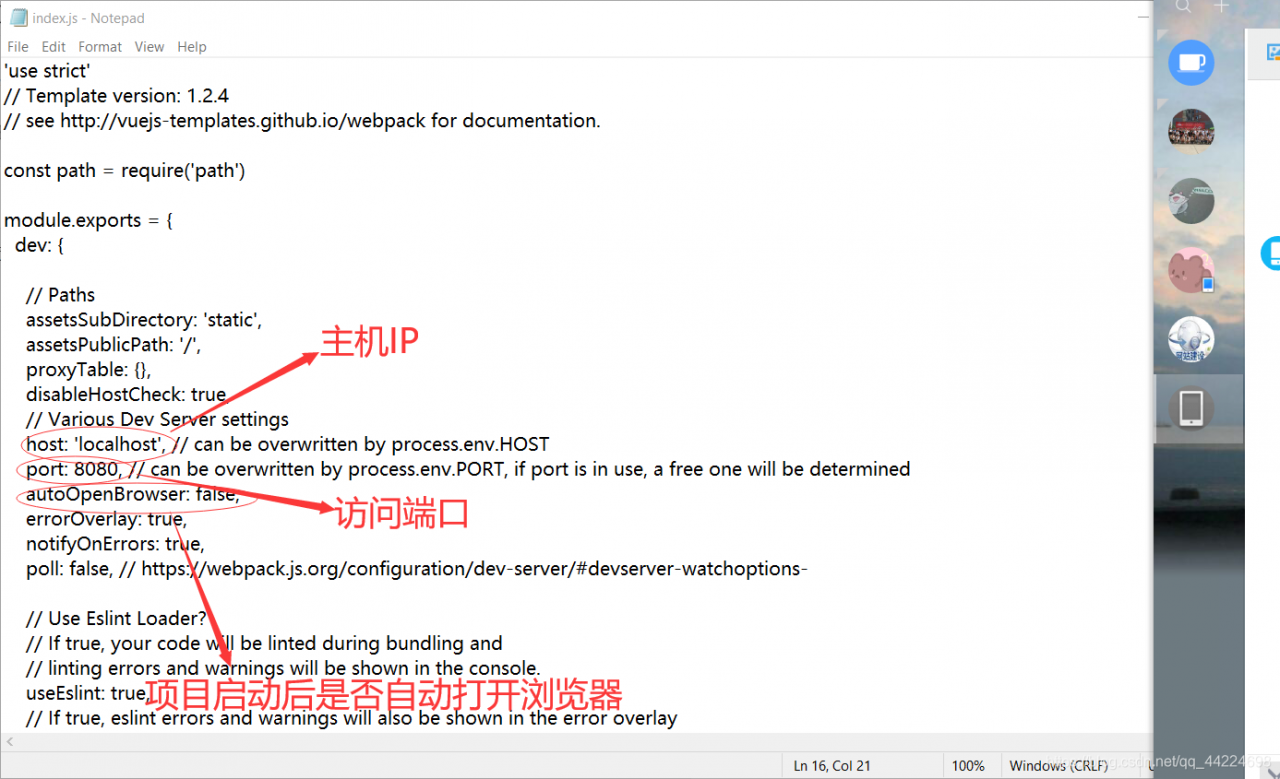
The problem is as follows: the IP address cannot be accessed

Enter the file “project name – config”- index.js ”Open index.js File, modify parameter

after modification, it can be accessed normally:

If my article is helpful to you, welcome to like, leave a message and pay attention to it. Thank Sanlian!!!
The problem has not been solved!!! 😘😘😘

CSDN: I heard that you are good at playing
GitHub: zhongzhimao
Coupons: coupons

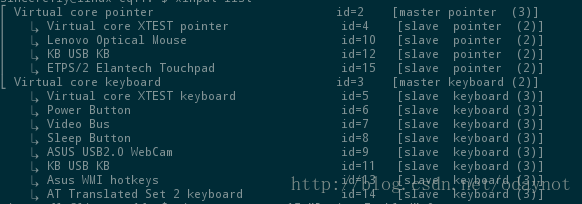
Opensuse12.3 enable / disable touchpad

Use the command:

xinputlist 

View devices

Find the ID of the touchpad. For example, my id = 15

Then use the command:

xinput set-prop 15 “Device Enabled”0

The last “0” is to close the touchpad, and “1” is to open the touchpad

OpenSUSE test is available. I always use the external keyboard, but I can’t use the touch pad. Anyway, I don’t need it. It’s better to turn it off. Maybe I can save some power?Ha ha
ha