Category Archives: How to Fix

[C]fatal error: mysql.h: No such file or directory

Environment: under the Linux distribution of windows system, Ubuntu 20.04.2 lts;

Problem Description: MySQL C API programming, after installing MySQL C development library, sudo apt install default libmysqlclient dev , compile version. C file: GCC version. C - O version. O
version. C is as follows:

#include <mysql.h>
#include <stdio.h>

int main(int argc, char **argv)
{
        printf("MySQL client version: %s\n", mysql_get_client_info());

        exit(0);
}

report errors:

version.c:1:10: fatal error: mysql.h: No such file or directory
    1 | #include <mysql.h>

Problem reason: no header file path parameter, unable to address
problem modification: Where is MySQL find mysql. H path: /usr/include/MySQL
recompile: GCC version. C - O version. O - I/usr/include/MySQL
report error again:

/usr/bin/ld: /tmp/ccEn7kBU.o: in function `main':
version.c:(.text+0x14): undefined reference to `mysql_get_client_info'
collect2: error: ld returned 1 exit status

Cause of the problem: no lib parameter is added, so the function cannot be referenced
problem modification: GCC version. C - O version. O - I/usr/include/MySQL - lmysqlclient
problem solving.
ImportError:libta_lib.so.0

The question is like the title

terms of settlement:

Installation through source code compilation

wget http://prdownloads.sourceforge.net/ta-lib/ta-lib-0.4.0-src.tar.gz
tar -xzf ta-lib-0.4.0-src.tar.gz
cd ta-lib/
./configure --prefix=/usr
make
Sudo make install
pip install numpy

Find the. So file location and import environment variables

find/-name libta_lib.so.0
export LD_LIBRARY_PATH=/usr/lib:$LD_LIBRARY_PATH


pytorch raise RuntimeError(‘Error(s) in loading state_dict for {}:\n\t{}‘.format

When training the model, we need to find out whether there is multi GPU training

If using Python to load the model normally:

model.load_state_dict(torch.load(model_path))

If multi GPU training is used in training

model = torch.nn.DataParallel(model, device_ids=range(opt.ngpu))

If so, loading the model requires

model.load_state_dict({k.replace('module.',''):v for k,v in torch.load(model_path).items()})

[go] solve the fatal error of go: concurrent map writes map non concurrent security

Map is not concurrency safe, when there are multiple concurrent growths reading and writing the same map  
A panic error occurs

concurrent map writes

For example, this error occurs in the following code:

var mMap map[int]int

func TestMyMap(t *testing.T) {
    mMap = make(map[int]int)

    for i := 0; i < 5000; i++ {
        go func() {
            mMap[i] = i
        }()
        go readMap(i)
    }
}
func readMap(i int) int {
    return mMap[i]
}

There are many ways to solve this problem. Now we use read-write lock,

Concurrent access to map is not safe, and undefined behavior will appear, leading to program exit. Therefore, if you want to access the map concurrently in multiple coroutines, you must provide some synchronization mechanism. Generally, you can control the concurrent access to the map by reading and writing the lock sync.rwmutex. Encapsulating the map and sync.rwmutex can realize the secure concurrent access to the map

Code after transformation

type SMap struct {
    sync.RWMutex
    Map map[int]int
}

func (l *SMap) readMap(key int) (int, bool) {
    l.RLock()
    value, ok := l.Map[key]
    l.RUnlock()
    return value, ok
}

func (l *SMap) writeMap(key int, value int) {
    l.Lock()
    l.Map[key] = value
    l.Unlock()
}

var mMap *SMap

func TestMyMap(t *testing.T) {
    mMap = &SMap{
        Map: make(map[int]int),
    }

    for i := 0; i < 5000; i++ {
        go func() {
            mMap.writeMap(i, i)
        }()
        go readMap(i)
    }
}
func readMap(i int) (int, bool) {
    return mMap.readMap(i)
}

  There are three ways:

1. Use channel
2. Use sync. Map
3. Use map but lock it

Error handling response: Error: Syntax error, unrecognized expression: .c-container /deep/ .c-contai

The following error message appears on the browser console:

Error handling response: Error: Syntax error, unrecognized expression: .c-container /deep/ .c-container
at Function.se.error ()
at se.tokenize ()
at se.select ()
at Function.se [as find] ()
at S.fn.init.find ()
at new S.fn.init ()
...

After checking, it is found that the plug-in affects the global $. After deleting the plug-in in the browser (you need to confirm which plug-in it is), you can solve the error

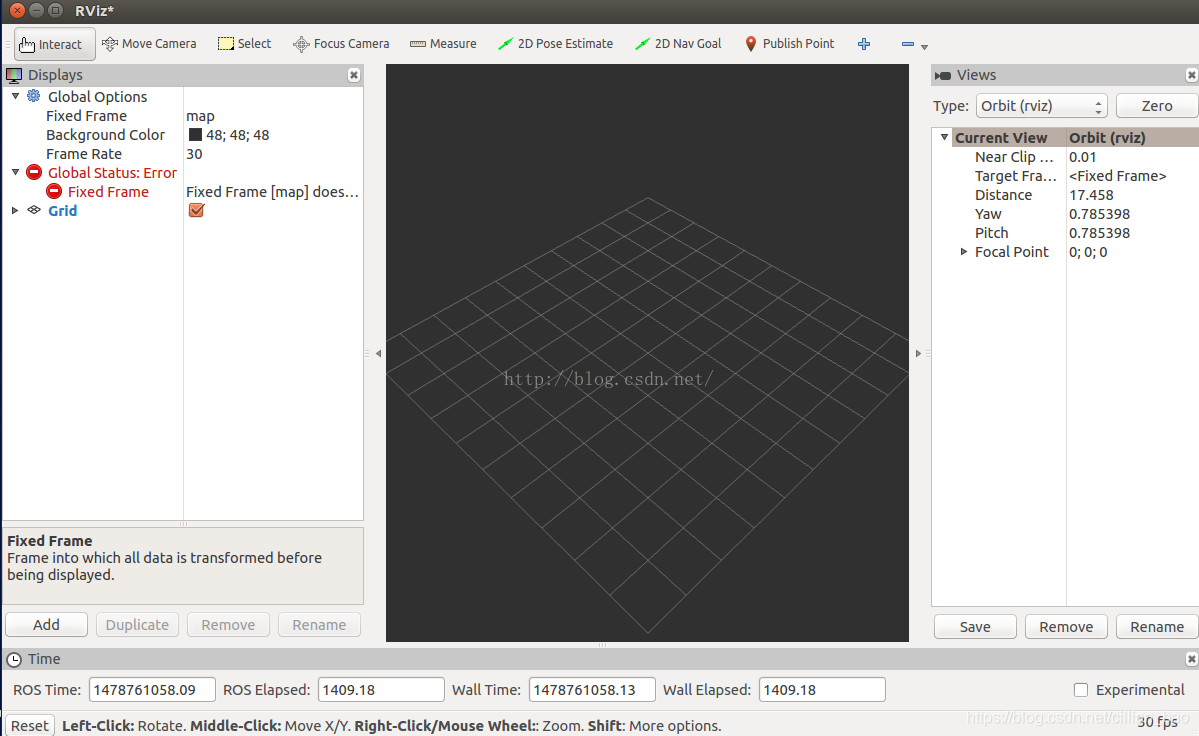
Resolution of problems with rviz global status displayed as error

Resolution of problems with rviz global status displayed as error

Run the program rosrun rviz rviz – D in the official tutorial of ROS

rospack find turtle_ tf/rviz/turtle_ rviz.rviz

No coordinates are displayed for the results found

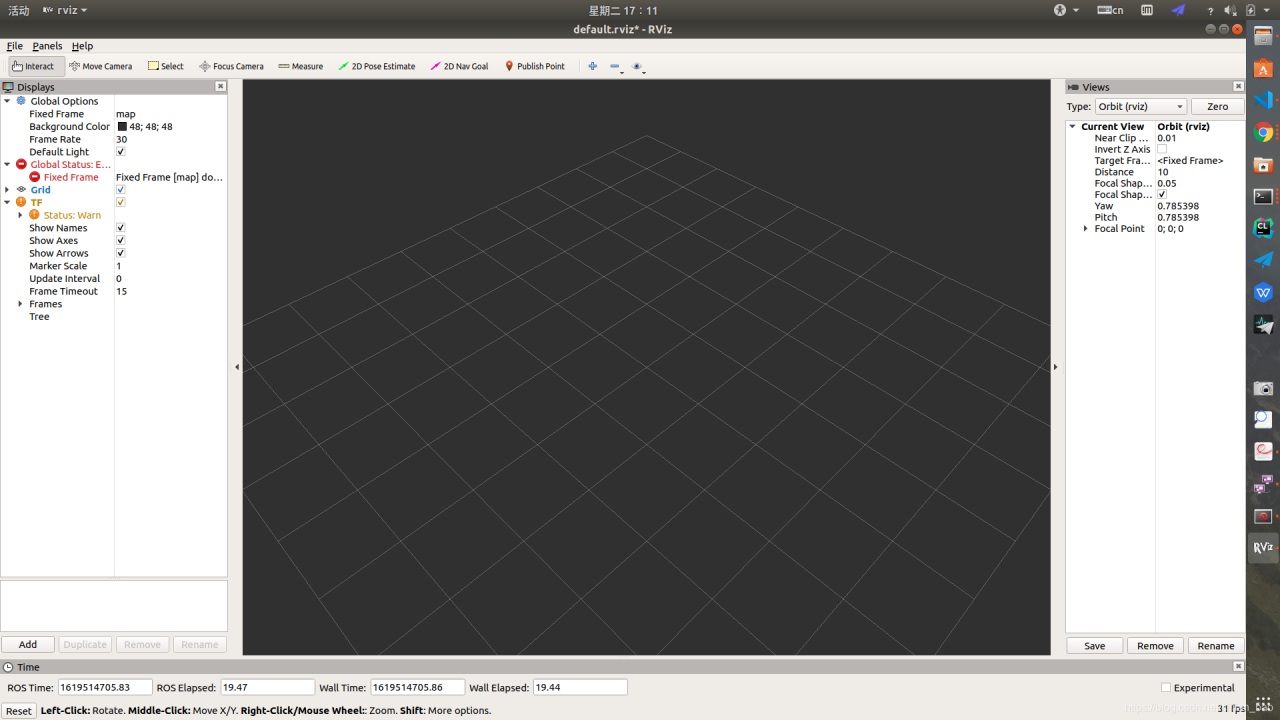
Later, I run rosrun rviz when I write TF transformation, and find that the status of TF is warning when add joins TF

In fact, first of all, change the map on the left side of the fixed frame under global options in the upper left corner to world, and then the global status will become OK.

Then select add in the lower left corner to add a TF display. So you can see that there are three coordinates in the middle three-dimensional diagram. Two of them are the coordinates of the two turtles, and the one in the middle is the world coordinates. Next, move the tortoise, and the two coordinates will follow.

Understand the nature of the displays on the left in rviz. In fact, those things are the same as a model. When a tortoise is represented by a coordinate system, the coordinate system will change accordingly. How do you know about this change?In frame, it will receive the corresponding message and then make corresponding actions according to the message.

The exact reason is still unknown

Solve the problem of “error empty block statement no empty” in the console (Vue project)

Solve the problem of “error empty block statement no empty” in the console (Vue project)

This problem is caused by the code space in the page, and the specific reason is the eslint verification

Solution

The first step is to add in package. JSON

{
  "name": "system",
  "version": "0.1.0",
  "private": true,
  "eslintConfig": {
    "plugins": ["example"],
    "env": {
        "example/custom": true
    }
},
}

The second step is to add an independent configuration file. Eslintrc. JS in the root directory of the project

module.exports = {
  root: true,
  env: {
    node: true
  },
  'extends': [
    'plugin:vue/essential',
    'eslint:recommended'
  ],
  parserOptions: {
    parser: 'babel-eslint'
  },
  rules: {
    'no-console': process.env.NODE_ENV === 'production' ?'warn' : 'off',
    'no-debugger': process.env.NODE_ENV === 'production' ?'warn' : 'off'
  }
}

The third step is to create vue.config.js in the project root directory

module.exports = {
    devServer: {
        overlay: {
            warnings: false,
            errors: false
        }
    }
}

When writing a website, Vue + Flash prompts network error when visiting Vue page

Flash page is mounted at 127.0.0.1:8010
Vue page is mounted at 127.0.0.1:8080 (Axios. Defaults. Baseurl)=‘ http://127.0.0.1 :8010’)

After running, you can access port 8010, but when you access port 8080, you will be prompted with network error, and the security group port will be set to
after checking, it is found that port 8010 is forward to port 1527

guess that port 8010 is occupied
after a look, it is really

so you can directly modify the page port in app.py to 5000,
axios.defaults.baseURL = ‘ http://127.0.0.1 : 5000 ‘(or other non conflicting ports)

This time, you can directly access port 8080
it is found that using ‘127.0.0.1’ can still achieve public network page projection, but only using ‘0.0.0.0’ for flash

Command failed: NPM install — loglevel error

When creating a project, vuecli4 always fails to report an error. Command failed: NPM install — loglevel error
installing the Taobao image is also an error.
the way to find it on the Internet
NPM install chromedriver — chromedriver_ cdnurl= http://cdn.npm.taobao.org/dist/chromedriver
After completing the operation, re create the project Vue create****

My installed version is as follows:
node – V
v14.16.1

npm -v
6.14.2

vue -V
@vue/cli 4.5.12

npm install chromedriver –chromedriver_ cdnurl= http://cdn.npm.taobao.org/dist/chromedriver

vue create

So it worked