Category Archives: How to Fix

Tensorflow UnknownError (see above for traceback): Failed to get convolution algorithm. This is pro

The environment configuration is Ubuntu 16.04, tensorflow 1.13.1, cuda10, cudnn7.6.4.
Error when running tensorflow code
UnknownError (see above for traceback): Failed to get convolution algorithm. This is probably because cuDNN failed to initialize, so try looking to see if a warning log message was printed above.
With the tensorflow, cuda, and cudnn versions corresponding correctly, add the following code to the code.

import os
os.environ['CUDA_VISIBLE_DEVICES'] = "0"

config = tf.ConfigProto()
config.allow_soft_placement=True # If the device you specify does not exist, allow TF to allocate the device automatically
config.gpu_options.per_process_gpu_memory_fraction = 0.9 #Allocate a portion of the video memory to the program to avoid memory overflow
config.gpu_options.allow_growth = True #Allocate video memory on demand

with tf.Session(config=config) as sess:
	#Your Codes

AAPT: error: ‘null‘ is incompatible with attribute button (attr) reference.

Problem description

When using radio button, I want to cancel the small circle he brought with me. Use the following code

 android:button="null"

It’s just an error caused by the @ sign in front of null. According to the error message, you can see error: “null”   I haven’t found any other bloggers for a long time. This family is all caused by font size or color. At the beginning, they thought that their error message was null, and no one made such a small mistake for an hour  

AAPT: error: 'null' is incompatible with attribute button (attr) reference.

Solution:

Note that the correct code is here·········

 android:button="@null"


The solution of duplicate entry ‘for key’ primary ‘when inserting data in MySQL

The problem is the key duplication encountered in inserting data table.
solution:
1. Using ignore, if there are duplicate values in the inserted record, the record row with duplicate values will be ignored, and the insertion of other rows will not be affected.

INSERT IGNORE INTO Table_name(…..) VALUES(1,1),(2,2),(3,3);

2. Use replace to delete the duplicate record row in the table before inserting when the inserted record encounters primary key or unique duplicate

REPLACE INTO Table_name() VALUES(1,1),(2,2),(3,3)

3. Using values after on duplicate key update refers to the value of the inserted record, while not using values refers to the value of the table itself. The record of the subsequent update is the ID of the duplicate primary key or unique key where.

NSERT TO Table_name() VALUES(1,1),(1,2) ON DUPLICATE KEY UPDATE NAME1=NAME1+1;

Download: https://blog.csdn.net/zhangyr_student/article/details/80119238

Springboot startup error: error starting ApplicationContext

Error starting ApplicationContext. To display the auto-configuration report re-run your application with 'debug' enabled.
2017-11-16 15:32:12.994 ERROR 2668 --- [           main] o.s.b.d.LoggingFailureAnalysisReporter   : 

***************************
APPLICATION FAILED TO START
***************************

Description:

Cannot determine embedded database driver class for database type NONE

Action:

If you want an embedded database please put a supported one on the classpath. If you have database settings to be loaded from a particular profile you may need to active it (no profiles are currently active).

The reason is: when springboot starts, it will automatically inject data source and configure JPA
solution: exclude its injection in @ springbootapplication
@ springbootapplication (exclude = {datasourceautoconfiguration. Class, hibernatejpaautoconfiguration. Class})

//@SpringBootApplication
@SpringBootApplication(exclude={DataSourceAutoConfiguration.class,HibernateJpaAutoConfiguration.class})
public class CreditApplication {
    public static void main(String[] args) {
        SpringApplication.run(CreditApplication.class, args);
    }
}

Add the above configuration.

Uncaught (in promise) Error: timeout of 5000ms exceeded

solve

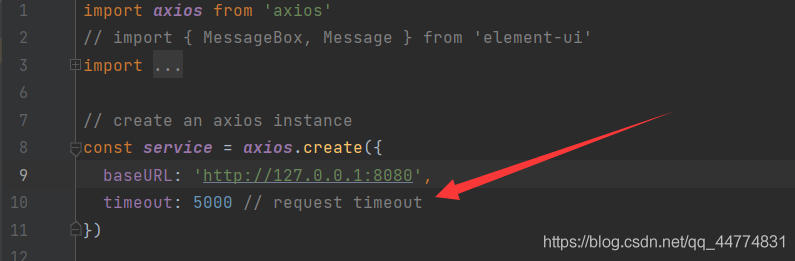
Method 1: set Axios in main.js method 2: if Axios is encapsulated into request

In the process of doing the project, due to the large amount of data requested, the request timed out, so this error was reported. The timeout time of 5000ms was set when Axios was configured. We can solve this error by changing this setting

Method 1: set Axios in main.js

Set the timeout of Axios in main.js, but it is generally not available. You need to set it yourself. Then main.js can be found under SRC of your project, and add Axios. Default. Timeout = 50000 in it, which means that setting the timeout to 50 seconds should be enough

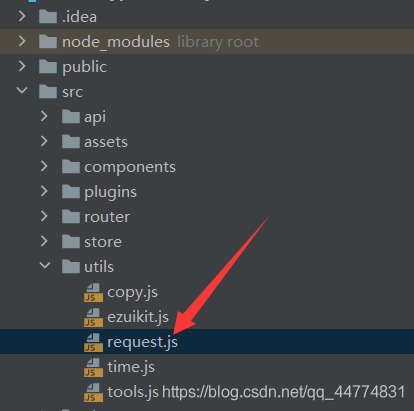
Method 2: if Axios is encapsulated into request

If the first method is not used at all, you can change it in another setting:

here

Strange exception 001: invalid or unexpected token

The following error suddenly appears on a query page:

Uncaught SyntaxError: Invalid or unexpected token,

Translated into Chinese:
the captured query is invalid or unexpected
what is this?Careful query code logic completely no problem, a face muddled force, do not know what happened.

Since there is no problem with the code logic, it is a data problem. After checking all the data to be displayed on the page, we found some doubtful points, such as single quotation marks and double quotation marks.

In fact, this error prompt tells us that the data has special characters; The data has special characters; The data has special characters

onnx-tensorrt/builtin_op_importers.cpp:766:12: error: ‘class nvinfer1::IDeconvolutionLayer’ has no m

When compiling the onnxruntime source code, an error is reported:

/home/zxq/cxx/onnxruntime/cmake/external/onnx-tensorrt/builtin_op_importers.cpp:766:12: error: ‘class nvinfer1::IDeconvolutionLayer’ has no member named ‘setDilationNd’
     layer->setDilationNd(dilations);
            ^~~~~~~~~~~~~
/home/zxq/cxx/onnxruntime/cmake/external/onnx-tensorrt/builtin_op_importers.cpp: In function ‘onnx2trt::NodeImportResult onnx2trt::{anonymous}::importGemm(onnx2trt::IImporterContext*, const onnx::NodeProto&, std::vector<onnx2trt::TensorOrWeights>&)’:
/home/zxq/cxx/onnxruntime/cmake/external/onnx-tensorrt/builtin_op_importers.cpp:1250:18: error: ‘class nvinfer1::IShuffleLayer’ has no member named ‘setZeroIsPlaceholder’
         squeeze->setZeroIsPlaceholder(false);
                  ^~~~~~~~~~~~~~~~~~~~
/home/zxq/cxx/onnxruntime/cmake/external/onnx-tensorrt/builtin_op_importers.cpp: In function ‘onnx2trt::NodeImportResult onnx2trt::{anonymous}::importGRU(onnx2trt::IImporterContext*, const onnx::NodeProto&, std::vector<onnx2trt::TensorOrWeights>&)’:
/home/zxq/cxx/onnxruntime/cmake/external/onnx-tensorrt/builtin_op_importers.cpp:1536:20: error: ‘class nvinfer1::IShuffleLayer’ has no member named ‘setZeroIsPlaceholder’
         unsqueeze->setZeroIsPlaceholder(false);
                    ^~~~~~~~~~~~~~~~~~~~
/home/zxq/cxx/onnxruntime/cmake/external/onnx-tensorrt/builtin_op_importers.cpp: In function ‘onnx2trt::NodeImportResult onnx2trt::{anonymous}::importLSTM(onnx2trt::IImporterContext*, const onnx::NodeProto&, std::vector<onnx2trt::TensorOrWeights>&)’:
/home/zxq/cxx/onnxruntime/cmake/external/onnx-tensorrt/builtin_op_importers.cpp:2051:22: error: ‘class nvinfer1::IShuffleLayer’ has no member named ‘setZeroIsPlaceholder’
         reshapeBias->setZeroIsPlaceholder(false);
                      ^~~~~~~~~~~~~~~~~~~~
/home/zxq/cxx/onnxruntime/cmake/external/onnx-tensorrt/builtin_op_importers.cpp: In function ‘onnx2trt::NodeImportResult onnx2trt::{anonymous}::importRNN(onnx2trt::IImporterContext*, const onnx::NodeProto&, std::vector<onnx2trt::TensorOrWeights>&)’:
/home/zxq/cxx/onnxruntime/cmake/external/onnx-tensorrt/builtin_op_importers.cpp:3202:22: error: ‘class nvinfer1::IShuffleLayer’ has no member named ‘setZeroIsPlaceholder’
         reshapeBias->setZeroIsPlaceholder(false);
                      ^~~~~~~~~~~~~~~~~~~~
/home/zxq/cxx/onnxruntime/cmake/external/onnx-tensorrt/builtin_op_importers.cpp: In function ‘onnx2trt::NodeImportResult onnx2trt::{anonymous}::importTRT_Shuffle(onnx2trt::IImporterContext*, const onnx::NodeProto&, std::vector<onnx2trt::TensorOrWeights>&)’:
/home/zxq/cxx/onnxruntime/cmake/external/onnx-tensorrt/builtin_op_importers.cpp:4219:12: error: ‘class nvinfer1::IShuffleLayer’ has no member named ‘setZeroIsPlaceholder’
     layer->setZeroIsPlaceholder(zeroIsPlaceholder);
            ^~~~~~~~~~~~~~~~~~~~
external/onnx-tensorrt/CMakeFiles/nvonnxparser_static.dir/build.make:103: recipe for target 'external/onnx-tensorrt/CMakeFiles/nvonnxparser_static.dir/builtin_op_importers.cpp.o' failed
make[2]: *** [external/onnx-tensorrt/CMakeFiles/nvonnxparser_static.dir/builtin_op_importers.cpp.o] Error 1
CMakeFiles/Makefile2:2581: recipe for target 'external/onnx-tensorrt/CMakeFiles/nvonnxparser_static.dir/all' failed
make[1]: *** [external/onnx-tensorrt/CMakeFiles/nvonnxparser_static.dir/all] Error 2
Makefile:165: recipe for target 'all' failed
make: *** [all] Error 2
Traceback (most recent call last):
  File "/home/zxq/cxx/onnxruntime/tools/ci_build/build.py", line 1986, in <module>
    sys.exit(main())
  File "/home/zxq/cxx/onnxruntime/tools/ci_build/build.py", line 1921, in main
    build_targets(args, cmake_path, build_dir, configs, num_parallel_jobs, args.target)
  File "/home/zxq/cxx/onnxruntime/tools/ci_build/build.py", line 1007, in build_targets
    run_subprocess(cmd_args, env=env)
  File "/home/zxq/cxx/onnxruntime/tools/ci_build/build.py", line 528, in run_subprocess
    return run(*args, cwd=cwd, capture_stdout=capture_stdout, shell=shell, env=my_env)
  File "/home/zxq/cxx/onnxruntime/tools/python/util/run.py", line 41, in run
    completed_process = subprocess.run(
  File "/home/zxq/anaconda3/lib/python3.8/subprocess.py", line 512, in run
    raise CalledProcessError(retcode, process.args,
subprocess.CalledProcessError: Command '['/usr/local/bin/cmake', '--build', '/home/zxq/cxx/onnxruntime/build/Linux/Release', '--config', 'Release']' returned non-zero exit status 2.

reason:

From the error message, we can see that it is related to the third-party package external/onnx tensorrt of oonnxruntime, and then we can see that
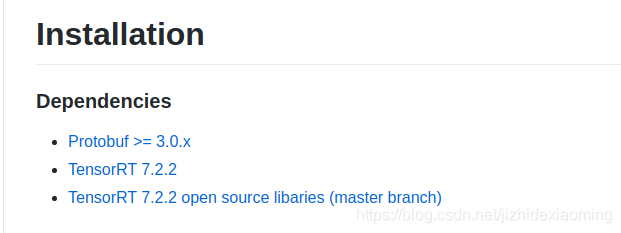
Onnx runtime – rel-1.7.2 is the third-party package onnx tensorrt. This package depends on tensorrt version 7.2.2, but I installed 7.0.0, which is too low.

The reason why I installed 7.0.0 is that I installed CUDA 10.0 before, and CUDA 10.0 supports tensorrt 7.0.0 at most.

terms of settlement:

(1) Download the appropriate version of onnxruntime again. The download is too slow and the time cost is too high.

(2) Update CUDA 11.0, CUDA 11.0 can support the latest tensorrt 7.2.3, re install CUDA and tensorrt reference tutorial.
 

GitHub upload failed: git push error: failed to push some refs to exception handling

reason

When GitHub created the project, the code was uploaded and the readme.md file was manually added to GitHub, but the local warehouse did not update the readme.md file.

resolvent

First, pull the files from the remote code base to the local code base, and then push the new code to the GitHub code base

Use the command to pull: git pull -- rebase origin master
and then upload: git push - U origin master