Category Archives: How to Fix

ExpressionChangedAfterItHasBeenCheckedError: Expression has changed after it was checked.

  Time: May 8, 2021 14:22:35

ERROR Error: NG0100: ExpressionChangedAfterItHasBeenCheckedError: Expression has changed after it was checked. Previous value: 'true'. Current value: 'false'.. Find more at https://angular.io/errors/NG0100
    at throwErrorIfNoChangesMode (core.js:6792)
    at bindingUpdated (core.js:12940)
    at Module.ɵɵproperty (core.js:14740)
    at InvoiceManagementComponent_Template (invoice-management.component.html:55)
    at executeTemplate (core.js:9600)
    at refreshView (core.js:9466)
    at refreshComponent (core.js:10637)
    at refreshChildComponents (core.js:9263)
    at refreshView (core.js:9516)
    at refreshEmbeddedViews (core.js:10591)

The meaning of the problem is that once the page is rendered, don’t change it. If you change it again, I will report you an error. And that’s it.

Solution: add a line of code to the ngafterviewinit() method

  ngAfterViewInit(): void {
    this.changeDetectorRef.detectChanges();
  }

This only needs to be declared in the constructor

  constructor(
    public changeDetectorRef: ChangeDetectorRef
  ) { }


: – 1: error: lnk1168: unable to open xxx.exe for writing

1. Problems

The questions are as follows:

👎 Error: lnk1168: unable to open staging/sggroundcontrol.exe for writing

2. Solutions

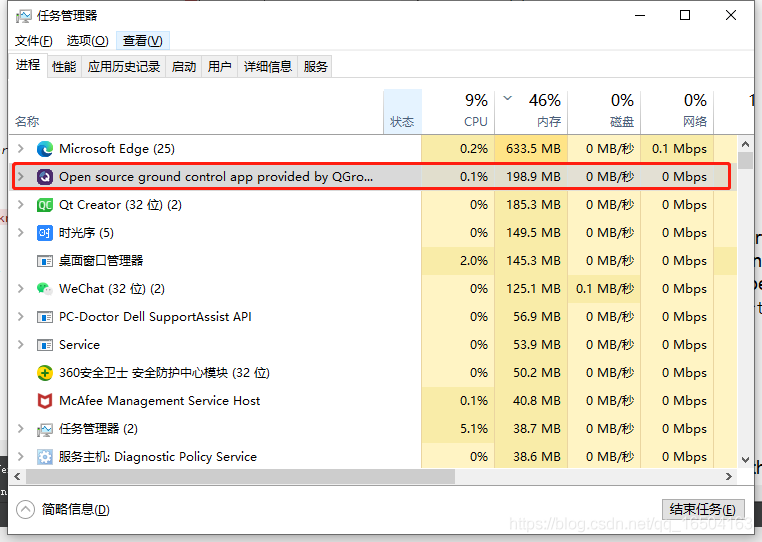
On the Internet, it is said that the process is running, just finish the process of the program, open the “process manager”, press the “Ctrl + Alt + delete” key combination, and then find the corresponding process and right-click to finish, as shown below,

but sometimes the task manager can’t find the process, and this situation is generally restarted

Next time, it’s better to drop the program manually, wait for the system to shut down, and then run “Ctrl + R” as follows:

every time you do this, you will never encounter this error again~

Failed to dlsym make_device: undefined symbol: make_device

Failed to dlsym make_ device: undefined symbol: make_ device

Recently, I encountered some bugs when doing development. I have been troubled for a long time. Although I am a good cook, I think I can accumulate it. When I encounter the same type of problems in the future, I have a way to solve the problems. The problem is as follows: Android recovery system can do some basic test demo below. But this latest demo is developed by C + + and C language. Some functions need to rely on dynamic libraries, such as librecovery_ UI. So, but there is a special library called librecovery_ ui.recovery.so。 At that time, using the find command, we could find the generation location of the library. However, when using grep to find the generation location of the dynamic library, we couldn’t find it. We only found the calling location. For a time, we doubted whether we had made a mistake. Finally, we searched under the general system root directory. Finally, we kept printing a lot of messy code under the out subdirectory, thinking it was a program crash, It’s time for ^ C to end the process. But in the end, no matter how many, just let it collapse. Finally, we found the location of the Library under the out directory. It turned out that it was an automatically generated MK file, in which many concise generation dependent library scripts were used. Finally, we found the location of the so.

Then I met the problem on the topic, that is, how can the so library compiled according to the correct android.mk script file not find the defined library when using dlopen call?I wonder if there is a problem with the function, and then I wrote a new function to test the call, and found it still can’t work, Failed to dlsym FN: undefined symbol: test is also displayed. Then I searched the Internet and found that most people said that they needed to add extern “C” to the function. Finally, according to what I said on the Internet, I found that it was still not possible. Finally, I asked my colleagues and got the answer to the question, which is to use the nm command of Linux to find the dynamic library or the static library that contains the functions that can be called. Finally, I found that the dynamic library that I passed to the board did not have the make that I wanted to call_ Then use the find command to find two. So libraries with the same name. Finally, find the function body to be called in another library. Finally, transfer another. So library to the board. Finally, it is successful.

git remote: HTTP Basic: Access denied error resolution

git error: git remote: HTTP Basic: Access denied

Cause of the problem: it may be that the password of the remote warehouse has just been changed, resulting in the inconsistency between the user name and password of the local git configuration and the user name and password registered on gitlab.

1. Solution 1:

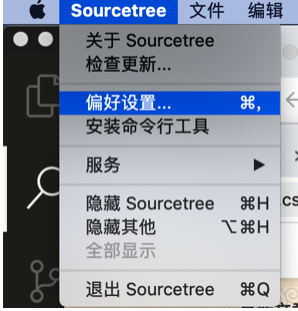
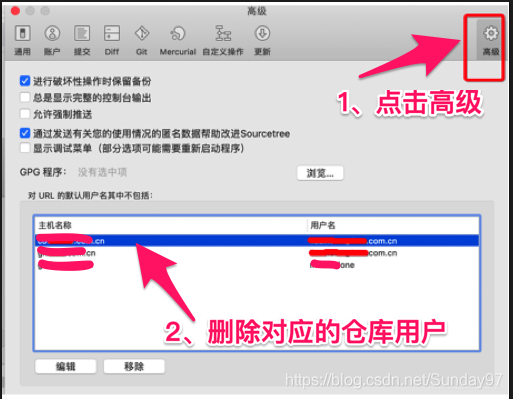
Follow the steps shown in the figure

Then continue to use soucetree, you will be prompted to enter the user name and password

2. Solution 2:

If the account password changes, use the following command to re-enter the account password

git config –system –unset credential.helper

If the problem cannot be solved with the first command, enter the following command again:

git config –global http.emptyAuth true

Org.springframework.beans.factory.xml.xmlbeandefinitionstoreexception: the wildcard matching is comprehensive, but the declaration of element XX: XX XX cannot be found

When configuring spring’s XML file, you want to start component scanning. As a result, the following error occurred during the operation:

<?xml version="1.0" encoding="UTF-8"?>
<beans xmlns="http://www.springframework.org/schema/beans"
       xmlns:xsi="http://www.w3.org/2001/XMLSchema-instance"
       xmlns:context="http://www.springframework.org/schema/context"
       xsi:schemaLocation="http://www.springframework.org/schema/beans
                           http://www.springframework.org/schema/beans/spring-beans.xsd">
    <context:component-scan base-package="com.zxb"></context:component-scan>
</beans>

org.springframework.beans.factory.xml.XmlBeanDefinitionStoreException: Line 10 in XML document from class path resource [bean2.xml] is invalid; nested exception is org.xml.sax.SAXParseException; lineNumber: 10; columnNumber: 52; CVC complex type. 2.4. C: wildcard matching is comprehensive, but the element cannot be found‘ context:component-scan ’A statement from the government.

After searching for a long time, it turned out that in the XML file, you need to specify the specific location of the schema file to be followed through the schemalocation . I forgot to configure it, just add it.

<?xml version="1.0" encoding="UTF-8"?>
<beans xmlns="http://www.springframework.org/schema/beans"
       xmlns:xsi="http://www.w3.org/2001/XMLSchema-instance"
       xmlns:context="http://www.springframework.org/schema/context" 
       xsi:schemaLocation="http://www.springframework.org/schema/beans
                           http://www.springframework.org/schema/beans/spring-beans.xsd
                           http://www.springframework.org/schema/context
                           http://www.springframework.org/schema/context/spring-context.xsd">
    <context:component-scan base-package="com.zxb"></context:component-scan>
</beans>

It’s not detailed enough~

Solve the problem that dbvisualizer cannot connect to mysql8

reference resources: https://blog.csdn.net/yeshang_ lady/article/details/108224358

Reason: due to the change of MySQL driver, we need to change the MySQL driver of dbvisualizer.

resolvent:

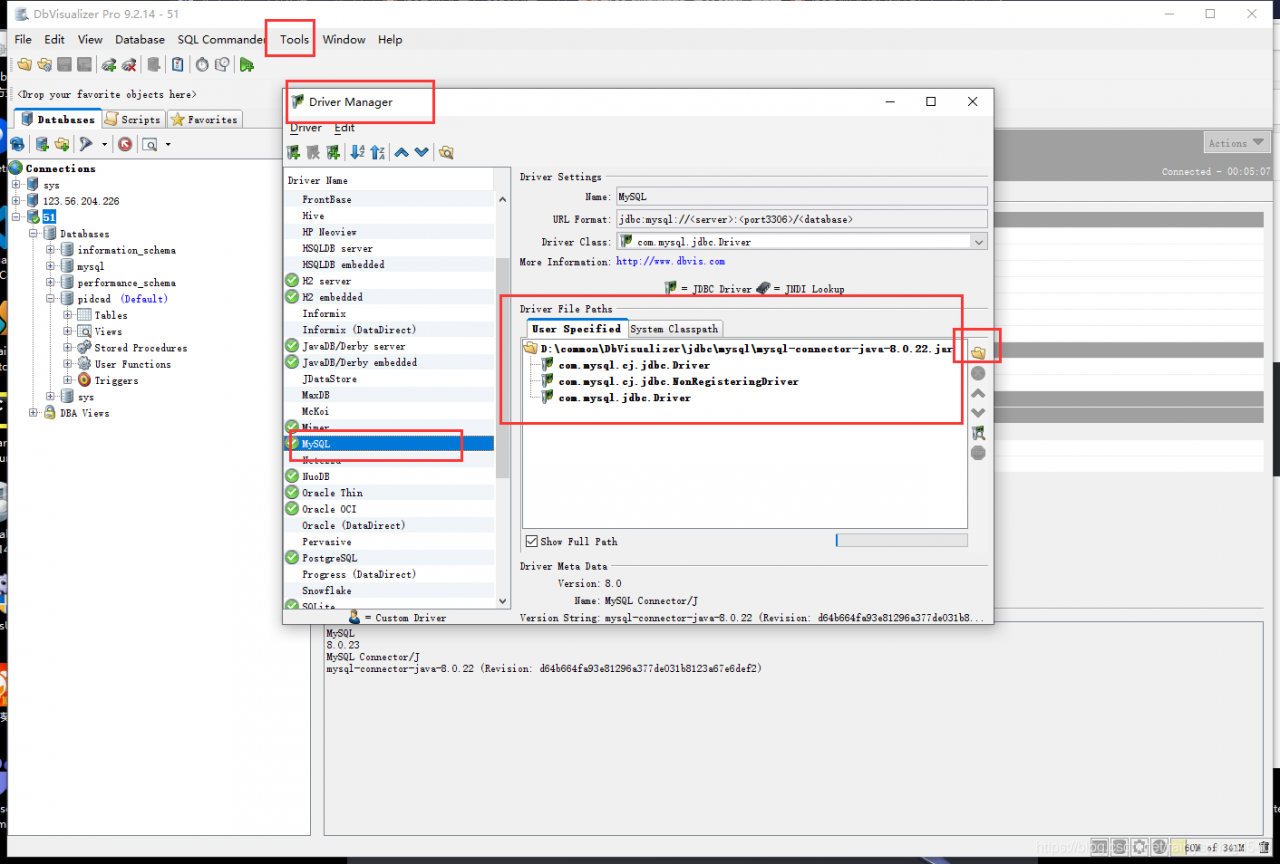
Step 1: download the MySQL 8 driver. I didn’t find the address of the blog post above. I used Maven to download it. Just build a maven project. Enter the address of mysql8 in pom.xml

<dependency>
			<groupId>mysql</groupId>
			<artifactId>mysql-connector-java</artifactId>
			<scope>runtime</scope>
		</dependency>

Then, go to Maven reference to find the package address.

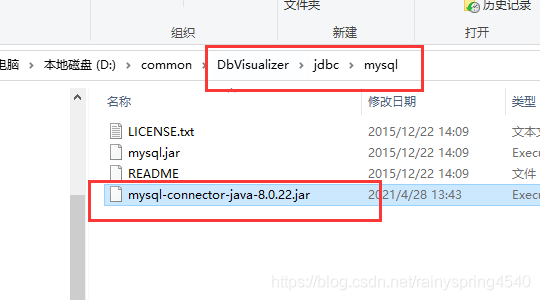
Step 2: put the jar package into the MySQL driver directory of dbvisualizer

Step 3: reconfigure the MySQL driver. As shown in the figure below, delete the original MySQL driver configuration and replace it with a new jar directory

 
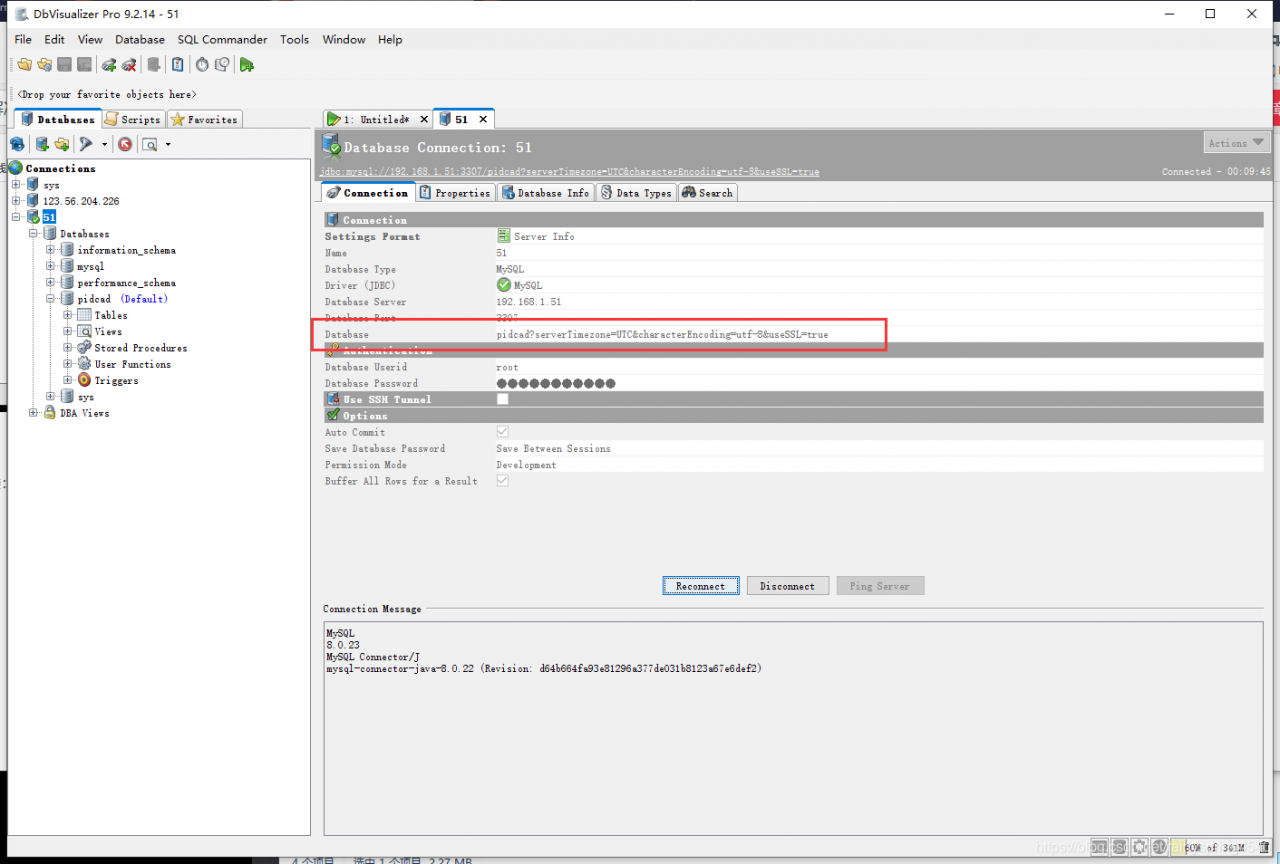
Step 4: create a connection:

 
Special note: in the database column, you should not only input the database, but also include the time zone

test?serverTimezone=UTC&characterEncoding=utf-8&useSSL=true


Error reporting when importing sqoop from Mysql to hive

21/05/06 13:30:53 ERROR tool.ImportTool: Import failed: java.io.IOException: java.lang.ClassNotFoundException: org.apache.hadoop.hive.conf.HiveConf
        at org.apache.sqoop.hive.HiveConfig.getHiveConf(HiveConfig.java:50)
        at org.apache.sqoop.hive.HiveImport.getHiveArgs(HiveImport.java:392)
        at org.apache.sqoop.hive.HiveImport.executeExternalHiveScript(HiveImport.java:379)
        at org.apache.sqoop.hive.HiveImport.executeScript(HiveImport.java:337)
        at org.apache.sqoop.hive.HiveImport.importTable(HiveImport.java:241)
        at org.apache.sqoop.tool.ImportTool.importTable(ImportTool.java:537)
        at org.apache.sqoop.tool.ImportTool.run(ImportTool.java:628)
        at org.apache.sqoop.Sqoop.run(Sqoop.java:147)
        at org.apache.hadoop.util.ToolRunner.run(ToolRunner.java:76)
        at org.apache.sqoop.Sqoop.runSqoop(Sqoop.java:183)
        at org.apache.sqoop.Sqoop.runTool(Sqoop.java:234)
        at org.apache.sqoop.Sqoop.runTool(Sqoop.java:243)
        at org.apache.sqoop.Sqoop.main(Sqoop.java:252)
Caused by: java.lang.ClassNotFoundException: org.apache.hadoop.hive.conf.HiveConf
        at java.net.URLClassLoader.findClass(URLClassLoader.java:381)
        at java.lang.ClassLoader.loadClass(ClassLoader.java:424)
        at sun.misc.Launcher$AppClassLoader.loadClass(Launcher.java:335)
        at java.lang.ClassLoader.loadClass(ClassLoader.java:357)
        at java.lang.Class.forName0(Native Method)
        at java.lang.Class.forName(Class.java:264)
        at org.apache.sqoop.hive.HiveConfig.getHiveConf(HiveConfig.java:44)
        ... 12 more

Reason: the hive-common-2.3.3.jar package is missing. Just copy it from hive’s lib directory to sqoop’s lib directory.

Brief introduction of Linux MMAP and solution of bus error

Bus error occurs when mMAP Shared memory is used for communication between unrelated processes. 

Introduction to MMap communication mechanism
About the mmap

Mmap maps a file or other object into memory. A file is mapped to multiple pages, and if the file size is not the sum of all pages, the unused space of the last page is cleared. Munmap does the opposite, removing the object map for a specific address area.
When mmap is used to map the file to the process, the virtual address can be directly operated for file reading and writing operations, and there is no need to call read,write and other system calls. Note, however, that writing directly to this segment of memory does not write anything larger than the current file size.

An obvious benefit of using Shared memory communication is efficiency,
Because the process can read and write directly to memory without any copy of the data. For communications such as pipes and message queues, there are four copies of the data in the kernel and user space, and only two copies of the data in Shared memory: once from the input file to the Shared memory area, and once from the Shared memory area to the output file. In fact, when processes share memory, they do not always unmap after reading and writing a small amount of data, and re-establish the Shared memory area when there is new communication. Instead, the Shared area is kept until the communication is complete, so that the data content is kept in Shared memory and not written back to the file. Content in Shared memory is often written back to the file when the map is unmapped. Therefore, using the Shared memory communication method is very efficient.

Introduction to the MMAP function

Void * START, size_t length, int PROt,int FD, OFF_t offset);

Parameter description:

Start: The start address of the mapping area.
length: the length of the desired mapping area.
prot: the desired memory protection flag cannot conflict with the open mode of the file. Is one of the following values that can be reasonably combined by an OR operation.
 PROT_EXEC// pages can be executed
 PROT_READ/page/content can be read
 PROT_WRITE// page can be written to the
 PROT_NONE // page not accessible

flags: specifies the type of mapping object, mapping options, and whether the mapping page can be Shared. Its value can be a combination of one or more of the following bits. MAP_SHARED is generally used.
MAP_SHARED// Shared with all the process of mapping the object mapping space. Writes to a Shared area, equivalent to output to a file. The file is not actually updated until either Msync () or Munmap () is invoked.

fd: valid file description. If MAP_ANONYMOUS is set, the value should be -1 for compatibility issues.
offset: offset of the mapped object content (generally 0).


Bus Error solution

After mMAP, when the memory copy is made, the write() function is first used to write to the file descriptor that has been opened.


Reference code

Write:

<span style="font-size:12px;">// Arthur: zhangxiao
// Data: 2014/12/24	
// Note: mmap write
/*******************/

#include <sys/mman.h>
#include <sys/types.h>
#include <sys/stat.h>
#include <fcntl.h>
#include <unistd.h>
#include <assert.h>
#include <string.h>
#include <stdio.h>
//#define FILENAME "/home/zhangxiao/embededSystem/example/Mmap/test"

#define FILENAME "/tmp/test"
#define BUFLEN 128	
typedef struct
{
	char name[BUFLEN];
	int  id;
}people;

int main(int argc, char** argv) 
{
	int i;
	unsigned int pmap=0;
	int fd;
	fd=open(FILENAME ,O_CREAT|O_RDWR|O_TRUNC,00777 );
	assert(fd !=-1);
	pmap = (unsigned int)mmap(0,sizeof(people),PROT_READ|PROT_WRITE,MAP_SHARED,fd,0);
	assert(pmap!=-1);
	write(fd," ",sizeof(people)); //write something
	unsigned int addr;
	addr=pmap;
	char tempname[30]="helloworld";
	int tempid=253; 
	addr = pmap + sizeof(char)*BUFLEN;	
	memcpy((void *)pmap,tempname,strlen(tempname)+1);
	memcpy((void *)addr, &tempid,sizeof(int));
	munmap((void *) pmap,sizeof(char)*BUFLEN);
	close(fd);
	printf("umap ok\r\n");
	return 0;
}</span><strong style="color: rgb(255, 0, 0); font-size: 19px;">
</strong>

Read:

// Arthur: zhangxiao
// Data: 2014/12/24	
// Note: mmap read 
/*******************/
#include <sys/mman.h>
#include <sys/types.h>
#include <sys/stat.h>
#include <fcntl.h>
#include <unistd.h>
#include <assert.h>
#include <string.h>
#include <stdio.h>
//#define FILENAME "/home/zhangxiao/embededSystem/example/Mmap/test"
#define FILENAME "/tmp/test"
#define BUFLEN 128	
typedef struct
{
	char name[BUFLEN];
	int  id;
}people;

int main(int argc, char** argv) 
{
	int i;
	unsigned int pmap=0;
	int fd;
	fd=open(FILENAME ,O_CREAT|O_RDWR,00777 );
	assert(fd !=-1);
	pmap = (unsigned int)mmap(0,sizeof(people),PROT_READ|PROT_WRITE,MAP_SHARED,fd,0);
	unsigned int addr;
	addr = pmap + sizeof(char)*BUFLEN;	
	printf("id=%d   name=%s\n\r",*((int *)addr),(char *)pmap);	
	munmap((void *) pmap,sizeof(char)*BUFLEN);
	close(fd);
	printf("umap ok\r\n");
	return 0;
}


Makefile:

CROSS = gcc

flags=-o
all:mmap_read mmap_write

mmap_read:mmap_read.c
	$(CROSS) $(flags) mmap_read mmap_read.c
mmap_write:mmap_write.c
	$(CROSS) $(flags) mmap_write mmap_write.c

clean:
	rm -rf mmap_read mmap_write<strong>
</strong>

 

Mongoose Error: e11000 duplicate key error collection, code: 11000

Problem description:

MongoError: E11000 duplicate key error collection: test.elementusers index: username_1 dup key: { username: "admin" }
    at Function.create (/Users/liangrumeng/Documents/HBuilderProjects/workspace/myapp/node_modules/mongodb/lib/core/error.js:44:12)
    at toError (/Users/liangrumeng/Documents/HBuilderProjects/workspace/myapp/node_modules/mongodb/lib/utils.js:150:22)
    at coll.s.topology.insert (/Users/liangrumeng/Documents/HBuilderProjects/workspace/myapp/node_modules/mongodb/lib/operations/common_functions.js:266:39)
    at handler (/Users/liangrumeng/Documents/HBuilderProjects/workspace/myapp/node_modules/mongodb/lib/core/sdam/topology.js:1000:24)
    at wireProtocol.(anonymous function) (/Users/liangrumeng/Documents/HBuilderProjects/workspace/myapp/node_modules/mongodb/lib/core/sdam/server.js:457:5)
    at /Users/liangrumeng/Documents/HBuilderProjects/workspace/myapp/node_modules/mongodb/lib/core/connection/pool.js:408:18
    at process._tickCallback (internal/process/next_tick.js:61:11)
  driver: true,
  name: 'MongoError',
  index: 0,
  code: 11000,
  keyPattern: { username: 1 },
  keyValue: { username: 'admin' },
  errmsg:
   'E11000 duplicate key error collection: test.elementusers index: username_1 dup key: { username: "admin" }',
  [Symbol(mongoErrorContextSymbol)]: {} 

MongoError: E11000 duplicate key error collection: test.elementusers index: username_1 dup key: {username: “admin”}
at Function. Create
driver: true,
name: ‘MongoError’,
index: 0,
code: 11000,
keyPattern: {username: 1},
keyValue: {username: ‘admin’},
errmsg:
‘E11000 duplicate key error collection: Test.elementusers index: username_1 dup key: {username: “admin”}’,
[Symbol(mongoErrorContextSymbol)]: {}
The reason:
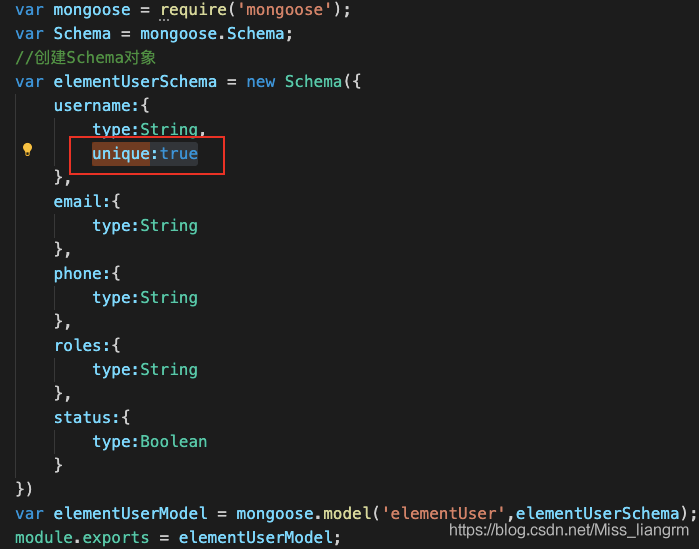
Because unique:true is set in the Schema, the registered user name must be unique.

We can make a corresponding judgment in ERR.

if(err.code == '11000'){
    res.json({
        msg:'This username has already been registered, please change your username',
        success:false
    })
}

Using jgit to report errors: the solution of algorithm negotiation failure

In today’s Java project, when using the jgit library to pull the remote code with SSH protocol, we encountered a lot of errors and stepped on a lot of holes to solve the problem. I’d like to record it here to help you
first of all, let’s talk about the use environment:

    1. there is no problem for the code to run on the Linux server. You can use SSH to pull the code. The local MacBook can pull code with SSH, but not with java code

Problem solving

        1. code error:

      com.jcraft.jsch.jschexception: algorithm negotiation failure

      1. this means that the algorithm negotiation fails, and SSH communication protocol has a stage of secret agreement and algorithm negotiation, in which both parties negotiate the final algorithm according to the algorithm supported by the local end and the opposite end. Different versions of openssh have different default algorithm lists, which may lead to the failure of algorithm negotiation. Use SSH – version to view the current openssh version
$ ssh -Version
OpenSSH_7.9p1, LibreSSL 2.7.3

View_ Protocol used in RSA private key file header

-----BEGIN OPENSSH PRIVATE KEY-----

Use SSH keygen - M PEM - t RSA to generate old format keys

-----BEGIN RSA PRIVATE KEY-----

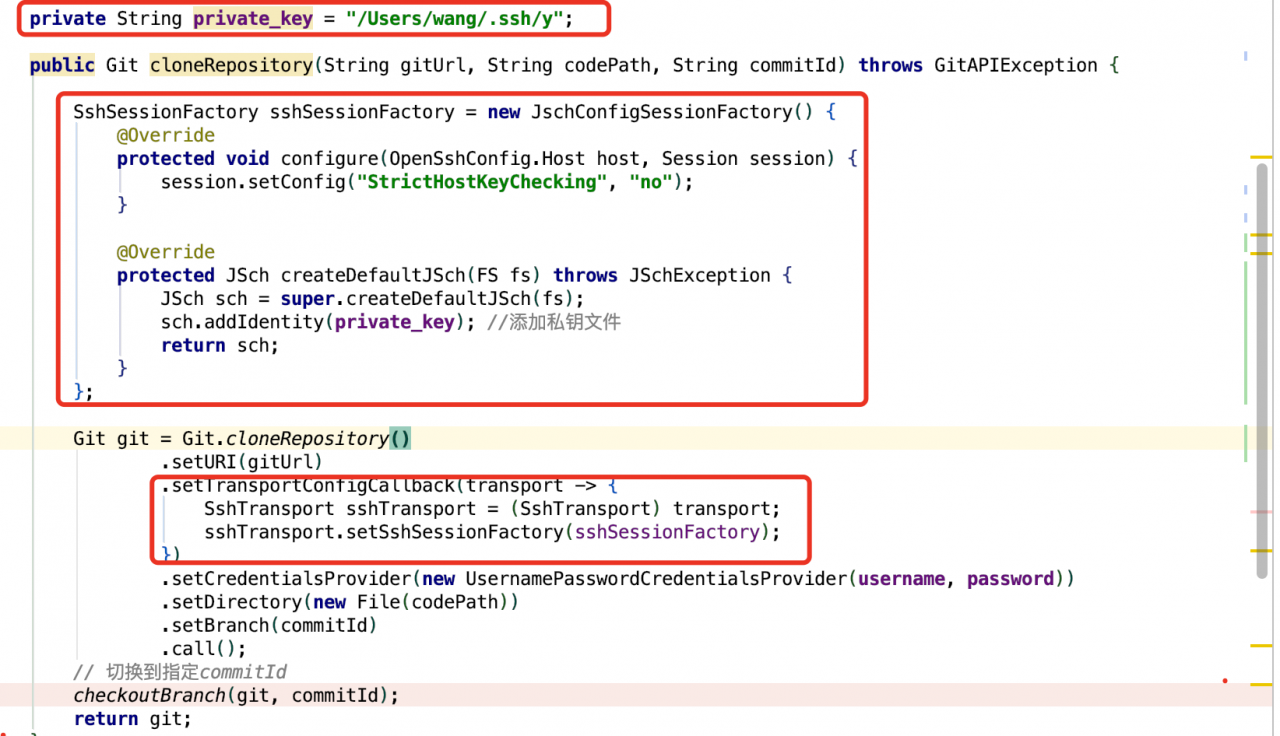
When configuring the newly generated public key of SSH in gitlab repository settings in Git clone repository, specify the SSH private key file

private String private_key = "/Users/wang/.ssh/y";
SshSessionFactory sshSessionFactory = new JschConfigSessionFactory() {
            @Override
            protected void configure(OpenSshConfig.Host host, Session session) {
                session.setConfig("StrictHostKeyChecking", "no");
            }

            @Override
            protected JSch createDefaultJSch(FS fs) throws JSchException {
                JSch sch = super.createDefaultJSch(fs);
                sch.addIdentity(private_key); 
                return sch;
            }
        };

        Git git = Git.cloneRepository()
                .setURI(gitUrl)
                .setTransportConfigCallback(transport -> {
                    SshTransport sshTransport = (SshTransport) transport;
                    sshTransport.setSshSessionFactory(sshSessionFactory);
                })
                .setCredentialsProvider(new UsernamePasswordCredentialsProvider(username, password))
                .setDirectory(new File(codePath))
                .setBranch(commitId)
                .call();
        checkoutBranch(git, commitId);
        return git;

Other issues

      1. an error is reported when jsch connects to SSH: the invalid private key reports an error in the private key file that uses

--- begin open private key -----

      1. protocol by default. Just use the above method to generate the old RSA private key. In

/etc/SSH/sshd_ Add the following two lines to the config

      1. file to enable SSH to support corresponding algorithms and Macs
KexAlgorithms [email protected],ecdh-sha2-nistp256,ecdh-sha2-nistp384,ecdh-sha2-nistp521,diffie-hellman-group-exchange-sha256,diffie-hellman-group14-sha1,diffie-hellman-group-exchange-sha1,diffie-hellman-group1-sha1

MACs [email protected],[email protected],[email protected],[email protected],hmac-sha2-512,hmac-sha2-256,hmac-ripemd160,[email protected],hmac-md5,hmac-sha1,hmac-sha1-96,hmac-md5-96

Restart sshd service on MAC

sudo launchctl load -w /System/Library/LaunchDaemons/ssh.plist

Stop sshd service on MAC

sudo launchctl unload -w /System/Library/LaunchDaemons/ssh.plist

How to check whether a process is started

sudo launchctl list | grep sshd
0   com.openssh.sshd

TypeError(‘Keyword argument not understood:‘, ‘***‘) in keras.models load_model

TypeError(‘Keyword argument not understood:’, ‘***’) in keras.models load_ model

1.Problem description

    1. after training on Google colab, model.save (filepath)_ Save) and then use after saving
from keras.models import load_model
model = load_model(model_file)
# Error: TypeError: ('Keyword argument not understood:', 'step_dim')

2.Solutions

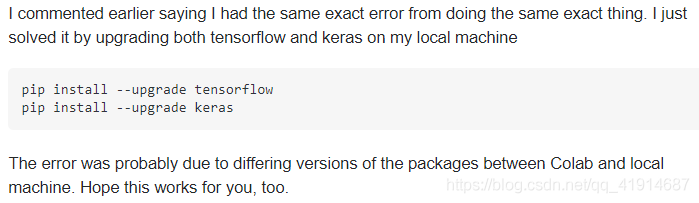
      1. method 1: confirm whether the versions of keras and TF are different twice. Someone’s solution: I only solved it by upgrading tensorflow and keras on the local computer at the same time

pip install --upgrade tensorflow
pip install --upgrade keras

What he means is the version problem. After training on Google’s colab, the model is saved locally. When it is called locally, the loading model will report an error due to the different versions of the packages in the two environments
then you can adjust the version of the local related package.

Similar to the following answer, the version when the model is saved is inconsistent with the version when the model is loaded, which may cause this problem
then unify the versions

import tensorflow as tf
import keras

print(keras.__version__)
print(tf.__version__)

But mine is still read on the colab, and the environment is the same, so this method can’t solve my specific problem.

      1. method 2. Model.load_ Weights() only reads weights


      1. the general idea is that we start with models.load_ Model () reads the network and weight. Now, because of the keyword argument not understood in the custom model, we first build the model structure, and then model. Load_ Weights () reads weights, which can achieve our original purpose


      1. at present, I use this method to solve the problem of re reading and importing the parameters of the network structure model of the user-defined model

I also have this problem I’ve tried a lot of methods and found that this method can be used

# first,build model
model = TextAttBiRNN(maxlen, max_features, embedding_dims).get_model()
model.compile(loss='binary_crossentropy',
              optimizer='adam',
              metrics=['accuracy'])
              
# second, load weights: I solved the problem with this:
model_file = "/content/drive/My Drive/dga/output_data/model_lstm_att_test_v6.h5"
model.load_weights(model_file)
# then,we will find the modle can be use.
# in this way,I avoided the previous questions.