Category Archives: How to Fix

Solve the problem that springboot does not scan @ repository

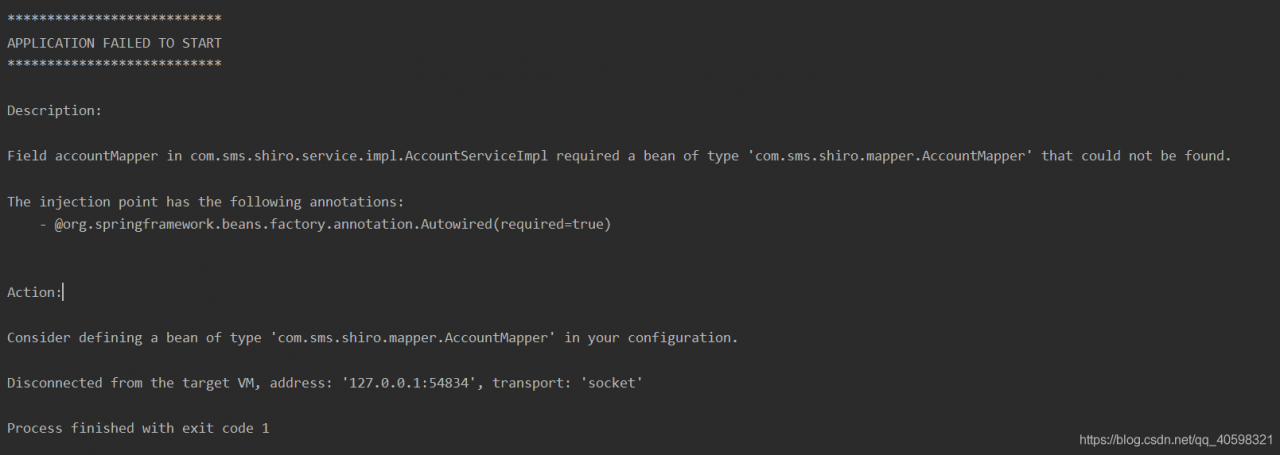
Problem: if you use @ repository annotation to annotate Dao layer alone, and do not use @ mapperscan scan, you will report an error when starting the project: field xxmapper in com.sms.shiro.service.impl.xxserviceimpl required a bean of type ‘com.sms.shiro.mapper.xxmapper’that could not be found.
, the difference between @ mapper and @ Repository:
1, @Repository is the annotation of spring family
2. When using @ mapper annotation, spring doesn’t know it, and the mapper injected into service by @ Autowired will be popular.

2、 Back to the question, it is clear that componentscan in springboot scans all annotated components under the starter package, but why can’t we find @ repository components
reason: the reason for this problem is that springboot automatically filters out interfaces and abstract classes during scanning, so the mapper interface modified by @ repository can’t be called a bean, so it can’t be injected into the service.

3、 Solution:

3.1 do not use @ repository, use @ mapper directly in the mapper layer interface, but if the project is large, it will be very troublesome.

3.2 if you want to use @ repository because springboot can’t scan mapper interface, then use @ mapperscan to scan all mapper interface packages on the launcher, such as: @ mapperscan ("com. SMS. Shiro. *. Mapper")

3.3 in fact, after using @ maperscan annotation to scan the mapper interface, the mapper interface does not need @ repository and @ mapper to register beans. However, if you want the project structure to be clear, after using @ maperscan annotation to scan, both @ repository and @ mapper can be used, and no error will be reported.
Springmvc Content type ‘application/json‘ not supported

In the practice of spring MVC, many people may encounter this annoying problem, it took a long time to solve, the code is right, but he just reported an error
content type ‘application/JSON’ not supported
I have found many articles on the Internet and used many methods, but they can’t solve this problem
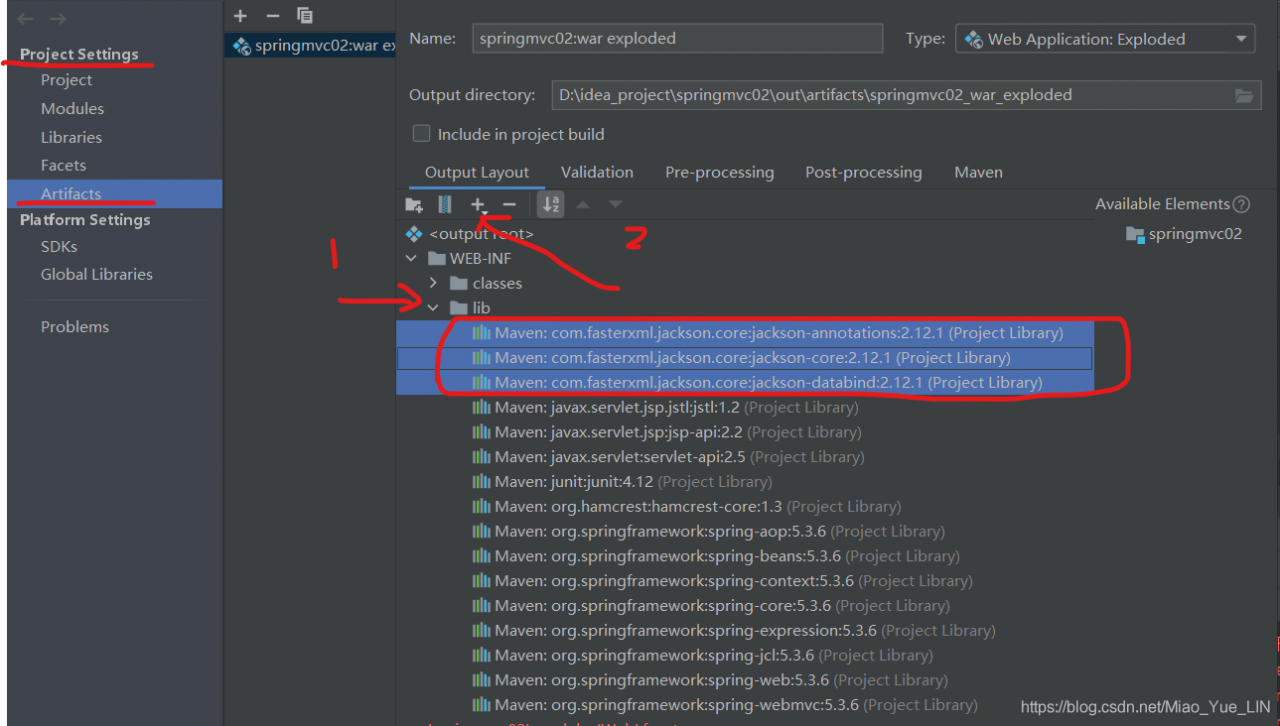
finally, I remembered if I didn’t add the jar package required by JSON in lib, so I tried it… It was a success indeed
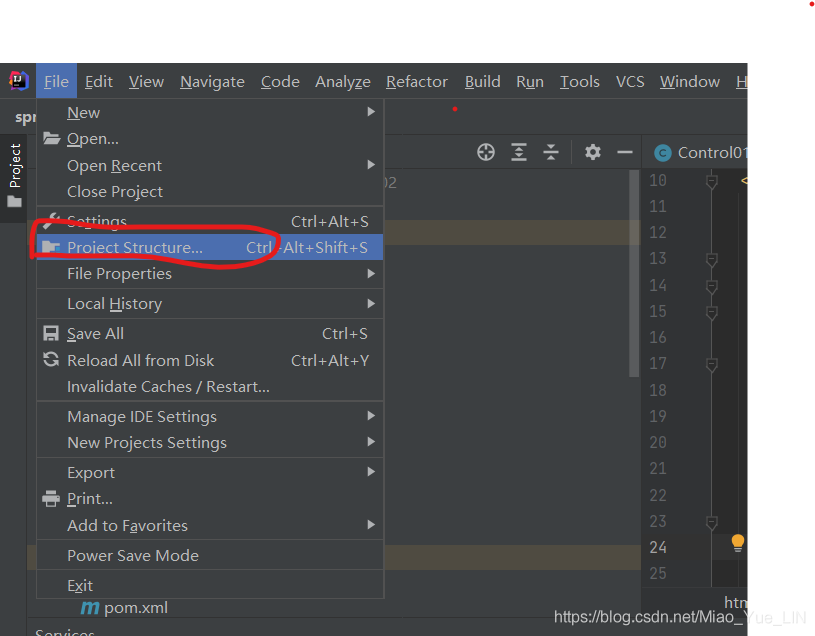
the following is my method

because I have added it, so here you can see that there are three jar packages in my lib package,
just add these three packages~~~

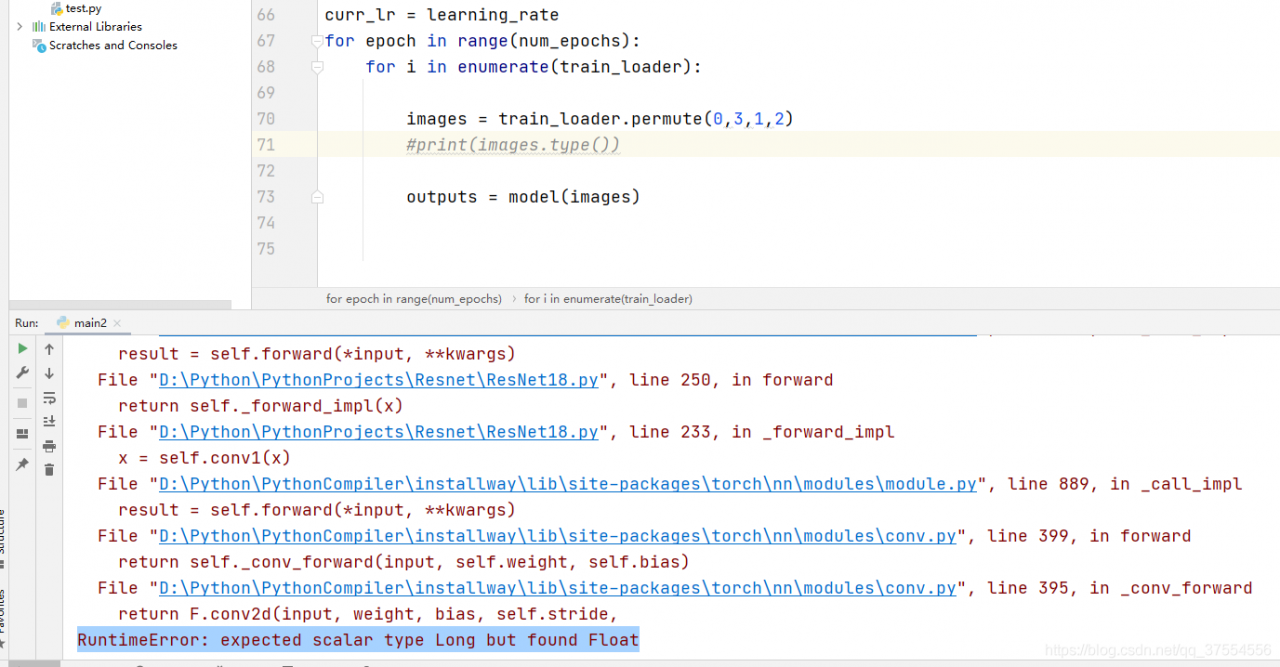
Successfully solved the problem of “runtimee” in RESNET dataset classification rror:expected scalar type Long but found Float”

Recently, I encountered some mistakes as shown in the title when doing deep learning classification, but I don’t know how to modify them. Finally, after exploration, I successfully solved them
the problems and solutions are reported directly below.

Error

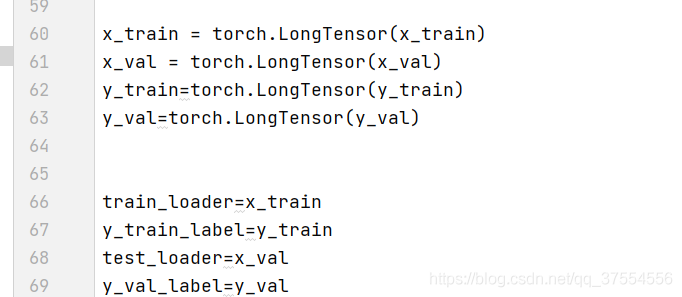
Solution

In practice, the label of classification should be long, and the image should be float32
therefore, modifying the data type will succeed, but it doesn’t matter. I’ll share it with you after I solve it successfully!

Solution of server connection reused (test environment)

In the Intranet environment, the interface on the test server fails to connect. The returned information is as follows:

Unable to connect to remote host: Connection refused

The server system is Ubuntu 16.04. If you use sudo UFW disable to shut down the firewall, you still can’t because of iptables

According to the method described in the following article

https://blog.csdn.net/zuifeng503/article/details/8209441

Just use the following command to turn off iptables

sudo iptables -P INPUT ACCEPT  
sudo iptables -P FORWARD ACCEPT  
sudo iptables -P OUTPUT ACCEPT  
sudo iptables -F  

Mysql Error:The user specified as a definer (‘mysql.infoschema‘@‘localhost‘) does not exist

Copyright note: This article is kept and original by the blogger. Please indicate the source for reprint
original address: https://blog.csdn.net/qq_ 38688267/article/details/117745441

Contents of articles

Scenario Description: find a solution on the network and use ‘mysqldump — all databases’ to back up the’ MySQL ‘library

Finally, the solution is summarized

Scene introduction

   after installing mysql8, use mysqldump command to backup data from mysql5.7, and then synchronize to mysql8. The specific orders are as follows:

mysqldump -uroot -p --all-databases > /root/dump.sql

   then import the data into mysql8 through source command. After the import, when querying the table list, mysql8 reports an error: MySQL E rror:The user specified as a definer (‘mysql.infoschema’@’localhost’) does not exist


Looking for solutions on the Internet

   a slightly more reliable solution: https://blog.wmsay.com/article/44 . But it still doesn’t solve my problem…


Do it yourself

   after careful thinking, I think that the problem may be in dump. SQL , because I directly specified all databases libraries, which may be MySQL and information_ Schema and other libraries are backed up, and then the data of these libraries in MySQL 8 is covered, resulting in an error.

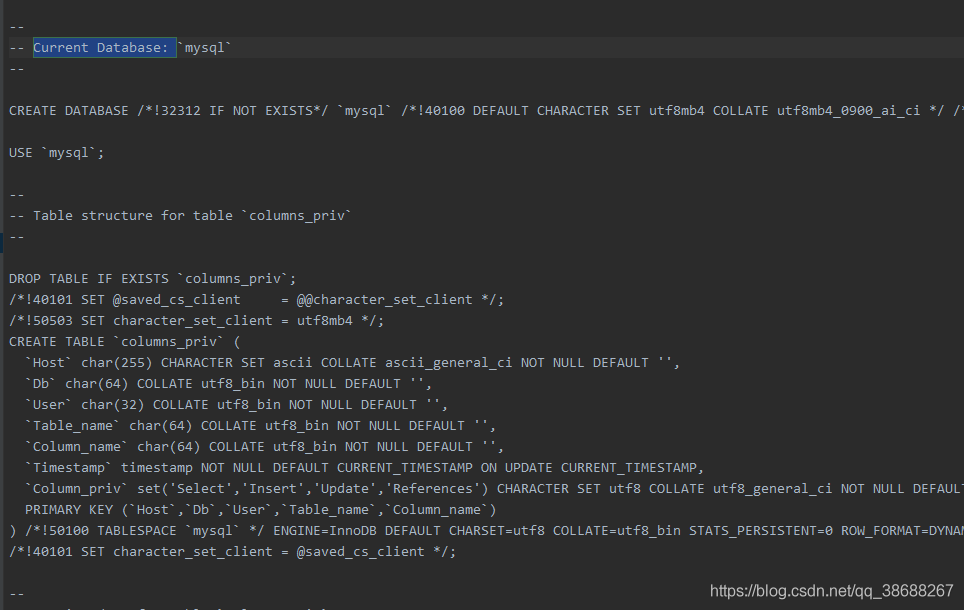
   in order to confirm my idea, I tried the mysqldump -- all databases command locally and looked at the data in it:

Using mysqldump -- all databases will back up the MySQL library

   will not back up information_ schema、performance_ Schema library
  

Final solution

   the reason is the data coverage of MySQL database data mysql5.7, which is bound to have problems. Simply re install MySQL 8. Then dump the data again and specify the library to dump

mysqldump -uroot -p --databases mydb1 mydb2 > /root/dump.sql

Summary

   when using mysqldump , do not use the -- all databases parameter lazily, but use the -- databases db1 DB2 db3 method to specify. Using mysqldump -- all databases will back up the MySQL library, which is prone to problems!

[Python] pip.vendor.urllib3.exceptions.readtimeouterror: httpsconnectionpool protocol

When installing a python module with pip or pychar, you sometimes encounter a readtimeout error. The reason for this problem is probably the network speed

my default source is Tsinghua, sometimes the link network is not good ( the day after the college entrance examination today, it is estimated that there are too many visitors, everyone wants to go to Tsinghua, ha ha ), so I change the source.

pip --default-timeout=100 install pyspark -i http://pypi.douban.com/simple/ --trusted-host pypi.douban.com

Perfect solution

ModuleNotFoundError: No module named ‘MySQLdb‘

Install MySQL client to solve!

Install the following dependent packages in order

================================

yum install mysql-devel

yum install gcc

yum install python3-devel

pip3 install mysqlclient

================================
the two methods found before
install MySQL connector Python
or pymysql.install_ as_ Mysqldb ()
doesn’t work for me. If I use it, there will be other errors

Nginx upload error 413 request entity too large

By default, when using nginx reverse proxy to upload more than 2MB files, an error 413 request entity too large will be reported. To solve this problem, it is very simple to modify the configuration of client_ max_ body_ The size value is enough

Modify nginx.conf


1 2 #cat /usr/local/nginx-1.7.0/conf/nginx.conf | grep client_ max_ body_ size client_ max_ body_ size 10M;

If you need to upload a larger file, the client_ max_ body_ The size can be changed to a larger value. Here it is changed to 10MB

Restart nginx


1 # /usr/local/nginx-1.7.0/sbin/nginx -s reload


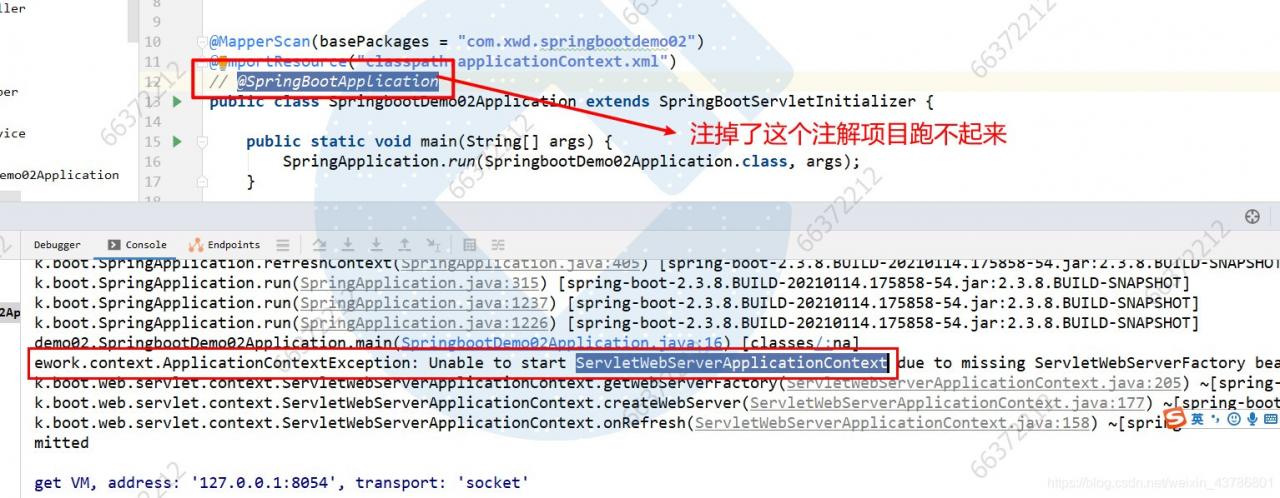
ApplicationContextException: Unable to start ServletWebServerApplicationContext due to missing…..

ApplicationContextException: Unable to start ServletWebServerApplicationContext due to missing ServletWebServerFactory bean.

When I started the web project of springboot, I suddenly reported an error. At first, I suspected that I had forgotten to add the web dependency, but I found that it was not;

		<dependency>
            <groupId>org.springframework.boot</groupId>
            <artifactId>spring-boot-starter-web</artifactId>
            <version>2.3.8.RELEASE</version>
        </dependency>

Later, after checking for a long time, I found that I made a small mistake. It turned out that I accidentally dropped the @ springbootapplication annotation. I hope you don’t make the same mistake. When starting a web project without the @ springbootapplication annotation, the spring container can’t create the class servletwebservercapplicationcontext, And springboot project also can’t get up, bug solved, thanks for watching.

To solve the problem of C # calling excel interface error, prompt: the COM object of Microsoft. Office. Interop. Excel. Applicationclass is forcibly converted to the interface type “Microsoft. Offi”

Solve the problem of C # calling excel interface error, prompt: the COM object of microsoft.office.interop.excel.applicationclass is forcibly converted to the interface type of microsoft.office.interop.excel_ Application”。 This operation failed because the IID is “{000208d5-0000-0000-c000-000000000046}”

For more information about calling just in time (JIT) debugging instead of this dialog,
see the end of this message.

**************Exception text ^ ^ ^ ^ ^ ^ ^ ^ ^ ^ ^ ^ ^ ^ ^ ^ ^ ^ ^ ^ ^ ^ ^ ^ ^ ^ ^ ^ ^ ^ ^ ^ ^ ^ ^ ^ ^ ^ ^ ^ ^ ^ ^ ^ ^ ^ ^ ^ ^ ^ ^ ^ ^_ Application”。 This operation failed because the queryinterface call to the COM component of the interface with IID “{000208d5-0000-0000-c000-000000000046}” failed with the following error: the library is not registered( Exception from HResult: 0x8002801d (type_ E_ LIBNOTREGISTERED))。

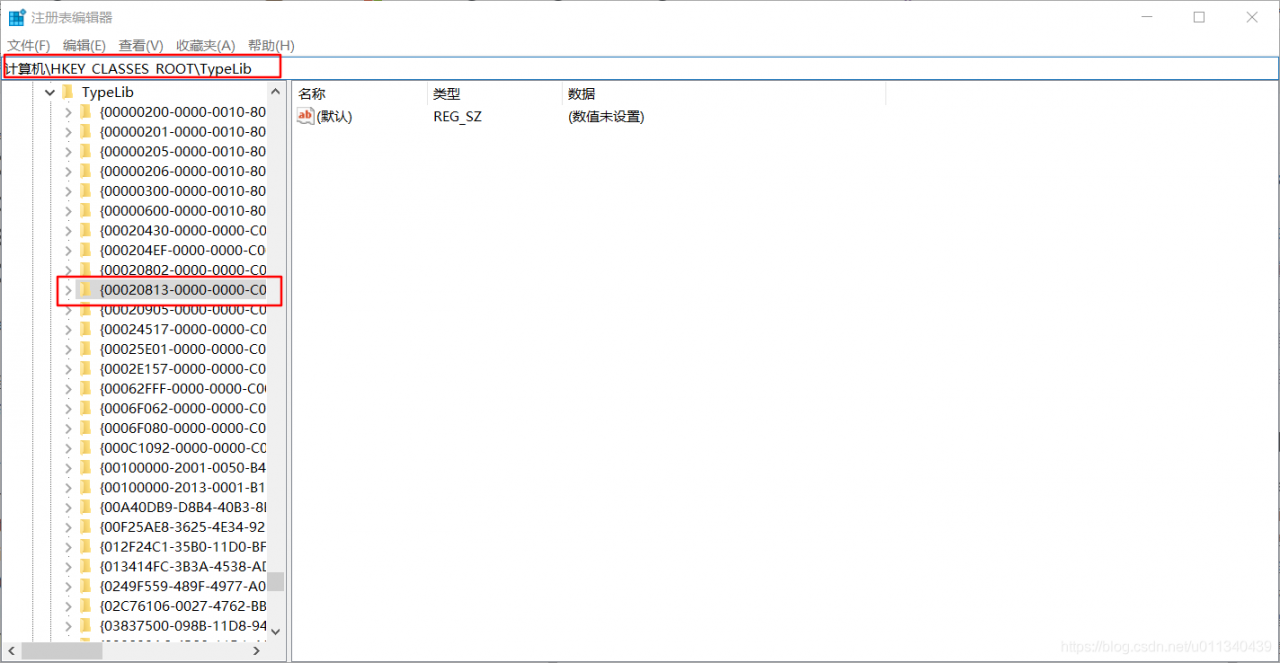
1. Run the “regedit” command to open the registry
2. In the registry address bar, enter:
Computer/HKEY_ CLASSES_ Root/typelib {00020813-0000-0000-c000-000000000046}
locate to the {00020813-0000-0000-c000-000000000046} folder
3. Delete the 1.9 folder under {00020813-0000-0000-c000-000000000046} (the author’s computer is office 2013, 1.8 and 1.9 folder coexist at the same time, delete the higher version)
4. Start the program again, OK