Category Archives: How to Fix

Migration admin.0001_initial is applied before its dependency xxx.0001_initial on database ‘default‘

Problem orientation

Developed in Django framework, a user table is defined to replace the user table automatically generated by the framework, which appears when the migrate command is executed to synchronize the database. Details of the error are as follows

E:\SweetYaya\MyProj01> python manage.py migrate
Traceback (most recent call last):
  File "manage.py", line 22, in <module>
    main()
  File "manage.py", line 18, in main
    execute_from_command_line(sys.argv)
  File "D:\Program Files\Python36\lib\site-packages\django\core\management\__init__.py", line 419, in execute_from_command_line
    utility.execute()
  File "D:\Program Files\Python36\lib\site-packages\django\core\management\__init__.py", line 413, in execute
    self.fetch_command(subcommand).run_from_argv(self.argv)
  File "D:\Program Files\Python36\lib\site-packages\django\core\management\base.py", line 354, in run_from_argv
    self.execute(*args, **cmd_options)
  File "D:\Program Files\Python36\lib\site-packages\django\core\management\base.py", line 398, in execute
    output = self.handle(*args, **options)
  File "D:\Program Files\Python36\lib\site-packages\django\core\management\base.py", line 89, in wrapped
    res = handle_func(*args, **kwargs)
  File "D:\Program Files\Python36\lib\site-packages\django\core\management\commands\migrate.py", line 95, in handle
    executor.loader.check_consistent_history(connection)
  File "D:\Program Files\Python36\lib\site-packages\django\db\migrations\loader.py", line 310, in check_consistent_history
    connection.alias,
django.db.migrations.exceptions.InconsistentMigrationHistory: Migration admin.0001_initial is applied before its dependency MyApp.0001_initial on database 'default'.

terms of settlement

Method 1

delete database , delete all Auth in the database_ and Django_ and re execute it. It's rough. It's not good.

Method 2

First makemigrations Open settings. Py and comment out install_ In apps,
'django. Contrib. Admin ', Open URLs. Py , comment out the admin in urlpatterns, and then migrate will not report an error. Finally, pay attention to recover the comment content

Error messages of copying files to Linux system by PSCP in Windows operating system

First try: PSCP – I & lt; Local storage path of private key file & gt& lt; Windows local file & gt; [email protected] :/home/jerry

Encountered error message: server reused our key

Fatal Error: No supported authentication methods available (server sent: publickey )

Take a closer look. In my putty, the host name is ubuntu@VM-0-2-ubuntu So I replaced root in the command line with Ubuntu:

After that, the error message becomes: unable to open/home/Jerry/xxx.zip: permission denied

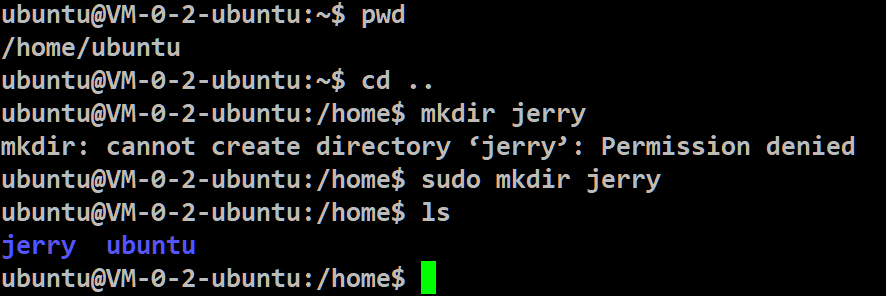
The reason is that I created the Jerry directory through sudo command:

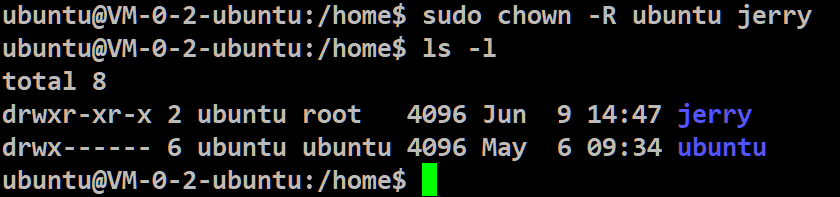
The LS command shows that both the owner and the owner’s group are root users, so you will encounter permission problems

Use the chown command to change the owner of the Jerry folder back to a Ubuntu user

sudo chown -R ubuntu jerry

After that, PSCP is executed successfully


More original articles by Jerry can be found in “Wang Zixi”:

Could not install Gradle distribution

Could not install Gradle distribution

New computer, new Android studio 4.2, new first project error:

Could not install Gradle distribution from 'https\://services.gradle.org/distributions/gradle-6.7.1-bin.zip'

Solution:
(1) click the link in the error message:
1 https://services.gradle.org/distributions/gradle-6.7.1-bin.zip
Download the compressed package to the specified path and unzip it
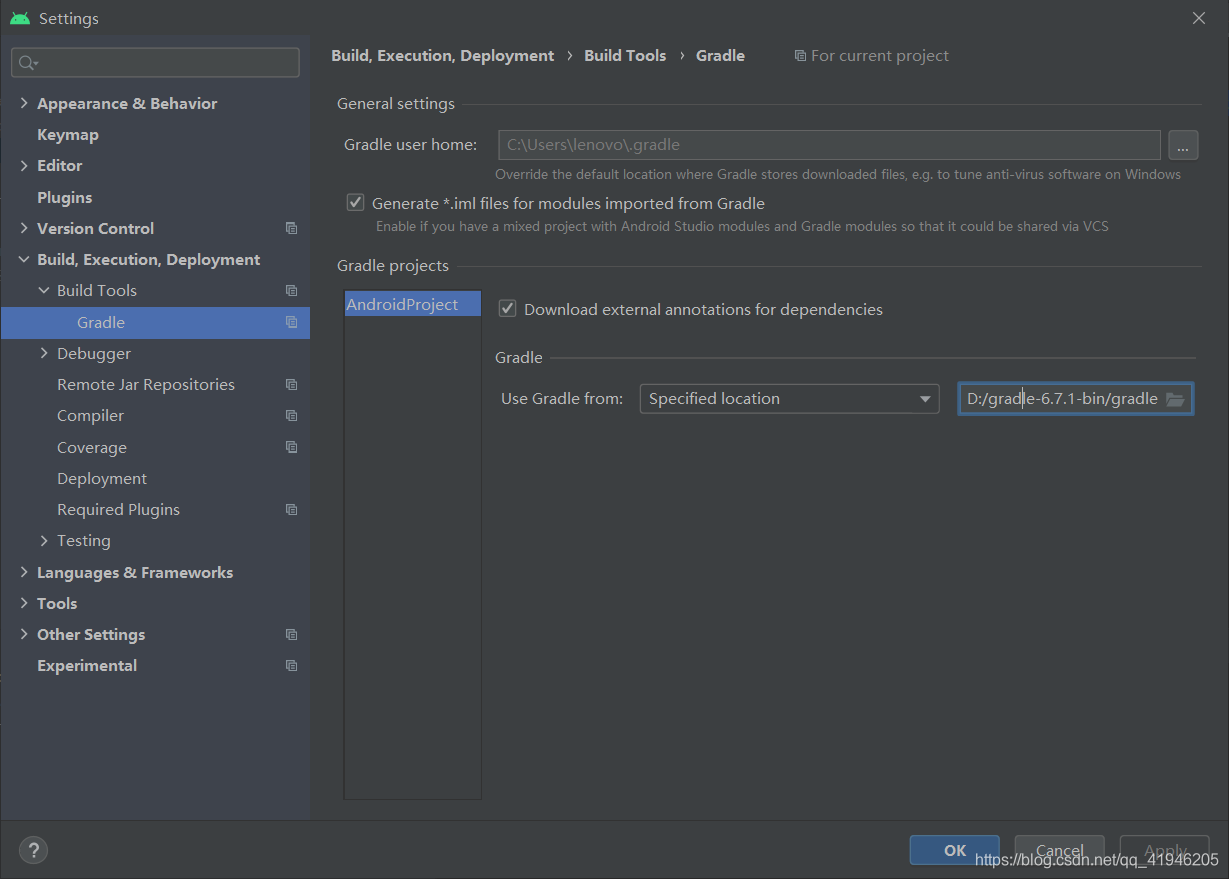
(2) click file – & gt; Settings-> Build, Execution,Deployment-> Build Tools-> Gradle, in the gradle projects area, change use gradle from to your own download path, retry:

(3) Successful solution:

Creating Server TCP listening socket 127.0.0.1:6379: bind: No error。。。 Solutions to problems encountered in startup

Creating Server TCP listening socket 127.0.0.1:6379: bind: No error。。。 Solutions to problems encountered in startup

D:\redis>redis-server.exe redis.windows.conf
[9952] 03 Jul 15:48:22.538 # Creating Server TCP listening socket 127.0.0.1:6379: bind: No error

D:\redis>redis-cli.exe
127.0.0.1:6379> shutdown
(0.51s)
not connected> exit

D:\redis>redis-server.exe redis.windows.conf
                _._
           _.-``__ ''-._
      _.-``    `.  `_.  ''-._           Redis 3.2.100 (00000000/0) 64 bit
  .-`` .-```.  ```\/    _.,_ ''-._
 (    '      ,       .-`  | `,    )     Running in standalone mode
 |`-._`-...-` __...-.``-._|'` _.-'|     Port: 6379
 |    `-._   `._   /    _.-'    |     PID: 16908
  `-._    `-._  `-./  _.-'    _.-'
 |`-._`-._    `-.__.-'    _.-'_.-'|
 |    `-._`-._        _.-'_.-'    |           http://redis.io
  `-._    `-._`-.__.-'_.-'    _.-'
 |`-._`-._    `-.__.-'    _.-'_.-'|
 |    `-._`-._        _.-'_.-'    |
  `-._    `-._`-.__.-'_.-'    _.-'
      `-._    `-.__.-'    _.-'
          `-._        _.-'
              `-.__.-'

[16908] 03 Jul 15:49:06.195 # Server started, Redis version 3.2.100
[16908] 03 Jul 15:49:06.246 * DB loaded from disk: 0.049 seconds
[16908] 03 Jul 15:49:06.246 * The server is now ready to accept connections on port 6379

Failed to download resource “expect_bottle_manifest“

When we are in brew install XXXX, we will encounter this kind of problem

curl: (22) The requested URL returned error: 404 Not Found
Warning: Bottle missing, falling back to the default domain...
==> Downloading https://ghcr.io/v2/homebrew/core/autoconf/manifests/2.69-4

curl: (22) The requested URL returned error: 404 
Error: Failed to download resource "autoconf_bottle_manifest"
Download failed: https://ghcr.io/v2/homebrew/core/autoconf/manifests/2.69-4

The prompt said that one of the supporting plug-ins could not be installed, which was very annoying

 
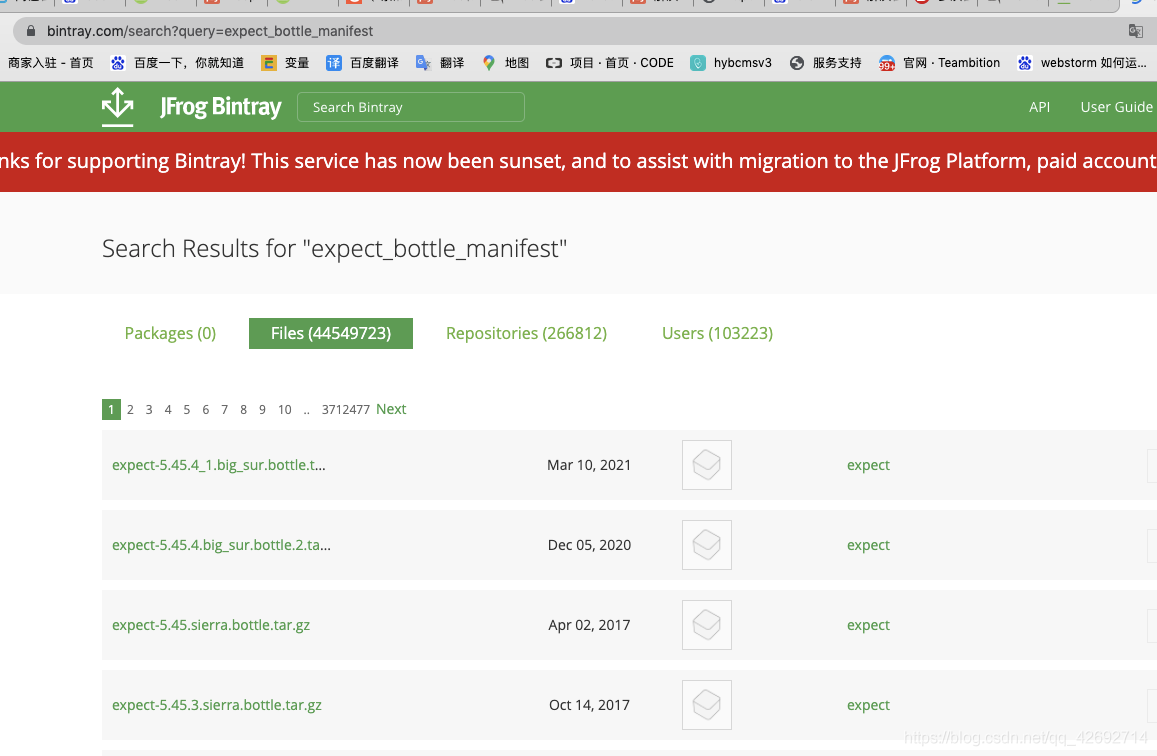
This is the time we should visit https://bintray.com/   Website, to search the version of the software you can’t download

Find the software and download it, then put it on the local computer

/In usr/local/cell/folder, and then execute brew install XXX on the terminal,  
You will find that this software is no longer needed to download


On the solution of fileprovider conflict

Fileprovider conflict resolution

Because the Maven service of Weibo sharing SDK is abnormal, the Maven automatic integration fails, so the AAR file of Weibo 10.10.0 is downloaded for local integration. Error report after adding project android:resource= “@xml/file_ XXX “reuse does not work 1. Upgrade compilesdkversion = 29
2. Add tools:replace= “ android:resource ”Go to the following figure

   <provider
            android:name="androidx.core.content.FileProvider"
            android:authorities="${applicationId}.fileProvider"
            android:exported="false"
            android:grantUriPermissions="true"
            tools:replace="android:authorities">
            <meta-data
                android:name="android.support.FILE_PROVIDER_PATHS"
                android:resource="@xml/file_xxx"
                tools:replace="android:resource" />
        </provider>

solve

DB2 timed task execution stored procedure cannot complete scheduler thread’s initialization

The following reports have been made in the implementation of failure checks.

2021-06-09-14.46.11.868000-420 I16975H265 LEVEL: Error PID : 1412 TID : 1800 FUNCTION: DB2 Tools, DB2 administration server, SchedulerThread_run, SchedulerThread_run, probe:5 DATA String, 50 bytes cannot complete scheduler thread’s initialization! 2008-05-01-14.46.16.868000-420 I170042H386 LEVEL: Error PID : 1412 TID : 1800 FUNCTION: DB2 Tools, DB2 administration server, MDUtility: :connectMD, MDUtility probe:10 DATA Sint32, 4 bytes – 300 DATA #2 : Sint32, 4 bytes 0 DATA #3 : Sint32, 4 bytes 0 DATA #4 : String, 7 bytes TOOLSDB DATA #5 : String, 8 bytes SYSTOLS DATA #6 : String, 4 bytes NULL

Reference is made to the website: https://www.ibm.com/support/pages/db2-scheduler-thread-initialization-error-db2diaglog
>

Yes